

Threads Scraper: Posts, Views, Replies, Profiles & Search
Pricing
from $1.75 / 1,000 posts
Threads Scraper: Posts, Views, Replies, Profiles & Search
Threads scraper for public posts, replies and profiles, without login. Full post history with view counts on every post, keyword and account search, language and engagement filters, and a watch mode that returns only new posts. Errors and filtered rows are not charged.
Pricing
from $1.75 / 1,000 posts
Rating
0.0
(0)
Developer

Quarra Labs
Maintained by CommunityActor stats
0
Bookmarked
88
Total users
25
Monthly active users
2 hours ago
Last modified
Categories
Features
Share
Threads Scraper returns posts (text, likes, replies, reposts, quotes, view count, media, language), replies, profiles (followers, bio, links, creator stats) and keyword results from Meta Threads (threads.com) without login or cookies, at $2.50 per 1,000 posts, replies or search results and $5 per 1,000 profiles: the full post history of any public account, every reply Threads serves, and posts and accounts found by keyword. Give it usernames, post URLs or keywords, and download JSON, CSV or Excel, or read the results through the Apify API.
Each input either returns its data or gets a free error row that says why. You pay per result, and errors,
duplicates and rows removed by your filters are not charged.
What you get
- Full post history back to an account's first post: in our tests, 226 posts of @zuck, back to July 2023, in 23 seconds.
- A date window for a monthly or campaign report:
sinceanduntilon account posts, replies and reposts. Every post carriesisPaidPartnership,isPinned,isEditedandisAiLabeled, with the quoted post and the post it answers. - View counts on every post and search result, at no extra charge, plus
engagementPerView,engagementRateandviewsPerHourto rank posts by how they did for their reach. - Replies to any post, newest or top first, with the coverage per post (Threads hides some replies from logged-out visitors; the run tells you how many you got against the counter).
- Profiles and creator stats: followers, bio, contact links and e-mails the creator made public in the bio, median engagement of recent posts, posting rhythm.
- Only new posts on a schedule: name a watch (
watchName): the first run delivers a baseline, then each run returns and charges only what is new.
How to scrape Threads
- Pick a mode:
posts,postReplies,profiles,search,accountSearch,postDetails,accountRepliesoraccountReposts. - Add usernames, post URLs (share links work) or keywords, and a
maxItemsper input (0 = no limit). - Optionally filter by language, likes, replies, views or followers. Filtered rows are not charged.
- Run, then export the dataset or call it from the API, Make, Zapier, n8n or an AI agent through MCP.
- To monitor accounts or keywords, set a
watchNameand add a schedule in Apify Console.
Input examples
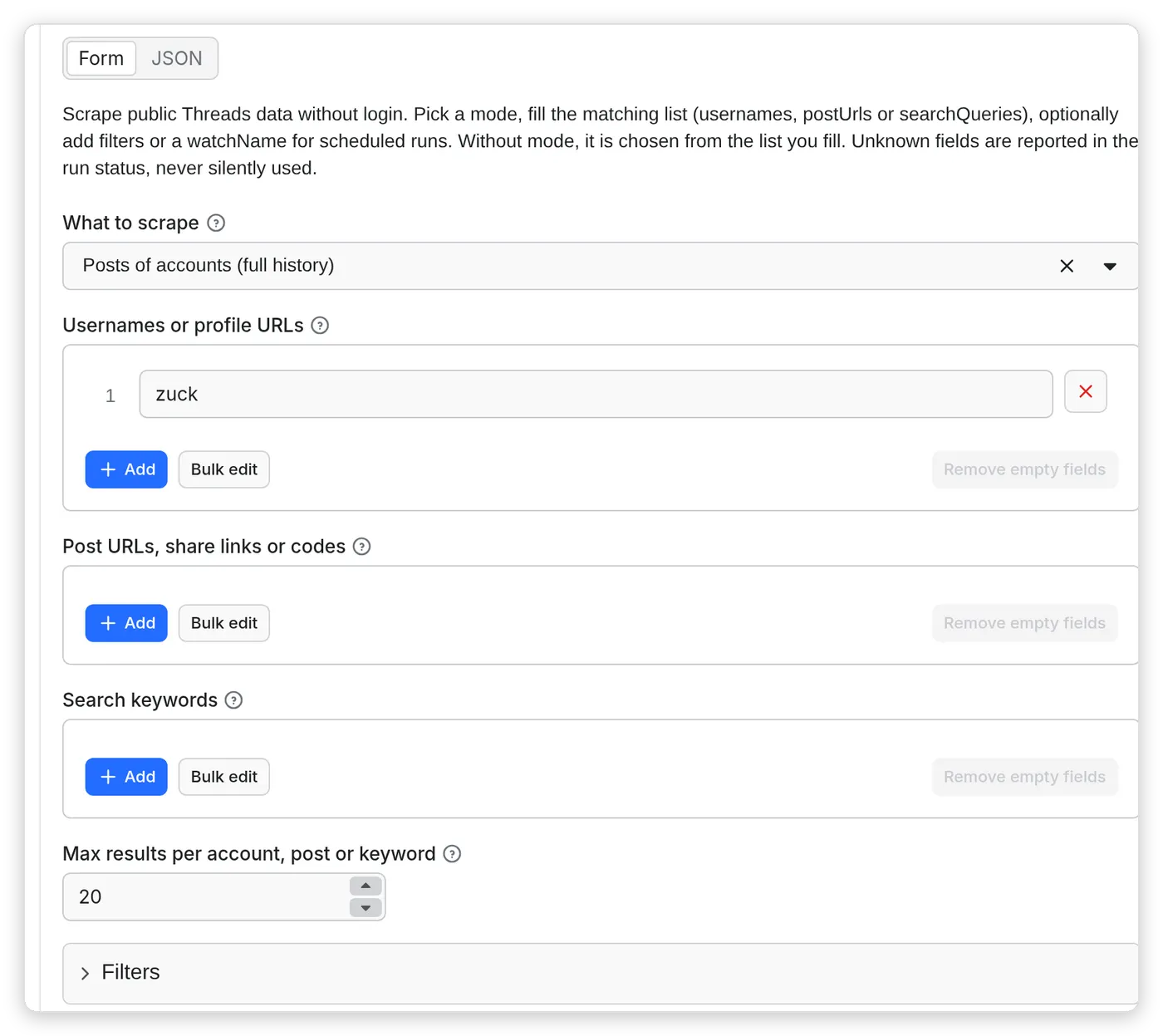
The 200 latest posts of two accounts:
The replies to a post:
English posts about a topic, with some traction:
Coffee creators with at least 5,000 followers and their engagement:
One account's September posts, for a monthly report:
New posts of two accounts, every day (schedule this input):
Output example
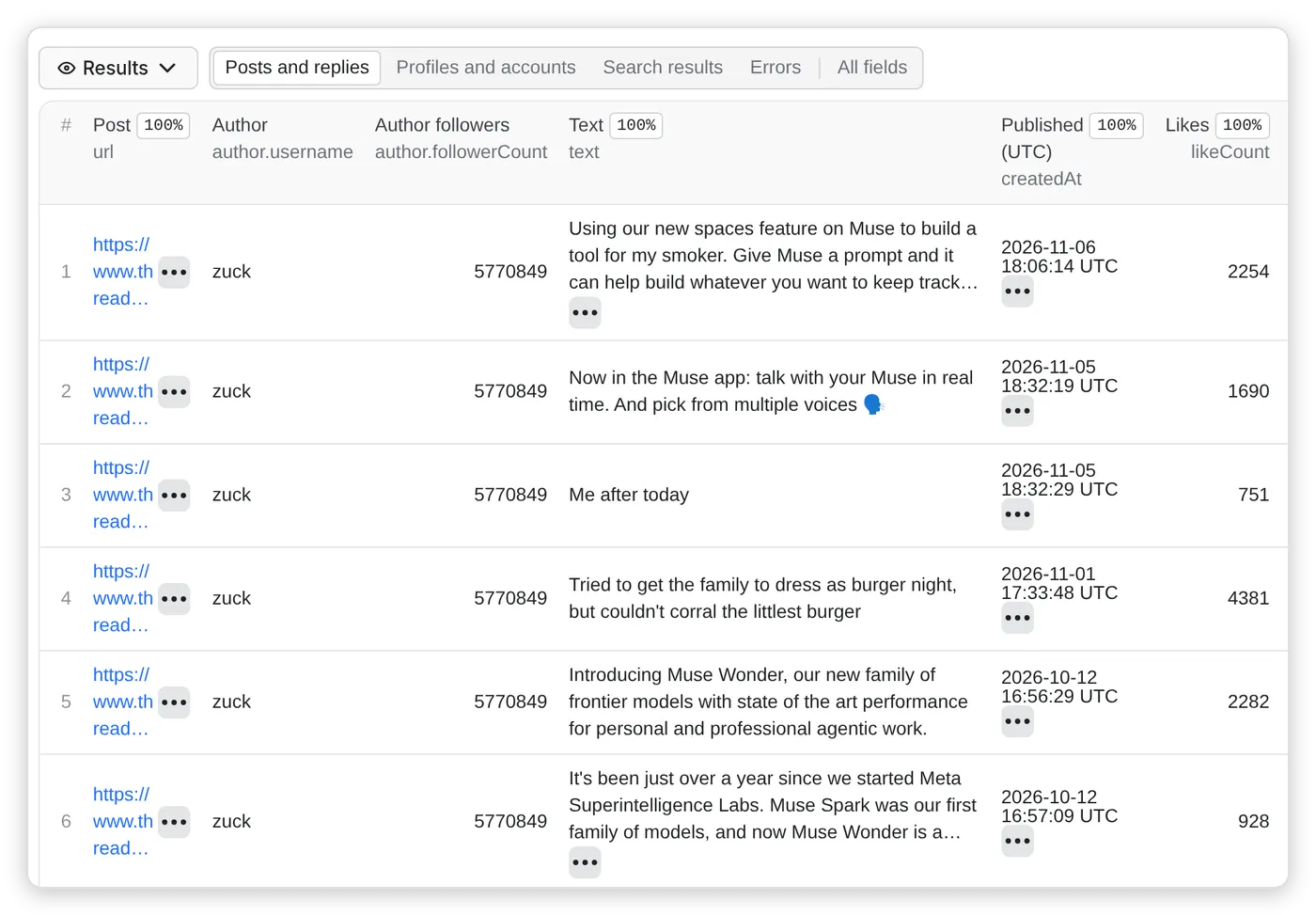
A real post (September 2026), with some fields left out:
Every run also writes an OUTPUT record: results per input, the reason for each failed input, reply coverage per
post, how many rows each filter removed, and the number of charged events.
What we measured
Measured between October 4 and 7, 2026, against the page threads.com shows a logged-out visitor.
- Accuracy: on 20 posts of @zuck, we compared seven values (likes, replies, reposts, quotes, shares, views, date) of three posts with the public page a minute after the run: 21 of 21 identical (on Apify).
- Speed: on Apify, 20 posts with view counts in 9.4 to 13.1 seconds of run time.
- Search reach: Threads shows a logged-out visitor about 20 posts per wording. The Actor also searches close wordings and hashtags and merges them without duplicates: on "AI agents", 104 and 120 unique posts in two runs of our tests (October 6), against 31 and 33 for the exact wording alone.
- Long posts: a 2,200-character post folded by Threads into an attachment comes out complete, in
textand inattachmentText.
Compared with the most used Threads scraper in the top search results
The most used of the top Threads scraper search results on the Store (by monthly users, October 9, 2026) is a solid tool with more modes for reposts and replies. Here is how the two differ, from its public Store page and README on October 9, 2026 and from our runs of both on Apify on October 5 and 6, 2026. Other scrapers update often, so these figures are dated.
| This Actor | Most used of the top search results | |
|---|---|---|
| Price per post, Free plan | $2.50 / 1,000 | $2.50 / 1,000 |
| Run start on the Free plan | $0.005 (512 MB) | $0.08 (4 GB default, $0.02 per GB) |
| Run start on paid plans | $0.005 | $0.02 |
| View counts | on every post and search result | "views when available" |
| Only new items on scheduled runs | built in (watchName), already delivered items not charged again | scheduled searches sorted by recent |
| Language filter | detected on every post, every mode | preferred result language for search (beta) |
| 20 posts of one account, run time | 9.4 to 13.1 s | 14 and 19 s |
For 20 posts on the Free plan, that is $0.055 here against $0.13. A watch checked every hour that finds nothing new costs $3.60 a month in run starts.
How much does it cost to scrape Threads?
You pay per result, with lower prices on the Scale and Business plans:
| Event, per 1,000 | Free and Starter | Scale | Business and above |
|---|---|---|---|
| Post, view count included (account posts, replies tab, reposts tab, post by URL) | $2.50 | $2.00 | $1.75 |
| Search result, view count included | $2.50 | $2.00 | $1.75 |
| Reply to a post | $2.50 | $2.00 | $1.75 |
| Profile (by username or by account search), creator stats included | $5.00 | $4.00 | $3.50 |
| Actor start, per run | $0.005 | $0.005 | $0.005 |
Platform costs are included. Errors, duplicates, rows removed by a filter, private accounts and items already delivered to a watch are not charged. You can set a maximum cost per run in the run options; the Actor stops cleanly there and tells you. With the $5 of free monthly credit of the Apify Free plan, that is about 2,000 posts with their view counts.
Use cases
- Brand and topic monitoring: scheduled keyword searches that return only new posts.
- Competitor and public figure tracking: new posts every day, with engagement per view.
- Audience research: the replies to a product launch or an announcement, for sentiment analysis.
- Creator discovery: follower count, engagement rate, posting rhythm and the contact e-mails creators made public in the bio, by topic.
- Research and AI datasets: topic datasets filtered by language, for newsrooms, academics and AI models.
- Automation: dashboards, warehouses and AI agents through the Apify API, schedules, integrations and MCP.
Use it as an API (server mode)
You can also call this Actor like a web API: send one HTTP request, get the rows back in the response. No run to start, no dataset to poll.
Or with a JSON body:
| Path | What it returns |
|---|---|
/posts | Posts of Threads accounts (full history, view counts) |
/profiles | Public profiles of Threads accounts |
/account-replies | Replies written by Threads accounts (their Replies tab) |
/account-reposts | Reposts of Threads accounts (their Reposts tab) |
/post | Threads posts from their links |
/replies | Replies to Threads posts |
/search | Threads posts found by keyword or #hashtag |
/search-accounts | Threads accounts found by keyword |
Every path takes the same fields as the input of a run (maxItems, since, languages, minLikes…), as query
parameters or in the JSON body. The full description of each path is in the Server tab. The response has the same
rows as the dataset of a run, in results, with the run summary in output, the final message in message and the
events charged for this request in charged.
- Same price as a run. Each request is processed like one run with the same input and charged the same events: one per post, search result, reply or profile delivered, at the prices above. Errors, duplicates, rows removed by a filter and private accounts are free, and a request refused for bad parameters costs nothing.
- Your own server. The server runs in your Apify account, like a run: the Actor start fee ($0.005) is charged once when it starts, and the platform usage of its run is billed to your account. It stays ready between requests and stops after 2 minutes without one; the next request starts it again (a few seconds).
- Response time. Measured on 18 November 2026: 3 to 7 seconds for account posts, replies and profiles, the first request included (it also waits for the server to start), about 10 seconds for a keyword search.
- Time limit. A request stops after about 4.5 minutes and returns what was delivered by then, charged for that only. For a full account history or several thousand rows, start a run.
- One request at a time per server. Requests sent together wait for each other, or Apify starts another server for them.
- Every row is also saved in the dataset of the server's run, so nothing you paid for is lost if your connection drops.
Send results to Slack, Notion or Discord
Pick one of your Apify MCP connectors in "Send results to your app" (Notion connects in one click), or paste a Slack, Discord, Make, Zapier or n8n webhook URL. After each successful run, a summary lands there: the number of results, the first 25 with their links, and a link to the full dataset. Schedule the Actor and fresh results reach your team every day without opening Apify.
Limits
- Since November 24, 2026, Threads shows a logged-out visitor only about 20 replies per sort order (newest and top). The Actor collects both orders, so about 40 direct replies per post at most (43 on a post with 2,600 replies), and reports the coverage per post. The rest needs a login.
- Keyword search is limited by Threads for logged-out visitors: no pagination, no date filter. Expanding the wording
multiplies the results without making them exhaustive. For large studies, collect the accounts that matter with
the
postsmode. - Account search returns up to about 100 accounts per keyword.
- Follower and following lists need a login, and this Actor does not log in. Private accounts are not scraped.
- A run takes up to 1,000 accounts, posts or keywords; split longer lists.
FAQ
Is there an official Threads API?
Yes. Meta's Threads API lets an approved app publish, search public posts by keyword (up to 2,200 queries a day) and look up public profiles, with app review and access tokens, and it returns no view counts in its documented search fields. This Actor reads the public pages any logged-out visitor sees: no app, no token, no account, and view counts on every post.
Is it legal to scrape Threads?
The Actor collects public data that anyone can see without logging in, and does not use an account. In January 2024, a US federal district court held that Facebook's and Instagram's terms did not bar Bright Data's logged-out scraping of public data (Meta v. Bright Data, N.D. Cal.); that ruling does not decide your case. Meta's terms and privacy law apply to how you use the data: personal data is protected by the GDPR in the EU and by similar laws elsewhere. Collect what you need for a legitimate purpose, and ask a lawyer if you are unsure.
Do I need a Threads or Instagram account or cookies?
No account and no cookies. Platform costs are included in the price.
Can I get only the new posts every day?
Yes. Set watchName and schedule the Actor. The first run delivers and charges a baseline (what Threads shows today); later runs return and charge only
what is new for that watch. A target added later gets its own baseline, charged as usual. Mode profiles has no
baseline: the first run returns every profile, later runs only the profiles that changed. A run with nothing new costs only the $0.005 start.
My run succeeded but returned no data. Why?
Every input that gave nothing has an error row and a line in the run status: the account does not exist or is
private, the keyword has no result, or your filters removed everything. You pay only the run start. A run is marked
failed only when Threads or the Actor failed, so the success rate on this page measures the scraper, not the inputs.
Can an AI agent use it?
Yes. Every input field says what it does and whether it changes the cost, common field names from other scrapers
(limit, maxResults, query, urls) are understood, unknown fields are reported instead of ignored, and the output
fields are typed in the dataset schema.
Something broke or a field is missing?
Open an issue in the Issues tab with the link to your run. We reply within two business days.
Does the Actor send anything to Quarra?
Only when a run fails or runs out of time: the Actor, its build, the error type, the line of our code where it happened, and the memory and time the run was given, so we can fix it fast. Never your input, your results, your account or the run ID.
Did this Actor save you time?
A rating on its Reviews tab helps other users find it.
More data tools from Quarra
| Actor | What it does |
|---|---|
| Reddit Scraper | Posts, complete comment trees, search and users; threads as Markdown for LLMs |
| Google Trends Scraper | Interest over time, by region, related queries and the full Trending now list |


