
JSON Resume to PDF Generator
Pricing
from $0.37 / 1,000 generated pdfs
JSON Resume to PDF Generator
Turn a JSON Resume into an ATS-ready PDF you can attach to job boards. Five print themes (Even, Elegant, Stack Overflow, Kendall, Flat), A4 or US Letter, and a download URL. Open-standard JSON — no $49/month resume API. Paste resume.json, pick a theme, generate PDFs via API or Console.

JSON Resume in. ATS-ready PDF out. Call it as a resume generation API on Apify: pick a print theme, choose A4 or Letter, and download a file you can attach to a job board. No $49/month seat. No proprietary schema. No live link that an ATS cannot open.
Paste a JSON Resume (or start from the Alex Rivera sample on the Input tab), choose a theme, run.
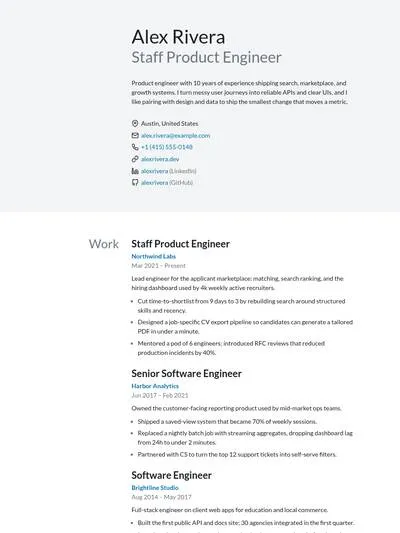
Even Default · two-column |
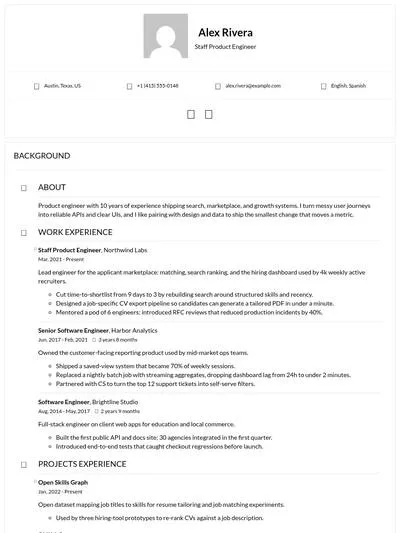
Elegant Card layout |
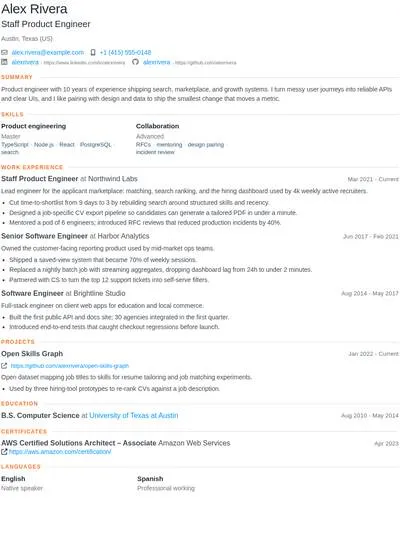
Stack Overflow Classic SO CV |
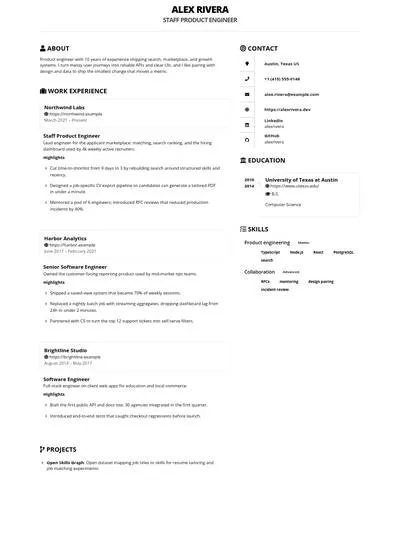
Kendall Bootstrap · photo header |
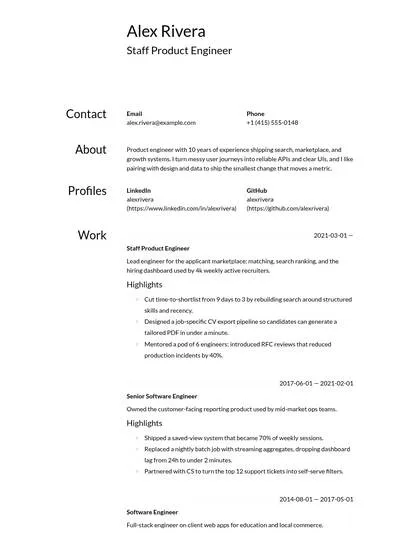
Flat Minimal single column |
What is JSON Resume to PDF?
JSON Resume to PDF is a JSON-to-PDF resume API. It takes a JSON Resume 1.0.0 document, renders it with a community jsonresume-theme-* package, waits for fonts, and prints a PDF. The file lands in the run's Key-Value Store; the dataset row has the download URL.
You do not write HTML or CSS. You do not host a resume website. You keep one structured resume, tailor the JSON for each job, and generate a new PDF.
What you get
- Five print templates — Even, Elegant, Stack Overflow, Kendall, and Flat (the most-used JSON Resume themes on npm)
- Open standard input —
basics,work,education,skills,projects, … not a vendor-only JSON shape - A4 or US Letter — the two paper sizes job boards actually want
- A real file —
application/pdfin storage, with apdfUrlyou can fetch from any language - Apify platform — API, schedules, webhooks, integrations, run logs, pay per generated PDF plus platform usage
Why generate a PDF instead of sharing a live resume link?
Products like LiveResume argue that a PDF is a dead snapshot. For a personal site that can be true. For job applications it is not:
- Most ATS and company portals still ask for a PDF or DOCX attachment. A live URL is optional, extra, or blocked.
- Recruiters forward files. They do not re-open your hosted editor.
- You often want a snapshot: the version you sent for that posting, with that title and those highlights.
Keep a live page if you like. Use this Actor for the file you actually submit.
JSON Resume API vs hosted resume generators
UseResume's resume generation API is a hosted SaaS: proprietary content + style JSON, many color variants, cover letters, $49/month. Fine if you want that bundle.
JSON Resume to PDF is the other trade: portable JSON Resume, themes you can also render locally with resume-cli, and Apify compute instead of a monthly API seat.
| JSON Resume to PDF | Hosted resume API ($49/mo class) | Live-link resume | |
|---|---|---|---|
| Input | JSON Resume (open) | Vendor content + style | WYSIWYG editor |
| Output | PDF you own in Key-Value Store | Hosted PDF download | Live URL (PDF export extra) |
| Templates | 5 npm print themes | 20–30 in-house layouts | Site theme |
| Paper size | A4 or Letter | Style object | Limited |
| Job boards / ATS | Attach the PDF | Attach the PDF | Link often rejected |
| Pricing | Per PDF + Apify usage | Monthly platform fee + credits | SaaS subscription |
| Automation | apify-client, schedules, webhooks | REST + vendor SDK | Usually none |
Who uses a JSON Resume PDF API?
Named jobs this Actor is built for:
- Software engineers on Greenhouse / Lever — keep one
resume.json, rewritesummaryandwork[].highlightsper posting, print a PDF to upload. - Career coaches producing client resumes — same schema for every client; swap theme and paper size instead of rebuilding Word files.
- Recruiting agencies batching candidate PDFs — call the Actor from a pipeline whenever a candidate record changes.
- Job-search agents — an LLM rewrites highlights against a job description, then this Actor prints the file.
- Bootcamps exporting student resumes — one JSON Resume per graduate, Even or Flat theme, Letter for US employers.
- ATS-safe Flat theme runs — picky portals that mangle two-column layouts; generate a second PDF with Flat and compare.
- US Letter for American job boards — LinkedIn Easy Apply, Workday, and most US ATS expect Letter.
- A4 for EU / UK applications — the default paper size for European employers.
- Engineering CVs on the Stack Overflow theme — compact sections and skill tags that scan like the classic SO CV.
- HR tools that already store JSON Resume — add a print step without adopting a vendor schema.
- Portfolio sites that still need an attachment — keep the live page; generate the PDF the application form requires.
- Multiple roles from one source of truth — duplicate JSON per title (backend, staff, manager) and print each version.
How to generate a resume PDF from JSON
- Open the Input tab. Start from the prefilled Alex Rivera sample or paste your
resume.json. - Tailor
basics.summary, the relevantwork[].highlights, andskillsto the job description. - Pick a theme. Even is the default (same family as the official resume CLI).
- Set paper size to
A4orLetter. - Run. Download from the Key-Value Store or the dataset
pdfUrl. - Duplicate the JSON for the next posting and run again.
Anyone who can edit JSON can use this. There is no login to a resume host.
Resume generation API example
Python, PHP, and curl work the same way against the Apify Actors API. Need a generic HTML page instead of a resume? Use HTML to PDF.
Resume templates (JSON Resume themes)
The Actor ships the five most-installed jsonresume-theme-* packages. Previews above use the same sample resume as the Input tab.
| Theme | Best for |
|---|---|
| Even | Default two-column. General engineering and product resumes. |
| Elegant | Card layout, contact header. More designed, still professional. |
| Stack Overflow | Classic SO CV: compact sections, skill tags, easy to scan. |
| Kendall | Bootstrap layout; photo header when basics.image is set. |
| Flat | Minimal single column. Fewest visual flourishes; safest for picky ATS. |
Some themes honor JSON Resume meta options (for example Even's meta.themeOptions.colors). See each theme's npm page. This Actor does not add extra color pickers.
Input
Open the Input tab for the full editor. Fields:
| Field | What it is |
|---|---|
resume | JSON Resume object (basics, work, education, skills, projects, …) |
theme | even (default), elegant, stackoverflow, kendall, or flat |
fileName | Optional Key-Value Store key. Defaults to pdf-{name}-{theme}.pdf |
format | Paper size: A4 (default) or Letter |
printBackground | Include CSS backgrounds (default true) |
Example:
The schema follows JSON Resume 1.0.0. Extra fields are ignored. basics.name is required. Empty sections are omitted by the theme.
Output
The PDF is stored in the default Key-Value Store. The dataset has one row with the download link:
JSON / CSV / Excel exports of the dataset are metadata, not the PDF bytes. Use pdfUrl or the Key-Value Store for the resume.
Unnamed run storage on Apify expires after 7 days. Save the PDF if you need it longer, or copy it to your own store from the API.
How much does a resume PDF cost?
This Actor is pay-per-event. You pay a small fee per generated PDF plus Apify platform usage (compute for the Chrome print). There is no $49/month resume-API plan.
Each run is a short print: one HTML document, CDN fonts, one PDF. A single resume usually finishes in well under a minute on 1 GB of memory. Generate a few sample PDFs on the free tier to see compute cost for your typical resume length. Batch jobs (many tailored resumes) are a good fit for Actor tasks and schedules.
FAQ
Is this a resume parser? No. Parsers turn PDF into JSON. This Actor goes the other way: JSON Resume in, PDF out.
Do I need to host my resume on jsonresume.org? No. Paste the JSON in input. Any valid JSON Resume document works.
Will Applicant Tracking Systems read the PDF? Themes are HTML/CSS print layouts. Even and Flat are the most conventional. If a specific ATS mangles icons, generate a second PDF with Flat and compare.
Can I change colors? Some themes honor JSON Resume meta options. The Actor does not add extra color inputs.
Does this replace UseResume or LiveResume? No. UseResume bundles cover letters, parsing, and AI tailoring in one paid API. LiveResume is a hosted live profile with analytics. This Actor is the print step: open JSON in, PDF file out, on Apify.
Is it legal to store resumes here? You send your own (or your client's) resume data to a run you control. Treat the JSON as personal data: do not put other people's resumes into public shared runs. Follow GDPR and local employment rules for any data you keep.
Where do I get help? Open an issue on the Actor page. Feature ideas (more themes, job-description tailoring) are welcome.
Related Actors
- HTML to PDF — render arbitrary HTML or a URL to PDF
- URL to PDF — print a public page to PDF
- CSV / TSV to JSON Converter — structured file conversion for pipelines
Image Credit
Theme previews are generated from the sample JSON Resume using jsonresume-theme-even, jsonresume-theme-elegant, jsonresume-theme-stackoverflow, jsonresume-theme-kendall, and jsonresume-theme-flat. Sample candidate data is fictional.