
Google Play Reviews Scraper (Android) + Insights | $0.10/1K
Pricing
from $0.10 / 1,000 reviews
Google Play Reviews Scraper (Android) + Insights | $0.10/1K
Scrape Google Play Store reviews by app URL, package name or app name. Get ratings, text, app version, developer replies and a free insights summary of top complaints.
Pricing
from $0.10 / 1,000 reviews
Rating
0.0
(0)
Developer

Rasa Reka
Maintained by CommunityActor stats
0
Bookmarked
2
Total users
1
Monthly active users
3 days ago
Last modified
Categories
Features
Share
Google Play Reviews Scraper (Android) + Free Insights
Scrape Google Play Store reviews for any Android app, including developer replies, in any country and language, and get a free review-analysis report with every run: rating distribution, top complaint and praise topics, developer reply rate, rating by app version and by month. Paste a Play Store link, a package name, or just the app name.
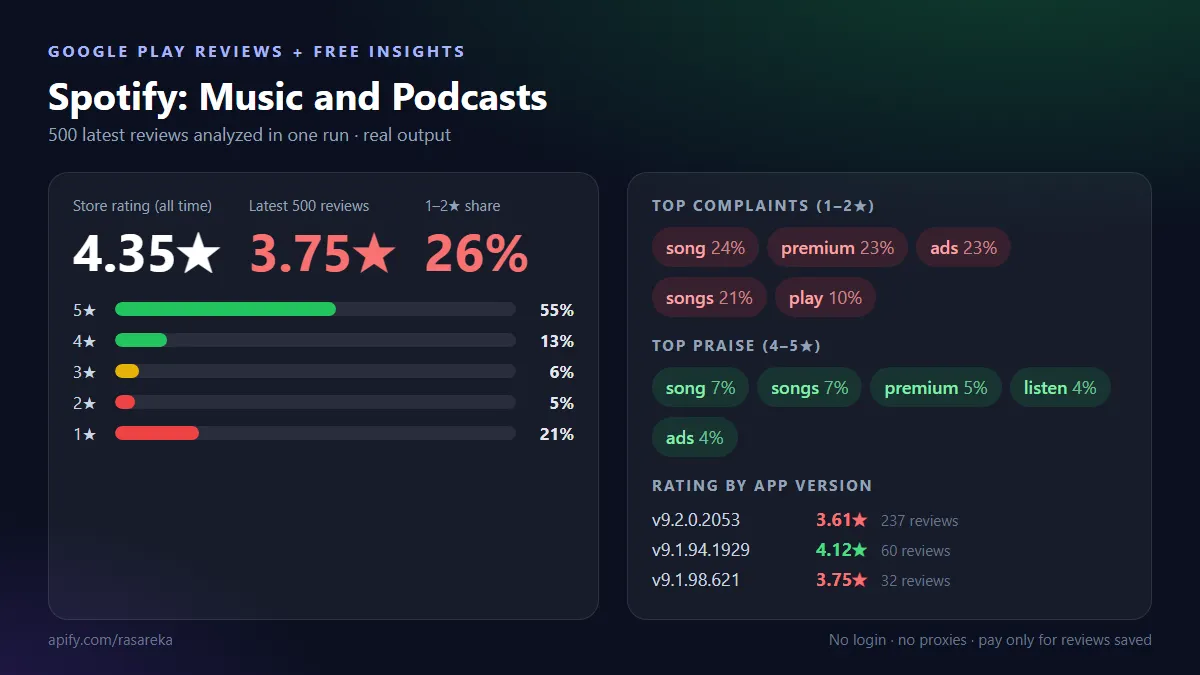
Real output from one run on Spotify (US, 500 newest reviews). The store says 4.35★, but the newest reviews average 3.75★ and 26% are 1–2★. The latest version (9.2.0) is rated 3.61★ against 4.12★ for the previous one, and the top complaints are premium and ads. That is a bad release you can see in one glance, and the report is free.
What you get
- ⭐ Star rating and full review text
- 📱 App version each review was written for
- 🗓️ Review date, reviewer name and avatar
- 👍 Thumbs-up count
- 💬 Developer reply text and date
- 🔗 Direct link to each review
- 📊 Free INSIGHTS report per app: average rating, 1–5★ distribution, share of negative reviews, top complaints (1–2★) and top praise (4–5★), developer reply rate, rating by app version and by month, plus app metadata (developer, category, installs, current version, all-time store rating and rating count)
Why this Actor
| Typical Google Play review scraper | This Actor | |
|---|---|---|
| Input | Package name or URL | Package name, URL or app name |
| Developer replies | Sometimes | Included (text and date) |
| Filter by stars | Sometimes | Yes, pay only for the 1–2★ reviews you want |
| Review-analysis report | No, you analyse it yourself | Included free (complaints, praise, reply rate, rating by version and month) |
| Spot a bad release | Manual | Rating by app version in the report |
| Speed | Varies | ~1,000 reviews in a few seconds |
| Failed apps | Sometimes charged | Never charged, listed in a free FAILED record |
Use cases
- App review monitoring: schedule a weekly run and watch the rating trend and new complaints after each release.
- ASO (App Store Optimization): learn the exact words users use about your app and your competitors.
- Competitor analysis: find the features users beg competitors for, and how often competitors reply.
- Customer support benchmarking: compare developer reply rates across apps.
- Sentiment analysis and AI/LLM pipelines: clean, structured reviews for sentiment models, topic modelling or RAG. The INSIGHTS report is compact enough to pass straight to an LLM.
- Agencies: monthly Google Play review reports for clients.
How to use it
- Add one or more apps: a Play Store URL (
https://play.google.com/store/apps/details?id=com.spotify.music), a package name (com.spotify.music) or a name (Notion). - Pick a country and language.
- Optional: choose
ratingssuch as["1","2"]to collect only negative reviews. - Run. Reviews go to the dataset; the report goes to Storage → Key-value store → INSIGHTS.
Input example
Output example (one review)
INSIGHTS report example (real, shortened)
Export to JSON, CSV or Excel, or connect to Google Sheets, Make, Zapier, n8n or your own code through the Apify API.
Pricing
Pay per result: you pay only for reviews saved to your dataset. The INSIGHTS report is free, and failed apps are never charged. Set a maximum cost per run in the run options and the Actor stops cleanly when it is reached.
Limits
Google Play returns reviews per country and language, so run each market you care about separately. Topic extraction is keyword-based, so read the review text for nuance.
Also from Rasa Reka
- Apple App Store Reviews Scraper + Insights: the same report for iPhone and iPad apps
- App Store & Google Play Reviews MCP Server: let Claude, Cursor or any AI agent analyse app reviews live
- Google Play Apps Scraper: search, app details and top charts
Using an AI agent?
The same data is available as an MCP server for Claude, Cursor, VS Code, n8n and other AI clients: App Store & Google Play Reviews MCP Server. Your agent asks in plain English and gets compact answers and summaries, billed per call.
FAQ
Do I need a Google account or API key? No.
How many reviews can I get? Thousands per app. Set maxReviewsPerApp to what you need.
Is scraping Google Play reviews legal? This Actor reads publicly available reviews only. You are responsible for how you use the data, including privacy laws such as GDPR when handling reviewer names.
Something broken or a feature missing? Open an issue on the Issues tab. We usually reply within 24 hours.


