

ArXiv Preprint Paper Search
Pricing
from $2.00 / 1,000 paper fetcheds
ArXiv Preprint Paper Search
Search and extract preprint research papers from the ArXiv open-access repository. Query over 2.4 million academic papers across physics, mathematics, computer science, biology, economics, and more with structured JSON output, no API key required.
Pricing
from $2.00 / 1,000 paper fetcheds
Rating
0.0
(0)
Developer

Ryan Clinton
Maintained by CommunityActor stats
0
Bookmarked
22
Total users
4
Monthly active users
a month ago
Last modified
Categories
Share
ArXiv Preprint Intelligence
Turn any research topic into a reading plan, a citation plan, a monitoring feed, and a RAG-ready corpus — from a deterministic analysis of arXiv papers, with no LLM and no API key. Point it at a topic and it does the literature-review triage you would otherwise do by hand: which academic papers to read first, which are safe to cite, which ship code, and which preprints have crossed into peer-reviewed publication — across 2.4M+ research papers in computer science, physics, mathematics, biology, and economics.

One query, a whole research workflow
One arXiv search produces, as structured JSON you can branch on:
reading plan → citation plan → RAG-ready corpus → monitoring feed → topic-health report
Example: one query in, decisions out
Input:
Returns (illustrative shape):
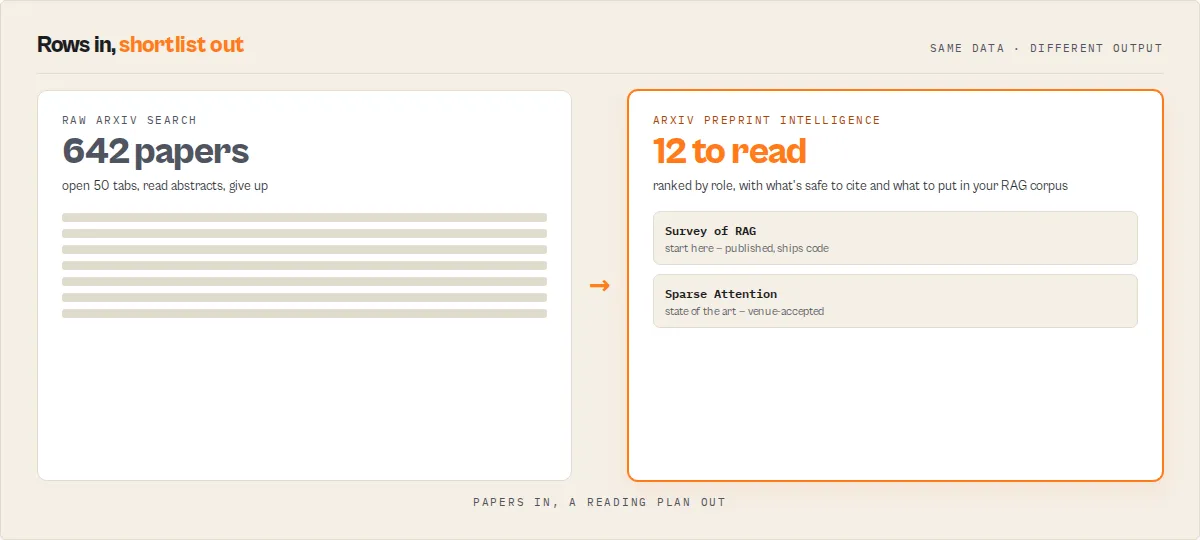
- 642 papers found and appraised deterministically
- Read first: the top survey, the foundational candidate, the leading benchmark
- Safe to cite: 127 — use with caution: 86 — avoid (withdrawn): 12
- Approved for a RAG corpus: 311
- Research completeness: 84/100 — gap: stronger benchmark coverage
That is the systematic-review triage a researcher does by hand, returned in a single run as machine-readable records. Papers in, a reading plan out.
What does this actor do?
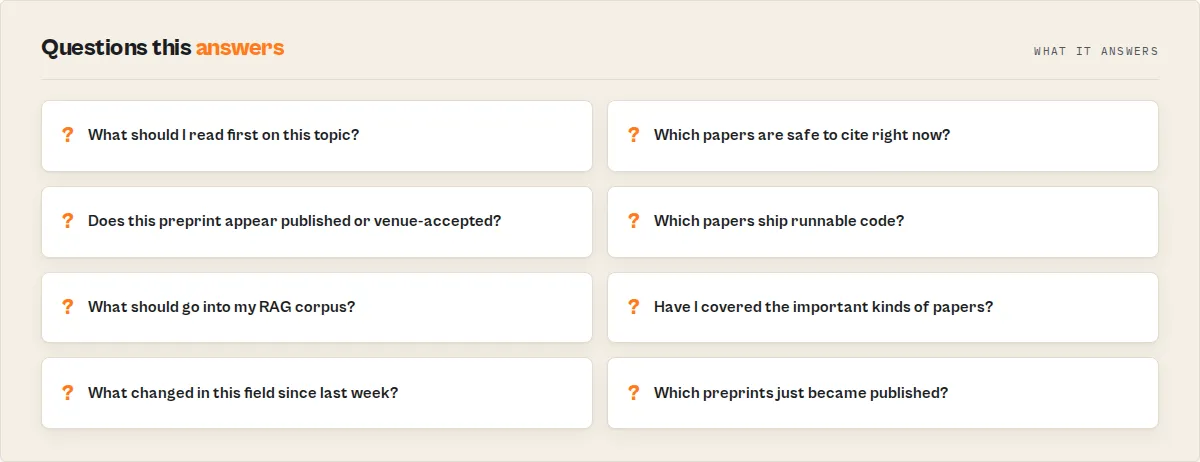
It queries the ArXiv API for papers matching your keywords, authors, abstracts, or categories, then runs a deterministic appraisal over arXiv's own metadata to answer the questions a raw search cannot:
- Is this safe to cite? Each paper is classified
published(it carries a journal reference or an external DOI),accepted(the author comment reports a venue), orpreprint— with acitationRiskof low / medium / high and the reasons behind it. - Is it reproducible? Code links in the comment or abstract surface as
hasCode+codeUrl. - How mature is it? A 0-100
maturityScoreblends publication status, code availability, revision activity (the version suffix), and collaboration — a different axis from search relevance, so a brand-new high-relevance preprint reads as high-relevance / low-maturity. - Where do I start? A hero research brief gives reading order, what to read first (most-trusted, foundational, latest, reproducible), and key takeaways.
- What's the shape of the field? A landscape summary reports the preprint-vs-published mix, reproducibility rate, topic clusters, a timeline, composition drift, and honest gaps.
Scoring is fully deterministic — no LLM in the appraisal path, so the same query always returns the same verdicts. The point is not better search: it is turning a research topic into a reading plan, a citation plan, a monitoring feed, and a RAG-ready corpus — packaged as structured records, not a list you still have to triage. That is the job arXiv, Semantic Scholar, and OpenAlex leave to you.
Built for
| User | Job to be done | What the actor gives them |
|---|---|---|
| Researchers | Find what to read first | Ranked research brief + maturity signals |
| Students | Avoid citing unsafe sources | citationRisk verdicts + preferred citation target |
| RAG builders | Filter out unstable papers | ragSafe, publication status, code, citation risk |
| Analysts | Monitor fast-moving topics | Monitor mode with typed deltas |
| Tool developers | Normalize arXiv into JSON | Stable schema + deterministic scoring |
Raw arXiv API vs this actor
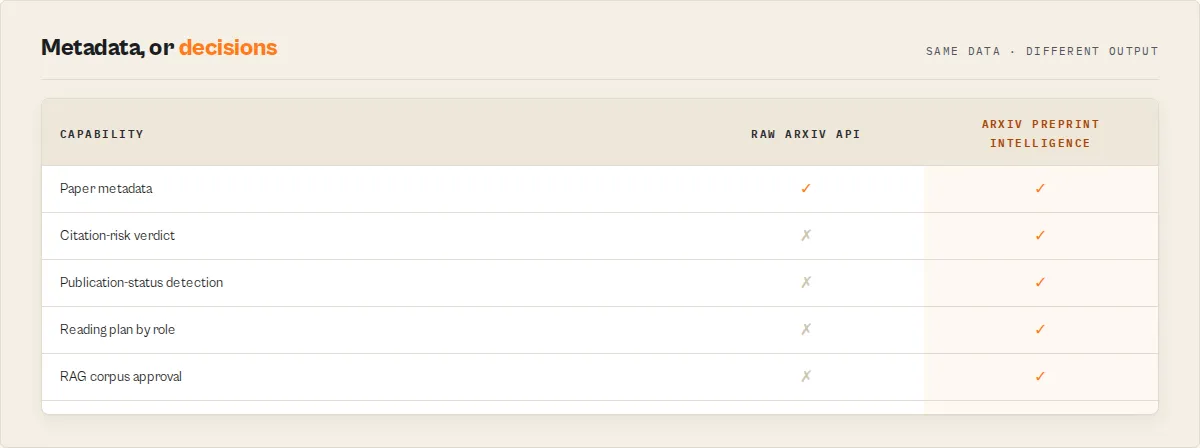
| Raw arXiv API | This actor |
|---|---|
| Atom XML | Clean JSON |
| Paper metadata | Paper decisions |
| Search rank only | Relevance + maturity + priority |
| Manual citation checking | Citation-risk verdict + BibTeX |
| No corpus view | Landscape summary |
| No scheduled deltas | Monitor mode (typed change events) |
| No workflow branching | Stable enums |
Trust model
- No LLM calls, no external enrichment — arXiv API metadata only.
- No API key required.
- Deterministic scoring: the same input always produces the same appraisal.
- Every decision ships with its reasons (
citationRiskReasons,signalReason, optionalevidenceledger). - Independent project — not affiliated with or endorsed by arXiv.
Thank you to arXiv for use of its open access interoperability.
What you get from one query
- What to read — a research brief (reading order + role picks) and a
research-mapthat buckets every paper by role: survey, foundational, benchmark, dataset, state-of-art, reproducible, emerging, historical - What to cite — a citation-risk verdict + recommended action per paper, a citation plan (safe-to-cite / cite-with-caveat / avoid), and BibTeX
- What goes in your RAG — a
corpus-assessmentrecord: approved / questionable / rejected counts, a 0-100 corpus-quality score, and the reasons - Have I done enough? — a
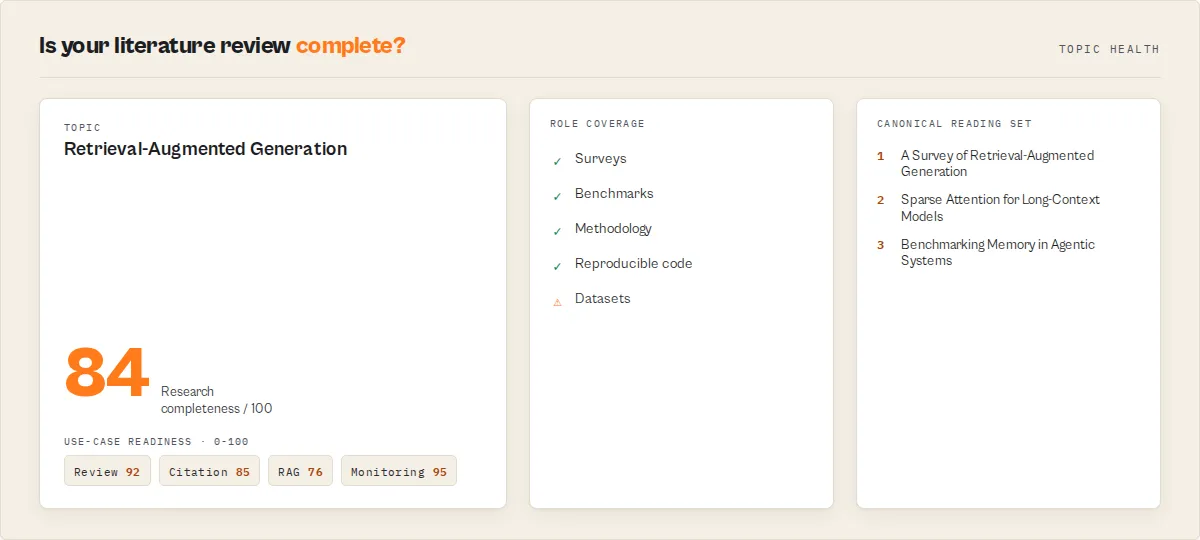
topic-healthrecord: field maturity, research-completeness with per-role coverage andmissingRoles, a canonical reading set (the handful that matter), reading-effort estimate, and use-case readiness (review / citation / RAG / monitoring) - What changed — typed monitor deltas plus a field-level research event feed (publication wave, code-adoption spike, new survey, new foundational candidate)
- The shape of the field — a corpus landscape: publication mix, survey count, top authors, timeline, gaps
Common use cases
Build a literature review:
Find safe-to-cite papers only:
Build a RAG corpus (stable, non-withdrawn):
Monitor a field on a schedule:
Ready-to-run examples
One-click, pre-configured runs you can try or clone:
- Build a Literature Review from arXiv — a topic in, a ranked reading plan out
- Which arXiv Papers Are Safe to Cite? — peer-review status + citation-risk verdict per paper
- Build a RAG-Ready Corpus from arXiv — a RAG-safe corpus with a quality score
- Find arXiv Papers That Have Code — reproducible papers with a code link
- Track the Newest arXiv Papers in a Field — latest papers in a category, appraised
- Generate a Reading List for Any Topic — where to start, ordered by role and priority
- Is My Literature Review Complete? — role coverage and what's missing
Why use ArXiv Preprint Paper Search on Apify?
Running this actor on the Apify platform gives you several advantages over calling the ArXiv API directly:
- No infrastructure to manage. The actor runs in the cloud, handles rate limiting (ArXiv requires a minimum 3-second delay between requests), and automatically paginates through large result sets.
- Structured output. Raw ArXiv Atom XML feeds are parsed and transformed into clean JSON records ready for analysis, database import, or integration with other tools.
- Scheduling and automation. Set up recurring runs to monitor new papers in your research area on a daily or weekly basis using Apify's built-in scheduler.
- Integration-ready. Push results directly to Google Sheets, webhooks, Slack, email, or any downstream system using Apify integrations.
- No API key required. ArXiv's API is open and free. This actor wraps it with proper rate-limit compliance so you never get blocked.
Key features
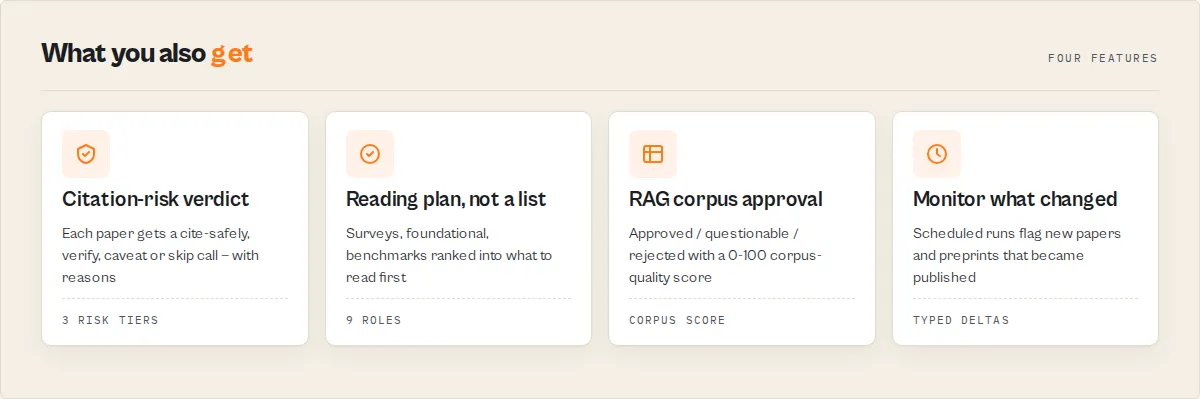
- Publication-status classification — every paper tagged
published/accepted/preprintfrom journal references, external DOIs, and venue mentions in the author comment - Citation-risk verdict —
low/medium/highwith reasons, so you know what is safe to cite as-is and what needs a peer-reviewed version first - Dual-axis scoring — a search
relevanceScoreand an independentmaturityScore(with a factor breakdown), because "matches my query" and "is trustworthy" are different questions - Reproducibility detection —
hasCode+codeUrlfrom links in the comment or abstract - Recommended action per paper —
cite-safely,cite-as-accepted,verify-publication,read-first,cite-with-caveat, orskip-withdrawn - Survey & paper-type detection —
isSurvey+paperType(survey / benchmark / dataset / methodology / theoretical / empirical / position-paper) from title + abstract, no LLM — surveys surface as a dedicated reading role - Foundational-candidate flag —
foundationalCandidatemarks the earliest established paper of its field within the returned set — a deterministic metadata heuristic, deliberately named a candidate because arXiv exposes no citations to assert true seminality - Author signals — per-paper author count, first/last author, large-collaboration flag; per-corpus top authors and collaboration share
- Citation companion — deterministic BibTeX, preferred citation target (published / accepted / arXiv version), citation warning, and version-aware note per paper (BibTeX only — no style-formatted strings to get wrong, no LLM)
- Venue normalization — the author comment parsed into
{ venueName, venueYear, venueType }(ICML, NeurIPS, Nature, …) with a confidence band - Lifecycle detection — withdrawn / superseded / erratum flags from the comment, with a replacement hint where the source gives one
- Inspectable by design — every verdict ships with its reasons, and an opt-in evidence ledger exposes the status signals, risk signals, and score trace behind each classification (credibility infrastructure for auditors, not a headline you have to read)
- Filters — only-peer-reviewed, exclude-withdrawn, require-code, minimum-version-count, and freshness (all counted and disclosed, never silently dropped)
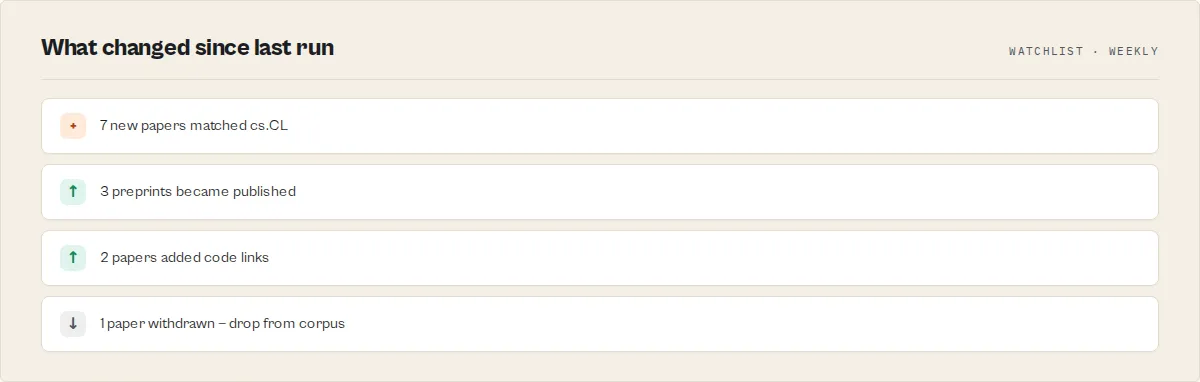
- Typed monitor deltas — scheduled runs emit
new-paper,status-upgrade(preprint → published),new-version,code-added,withdrawn, andrisk-changedchange events - Research brief — reading order, what to read first, key takeaways, and suggested next queries
- Corpus landscape — preprint-vs-published mix, reproducibility rate, topic clusters, timeline, composition drift, and honest gaps
- Analysis modes — reweight priorities for
literature-review,cite-check,trend-watch, orragingestion - Monitor mode — track a query across scheduled runs and get a delta: new papers, and which preprints became published or accepted since last time
- Dashboard mode — one digest record instead of per-paper rows, charged once
- Full ArXiv search syntax — field prefixes (
ti:,au:,abs:,cat:,co:,all:), Boolean operators, category filtering, flexible sorting, up to 5,000 papers per run with automatic rate-limit handling
How to use ArXiv Preprint Paper Search
- Navigate to the actor's input page on Apify.
- Enter a Search Query using plain keywords or ArXiv field prefixes. For example:
all:large language models-- search across all fieldsti:transformer AND au:vaswani-- papers with "transformer" in the title by author Vaswaniabs:reinforcement learning-- search within abstracts only
- Optionally specify a Category to narrow results to a specific ArXiv subject (e.g.,
cs.AIfor Artificial Intelligence,cs.CLfor Computation and Language). - Choose your preferred Sort By method (Relevance, Last Updated, or Submission Date) and Sort Order (Descending or Ascending).
- Set Max Results to control how many papers to return (1 to 5,000).
- Click Start and wait for the run to complete. Results appear in the dataset tab.
You can also call this actor programmatically via the Apify API or integrate it into larger automation workflows.
Input parameters
| Parameter | Type | Required | Default | Description |
|---|---|---|---|---|
searchQuery | String | No* | - | Search query with optional field prefixes: all: (default), ti: (title), au: (author), abs: (abstract), cat: (category), co: (comment). Combine with AND, OR, ANDNOT. |
category | String | No* | - | ArXiv category filter such as cs.AI, cs.CL, math.CO, physics.hep-th, or stat.ML. See the full taxonomy at arxiv.org/category_taxonomy. |
sortBy | Select | No | relevance | How to sort results. Options: relevance, lastUpdatedDate, submittedDate. |
sortOrder | Select | No | descending | Sort direction. Options: descending, ascending. |
maxResults | Integer | No | 50 | Maximum number of papers to return. Range: 1 to 5,000. |
analysisMode | Select | No | general | Reweights the per-paper priority score: general, literature-review, cite-check, trend-watch, rag. |
outputProfile | Select | No | standard | Field depth per paper: minimal (decision fields), standard (adds metadata + reasons), full. |
outputMode | Select | No | papers | papers streams per-paper records + brief + summary; dashboard returns one digest record (charged once). |
emitResearchBrief | Boolean | No | true | Emit the hero research-brief record (reading order, what to read first, takeaways). |
includeCitationFields | Boolean | No | true | Add the per-paper citation block (BibTeX, preferred target, warnings). |
includeEvidenceLedger | Boolean | No | false | Add the per-paper evidence ledger (status/risk signals + score trace). |
onlyPeerReviewed | Boolean | No | false | Keep only published or venue-accepted papers (drops preprint-only; dropped counts disclosed in the summary). |
excludeWithdrawn | Boolean | No | false | Drop papers whose comment marks them withdrawn (dropped counts disclosed in the summary). |
requireCode | Boolean | No | false | Keep only papers with a detected code/repository link (dropped counts disclosed). |
minVersionCount | Integer | No | 1 | Keep only papers revised at least this many times (2 drops single-version preprints). |
freshnessFilter | Select | No | any | Keep only papers at least this fresh: any, cutting-edge (<90d), recent (<1y), established (<3y), older. |
monitorMode | Boolean | No | false | Track the query across scheduled runs; emits a paper-delta record of changes since the last run. |
watchlistName | String | No | default | Names the monitor baseline. Same name = same tracked watchlist over time. |
proxyConfiguration | Object | No | Apify residential | Runs requests through Apify Proxy so shared-IP rate limits don't interrupt results. Residential by default for reliability; switch to datacenter or disable if you prefer. |
*At least one of searchQuery or category must be provided.
Input examples
Basic keyword search:
Category filter for AI papers:
Author search combined with title filter:
Recent machine learning papers across categories:
Tips for best results
- Use field prefixes for precision. Instead of a broad search like
neural networks, tryti:neural networksto match only titles, orau:hinton AND ti:deep learningto find specific author-topic combinations. - Combine search query with category. Setting both
searchQueryandcategoryapplies an AND filter, which significantly narrows results. For example, searchingtransformerwith categorycs.CLreturns only computational linguistics papers about transformers. - Sort by submission date for recent papers. If you want the newest research, set
sortBytosubmittedDateandsortOrdertodescending. - Boolean operators must be uppercase. Use
AND,OR, andANDNOT(not lowercase). Example:ti:attention AND abs:transformer ANDNOT au:vaswani. - Quote multi-word terms for exact matching. ArXiv's API treats spaces within a field prefix as AND by default. Use
ti:"attention is all you need"for exact phrase matching in titles. - Monitor research trends. Schedule this actor to run weekly with a category filter to track new papers in your field automatically.
Programmatic access
You can call ArXiv Preprint Paper Search programmatically from any language or tool that supports HTTP requests. Below are examples using the Apify API with the actor ID ryanclinton/arxiv-paper-search.
Python:
JavaScript:
cURL:
Output records
The dataset carries several record types, distinguished by recordType:
paper— one per matching paper, with the full ArXiv metadata plus the appraisal layer.research-brief— a single hero record: reading order, what to read first, a stagedlearningPath(start here → core concepts → state of the art → latest), key takeaways, suggested next queries (on by default; disable withemitResearchBrief: false).research-map— every paper bucketed byresearchRole(survey / foundational / benchmark / dataset / state-of-art / reproducible / emerging / historical), plus acitationPlan(safe-to-cite / cite-with-caveat / avoid).corpus-assessment— the RAG-corpus verdict:approved/questionable/rejectedcounts, a 0-100corpusQuality+ grade, deterministicreasons[], and the approved/rejected ID lists. Mirrored to theCORPUS_ASSESSMENTKV record.topic-health— the topic-level read:fieldMaturity,citationHealth,reproducibilityHealth,activityTrend,researchCompleteness(per-role coverage +missingRoles+ assessment),canonicalReadingSet,readingEffort,researchReadiness(forLiteratureReview / forCitation / forRAG / forMonitoring), andwatchItems. Mirrored to theTOPIC_HEALTHKV record.
researchCompleteness is a deterministic coverage heuristic over the distribution of research roles (survey, benchmark, dataset, methodology, foundational, reproducible) within the returned result set — it measures whether your search surfaced a representative mix of paper kinds, not global completeness across all research ever published on the topic. Widen maxResults or the query to improve coverage.
landscape-summary— a single corpus record: publication mix, reproducibility rate, topic clusters, timeline, composition drift, gaps. Also mirrored to theSUMMARYkey-value record.dashboard— replaces the per-paper rows whenoutputMode: "dashboard".paper-delta— emitted in monitor mode (runs after the first) with achanges[]array of typed events (new-paper,status-upgrade,new-version,code-added,withdrawn,risk-changed), each withfrom/to/impact.
The landscape-summary (and dashboard) also carry a coverage block (cap reached, recommended partitioning), a runStats block (pages fetched, retries), and an enriched queryDiagnostics block (deterministic advice + suggested narrower queries). The research brief is mirrored to the RESEARCH_BRIEF KV record and as paste-ready Markdown at the BRIEF KV record.
Example paper record
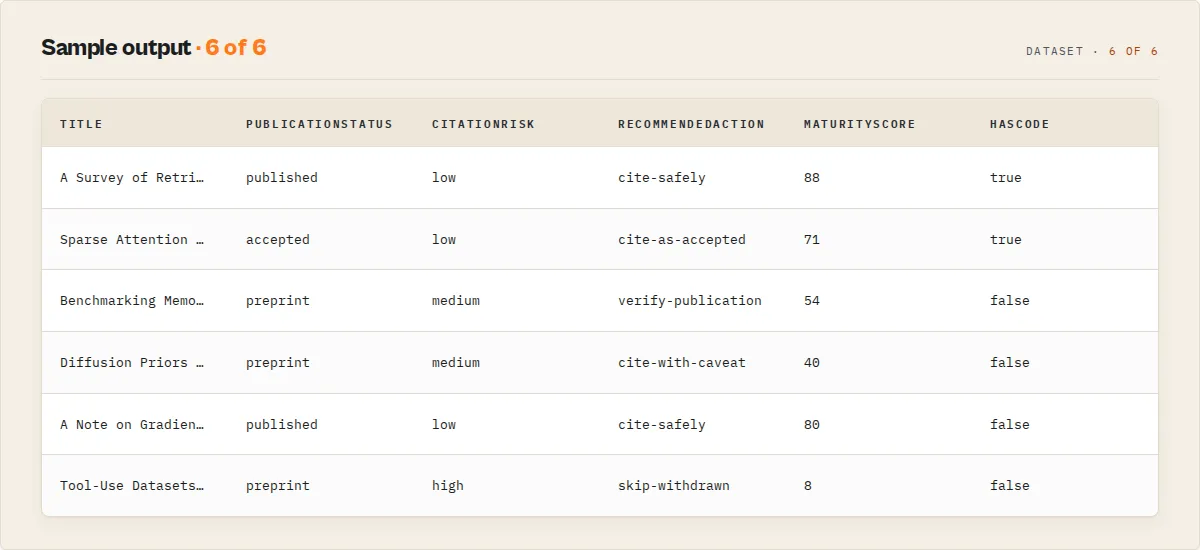
Output fields reference
ArXiv metadata (every paper record)
| Field | Type | Description |
|---|---|---|
arxivId | String | ArXiv identifier with version suffix (e.g., 2401.02385v2) |
title | String | Paper title, whitespace normalized |
abstract | String | Full abstract text |
published / updated | String | Submission and last-revision dates (ISO 8601) |
primaryCategory / categories | String / String[] | Primary and all ArXiv categories |
authors / authorList | String / String[] | Author names |
pdfUrl / absUrl | String | PDF and abstract-page URLs |
doi / journalRef / comment | String or null | DOI, journal reference, author comment |
Appraisal layer (the intelligence)
| Field | Type | Description |
|---|---|---|
publicationStatus | Enum | published / accepted / preprint |
peerReviewStatus | Enum | published / accepted / preprint-only |
statusConfidence | Enum | Confidence in the status classification: high / medium / low |
venue | String or null | Detected publication or acceptance venue (raw) |
venueNormalized | Object or null | Parsed venue { venueName, venueYear, venueType, confidence } |
canonicalArxivId / version | String / Integer | Version-stripped ID and the version number |
categoryNames | String[] | Human-readable names for the category codes |
paperLifecycle | Object | { withdrawn, superseded, replacementHint, errataHint, statusConfidence } |
citation | Object | Deterministic { bibtex, bibtexKey, preferredCitationTarget, citationWarning, versionAwareCitationNote } (BibTeX only, opt-in) |
evidence | Object | { statusSignals[], riskSignals[], scoreTrace[] } behind the verdict (opt-in) |
paperType / isSurvey / surveyConfidence | Enum / Boolean / Enum | Document type and survey detection from title + abstract |
foundationalCandidate / foundationalReason | Boolean / String | Earliest established paper of its field in the result set (metadata proxy) |
researchRole | Enum | The paper's role in a reading plan: survey / foundational / benchmark / dataset / state-of-art / reproducible / emerging / historical / methodology |
authorCount / firstAuthor / lastAuthor / largeCollaboration | Integer / String / String / Boolean | Author signals |
maturityScore | 0-100 | Trust axis: publication status, code, revisions, collaboration |
maturityFactors | Array | { factor, points } breakdown of the maturity score |
maturityTier | Enum | peer-reviewed / venue-accepted / established-preprint / fresh-preprint |
relevanceScore | 0-100 | Search-relevance axis (rank-derived) |
priorityScore | 0-100 | Mode-weighted ordering scalar — the field to sort by |
citationRisk | Enum | low / medium / high, with citationRiskReasons[] |
recommendedAction | Enum | cite-safely / cite-as-accepted / cite-with-caveat / verify-publication / read-first / skip-withdrawn |
hasCode / codeUrl | Boolean / String | Reproducibility — code link detected |
versionCount / revisionActivity | Integer / Enum | Revisions: single-version / revised / heavily-revised |
recencyDays / freshness | Integer / Enum | cutting-edge / recent / established / older |
crossListed / interdisciplinary | Boolean | Multi-category / multi-archive |
ragSafe / ragSafeReason | Boolean / String | Safe to index into a RAG corpus |
isLandmark / landmarkReason | Boolean / String | Earliest paper of its archive in the result set |
why / signalReason | String[] | Plain-English recommendation reasons and the classification chain |
summary | String | LLM-quotable one-line summary (≤280 chars) |
How it works
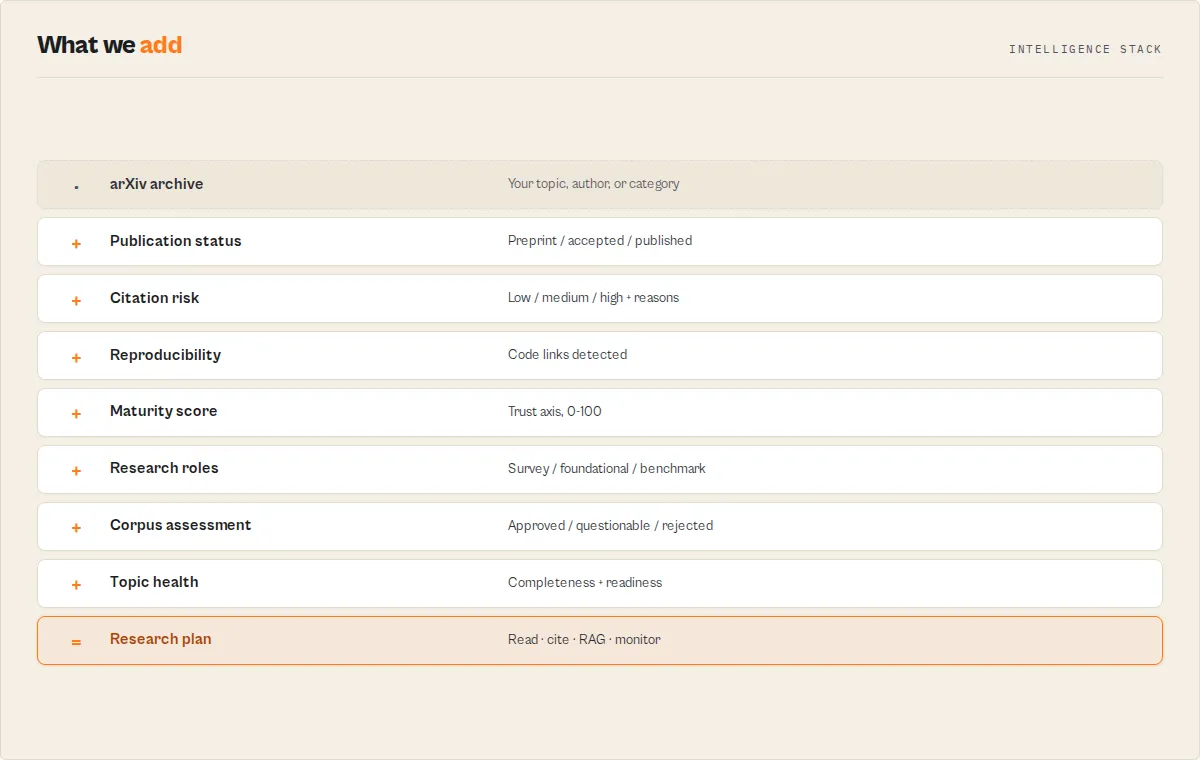
The actor fetches data from the ArXiv API (export.arxiv.org/api/query), which returns results as Atom XML feeds. The pipeline handles XML parsing, pagination, rate limiting, and data transformation to produce clean JSON output.
Query field prefix syntax
The ArXiv API supports field-specific search prefixes that can be combined with Boolean operators:
| Prefix | Field | Example |
|---|---|---|
all: | All fields (default) | all:neural network |
ti: | Title | ti:attention mechanism |
au: | Author | au:lecun |
abs: | Abstract | abs:reinforcement learning |
cat: | Category | cat:cs.AI |
co: | Comment | co:ICML 2024 |
Combine with AND, OR, ANDNOT: ti:transformer AND au:vaswani ANDNOT abs:vision
When a category input is provided, the actor appends AND cat:{category} to the query automatically.
Rate limiting
ArXiv requires a minimum 3-second delay between API requests. The actor enforces a 3.1-second delay between paginated fetches to stay compliant. Each page retrieves up to 100 papers, so fetching 500 papers requires approximately 5 requests with a total wait time of about 12-15 seconds.
How much does it cost to run?
ArXiv Preprint Paper Search is very cost-efficient. The ArXiv API is completely free with no usage fees or API keys. The actor uses minimal compute resources on the Apify platform.
| Scenario | Papers | Approximate time | Estimated cost |
|---|---|---|---|
| Quick search | 50 | ~5 seconds | ~$0.001 |
| Medium batch | 500 | ~20 seconds | ~$0.005 |
| Large extraction | 5,000 | ~3-4 minutes | ~$0.01-0.02 |
Note: Large queries take longer primarily because of the required 3-second delay between paginated API requests, not because of compute intensity. Each page fetches up to 100 papers, so 5,000 papers require approximately 50 pages with ~155 seconds of mandated wait time.
Costs are based on Apify platform usage at 256 MB memory. Actual costs may vary slightly based on network conditions and response sizes.
Requests run through Apify residential proxy by default so shared-IP rate limits don't interrupt results. ArXiv responses are small (XML), so proxy traffic is tiny — roughly a cent or two per run. If you prefer, set proxyConfiguration to datacenter or disable it (faster/cheaper, but you may hit rate limits on busy shared IPs).
Limitations and responsible use
- Rate limiting adds latency. The 3-second delay between pages means large result sets (1,000+ papers) take minutes to retrieve. Plan accordingly for time-sensitive workflows.
- No full-text extraction. The actor returns abstracts and PDF links, not the full text of papers. Use the
pdfUrlfield to download PDFs separately if full text is needed. - Result cap at 5,000. ArXiv's API and this actor limit results to 5,000 papers per query. For broader coverage, run multiple queries with different category or date filters.
- ArXiv coverage only. This actor searches ArXiv preprints specifically. For published journal articles, peer-reviewed papers, or other databases, see the related actors listed below.
- XML response quirks. ArXiv's API may return approximate total counts for very broad queries. The
opensearch:totalResultsvalue is informational and may not exactly match the number of retrievable results. - Respect ArXiv's terms of service. This actor complies with ArXiv's rate limits. Avoid scheduling excessively frequent runs that would place unnecessary load on ArXiv's infrastructure.
ArXiv category reference
Common ArXiv categories for quick reference:
| Category | Subject | Discipline |
|---|---|---|
cs.AI | Artificial Intelligence | Computer Science |
cs.CL | Computation and Language (NLP) | Computer Science |
cs.CV | Computer Vision and Pattern Recognition | Computer Science |
cs.LG | Machine Learning | Computer Science |
cs.CR | Cryptography and Security | Computer Science |
cs.SE | Software Engineering | Computer Science |
cs.RO | Robotics | Computer Science |
cs.DS | Data Structures and Algorithms | Computer Science |
math.CO | Combinatorics | Mathematics |
math.OC | Optimization and Control | Mathematics |
math.ST | Statistics Theory | Mathematics |
stat.ML | Machine Learning | Statistics |
stat.ME | Methodology | Statistics |
physics.hep-th | High Energy Physics - Theory | Physics |
physics.hep-ph | High Energy Physics - Phenomenology | Physics |
quant-ph | Quantum Physics | Physics |
cond-mat.mtrl-sci | Materials Science | Physics |
q-bio.BM | Biomolecular Structure | Quantitative Biology |
q-bio.GN | Genomics | Quantitative Biology |
q-fin.ST | Statistical Finance | Quantitative Finance |
eess.SP | Signal Processing | Electrical Engineering |
eess.AS | Audio and Speech Processing | Electrical Engineering |
The full taxonomy with all categories is available at arxiv.org/category_taxonomy.
FAQ
How do I know which arXiv papers are safe to cite?
Run with analysisMode: "cite-check". Each paper is classified published / accepted / preprint with a citationRisk verdict (low / medium / high) and the reasons behind it, so you cite the peer-reviewed work and flag the rest. Add onlyPeerReviewed: true to keep just the published and venue-accepted papers. See the Safe-to-Cite example.
How do I build a RAG corpus from arXiv?
Run with analysisMode: "rag" and excludeWithdrawn: true. The actor flags every paper ragSafe (or not, with the reason) and emits a corpus-assessment record splitting the set into approved / questionable / rejected with a 0-100 corpus-quality score — so you ingest only stable, citable papers. See the RAG Corpus example.
How do I find arXiv papers that have code?
Set requireCode: true. The actor detects code/repository links in each paper's comment and abstract and keeps only the reproducible ones, surfacing codeUrl per paper. See the Papers With Code example.
How do I build a literature review from arXiv?
Run with analysisMode: "literature-review". You get a research brief with reading order and what to read first (survey, foundational, latest, reproducible), plus a topic-health record showing role coverage and any gaps in what you found. See the Literature Review example.
Can I search for papers by a specific author?
Yes. Use the au: prefix in the search query field. For example, au:yann lecun will find papers authored by Yann LeCun. You can combine this with other filters like au:lecun AND ti:convolutional.
What is the difference between searchQuery and category?
The searchQuery field accepts free-text queries with optional field prefixes and Boolean operators. The category field is a convenience filter that appends AND cat:{value} to your query automatically. You can use them independently or together. At least one must be provided.
How do I find the most recent papers in a field?
Set sortBy to submittedDate and sortOrder to descending. Combine with a category filter (e.g., cs.AI) to get the newest papers in a specific subject area without needing a keyword query.
Can I get the full text of papers?
This actor returns the abstract and a direct PDF download link (pdfUrl) for each paper. To access the full text content, download the PDF files using the provided URLs. ArXiv's API does not serve full-text content directly.
Is there a rate limit? The ArXiv API requires a minimum 3-second delay between requests. This actor handles rate limiting automatically with a 3.1-second delay between pages. Each page retrieves up to 100 papers, so fetching 500 papers requires about 5 requests and 15 seconds of API wait time.
How do Boolean operators work in the search query?
Use uppercase AND, OR, and ANDNOT between field-prefixed terms. For example: ti:transformer AND au:vaswani finds papers with "transformer" in the title authored by Vaswani. abs:reinforcement learning ANDNOT ti:survey finds RL papers that are not surveys. Operators must be uppercase to be recognized by the ArXiv API.
Use in Dify
Drop this actor into Dify workflows via the Apify plugin's Run Actor node. Each paper returns classified and verdicted as structured JSON: publicationStatus (published / accepted / preprint), citationRisk (low / medium / high), and recommendedAction plus a ragSafe boolean your downstream node branches on. A plain arXiv search returns raw Atom metadata you still have to interpret; this returns the decision.
- Actor ID:
ryanclinton/arxiv-paper-search - Sample input (find safe-to-cite work on a topic):
A Dify if/else node routes on the stable enums without parsing prose:
recommendedAction == "cite-safely"→ add to the citation list automaticallyrecommendedAction == "verify-publication"→ branch to a human-review step (an established preprint may now be published)citationRisk == "high"→ exclude, or flag with thecitationRiskReasons[]array (usable verbatim in a warning)ragSafe == true→ route the abstract into your vector-store ingestion node
Opt-in modes Dify workflows can leverage: analysisMode reweights the priority order per task (cite-check, literature-review, trend-watch, rag); outputMode: "dashboard" returns a single digest object (one charge) for a corpus-level branch; monitorMode emits a paper-delta record a scheduled Dify run can alert on when a tracked preprint crosses into publication. The whatToRead[] array on the research brief and the citationRiskReasons[] / signalReason[] arrays are plain strings usable verbatim — no LLM rewriting needed.
Related actors
| Actor | Description | Link |
|---|---|---|
| OpenAlex Research Search | Search the OpenAlex catalog of 250M+ scholarly works, authors, and institutions | ryanclinton/openalex-research-search |
| Crossref Academic Paper Search | Search the Crossref metadata registry for published journal articles with DOIs | ryanclinton/crossref-paper-search |
| Semantic Scholar Paper Search | Search Semantic Scholar for citation counts, influence scores, and related papers | ryanclinton/semantic-scholar-search |
| PubMed Biomedical Literature Search | Find biomedical and life science research papers from the PubMed/MEDLINE database | ryanclinton/pubmed-research-search |
| CORE Open Access Papers | Search the CORE aggregator for open-access research papers with full-text availability | ryanclinton/core-academic-search |
| DBLP Publication Search | Find computer science publications indexed in the DBLP bibliography | ryanclinton/dblp-publication-search |


