

Canada Federal Corporation Search
Pricing
from $2.00 / 1,000 corporation fetcheds
Canada Federal Corporation Search
Search the Corporations Canada federal registry for any federally incorporated business by name, corporation number, or 9-digit business number.
Pricing
from $2.00 / 1,000 corporation fetcheds
Rating
0.0
(0)
Developer

Ryan Clinton
Maintained by CommunityActor stats
0
Bookmarked
42
Total users
8
Monthly active users
2 months ago
Last modified
Categories
Share
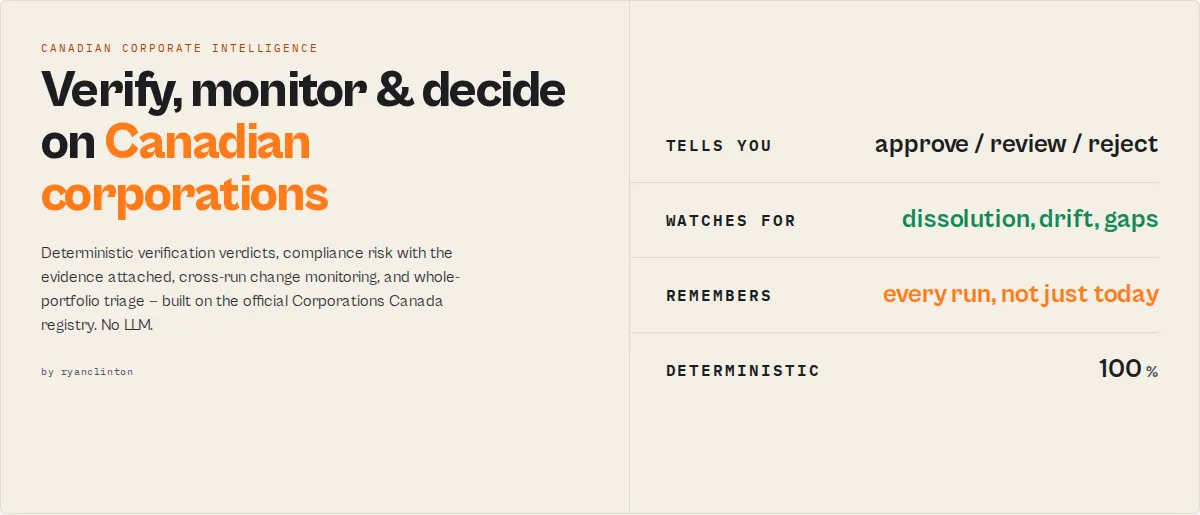
Most registry tools tell you what a company is. This one tells you whether you should trust it.
Most registry tools answer "What does this company look like today?" Canada Federal Corporation Search answers "Should I trust this company, what changed, and what should happen next?"
Built for: vendor onboarding · customer KYC · compliance monitoring · legal review · portfolio screening.
Search any federally incorporated Canadian company and get back an actionable decision, monitoring signals, historical intelligence, and a workflow-ready next action -- all built directly on top of the official Corporations Canada registry.
- ✓ Verification verdicts
- ✓ Risk assessments
- ✓ Continuous monitoring
- ✓ Historical intelligence
- ✓ Workflow-ready actions
Registry search actors return records. Corporate intelligence actors return decisions, monitoring signals, and actions. Canada Federal Corporation Search is built as a corporate intelligence actor: most registry databases were designed for human lookup, but modern workflows need machine decisions, so this actor converts corporate registry records into deterministic, workflow-ready intelligence.
What you get back
Verify
Monitor
Investigate
Act
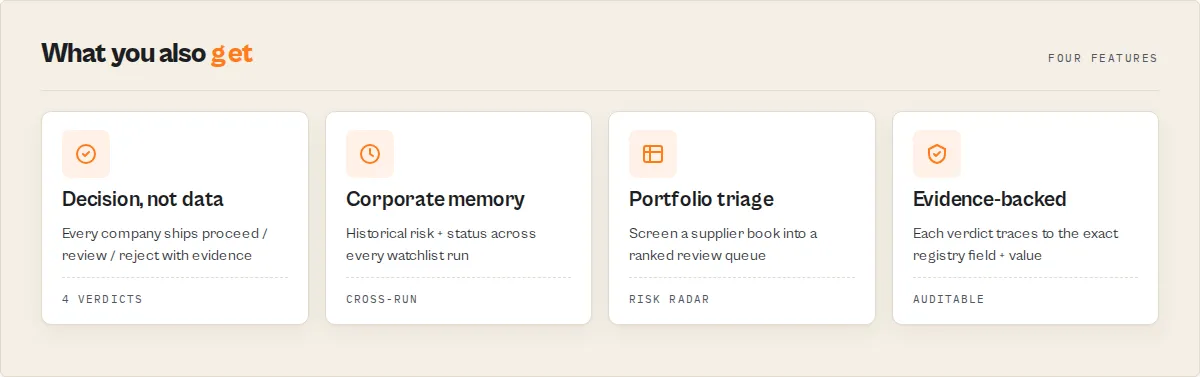
Most registry tools stop at data retrieval. Canada Federal Corporation Search continues all the way to a decision. Every record is verified, scored, monitored, explained, and translated into a workflow-ready action. Over time, watchlists accumulate historical intelligence that cannot be recreated from the registry alone, turning simple company searches into a continuously improving due-diligence system.
The moat: what a competitor can't backfill
Six months into monitoring a company on a watchlist, one record carries this:
A competitor can tell you what this company looks like today. This actor tells you how it has changed over the last 184 observations -- a risk score that has climbed from 8 to 57 over 163 days. Registry data can be backfilled; accumulated history cannot. (Full detail in What makes this different below.)
Continuous corporate due diligence and monitoring for Canadian federal entities, with deterministic decisions, portfolio intelligence, and change detection built directly on top of the official Corporations Canada registry. Search by name, corporation number, or 9-digit business number, and get back a verification verdict instead of raw rows. This Apify actor queries the official ISED (Innovation, Science and Economic Development Canada) database and converts the registry record into deterministic intelligence: a normalised verificationStatus, a 0-100 compliance riskScore and a positive-framing registryHealthScore, the specific complianceSignals that drove them, and a recommendedAction (proceed / verify-further / enhanced-due-diligence / do-not-proceed) your KYC or onboarding workflow can branch on without parsing prose. Underneath the decision sits the full registry record -- name, status, incorporation date, governing legislation, registered office address, director limits, annual return history, corporate activity timeline, and every historical name change.
This actor is built around three jobs:
- Verify --
verificationStatus,riskScore/riskLevel,registryHealthScore,filingHealth,entityMatchConfidence, anentityProfilelabel (e.g. "Stable Legacy Corporation"), and arecommendedActiontell you in one field whether a corporation is safe to transact with. Set ajobToBeDone(vendor-onboarding, customer-kyc, investment-screening, …) and the actor reframes that verdict into ajobScreeningblock (APPROVE/REVIEW/REJECT+ review level) and a routednextAction({ owner, priority, action }) your workflow tool assigns directly.decisionFactorsand a fullevidence[]array trace every verdict back to the exact registry field and value behind it, so a reviewer can audit any decision. - Monitor -- set a
watchlistNameand the actor remembers each corporation between scheduled runs, emittingtemporalSignalschange events (NEW-FILING,NAME-CHANGED,ADDRESS-CHANGED,LEGISLATION-CHANGED,DISSOLVED,AMALGAMATED,STATUS-CHANGED,RISK-INCREASED) with achangeSeverity(low / medium / high / critical) and a plain-EnglishchangeSummary. Crucially, it also accumulates acorporateMemoryno competitor can backfill: first-seen date, runs seen, historical statuses / names / risk scores, and anentityTrend(deteriorating / improving / stable) over the time you've been watching. - Investigate --
corporateGraphreconstructs the entity's identity chain (current name, every previous name, corporation and business numbers, full event timeline), theintelligenceTimelineturns the activity history into typed, categorised, severity-tagged events each with a plain-English explanation,anomalySignalsflags deterministic red flags (filing gaps, frequent renaming, reactivation after long dormancy),driftScoreandinvestigationPriority(CRITICAL → NONE) tell legal teams what to look at first, andlifecycleStageclassifies the company from startup to legacy to dormant-risk.
Screening a portfolio? Every multi-result run emits a portfolioInsights block -- a riskRadar (critical / high / medium / low counts), topRisks, needsImmediateReview, active percent, dissolved count, newly-flagged count, and average health score across the whole list -- so a vendor or supplier screen tells you the shape of the book at a glance, and in watchlist mode it trends those numbers run-over-run. A searchIntentAnalysis block (exact-match found, close matches, ambiguity level) tells automation whether the result is safe to act on unattended. Looking ahead, futureRiskSignals and predictedRiskDirection surface upcoming filing obligations before they lapse.
Why existing registry tools fall short
Most registry tools tell you:
- ✓ Company name
- ✓ Status
- ✓ Incorporation date
But they don't tell you:
- ✗ Is this company safe to transact with?
- ✗ Has its risk profile changed?
- ✗ Does it require compliance review?
- ✗ Should onboarding continue automatically?
- ✗ What changed since last month?
Canada Federal Corporation Search answers those questions directly.
Registry search vs corporate intelligence
| Question | Registry search | This actor |
|---|---|---|
| Is the company active? | ✓ | ✓ |
| Has it filed recently? | Manual review | ✓ |
| Is it safe to onboard? | You decide | ✓ |
| Has its risk increased? | Not available | ✓ |
| Has the company changed identity? | Manual research | ✓ |
| What should happen next? | Not available | ✓ |
| What changed since last review? | Not available | ✓ |
Before vs after
A raw registry scraper returns this, and leaves you to decide what it means:
Can we onboard this vendor? Unknown.
This actor returns a decision:
Can we onboard this vendor? Yes.
Prevent common due-diligence failures
People buy protection from failure, not data. Here is what slips through a manual registry workflow, and what this actor surfaces instead:
| Failure | Traditional workflow | This actor |
|---|---|---|
| Vendor no longer in good standing | Review missed | STATUS-CHANGED / DISSOLVED alert |
| Annual returns stop being filed | Detected months later | RISK-INCREASED + filing-gap-detected |
| Company quietly changes identity | Often missed | NAME-CHANGED + identity drift |
| Risk climbing slowly over time | Invisible | entityTrend: deteriorating |
What makes this different: continuous corporate memory
Most registry tools provide snapshots. This actor builds memory.
When you run it on a watchlistName, every monitored company accumulates a historical intelligence profile no competitor can reconstruct after the fact:
- Historical statuses
- Historical risk scores
- Historical names
- Risk trend analysis (
entityTrend) - Deterioration detection over time
- Full change history
The longer you monitor an entity, the more intelligence the system generates. A first-time competitor run sees only today's record; by run 312 this actor knows a company's risk has been climbing for 417 days across three name changes. Registry data can be backfilled; accumulated history cannot.
Every decision is also fully traceable: the evidence[] array ties each signal back to the exact registry field and value that produced it, so a compliance reviewer can audit any verdict without leaving the dataset.
Built for
- Procurement teams -- "Can we approve this supplier?" →
jobScreening.decision - Compliance teams -- "Who requires review today?" →
portfolioInsights.needsImmediateReview - Legal teams -- "What changed since our last review?" →
temporalSignals.changeFlags - Sales teams -- "Is this company real and active?" →
verificationStatus+entityMatchConfidence
Designed to slot into automated workflows: procurement systems, vendor onboarding, customer KYC, compliance monitoring, legal review queues, and portfolio screening.
This actor is for / not for
For
- ✅ Federal corporation verification
- ✅ Vendor onboarding and supplier review
- ✅ Customer KYC
- ✅ Compliance monitoring and change detection
- ✅ Portfolio screening
Not for
- ❌ Provincial-only corporation searches (this covers the federal Corporations Canada registry)
- ❌ Director / officer investigations (the ISED API exposes director limits, not names)
- ❌ Financial-statement or credit-risk analysis (the registry has no financial data)
Why compliance teams like this
- Deterministic scoring -- the same corporation always scores the same; no randomness
- No AI hallucinations -- every signal is a documented rule over registry fields
- Explainable decisions --
decisionFactorsshows the weighted signals behind every verdict - Evidence-backed verdicts --
evidence[]traces each signal to the exact registry field and value - Stable output enums -- additive within a major version, safe to branch on
- Automation-safe fields --
searchIntentAnalysis.automationSafegates unattended action - Historical intelligence --
corporateMemorybuilds an audit trail of how an entity changed over time
Why use Canada Federal Corporation Search?
Searching the Corporations Canada website manually is slow, limited to one lookup at a time, and provides no way to export results in a structured format. The search interface requires navigating HTML forms, clicking through individual corporation pages, and manually copying data. This actor eliminates all of that friction. Provide a search query, click Start (or call the API), and receive clean, structured JSON with every field normalized and ready for analysis. No HTML parsing, no manual data entry, no infrastructure to maintain.
Running on Apify's cloud platform gives you scheduled runs for continuous corporate monitoring, built-in dataset storage with export to JSON, CSV, and Excel, and one-click integrations with Google Sheets, Slack, Zapier, Make, and hundreds of other services. For compliance teams, this means automated daily or weekly verification of corporation status. For research workflows, it means bulk corporation discovery by name that would take hours through the government website completed in seconds.
The actor uses a two-phase approach for maximum data richness: it first searches the Corporations Canada HTML form to discover matching corporations, then fetches full details for each match through the official ISED JSON API. This delivers far more data than the search results page alone -- including annual return history, activity timelines, director limits, and historical name changes. No API keys or paid subscriptions are required. The actor queries the freely accessible Corporations Canada government database directly.
Capabilities
- Verification verdict, not raw rows -- Every result carries a normalised
verificationStatus(verified-active / inactive-amalgamated / inactive-discontinued / dissolved / unknown) and anisActiveboolean your workflow can route on directly - Deterministic compliance risk score -- A 0-100
riskScoreandriskLevelband (low / medium / high / critical) computed from registry signals, with the exactcomplianceSignalsthat produced it attached for audit. No LLM, no black box -- the same corporation always scores the same - Recommended action for KYC and onboarding -- A
recommendedActionof proceed / verify-further / enhanced-due-diligence / do-not-proceed, plus a plain-EnglishsummaryandwhyThisMattersyour reviewers can read in seconds - Search by name, number, or business number -- Enter a company name like "Shopify", a corporation number like "8048894", or a 9-digit CRA business number to find matching corporations instantly
- Smart query detection -- Automatically determines whether your query is a numeric lookup (1-9 digits) or a name search based on the input format, routing to the optimal search strategy
- Corporate monitoring across runs -- Set a
watchlistNameand the actor remembers each corporation between scheduled runs, emittingtemporalSignals(NEW / STATUS-CHANGED / RISK-INCREASED / RISK-DECREASED) so you catch a dissolution or lapsed filing the day it happens - Output profiles for every consumer -- Pick
minimal(decision + identity for Zapier/Make rules),standard(decision layer + full registry detail),full, orllm(agent-optimised) so each downstream tool gets exactly the payload it needs - Cohort summary record -- Multi-result runs emit a summary row with counts by verification status, risk level, and recommended action, so a bulk screen tells you the shape of the list at a glance
- Filter by status, legislation, and province -- Narrow to Active corporations only, search specific federal statutes, or restrict to any of Canada's 13 provinces and territories
- Full registry detail underneath -- Corporation number, business number, name, status, incorporation date, corporation type, registered office address, director limits, annual returns, activity timeline, and complete historical name list
- Direct government source -- All data comes straight from the ISED Corporations Canada database, ensuring accuracy and currency
- Batch processing with rate limiting -- Fetches up to 100 corporations per run in batches of 5 with built-in delays to respect government server resources
How to use Canada Federal Corporation Search
Using Apify Console
- Navigate to the Canada Federal Corporation Search actor page on the Apify Store and click Try for free.
- On the Input tab, enter your search query -- a corporation name (e.g.,
Shopify), corporation number (e.g.,8048894), or 9-digit business number. - Optionally select filters for Corporation Status, Governing Legislation, or Province of Registered Office.
- Set Maximum Results to control how many records to return (default is 25, maximum is 100).
- Click Start to run the actor.
- Once the run finishes, open the Dataset tab to view, filter, and export results as JSON, CSV, or Excel.
Using the API
Call the actor programmatically using the Apify REST API, official client libraries, or cURL:
cURL:
Input parameters
| Parameter | Type | Required | Default | Description |
|---|---|---|---|---|
query | String | Yes | -- | Corporation name, corporation number (1-9 digits), or 9-digit CRA business number to search for. |
status | Select | No | Any | Filter by corporation status. Options: Any, Active (1), Inactive - Amalgamated (9), Inactive - Discontinued (10), Dissolved (11). |
governingLegislation | Select | No | Any | Filter by governing legislation. Options include: Canada Business Corporations Act (6), Canada Not-for-profit Corporations Act (14), Canada Corporations Act Part II (3), Special Act of Parliament (9), Boards of Trade Act Part I (7) and Part II (8), Canada Cooperatives Act (12), Pension Fund Societies Act (5), Other (13). |
province | Select | No | Any | Filter by province of registered office. All 13 Canadian provinces and territories are supported: AB, BC, MB, NB, NF, NT, NS, NU, ON, PE, QC, SK, YT. |
maxResults | Integer | No | 25 | Maximum number of results to return (1--100). Only applies to name searches. Direct number lookups always return a single result. |
jobToBeDone | Select | No | general | Reframes the verdict for your workflow into a jobScreening decision (APPROVE / REVIEW / REJECT + review level). Options: general, vendor-onboarding, customer-kyc, supplier-review, sales-lead-validation, investment-screening, acquisition-target, nonprofit-review. Investment/acquisition jobs are strict; sales-lead-validation mainly checks the company is real and active. |
analysisProfile | Select | No | standard | Job-named output shape. verification = KYC decision fields (verdict, risk, health, filing, match confidence, fingerprint); monitoring = change events + anomalies + timeline for scheduled runs; investigation = corporate graph + identity chain + full event timeline; compliance / full = everything; minimal = decision + identity (for Zapier/Make rules); standard (default) = decision layer + full registry detail; llm = decision blocks + plain-English summary for AI agents. |
outputProfile | Select | No | -- | Legacy alias for analysisProfile (verbosity values only: minimal / standard / full / llm). Still accepted; new integrations should use analysisProfile. If both are set, analysisProfile wins. |
watchlistName | String | No | -- | Set a name to enable cross-run corporate monitoring. The actor remembers each corporation between runs and emits temporalSignals. Leave blank for a one-off lookup. The first run on a new watchlist marks every record as NEW. |
Example input
Query detection rules
The actor uses the following logic to determine the search strategy:
- 1-9 digits (e.g.,
8048894or818338881) -- treated as a numeric lookup. Tries direct JSON API first, falls back to HTML form search for partial matches. - Anything else (e.g.,
Shopify,Air Canada) -- treated as a corporation name search via the Corporations Canada HTML form.
Output
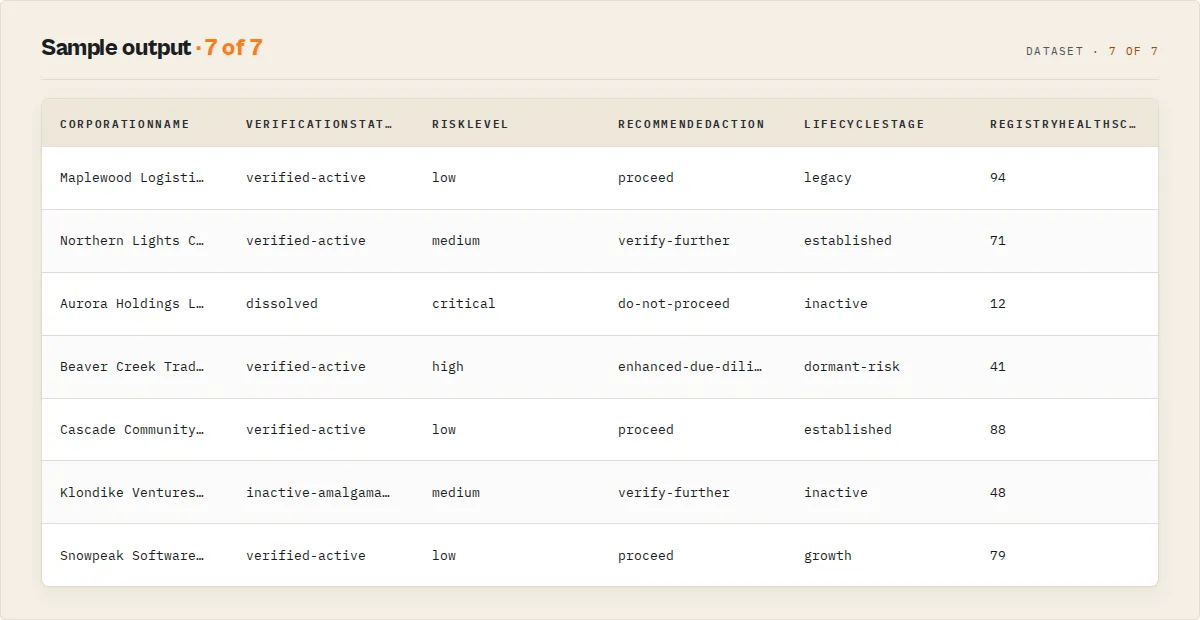
Each corporation record leads with the decision layer, then the full registry detail. Here is a standard-profile example:
Output fields
Decision layer (on every corporation record):
| Field | Type | Description |
|---|---|---|
verificationStatus | String | Normalised status: verified-active, inactive-amalgamated, inactive-discontinued, dissolved, unknown. The routing primitive |
isActive | Boolean | True when the corporation is in active good standing |
riskScore | Number | Deterministic 0-100 due-diligence caution score |
riskLevel | String | Risk band: low, medium, high, critical |
registryHealthScore | Number | 0-100 positive-framing health score (active status + filing currency + longevity + identity stability). Answers "how healthy?" where riskScore answers "how dangerous?" |
identityStabilityScore | Number | 0-100, higher = more stable. Penalises frequent and recent name changes |
entityMatchConfidence | Number or null | 0-100 confidence that the result matches your query (100 on exact number lookups). Critical when screening ambiguous names like "Shopify" vs "Shopify Technologies" |
lifecycleStage | String | startup, growth, established, legacy, dormant-risk, inactive, unknown — from age, filing history, and status |
entityProfile | Object | Merged profile: { label (e.g. "Stable Legacy Corporation" / "High-Churn Entity" / "Dormant Shell Risk"), category (stable/growth/churn/dormant/filing-risk/inactive/standard), ageBand, filingBehaviour, identityStability, statusHealth } |
nextAction | Object | Routed workflow task: { owner (compliance/procurement/legal/sales/none), priority, action (e.g. approve-vendor / review-filing-gap / reject-and-escalate) } |
reviewReason | String | Short human reason for the review queue (e.g. "Annual return overdue.") |
corporateMemory | Object | Watchlist mode only. Cross-run history: { firstSeen, runsSeen, historicalStatuses[], historicalNames[], historicalRiskScores[], entityTrend { direction (deteriorating/improving/stable/new), durationDays } } |
anomalySignals | Array | Deterministic red-flag codes: recent-name-change, unusually-frequent-renaming, filing-gap-detected, long-dormant, reactivated-after-long-inactivity, overdue-filings, dissolved-with-recent-activity, newly-incorporated. Empty array when none |
driftScore | Number | 0-100 corporate-drift score (identity churn + filing irregularity + reactivation) |
investigationPriority | String | Legal/investigator triage: CRITICAL, HIGH, MEDIUM, LOW, NONE. Distinct from transaction risk |
decisionFactors | Array | Explainability — weighted signals behind the verdict: [{ signal, weight, direction }] |
evidence | Array | Receipts — every signal traced to the registry field + value: [{ signal, sourceField, sourceValue, explanation }]. Makes every verdict auditable |
futureRiskSignals | Array | Deterministic upcoming-obligation flags (annual-return-due-within-90-days, annual-return-overdue, administrative-dissolution-risk) |
predictedRiskDirection | String | increase, stable, decrease, unknown — directional from filing obligations, not a probabilistic forecast |
jobScreening | Object | Job-framed verdict: { job, decision (APPROVE/REVIEW/REJECT), reviewLevel (NONE/STANDARD/ENHANCED), rationale } |
filingHealth | Object | { status (current / due-soon / overdue / no-filings / not-applicable), lastReturnYear, expectedReturnYear, daysSinceExpectedFiling } — is the corporation keeping up with its annual-return obligations? |
timelineInsights | Object | { yearsActive, annualReturnCount, longestFilingGapYears, lastActivityAgeDays } — BI-ready activity summary |
intelligenceTimeline | Array | Activity + name history as intelligence events — each with type, category, severity, impact, and a plain-English explanation, sorted by date |
corporateGraph | Object | Identity chain: { currentName, previousNames[], corporationNumber, businessNumber, timeline[] } — what this entity used to be |
recommendedAction | String | KYC verdict: proceed, verify-further, enhanced-due-diligence, do-not-proceed |
complianceSignals | Array | Stable signal codes with detail (e.g. dissolved, filing-overdue, recently-incorporated, multiple-name-changes) that drove the score |
confidence | Object | Data-completeness confidence: { score, level, components[] } |
corporationAgeYears | Number or null | Whole years since incorporation |
yearsSinceLastFiling | Number or null | Whole years since the most recent annual return |
nameChangeCount | Number | Count of historical primary-name changes |
summary | String | Plain-English one-line verdict |
whyThisMatters | String | Plain-English rationale for the recommended action |
dataGaps | Array | Fields the registry does not expose, with the sibling actor that fills them |
actorGraph | Object | Suite navigation: { previous, current, next[] } |
temporalSignals | Object | Present only in watchlist mode: { changeFlag (primary), changeFlags[] (all detected: NEW-FILING / NAME-CHANGED / ADDRESS-CHANGED / LEGISLATION-CHANGED / DISSOLVED / AMALGAMATED / STATUS-CHANGED / RISK-INCREASED / RISK-DECREASED / UNCHANGED), changeSummary (plain-English), previousStatus, statusChanged, riskDelta, firstSeenAt, lastSeenAt, runsSeen } |
Registry detail:
| Field | Type | Description |
|---|---|---|
corporationNumber | String | The unique Corporations Canada corporation number |
businessNumber | String | The 9-digit Canada Revenue Agency (CRA) business number |
corporationName | String | Current primary name of the corporation |
status | String | Registration status -- typically Active, Amalgamated, Discontinued, or Dissolved |
governingLegislation | String | The federal act under which the corporation is governed (e.g., "Canada Business Corporations Act") |
incorporationDate | String | Date the corporation was incorporated (YYYY-MM-DD) |
corporationType | String | Classification from the most recent annual return (e.g., "Distributing corporation with 50 or more shareholders") |
registeredOfficeAddress | String | Full formatted registered office address including street, city, province, postal code, and country |
registeredOfficeCity | String | City of the registered office |
registeredOfficeProvince | String | Full province or territory name of the registered office (e.g., "Ontario", "British Columbia") |
registeredOfficePostalCode | String | Canadian postal code of the registered office |
registeredOfficeCountry | String | Country of the registered office (typically "Canada" or "United States") |
directorLimits | Object or null | Minimum and maximum number of directors allowed, or null if not specified |
annualReturns | Array | Filing history with annual meeting dates, filing years, and corporation type classifications |
activities | Array | Timeline of corporate events -- incorporation, annual returns, amendments, name changes, and other milestones |
corporationNames | Array | All current and historical corporation names with name type, effective dates, and expiry dates |
canadaUrl | String | Direct URL to the corporation's detail page on the Corporations Canada website |
Use cases
- Business verification -- Confirm that a Canadian federal corporation is in active standing before entering into a business relationship, signing a contract, or extending credit
- Due diligence -- Research potential partners, suppliers, or acquisition targets by retrieving their full registration details, incorporation date, and governing legislation
- Compliance screening -- Automate corporation status verification as part of KYC (Know Your Customer) and vendor onboarding workflows across Canadian jurisdictions
- Lead generation -- Search by industry-related keywords to discover federally incorporated businesses for sales prospecting and outreach campaigns
- Corporate monitoring -- Schedule daily or weekly runs to track status changes, new annual return filings, or corporate activity events for a portfolio of companies
- Competitive intelligence -- Research competitors' corporate structure, incorporation history, registered office locations, and director configurations
- Legal research -- Look up corporations by number for litigation support, corporate governance analysis, or regulatory compliance investigations
- Name change tracking -- Use the corporationNames array to trace a company's full naming history, useful for brand research and historical corporate analysis
- Cross-border research -- Combine with UK Companies House, Australia ABN Lookup, or NZ Companies Search for multi-jurisdiction corporate due diligence
- Nonprofit research -- Filter by the Canada Not-for-profit Corporations Act to find and analyze federally registered Canadian nonprofits
API & Integration
Python
JavaScript
cURL
Integrations
Connect Canada Federal Corporation Search to your existing tools and workflows:
- Google Sheets -- Automatically export corporation data to a spreadsheet for team review, compliance tracking, and record-keeping
- Slack / Email -- Get notified when monitored corporations change status using Apify webhooks
- Zapier / Make -- Route corporation data to CRMs, compliance systems, databases, or hundreds of other third-party apps
- REST API -- Fetch results programmatically from any language or platform using the Apify dataset API
- Scheduled runs -- Set up Apify schedules to run daily, weekly, or monthly corporation verification checks automatically
- Webhooks -- Trigger downstream actions (notifications, database writes, compliance alerts) whenever a run completes
Use in Dify
Drop this actor into Dify workflows via the Apify plugin's Run Actor node. Each corporation returns verified, scored, and recommended as structured JSON -- verified-active / dissolved / inactive-discontinued plus the riskLevel and recommendedAction your downstream node branches on. A raw registry scraper pointed at Corporations Canada returns the HTML of a government search form; this returns a due-diligence decision.
- Actor ID:
ryanclinton/canada-corporation-search - Sample input (verify a counterparty before onboarding):
A Dify if/else node routes on the stable enums without parsing any prose. The cleanest single branch is jobScreening.decision:
jobScreening.decision == "REJECT"→ block onboarding, escalate to compliancejobScreening.decision == "REVIEW"→ branch to a manual-review task (jobScreening.reviewLeveltells you standard vs enhanced)jobScreening.decision == "APPROVE"→ continue the automated flow
Or branch on the universal recommendedAction (do-not-proceed / enhanced-due-diligence / verify-further / proceed), verificationStatus (dissolved / inactive-amalgamated / verified-active), riskLevel (critical / high / medium / low), or investigationPriority for a legal-review queue. For scheduled monitoring flows, set a watchlistName and branch on temporalSignals.changeFlag (STATUS-CHANGED / RISK-INCREASED) to fire an alert only when a corporation's standing actually moves. The complianceSignals[] codes (filing-overdue, multiple-name-changes, etc.) are stable strings usable verbatim in a notification body -- no LLM rewriting needed. Use outputProfile: "llm" to hand an agent only the decision blocks plus the plain-English summary.
How it works

The actor follows a two-phase pipeline to retrieve corporation data from the Corporations Canada registry:
- Query analysis -- Parses the input query and determines the search strategy. Numeric queries (1-9 digits) are routed to direct lookup; all other queries are treated as name searches.
- Direct number lookup -- For numeric queries, attempts a direct JSON API call to
corporations/{id}.jsonfor instant results. If the direct lookup fails (partial number or business number format), falls back to the HTML form search. - Name search via HTML form -- For name queries, constructs a POST request to the Corporations Canada search form with the query, status, governing legislation, and province filters. Parses the HTML response using regex to extract corporation IDs and basic metadata.
- Batch detail fetching -- For each matched corporation ID, fetches full details from the ISED JSON API endpoint. Processes in batches of 5 with 500ms delays between batches to respect server resources.
- Data transformation -- Raw API responses (which arrive as
[data, null]arrays) are normalized into a clean 17-field output schema. Province codes are mapped to full names, country codes to full names, and the current primary corporation name is identified from the names array. - Dataset push -- Results are pushed to the Apify dataset for export and integration. Logging tracks search progress, batch processing, and final result counts.
Performance & cost
| Scenario | Results | Approx. duration | Memory | Estimated cost |
|---|---|---|---|---|
| Direct number lookup | 1 | 2--5 seconds | 256 MB | < $0.001 |
| Name search (10 results) | 10 | 5--10 seconds | 256 MB | ~$0.001 |
| Name search (25 results) | 25 | 10--20 seconds | 256 MB | ~$0.002 |
| Name search (50 results) | 50 | 15--30 seconds | 256 MB | ~$0.003 |
| Name search (100 results) | 100 | 30--60 seconds | 256 MB | ~$0.005 |
- The actor makes lightweight HTTP requests only -- no browser rendering or heavy crawling.
- No API keys or paid subscriptions are required. The Corporations Canada database is freely accessible.
- Apify's free tier includes $5/month of platform credits, which covers thousands of typical runs.
- Cost scales primarily with the number of detail API calls (one per matched corporation).
- Scheduled runs for daily monitoring of a corporation portfolio are extremely economical.
Limitations
- Federal corporations only -- This actor searches the Corporations Canada federal registry. Corporations registered only at the provincial level (e.g., Ontario Business Registry, Registraire des entreprises du Quebec) are not included.
- Maximum 100 results per run -- Name searches are capped at 100 results per execution. For broader coverage, run multiple searches with different query terms, province filters, or status filters.
- No director names -- The ISED JSON API returns director minimum/maximum limits but does not expose individual director or officer names.
- No financial data -- The registry contains registration and filing data only. Revenue, assets, employee counts, and other financial metrics are not available.
- HTML parsing dependency -- The search results page is parsed using regex patterns. If ISED changes the HTML structure of the search results page, the name search may need updating. Direct number lookups use the stable JSON API and are unaffected.
- Rate limiting -- The actor respects government server resources by processing in batches of 5 with 500ms delays. Large searches of 100 results may take up to 60 seconds to complete.
- No address history -- Only the current registered office address is returned. Historical address changes are not available through the API.
Responsible use
- Respect government resources -- The actor includes built-in rate limiting (batches of 5, 500ms delays) to avoid overloading the Corporations Canada servers. Do not modify these settings to bypass rate limits.
- Public data only -- All data returned by this actor is publicly available on the Corporations Canada website. No private, confidential, or restricted information is accessed.
- Comply with applicable laws -- Ensure your use of corporate registry data complies with Canadian privacy legislation (PIPEDA) and any applicable provincial privacy laws, particularly when combining corporate data with personal information.
- No scraping circumvention -- This actor accesses the publicly available Corporations Canada search form and JSON API in the same manner as any web browser would. It does not bypass access controls, CAPTCHAs, or authentication.
- Attribute the source -- When publishing or redistributing data obtained through this actor, attribute the source as Corporations Canada / Innovation, Science and Economic Development Canada (ISED).
FAQ
What corporations are included in this database? This actor searches the Corporations Canada federal registry, which contains all corporations incorporated under federal legislation -- primarily the Canada Business Corporations Act (CBCA) and the Canada Not-for-profit Corporations Act (CNCA). Provincial corporations registered only at the provincial level are not included.
Can I search by business number? Yes. Enter a 9-digit CRA business number as your query, and the actor will detect it as a numeric query and look it up directly via the JSON API.
Can I search by corporation number? Yes. Enter a corporation number (typically 6-8 digits) and the actor will attempt a direct JSON API lookup. If the direct lookup fails, it falls back to the HTML form search.
How current is the data? All data comes directly from the live Corporations Canada database maintained by ISED. It reflects the most recent filings and updates submitted to the federal registry at the time of the API call.
What does the status field mean?
- Active -- The corporation is in good standing and currently registered.
- Inactive - Amalgamated -- The corporation has merged with another corporation under an amalgamation.
- Inactive - Discontinued -- The corporation has been voluntarily discontinued by its directors or shareholders.
- Dissolved -- The corporation has been dissolved, either voluntarily or by the Director for non-compliance (such as failure to file annual returns).
What is the difference between corporation number and business number? The corporation number is assigned by Corporations Canada when a federal corporation is created. The business number (BN) is a 9-digit number assigned by the Canada Revenue Agency (CRA) for tax purposes. Both can be used to look up a corporation.
Do I need an API key? No. The Corporations Canada database is freely accessible. No API keys, registration, or paid subscriptions are required to use this actor.
Can I use this actor on a schedule? Yes. Use Apify's built-in scheduler to run the actor daily, weekly, or at any custom interval. This is useful for monitoring status changes, new filings, or corporate events for specific corporations over time.
Is there a rate limit? The actor self-limits by processing corporation detail requests in batches of 5 with 500ms delays between batches. The maximum of 100 results per run is sufficient for most use cases and keeps request volume within responsible limits.
Can I find provincial corporations? No. This actor only searches the federal Corporations Canada registry. For provincial corporations, you would need to search the relevant provincial registry (e.g., Ontario Business Registry, BC Corporate Registry). The OpenCorporates Search actor may help for cross-jurisdictional searches.
What is the governing legislation field? This indicates which federal act a corporation is registered under. The most common is the Canada Business Corporations Act (CBCA) for for-profit companies. Nonprofits are typically under the Canada Not-for-profit Corporations Act (CNCA). Other options include the Canada Cooperatives Act, Boards of Trade Act, and Special Acts of Parliament.
What information is in the annual returns array? Each annual return entry contains the annual meeting date, filing year, and the corporation type classification at the time of filing. Gaps in filing years may indicate compliance issues or a dissolved corporation.
Related actors
| Actor | Description | Link |
|---|---|---|
| UK Companies House | Search the UK Companies House register for company details, officers, directors, and filing history. Pairs with this actor for UK-Canadian cross-border business research. | apify.com/ryanclinton/uk-companies-house |
| OpenCorporates Search | Search the world's largest open database of company information covering 140+ jurisdictions, including Canada. Useful for cross-referencing federal registry data with international corporate records. | apify.com/ryanclinton/opencorporates-search |
| Australia ABN Lookup | Search the Australian Business Register for businesses by ABN, ACN, or name. Ideal for multi-country corporate due diligence workflows alongside Canadian federal data. | apify.com/ryanclinton/australia-abn-lookup |
| NZ Companies Office | Search the New Zealand Companies Office register for company details and status. Combine with this actor for Commonwealth-wide business research. | apify.com/ryanclinton/nz-companies-search |
| GLEIF LEI Lookup | Search the Global Legal Entity Identifier (LEI) database for corporate entity identifiers. Useful for cross-referencing Canadian corporations in global financial regulatory contexts. | apify.com/ryanclinton/gleif-lei-lookup |


