

Nominatim Address Geocoder
Pricing
from $1.00 / 1,000 location geocodeds
Nominatim Address Geocoder
Batch geocode addresses to GPS coordinates (forward geocoding) or convert latitude/longitude coordinates back to street addresses (reverse geocoding) using the OpenStreetMap Nominatim API. Powered by the world's largest open geographic database with global coverage across 200+ countries.
Pricing
from $1.00 / 1,000 location geocodeds
Rating
0.0
(0)
Developer

Ryan Clinton
Maintained by CommunityActor stats
0
Bookmarked
38
Total users
7
Monthly active users
19 days ago
Last modified
Categories
Share
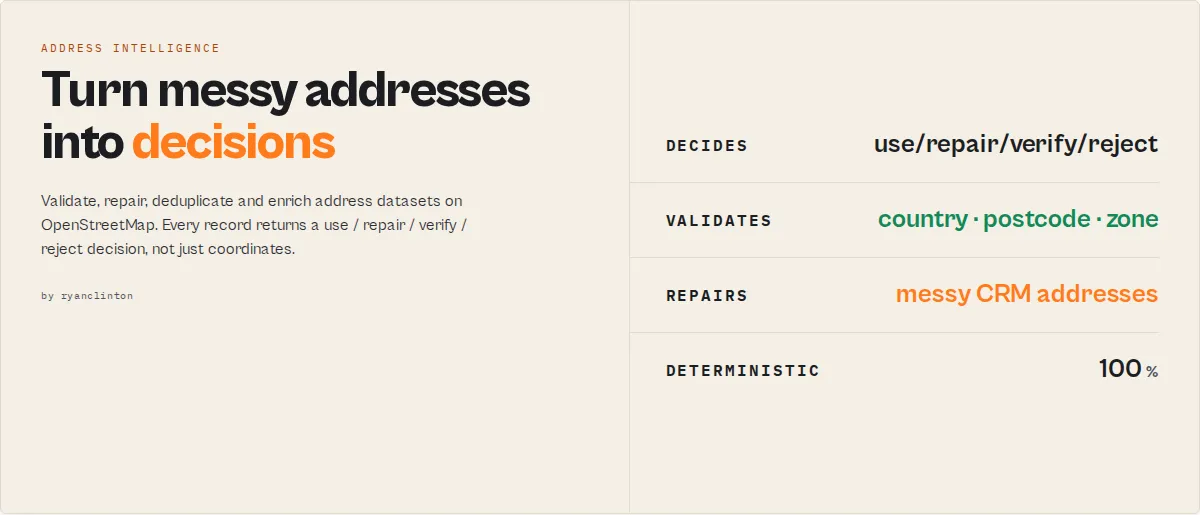
Raw geocoding APIs tell you where an address is. This actor tells you whether you should trust it, repair it, route it, or reject it.
Audit, validate, repair, deduplicate, and enrich address datasets at scale on OpenStreetMap. The output is not a coordinate. It's an action.
Input: 50,000 messy addresses
Output: 42,108 use • 5,124 repair • 1,932 verify • 836 reject
…without reading a single address manually. No API key, 200+ countries, automatic rate-limit compliance.
The difference, in one picture
Why address data fails
Bad address data quietly creates duplicate CRM records, failed deliveries, incorrect territory assignment, broken lead routing, wasted sales outreach, and inaccurate reporting. Raw geocoding APIs make this worse: they return coordinates for almost anything, even a vague, misspelled, or duplicate address, with no signal that something is wrong.
Raw geocoding APIs return coordinates. This actor tells you whether you should trust them.
Most geocoders stop here
Your workflow still doesn't know:
- ❌ Can I trust it?
- ❌ Can I deliver to it?
- ❌ Should I repair it?
- ❌ Is it a duplicate?
- ❌ Should I reject it?
This actor ends here
Your workflow knows exactly what to do next.
The most important field
Possible values: use (trustworthy, act on it) · repair (resolved, but clean the source address first) · verify (needs a human look) · reject (unusable).
Not the latitude. Not the longitude. Not the confidence score. Everything else in this actor — normalization, validation, risk scoring, deliverability, territory assignment — exists to produce this one decision, so your CRM, dialler, routing engine, or ETL job can act on it automatically.
This isn't one address. It's your whole dataset.
Point the actor at 50,000 CRM records (via queries, structuredAddresses, or inputDatasetId) and the run-ending summary classifies every one and tells you what to do — without reading a single address manually:
Without this actor: someone manually reviews 50,000 rows to find the 7,892 that are broken.
With this actor: every record is classified automatically, and datasetRecommendations hands you a ranked fix-list. stewardReport (use workflow: "steward") names the single highest-priority issue and the quality points you'd recover by fixing it.
Why not just use Google, HERE, Mapbox, or OpenCage?
| Question | Raw geocoder | This actor |
|---|---|---|
| Where is it? | ✓ | ✓ |
| Can I trust it? | ✗ | ✓ |
| Should I repair it? | ✗ | ✓ |
| Is it a duplicate? | ✗ | ✓ |
| Is it deliverable? | ✗ | ✓ |
| Which territory owns it? | ✗ | ✓ |
| What should I do next? | ✗ | ✓ |
At a glance
| Capability | Raw geocoding API | This actor |
|---|---|---|
| Coordinates + address breakdown | ✓ | ✓ |
| Validation (country / boundary / postcode) | ✗ | ✓ |
| Repair suggestions for messy addresses | ✗ | ✓ |
| Deduplication + entity resolution | ✗ | ✓ |
| Deliverability scoring (logistics) | ✗ | ✓ |
| Sales-territory assignment | ✗ | ✓ |
| Whole-dataset audit reports | ✗ | ✓ |
A use / repair / verify / reject decision | ✗ | ✓ |
(See Key features for the full list — enrichment, geofencing, caching, urbanicity, and more.)
What problem are you solving?
Pick the row that matches your pain and the actor configures itself:
| If you have… | Use workflow |
|---|---|
| Dirty CRM addresses | crm-cleanse |
| Duplicate customer records | deduplicate |
| Failed deliveries | delivery-validation |
| Bad data imports | audit |
| Territory / lead assignment | lead-routing |
| Addresses needing enrichment | enrich |
| "Find everything wrong with my dataset" | steward |
In outcomes: prevent duplicate CRM records, reject bad delivery locations automatically, fix messy customer addresses, route leads to the correct territory, and audit an entire address dataset in a single run — for CRM teams, logistics teams, revenue operations, and data engineers.
Who this is not for
If you only need raw latitude/longitude, basic reverse geocoding, or a one-off single-address lookup, a plain geocoder is simpler and cheaper — you don't need this. Reach for this actor when you're processing a dataset and need validation, repair, deduplication, deliverability, territory assignment, or a quality audit — decisions, not just coordinates.
Choose your workflow
Set workflow to match your job — it composes with mode (forward/reverse) and tunes the output for your use case. The full decision layer is always computed.
| Workflow | Use case | Example |
|---|---|---|
audit | Grade a CRM/dataset's address quality | { "workflow": "audit", "queries": [...] } |
validate | Confirm addresses resolve in the right country/boundary | { "workflow": "validate", "expectedCountry": "GB", "queries": [...] } |
enrich | Add full location intelligence (timezone, Plus Code, category) | { "workflow": "enrich", "queries": [...] } |
deduplicate | Collapse addresses that point to the same place | { "workflow": "deduplicate", "queries": [...] } |
delivery | Score logistics serviceability for each location | { "workflow": "delivery", "queries": [...] } |
(Customer-named aliases also work: crm-cleanse, lead-routing, delivery-validation.)
How the decision is made
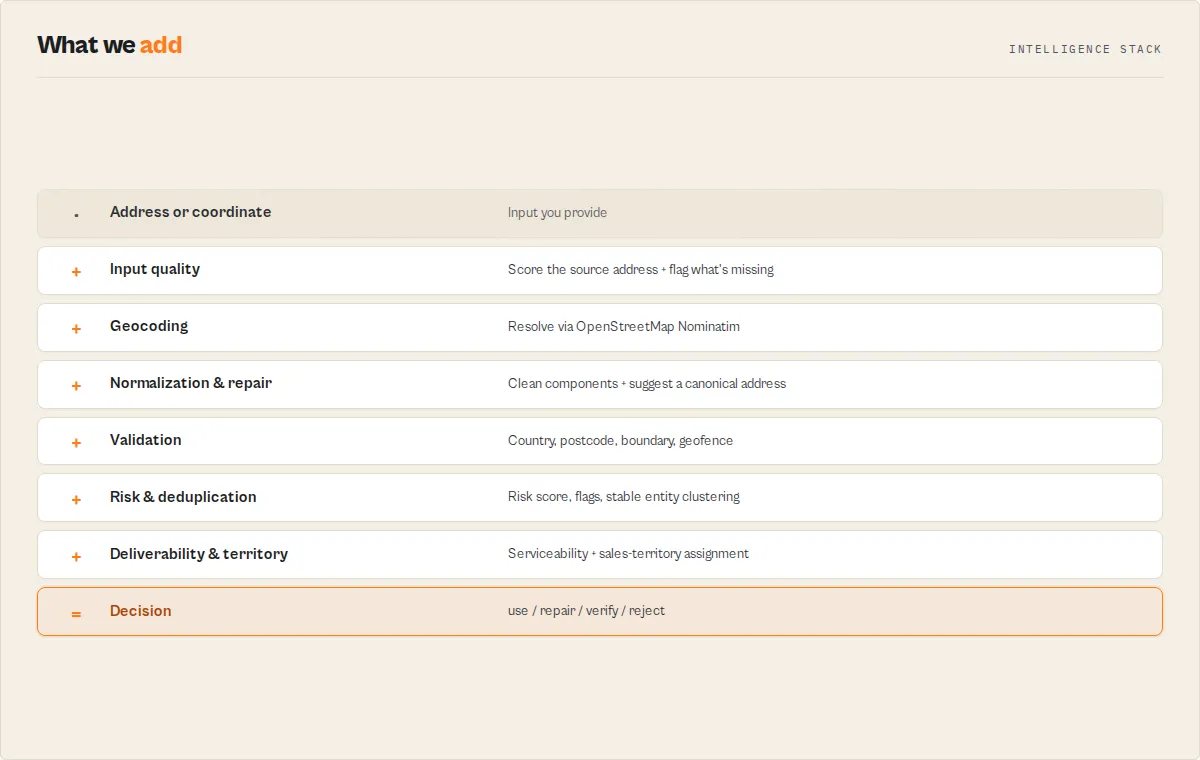
This actor is an Address Intelligence Engine: five independent signals feed one decision, and you can see every one of them.
Every record runs through a deterministic pipeline — no AI, no black box. Each score, flag, and recommendation traces back to a documented rule, and every result carries an explanation[] array spelling out the reasoning in plain English.
How a few of the derived signals are calculated (the full rules are in the dataset schema field descriptions):
confidenceScore= a base from the precision tier (rooftop 90 → country 20) plus small documented bonuses for a resolved house number (+4), postcode (+3), country-filter match (+3), and a single candidate (+3). TheconfidenceBreakdownobject shows each component.deliverySuitability/serviceability.deliverable= precision-driven:rooftop/streetprecision is deliverable;city-level or coarser is not precise enough for last-mile delivery. Thereasonfield states which rule applied.recommendedAction=rejectif no match;verifyif ambiguous or a boundary violation;repairif it resolved but the source address is messy;useif high-confidence and unambiguous. Theexplanation[]andreviewReasons[]show exactly which conditions fired.riskScore= a weighted sum of the risk flags present (e.g. country mismatch +30, ambiguous +20, postcode mismatch +15); theriskFlags[]array lists every contributor.
The output is not a coordinate. The output is an action.
Example automation rules
Because the output is a decision, you wire it straight into your tools — no parsing, no scripting. Branch on recommendedAction:
recommendedAction | What your automation does |
|---|---|
use | Write the record straight to your CRM / database / map layer |
repair | Update the source record with repairSuggestion, then re-import |
verify | Send to a human review queue (with reviewReasons attached) |
reject | Block the import / flag for correction |
In Zapier, Make, n8n, or Dify, that's a single if/else node on one field. This actor isn't returning data — it's returning workflow decisions.
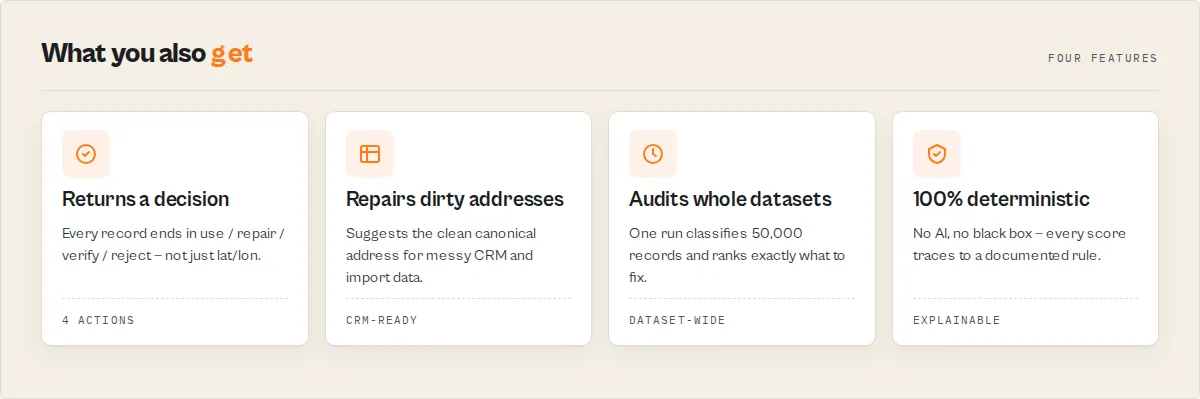
Why use this actor?
- Two-way address resolution -- forward geocode addresses to coordinates or reverse geocode coordinates to addresses in a single actor, eliminating the need for separate tools
- Batch processing built in -- submit hundreds of addresses or coordinate pairs at once instead of writing custom scripts to loop through individual API calls
- Automatic rate limit compliance -- Nominatim enforces a strict 1 request/second policy and will block violators; this actor spaces requests at 1.1 seconds automatically so you never get banned
- Structured, consistent output -- every result returns the same fields with null-safe handling for failed lookups, making downstream data processing predictable and reliable
- Cloud-native scheduling -- run geocoding jobs on recurring schedules via Apify, trigger runs via webhooks, and pipe results directly into Google Sheets, CRMs, or databases without local infrastructure
Key features
- Forward geocoding -- convert street addresses, landmarks, city names, or any place description into precise latitude/longitude GPS coordinates
- Reverse geocoding -- convert GPS coordinate pairs back into fully structured street addresses with city, state, country, and postcode
- Batch processing -- geocode hundreds of addresses or coordinate pairs in a single actor run with automatic queuing
- Country code filtering -- restrict forward geocoding results to a specific country using ISO 3166-1 alpha-2 codes (e.g., US, GB, DE, JP) for higher accuracy
- Multi-language results -- retrieve address components in English, German, French, Spanish, Japanese, or any language supported by OpenStreetMap
- Full address decomposition -- every result includes house number, road, city, state, country, and postcode as separate fields
- OpenStreetMap metadata -- includes OSM type, OSM ID, place type classification, importance ranking score, and geographic bounding box
- Match-quality decision layer -- every result is classified by
matchType,precision, andconfidenceScore, then given arecommendedAction(use/verify/reject) your workflow can branch on directly - Address standardization -- a
normalizedAddressobject with clean house number, street, city, county, state, postcode, and country, plus anadministrativeHierarchyfrom broad to narrow - Input quality scoring -- each address gets an
inputQualityscore so you can tell garbage source data from good data before trusting the geocode - Ambiguity & duplicate detection -- flags vague queries with multiple candidates (
ambiguous,candidateCount) and marks repeat places in a batch (isDuplicate,duplicateOf) - Country validation -- set
expectedCountryto verify every result landed in the country you expected (countryMatched) - Spatial enrichment -- every resolved coordinate carries its Plus Code, IANA timezone, current UTC offset, continent, and hemisphere, computed offline at no extra cost
- Batch analytics -- a per-run summary record with
dataQualityScore, duplicates found, countries detected, ambiguous count, and the top failure reason - Dataset chaining -- read addresses straight from another Apify dataset with
inputDatasetIdinstead of re-pasting them - Structured address input -- feed clean, field-separated addresses (
{ houseNumber, street, city, state, postcode, country }) for higher-precision matching, perfect for CRM, Salesforce, HubSpot, and ERP exports - Location categories -- every place is classified
government,commercial,residential,landmark,transport, and more, from OpenStreetMap tags - Boundary & postcode validation -- check results against
allowedCountries/allowedStatesand verify the input postcode resolved correctly - Distance & bearing -- set a reference point and every result reports its distance (km and miles) and compass bearing, with optional radius geofencing
- Cross-run cache -- name a cache and repeated addresses are served instantly without re-calling Nominatim and without being charged again
- Risk flags & levels -- every record carries a
riskLevel(none/low/medium/high) and stableriskFlags(ambiguous, country mismatch, boundary violation, low confidence, duplicate, poor input) so you can auto-reject or route bad data - Deliverability scoring -- a logistics
deliverySuitabilityscore answers "can a parcel actually reach this point?", distinct from match confidence - Address repair suggestions -- when input is messy but resolves, the actor suggests the clean canonical address, with concrete
inputQualityfix recommendations - Entity resolution -- a stable cross-run
entityid means "IBM HQ", "IBM Headquarters", and "1 New Orchard Road" all collapse to the same entity for deduplication - Geofencing -- pass circular or polygon geofences (delivery zones, territories) and every result reports which it falls inside
- Dataset audit & diagnosis -- every run produces an
auditReport(valid / needs-review / duplicates / country-conflicts / poor-quality counts) and a gradeddatasetDiagnosiswith per-dimension risk levels - Job workflows -- pick
audit,validate,enrich,deduplicate, ordeliveryand the actor tunes its output for your use case (composes with forward/reverse mode) - Repair decisions -- messy-but-resolvable addresses route to a
repairaction with arepairConfidence, so you clean source data instead of just flagging it - Logistics serviceability -- boolean
serviceability(deliverable/urban/rural) drops straight into delivery-routing automation rules - Sales territory assignment -- define geographic or administrative
salesTerritoriesand every result is tagged with itsterritoryfor CRM routing and ownership - Automatic rate limiting -- built-in 1.1-second delay between requests keeps you compliant with Nominatim usage policy without manual throttling
- Null-safe failure handling -- when an address cannot be resolved, the actor returns a record with the original query preserved and all location fields set to null
- Zero configuration -- no API keys, no account registration, no billing setup; just provide addresses and run
How to use Nominatim Address Geocoder
Using the Apify Console
- Navigate to the Nominatim Address Geocoder actor page on Apify Store.
- Click Try for free to open the actor in the Apify Console.
- Select the Geocoding Mode -- choose "Forward" to convert addresses to coordinates, or "Reverse" to convert coordinates to addresses.
- For forward mode, enter your addresses in the Addresses to Geocode field, one per line. Optionally set a Country Code to restrict results.
- For reverse mode, enter matching lists of Latitudes and Longitudes, one value per line. Both lists must have the same length.
- Optionally change the Language from the default "en" to receive results in another language.
- Click Start and wait for the run to complete.
- View results in the Dataset tab, or export to JSON, CSV, Excel, or other formats.
Using the Apify API or CLI
Input parameters
| Parameter | Type | Required | Default | Description |
|---|---|---|---|---|
mode | Select | No | forward | Geocoding direction. "forward" converts addresses to coordinates. "reverse" converts coordinates to addresses. |
workflow | Select | No | standard | Job preset (composes with mode): audit, validate, enrich, deduplicate, delivery. Tunes default output detail; the full decision layer always computes. |
queries | String list | No | -- | List of addresses, place names, or landmarks to geocode. Used in forward mode only. One address per line. |
latitudes | String list | No | -- | List of latitude values for reverse geocoding. Must match the length of the longitudes list. |
longitudes | String list | No | -- | List of longitude values for reverse geocoding. Must match the length of the latitudes list. |
countryCode | String | No | -- | Restrict forward geocoding to a specific country. Use ISO 3166-1 alpha-2 codes such as "US", "GB", "DE", "FR", "JP". |
language | String | No | en | Preferred language for results. Use ISO 639-1 codes: "en", "de", "fr", "es", "ja", "zh", "ar", etc. |
maxAlternatives | Integer | No | 0 | Forward mode only. When greater than 0, also return up to N alternative candidate matches per address in an alternatives array, so you can disambiguate when the top match might be wrong. |
minConfidence | Integer | No | 0 | Quality gate (0-100). Matches scoring below this confidence still appear in the dataset flagged suppressed: true, but are not charged. |
outputProfile | Select | No | standard | How many fields each result carries. minimal = coordinates plus the decision layer. standard = full address plus the decision layer. full = everything including OSM internals, bounding box, decision trail, and next-actor suggestions. |
structuredAddresses | Array | No | -- | Forward mode: addresses as structured objects ({ houseNumber, street, city, county, state, postcode, country }) for higher-precision matching. Overrides queries when set. Ideal for CRM/ERP exports. |
expectedCountry | String | No | -- | ISO 3166-1 alpha-2 code. When set, validation.countryMatched verifies each result resolved to this country. |
allowedCountries | String list | No | -- | Boundary validation: ISO alpha-2 codes a result must fall within. Outside results get validation.boundaryViolation: true. |
allowedStates | String list | No | -- | Boundary validation: state/region names a result must fall within (case-insensitive, e.g. "England", "California"). |
referenceLat / referenceLon | Number | No | -- | A reference point. When both are set, every result reports geospatial.distanceKm, distanceMiles, and bearing from it. |
maxRadiusKm | Number | No | -- | With a reference point set, results within this many km are flagged geospatial.insideRadius: true. |
geofences | Array | No | -- | Circular ({name, lat, lon, radiusKm}) or polygon ({name, polygon:[[lat,lon],…]}) geofences. Each result reports which it falls inside. Ideal for delivery zones. |
salesTerritories | Array | No | -- | Named territories — geographic ({name, polygon} / {name, lat, lon, radiusKm}) or administrative ({name, countries:["GB"], states:["England"]}). Each result is assigned the first matching territory. |
cacheName | String | No | -- | Opt-in cross-run cache. When set, repeated addresses are served instantly from a named store (no re-fetch, no charge). Leave blank to disable. |
cacheMaxAgeDays | Integer | No | 30 | How long a cached result stays valid before being re-fetched. |
inputDatasetId | String | No | -- | Read forward-mode addresses from another Apify dataset (e.g. a previous actor's output) instead of, or in addition to, the queries field. |
addressField | String | No | address | The field name to read the address from when inputDatasetId is set. |
Forward geocoding input example
Reverse geocoding input example
Tips for input
- For forward geocoding, include as much detail as possible -- street number, street name, city, state, and country yield the best results.
- Always set the
countryCodewhen you know the target country. This prevents the geocoder from returning matches in the wrong country (e.g., "Springfield" exists in 30+ US states and in other countries). - For reverse geocoding, use at least 4 decimal places of precision for street-level accuracy.
- The latitudes and longitudes lists must be the same length -- each latitude at index N is paired with the longitude at index N.
Output
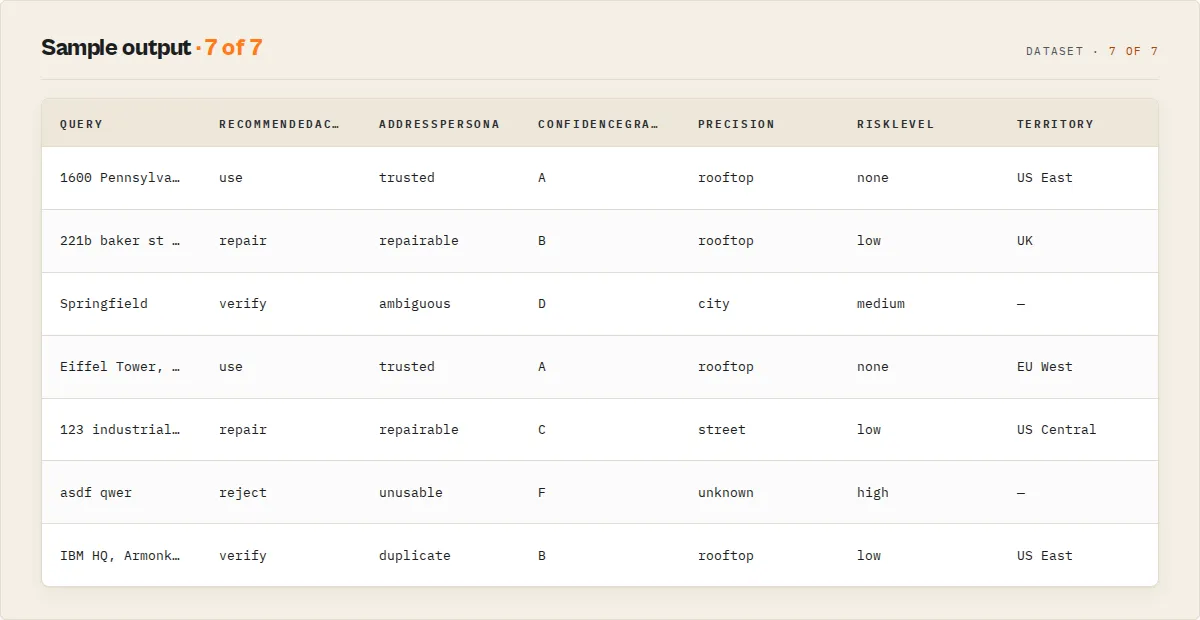
Each geocoding result pairs a deterministic decision layer with a standardized address and spatial enrichment. Here is an example of a forward geocoding result (standard profile):
Decision & quality fields
| Field | Type | Description |
|---|---|---|
matched | Boolean | true when the query resolved to a location |
matchType | String | How it matched: exact, normalized, partial, ambiguous, fallback, or none |
precision | String | Precision tier: rooftop, street, neighborhood, city, region, country, unknown |
confidenceScore | Number | Deterministic 0-100 score from precision, importance, and match completeness |
confidenceLevel | String | Stable band: high (>=75), medium (>=45), low (>0), none (0) |
confidenceFactors | Array | Plain-English drivers behind the score, for auditability |
confidenceBreakdown | Object | Numeric point contributions: { base, importance, houseNumber, postcode, countryFilter, singleCandidate } |
confidenceGrade | String | A–F letter grade on the confidence score |
recommendedAction | String | The decision to branch on: use (high & unambiguous), verify (ambiguous/boundary), repair (resolved but the source address is messy), reject (no match) |
addressPersona | String | One-word dashboard label: trusted, repairable, ambiguous, unusable, duplicate |
explanation | Array | Plain-English account of why this decision was reached (what resolved, what's wrong, confidence, action) |
reviewReasons | Array | Action-scoped codes for why the record needs attention — empty when the action is use |
riskScore / riskLevel / riskFlags | Number / String / Array | Numeric 0-100 risk, the none/low/medium/high band, and the stable flag codes behind it |
deliverySuitability | Object / null | Logistics deliverability { score, level, reason } — can a parcel reach this point? |
serviceability | Object / null | Boolean logistics projection { deliverable, urban, rural, reason } for if/then automation |
entity | Object | Stable cross-run { id, confidence } for deduplicating addresses that resolve to the same place |
territory / recommendedOwner | String / null | The first matching salesTerritories name and its owner, for CRM lead routing |
repairSuggestion / repairConfidence / repairReasons | String / Number / Array | A clean canonical address, a 0-100 confidence, and what it fixed (e.g. street_name_expanded, postcode_added_from_match) |
summary | String | One-line plain-English verdict an LLM or agent can quote directly |
candidateCount | Number | How many candidate matches the geocoder returned |
ambiguous / needsDisambiguation | Boolean | true when multiple plausible candidates exist at a coarse precision |
isDuplicate / duplicateOf / duplicateCluster | Boolean / Number | Duplicate flag, the first index, and a stable cluster id shared by all members of the same place |
failureReason | String / null | When unmatched: not_found, too_vague, country_conflict, or invalid_coordinates |
inputQuality | Object / null | { score, level, signals[], issues[], recommendation } rating the input address string and how to improve it (null in reverse mode) |
validation | Object | { countryMatched, matchedCountry, insideAllowedBoundary, boundaryViolation, postcodePresent, postcodeMatched } from expectedCountry / allowedCountries / allowedStates / input postcode |
geofencing | Object / null | When geofences are provided: { insideGeofence, matched[], results[] } |
geospatial | Object / null | When a reference point is set: { distanceKm, distanceMiles, bearing, insideRadius } |
cacheHit / cacheSource / cacheAgeDays | Boolean / String / Number | Whether the result came from the cross-run cache, and how old it was |
decisionTrail | Array | Step-by-step processing audit (full profile) |
Address & enrichment fields
| Field | Type | Description |
|---|---|---|
latitude / longitude | Number / null | GPS coordinates of the resolved location |
displayName | String / null | Full formatted address as returned by Nominatim |
normalizedAddress | Object / null | Standardized components: houseNumber, street, city, county, state, postcode, country, countryCode |
administrativeHierarchy | Object / null | Populated administrative levels broad → narrow (country, state, county, district, city) |
locationCategory | String / null | Broad place category from OSM tags: government, commercial, residential, landmark, education, healthcare, transport, area, other |
addressCompleteness | Number / null | 0-100 fraction of the core address components the geocoder populated |
enrichment | Object / null | plusCode (Open Location Code), hemisphere, continent, urbanicity (urban/suburban/rural), timezone (IANA), utcOffset |
placeType | String / null | Place classification such as "house", "street", "city", "country" |
placeRank | Number / null | Nominatim place_rank (0-30); higher is more specific (full profile) |
importance | Number / null | Nominatim importance ranking score between 0 and 1 |
osmType / osmId | String / Number | OpenStreetMap object type and identifier (full profile) |
boundingBox | Array / null | Geographic bounding box as [south lat, north lat, west lon, east lon] (full profile) |
alternatives | Array | Candidate matches when maxAlternatives > 0, each with coordinates, display name, and importance |
extractedAt | String | ISO 8601 timestamp of when the result was extracted |
When a query cannot be resolved, matched is false, recommendedAction is reject, failureReason explains why, and the location fields are null while query, summary, inputQuality, and extractedAt stay populated. Filter on recommendedAction, matchType, or confidenceLevel to separate clean matches from ones that need review.
Coverage summary record
After the result records, the actor pushes one recordType: "summary" record so you can read the health of the whole batch at a glance:
The auditReport is your address-quality audit in one object (valid / needs-review / duplicates / country-conflicts / poor-quality counts); the datasetDiagnosis grades the batch and assigns a risk level to each quality dimension; datasetRecommendations ranks what to fix next; and stewardReport names the single highest-priority issue and the quality points recoverable by fixing it. The per-dimension rates feed automation thresholds.
Use cases
- Real estate analysis -- geocode property addresses to plot them on maps, calculate distances between listings, or enrich property datasets with GPS coordinates
- Logistics and delivery routing -- convert customer delivery addresses into coordinates for route optimization and distance calculations
- Lead enrichment -- add geographic coordinates to business contact lists for proximity-based sales targeting and territory mapping
- Data cleaning and normalization -- standardize messy address data by geocoding free-text addresses and extracting structured components (city, state, postcode)
- Store locator databases -- build store finder features by geocoding retail locations and storing their coordinates for nearest-store lookups
- Academic research -- geocode survey respondent locations, historical site addresses, or field study coordinates for spatial analysis and GIS mapping
- Event planning -- convert venue addresses to coordinates for generating maps, calculating travel times, and finding nearby hotels or restaurants
- IoT and sensor data -- reverse geocode GPS coordinates from tracking devices, fleet vehicles, or mobile apps into human-readable addresses
- Market research -- map competitor locations, analyze geographic distribution of customers, or identify underserved areas by geocoding address datasets
API & integrations
Python
JavaScript
cURL
Integration platforms
- Google Sheets -- export geocoded results directly to spreadsheets for mapping and visualization
- Zapier -- trigger geocoding runs and route results to 5,000+ connected apps
- Make (Integromat) -- build multi-step automation workflows with geocoded address data
- Webhooks -- receive HTTP notifications when geocoding runs complete for event-driven pipelines
- Slack / Email -- get notified of completed runs or failed lookups automatically
- Apify datasets API -- fetch results programmatically in JSON, CSV, XML, or Excel format from any language
Use in Dify
Drop this actor into Dify workflows via the Apify plugin's Run Actor node. Each address returns geocoded, scored, and classified as structured JSON — use / verify / reject plus the precision tier and confidenceScore your downstream node branches on. A raw geocoding API pointed at the same address returns a coordinate with no quality signal; this returns a decision about whether that coordinate is trustworthy.
- Actor ID:
ryanclinton/nominatim-geocoder - Sample input (geocode a batch of customer addresses and only auto-accept the clean ones):
Branching on the decision. Wire a Dify if/else node to the recommendedAction field so each address routes itself without anyone reading the coordinates:
recommendedAction == "use"→ write the coordinates straight to your database / CRM / map layerrecommendedAction == "verify"→ send to a human-review queue (medium/low confidence — the match resolved but may be coarse)recommendedAction == "reject"→ flag the address as undeliverable / unresolvable and request a correction
For tighter control, branch on precision (e.g. only accept rooftop or street for last-mile delivery, allow city for analytics) or threshold on the numeric confidenceScore. The summary field is a plain-English one-liner an LLM node can quote verbatim into a notification.
Opt-in modes Dify workflows can leverage: set minConfidence to have the actor pre-filter low-quality matches (they still appear flagged, but routing can skip them); set maxAlternatives to receive candidate matches in an alternatives array for a disambiguation step; set outputProfile: "minimal" to keep the Dify variable payload lean. The end-of-run recordType: "summary" record gives a single node the batch coverage (successRate, precision/confidence distributions) without aggregating per-row.
How it works
The actor processes geocoding requests through the following pipeline:
- Input validation -- the actor reads the input configuration and validates the selected mode, checking that queries are provided for forward mode or that matching latitude/longitude arrays exist for reverse mode.
- Request construction -- for each item in the batch, the actor builds a Nominatim API request URL with the appropriate parameters (
/searchfor forward,/reversefor reverse) including format, address detail, country code, and language settings. - Rate-limited execution -- requests are sent sequentially with a 1.1-second delay between each call. A custom User-Agent header identifies the actor to comply with Nominatim's terms of service.
- Response parsing -- the Nominatim JSON response is parsed and mapped into a standardized 16-field output structure. The city field is intelligently resolved from city, town, village, or municipality depending on what Nominatim returns.
- Null-safe fallback -- if a query returns no results or encounters an error, a result record is still created with the original query and all location fields set to null.
- Dataset push -- all results are pushed to the Apify dataset in a single batch for efficient storage and retrieval.
Performance & cost
The actor runs on minimal resources since it only performs lightweight HTTP API calls with no browser rendering or HTML parsing.
| Batch size | Estimated time | Estimated Apify cost | Nominatim API cost |
|---|---|---|---|
| 10 addresses | ~12 seconds | < $0.01 | Free |
| 50 addresses | ~1 minute | < $0.01 | Free |
| 100 addresses | ~2 minutes | $0.01 -- $0.02 | Free |
| 500 addresses | ~9 minutes | $0.05 -- $0.08 | Free |
| 1,000 addresses | ~18 minutes | $0.10 -- $0.15 | Free |
- Memory usage: 256 MB (minimum tier) is sufficient for all batch sizes
- Processing speed: ~1.1 seconds per address due to Nominatim's mandatory rate limit
- Cost driver: Apify compute time is the only cost; the Nominatim API itself is completely free
- Comparison: Google Maps Geocoding API charges $5.00 per 1,000 requests; this actor geocodes the same volume for approximately $0.10 in Apify compute
Limitations
- Rate limit of 1 request per second -- Nominatim enforces this strictly, so large batches (1,000+ addresses) will take 18+ minutes. This cannot be bypassed without hosting your own Nominatim instance.
- Single best result by default -- forward geocoding returns the top-ranked result unless you set
maxAlternatives, which adds up to 10 candidate matches per address in analternativesarray for disambiguation. - OpenStreetMap data coverage varies -- accuracy is excellent in North America, Europe, and major cities worldwide, but may be lower in rural or less-mapped regions of developing countries.
- Address component language availability -- multi-language results depend on translations existing in OpenStreetMap. Less common languages may fall back to the local language of the location.
- Confidence is a deterministic heuristic -- the
confidenceScoreis derived from the match precision and OpenStreetMap importance, not a probabilistic model. It tells you how specific and prominent the match is, which is the right signal for filtering, but it is not a statistical match probability. - Sequential processing only -- due to the rate limit, requests are processed one at a time. Parallel geocoding is not supported by the public Nominatim instance.
Responsible use
- Respect Nominatim usage policies -- this actor complies with the Nominatim Usage Policy by enforcing rate limits and providing a descriptive User-Agent header. Do not attempt to bypass these limits.
- Attribute OpenStreetMap -- Nominatim data comes from OpenStreetMap contributors. If you display geocoded results publicly, include appropriate attribution as required by the ODbL license.
- Avoid excessive batch sizes -- while the actor handles rate limiting automatically, submitting extremely large batches (10,000+ addresses) places unnecessary load on the free public Nominatim infrastructure. For very large workloads, consider hosting your own Nominatim instance.
- Do not use for real-time applications -- the 1-second rate limit makes this unsuitable for user-facing real-time geocoding. Use it for batch processing and data enrichment workflows instead.
- Handle personal data responsibly -- if you are geocoding personal addresses, ensure compliance with applicable data protection regulations (GDPR, CCPA, etc.) regarding the processing and storage of location data.
FAQ
Q: Is the Nominatim geocoding API free to use? A: Yes. Nominatim is a free, open-source geocoding service powered by OpenStreetMap data. There are no API keys, subscriptions, or per-request charges. The only cost is Apify compute time for running the actor.
Q: How accurate is Nominatim compared to Google Maps Geocoding?
A: For well-mapped regions (North America, Europe, Australia, major cities worldwide), Nominatim accuracy is comparable to commercial services. OpenStreetMap data is community-maintained and coverage varies by region. The importance field provides a rough indicator of place prominence, though it is not a match confidence score.
Q: Do I need an API key or account to use this actor? A: No. The Nominatim API requires no authentication. You only need an Apify account to run the actor. The actor handles all Nominatim communication including the required User-Agent header.
Q: What happens if an address cannot be found?
A: The actor returns a result record with the original query preserved in the query field and all location fields (latitude, longitude, displayName, city, etc.) set to null. This makes it easy to identify and retry failed lookups.
Q: Can I geocode addresses in any country?
A: Yes. OpenStreetMap has global coverage spanning 200+ countries. Use the countryCode parameter with an ISO 3166-1 alpha-2 code (e.g., "US", "GB", "JP", "BR", "IN") to restrict results and improve accuracy for a specific country.
Q: How many addresses can I geocode in one run? A: There is no hard limit on batch size. Processing time scales linearly at approximately 1.1 seconds per address. A batch of 100 addresses takes about 2 minutes; 1,000 addresses takes about 18 minutes. For batches larger than 1,000, consider splitting across multiple scheduled runs.
Q: Can I get results in languages other than English?
A: Yes. Set the language parameter to any ISO 639-1 language code (e.g., "de" for German, "fr" for French, "ja" for Japanese, "ar" for Arabic). Address components will be returned in the specified language when translations exist in OpenStreetMap.
Q: What is the difference between forward and reverse geocoding? A: Forward geocoding converts a text address (like "1600 Pennsylvania Ave, Washington DC") into GPS coordinates (38.8977, -77.0365). Reverse geocoding does the opposite -- it takes GPS coordinates and returns the corresponding street address.
Q: Why does the actor take over a second per address? A: The public Nominatim API enforces a strict rate limit of 1 request per second. The actor waits 1.1 seconds between requests to ensure compliance and prevent your requests from being blocked. This is a limitation of the free public service, not the actor itself.
Q: Can I use the results for commercial purposes? A: Yes. OpenStreetMap data is licensed under the Open Database License (ODbL), which permits commercial use provided you give appropriate attribution and share any modifications to the data itself. Geocoding results derived from the data can be used freely.
Q: What coordinate format does reverse geocoding expect? A: Latitudes and longitudes should be provided as decimal degree strings (e.g., "48.8584" for latitude, "2.2945" for longitude). Use at least 4 decimal places for street-level accuracy. The latitudes and longitudes lists must be the same length.
Q: How does the actor handle errors or API failures?
A: If a Nominatim request fails due to a network error or API issue, the actor logs the error and returns a result with null location fields for that query. The batch continues processing remaining items. No data is lost -- you can identify failures by checking for null latitude values.
Related actors
| Actor | Description |
|---|---|
| OpenStreetMap POI Search | Search for points of interest (restaurants, shops, parks, hospitals) near geocoded coordinates using OpenStreetMap data |
| Open Charge Map EV Stations | Find electric vehicle charging stations near any geocoded location worldwide |
| Weather Forecast Search | Get weather forecasts and current conditions for geocoded GPS coordinates |
| IP Geolocation Lookup | Convert IP addresses to geographic locations -- a complementary approach to address-based geocoding |
| REST Countries Data Search | Look up country details including ISO codes, currencies, and languages to pair with geocoded country results |


