

Corporate Decision Intelligence: KYC, Compliance, Supplier Risk
Pricing
from $1.00 / 1,000 company fetcheds
Corporate Decision Intelligence: KYC, Compliance, Supplier Risk
Resolve, score, and monitor companies across 140+ jurisdictions. Each record carries a stable entity ID, a deterministic risk score with evidence, confidence, data quality, and freshness. Free multi-source mode or full OpenCorporates coverage with an API key.
Pricing
from $1.00 / 1,000 company fetcheds
Rating
0.0
(0)
Developer

Ryan Clinton
Maintained by CommunityActor stats
3
Bookmarked
126
Total users
25
Monthly active users
a month ago
Last modified
Categories
Share
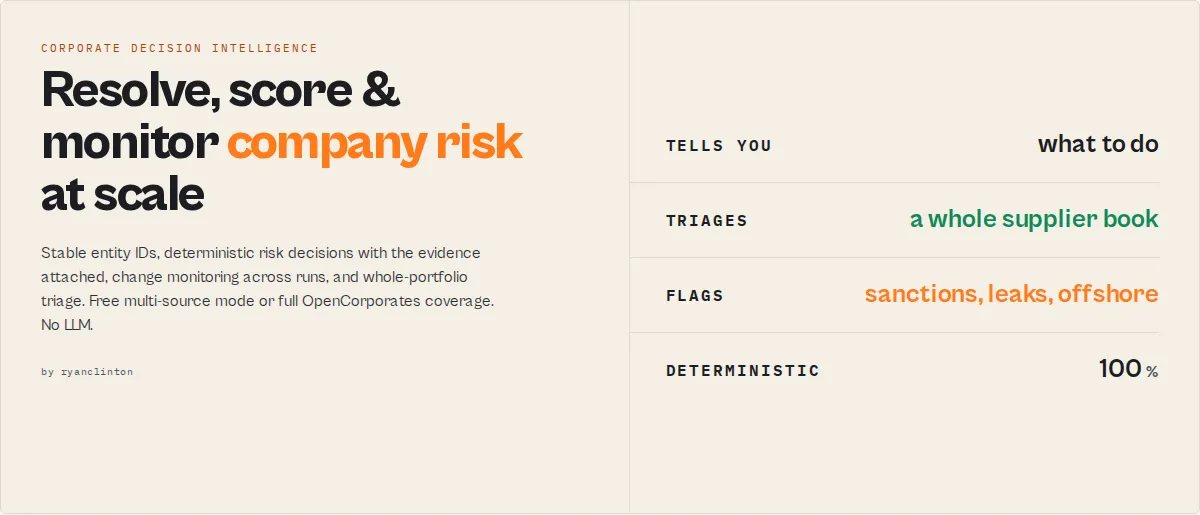
Most company-search tools tell you what a company is. This actor tells you what to do about it.
Most compliance and procurement teams don't have a data problem. They have a prioritisation problem. This actor is designed to surface the 20 entities that matter, not the 5,000 that don't. Most company-search tools return companies; this actor returns priorities. Deterministic, explainable, no LLM.
Ready-to-run examples
Don't want to build an input from scratch? Each of these is a published, one-click example (see all) — open it, see real output, run it:
- Company Registry Search — search official company registries by name: registration number, jurisdiction, status, type, incorporation date and registered address
- Company Registration Number Lookup — look a company up directly by its registration number, with officers and directors
- KYC Company Check — a due-diligence view: officers, ownership and sanctions health signals plus a risk and resolution score per entity
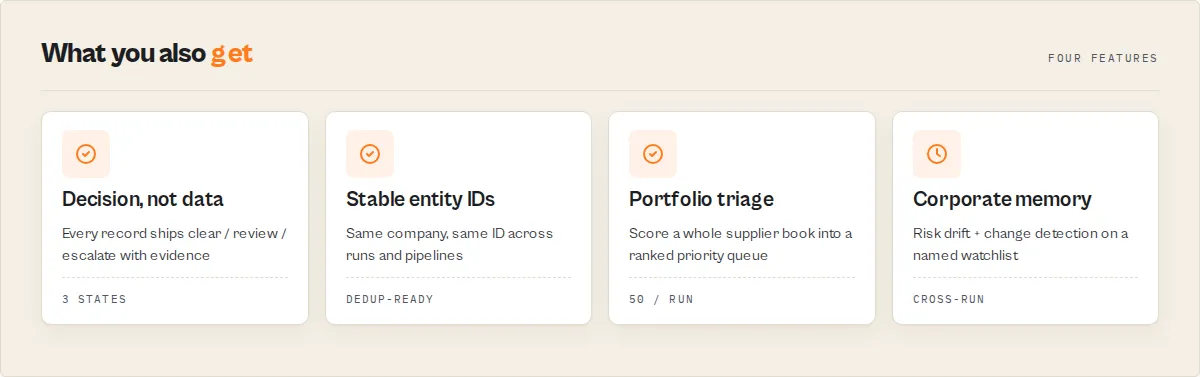
In one run you get
- A stable company identity that survives across runs
- A risk decision (
clear/review/escalate) with the evidence behind it - Change detection and risk drift since the last run
- Portfolio-level risk analysis across an entire supplier book
- Recommended, cost-ranked next investigation steps
Search is how the actor works. Decision intelligence is what it produces. Global registry search runs underneath all of it: full OpenCorporates coverage with a key, or free multi-source mode (Companies House, INSEE SIRENE, GLEIF, OpenSanctions, ICIJ Offshore Leaks, OpenOwnership) without one.
What is Corporate Decision Intelligence?
Traditional company-search tools answer "what is this company?". Corporate Decision Intelligence answers "what should I do about this company?": it resolves the entity, assesses risk, explains the decision, prioritises the investigation, and monitors change over time. Search is infrastructure; the decision is the product.
What problems does this solve?
- Which of these 5,000 suppliers should I investigate first?
- Which companies became riskier since last week?
- Which counterparties should be escalated to compliance?
- Which company is the correct match among 20 similar names?
- Which enrichment actor should I run next, and is it worth the spend?
- What changed, and does it matter?
Most tools return records. This returns decisions.
A registry wrapper returns { "status": "active" }. This actor returns:
Most tools tell you the company exists. This actor tells you what to do next: identity confidence, risk signals with evidence, an escalation decision, change detection, portfolio analytics, and a cost-aware investigation plan. The raw registry data is still there in every record. You just don't have to build these layers on top of it yourself.
Analyse 50 companies as easily as one
Nobody wakes up wanting to "search a company." They want to analyse their suppliers, counterparties, vendors, or customer book. Pass a list:
and one run returns a ranked list of problems, not a list of companies:
- Highest-risk entities, each with a relative-risk percentile
- Portfolio outliers (the anomalies worth a second look)
- Offshore / sanctions / inactive concentration
- Jurisdiction exposure across the book
- Shared-officer and shared-address networks
- An investigation priority queue
- Run-over-run risk drift (watchlist mode)
See Portfolio mode for the full input shape.
Real-world output
A portfolio run returns a triaged book, not a pile of lookups:
500 suppliers analysed. 23 need escalation. Start with the top 20 in the priority queue.
Corporate Memory
Most company-search tools forget everything between runs. This actor remembers. Set a watchlistName and it tracks each entity across runs:
- First seen and last seen
- Risk trajectory (rising / falling / stable)
- Change history, and how many runs moved a tracked field
- Risk increases since the last run
- Entity volatility over time
So you can ask "which suppliers became riskier?" instead of "what does this company look like today?". By run 10 you hold a per-entity track record a fresh competitor run cannot backfill.
Questions you can answer
Can answer:
- Which suppliers should I investigate first?
- Which companies became riskier since the last run?
- Which entities require escalation?
- Which companies look unusual in my book?
- Which jurisdictions dominate my portfolio?
- Which entities share officers or addresses?
- Which enrichment is worth running next?
Cannot answer (chain a specialist actor instead):
- Beneficial-ownership chains and ultimate-beneficial-owner determination
- Cross-registry ownership graphs
For ownership depth, follow the LEI / ownership siblings named in each record's actorGraph.next[].
How this differs
| Capability | Registry APIs | Registry scrapers | This actor |
|---|---|---|---|
| Company search | ✓ | ✓ | ✓ |
| Entity resolution (stable ID) | ✗ | ✗ | ✓ |
| Confidence scoring | ✗ | ✗ | ✓ |
| Risk signals with evidence | ✗ | Partial | ✓ |
| Escalation decisions | ✗ | ✗ | ✓ |
| Change detection over time | ✗ | ✗ | ✓ |
| Portfolio analysis | ✗ | ✗ | ✓ |
| Investigation prioritisation | ✗ | ✗ | ✓ |
| Next-step recommendations | ✗ | ✗ | ✓ |
Why teams switch from registry APIs
- Registry APIs return records. This actor returns decisions.
- Registry APIs forget previous runs. This actor tracks risk over time.
- Registry APIs make you invent your own scoring. This actor provides an escalation decision with the evidence attached.
- Registry APIs leave enrichment planning to you. This actor predicts which enrichment is worth running next.
The raw registry data is still in every record. You just stop building these layers yourself.
Before and after
Before: search a company → get 50 records → manually inspect each → guess which one matters → repeat for the next company.
After: search a company → get one verified entity → receive a risk decision → see the evidence behind it → know exactly what to investigate next. Feed a list of 50 companies and get the whole book triaged at once.
Built for
- Compliance teams — escalate only the entities that matter, with the evidence attached for audit.
- Procurement teams — prioritise supplier risk across an entire vendor book in one run.
- Investigators — resolve ambiguous entities and follow evidence-backed risk signals.
- AI workflows — branch on deterministic decisions (
decision.status) instead of parsing text. - Data teams — join on stable
entityIdacross runs and enrichment pipelines.
Built for automation
Most systems force you to invent thresholds: if risk.score > 62. This actor already makes the routing decision for you: if decision.status == "escalate". Every result is a routing primitive you can branch on directly in:
- Dify, n8n, Make, Zapier
- MCP / agent tool calls
- Internal compliance workflows and case-management queues
No prose parsing, no threshold-guessing. The decision, its priority, its reason codes, and its confidence are all stable enum values.
Why deterministic beats AI-generated risk scores
Many compliance tools produce opaque, AI-generated risk scores you cannot defend in an audit. This actor attaches the receipts to every decision:
- Why was this escalated? The
risk.factorsanddecision.reasonCodes. - Which source contributed? The
risk.evidence[]carries{ code, weight, source }. - How confident is the identity match? The
resolution.identityTierandconfidenceFactors. - Will it reproduce? The same input and sources produce the same output, every run.
No LLM, no randomness, no black box. That auditability is what makes the output usable in regulated KYC and compliance workflows.
Why use this actor?
- The same company gets the same identity every time. No duplicate companies, no rematching names, no broken joins. Every resolved company receives a stable identity (
entityId) that stays constant across runs and sibling actors, so you can dedupe, monitor, and enrich the same entity over time without re-matching strings. (Under the hood it is a deterministic hash of the normalised name, jurisdiction, and number, so it is reproducible, not guessed.) - Two paths, one actor. With an OpenCorporates API key: 200M+ companies across 140+ jurisdictions in a single search. Without a key: free multi-source mode covering UK (Companies House full register), France (INSEE SIRENE full register), and globally-LEI'd entities (GLEIF, ~2.7M legal entities), with sanctions / leak / ownership enrichment.
- Zero infrastructure required. The actor runs on Apify's cloud platform with automatic retries, rate-limit handling, and exponential backoff built in. No servers to provision, no API client code to write.
- Structured, export-ready output. Results land in a clean Apify dataset you can download as JSON, CSV, Excel, or XML -- or pipe directly into Google Sheets, Zapier, Make, Slack, and thousands of other tools.
- Schedule and automate. Use Apify Schedules to run recurring searches on any cron pattern for ongoing corporate monitoring, compliance screening, or market research.
- Intelligence, not just records. Every company record is scored, classified, and signalled — entity-resolution confidence, deterministic risk (offshore / sanctions / leak / ownership signals), data-quality completeness, health flags, and freshness — so KYC, due-diligence, and compliance consumers branch on decisions, not raw fields.
- Deterministic and reproducible. Every score, tier, decision, risk factor, and prediction is computed by a documented rule from the sources in hand. No LLM, no randomness: the same input and sources produce the same output, run after run, with the evidence attached. That auditability is what makes it usable in compliance and KYC workflows. The AI-agent compatibility (MCP, Dify branching, the
llmoutput profile) is a side benefit of that determinism, not the headline. - Chain with other actors. Every record carries
actorGraph.next[]pointing at sibling actors (UK Companies House, VAT validation, sanctions screening, LEI lookup) so downstream pipelines can branch on it without parsing prose.
Key features
-
Entity-resolution + risk intelligence layer -- every company record carries a
resolutionblock (stableentityId, 0-100 confidence, source count), a deterministicriskblock (0-100 score + level + stable factor codes), adataQualitycompleteness block, booleanhealthSignals, and afreshnessindicator. Computed from the sources already fetched: no extra API calls, no LLM, fully reproducible. UseoutputProfile: "intelligence"for the flagship decision-first payload. -
200M+ companies, 140+ jurisdictions with an OpenCorporates API key -- search across the United States (all 50 states), United Kingdom, Germany, France, Australia, Canada, and dozens more in a single query
-
Free multi-source mode without a key -- Companies House (GB), INSEE SIRENE (FR), and GLEIF for global LEI entities, enriched with OpenSanctions, ICIJ Offshore Leaks, and OpenOwnership
-
Provenance and confidence metadata -- every record carries a
_metablock listing contributing sources, the canonical source, coverage class (registry / sanctions / leak / ownership), normalised entity type, and any alternative field values surfaced by other sources -
Conservative dedupe -- jurisdiction-aware canonical-number matching, three-way concordance for non-offshore jurisdictions, additional concordance signal required for offshore jurisdictions to prevent shelf-company false merges
-
Jurisdiction-level filtering -- narrow results with jurisdiction codes like
us_cafor California,gbfor the United Kingdom, ordefor Germany -
Country-level filtering -- use broader two-letter country codes (
us,gb,de) when you do not need state or province precision -
Company status filtering -- filter by Active, Inactive, or Dissolved to focus on the companies that matter to your use case
-
Officer and director search -- enable the
includeOfficersoption to retrieve directors and officers matching your query alongside company results -
Automatic pagination -- fetches up to 100 results per run with rate-limit handling and exponential backoff retries built in
-
Clean address formatting -- combines street address, locality, region, postal code, and country into a single human-readable string
How to use
Using the Apify Console
- Navigate to the OpenCorporates Global Company Search actor page on Apify.
- Click Start to open the input form.
- Enter your Search Query -- a company name, keyword, or partial name (e.g., "Tesla", "Acme Corp").
- Optionally set Jurisdiction Code, Country Code, or Company Status filters.
- Paste your OpenCorporates API Key into the API Key field (get one at opencorporates.com/api_accounts/new).
- Toggle Include Officers/Directors if you need officer data.
- Set Max Results (1--100) depending on how many records you need.
- Click Start and view results in the Dataset tab when the run completes.
Using the Apify API -- JavaScript
Using the Apify API -- Python
Input parameters
| Parameter | Type | Required | Default | Description |
|---|---|---|---|---|
query | String | Yes | -- | Company name, keyword, or registration number to search for (e.g., "Google", "Tesla Motors", "C3259768") |
jurisdictionCode | String | No | -- | Two-letter jurisdiction code (e.g., us_ca for California, gb for UK, de for Germany). Leave empty to search all jurisdictions |
countryCode | String | No | -- | Two-letter country code for broader geographic filtering (e.g., us, gb, de) |
status | String | No | All | Filter by company status: Active, Inactive, or Dissolved |
lookupType | String | No | auto | auto (default) detects a registration-number-shaped query when a jurisdiction is set and looks it up directly; otherwise name search. number forces direct by-number lookup (needs a jurisdiction/country code). name always searches by name. See "Lookup by registration number" below |
apiKey | String | No | -- | OpenCorporates API key (optional). Without a key the actor runs the free multi-source chain. With a key you get full OpenCorporates coverage including US private entities. Get one at opencorporates.com |
fallbackMode | String | No | auto | auto (default) uses the free chain when no key is provided. free forces the free chain. paid requires an OpenCorporates API key |
outputProfile | String | No | standard | Payload shape. minimal (top-level fields only), standard (top-level + compact _meta + intelligence blocks), full (everything), llm (standard + per-record summary string), intelligence (decision-first: leads with the intelligence blocks, drops _meta diagnostics) — see below |
includeOfficers | Boolean | No | false | Also search for officers/directors matching the query |
maxResults | Integer | No | 25 | Maximum number of results to return (1--100) |
watchlistName | String | No | -- | Optional. Enables cross-run monitoring: stores a per-entity snapshot in a named key-value store and adds monitoring + history + riskTrend blocks reporting what changed since the last run on the same watchlist. See "Monitoring mode" below |
companies | Array | No | -- | Optional. List of company names/numbers to process as a portfolio (overrides query). Each is searched in turn; the summary record carries a portfolio rollup + ranked priority queue. Capped at 50. See "Portfolio mode" below |
Example input JSON
Tips for input configuration
- Use
jurisdictionCodefor state-level precision (e.g.,us_nyfor New York) andcountryCodefor broad country-level filtering. You can use both together. - Start with a small
maxResults(10--25) to validate your query before scaling up to 100. - The
apiKeyfield is marked as secret -- it will not appear in run logs or shared configurations.
About outputProfile: "llm"
When set to llm, every company record carries a summary field — a single plain-English string AI agents can quote without joining fields. Format:
The summary is deterministic and includes whichever of companyName, jurisdiction, status, companyNumber, incorporationDate, and _meta.sources are populated. Compact enough to fit inside a tool-call message, parseable by humans, and stable across runs.
About entityType (filtering hint)
Every company record carries a normalised entityType enum: operating_company / holding_company / issuer / fund / branch / subsidiary / sole_proprietor / nonprofit / government / unknown. Useful when you only want operating companies and don't want issuance vehicles polluting the result set. For example, a search for "Barclays" can return dozens of GLEIF-registered issuance and treasury subsidiaries; filtering entityType === "operating_company" keeps the operating banks and drops the vehicles. Downstream JSONata / Dify / n8n consumers can branch on this without parsing prose.
Lookup by registration number
Set lookupType: "number" (or leave it on auto with a registration-number-shaped query) plus a jurisdiction to fetch a specific company directly instead of searching by name:
Direct by-number lookup works on the paid OpenCorporates path for any jurisdiction (via the /companies/{jurisdiction}/{number} endpoint) and on the free path for the UK via Companies House. A jurisdiction/country code is required — a bare number is ambiguous across registries. If the direct lookup finds nothing, the actor falls back to a name search so you still get results.
Monitoring mode (watchlistName)
Set watchlistName to turn a one-off search into a recurring monitor. The actor stores a per-entity snapshot (status, risk score, officer count, address presence) in a named key-value store keyed by the watchlist name, and on the next run adds a monitoring block to each company record:
changeTypeisnew(first sight on this watchlist),unchanged, orchanged.changedFields[]lists which tracked fields moved:status,riskScore,officers,address.- The first run on a new watchlist logs a notice and marks every record
new; change detection activates from the second run onward. - Records are keyed on the stable
resolution.entityId, so the same company is tracked across runs even as other fields shift. The snapshot is bounded (50,000 entities, FIFO). Schedule the actor with the samewatchlistNameon a cron pattern to track companies over time. - Alongside
monitoring, each record carries ahistoryblock in watchlist mode:firstSeen,lastSeen,changeCount(how many runs changed a tracked field), andrunsSeen. Compliance teams usehistory.changeCountto surface the most volatile entities on a watchlist without diffing runs themselves. - Each record also carries a
riskTrendblock in watchlist mode (current,previous,delta,direction) so you can answer "whose risk went up since last run?" withWHERE riskTrend.direction = "up".
Portfolio mode (companies[])
Pass a list of companies to triage a whole supplier / vendor / counterparty book in one run. Each company is searched in turn (its records stream as it finishes), and the summary record carries portfolio-level intelligence:
The summary record (and the SUMMARY KV key) then carries:
portfolio—{ total, highRisk, offshore, sanctions, inactive, ownershipUnknown, escalate, review, clear }counts across the book. Answers "what is the composition of my supplier book?".jurisdictionExposure—[{ jurisdiction, count }]sorted by count. Your geographic concentration (e.g. 320 GB, 22 KY) — compliance teams gate on offshore share.riskClusters—[{ factor, count }]sorted by count. Answers "what kind of risk do I have?" (42 offshore, 7 in-leaks) instead of "which companies have risk?".priorityQueue— the top 20 entities ranked bydecision.priorityScore, each withentityId,companyName,jurisdiction,priorityScore,status,reasonCodes, and ariskPercentile+riskTier(relative risk within the run, e.g. "riskier than 92% of this book"). This is the "show me the 20 problems, not the 5,000 companies" view.outliers— the anomalies in the book (highest_risk,only_offshore_entity,only_sanctioned_entity,only_entity_in_leaks,only_inactive_entity). Compliance teams care more about what is unusual than what is average. Emitted for portfolios of 3+ companies.network— officers and registered addresses shared across ≥2 companies in the book (withriskyConnectionsflagging shared groups that contain an escalate-status company).watchlistSummary(whenwatchlistNameis also set) —{ newCompanies, changesDetected, highRiskEntities, newRisks }, a run-over-run dashboard.
Each company record carries a query field naming which input produced it. The portfolio is capped at 50 companies per run; one company failing does not abort the others (it lands as an error record tagged with its query).
Output
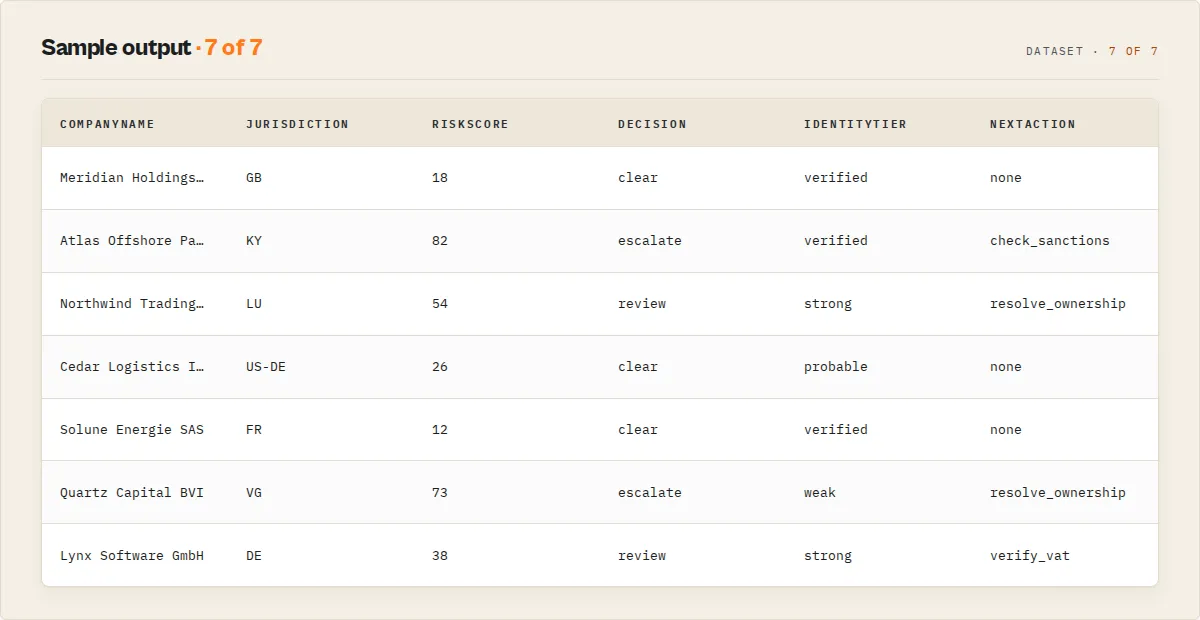
Company result example
Free-mode example (no API key — multi-source chain)
When the actor runs without an OpenCorporates API key, results come from the free chain and carry a _meta block describing provenance. The companyName, companyNumber, jurisdictionCode, status, incorporationDate, registeredAddress, and officers top-level fields stay shape-compatible with the paid mode for downstream consumers reading by field name.
Officer result example (when includeOfficers is enabled, paid path)
Output fields reference
| Field | Type | Description |
|---|---|---|
companyName | String | Official registered name of the company |
companyNumber | String | Registration number assigned by the official registry |
jurisdictionCode | String | Jurisdiction code in OpenCorporates format (e.g., us_ca, gb) |
jurisdiction | String | Human-readable jurisdiction label (e.g., "US - CA", "GB") |
incorporationDate | String/null | Date the company was incorporated (YYYY-MM-DD) |
dissolutionDate | String/null | Date the company was dissolved, if applicable |
companyType | String/null | Legal entity type (e.g., "Domestic Stock", "Limited Company") |
registryUrl | String/null | URL of the official government registry page |
status | String/null | Current company status (e.g., "Active", "Dissolved") |
registeredAddress | String/null | Formatted registered address combining street, locality, region, postal code, and country |
source | String/null | Name of the official registry publisher (e.g., "California Secretary of State") |
opencorporatesUrl | String/null | Direct URL to the company's OpenCorporates profile page. Always null in free mode -- the actor never fetches opencorporates.com pages without an API key. |
officers | Array/null | Officer data (null for company search results; officers are returned as separate dataset items). In free mode, officer data is only populated when Companies House supplied it for a GB company with includeOfficers: true. |
entityType | String | Normalised entity-type enum: operating_company, holding_company, issuer, fund, branch, subsidiary, sole_proprietor, nonprofit, government, unknown. Use this to filter (e.g. drop issuer records when you only want operating companies). |
_meta | Object | Provenance + merge metadata (free mode). Contains sources[], canonicalSource, coverageClass, coverageClasses[] (all contributing classes when merged), matchedBy, sourcePriority, snapshotDate, investigativeOnly, normalisedName, softClusterId, sourceEntityType (each source's raw type), alternates (field values that disagreed across sources), and candidateMatches[]. |
resultType | String | Present only on officer results -- always set to "officer" |
recordType | String | Discriminator on every record: company (an entity), advisory (a coverage-gap warning record), or summary (the run-level summary, one per run, last in the dataset). Filter with WHERE recordType = "company" to get only entities. |
schemaVersion | String | Output-shape version (e.g. 1.1.0), independent of the actor build version. Branch on this to detect additive shape changes without inspecting the build tag. |
actorGraph | Object | Per-company next-best-actor pointers: { current, next[] } where each next[] entry is { actor, reason, expectedYield? } naming a sibling actor that enriches or verifies this record. next[] is ordered by expectedYield (highest first) — it is the cost-aware investigation plan, so actorGraph.next[0] is the enrichment to run first. expectedYield (high/medium/low, from coveragePrediction) tells you whether each sibling is worth the spend. |
failureType | String | Present only on error records (error: true). Classifies the failure: invalid-input, timeout, or api-error. Lets you tell bad input from upstream problems. |
Intelligence layer (on every company record)
Computed deterministically from the sources already fetched — no extra API calls, no LLM. Included in the standard, full, llm, and intelligence output profiles; stripped in minimal.
| Field | Type | Description |
|---|---|---|
decision | Object | The routing primitive + explainability report — branch on this instead of thresholding raw scores: status (clear / review / escalate), priority (high/medium/low), priorityScore (0-100 sortable investigation-queue score), reasonCodes[] (the "because" — the risk factors behind it), confidence (high/medium/low, from identity strength + evidence depth). if decision.status == "escalate" is cleaner than if risk.score > 62. |
coveragePrediction | Object | Predicts whether enrichment would yield data before you spend on it: registry / ownership / officers, each confirmed / likely / unlikely / unknown. Pairs with actorGraph.next[].expectedYield so a workflow can skip enrichment that would return nothing. Deterministic heuristic from current coverage + jurisdiction. |
resolution | Object | Entity-resolution confidence: entityId (stable sha256-derived id, joinable across runs and sibling actors), confidenceScore (0-100), resolutionLevel (high/medium/low), identityTier (compliance 5-tier: verified / strong / probable / weak / unresolved), matchedSources, matchedBy, and confidenceFactors[] (stable codes: registry_match, jurisdiction_match, company_number_match, multi_source_confirmation, canonical_number_merge). |
risk | Object | Deterministic corporate-risk signal: score (0-100), level (high/medium/low/minimal), factors[] (stable codes), and evidence[] — the receipts behind each factor: { code, weight, source } (e.g. { "code": "appears_in_leaks", "weight": 30, "source": "icij-leaks" }). Factor codes: offshore_jurisdiction, appears_in_leaks, sanctions_association, ownership_unverified, inactive_registry_status, multiple_candidate_matches. |
consensus | Object | Cross-source agreement (free path): agreement (0-100), sources (count), disputedFields[] (fields where sources disagreed). High agreement across multiple sources is a trust signal; disputed fields flag where to verify. |
dataQuality | Object | Field-completeness: score (0-100), presentFields[], missingFields[] over the core registry fields. |
healthSignals | Object | Automation-friendly booleans: active, officersPresent, registeredAddressPresent, ownershipKnown, sanctionsClear. |
freshness | Object | source (live-registry/snapshot), snapshotDate, daysOld, tier (live/high/medium/low). Snapshot enrichment sources carry a date; live registry lookups report live. |
ownershipReadiness | Object | Beneficial-ownership discovery readiness: available (an ownership-class source already contributed), sourceCount, actor (sibling slug that resolves/extends ownership). Branch on available === false to decide whether to run the ownership sibling next. |
nextActions | Array | Deterministic investigation hints — stable verb codes derived from risk / jurisdiction / entity type: check_sanctions (risk ≥ 60 or sanctions/leak signal), verify_vat (EU jurisdiction), resolve_ownership (holding / issuer / fund / offshore), confirm_registry (no company number). Distinct from actorGraph (which names actor slugs); these are the action intents a workflow branches on. |
monitoring | Object | Present only when watchlistName is set. Cross-run change detection: changeType (new/unchanged/changed), changedFields[] (status/riskScore/officers/address), previousState ({status, riskScore} or null on first sight). See "Monitoring mode" above. |
riskTrend | Object | Present only when watchlistName is set. Risk drift vs the prior run: current, previous (null on first sight), delta, direction (up/down/flat/new). Answers "what changed?" not "what exists?". |
history | Object | Present only when watchlistName is set. Cross-run entity memory: firstSeen, lastSeen, changeCount (runs where a tracked field changed), runsSeen, riskChanges (runs where the risk score specifically moved), sourcesSeen (max distinct sources ever), riskTrajectory (rising/falling/stable/new over the retained history). Keyed on the stable resolution.entityId — the corporate-memory competitors can't backfill. |
query | String | Portfolio mode only. The input company name/number that produced this record. |
Summary record
The last record in every run is a recordType: "summary" record carrying the run-level coverage block (sources attempted / responded / timed out, records returned, coverage classes), a coverageReport (jurisdiction / ownership / officer coverage tiers, an overallCoverage 0-100 score, plus a scores heatmap with per-class numeric coverage — registry, sanctions, leak, ownership, officers each 0-100 — across the result set), a portfolio rollup ({ total, highRisk, offshore, sanctions, inactive, ownershipUnknown, escalate, review, clear }), a priorityQueue (top 20 entities ranked by decision.priorityScore, each with a riskPercentile + riskTier = relative risk within the run), a jurisdictionExposure array ({ jurisdiction, count } sorted by count — your supplier-book geography), a riskClusters array ({ factor, count } sorted — what kind of risk you hold, not just which companies), an outliers array ({ entityId, companyName, reason } — the anomalies: highest_risk, only_offshore_entity, only_sanctioned_entity, etc.; compliance cares about anomalies more than averages), an optional network block (officers AND registered addresses shared by ≥2 companies, each with strength = company count, plus riskyConnections = shared groups containing an escalate-status company), an optional watchlistSummary (watchlist mode), dataGaps[] (named gaps with a suggestedFix and targetActorSlug), a run-level actorGraph, and schemaVersion. The same object is also mirrored to the run's SUMMARY key-value-store key so API / Console / MCP consumers can read coverage without scanning the dataset.
Use cases
- KYC and due diligence -- verify company existence, registration status, and registered addresses across 140+ jurisdictions as part of Know Your Customer workflows
- Competitive intelligence -- track competitor registrations, monitor new incorporations in your industry, and identify corporate structures across multiple countries
- Compliance screening -- check whether counterparties are active, dissolved, or inactive before entering business relationships
- Corporate genealogy research -- trace company histories, dissolution dates, and officer tenures to understand corporate evolution over time
- Lead generation and enrichment -- find companies matching specific criteria and enrich lead databases with official registry data
- Academic and journalistic research -- investigate corporate structures, cross-border registrations, and officer networks for research publications
- M&A target identification -- search for companies by type, jurisdiction, and status to identify potential acquisition targets
- Supply chain verification -- confirm that suppliers and vendors are properly registered and active in their stated jurisdictions
- Officer network mapping -- use the officer search to discover connections between individuals and companies across jurisdictions
API & integration
Python
JavaScript
cURL
Platform integrations
This actor works with all standard Apify integrations:
- Webhooks -- trigger downstream actions when a run completes
- Schedules -- automate recurring searches on any cron pattern
- Google Sheets -- export results directly to a spreadsheet
- Zapier / Make / n8n -- connect to thousands of apps for automated workflows
- Slack -- receive notifications when new results are available
How it works
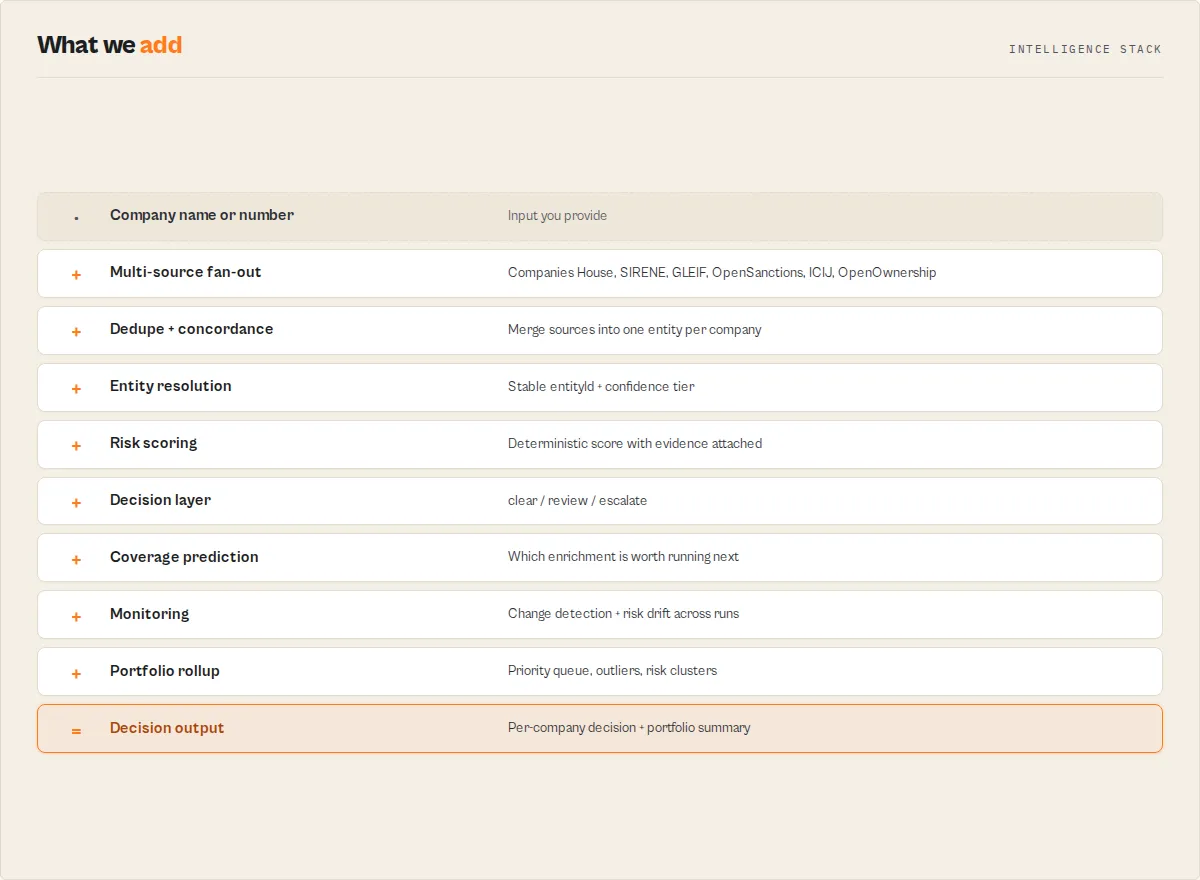
- Input validation -- the actor reads your input parameters and verifies that a search query is provided.
- Path selection -- the actor branches based on
fallbackModeand the presence ofapiKey:apiKeypresent (orfallbackMode: "paid") → query the OpenCorporates API directly.apiKeyabsent (orfallbackMode: "free") → run the free multi-source chain.
- Paid path (OpenCorporates API):
- Build search parameters from
jurisdictionCode,countryCode,status. - Query
/companies/searchwith pagination, 1.5-second delay between pages. - On HTTP 429: exponential backoff (10s, 20s, 30s) and up to 3 retries.
- Optionally query
/officers/searchwhenincludeOfficersis set. - Transform results into the output schema and push to the dataset.
- Build search parameters from
- Free path (multi-source chain):
- Resolve enrichment snapshots from the actor's named Apify KV store (lazy-downloaded with SHA256 verification on cold start).
- Run registry sources in parallel under per-source deadlines: Companies House (GB), INSEE SIRENE (FR), GLEIF (global LEIs).
- Run enrichment sources locally against bundled SQLite snapshots: OpenSanctions, ICIJ Offshore Leaks, OpenOwnership.
- Three-pass dedupe + merge: canonical key (jurisdiction + canonicalised number), three-way concordance (normalised name + jurisdiction + incorporation date), offshore carveout for shell-company jurisdictions.
- Emission gates: enrichment-only entities require two-source concordance; US-targeted queries with no registry hits get an advisory record; unknown-jurisdiction records are capped at 50 per run.
- Each output record carries a
_metablock with provenance, normalised entity type, coverage class, and any alternate field values that disagreed across sources.
- Output -- all results pushed to the Apify dataset. A single structured metrics JSON line is logged at the end of the run for observability.
Path selection truth table
fallbackMode | apiKey provided | Behaviour |
|---|---|---|
auto (default) | yes | Paid path (OpenCorporates API) |
auto (default) | no | Free path (multi-source chain) |
free | any | Free path (forces free chain even if a key is provided) |
paid | yes | Paid path |
paid | no | Hard fail — actor throws an error and exits |
Performance & cost
| Metric | Value |
|---|---|
| Memory allocation | 256 MB |
| Timeout | 3,600 seconds (1 hour) |
| Typical run time (25 results) | 10--20 seconds |
| Typical run time (100 results with officers) | 30--60 seconds |
| Apify PPE charge (25 results) | ~$0.025 (25 × $0.001 per company-fetched event) |
| Apify PPE charge (100 results) | ~$0.10 |
| Apify compute cost (typical run) | $0.0005 -- $0.002 of platform credits per run |
| Apify Free-plan credits | $5 / month, supports hundreds of runs |
| API delay between pages | 1.5 seconds (paid path only) |
| Max retries on rate limit | 3 attempts with exponential backoff |
Two costs to be aware of:
- Apify platform cost — what the actor charges per run. Per-event PPE pricing of $0.001 per company-fetched event, plus modest compute cost (~$0.0005 to $0.002 per run). The advisory and summary records are NOT charged.
- OpenCorporates API cost — only when you pass an
apiKey. OpenCorporates offers a free tier with low rate limits; commercial / data-licence tiers run from roughly $300 / month to $1000+ / month depending on volume, jurisdictions, and rate limits. Check opencorporates.com for current pricing. The free path of this actor (the default) does not call the OpenCorporates API at all -- it uses Companies House, INSEE SIRENE, GLEIF, and the bundled OpenSanctions / ICIJ / OpenOwnership snapshots.
Keyless coverage scorecard
What you get without an API key (the free multi-source path). Pass an OpenCorporates apiKey for full global coverage across all 140+ jurisdictions.
| Jurisdiction class | Coverage | Notes |
|---|---|---|
| United Kingdom | Strong | Companies House full register |
| France | Strong | INSEE SIRENE full register |
| Global listed companies | Medium | GLEIF covers regulated entities with an LEI |
| Offshore (BVI/Cayman/Panama/Bahamas/Bermuda/etc.) | Partial | ICIJ Leaks + OpenSanctions overlap only |
| US private companies / LLCs | Weak | Pass an OpenCorporates API key for full US coverage |
| Most of EU outside FR | Weak | Pass an OpenCorporates API key |
| Asia (CN/JP/KR/IN/etc.) | Weak | Pass an OpenCorporates API key |
Limitations
- US private-entity coverage in keyless mode is minimal. GLEIF only covers regulated US entities with an LEI. For comprehensive US company discovery (state-level Secretary of State data, LLCs, private corporations), pass an OpenCorporates API key.
- Officer detection in keyless mode is GB-only. Companies House returns officer data for UK companies; other free sources do not include officer records.
- Rate limits apply. When using an OpenCorporates API key, the actor handles rate limits automatically with exponential backoff. The free sources have their own modest rate limits which the actor respects via per-source timeouts.
Offshore concordance carveout
In free mode, the actor merges records from different sources using a conservative deterministic dedupe. For most jurisdictions, two records merge when they share both:
- The same canonical jurisdiction + canonicalised company number, OR
- The same normalised legal name AND jurisdiction AND incorporation date.
In offshore jurisdictions, criterion #2 alone is insufficient because shell-company formation patterns routinely reuse template names and batch incorporation dates. To prevent false merges, the actor requires one additional concordance signal before merging two offshore records:
- Normalised registered-address overlap, OR
- At least one normalised officer name shared between the two records.
Note that raw legal-name equality is not sufficient as a standalone signal in offshore jurisdictions — formation agents commonly issue dozens of distinct entities under the identical template name (e.g. "Asset Holdings Ltd"). Locked-in by regression tests in test/regression-fixtures.test.ts.
Offshore jurisdictions covered by this carveout: vg (British Virgin Islands), ky (Cayman Islands), pa (Panama), sc (Seychelles), bs (Bahamas), mh (Marshall Islands), ai (Anguilla), bz (Belize), bm (Bermuda).
When two offshore records satisfy #1 (canonical jurisdiction + number) they still merge; the carveout only applies to the three-way concordance path.
- Maximum 100 results per run. The
maxResultsparameter caps at 100. For larger datasets, run multiple queries with different filters or jurisdiction codes. - Officer search is single-page. The officer endpoint fetches only the first page of results (up to the
maxResultslimit) without pagination. - Data freshness varies by jurisdiction. OpenCorporates updates its database from official registries on different schedules. Major jurisdictions are typically updated weekly or monthly, but some smaller registries may lag.
- By-number lookup needs a jurisdiction. Direct registration-number lookup (
lookupType: "number") requires a jurisdiction/country code, and on the free path is GB-only (Companies House); other jurisdictions need an OpenCorporates API key. A bare number with no jurisdiction falls back to name search. - Relationship data is within-run only. The summary
networkblock detects officers shared across companies in the same result set. Cross-entity ownership chains and beneficial-owner graphs are out of scope here — chain to the sibling actors named inactorGraph.next[](UK Companies House, GLEIF LEI, OpenOwnership) for those. - Address formatting depends on registry data. Not all registries provide complete address information. Some fields may be null or incomplete depending on the jurisdiction.
Responsible use
- Respect OpenCorporates terms of service. Ensure your usage complies with the OpenCorporates API terms. Commercial use may require a paid API plan.
- Handle personal data carefully. Officer names and positions are personal data. Process them in accordance with applicable data protection laws such as GDPR, CCPA, or equivalent regulations in your jurisdiction.
- Do not use for harassment or discrimination. Company and officer data should be used for legitimate business purposes such as due diligence, compliance, research, and verification -- never for stalking, harassment, or discriminatory practices.
- Verify critical information at primary sources. For formal KYC, AML, or legal proceedings, always cross-reference OpenCorporates data against the original government registry to confirm accuracy and currency.
- Use reasonable request volumes. Avoid unnecessarily high-frequency runs that could strain the OpenCorporates API. Use filters and appropriate
maxResultsvalues to retrieve only the data you need.
FAQ
Do I need an OpenCorporates API key to use this actor? No. The actor runs a free multi-source chain by default. With a key you get full OpenCorporates coverage including US private entities and 140+ jurisdictions. Without a key you get strong coverage for the UK and France, partial coverage for offshore jurisdictions, and weak coverage for US private companies. Sign up for a key at opencorporates.com/api_accounts/new.
Which free sources are used in keyless mode? Companies House for UK companies (5M+), INSEE SIRENE for French companies (30M+), GLEIF for global regulated entities with an LEI (2.7M+), plus enrichment from OpenSanctions, ICIJ Offshore Leaks, and OpenOwnership.
Is the OpenCorporates API key free? OpenCorporates offers a free tier with low rate limits suitable for prototyping or non-commercial use. Commercial / data-licence plans cost roughly $300 / month at the entry tier and scale to $1000+ / month for higher-volume access. Visit opencorporates.com for current pricing and rate limits.
Is the free (keyless) path actually free? You still pay Apify's per-event PPE charge ($0.001 per company-fetched event) plus a small amount of compute. There are no external API costs on the free path — the actor uses Companies House (free key, fleet-held), INSEE SIRENE (no key required), GLEIF (no key required), and bundled snapshots for OpenSanctions / ICIJ Leaks / OpenOwnership. The free path is materially cheaper than paying for an OpenCorporates commercial plan; it trades coverage breadth (especially US private entities) for cost.
What jurisdictions does OpenCorporates cover?
Over 140 jurisdictions worldwide, including all 50 US states, the United Kingdom, Germany, France, Canada, Australia, the Netherlands, and many more. Use the jurisdictionCode or countryCode filters to target specific regions.
What is the difference between jurisdictionCode and countryCode?
countryCode is a broad two-letter filter (e.g., us returns companies from all US states). jurisdictionCode is more specific -- for example, us_ca returns only California companies and us_ny returns only New York companies.
How do I search for companies in a specific US state?
Set jurisdictionCode to the state code in the format us_xx -- for example, us_ca for California, us_ny for New York, or us_de for Delaware.
What happens if I hit the OpenCorporates rate limit? The actor automatically handles HTTP 429 rate-limit responses. It waits with exponential backoff (10 seconds, then 20, then 30) and retries up to 3 times per request before moving on.
Can I run this actor on a schedule? Yes. Use Apify Schedules to run the actor on any cron pattern -- daily, weekly, or custom intervals. This is ideal for ongoing corporate monitoring or compliance checks.
How do I get officer data in the results?
Set includeOfficers to true in the input. The actor will perform an additional search against the OpenCorporates officers endpoint. Officer results appear in the same dataset with a resultType: "officer" field.
Are company and officer results mixed in the same dataset?
Yes. Company results have the standard company fields, while officer results include a resultType: "officer" field. You can filter by the presence of resultType to separate them.
Can I combine this with other Apify actors? Absolutely. Use the Apify API or platform integrations to chain this actor with other actors -- for example, run a company search and then pass the results to a sanctions screening actor or a VAT validation actor.
What output formats are available? Results are stored in an Apify dataset and can be exported as JSON, CSV, Excel (XLSX), XML, or RSS. You can also access them programmatically via the Apify API.
Is this actor suitable for KYC/AML compliance workflows? The data comes from official government registries aggregated by OpenCorporates and can be a useful component of due diligence workflows. However, for formal KYC/AML processes, always verify critical information against primary registry sources.
Use in Dify
Drop this actor into Dify workflows via the Apify plugin's Run Actor node. Every record is typed, deduped, source-attributed, and scored structured JSON: a recordType discriminator (company / advisory / summary), an entityType enum, a risk block (level: high / medium / low / minimal), a resolution confidence block, and an actorGraph.next[] array of ranked next-actor pointers your downstream node consumes verbatim. Point a generic registry scraper at the same sources and you get raw per-source JSON to merge yourself; this returns one merged, typed, risk-scored record per entity plus a run-level coverage report.
- Actor ID:
ryanclinton/opencorporates-search - Sample input (keyless UK search, decision-first intelligence payload):
- Branching example — a Dify if/else node routes on
recordType, then on the intelligence enums:recordType == "summary"→ readcoverage+coverageReport+dataGaps[]to decide whether coverage was sufficient or a paidapiKeyre-run is needed.recordType == "advisory"→ coverage-gap warning; branch to a fallback source (the advisory record names the gap).recordType == "company"→ branch ondecision.status:escalate→ manual review / sanctions screening;review→ queue for a human;clear→ auto-proceed. Branch again onresolution.identityTierto gateweak/unresolvedmatches. Sort the run withdecision.priorityScoreto work the highest-attention entities first.
- Chain the next step automatically — each
companyrecord'sactorGraph.next[]carries{ actor, reason }sibling-actor slugs (e.g.ryanclinton/eu-vat-validator,ryanclinton/gleif-lei-lookup). A Dify loop readsactorGraph.next[0].actorand runs it with no LLM rewriting. Theresolution.entityIdis a stable join key for deduping across runs.
The summary record is also mirrored to the run's SUMMARY key-value-store key, so a Dify HTTP node can read the coverage block without scanning the dataset.
Related actors
| Actor | Description | Link |
|---|---|---|
| UK Companies House | Search UK Companies House for detailed company data, filings, and officer information | apify.com/ryanclinton/uk-companies-house |
| EU VAT Validator | Validate European Union VAT numbers via the official VIES service | apify.com/ryanclinton/eu-vat-validator |
| GLEIF LEI Lookup | Look up Legal Entity Identifiers (LEIs) to verify company identity in financial transactions | apify.com/ryanclinton/gleif-lei-lookup |
| OpenSanctions Search | Search global sanctions and politically exposed persons (PEP) lists | apify.com/ryanclinton/opensanctions-search |
| OFAC Sanctions Search | Search the US Treasury OFAC sanctions list for designated individuals and entities | apify.com/ryanclinton/ofac-sanctions-search |
| SEC Insider Trading | Track SEC Form 4 insider trading filings for public companies | apify.com/ryanclinton/sec-insider-trading |


