

OFAC Sanctions List Search — SDN Screening with Fuzzy Matching
Pricing
from $2.00 / 1,000 record fetcheds
OFAC Sanctions List Search — SDN Screening with Fuzzy Matching
Screen names against the US Treasury OFAC SDN sanctions list and get a decision, not just rows: a clear / potential-match / likely-match verdict per subject, plus false-positive resolution that explains why a hit is NOT the sanctioned person. Batch screening, watchlist monitoring, no API key.
Pricing
from $2.00 / 1,000 record fetcheds
Rating
0.0
(0)
Developer

Ryan Clinton
Maintained by CommunityActor stats
0
Bookmarked
50
Total users
2
Monthly active users
2 months ago
Last modified
Categories
Share
OFAC Sanctions List Search
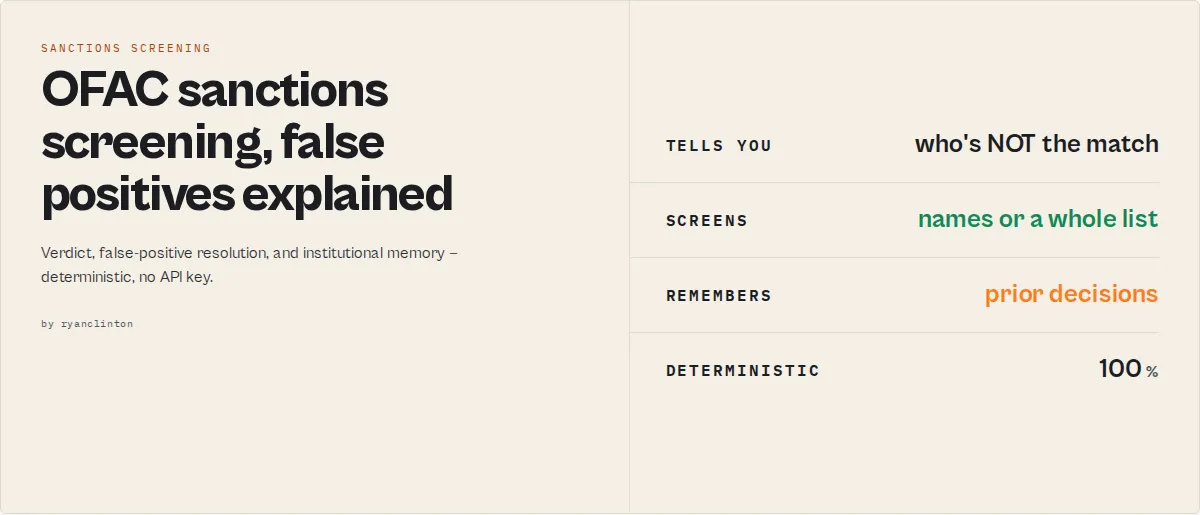
Screen one name or a whole customer list against the US Treasury OFAC Specially Designated Nationals (SDN) sanctions list directly from the Apify platform. For every subject the actor returns a clear screening verdict -- clear, potential-match, or likely-match -- plus a recommended action (clear / manual-review / escalate-for-review) and the matching SDN entries with full biographical detail. It supports individuals, entities, vessels, and aircraft with fuzzy name matching, date-of-birth false-positive reduction, sanctions program and country filters, and optional watchlist monitoring that flags when a previously-clear subject becomes newly sanctioned. No API key is required -- the actor pulls data straight from the public OFAC source.
Why use OFAC Sanctions List Search
Compliance screening against the OFAC SDN list is a legal requirement for many businesses operating in or with connections to the United States. Banks, fintech companies, law firms, real estate agencies, and import/export businesses must verify that their customers, partners, and counterparties do not appear on the sanctions list. Manual lookups through the OFAC website are slow, limited to one query at a time, and offer no programmatic access for bulk workflows.
This actor solves that problem by giving you full programmatic access to the complete SDN list through a simple API call. You can integrate it into your onboarding pipelines, run batch screening jobs against your entire customer database, or set up scheduled checks that alert you when new matches appear. The built-in fuzzy matching engine handles name variations, transliteration differences, and spelling discrepancies that would be missed by exact-match lookups.
Unlike the official OFAC search tool, this actor returns structured JSON data that can be piped directly into your compliance workflows, CRM systems, or case management platforms. Every result includes a confidence score from 0 to 100, letting you prioritize high-confidence matches for human review while filtering out noise. The actor processes the entire SDN list -- over 12,000 entries -- in seconds, so you get comprehensive coverage without the wait.
Whether you are building an automated KYC pipeline, conducting due diligence on business partners, or monitoring sanctions exposure across a portfolio, this actor provides the data backbone you need without requiring a Treasury API key, paid data vendor, or custom infrastructure.
Key features
- Explains false positives -- For every subject it answers "is this probably NOT the sanctioned person?" with
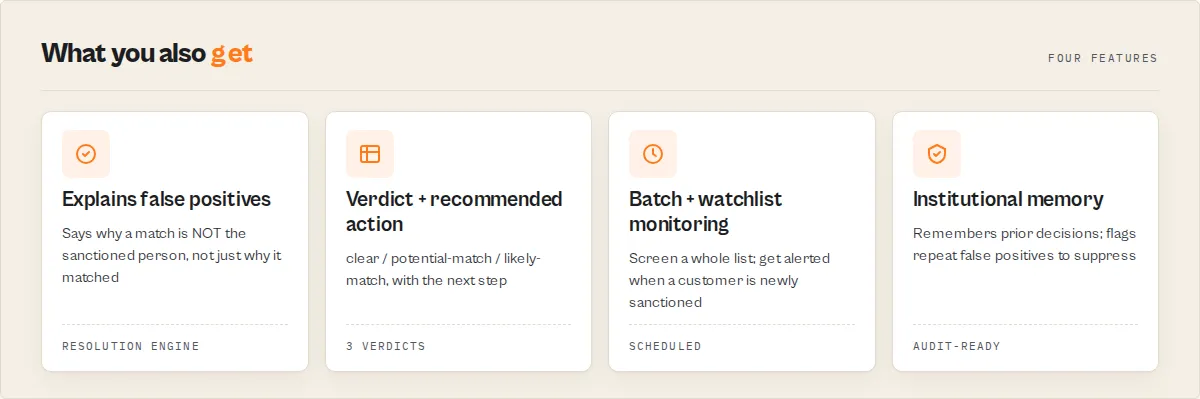
resolutionLikelihood(same-person / different-person / unknown),negativeSignals, anautoClearCandidateflag, a plain-EnglishscreeningNarrative, and areviewPriorityScorethat sorts the queue so analysts dismiss false positives fast and work real hits first. Most tools only explain why a name matched; this one explains why it should be dismissed. - Institutional memory -- With a watchlist and scheduled runs, the actor remembers prior decisions:
priorScreenings(seen 47 times, always cleared),resolutionStability(stable / changed),suppressionCandidatefor repeat false positives, anddecisionConsistencyfor audit. The batch summary compresses 10,000 verdicts into what needs an analyst today --newHighRiskHitsvsstableHistoricalFalsePositives. - Screening verdict per subject -- Every subject gets a top-level
screeningResult(clear / potential-match / likely-match) and arecommendedAction(clear / manual-review / escalate-for-review) so your pipeline can route on a stable value without parsing rows. Sanctions hits always recommend human review -- the actor never auto-blocks. - Batch screening -- Screen a whole customer list in one run via
subjects(array) orsubjectsText(one name per line). The SDN list is downloaded and parsed once, then every subject is screened against it. - Date-of-birth false-positive reduction -- Supply a subject's date or year of birth and individual matches are corroborated against the SDN entry's known DOBs. A conflicting year downgrades a strong name match as a likely false positive -- the #1 pain in sanctions screening.
- Match strength bands -- Each match is banded
exact / strong / partial / weak(with the basis: primary-name, alias, id-number, uid) so reviewers triage on a stable enum, not a raw number. - Explainable scoring -- Every match carries an
explanationobject (per-signal name/alias/ID similarity, DOB and country corroboration, matched tokens, risk factors) so a 92 and a 61 are self-explaining. Pair withoutputProfile: investigatorfor the full evidence breakdown. - Screening confidence -- A corroboration-based
high / medium / lowconfidence distinct from raw match quality, plus case-management fields (casePriority,reviewRequired,reviewReason) that drop into a review queue. - OFAC-program risk indicators -- Boolean flags (
terrorism,cyber,russia,iran,northKorea,narcotics,humanRights,weaponsProliferation) derived from the entry's programs so analysts filter by sanctions context. - Screening profiles --
conservative / balanced / aggressive / investigativepresets set the thresholds for you; transliteration expansion, input aliases, and direct ID-number matching boost recall. - Audit-ready -- Each run records the SDN list version, screening method, and thresholds applied, for reproducible, defensible screening.
- Watchlist monitoring -- Name a watchlist and each scheduled run flags per-subject change (new-hit / cleared / still-hit / unchanged), so you are alerted the moment a previously-clear customer is added to the SDN list.
- Full SDN list coverage -- Searches the complete OFAC Specially Designated Nationals list directly from treasury.gov, covering all sanctioned individuals, entities, vessels, and aircraft.
- Fuzzy name matching -- Uses Levenshtein distance, token matching, and substring analysis to catch spelling variations, transliterations, and partial name matches that exact searches would miss.
- Tunable thresholds --
reviewThresholdandhitThresholdlet you set your own risk appetite for what counts as a potential vs likely match. - Entity type filtering -- Narrow your search to specific categories: Individual, Entity, Vessel, or Aircraft, or search across all types at once.
- Sanctions program filtering -- Filter results by sanctions program codes such as SDGT, IRAN, UKRAINE-EO13662, CUBA, DPRK, SYRIA, and dozens more.
- Country-based filtering -- Filter by country across addresses, nationalities, citizenships, and vessel flags to focus on specific jurisdictions.
- Diacritics normalization -- Automatically strips diacritics and normalizes Unicode characters, so searches for "Muller" will match "Mueller" and vice versa.
- Rich structured output -- Returns complete records with aliases, ID documents, addresses, dates of birth, places of birth, vessel information, and direct OFAC detail page URLs.
- No API key required -- Pulls data from the publicly available treasury.gov XML feed with zero authentication setup.
- Batch-friendly design -- Combine with Apify scheduling and webhooks to run recurring compliance checks against your customer database automatically.
How to use
Using the Apify Console
- Navigate to OFAC Sanctions List Search on the Apify Store.
- Click Try for free to open the actor in the Apify Console.
- Enter a name, entity, or ID number in the Search Query field (e.g., "Putin").
- Optionally select a Search Type to filter by Individual, Entity, Vessel, or Aircraft.
- Optionally enter a Sanctions Program code (e.g., "UKRAINE-EO13662") or Country Filter (e.g., "Russia").
- Toggle Fuzzy Matching on or off depending on whether you want approximate or exact matching.
- Set the Max Results to control how many matches are returned (default: 50, max: 500).
- Click Start and wait for the run to complete.
- View results in the Dataset tab, or export as JSON, CSV, or Excel.
Using the Apify API
cURL:
JavaScript:
Python:
Input parameters
Provide a subject in any one of three ways: query (single name), subjects (array, for richer per-subject fields), or subjectsText (one name per line).
| Field | Type | Required | Default | Description |
|---|---|---|---|---|
query | String | One of the three | -- | Single name, entity, vessel, or ID number to screen |
subjects | Array | One of the three | -- | Batch: array of { subjectId?, externalReference?, name, aliases?, idNumber?, dateOfBirth?, yearOfBirth?, country?, program?, searchType? }. Aliases are screened under the same subject; idNumber is matched against the SDN ID documents |
subjectsText | String | One of the three | -- | Batch: a list of names, one per line |
runMode | Enum | No | "screen" | screen (decisioning), monitor (with a watchlist, emit only changed subjects), lookup (exact UID/ID/name, no fuzzy) |
subjectId | String | No | -- | Stable identifier echoed on every output record (single-subject; set per subject in the array for batch) |
externalReference | String | No | -- | KYC case / transaction / CRM reference echoed on every record |
searchType | Enum | No | "All" | Restrict to entry type: All, Individual, Entity, Vessel, Aircraft |
program | String | No | -- | Filter by sanctions program code (e.g., SDGT, IRAN, UKRAINE-EO13662, CUBA, DPRK) |
country | String | No | -- | The subject's known country. Corroborates matches (a mismatch becomes a different-person signal); does not filter hits out |
dateOfBirth | String | No | -- | Subject DOB (YYYY or full date). Corroborates individual matches; a conflict downgrades a name match as a likely false positive |
yearOfBirth | Integer | No | -- | Subject year of birth, if the full date is unknown |
screeningProfile | Enum | No | -- | Preset posture: conservative (fewest false positives), balanced, aggressive (max detection), investigative (surface weak matches). Sets thresholds + fuzzy for you |
fuzzyMatch | Boolean | No | true | Enable fuzzy/partial name matching. When disabled, requires exact substring match |
maxResults | Integer | No | 50 | Maximum matching SDN entries returned per subject (1--500) |
reviewThreshold | Integer | No | profile/50 | Score at/above which a match counts as a potential match. Overrides the profile |
hitThreshold | Integer | No | profile/75 | Score at/above which a match is treated as a likely match (escalate). Overrides the profile |
expandNameVariants | Boolean | No | false | Also screen common transliteration / corporate-suffix variants (Muhammad/Mohammed, Ltd/Limited) for higher recall |
deduplicateSubjects | Boolean | No | false | Collapse duplicate subject names before screening |
includeRejected | Boolean | No | false | Emit up to 5 near-miss candidates per subject (with the reason) for investigator audit |
watchlistName | String | No | -- | Name a watchlist to track results across runs and flag changes (with a change reason) |
outputProfile | Enum | No | "standard" | minimal (verdicts only), standard (verdict + lean matches), full (all fields), investigator (full + the evidence/explanation breakdown) |
Example input (batch with DOB disambiguation):
Tips for best input:
- Use full names when possible (e.g., "Vladimir Putin" rather than just "Putin").
- Supply
dateOfBirth/yearOfBirthfor individuals -- it sharply reduces false positives on common names. - Combine
countryandprogramfilters to narrow results when screening common names. - Set a
watchlistNameand schedule the run to be alerted when a customer is newly sanctioned. - Program codes are case-insensitive -- "iran" works the same as "IRAN".
Output
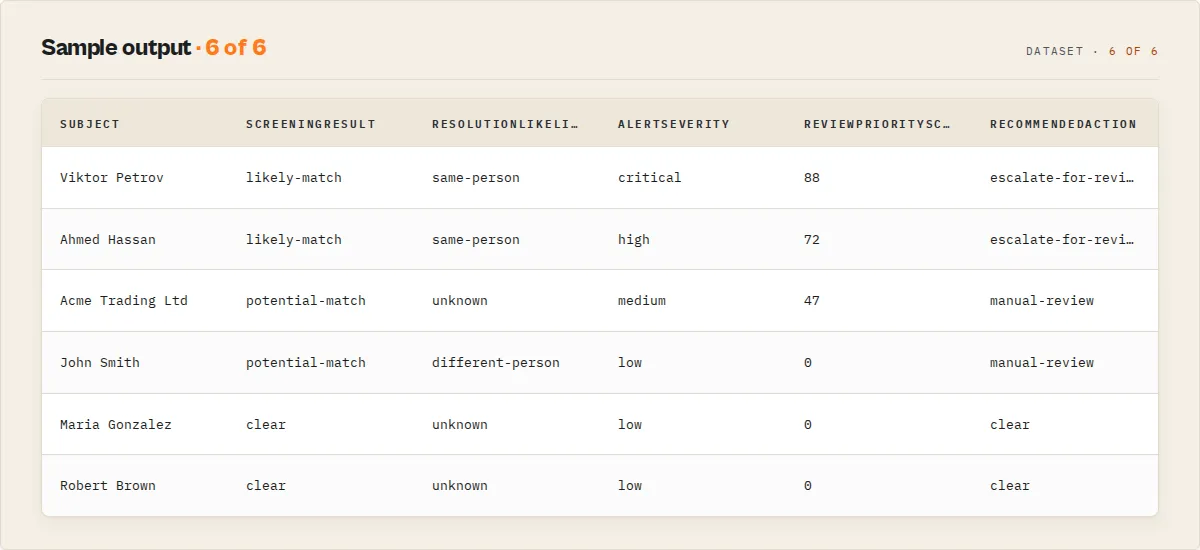
The dataset carries two record types, discriminated by recordType. For each subject the actor emits one screening-summary record (the verdict) followed by its match records (the SDN entries). A run-level SUMMARY (totals) is also written to the key-value store.
Screening-summary record -- the per-subject verdict your pipeline routes on:
screeningConfidence is about corroboration, not raw match quality: a strong name match with a confirmed date of birth or aligned country is high; the same name match with no corroborating signal is at most medium; a date-of-birth conflict drops it to low. casePriority / reviewRequired / reviewReason drop straight into a case-management queue, and riskIndicators (derived from the OFAC programs) let analysts filter by sanctions context — WHERE riskIndicators.russia = true.
Match record -- one matching SDN entry, enriched with the decision + explanation layer:
Built for production integration. Every record echoes your subjectId and externalReference, so downstream systems join on a stable key instead of a name. Each verdict carries a deterministic decisionId (subject + SDN version + thresholds + top match + verdict) for audit trails and cross-run deduplication. With aliases and variant expansion in play, matchedInput tells you exactly which input caused the hit ({ type: "alias", value: "Bob Smith", originalSubjectName: "Robert Smith" }), and variantGeneratedFrom records the transliteration rule when a generated variant matched.
Explaining false positives (analyst acceleration)
In real sanctions operations, the overwhelming majority of alerts are false positives, and analysts spend most of their day proving "this is NOT that person." Most tools only tell you why a name matched. This actor also tells you why a match should be dismissed -- and orders the queue so analysts work the real hits first.
For every subject the verdict carries:
resolutionLikelihood--same-person/different-person/unknown. Distinct from the match score: a 95 name match with a date-of-birth conflict and a country mismatch resolves todifferent-person, not a strong hit.negativeSignals[](on each match) -- the explicit reasons it is probably not the sanctioned entity:date-of-birth-conflict,country-mismatch,id-no-overlap,weak-name-match.autoClearCandidate--truewhen the whole alert is a likely false positive and safe to deprioritise. The actor identifies these; it never auto-clears.reviewPriorityScore(0-100) -- sort the review queue automatically; false positives sink to the bottom.alertSeverity--critical/high/medium/low, from confidence + corroboration + program risk.screeningNarrative-- a template-driven, audit-ready sentence (no LLM): "Partial name similarity... date of birth conflicts... country mismatch detected. Likely false positive -- recommend dismissal after review."evidence(on each match) -- a decision matrix of which signals corroborated:matchedPrimaryName,matchedAlias,matchedId,matchedCountry,matchedDob.
The same name screened twice shows the contrast:
| Subject | DOB | Country | resolutionLikelihood | alertSeverity | priority |
|---|---|---|---|---|---|
| Vladimir Putin | 1952 (confirmed) | Russia (aligned) | same-person | critical | 85 |
| Vladimir Putin | 1900 (conflict) | Spain (mismatch) | different-person | low | 0 |
Institutional memory
Set a watchlistName and screen on a schedule, and the actor remembers prior screening decisions -- deterministically, no LLMs, no human notes. The same customer screened at onboarding, on every payment, and at annual re-screen stops being a fresh investigation each time:
priorScreenings--{ seenBefore, timesScreened, firstSeen, lastSeen, previousOutcome }. The analyst sees this exact subject was screened 47 times before and always resolveddifferent-person.resolutionStability--stable(same result as last time) /changed(new evidence, new program, new match) /new. The field that tells an analyst "nothing changed, you cleared this last month."suppressionCandidate+suppressionReason-- a recommendation (never an auto-suppression) to deprioritise a false positive the analyst has cleared before:["date-of-birth-conflict", "country-mismatch", "screened-3-times"].decisionConsistency--{ matchesPriorOutcome, lastOutcome, lastReviewedAt }. The audit field big banks build internally: "this decision matches the prior outcome, last reviewed on X."commonNameRisk+uniquenessScore-- common names (Mohammed, Ali, Smith, Kim, Li, Wang) generate most false positives. The uniqueness score is derived from the actual SDN name population and feeds queue prioritisation -- not matching.identityConfidence(per match) --{ name, dob, country, id }0-100, so analysts see exactly what is driving the decision.
Case compression -- what actually needs attention
Given 10,000 screened customers, the batch SUMMARY answers the only question an operations lead is asking -- what needs an analyst today? -- instead of returning 10,000 verdicts:
newHighRiskHits: 3 is the number that matters; stableHistoricalFalsePositives: 128 is the noise the team has already cleared and can suppress. That is the difference between a screening tool and an operations platform.
Output field descriptions:
| Field | Type | Description |
|---|---|---|
uid | String | Unique OFAC identifier for the entry |
firstName | String/null | First name (null for entities without a first name) |
lastName | String | Last name or entity name |
fullName | String | Combined first and last name |
entityType | String | Entry type: Individual, Entity, Vessel, or Aircraft |
title | String/null | Title or position if available |
programs | String[] | Sanctions program codes (e.g., SDGT, IRAN, CUBA) |
remarks | String/null | OFAC remarks field with additional details |
addresses | Object[] | Known addresses with street, city, state, postal code, and country |
nationalities | String[] | Listed nationalities |
citizenships | String[] | Listed citizenships |
datesOfBirth | String[] | Known dates of birth |
placesOfBirth | String[] | Known places of birth |
idNumbers | Object[] | ID documents with type, number, country, issue/expiration dates |
aliases | Object[] | Known aliases with type, category, and name components |
vesselInfo | Object/null | Vessel details (call sign, type, flag, owner, tonnage) for vessel entries |
country | String/null | Primary country derived from nationality, citizenship, or address |
matchScore | Number | Confidence score from 0 to 100 (higher is a stronger match) |
ofacUrl | String | Direct link to the official OFAC details page |
source | String | Always "US Treasury OFAC SDN List" |
extractedAt | String | ISO 8601 timestamp of when the data was extracted |
A run-level SUMMARY record in the key-value store carries the audit metadata auditors ask for:
auditRecord answers "which list version, which method, which thresholds?" for reproducibility; datasetInfo records exactly which SDN publication was screened; watchlist summarises the monitoring run.
OFAC website vs this actor
| Capability | OFAC sanctions search website | This actor |
|---|---|---|
| Bulk / batch screening | ❌ one name at a time | ✅ a whole list in one run |
| Structured JSON output | ❌ HTML page | ✅ verdict + matches + explanation |
| Screening verdict + recommended action | ❌ you decide | ✅ clear / potential-match / likely-match |
| Date-of-birth false-positive reduction | ❌ | ✅ |
| Fuzzy + transliteration matching | partial | ✅ |
| Watchlist / ongoing monitoring | ❌ | ✅ change flags + change reason |
| Audit metadata (list version, method, thresholds) | ❌ | ✅ in the run summary |
| Pipeline / automation integration | ❌ | ✅ API, webhooks, Zapier, Make, Dify |
This actor reads from the same official US Treasury OFAC SDN source as the OFAC website. It is not a licensed commercial sanctions vendor and does not cover non-SDN lists or multi-source watchlists -- see "What this does NOT do" below.
Matching methodology
The match score (0--100) is a deterministic, transparent combination of signals -- no LLM, no black box:
- Exact primary-name match scores 100; substring containment 70--95; token overlap up to 55; Levenshtein fuzzy matching for short strings.
- Alias matches are weighted 0.9x and ID-number matches 0.85x relative to primary-name matches.
- Date-of-birth corroboration: a confirmed year raises screening confidence; a conflicting year reduces the effective score and downgrades the match as a likely false positive.
- Country corroboration aligns or flags the match.
Every match carries an explanation object exposing each of these signals, so a 92 and a 61 are self-explaining rather than something an analyst has to reverse-engineer. Because the scoring is deterministic, the same input + same SDN list version + same thresholds always produce the same result -- which is what the auditRecord records for reproducibility.
Enterprise workflow examples
Customer onboarding (KYC gate). Screen one applicant; route on the verdict.
recommendedAction = clear continues onboarding; manual-review / escalate-for-review holds it for a compliance officer.
Payment screening. Screen the counterparty on a transaction with the strict profile to minimise false holds.
Vendor / supplier due diligence. Batch-screen a supplier list with transliteration expansion for international names.
Ongoing monitoring. Schedule a daily run over your customer book on a watchlist; alert on changeFlag = "new-hit".
Use cases
- KYC/AML compliance screening -- Integrate into your customer onboarding pipeline to automatically check new customers against the SDN list before account approval.
- Ongoing monitoring -- Schedule daily or weekly runs to re-screen your entire customer database and detect newly added sanctions entries.
- Vendor and supplier due diligence -- Screen business partners, suppliers, and third-party vendors before entering into contracts or processing payments.
- Real estate transaction screening -- Verify buyers, sellers, and beneficial owners in property transactions as required by FinCEN guidance.
- Trade compliance -- Check counterparties, shipping companies, and vessel names before processing international trade transactions.
- Investment portfolio screening -- Scan portfolio companies, board members, and beneficial owners against the sanctions list for ESG and compliance reporting.
- Legal case research -- Search for sanctioned individuals and entities by name, alias, or ID number during legal investigations and litigation support.
- Journalist investigations -- Cross-reference persons of interest against the SDN list for investigative reporting on sanctions evasion or financial crime.
- Insurance underwriting -- Screen policy applicants and beneficiaries against sanctions lists as part of the underwriting risk assessment process.
- Nonprofit grant screening -- Verify grant recipients and partner organizations are not sanctioned before disbursing funds, as required by US federal grant conditions.
API & Integration
The actor's output is available through the Apify API immediately after each run completes. You can retrieve results in JSON, CSV, XML, or Excel format.
Python -- fetch results from the last run:
JavaScript -- fetch results from the last run:
cURL -- download results as CSV:
Integrations:
This actor works with all Apify integrations out of the box. Connect it to Zapier, Make (formerly Integromat), Google Sheets, Slack, Microsoft Teams, or email notifications using Apify's built-in integration options. Use webhooks to trigger downstream workflows whenever a run completes -- for example, automatically sending a Slack alert when high-confidence matches are found. You can also chain this actor with other actors using the Apify API for multi-step compliance pipelines.
Use in Dify
Drop this actor into Dify workflows via the Apify plugin's Run Actor node. Each subject returns a screening decision as structured JSON -- screeningResult (clear / potential-match / likely-match) plus the recommendedAction (clear / manual-review / escalate-for-review) your downstream node branches on. The official OFAC search returns an HTML results page a human has to read; this returns the routing primitive an automation acts on.
- Actor ID:
ryanclinton/ofac-sanctions-search - Sample input (gate a customer onboarding check):
A Dify if/else node routes on the screening-summary record's enum fields:
recommendedAction == "clear"→ continue onboarding automaticallyrecommendedAction == "manual-review"→ create a review taskrecommendedAction == "escalate-for-review"→ block onboarding and alert compliancechangeFlag == "new-hit"(on scheduled re-screens) → fire an "existing customer newly sanctioned" alert
Because every value is a stable enum, the branch conditions are exact-match equality checks -- no prose parsing, no LLM in the routing path. Set outputProfile: "minimal" for a one-record-per-subject verdict stream that keeps the workflow payload lean.
How it works
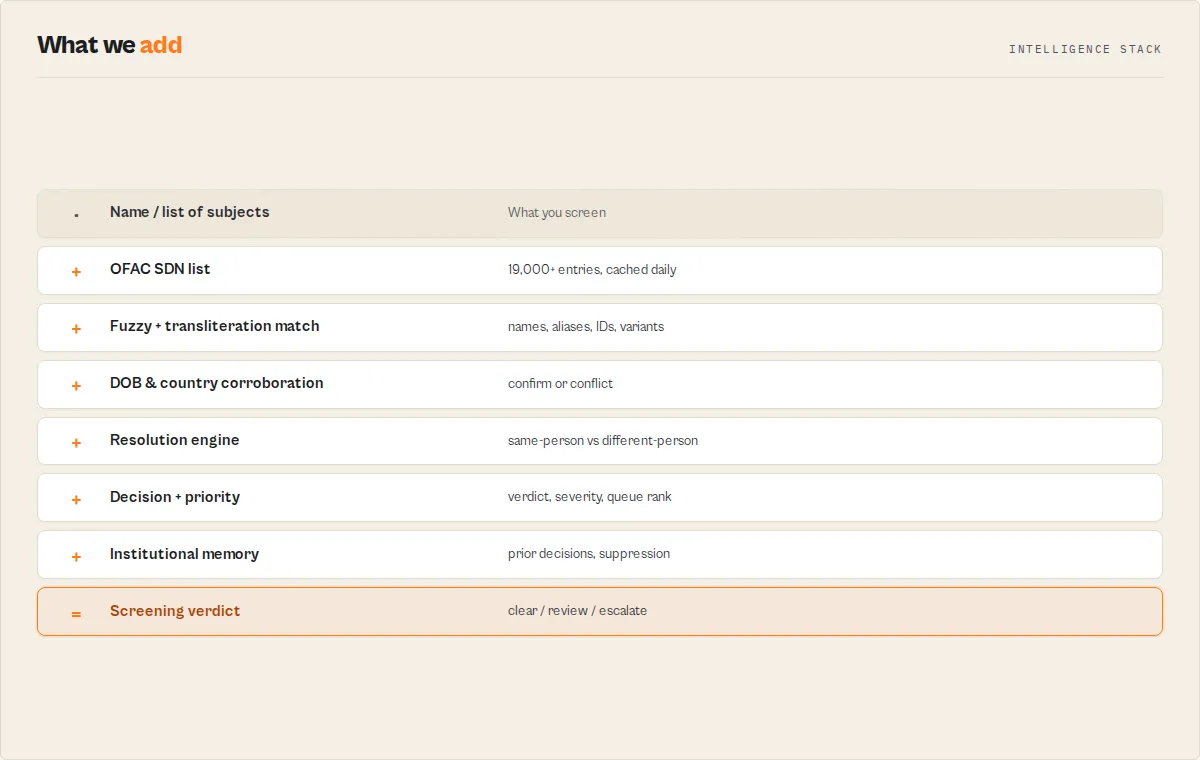
- Download -- The actor fetches the complete SDN XML file (~30 MB) directly from the US Treasury website at
treasury.gov/ofac/downloads/sdn.xml. - Parse -- The XML is parsed in memory using
fast-xml-parserwith array hints to ensure consistent handling of single-element and multi-element lists. - Normalize -- The search query is normalized: lowercased, diacritics stripped, punctuation removed, and whitespace collapsed. The same normalization is applied to every field being compared.
- Filter -- Entries are filtered by search type (Individual/Entity/Vessel/Aircraft) and sanctions program code. Country is used to corroborate a match (a mismatch becomes a
different-personsignal), never to filter potential hits out. - Score -- Each surviving entry is scored 0--100 against the query using a multi-signal approach: exact full-name match (100), substring containment (70--95), token overlap (up to 55), and Levenshtein fuzzy matching for short strings. Alias matches receive a 0.9x multiplier, ID number matches receive 0.85x, and remarks matches cap at 30.
- Threshold -- Entries scoring below the threshold are discarded (20 for fuzzy mode, 50 for exact mode).
- Rank and output -- Remaining entries are sorted by score descending, truncated to
maxResults, transformed into structured JSON with all available fields, and pushed to the Apify dataset.
Performance & cost
| Metric | Value |
|---|---|
| Average run time | 15--30 seconds |
| XML download | 5--15 seconds (~30 MB) |
| Parse + search | 3--10 seconds |
| Memory usage | 512 MB (recommended) |
| Compute units per run | ~0.01--0.02 CU |
| Cost per run (pay-as-you-go) | ~$0.005--$0.01 |
| Free tier estimate | ~50--100 runs/month on the free plan |
| SDN list size | ~12,000+ entries |
| Max results per run | 500 |
Costs depend on Apify's current pricing and may vary based on platform load and actual run duration. The actor is optimized for single-pass in-memory processing, so it does not make multiple HTTP requests or use persistent storage beyond the output dataset.
Limitations
- SDN list only -- This actor screens against the OFAC SDN list. It does not cover the Consolidated Sanctions List, the Sectoral Sanctions Identifications (SSI) list, the Non-SDN Palestinian Legislative Council list, or other OFAC sub-lists. For broader multi-source coverage (SDN + global watchlists + PEPs) see the related actors below.
- No historical data -- The actor always downloads the current SDN list. It does not provide historical snapshots or track when entries were added or removed.
- Name matching is heuristic -- While fuzzy matching handles many variations, heavily transliterated names across different scripts (e.g., Arabic, Cyrillic, Chinese) may not always match perfectly.
- Download dependency -- The actor relies on the treasury.gov XML feed being accessible. If the Treasury website is down or the XML format changes, the actor will fail.
- In-memory processing -- The entire SDN XML (~30 MB parsed) is held in memory. The 2 GB memory floor handles this comfortably and keeps the parse fast; the daily list is cached so warm runs skip the download.
- No real-time updates -- OFAC typically updates the SDN list a few times per week. There may be a delay between OFAC publishing an update and the XML file reflecting the change.
What this does NOT do
This actor screens against the OFAC SDN list specifically. It is the focused, no-API-key tool for that one source. For adjacent needs, use the right sibling actor instead:
| Need | Use this instead |
|---|---|
| Global multi-source sanctions + PEPs + watchlists (80+ sources) | OpenSanctions Search |
| Full financial-crime risk screening across 16 sources | Financial Crime Screening |
| Interpol Red/Yellow/UN notices for wanted & missing persons | Interpol Notice Search |
| The other OFAC lists (Consolidated/SSI/Non-SDN) | not covered here — use OpenSanctions Search |
It also does not auto-block or auto-clear anyone: every match recommends human review, never an automated decision. The verdict (screeningResult + recommendedAction) is a routing primitive for your compliance workflow, not a final adjudication.
Responsible use
- Not a substitute for legal compliance programs -- This actor is a screening tool, not a compliance program. Always consult qualified legal counsel for sanctions compliance obligations specific to your jurisdiction and industry.
- Human review required -- Fuzzy matching may produce false positives. All results, especially those with match scores below 80, should be reviewed by a trained compliance professional before taking action.
- Respect the data source -- The SDN list is published by the US Department of the Treasury. Avoid excessive request frequency that could burden the treasury.gov servers. Use Apify scheduling at reasonable intervals (daily or weekly) rather than minute-by-minute polling.
- Privacy considerations -- Sanctions screening results contain personal information (names, dates of birth, addresses, ID numbers). Handle this data in accordance with applicable privacy regulations such as GDPR, CCPA, and your organization's data protection policies.
- Do not use for discrimination -- Sanctions screening should be applied uniformly as part of a documented compliance process. Do not use this tool to discriminate against individuals based on nationality, ethnicity, or other protected characteristics beyond what is required by sanctions regulations.
FAQ
Q: Do I need an API key or Treasury account to use this actor? A: No. The actor downloads the SDN list from a publicly available XML file hosted on treasury.gov. No API key, registration, or authentication is required.
Q: How current is the SDN data? A: The actor downloads the live SDN XML file from treasury.gov on every run. The data is as current as the latest OFAC publication, which is typically updated several times per week.
Q: What does the match score mean? A: The match score ranges from 0 to 100. A score of 100 means an exact match on the primary name. Scores of 70--95 indicate strong substring matches. Scores of 50--70 suggest partial token overlap. Scores below 50 are weaker fuzzy matches. Alias matches are weighted at 0.9x and ID matches at 0.85x relative to primary name matches.
Q: How does fuzzy matching work? A: Fuzzy matching uses a combination of Levenshtein edit distance (for detecting typos and transliteration variations), token-based matching (for name word overlap), substring detection, and diacritics normalization. It is designed to catch common variations like "Muller" vs. "Mueller" or "Mohammad" vs. "Muhammad".
Q: Can I search by ID number or passport number? A: Yes. Enter the ID or passport number as the search query. The actor checks against all ID documents listed for each SDN entry. ID matches are scored at 0.85x the primary name match weight.
Q: Can I screen a list of names in bulk?
A: Yes. Pass a subjects array (with per-subject subjectId, dateOfBirth, country, etc.) or a subjectsText list (one name per line) and the actor screens every subject in a single run -- the SDN list is downloaded and parsed once, then each subject is screened against it. Each subject gets its own screening-summary verdict.
Q: What sanctions programs are covered? A: All programs on the SDN list are searchable. Common codes include SDGT (terrorism), IRAN, CUBA, DPRK (North Korea), SYRIA, UKRAINE-EO13661, UKRAINE-EO13662, RUSSIA-EO14024, CYBER2, GLOMAG (Global Magnitsky), and many more.
Q: Does this actor cover the full consolidated OFAC sanctions list? A: No, this actor specifically covers the SDN (Specially Designated Nationals) list. It does not include the Sectoral Sanctions (SSI), the Non-SDN Menu-Based Sanctions, or other supplementary lists published by OFAC.
Q: How do I set up recurring screening? A: Use the Apify scheduling feature to run the actor on a daily or weekly basis. Combine it with a webhook to receive a notification or trigger a downstream workflow whenever results are returned.
Q: Can I search for vessel names?
A: Yes. Set the searchType to "Vessel" and enter the vessel name or IMO number as the query. Results will include vessel-specific fields such as call sign, vessel type, flag, owner, and tonnage.
Q: What happens when no results are found?
A: The actor pushes a single object to the dataset with a message field indicating no matches were found, along with the query parameters and the SDN list metadata (publication date and total entry count).
Q: How much does it cost to run? A: A typical run costs approximately $0.005--$0.01 in Apify compute units. On the free plan, you can run approximately 50--100 screenings per month at no cost.
Related actors
| Actor | Description | Link |
|---|---|---|
| OpenSanctions Search | Search the OpenSanctions global dataset covering sanctions, PEPs, and criminal watchlists from 80+ data sources | Link |
| Interpol Red Notice Search | Search Interpol's database of Red Notices for wanted persons worldwide | Link |
| UK Companies House | Search the UK Companies House register for company details, officers, and filing history | Link |
| OpenCorporates Search | Search the world's largest open database of company information across 140+ jurisdictions | Link |
| GLEIF LEI Lookup | Look up Legal Entity Identifiers (LEIs) for corporate entity verification and ownership data | Link |
| SEC Insider Trading | Search SEC EDGAR for insider trading filings (Form 4) by company or individual | Link |


