
Senate Lobbying Disclosure Search
Pricing
$30.00 / 1,000 result returneds
Senate Lobbying Disclosure Search
Search **25+ years of federal lobbying disclosure filings** from the US Senate LDA database. Find out who is lobbying Congress, on behalf of which clients, on what policy issues, how much money is involved, and which lobbyists have revolving-door government connections.
Pricing
$30.00 / 1,000 result returneds
Rating
0.0
(0)
Developer

Ryan Clinton
Maintained by CommunityActor stats
0
Bookmarked
2
Total users
0
Monthly active users
2 months ago
Last modified
Share
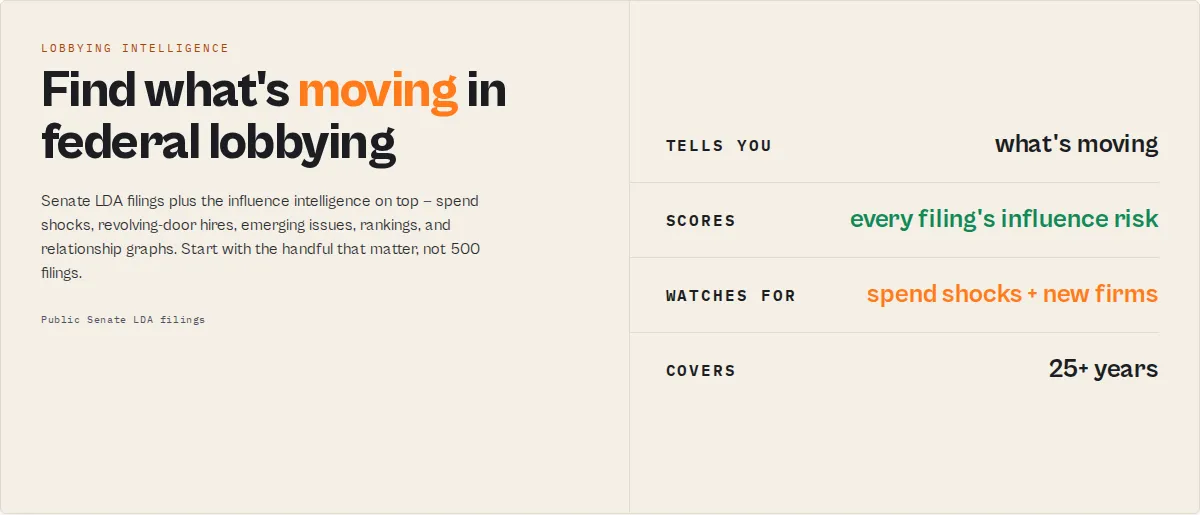
Search 25+ years of federal lobbying disclosure filings from the US Senate LDA database. Find out who is lobbying Congress, on behalf of which clients, on what policy issues, how much money is involved, and which lobbyists have revolving-door government connections.
No API key required.
What you get
Lobbying filings + influence-risk scores + emerging issues + revolving-door intelligence + competitive benchmarks + relationship graphs + watchlist monitoring — from one keyless source.
Why this is different
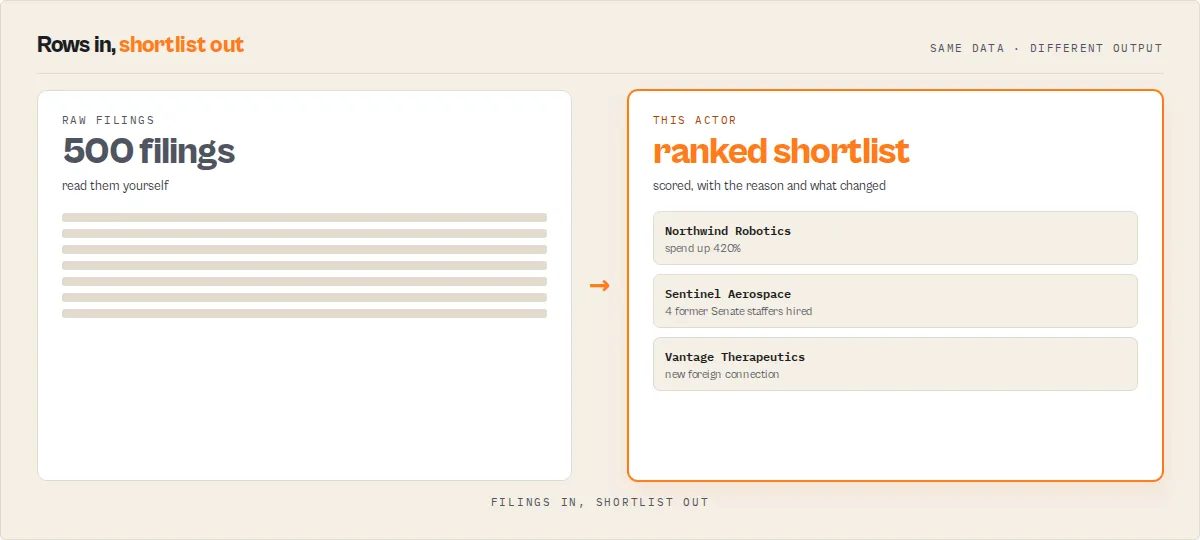
Most lobbying tools return filings. This one returns filings plus the influence intelligence on top of them — spend shocks, emerging issues, revolving-door hiring, influence rankings, committee targeting, and regulatory heat maps. So instead of reading hundreds of filings, you start with the handful that matter.
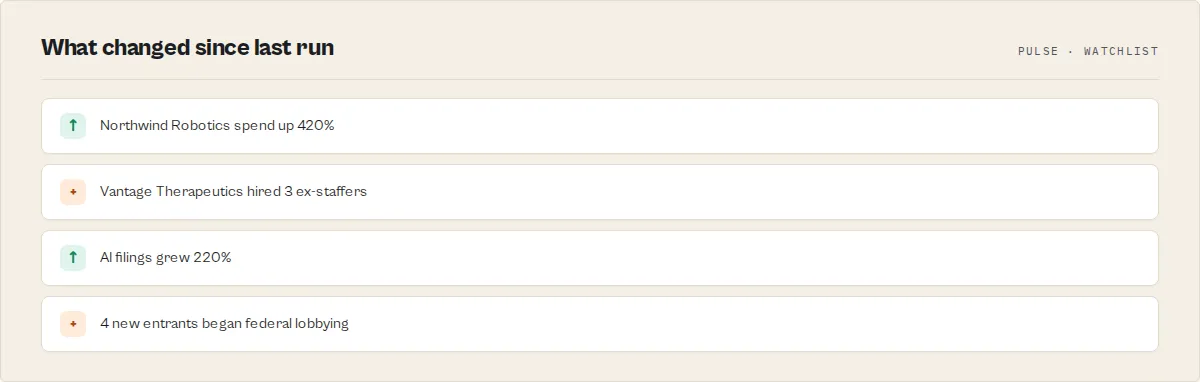
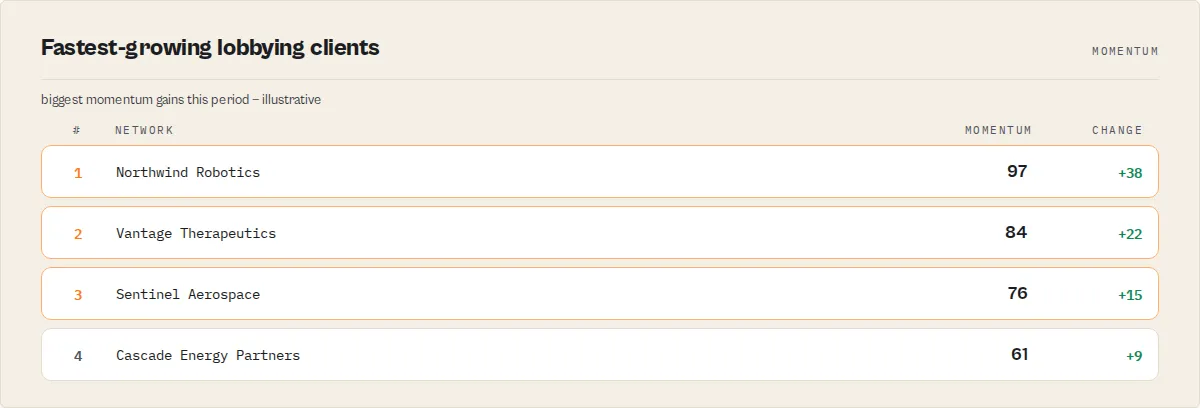
Run searchMode: "pulse" and the actor tells you what's moving, before you even name a company. Illustrative feedEvent / momentum records (shape, with example values):
Every headline is a deterministic template filled from the filing data — the events are real computations over the LDA dataset, the specific numbers above are illustrative.
Research jobs
Pick the job, not the feature. Each maps to one searchMode (or a flag).
| Your job | How |
|---|---|
| See what's moving right now, without naming a company | searchMode: "pulse" — an importance-ranked feed of spend shocks, new entrants, revolving-door hires, and issue crossovers |
| Monitor a specific company over time | searchMode: "competitive" for peer context, or set a watchlistName and schedule it for NEW / UPDATED / new-influence alerts |
| Discover emerging issues in a policy area | searchMode: "intelligence" with an issueAreaCode or activityKeywords — emerging issues, heat map, momentum |
| Track revolving-door influence | filter with minRevolvingDoorScore, or watch the revolvingDoorHire feed events |
| Build influence graphs | includeGraphEdges: true for edge records, plus networkInsight records in intelligence mode |
| Find the top spenders / most-lobbied issues | searchMode: "rankings" |
| Rank entities by overall clout | includeProfiles: true and sort by influenceIndex |
What each job returns
| Job | Key output fields |
|---|---|
| Score & triage filings | influenceRiskScore, riskTier, notabilityFactors, revolvingDoor, hasForeignEntities |
| Pulse / what's moving | feedEvent.eventType, feedEvent.importance, feedEvent.headline, momentum.momentumScore |
| Rankings | ranking.rankingType, ranking.rank, ranking.name, ranking.value |
| Revolving door | revolvingDoorScore, governmentBranches, highestOfficeHeld, revolvingDoorLobbyists |
| Foreign influence | hasForeignEntities, foreignCountries, foreignEntities[] |
| Trends | trendSummary.year, trendSummary.totalIncomeUsd, incomeChangePctVsPriorYear, emergingIssue |
| Entity profiles | influenceIndex, networkStrengthScore, totalSpendUsd, spendRank, issueConcentrationScore |
| Relationship graph | edge.from, edge.to, edge.relationship, edge.weight, relationshipYears |
Ready-to-run examples
One-click published tasks — each opens with a preset for a specific job (edit the inputs and run):
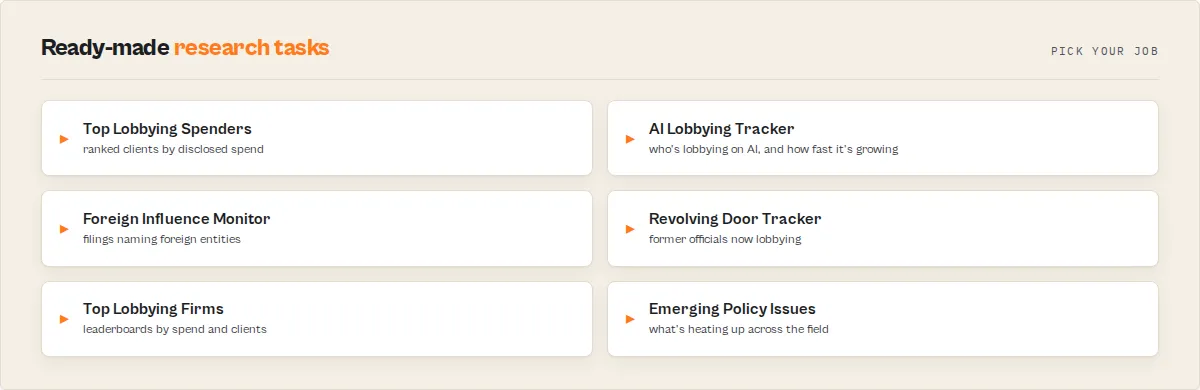
- Lobbying Pulse: What's Moving in Federal Lobbying — the importance-ranked feed of spend shocks, new entrants, and revolving-door hires.
- Biggest Lobbying Spenders — leaderboards of top clients, firms, and lobbyists by spend.
- Foreign Influence Lobbying Monitor — filings tied to foreign entities, with the countries involved.
- Revolving Door Lobbyist Tracker — lobbyists who held prior government roles, scored by seniority.
- AI Lobbying Tracker — who is lobbying Congress on artificial intelligence.
- Company Lobbying Spending Trends — multi-year spend, firms, lobbyists, and issues for any company.
- Healthcare & Pharma Lobbying Tracker — health-sector lobbying by company, issue, and spend.
- Defense Lobbying Tracker — which defense and aerospace contractors are lobbying, on what.
- Big Tech Lobbying Tracker — technology-sector lobbying by company and issue.
- Energy & Oil & Gas Lobbying Tracker — energy-sector lobbying by company and issue.
- Financial Services Lobbying Tracker — bank and financial-regulation lobbying.
See all on the examples page.
Common questions this actor answers
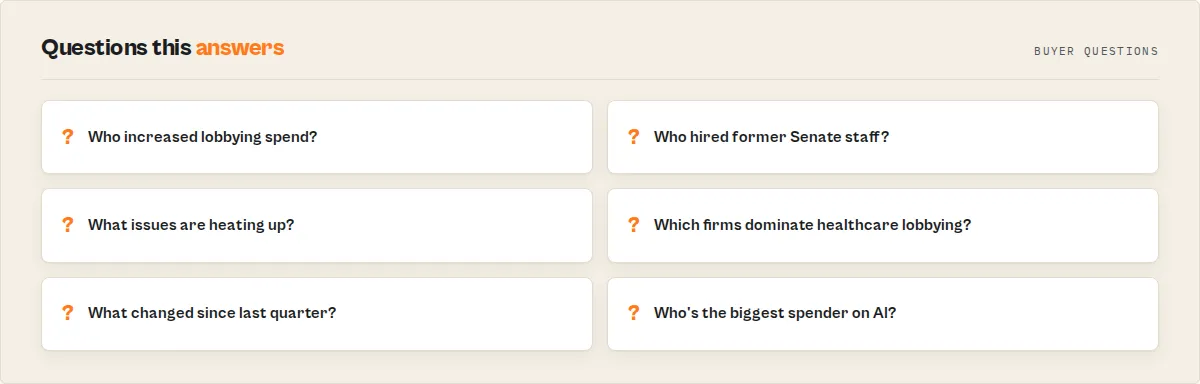
Who are the biggest lobbying spenders? Run searchMode: "rankings" — it returns leaderboards of top clients and firms by spend.
Which companies increased their lobbying spend the most? Run searchMode: "pulse" — spendShock feed events surface the biggest quarter-over-quarter jumps.
Which former government officials became lobbyists? Filter by minRevolvingDoorScore, or watch revolvingDoorHire events; each filing carries highestOfficeHeld and governmentBranches.
What policy issues are growing fastest? Run searchMode: "intelligence" and read the regulatoryHeat records and emergingIssue records.
Which committees and agencies are being targeted? Intelligence mode emits committeeInfluence and agencyInfluence records mapping each to the companies lobbying it.
How do I compare two companies' lobbying? Run searchMode: "competitive" with a clientName for spend rank, peer list, and issue overlap.
Why Use Senate Lobbying Disclosure Search?
The Senate LDA website lets you browse filings one page at a time, 25 results per page, with no bulk export. Extracting data for analysis means clicking through dozens of pages and copying by hand. This actor handles pagination, flattens the deeply nested JSON, and layers deterministic intelligence on top.
| Job | Generic LDA scraper | This actor |
|---|---|---|
| Find filings | ✓ | ✓ |
| Detect spend spikes | ✗ | ✓ |
| Track new lobbying firms | ✗ | ✓ |
| Monitor revolving-door hires | ✗ | ✓ |
| Build influence graphs | ✗ | ✓ |
| Identify emerging issues | ✗ | ✓ |
| Rank entities by clout | ✗ | ✓ |
Features
Search
- Filter by client, firm, lobbyist, issue area, period, or industry — partial name matching, 77 issue categories, any year from 1999 on; flattened records with stable
lobbyistIds and convenience strings. - Activity keyword & bill filtering — adds the full-text activity search the Senate API lacks. Pass
activityKeywords(any/all/phrase); every filing also carriesmentionedBillNumbers,mentionedAgencies,mentionedCommittees. - Quality filters —
minIncome,minNotability,minRevolvingDoorScorenarrow to what matters.
Intelligence
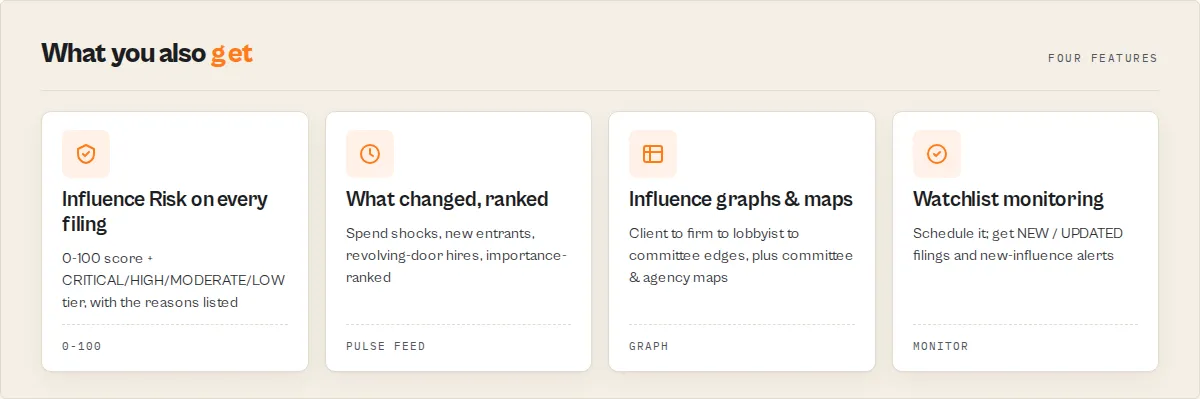
- Influence Risk score + Influence Index — per-filing
influenceRiskScore(0-100) +riskTier, and a per-entity headlineinfluenceIndex(breadth + spend + persistence). - Pulse / Intelligence feed (
searchMode: "pulse"/"intelligence") — an importance-ranked feed of what changed (spend shocks, new entrants, new issues, revolving-door hires, issue crossovers) + momentum leaderboard + regulatory heat map. Sector-wide or focused. - Rankings, Competitive, Trend (
searchMode) — leaderboards; same-industry peer benchmark; per-year rollups with emerging issues. - Revolving-door intelligence —
revolvingDoorScore,governmentBranches,highestOfficeHeld.
Monitoring
- Watchlists —
watchlistNametracks a search across runs; filings tagNEW/SEEN/UPDATED(withchangedFields). - New-influence detection —
influenceChangerecords fire when a tracked client adds a new firm, lobbyist, issue, agency, committee, or foreign entity, or spikes spend. - Anomaly flags — deterministic per-filing triggers for scheduled alerts.
Network analysis
- Relationship graph edges (
includeGraphEdges) —edgerecords for Gephi / Neo4j, with relationship longevity on client→firm links. - Committee & agency influence maps — who lobbies each committee and agency.
- Network insights — most connected firm, most connected lobbyist, most-targeted committee, fastest-growing network.
How to Use
-
Enter search criteria — provide at least one filter: client name, lobbying firm name, lobbyist name, issue area, or filing period. You can combine multiple filters.
-
Select the year — choose the filing year (1999–2026). Defaults to 2024.
-
Set income threshold — optionally set a minimum income/expense amount to filter out small engagements.
-
Run and download — click "Start" and wait for the run to complete (typically 5–30 seconds). Download the structured JSON dataset.
Input Parameters
| Parameter | Type | Required | Default | Description |
|---|---|---|---|---|
searchMode | Select | No | filings | filings, trend, rankings, competitive, intelligence (influence feed), or pulse (zero-config sector-wide feed) |
preset | Select | No | — | One-click intent (company-intelligence, firm-portfolio, foreign-influence-watch, revolving-door-watch, issue-area-scan, quarterly-monitor) |
clientName | String | No* | — | Client/organization paying for lobbying (partial match, e.g., "Amazon") |
registrantName | String | No* | — | Lobbying firm name (partial match, e.g., "Akin Gump") |
lobbyistName | String | No | — | Individual lobbyist name (partial match) |
filingYear | Integer | No | 2024 | Filing year (1999–2026), filings mode |
yearStart / yearEnd | Integer | No | end−5 / current | Year range for trend mode |
filingPeriod | Select | No | All | Q1–Q4 reports, Registration, Miscellaneous Amendment, or Termination |
issueAreaCode | Select | No | All | Policy issue area (77 categories) |
industry | String | No | — | Only return filings whose client is classified into this industry (e.g. "Technology", "Defense & Aerospace") |
activityKeywords | Array | No | — | Keyword/bill filter over activity descriptions, e.g. ["AI", "H.R. 815"] |
activityKeywordMode | Select | No | any | any / all / phrase matching for activityKeywords |
minIncome | Number | No | — | Minimum income/expense amount in USD |
minNotability | Integer | No | — | Only return filings with an influence-risk score at or above this value (0–100). Try 45 for high-attention filings only |
minRevolvingDoorScore | Integer | No | — | Only return filings with a revolving-door score at or above this value (0–100) |
includeProfiles | Boolean | No | false | Also emit aggregate client / firm / lobbyist profile records |
includeGraphEdges | Boolean | No | false | Also emit relationship edge records for graph tools |
dedupeStrategy | Select | No | allFilings | latestPerEngagement collapses re-files to the latest per client + firm + period |
maxResults | Integer | No | 100 | Maximum filings to return (1–5,000) |
watchlistName | String | No | — | Track this exact search across runs; filings are tagged NEW / SEEN / UPDATED versus prior runs |
changeMode | Select | No | newAndUpdated | Watchlist: newAndUpdated flags changed filings as UPDATED; newOnly only NEW vs SEEN |
*At least one name-based or keyword search parameter is recommended for meaningful results.
Input Examples
Find all Amazon lobbying in 2024:
Top defense industry lobbying firms in Q4 2024:
Track a specific lobbying firm's client portfolio:
Healthcare lobbying activity above $50K:
Foreign-connected lobbying registrations:
Disambiguate lobbyists by ID and career history (Portman example):
The structured lobbyists[] array on each filing carries lobbyistId (Senate LDA stable ID) and coveredPosition (full career history as filed). For Rachel Portman (lobbyistId: 145585), coveredPosition reads "Deputy Health Policy Director, Committee on Senate Health, Education, Labor and Pensions; Health Policy Assistant, Sen. Richard Burr; Intern, Rep. Robert Portman" — clearly distinguishing her from filings naming Sen. Robert Portman directly. Group results by lobbyistId to deduplicate across filings.
Input Tips
- Client and registrant name searches use partial matching — "Amazon" matches "Amazon.com Services LLC", "Amazon Web Services", "Amazon.com Inc.", etc.
- Use issue area codes for the most targeted policy searches. Common codes: DEF (Defense), HCR (Health), TAX (Taxation), TEC (Telecommunications), ENV (Environment).
- Registrations (RR) reveal new lobbying relationships but don't include financial data. Quarterly reports (Q1–Q4) contain income/expense figures.
- The
minIncomefilter is applied client-side to ensure numeric accuracy. The actor fetches extra pages to compensate for filtered results. - Combine
clientNamewithissueAreaCodeto see what a specific company is lobbying on in a particular policy area.
Output
Output schema reference
The headline fields are covered above (intelligence fields, record types, views). The tables below are the complete per-field reference for API and agent consumers — most buyers never need them.
Filing metadata:
| Field | Type | Description |
|---|---|---|
filingId | String | Unique filing UUID |
filingType | String | Filing type code (Q1–Q4, RR, MA, TA) |
filingTypeDisplay | String | Human-readable filing type |
filingYear | Integer | Filing year |
filingPeriod | String | Filing period (Q1–Q4, RR, MA, TA) |
filingDate | String | Date the filing was submitted |
filingDocumentUrl | String | Direct URL to the filing document on Senate website |
Client fields:
| Field | Type | Description |
|---|---|---|
clientName | String | Organization paying for lobbying |
clientDescription | String | Client business description |
clientState | String | Client state (US states or "DC") |
clientCountry | String | Client country code |
Registrant (lobbying firm) fields:
| Field | Type | Description |
|---|---|---|
registrantName | String | Lobbying firm or self-filing organization |
registrantDescription | String | Firm description |
registrantCity | String | Firm city |
registrantState | String | Firm state |
registrantCountry | String | Firm country code |
registrantContactName | String | Primary contact person |
Financial fields:
| Field | Type | Description |
|---|---|---|
income | Number / null | Income reported by outside lobbying firms (what they were paid) |
expenses | Number / null | Expenses reported by in-house lobbyists (what they spent) |
expensesMethod | String | How in-house expenses were calculated |
Activity fields:
| Field | Type | Description |
|---|---|---|
lobbyingActivities[] | Array | Detailed lobbying activities (see nested fields below) |
lobbyists[] | Array | Top-level deduplicated lobbyists across the filing (see nested fields below) |
lobbyistNames | String | Comma-separated list of all lobbyists on the filing (convenience field) |
issueAreas | String | Comma-separated unique issue areas (convenience field) |
Lobbying activity nested fields:
| Field | Type | Description |
|---|---|---|
lobbyingActivities[].issueCode | String | Three-letter issue area code (DEF, HCR, TAX, etc.) |
lobbyingActivities[].issueArea | String | Full issue area name |
lobbyingActivities[].description | String | Specific bills, regulations, and issues lobbied on |
lobbyingActivities[].lobbyists[] | Array | Individual lobbyists working on this issue |
lobbyingActivities[].lobbyists[].lobbyistId | Integer / null | Senate LDA stable lobbyist ID (use as join key when grouping by lobbyist) |
lobbyingActivities[].lobbyists[].firstName | String | Lobbyist first name |
lobbyingActivities[].lobbyists[].lastName | String | Lobbyist last name |
lobbyingActivities[].lobbyists[].coveredPosition | String | Full career history of former government roles as recorded on this filing |
lobbyingActivities[].lobbyists[].newLobbyist | Boolean | Whether this is a newly registered lobbyist |
Top-level lobbyists fields:
| Field | Type | Description |
|---|---|---|
lobbyists[].lobbyistId | Integer / null | Senate LDA stable lobbyist ID |
lobbyists[].name | String | Full name (firstName lastName) |
lobbyists[].coveredPosition | String | Full career history of former government roles |
Foreign entity fields:
| Field | Type | Description |
|---|---|---|
foreignEntities[] | Array | Foreign organizations connected to the lobbying |
foreignEntities[].name | String | Foreign entity name |
foreignEntities[].country | String | Foreign entity country |
foreignEntities[].contribution | Number / null | Financial contribution amount |
foreignEntities[].ownershipPercentage | Number / null | Ownership stake percentage |
Derived intelligence fields (computed deterministically from the filing, no LLM):
| Field | Type | Description |
|---|---|---|
recordType | String | filing for data rows; the final record is summary; empty searches return no-results; a handled error returns error |
schemaVersion | String | Output-contract version; branch on this if the shape changes |
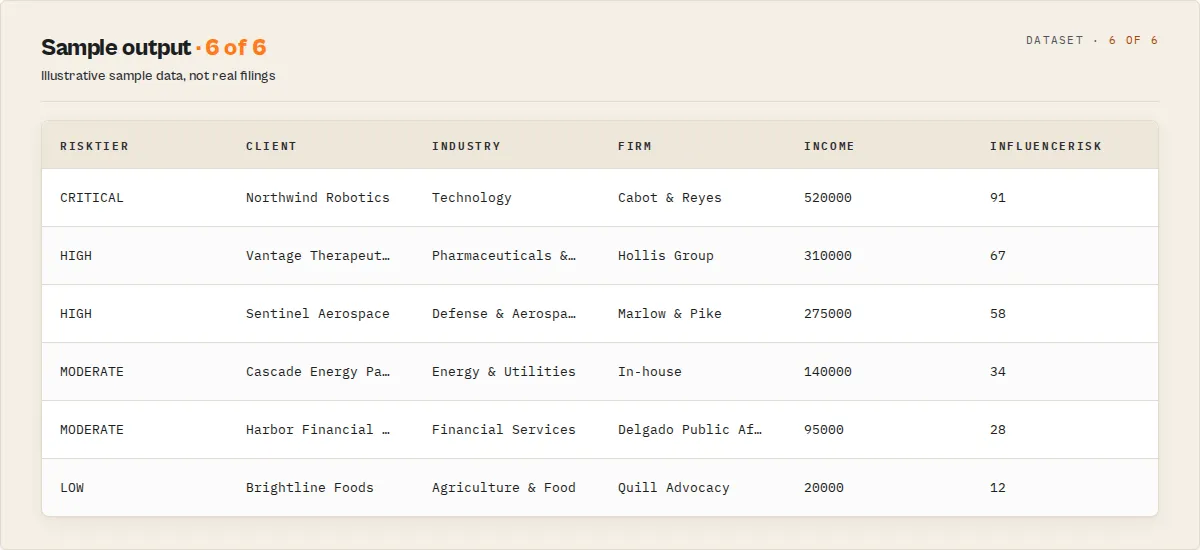
influenceRiskScore | Integer | Headline triage score 0–100. Rises with lobbying spend, foreign-entity involvement, revolving-door lobbyists, and conviction disclosures |
riskTier | String | Banded influence risk: CRITICAL (≥70), HIGH (≥45), MODERATE (≥20), LOW |
notabilityScore / notabilityTier | Integer / String | Deprecated aliases of influenceRiskScore / riskTier (identical values; retained so existing consumers don't break) |
notabilityFactors | Array | Plain-English reasons that drove the score |
revolvingDoor | Boolean | True when any lobbyist on the filing held a prior covered government position |
revolvingDoorLobbyists | Array | Names of those former officials |
revolvingDoorScore | Integer | 0–100 intensity of revolving-door influence (seniority + headcount + branch breadth) |
highestOfficeHeld | String | The most senior prior government position among the filing's lobbyists |
governmentBranches | Array | Branches those officials came from: Senate / House / Executive / Judicial / Agency |
revolvingDoorSeniority | String | Highest seniority of those prior roles: senior-official / congressional-staff / agency-official / other / none |
clientIndustry | String | Industry classified from the client name + business description (null when unmatched) |
anomalyFlags | Array | Deterministic single-filing anomalies (unusuallyLargeLobbyistCount, manyIssueAreas, foreignAndConviction, largeValueAmendment) |
hasForeignEntities | Boolean | True when the filing names foreign principals |
foreignCountries | Array | Countries of the named foreign entities |
hasConvictionDisclosures | Boolean | True when a named lobbyist carries a conviction disclosure |
newLobbyistCount | Integer | Count of lobbyists newly registered on this filing |
isAmendment | Boolean | True when the filing is an amendment (from filing type) |
filingFreshnessDays | Integer | Days between the filing date and the run |
mentionedBillNumbers | Array | Bill numbers (e.g. H.R. 815) found in the activity descriptions |
mentionedAgencies | Array | Federal agencies named in the activity descriptions |
matchedKeywords / activityMatchCount | Array / Integer | Activity keywords matched (only when activityKeywords is set) |
summary | String | Paste-ready one-line description of the filing (≤280 chars) |
changeFlag | String | Watchlist mode only: NEW, SEEN, or UPDATED |
changedFields | Array | Watchlist mode only: the fields that changed on an UPDATED filing |
firstSeenAt / runsSeen | String / Integer | Watchlist mode only: when the filing was first seen and how many runs it has appeared in |
Other record types
Beyond filing and the run summary, the dataset can also contain (each tagged by recordType):
trendSummary(trend mode) — one per year for the searched entity:year,filings,totalIncomeUsd,incomeChangePctVsPriorYear,uniqueRegistrants,uniqueLobbyists,revolvingDoorFilings,foreignInfluenceFilings,topIssueAreas,newIssueAreas,droppedIssueAreas.clientProfile/registrantProfile/lobbyistProfile(includeProfiles) —entity,yearsCovered,filings,totalSpendUsd,issueConcentrationScore,spendRank,spendRankPercentile,topRegistrants/topClients,topIssueAreas,revolvingDoorLobbyists,foreignConnections. Counts cover the run's result set, not all-time.edge(includeGraphEdges) —from,fromType,to,toType,relationship(paid_lobbying/employs_lobbyist/lobbied_issue/held_position),amountUsd,weight,year. Thepaid_lobbying(client → firm) edges also carry relationship-longevity:firstSeenYear,lastSeenYear,relationshipYears,quartersActive,totalSpendUsd. Drops into Gephi / Neo4j / Cytoscape.ranking(rankings mode) —rankingType(topClientsBySpend / topRegistrantsBySpend / topLobbyistsByFilings / topLobbyistsByClients / topIssueAreas / topForeignCountries / topRevolvingDoorLobbyists),rank,name,value,metric.emergingIssue(trend mode) —name,filingsPriorPeriod,filingsRecentPeriod,growthPercent,periodLabel: issue areas whose filing count grew between the two most recent years.influenceChange(watchlist mode) —client,changeType(newFirm/newLobbyist/newIssue/newAgency/newCommittee/foreignEntityAdded/spendIncrease),detail,value,percentChange.competitive(competitive mode) —client,industry,spendUsd,spendRank,peerCount,industryPeers,issueOverlap,note(peers and ranks are computed within the year scanned, not all-time).feedEvent(intelligence mode) —eventType(spendShock/newEntrant/newIssue/newFirm/revolvingDoorHire/foreignEntityAdded),importance(0-100),headline(paste-ready),client,value,percentChange,year. The importance-ranked influence feed.momentum(intelligence mode) —rank,client,momentumScore(0-100),spendGrowthPct,filingGrowthPct,newFirms,newLobbyists,newIssues. The fastest-growing lobbying actors.committeeInfluence(intelligence mode) —committee,companies,filings: which clients target a committee, extracted from covered positions.agencyInfluence(intelligence mode) —agency,companies,filings: which agencies are lobbied, extracted from activity descriptions.regulatoryHeat(intelligence mode) —issueArea,companies,filings,totalSpendUsd,growthPercent: the heat map of what's hot, growing, or fading.networkInsight(intelligence mode) —insightType,insight(paste-ready headline),entity,value: graph superlatives (most connected firm / lobbyist, most-targeted committee, fastest-growing network).
The entity-profile records carry both influenceIndex (0-100, the headline clout measure) and its networkStrengthScore component (structural breadth: firms + lobbyists + revolving-door intensity + branch/agency/committee breadth). Every filing carries mentionedCommittees (congressional committees named in its lobbyists' covered positions). The feedEvent stream also includes issueCrossover events ("AI lobbying surpassed telecom lobbying").
The Output tab carries dedicated views for Influence Feed, Trend (by year), Entity Profiles, Relationship Edges, Lobbyists (one row each), and Alerts (changes) alongside the filing views.
Run summary record
The last record pushed to the dataset is the run summary (recordType: "summary"), also written to the SUMMARY key-value store key for dashboards and agents:
| Field | Description |
|---|---|
filingsReturned / totalMatching | Filings returned vs total matching the search on the Senate API |
uniqueClients / uniqueRegistrants / uniqueLobbyists | Distinct entity counts across the result set |
totalIncomeUsd / totalExpensesUsd | Summed lobbying spend |
foreignInfluenceFilings / revolvingDoorFilings / convictionFilings | How many returned filings carry each signal |
notabilityDistribution | Count of filings per notability tier |
topClientsByIncome / topRegistrantsByIncome / topIssueAreas | The biggest spenders and most-lobbied issues in the result set |
newFilings / baselineRun | Watchlist mode: how many filings are new since the last run (baselineRun: true on the first run) |
truncated / truncatedReason | true when a cap (maxResults or charge limit) stopped the run short of all matching filings, with the reason — so you know to narrow the search or raise maxResults |
ppeChargedResults | Number of results actually billed on this run (null on free/owner runs) |
Dataset views
The Output tab opens on the Lobbying Filings view (notability tier first, so the highest-attention filings are obvious). Two focused views are also available: Foreign Influence (filings naming foreign entities) and Revolving Door (filings with former government officials).
Understanding the Financial Data
- Income — reported by outside lobbying firms (the registrant is a hired K Street firm). Represents what they were paid by the client for lobbying services during the quarter.
- Expenses — reported by in-house lobbyists (the registrant IS the client or part of the client organization). Represents what they spent on their own lobbying activities.
- A single filing will have either income OR expenses, never both.
- Quarterly reports (Q1–Q4) contain financial data. Registrations (RR), amendments (MA), and terminations (TA) generally do not.
- Income/expenses are reported in ranges for small amounts: under $5,000 may be reported as a range rather than an exact figure.
The Revolving Door
The coveredPosition field on individual lobbyists reveals former government roles — a key indicator of revolving-door lobbying. Examples:
- "Former Chief of Staff, Senate Armed Services Committee"
- "Former Deputy Assistant Secretary, Department of Defense"
- "Former Senior Advisor, White House National Economic Council"
These individuals are subject to cooling-off periods under federal law. The LDA requires disclosure of covered positions held within the past 20 years.
Disambiguating same-surname lobbyists
The Senate LDA stores covered_position on the per-filing-per-lobbyist join, not on the lobbyist record. For current filings, coveredPosition already contains the lobbyist's full career history of former government roles. Combine that with the stable lobbyistId to disambiguate.
Example: a search for lobbyistName: "Portman" against 2024 filings returns Rachel Portman (lobbyistId: 145585) with coveredPosition: "Deputy Health Policy Director, Committee on Senate Health, Education, Labor and Pensions; Health Policy Assistant, Sen. Richard Burr; Intern, Rep. Robert Portman". The career string and the ID together separate her from any filing referencing Sen. Robert Portman directly.
Older filings (pre-2010) sometimes carry coveredPosition: "N/A" or empty strings — the disclosure standard tightened over time. Use lobbyistId as the canonical join key across years.
Use Cases
- Political intelligence analysts tracking which companies and industries are lobbying on specific bills and regulations, and identifying emerging policy trends from shifts in lobbying spending
- Corporate government affairs teams benchmarking their lobbying spend against competitors, identifying the most active firms in their policy areas, and finding lobbyists with relevant Hill experience
- Investigative journalists following the money trail from corporate interests through K Street firms to policy outcomes, and cross-referencing lobbying data with campaign contributions and legislative votes
- Compliance officers verifying that lobbying activities are properly disclosed, checking for foreign entity connections, and monitoring revolving-door movements
- Policy researchers analyzing the relationship between lobbying spending and legislative outcomes across industries and issue areas
- Venture capital and private equity firms assessing regulatory risk for portfolio companies by monitoring lobbying activity in their target sectors
- Foreign policy analysts tracking foreign-connected lobbying activity to understand foreign influence on US policy
How to Use the API
Python
JavaScript
cURL
How It Works
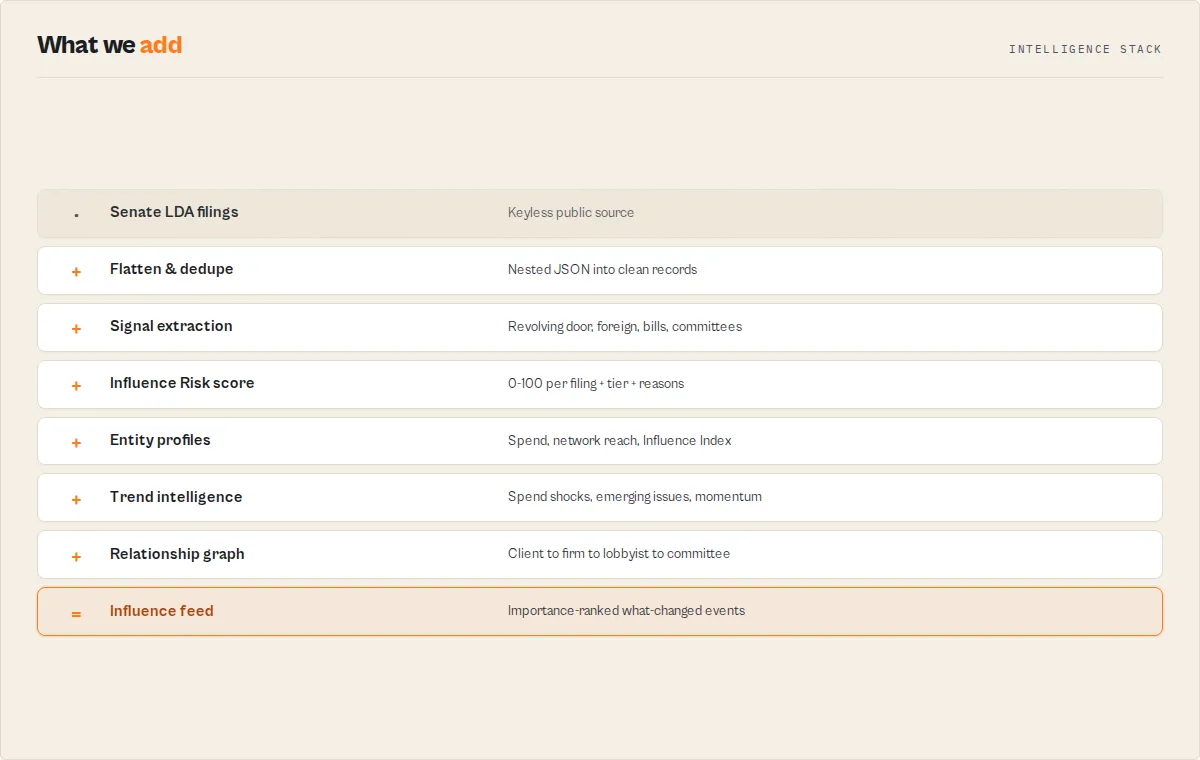
The actor queries the Senate LDA REST API, paginates the results (25 per page) up to maxResults, flattens the deeply nested filing JSON into clean records, and computes the deterministic intelligence layer (scores, classifications, aggregates, feed events) over the fetched data before streaming it to the dataset. No browser, no API key.
Data Sources
| Source | API Endpoint | Auth Required |
|---|---|---|
| US Senate LDA | https://lda.senate.gov/api/v1/filings/ | No |
Common Issue Area Codes
| Code | Issue Area | Code | Issue Area |
|---|---|---|---|
| DEF | Defense | HCR | Health Issues |
| TAX | Taxation | ENE | Energy/Nuclear |
| TEC | Telecommunications | ENV | Environment |
| TRD | Trade | FIN | Financial Institutions |
| BUD | Budget/Appropriations | IMM | Immigration |
| TRA | Transportation | AGR | Agriculture |
| EDU | Education | HOM | Homeland Security |
| LBR | Labor Issues | INS | Insurance |
| FOR | Foreign Relations | COM | Communications |
| MED | Medical/Disease | CPT | Computers/IT |
| PHA | Pharmacy | FUE | Fuel/Gas/Oil |
77 issue area codes available in the input dropdown. See the Senate LDA website for the complete list.
How Much Does It Cost?
| Scenario | Results | Est. Time | Est. Cost |
|---|---|---|---|
| Single company lookup (100 filings) | 100 | 10 sec | < $0.01 |
| Issue area + income filter (200 filings) | 200 | 15 sec | ~$0.01 |
| Full year scan, single firm (500 filings) | 500 | 30 sec | ~$0.02 |
| Broad issue area search (5,000 filings) | 5,000 | 3 min | ~$0.10 |
The actor uses 256 MB memory and makes lightweight API calls with no browser rendering. The Apify free tier covers hundreds of runs per month.
Tips
- Search by issue area for industry analysis — filtering by DEF (Defense), HCR (Health), or TAX (Taxation) reveals which companies and firms are most active in each policy domain.
- Check coveredPosition for revolving door — lobbyists with former government roles in the same policy area they're lobbying on are especially influential. Filter results for non-empty
coveredPositionstrings. - Use minIncome to surface big spenders — set
minIncome: 100000to focus on the highest-value lobbying engagements and filter out nominal filings. - Cross-reference with campaign finance — combine lobbying data with the FEC Campaign Finance Search actor to see both lobbying spending and political contribution patterns for the same companies.
- Track registrations for new relationships — filing period "RR" (Registration) reveals new client-lobbyist relationships being formed.
- Batch by year for trend analysis — run the actor once per year for the same client to track lobbying spending trends over time.
Limitations
- Senate API pagination — the API returns 25 results per page, requiring many sequential requests for large result sets. Fetching 5,000 results requires 200 API calls.
- No House-side data — this actor searches the Senate LDA database. House of Representatives lobbying data uses a different system.
- Income rounding — small lobbying engagements may be reported as income ranges rather than exact figures. The API returns the reported amount.
- Name matching is partial — searching "Smith" in lobbyist name will match all Smiths. Provide more specific names for precision.
- Keyword search is client-side — the Senate API itself has no full-text activity search, so
activityKeywordsfilters the activity descriptions after fetching. It works within the result set the search returns (bounded bymaxResults), not across the entire database. Pair keywords with a client/registrant/issue filter for the most complete coverage. - No amendment chain — the LDA API does not link an amendment to the original filing, so the actor flags
isAmendmentbut cannot reconstruct the amendment history.dedupeStrategy: "latestPerEngagement"collapses re-files to the latest per engagement as a practical substitute. - Registration filings lack financial data — RR (Registration) filings establish the lobbying relationship but don't include income/expense figures. Only quarterly reports (Q1–Q4) have financial data.
- Foreign entity data is self-reported — contribution amounts and ownership percentages are disclosed by the filing party and may be incomplete.
Responsible Use
- All data is public — lobbying disclosure filings are published by the US Senate under the Lobbying Disclosure Act and are freely available for public inspection.
- Respect Senate API rate limits — the actor paginates through results sequentially. Avoid launching excessive concurrent runs.
- Use for legitimate purposes — this tool is designed for policy analysis, competitive intelligence, investigative journalism, compliance monitoring, and academic research.
- Lobbying is legal — lobbying is a constitutionally protected activity. The LDA requires transparency, not prohibition.
FAQ
Is an API key required? No. The Senate LDA REST API is free and does not require authentication.
How current is the data? Lobbying filings are due 45 days after the end of each quarter. Q4 2024 filings were due by February 14, 2025. New filings appear in the database as they are processed by the Senate.
What is the difference between income and expenses? Income is reported by outside lobbying firms (K Street firms hired by clients). Expenses are reported by organizations that lobby on their own behalf (in-house lobbyists). A filing will have one or the other, never both.
Can I find lobbying connected to foreign governments?
Yes. The foreignEntities array in each filing discloses foreign organizations or governments connected to the lobbying activity, including their country and financial contribution.
How do I identify revolving-door lobbyists?
Check the coveredPosition field on individual lobbyists within the lobbyingActivities array (or the deduplicated top-level lobbyists[]). Non-empty values indicate former government roles — for current filings the field carries the lobbyist's full career history (e.g., "Former Chief of Staff, Senate Commerce Committee; Senior Counsel, Department of Justice").
How do I tell two lobbyists with the same surname apart?
Group results by lobbyistId (the Senate LDA stable ID) — each lobbyist has a unique ID regardless of name collisions. The coveredPosition career string is your second-line check: it shows the actual roles each ID held, separating Sen. Robert Portman from junior associates with the same surname.
Can I search for lobbying on a specific bill?
Not directly through this actor's input parameters. However, bill references appear in the lobbyingActivities[].description field. Search for a broad issue area (e.g., HCR for health) and then filter the results for specific bill numbers.
Why do some filings show $0 income? Some quarterly reports are filed as amendments or corrections with zero income. Additionally, termination filings (TA type) and miscellaneous amendments (MA type) typically don't include financial data.
How far back does the data go? The Senate LDA database contains filings from 1999 to present — over 25 years of federal lobbying disclosure data.
Use in Dify
Drop this actor into Dify workflows via the Apify plugin's Run Actor node. Every filing returns scored and classified as structured JSON — a notabilityTier (critical / high / medium / low) plus the revolvingDoor, hasForeignEntities, and hasConvictionDisclosures booleans your downstream if/else node branches on. A generic scraper pointed at the Senate LDA site returns rows you still have to read; this returns the filings worth reading and why.
- Actor ID:
ryanclinton/senate-lobbying-search - Sample input (surface only the high-attention filings for a company):
-
Branching example — a Dify if/else node routes on the stable enum and booleans without parsing prose:
notabilityTieriscriticalORhasForeignEntitiesistrue→ send to the analyst review branchrevolvingDooristrue→ tag as a former-official engagement and notify- else → log to the dataset and continue
-
Opt-in monitoring: set
watchlistNameand schedule the run. Each filing then carrieschangeFlag(NEW/SEEN), so a Dify workflow branches onchangeFlag == "NEW"to alert only on filings that appeared since the last run. -
The
notabilityFactors[]array is plain-English and usable verbatim in a Slack message, email, or LLM prompt — no rewriting. The run-levelsummaryrecord (also at theSUMMARYkey-value store key) gives a Dify aggregation node the totals and top spenders in one object.
Integrations
- Apify API — trigger runs programmatically for automated lobbying monitoring dashboards
- Zapier — automatically run lobbying searches when policy-relevant events occur
- Make (Integromat) — build workflows that track lobbying activity around specific legislative issues
- Google Sheets — export lobbying data for policy research teams and compliance reporting
- Webhooks — receive lobbying data as soon as the run completes for real-time policy intelligence
- Scheduled Runs — run quarterly after each filing deadline to keep your lobbying database current
Related Actors
| Actor | What it does | Use with Senate Lobbying Search |
|---|---|---|
| FEC Campaign Finance Search | Federal campaign contributions | Cross-reference lobbying with political donations from the same companies |
| Congress Bill Search | Congressional legislation | Find the bills being lobbied on by matching issue descriptions |
| Congress Stock Tracker | Congressional stock trades | Compare lobbying activity with congressional investment patterns |
| Federal Register Search | Federal regulations | Track the regulatory outcomes of lobbying campaigns |
| FARA Foreign Agents | Foreign agent registrations | Companion database for foreign-connected influence activity |
| CMS Open Payments | Pharma payments to physicians | Compare pharma lobbying spending with physician payment patterns |