
Knowledge Intelligence Engine — Website to Markdown for RAG
Pricing
from $20.00 / 1,000 page converteds
Knowledge Intelligence Engine — Website to Markdown for RAG
Turn any website, documentation site or help centre into a retrieval-ready knowledge corpus for RAG and AI search. Clean Markdown plus chunks, change detection, deduplication, retrieval scoring, version awareness and a full corpus audit, in one run.
Pricing
from $20.00 / 1,000 page converteds
Rating
0.0
(0)
Developer

Ryan Clinton
Maintained by CommunityActor stats
0
Bookmarked
23
Total users
0
Monthly active users
2 months ago
Last modified
Categories
Share
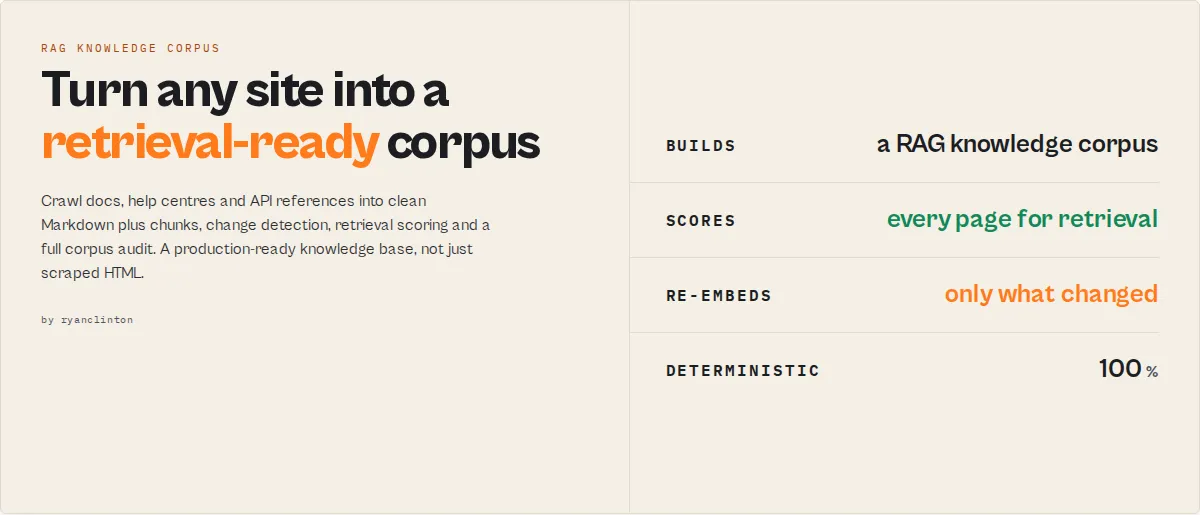
Most crawlers extract pages. This actor builds knowledge corpora.
Most teams think they need a crawler. What they actually need is a retrieval-ready knowledge corpus. A typical RAG pipeline is eight stages:
Most tools stop after the first step and hand you HTML. This actor does all eight in a single run and hands you a production-ready knowledge corpus: clean Markdown, embedding-ready chunks, change intelligence, retrieval scoring, version awareness, and a full corpus audit.
Feed the output straight into LangChain, LlamaIndex, Pinecone, Weaviate, Qdrant, Chroma, or any vector database. No browser, no JavaScript runtime, no preprocessing pipeline to build and maintain.
Note: the actor's slug is still
website-content-to-markdown(its original name). The Markdown conversion is the foundation; everything above is built on top of it.
What makes this different?
Most crawlers extract pages. This actor manages knowledge. It does not just tell you what content exists; it tells you:
- What changed since the last run (and returns only that, if you want)
- What matters (an importance and density ranking, not just word counts)
- What to embed and what to skip (a single retrieval score per page)
- What is duplicated, stale, or orphaned before it reaches production
- What is missing (crawl coverage vs the sitemap)
| Capability | Generic scraper | Typical extractor | This actor |
|---|---|---|---|
| Clean Markdown | ✅ | ✅ | ✅ |
| Boilerplate removal | ❌ | ✅ | ✅ |
| Change detection across runs | ❌ | Partial | ✅ |
| Delta crawls (return only changed pages) | ❌ | ❌ | ✅ |
| Per-page retrieval scoring | ❌ | ❌ | ✅ |
| Embedding-ready chunks | ❌ | ❌ | ✅ |
| Documentation classification | ❌ | ❌ | ✅ |
| Version awareness | ❌ | ❌ | ✅ |
| Duplicate / orphan / stale detection | ❌ | ❌ | ✅ |
| Corpus audit + recommendations | ❌ | ❌ | ✅ |
| Embedding-cost analysis | ❌ | ❌ | ✅ |
Most extraction tools tell you what content exists. This actor tells you what changed, what should be embedded, what should be removed, what is missing, and what is hurting retrieval. That is the moat.
Before and after
(Illustrative; real figures depend on the site.)
Re-embed only what changed (the expensive part of RAG)
Most crawlers return every page every time, so you re-embed, and re-pay for, the whole site on every refresh:
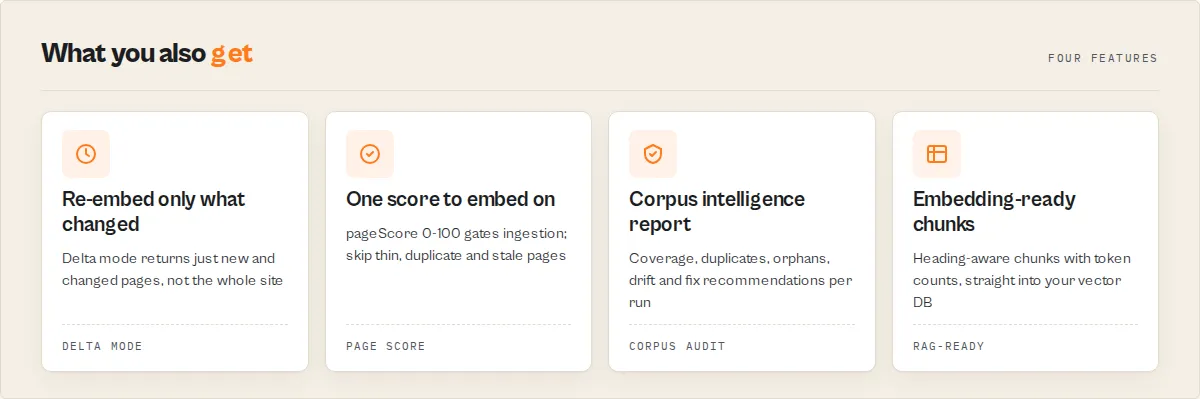
This actor tracks a content hash per page across runs. Set a watchlistName and deltaOnly, and a 1,000-page documentation site with 17 changed pages returns 17 records. The exact saving varies with how much your docs change, but on a stable site it is enormous.
What happens after the crawl?
Most crawlers stop at extraction. This one keeps going:
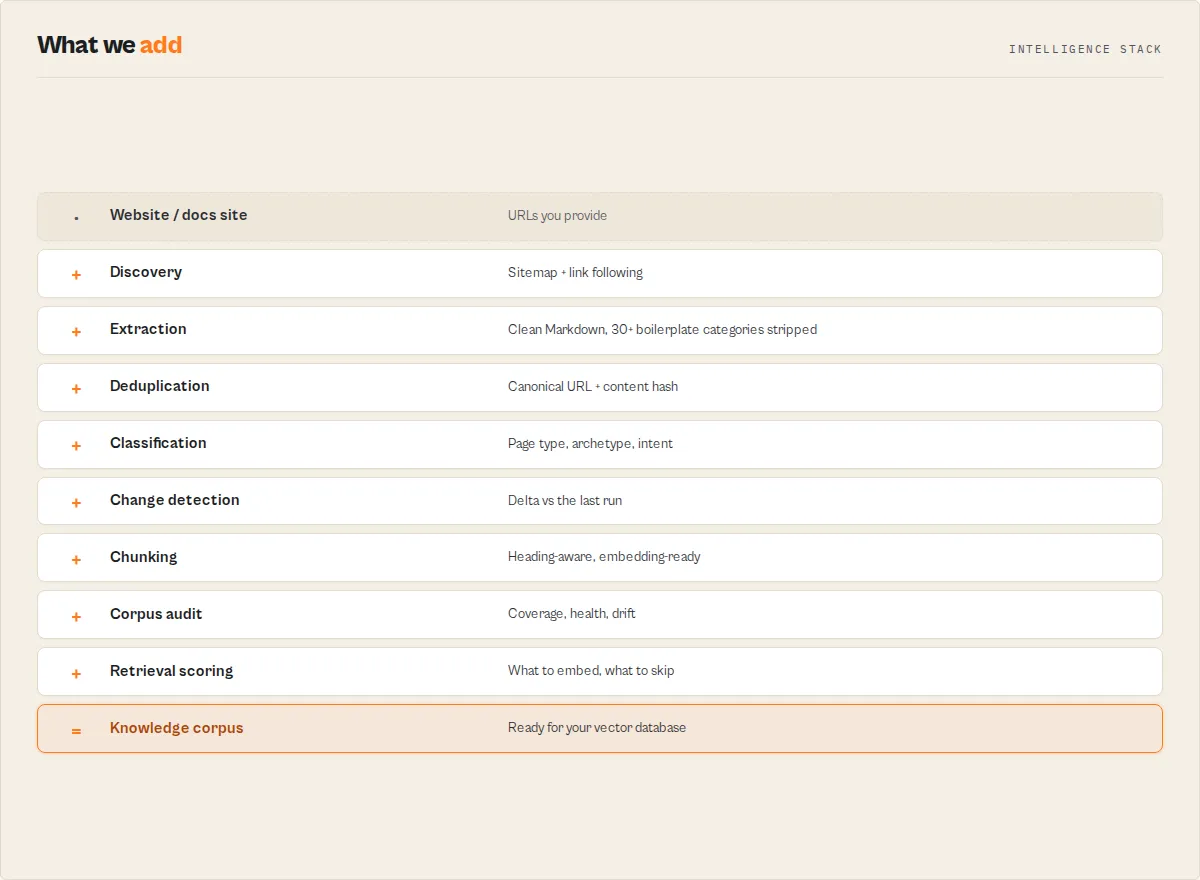
What you don't have to build
Most website crawlers stop at extraction. Everything else is a pipeline you build and maintain yourself:
| Build it yourself with a typical crawler | With this actor |
|---|---|
| Boilerplate-removal pipeline | ✅ built in |
| Deduplication pipeline | ✅ built in |
| Chunking pipeline | ✅ built in |
| Change-detection system | ✅ built in |
| Documentation classification | ✅ built in |
| Retrieval / quality scoring | ✅ built in |
| Corpus quality auditing | ✅ built in |
| Token-cost estimation | ✅ built in |
A typical extraction tool returns Markdown plus a little metadata. This actor returns Markdown, chunks, change intelligence, a corpus audit, retrieval scoring, coverage analysis, version awareness, and a knowledge graph. One side is a converter; the other is infrastructure.
Why RAG teams choose this
Built for AI ingestion, not generic scraping. The result: lower embedding costs (dedup + delta), higher retrieval quality (scoring + classification), smaller vector stores (skip thin and duplicate pages), faster refresh cycles (delta crawls), and far less post-processing code.
When a page renders its content client-side or restricts automated access, you get an explicit diagnostic record (jsRenderingRequired / botProtection) instead of a silently missing page, and those pages are never charged.
Corpus Intelligence Report
Why this matters: most teams never discover their duplicate documentation, orphaned pages, stale content, missing sitemap coverage, thin pages, or version conflicts until retrieval quality has already degraded in production. This actor finds them automatically, on every run, before they reach your model.
The feature almost no other extraction tool offers: the actor does not just hand you text, it tells you what is wrong with your knowledge corpus. Every run writes a SUMMARY to the key-value store with a corpusScore, a coverageConfidence ("did I crawl the whole thing?"), a retrievalAudit (excellent / good / poor pages + the top issues), an embedding-cost compression report, corpusDrift since the last run, and plain-English recommendations like "31 duplicate pages detected, dedupe on canonicalUrl" and "captured 500 of 560 sitemap pages (89.3%), raise maxPagesPerDomain for full coverage". Most tools tell you what content exists; this one tells you what to fix. (Full SUMMARY shape is documented in the output section below.)
A run summary reads like a corpus health dashboard:
Who is this for?
Built for: RAG engineers, AI platform teams, documentation teams, internal-search teams, and knowledge-management teams who need a retrieval-ready corpus, not just scraped text.
Not for: general web scraping, ecommerce product extraction, lead generation, or browser automation. If you only need raw HTML or a few fields, a generic crawler is simpler.
When a crawler is enough vs when you need this
| You only need... | Use a generic crawler |
|---|---|
| Markdown + basic metadata | A plain extraction tool is fine |
| You need... | Use this actor |
|---|---|
| Change detection + delta ingestion | ✅ |
| Retrieval scoring + quality filtering | ✅ |
| Corpus audit + coverage analysis | ✅ |
| Version awareness + documentation classification | ✅ |
| A knowledge graph + embedding-cost analysis | ✅ |
A real example
Point it at a documentation site and you get an ingestion-ready corpus plus a report, not just pages:
(Illustrative figures; actual numbers depend on the target site.)
What data can you extract?
| Data Point | Source | Example |
|---|---|---|
| 📄 Markdown content | Converted page HTML | # Getting Started\n\nThis guide covers... |
| 🔗 Page URL | Request URL | https://docs.pinnacletech.io/guides/setup |
| 📌 Page title | OpenGraph, <title>, or <h1> | Getting Started — Pinnacle Docs |
| 📝 Meta description | OpenGraph or <meta name="description"> | Learn how to set up your Pinnacle account... |
| 🔢 Word count | Counted from Markdown output | 1,843 |
| 🧮 Token estimate | Markdown length ÷ 4 (GPT-style) | 2,410 |
| ⭐ Content quality | wordCount + extraction method | rich |
| 🧩 Extraction method | Which content path matched | semantic-main |
| 🖥️ JS rendering required | Framework shell + thin static HTML | false |
| 🛡️ Bot protection | Anti-bot challenge detection | { "detected": false } |
| 🌐 Language | <html lang> attribute | en |
| 🔽 Crawl depth | Hops from starting URL | 2 |
| 🕐 Crawled at | Apify runtime timestamp | 2026-06-06T09:12:44.000Z |
Why use Website Content to Markdown?
Large language models and RAG pipelines need clean text — not raw HTML packed with <nav> elements, cookie consent banners, sidebar widgets, and tracking scripts. Preparing web content for AI consumption by hand means copy-pasting from dozens of pages, reformatting manually, and re-doing the work every time the source changes. That process does not scale.
This actor automates the entire pipeline: it discovers pages through sitemap.xml and internal link following, extracts the main content using semantic HTML selectors, strips more than 30 categories of boilerplate, and converts the result to GitHub Flavored Markdown in a single run. Every page becomes a clean, consistently formatted document ready for downstream AI processing.
Beyond the conversion itself, the Apify platform gives you tools that matter at scale:
- Scheduling — run weekly or on a custom cron to keep your knowledge base snapshots current
- API access — trigger runs from Python, JavaScript, or any HTTP client and pipe results directly into your pipeline
- Proxy rotation — scrape at scale without IP blocks using Apify's built-in residential and datacenter proxy infrastructure
- Monitoring — get Slack or email alerts when runs fail or produce unexpected results
- Integrations — connect output to LangChain, LlamaIndex, Pinecone, Weaviate, Zapier, Make, or webhooks in minutes
Features
Grouped by the job they do. Every field below is documented in full in the output fields table.
Content extraction
- Semantic main-content extraction (10 selectors,
<main>/<article>first), 30+ categories of boilerplate stripped, clean GitHub Flavored Markdown (headings, code, tables, task lists). - Sitemap discovery across five common locations + index files, breadth-first link following (depth ≤ 5), per-domain page caps, concurrent crawling with a session pool.
Retrieval optimization
pageScore(the headline 0-100), withretrievalScore,qualityScore,knowledgeDensityandextractionConfidenceas components.- Heading-aware
chunks(opt-in, embedding-ready with token counts),tokenEstimateper page,contentArchetype+intent+pageTypefor filtering and query routing.
Corpus intelligence
- Run-level
SUMMARY:corpusScore,coverageConfidence,retrievalAudit, embedding-costcompression, crawl-gap coverage, corpusrecommendations. corpusFingerprint+corpusDriftto measure how much the whole corpus changed between runs.
Change management
watchlistNamecontent hashing +changeType(new / content / structure / unchanged), anddeltaOnlyto emit (and charge for) only changed pages.
Documentation intelligence
documentationVersion+ run-level version-family resolution, API-reference detection (apiReference+endpoints),freshnessScore/stalenessDays,completeness,toc,codeBlocks,breadcrumbs.
Deduplication & hygiene
canonicalUrl+duplicateContentso the same page is never embedded twice, orphan / thin / stale detection at run level, and a link graph (extractLinks) for graph-RAG.
Reliability
- JS-SPA + anti-bot detection emits an explicit diagnostic record (never a silent gap, never charged), failed URLs are classified with a
failureType+recommendation, and proxy support for sites that restrict automated access.
The 3 fields most teams actually use
Don't let the field count intimidate you. Most pipelines branch on just three:
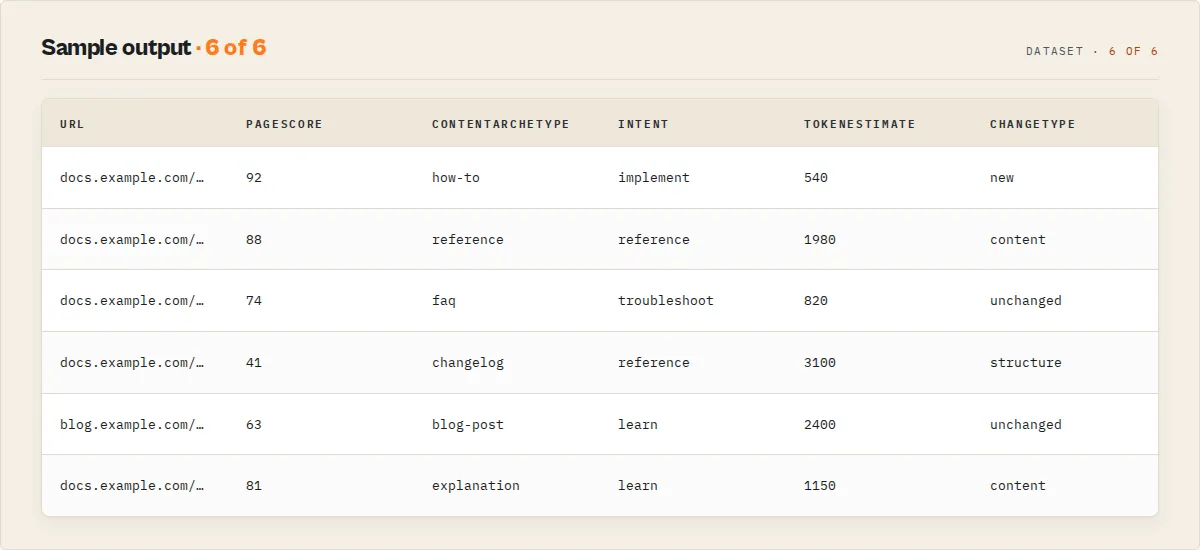
pageScore— the headline 0-100. Embed pages above your threshold.retrievalScore— the embed gate (>= 75is a clean cutoff).changeType—new/content/structure/unchanged, for re-embedding only what moved.
Everything else is optional intelligence: turn it on when you need corpus audits, chunking, classification, or the knowledge graph. The defaults give you clean Markdown plus those three fields.
Use cases for converting websites to Markdown
RAG pipeline ingestion
AI engineers building retrieval-augmented generation systems need clean text to chunk and embed. This actor converts entire documentation sites into structured Markdown pages in a single run. The wordCount field on each record lets you estimate token cost before committing to chunking and embedding, avoiding expensive surprises downstream.
LLM fine-tuning dataset preparation
Teams preparing fine-tuning datasets for instruction-following or domain-specific models need high-quality, boilerplate-free text. This actor converts blog posts, knowledge bases, and technical documentation with all navigation and ad content removed — so training data reflects actual prose, not menu structures.
AI chatbot and knowledge base construction
Product teams building internal chatbots or customer-facing support tools need to ingest their documentation into a vector store. This actor converts company wikis, help centers, and product docs into Markdown that integrates directly with LangChain's UnstructuredMarkdownLoader and LlamaIndex's SimpleDirectoryReader.
Competitive content analysis
Marketing and strategy teams analyzing competitor websites can convert entire competitor blogs and resource libraries to Markdown, then run LLM-based content gap analysis, keyword extraction, and tone comparison — all from structured text rather than raw HTML.
Documentation archival and migration
Engineering teams migrating from legacy CMS platforms or creating offline documentation snapshots need a reliable way to extract content as portable Markdown. This actor crawls the full site and produces files ready for import into Hugo, Jekyll, Astro, or any Markdown-based documentation tool.
Content monitoring and freshness tracking
Set a watchlistName and schedule the actor: each run hashes every page and marks it new, content, structure, or unchanged against the prior run. Re-embed only the pages whose changed flag is true instead of rebuilding your whole vector store on every refresh. The change intelligence is built in, with no second actor and no external state to manage.
How to convert a website to Markdown
- Enter your URLs — Paste one or more website URLs into the "Website URLs" field. Bare domains like
pinnacletech.ioare auto-prefixed withhttps://. Use section-specific URLs likehttps://docs.pinnacletech.ioto target only relevant content rather than an entire homepage. - Set your depth and page limit — The defaults (10 pages, depth 2) work for most documentation sections. Set depth to 0 if you only need the specific pages you listed. Increase
maxPagesPerDomainup to 100 for larger sites. - Run the actor — Click "Start" and wait. A 10-page run typically completes in under 30 seconds. A 100-page run takes 2–5 minutes depending on page size.
- Download your Markdown — Open the Dataset tab and export as JSON. Each record contains the
markdownfield with clean, LLM-ready content. You can also stream results via the API as they arrive.
Input parameters
| Parameter | Type | Required | Default | Description |
|---|---|---|---|---|
urls | string[] | Yes | — | Starting URLs to crawl. Bare domains are auto-prefixed with https://. One URL per line in the UI |
maxPagesPerDomain | integer | No | 10 | Maximum pages to convert per domain (range: 1–100) |
maxCrawlDepth | integer | No | 2 | Link-following depth from each starting URL. 0 = only the starting pages, 5 = maximum |
includeMetadata | boolean | No | true | Include title, meta description, language code, and word count in each output record |
onlyMainContent | boolean | No | true | Strip navigation, footers, sidebars, and ads. Extract only main article content |
generateChunks | boolean | No | false | Split each page into heading-aware chunks ready for embedding (each carries its heading path + token count). Skips the chunking step in your RAG pipeline |
chunkSize | integer | No | 1000 | Approximate target chunk size in tokens (used only when generateChunks is on; range 100–8000) |
extractLinks | boolean | No | false | Include per-page internal/external links and a run-level navigation graph (inbound link counts) in the key-value store |
extractAssets | boolean | No | false | Include page images that have alt text (type, alt, URL) on each record |
watchlistName | string | No | — | Name a watchlist to enable cross-run change detection. The actor stores each page's content hash under this name and marks pages new / content / structure / unchanged on the next run |
deltaOnly | boolean | No | false | Requires watchlistName. Crawls the whole site but emits (and charges for) only pages that are new or changed since the last run, so you re-embed just what moved |
proxyConfiguration | object | No | Apify Proxy | Proxy settings for crawling. Defaults to Apify's datacenter proxy pool. Use residential proxies for sites that restrict automated access |
Input examples
Convert a documentation site (most common use case):
Batch-convert multiple sites for a knowledge base:
Single-page extraction (no link following):
Input tips
- Start with depth 0 for specific pages — if you already know which pages you need, list them explicitly and set
maxCrawlDepth: 0to avoid crawling unrelated content. - Use section-specific URLs — targeting
https://docs.acmecorp.com/api-referencerather thanhttps://acmecorp.commeans the crawler starts in the right area and page limits apply to the relevant section. - Keep "main content only" enabled for AI workflows — disabling it includes navigation and sidebar text in the Markdown, which degrades chunking quality and wastes token budget in downstream LLM calls.
- Process multiple sites in one run — the actor deduplicates by domain and tracks page limits per domain independently, so batching 10 sites in one run is more efficient than 10 separate runs.
- Check word counts before embedding — the
wordCountfield lets you filter out near-empty pages and estimate token costs before sending to an embedding API.
Output example
A diagnostic record for a page that needs browser rendering looks like this (empty markdown, contentQuality: "empty", failureType: "js-required", and an actionable recommendation — this record is not charged):
Pages that never loaded (network error, repeated block, timeout) also land as records with failureType set to blocked / timeout / no-data and a matching recommendation, so no requested URL silently disappears. Filter WHERE failureType IS NOT NULL (or open the Failures & diagnostics dataset view) to see everything that needs attention.
Output fields
| Field | Type | Description |
|---|---|---|
recordType | string | page for a converted (or diagnostic) page, error for a run-level failure record. Stable enum for filtering |
schemaVersion | string | Output schema version (semver). Branch on this if you pin output shape in a pipeline |
url | string | Full URL of the converted page |
title | string | Page title from OpenGraph og:title, then <title> tag, then first <h1>. Empty string if includeMetadata is false |
description | string | Meta description from OpenGraph or <meta name="description">. On a diagnostic record, this carries the reason no content was extracted |
markdown | string | Full page content converted to GitHub Flavored Markdown. The primary output field. Empty on diagnostic records |
wordCount | integer | Word count of the Markdown text |
tokenEstimate | integer | Rough GPT-style token count (Markdown length ÷ 4) for context-window budgeting and RAG chunk sizing |
language | string or null | Language code from <html lang> attribute, lowercased and trimmed of region suffix (e.g., "en-US" becomes "en"). Null if not set |
crawlDepth | integer | Number of link hops from the starting URL. 0 means the starting page itself |
extractionMethod | string | How content was located: semantic-main, body-fallback, or full-page. Stable enum |
contentQuality | string | Richness band: rich (300+ words), moderate (50-299), thin, or empty. Filter a RAG corpus on this. Stable enum |
jsRenderingRequired | boolean | True when a JS-framework shell was detected and the static HTML yielded little content. The page likely needs browser rendering |
jsFramework | string or null | Detected client-side framework (Next.js, Nuxt, React, Angular, Vue, Svelte) when JS rendering is required |
botProtection | object | { detected: boolean, vendor: string | null }. Set when the response looks like an anti-bot challenge rather than content |
failureType | string or null | Why a page produced no content: no-data / blocked / timeout / js-required / parse-error. Null on content-bearing pages. Filter WHERE failureType IS NOT NULL for pages that need attention |
scrapeError | string or null | Human-readable reason a page produced no content. Null on success |
recommendation | string or null | Actionable next step for a failed page (enable proxy, use a browser-based crawler, etc.). Null on success |
qualityScore | integer | 0-100 content quality (word volume + heading structure + extraction cleanliness + richness). Sort on this; filter on the contentQuality band |
extractionConfidence | integer | 0-100 confidence that extraction captured the right content, with confidenceReason[] tags. Distinct from qualityScore (which rates the content) |
htmlSize / contentSize / boilerplateReduction | mixed | Raw HTML bytes, extracted Markdown bytes, and the % of boilerplate removed (the per-page embedding-volume saving) |
pageScore | integer | The single headline score (0-100). Read this one number; the scores below are its drill-down components |
retrievalScore | integer | Component. 0-100 embed-worthiness gate (quality + extraction confidence + structure + dedup). retrievalScore >= 75 is a clean ingestion filter |
knowledgeDensity | integer | Component. 0-100 information density (value per word). A short API reference can outscore a long marketing page |
completeness | object | { hasOverview, hasExamples, hasCode, hasFaq, hasTroubleshooting } — find docs lacking examples or troubleshooting |
intent | string | Retrieval-routing intent: learn / implement / troubleshoot / reference / other. A query-router branches on this |
documentationVersion | string or null | Version detected in the URL (v2, 2025, latest, ...). Keeps multi-version docs from mixing in one corpus |
versionFamily | string or null | Version-independent path so versions of the same doc group together. The SUMMARY resolves the latest version per family |
pageType | string | documentation / reference / blog / article / landing / other. Filter a mixed corpus by type |
contentArchetype | string | Finer intent: how-to / tutorial / faq / reference / changelog / release-notes / explanation / blog-post / landing / other. "Ingest docs but skip release notes" |
siteSection | string | URL-path section: api / reference / docs / guides / tutorials / blog / changelog / help / faq / other |
faqCount / procedure / procedureSteps | mixed | Knowledge-object signals: question-style heading count, whether the page is step-by-step, and how many steps |
breadcrumbs | array | Semantic breadcrumb trail (labels) from breadcrumb nav / schema.org BreadcrumbList |
freshnessScore / stalenessDays | integer or null | Freshness from modifiedAt (100 = recent, decays to 0 at ~2 years; days since modified). Null when no date metadata |
discoveredVia | string | How the URL entered the crawl: seed / sitemap / internal-link. For coverage troubleshooting |
publishedAt / modifiedAt | string or null | Publish / last-modified dates from page metadata. Null when the page declares none |
apiReference / endpoints | mixed | apiReference flags API docs; endpoints lists detected { method, path } pairs |
toc | array | Heading hierarchy: { level, title }[], for navigation and semantic chunking |
codeBlocks | array | Fenced code blocks: { language, lines }[] |
containsCode | boolean | True when the page has at least one code block |
chunks | array | Heading-aware chunks for RAG: { chunkId, headingPath, content, tokens, quality }[]. Each chunk carries a 0-100 quality. Empty unless generateChunks is on |
contentHash | string | sha256 of the Markdown. Diff across runs to skip re-embedding unchanged pages |
structureHash | string | sha256 of the heading skeleton. Distinguishes a restructure from a prose edit |
canonicalUrl | string or null | <link rel="canonical"> target, when present |
duplicateContent | boolean | True when the canonical URL differs from the crawled URL (e.g. a ?utm= variant). Dedupe your corpus on this |
changed / changeType / previousHash | mixed | Watchlist mode only (null otherwise). changeType is new / content / structure / unchanged |
parentPage | string or null | The page this URL was discovered from. Null for seed URLs |
internalLinks / externalLinks | array | Same-domain / cross-domain links. Empty unless extractLinks is on |
assets | array | Page images with alt text: { type, alt, url }[]. Empty unless extractAssets is on |
crawledAt | string | ISO 8601 timestamp of when the page was crawled and converted |
A run-level SUMMARY record turns the run into a full Corpus Intelligence Report in the key-value store:
The recommendations[] array surfaces plain-English findings like "31 duplicate pages detected — dedupe on canonicalUrl", "14 orphan pages found (in the sitemap, no inbound links)", and "Captured 500 of 560 sitemap pages (89.3%) — raise maxPagesPerDomain for full coverage". When extractLinks is on, a NAVIGATION_GRAPH key holds { nodes: [{ url, inboundLinks, importanceScore, orphan }], edges: [{ source, target }], generatedAt } — a PageRank-lite importance ranking plus the link edges for graph-based retrieval.
How much does it cost?
This actor uses Apify's pay-per-event pricing: $0.02 per page converted to Markdown, plus a negligible $0.00005 per run to start. Always check the Store page for the latest rate.
You only pay for content you receive. Pages that are skipped, blocked, require JavaScript rendering, fail to load, or are unchanged in delta mode are not charged, they are reported as diagnostic records at no cost.
Two controls keep spend predictable:
maxPagesPerDomaincaps how many pages each domain can convert, so a run can never exceed your page budget.deltaOnly(with awatchlistName) charges only for pages that changed since the last run. On a stable site, a scheduled refresh costs a small fraction of a full crawl, which is the core cost advantage over crawlers that re-process everything every time.
Compared with building this yourself: manual copy-paste preparation of 100 pages for a RAG pipeline takes hours and produces inconsistent formatting; this actor returns clean, scored, embedding-ready Markdown in minutes.
Convert websites to Markdown using the API
Python
JavaScript
cURL
How Website Content to Markdown works
Phase 1: URL discovery and sitemap parsing
When the actor starts, it normalizes each input URL (adding https:// for bare domains, validating format) and deduplicates by hostname. For each unique starting URL, it fetches /sitemap.xml using a 10-second timeout with an ApifyBot/1.0 User-Agent. The sitemap parser handles both standard sitemaps (extracting <loc> tags) and sitemap index files (fetching the first child sitemap). URLs matching binary file extensions — jpg, png, gif, pdf, zip, mp4, xml — are excluded. The combined list of starting URLs and sitemap-discovered URLs forms the initial request queue.
Phase 2: Breadth-first crawling
A CheerioCrawler runs with 10 concurrent workers at up to 120 requests/minute, with session pooling and persistent cookies for stable multi-page crawls. Three retries are attempted on failure. The handler skips responses without an html Content-Type to avoid processing XML sitemaps or JSON feeds that sneak through. Per-domain page counts and visited URL sets are tracked in a shared Map<string, DomainState> that enforces both the page cap and URL deduplication (trailing slash normalized). For each successfully processed page, the handler enqueues same-domain internal links from <a href> elements, filtering out fragments, external domains, and binary file extensions, up to maxCrawlDepth levels deep using BFS with __crawlDepth userData propagation.
Phase 3: Content extraction and Markdown conversion
The extraction pipeline runs in sequence for each page. First, extractContent() tries the 10 semantic selectors in order (<main>, <article>, [role="main"], #content, .content, .post-content, .entry-content, .article-body, .page-content, .main-content) and uses the first element with 200+ characters of inner HTML. A second Cheerio pass strips the 30+ non-content selectors from within the matched container. If no semantic container matches, the full <body> is used with the same stripping applied globally.
Next, htmlToMarkdown() passes the cleaned HTML to a pre-configured Turndown instance with ATX heading style, fenced code blocks (triple backtick), bullet markers, inline links, and preformattedCode: true to preserve code block whitespace. The turndown-plugin-gfm plugin adds table and strikethrough support. Two custom Turndown rules are applied: images without alt text or with data-URI sources are dropped entirely; anchor tags with empty text content are removed. The resulting Markdown is cleaned with cleanMarkdown() which collapses multiple blank lines, trims line-trailing whitespace, and strips whitespace-only lines.
Pages producing fewer than 50 characters of Markdown are checked for a JS-framework shell and anti-bot challenge markers. If either is detected, a diagnostic record is emitted (jsRenderingRequired / botProtection set, empty markdown, not charged) so the page is visible rather than silently lost; otherwise the page is skipped as genuinely empty. The final record includes the record type and schema version, URL, title (OpenGraph > <title> > <h1>), description (OpenGraph > meta description), Markdown, word count, token estimate, content-quality band, extraction method, JS-rendering and bot-protection signals, language, crawl depth, and ISO timestamp.
Tips for best results
-
Target section roots, not homepages. Pointing at
https://docs.acmecorp.comrather thanhttps://acmecorp.comensures your page budget is spent on documentation rather than marketing pages. The crawler follows internal links from the starting point. -
Use depth 0 when you have a URL list. If you already know which pages to convert, list them all in
urlsand setmaxCrawlDepth: 0. This is faster and more predictable than relying on link discovery. -
Estimate token budgets before embedding. Sum the
wordCountvalues in your output and multiply by 1.3. A 100-page documentation site averaging 800 words per page produces roughly 104,000 tokens — helpful to know before choosing an embedding model. -
Disable metadata for bulk training data. If you are building a fine-tuning dataset and only need raw Markdown text, set
includeMetadata: false. It has negligible cost impact but keeps output records leaner. -
Run on a schedule for living knowledge bases. Use Apify's scheduling to re-run this actor weekly against your source sites. Pair it with the Website Change Monitor to trigger re-conversion only when content actually changes.
-
For SPAs, use the Pro version. If a site loads content through JavaScript (React, Vue, Angular apps), this actor will return the skeleton HTML, not the rendered content. See the Limitations section.
-
Combine with Company Deep Research for enterprise content. Feed company website Markdown directly into the Company Deep Research actor for comprehensive intelligence reports that include the company's own published content.
-
Set proxy for rate-limited sites. Enable
proxyConfigurationwith Apify residential proxies if a site returns 429 or 403 errors during crawling. The session pool will rotate identities across requests.
Combine with other Apify actors
| Actor | How to combine |
|---|---|
| AI Training Data Curator | Convert websites to Markdown, then pass to the curator for deduplication, quality filtering, and fine-tuning dataset formatting |
| Website Change Monitor | Detect when source pages change, then trigger this actor to re-convert only the updated pages for incremental knowledge base updates |
| Company Deep Research | Convert a company's public website to Markdown and feed the content into deep research workflows for comprehensive intelligence reports |
| Website Contact Scraper | Run both actors on the same domain: one extracts contacts, the other extracts page content for enriched company profiles |
| Website Tech Stack Detector | Identify a site's technology stack first, then convert its content to Markdown — useful for contextualizing technical documentation |
| Competitor Analysis Report | Convert competitor sites to Markdown, then run competitive analysis on the structured text using LLMs |
| B2B Lead Gen Suite | Enrich lead profiles with content extracted from their company websites converted to Markdown |
Use in Dify
Drop this actor into Dify workflows via the Apify plugin's Run Actor node. Every page returns clean Markdown plus the classification enums your downstream node branches on. A generic HTML scraper pointed at the same site returns raw markup you then have to clean, classify, and triage by hand; this returns the Markdown already filtered and tagged for ingestion.
- Actor ID:
ryanclinton/website-content-to-markdown - Sample input (convert a documentation site for a RAG knowledge base):
Branching example — a Dify if/else node routes each record on stable enums, no prose parsing:
retrievalScore >= 75→ chunk + embed into the vector store; below that → skip (keeps low-value pages out of the corpus)contentArchetype == "release-notes"or"changelog"→ route to a separate index (or drop) instead of the main docs corpusfailureType == "js-required"→ route the URL to a browser-based crawler, then re-ingestfailureType == "blocked"→ route to a proxy-enabled re-runfailureType != null(any value) → error branch for review
Because failureType is null on every content-bearing page and set on every page that produced no content, one equality check (failureType IS NULL) cleanly separates the embed path from the triage path. retrievalScore is the single embed-gate; tokenEstimate feeds chunk-sizing on the embed branch; and with deltaOnly + a watchlist, the actor only emits changed pages so the whole Dify flow runs over the delta, not the full corpus.
Limitations
- No JavaScript rendering — the actor uses CheerioCrawler, which parses the server-delivered HTML response. Single-page applications (React, Vue, Angular, Next.js with client-side rendering) that load content via JavaScript return an empty shell. Rather than dropping these pages silently, the actor flags them with
jsRenderingRequired: trueand the detectedjsFramework, so you can route them to a browser-based actor. JS-detected pages are not charged. - No authenticated content — only publicly accessible pages are processed. Login walls, paywalls, and members-only content produce their gate page, not the protected content behind it.
- Same-domain crawling only — the crawler never follows links to external domains. If a site's documentation is split across multiple subdomains (e.g.,
docs.acmecorp.comandapi.acmecorp.com), list both as separate starting URLs. - 100-page maximum per domain — set by the input schema's
maximumconstraint. For very large sites, run multiple targeted crawls against specific sections. - Discovery depends on links + sitemaps — the crawler checks five common sitemap locations (
/sitemap.xml,/sitemap_index.xml,/sitemap-index.xml,/sitemaps.xml,/sitemap/sitemap.xml) and follows internal links, but a page that is neither linked from a crawled page nor listed in one of those sitemaps will not be discovered. Orphaned pages require explicit URL input. - No PDF or binary content — only HTML pages are converted. PDF documents, Word files, and embedded media are skipped.
- English-biased class name selectors — the semantic content selectors use English CSS class names (
.content,.post-content,.entry-content). Sites using non-English or unusual class naming conventions may needonlyMainContent: falseto capture all content, at the cost of including some boilerplate. - No JavaScript execution in content — dynamically inserted content (lazy-loaded sections, infinite scroll, tab-hidden content) is not captured because it requires browser execution.
Integrations
- LangChain / LlamaIndex — use the Apify integration to load Markdown output directly into your RAG pipeline as document chunks
- Zapier — send converted Markdown pages to Notion, Google Docs, Confluence, or Slack on run completion
- Make — chain conversion runs with Airtable, HubSpot, or Slack steps in automated content workflows
- Google Sheets — export URL, title, word count, and language to a spreadsheet for content audits
- Apify API — trigger runs programmatically from CI/CD pipelines and retrieve Markdown via REST for embedding workflows
- Webhooks — receive a POST notification with the dataset URL when conversion finishes, enabling async pipeline triggers
- Vector databases (Pinecone, Weaviate, Qdrant, Chroma) — pipe the
markdownfield directly into your embedding and upsert pipeline after chunking
Troubleshooting
-
Output Markdown is empty or very short — check the
jsRenderingRequiredandbotProtectionfields on the record. IfjsRenderingRequiredis true, the source site renders content client-side and needs a browser-based actor. IfbotProtection.detectedis true, the site restricts automated access from shared IPs (enable residential proxies). These pages are reported but not charged. -
Getting unexpected navigation or sidebar content in Markdown — some sites use non-standard markup without semantic HTML elements (
<main>,<article>). The actor falls back to body-level stripping, which may miss some structural elements. Try disablingonlyMainContentand stripping the specific selectors yourself in post-processing, or provide a more specific section URL. -
Run stopped before reaching the page limit — the actor logs a warning when the per-domain
pageCountcap is reached. IncreasemaxPagesPerDomain(up to 100) or run multiple crawls targeting different sections of the site. -
Some pages failing with 403 or 429 errors — the target site is blocking the crawler. Enable
proxyConfigurationwith"useApifyProxy": trueand optionally setproxyUrlsto residential proxies. The session pool will rotate IPs across requests. -
Sitemap URLs not being picked up — some sites serve their sitemap at a non-standard path (e.g.,
/sitemap_index.xmlor/sitemaps/pages.xml). The actor only checks/sitemap.xml. For sites with non-standard sitemap locations, add the specific page URLs manually to theurlsinput.
Responsible use
- This actor only accesses publicly available web pages.
- Respect
robots.txtdirectives and website terms of service regarding automated access. - Do not use converted content in ways that violate the original site's copyright or content license.
- Comply with applicable data protection laws (GDPR, CCPA) when storing or processing scraped content.
- For guidance on web scraping legality, see Apify's guide.
FAQ
How do I convert a website to Markdown for a RAG pipeline?
Enter the documentation site URL, set maxPagesPerDomain to the number of pages you want, and set onlyMainContent: true. Each output record contains a markdown field ready for chunking and embedding. The wordCount field helps you estimate token counts before sending to your embedding API.
What types of websites does this actor convert best? Text-heavy, server-rendered sites: documentation portals, developer guides, help centers, blogs, knowledge bases, and informational pages. Sites that rely on JavaScript to render their content (React SPAs, Angular apps) are not supported — use a headless browser approach for those.
Can I use the Markdown output directly with ChatGPT, Claude, or Gemini?
Yes. The Markdown format is natively understood by all major LLMs. Feed the markdown field directly into prompts, or use the word count to gauge how many pages fit within a context window (rough estimate: 1 word ≈ 1.3 tokens).
How many pages can I convert in one run? Up to 100 pages per domain per run, across as many domains as you provide. For larger sites, run multiple targeted crawls against different sections and merge the datasets. There is no limit on the number of domains in a single run.
Does this actor follow links to other domains?
No. The crawler only follows internal links within the same domain (and subdomain) as each starting URL. If you need content from multiple domains, add each as a separate entry in the urls input.
How is this different from manually copy-pasting website content? Manual copy-paste for 50 pages takes 2–4 hours and produces inconsistent formatting. This actor processes 50 pages in under 2 minutes, produces consistently formatted GitHub Flavored Markdown, strips all boilerplate automatically, and runs unattended on a schedule. The per-page word count and metadata fields are not available from manual copying.
How does the "main content only" mode work?
The actor tries 10 semantic HTML selectors in priority order — <main>, <article>, [role="main"], and 7 common content class names. The first matching element with 200+ characters of inner HTML is used as the content container. Non-content elements (nav, footer, sidebar, ads, etc.) are then stripped from within that container. If no semantic container is found, the full <body> is used with the same stripping applied.
Is it legal to convert website content to Markdown?
Accessing publicly available web pages is generally legal in most jurisdictions. However, you should review each target website's terms of service, respect robots.txt directives, and ensure your use of the converted content complies with copyright law. For commercial AI training use cases, some site terms explicitly restrict automated scraping. See Apify's guide on web scraping legality for a detailed overview.
Can I schedule this actor to run automatically? Yes. Apify's scheduling feature lets you set recurring runs on a cron schedule (daily, weekly, or custom). This is ideal for keeping documentation snapshots current or monitoring competitor content.
What happens to pages that fail to load? Failed requests are retried up to 3 times with exponential backoff. If still failing after retries, the page is logged as a warning and skipped. Skipped pages do not count toward the per-domain page limit, so your budget is not wasted on failures.
How is this different from Apify's Website Content Crawler? Both convert web pages to text, but this actor is a lightweight, cost-efficient solution for straightforward HTML sites. It uses CheerioCrawler (no browser, ~256 MB memory) and outputs structured JSON with per-page metadata. Apify's Website Content Crawler uses a full browser and supports JavaScript rendering but runs at higher cost. Choose this actor for static and server-rendered sites; choose a browser-based solution for SPAs.
Can I use this actor's output with LangChain or LlamaIndex?
Yes. The markdown field integrates directly with LangChain's UnstructuredMarkdownLoader and LlamaIndex's SimpleDirectoryReader. Apify also provides a native LangChain integration that loads dataset items as LangChain documents without any custom code.
Help us improve
If you encounter issues, you can help us debug faster by enabling run sharing in your Apify account:
- Go to Account Settings > Privacy
- Enable Share runs with public Actor creators
This lets us see your run details when something goes wrong, so we can fix issues faster. Your data is only visible to the actor developer, not publicly.
Support
Found a bug or have a feature request? Open an issue in the Issues tab on this actor's page. For custom solutions or enterprise integrations, reach out through the Apify platform.


