

Google Hotels Scraper & Hotel Prices API
Pricing
from $2.40 / 1,000 hotels
Google Hotels Scraper & Hotel Prices API
Scrape Google Hotels for any city or hotel: prices for your dates and guests from every booking site (Booking.com, Expedia, Agoda...) with booking links, room rates, ratings, review insights, amenities and contacts. Track competitor rates daily. No API key.
Pricing
from $2.40 / 1,000 hotels
Rating
0.0
(0)
Developer

Santiago
Maintained by CommunityActor stats
0
Bookmarked
4
Total users
3
Monthly active users
10 days ago
Last modified
Categories
Share
What is Google Hotels Scraper?
Google Hotels Scraper is an unofficial Google Hotels API that gets you hotel prices for your exact dates and guests from every booking site (Booking.com, Expedia, Hotels.com, Trip.com, Agoda and often the hotel's own website), with direct booking links, room rates (room type, beds, free cancellation, breakfast), plus ratings on Google and Tripadvisor, review insights, amenities, address, phone and website. Search any city, or track the specific hotels you care about. The data comes straight from Google Hotels.
Try it now: type a city in Locations, click Start, and get 100 hotels in about a minute. No API key, no code, no subscription: you pay only for the hotels you get.
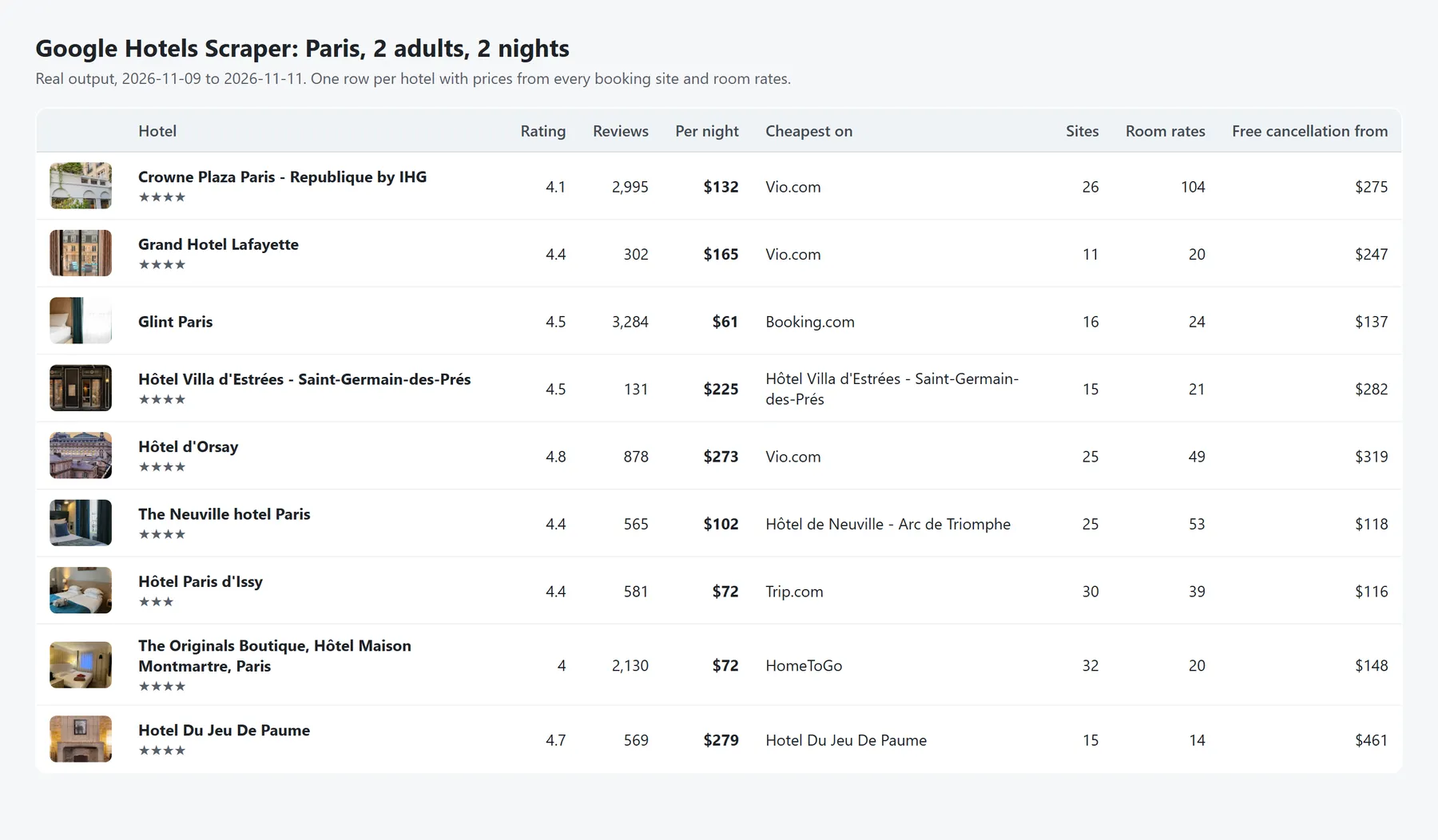
- 🏙️ Search any destination: cities, neighborhoods, landmarks ("hotels near the Eiffel Tower"), hotel names or free text ("beach resorts in Cancun"), in any language. 2,500+ hotels in big cities.
- 🏨 Track specific hotels: paste their Google Hotels or Google Maps links to monitor your hotel and your competitors every day.
- 💸 Hotel rate shopping: every booking site's price per night and for the whole stay, cheapest site first, with direct booking links.
- 🛏️ Room rates: room types with their price, beds, capacity, free cancellation and breakfast, from the official site, Booking.com, Expedia, Agoda and other sites Google features.
- 👨👩👧 Prices for your group: adults and children with their ages, exactly as on Google Hotels. Booking links open with the same guests.
- 📅 Price calendar: price the same stay for up to 90 consecutive check-in dates in one run, with minimum-stay restrictions.
- ⏰ Built for daily price tracking: relative dates ("30 days" from today) keep scheduled runs working forever.
- ⚡ Fast and reliable: no browser, about 600 hotels with full details in 3 minutes.
What data can you extract from Google Hotels?
| Group | Fields |
|---|---|
| Prices | Lowest price per night and for the whole stay, currency, check-in/out dates, nights, guests, deal vs. usual price (dealDiscountPercent), availability, minimum-stay restrictions |
| Prices by booking site | Provider (Booking.com, Expedia…), price per night, total price, member-price notes, direct booking URL, number of sites, cheapest site |
| Room rates | Room name, price per night and total, free cancellation, breakfast included, beds, capacity and extras (suite, balcony…), room photo, booking link, cheapest price with free cancellation. The 20 cheapest rates per hotel by default (Room rates per hotel, up to 500, or 0 to skip them) |
| Hotel profile | Name, star class, description, photos, check-in and check-out times |
| Reviews | Google rating, review count, rating breakdown by star, review aspects (Location, Service, Breakfast… with positive and negative mention counts), ratings on other sites (Tripadvisor, Priceline, Trip.com… with review counts) |
| Amenities | Full list grouped by category (Internet, Pools, Parking…), amenities not available (no pets, no pool…), languages spoken by staff. Always in English, whatever the search language, so they're easy to filter and compare |
| Contact & location | Full address with postal code, phone, official website, latitude/longitude, Google Maps link, nearby transit, attractions and airports with travel times |
| IDs | Google Hotels URL and Google Maps feature ID, to match hotels across runs and datasets |
Vacation rentals that Google lists next to hotels (apartments, rooms, houses) are included too, with prices, ratings and coordinates. Use the Property type filter to keep only hotels or only rentals.
Why this Google Hotels scraper?
| This Actor | |
|---|---|
| Coverage | Up to ~650 hotels per Google search, and 2,500+ in big cities thanks to automatic extra searches |
| Prices | Every booking site's price and room-level rates, for your exact dates, adults and children's ages |
| Input | City names in any language, hotel names, Google Hotels links, Google Maps links and share links; typos are corrected |
| Daily tracking | Relative dates ("14 days") so scheduled runs never break, and a price calendar of up to 90 check-in dates |
| Output | One row per hotel with nested offers and rooms, the same columns in every row, amenities always in English |
| Billing | Pay per hotel, no platform usage fees; places Google can't recognize are never charged; the run stops exactly at your maximum cost |
How to scrape Google Hotels
- Open the Input tab.
- Add locations to search (e.g.
Barcelona,Shibuya, Tokyo), one per line, and/or specific hotels (Google Hotels or Google Maps links). - Set check-in and check-out dates, the number of adults and the children's ages to get the exact price of your stay. Without dates, Google picks a default stay (usually 1 night about a week ahead) and each result shows the dates it used.
- Optionally filter by rating, star class, price per night or property type.
- Click Start. Download the results as JSON, CSV, Excel or HTML, or get them through the API.
Input example: search a city
Input example: hotel price tracker for your competitors
Schedule this run daily (Actor page → Schedule). The relative dates mean "a 2-night stay starting 14 days from the day of each run", so the schedule never needs updating:
How to get a hotel's link: open the hotel on Google Hotels and copy the address bar. Links copied after clicking a hotel in the results, Google share links and Google Maps links of the hotel all work. Every result also includes its googleHotelsUrl, so you can scrape a city once and then track the hotels you care about.
Input example: 30-day price calendar
This gives you one result per hotel and night: 30 consecutive 1-night stays starting a week from today, each with every booking site's price. Real example for The Hat Madrid, from Nov 2: $39 on Nov 2, $92 on Nov 3, $57 on Nov 4… On Nov 7 the hotel doesn't sell 1-night stays, and the result tells you what it does sell:
Google also suggests longer stays when they're cheaper per night (e.g. $92 for 1 night on Nov 3, or $76 per night for 2 nights). They're in longerStaySuggestion too.
Output example
Real result for The Hat Madrid, December 4–7 (shortened):
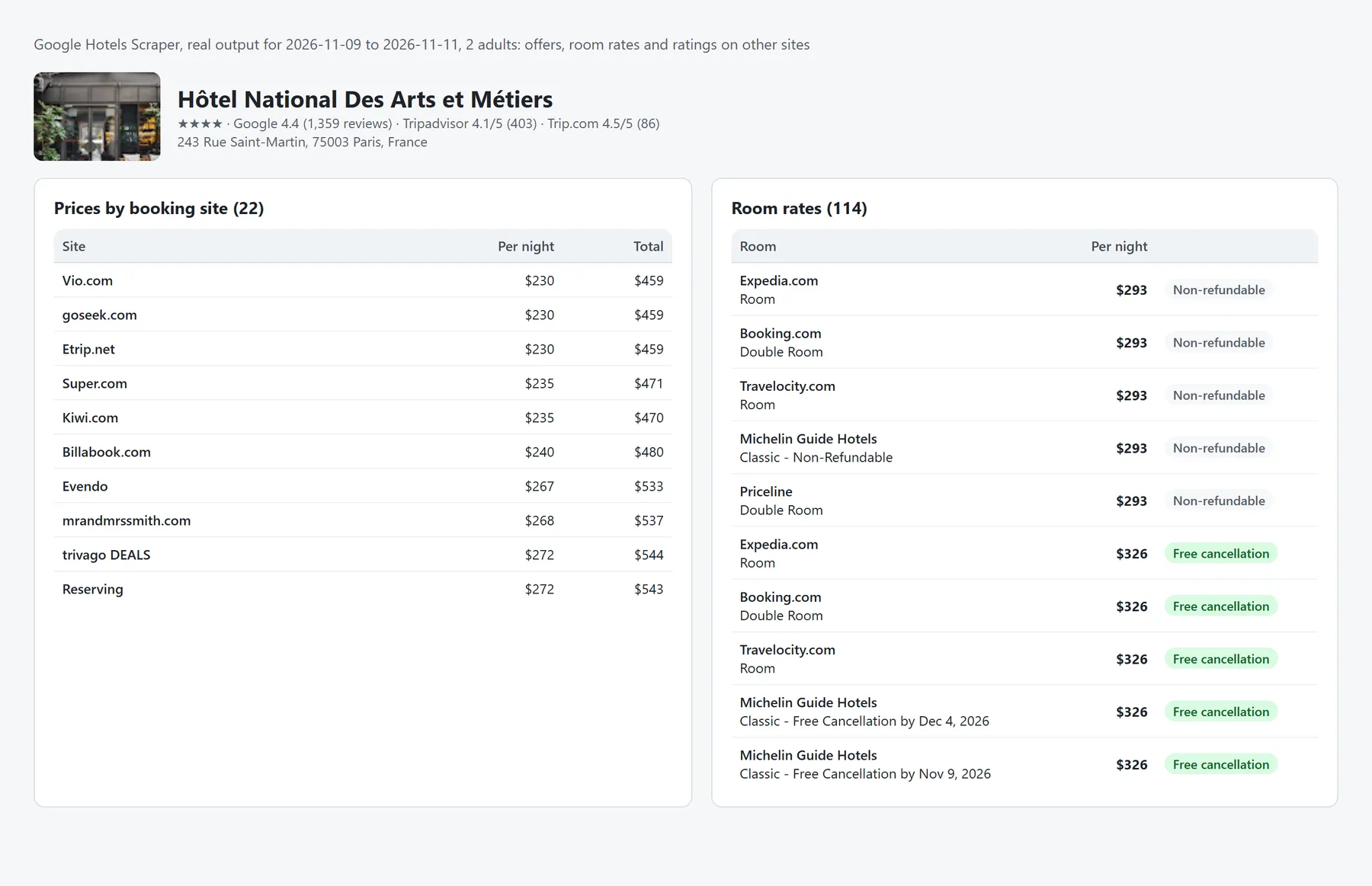
In the Output tab you can switch between five views: Hotels, Prices by booking site, Room rates, Contact & location, and Ratings & review insights.
How much does it cost to scrape Google Hotels?
You pay per hotel, with no subscription:
| What you get | Price |
|---|---|
| Hotel from the search results (prices, rating, reviews, location, photos…) | $3 per 1,000 hotels |
| + Full hotel details (prices from every booking site with links, room rates, ratings on other sites, website, full address, all amenities, languages) | +$4 per 1,000 hotels |
For example, 1,000 hotels with full details cost $7, and 1,000 without details cost $3. Tracking 10 competitor hotels every day costs about $2 per month. Apify Silver and Gold plans get lower prices. The Full hotel details option is on by default; turn it off if you only need the search data. Vacation rentals have no details page, so they're never charged the details fee.
Is it free to try? Yes: the Apify free plan includes $5 of monthly credits, enough for about 700 hotels with full details every month.
Set the run's maximum cost to control your spend: the Actor stops exactly at that limit, counting both charges.
Use cases
- Hotel rate shopping and rate parity: compare your rates with your competitors' on every booking site, every day.
- Revenue management: price calendars for the next 90 days, minimum-stay restrictions and deals.
- Travel agencies, OTAs and startups: build hotel inventories with live prices, ratings and amenities for any destination.
- Market and investment research: compare supply, star mix, price levels and guest sentiment across cities and neighborhoods.
- Lead generation for hospitality suppliers: hotel names, star classes, websites, phones and full addresses.
- AI agents and trip planners: structured JSON through the API or MCP, with a stable schema and field descriptions.
Google Hotels API for developers
Google has no public API for Google Hotels prices (the Google Hotel Center API is only for hotels sending their own rates). This Actor works as one: call it from your code and get JSON back.
The same works in JavaScript, with plain HTTP requests, or with no code through Make, Zapier, n8n, Google Sheets, Airtable or Slack integrations.
Use it from AI agents (MCP)
Connect the Apify MCP server to Claude, ChatGPT, Cursor or any MCP client and add this Actor (scrapr/google-hotels-scraper) as a tool. Your agent can then ask for "4-star hotels in Lisbon for next weekend under 150 EUR" and get live prices back. Every output field has a description, so agents know what each value means.
Filters
| Filter | Example |
|---|---|
| Minimum guest rating | 4.5 |
| Star classes | ["4", "5"] |
| Price per night range | minPricePerNight: 80, maxPricePerNight: 250 (in your Convert prices to currency if set) |
| Property type | hotels, vacationRentals or all |
Filters are applied to Google's results, and you only pay for the hotels that pass them. If almost no hotel matches (under 1% of the first 300), the search stops early and the log tells you to relax the filters.
Tips
- Big cities: one Google Hotels search shows only ~650 unique properties. When you ask for more, the Actor automatically adds narrower searches of the same place (star classes, budget, boutique, rentals…) and searches around landmarks spread across the area, keeping only properties inside it. Real run: New York, 2,667 hotels in 7 minutes.
searchQueryshows which search found each hotel. - Small places: Google includes hotels from nearby towns when a place has few of its own (
searchResolvedLocationshows the place Google used). - Typos and unknown places: the Actor retries misspelled places the way Google understands them ("Barcelna" → Barcelona). If Google still can't place a location, nothing is delivered or charged for it and the log tells you.
- Hotel names work as locations: "Hotel Ritz Madrid" returns that hotel first, then the hotels around it.
- Google Hotels search links work too: paste a
google.com/travel/search?q=…link in Specific hotels and it's searched like a location. Links that aren't Google Hotels or Google Maps are skipped with a warning. - Every result has the same fields, so CSV and Excel exports keep stable columns. Fields that don't apply are empty.
- Currency: Google prices in the currency of the search region (USD by default). Set Convert prices to currency (EUR, GBP, JPY…) to add converted prices using the daily European Central Bank rates.
- Languages: set Language to any language Google supports, as a code (
es,fr,ja,pt-BR…) or a name (Spanish,Deutsch…), to get hotel names, descriptions and room names in that language. Amenities stay in English so results compare across languages. Locations and relative dates can be written in any language ("30 días", "14 Tage"). - Dates: exact (
2026-12-04,20/12/2026when the day is above 12) or relative to the day of the run (30 days,2 weeks,tomorrow).
FAQ
Is there an official Google Hotels API?
No. Google offers APIs for hotels to upload their own prices (Hotel Center), but not to read hotel prices from Google Hotels. This Actor gives you that data as an API, with no Google account or API key.
Is it legal to scrape Google Hotels?
The Actor only collects publicly available information about businesses (hotels), without logging in, and it doesn't extract personal data. You're responsible for complying with the laws and terms that apply to your use case.
Why do some hotels have no price?
They're sold out or have no offers for your dates and number of guests (hasAvailability: false). If the hotel only sells longer stays on those dates, longerStaySuggestion tells you which stay is available and at what price.
Are prices taxes-included?
Prices are shown as Google displays them for the search region. In the US that's usually before taxes and fees; in Europe taxes are usually included. The bookingUrl takes you to the exact offer.
How do I track hotel prices every day?
Save your input as a task, use relative dates ("14 days" / "16 days") and add a daily schedule. Each run adds a dataset you can send to Google Sheets or your database; googleHotelsUrl and scrapedAt let you build a rate history.
How fresh are the prices?
They're read live from Google Hotels when the run starts, the same prices a visitor sees at that moment. Run it as often as you need: there's no daily quota.
Do I need proxies or a Google account?
No. The Actor works without proxies, logins or API keys. You only pay for the hotels you get.
Why do only some booking sites have room rates?
Google shows room-level rates for the sites it features on each hotel page (usually 2 to 4, often the hotel's official site and Booking.com). Every other site still has its price for your stay in offers.
Can I get review texts?
Not yet. This Actor returns ratings, rating breakdown and review aspects. Open an issue if you need full review texts.
Something doesn't work?
Open an issue in the Issues tab with your run link. We usually reply within 24 hours, and feature requests are welcome.
⭐ Found it useful? Please leave a rating on the Actor page. It helps other travel analysts and developers find it.


