
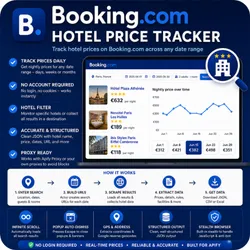
Booking.com Hotel Price Tracker
Pricing
Pay per usage
Booking.com Hotel Price Tracker
Tracks and extracts hotel prices from Booking.com for any location across a configurable date range. Filter by hotel name, set stay duration, guests, and proxy options.
Pricing
Pay per usage
Rating
0.0
(0)
Developer

ScrapySpider
Maintained by CommunityActor stats
0
Bookmarked
75
Total users
8
Monthly active users
5 months ago
Last modified
Categories
Share
Booking.com Hotel Price Tracker
Tracks hotel prices on Booking.com across a configurable date range for any destination — no account or login required — and returns structured JSON with hotel name, nightly price, check-in/check-out dates, and a direct hotel URL.
What you get
- Scrapes Booking.com search results for any city or destination
- Tracks daily nightly prices over a custom date range (days, weeks, or months)
- Configurable stay duration, number of adults, and children
- Optional hotel name filter — monitor specific properties or collect all results
- Outputs clean, structured JSON ready for analysis or export
- Uses stealth browser automation to handle JavaScript-rendered pages
What data does it extract?
Each result contains:
Hotel info: hotel name, direct Booking.com URL
Pricing: nightly price (EUR), price tier category
Stay details: check-in date, check-out date
Metadata: search results URL, scrape timestamp
Use cases
- Price monitoring: Track how a hotel's nightly rate changes week-over-week or month-over-month
- Competitive analysis: Compare pricing across all hotels in a destination for any date range
- Travel planning: Find the cheapest dates to stay at a specific hotel or in a city
- Revenue management: Monitor competitor pricing as part of a hotel revenue strategy
- Market research: Aggregate hotel pricing data across a destination for hospitality analysis
How to use
- Click Try for free above
- In the Input tab, enter a Location (e.g.
Paris, FranceorMiami Beach) - Set a Start Date and End Date for the date range you want to track
- Optionally set Nights Per Stay, Adults, Children
- Optionally add hotel names to Target Hotels to filter results to specific properties
- Click Start and wait for the run to complete
- Download your results as JSON, CSV, or Excel from the Output tab
Tip: For runs covering more than 30 days, enable Apify Proxy (Residential) in the proxy settings to reduce the chance of blocks.
Input parameters
| Parameter | Type | Required | Default | Description |
|---|---|---|---|---|
location | String | Yes | "St. Julian's, Malta" | City, region, or destination to search on Booking.com. Example: "New York", "Paris, France" |
startDate | String | No | Today | First check-in date to track (YYYY-MM-DD). |
endDate | String | No | 6 months from today | Last check-in date to track (YYYY-MM-DD). |
nightsPerStay | Integer | No | 1 | Number of nights per stay (1–30). Checkout = checkin + nightsPerStay. |
adults | Integer | No | 2 | Number of adult guests (1–30). |
children | Integer | No | 0 | Number of child guests (0–10). |
targetHotels | Array of strings | No | [] (all hotels) | Hotel names to filter. Leave empty to return all hotels in the search results. Example: ["Hilton Garden Inn", "Marriott"] |
maxRequestsPerCrawl | Integer | No | 200 | Maximum search pages to process. One page per check-in date. |
proxyConfigurationOptions | Object | No | No proxy | Proxy settings. Residential proxy is recommended for large date ranges. |
Output example
priceTier values:
| Value | Price Range |
|---|---|
1-5 | Under €50/night |
5-10 | €50–€100/night |
10-15 | Over €100/night |
N/A | Price could not be extracted |
Pricing
This Actor is free to use — you only pay for Apify platform compute time and proxy usage.
- A typical run covering 30 days processes ~30 pages and costs approximately $0.10–$0.30 in Apify credits
- A 6-month run (180 pages) costs approximately $0.50–$1.50 depending on proxy usage
- New Apify accounts receive $5 in free credits — enough for several full date-range runs
Technical notes
- No account needed: This Actor does not require a Booking.com login or cookies
- Residential proxies: Recommended for runs over 30 days to avoid rate limiting. Enable in the proxy settings
- Hotels filter: Booking.com results are filtered to hotels only (
ht_id=204). Apartments and other accommodation types are excluded - Price currency: Prices are extracted in EUR as displayed by Booking.com
- JavaScript rendering: Uses headless Chromium with stealth mode to handle Booking.com's dynamic content
- Rate limits: For very large runs (180+ pages), increase Actor memory to 2 GB and use residential proxies
- Data freshness: All data is scraped live — no cached results
Support
Have questions or found a bug? Reach out:
- Email: ScrapySpider@protonmail.com
- Website: ScrapySpider.com
- Response time: Within 24–48 hours on weekdays


![Expedia.com & Hotel.com [$2.5💰] Reviews/Ratings/Sentiment A. avatar](https://images.apifyusercontent.com/S3jQnQO1Qq7Evmm8G6HhWSwePurMx4mbNBaxjT2ShAg/rs:fill:76:76/cb:1/aHR0cHM6Ly9hcGlmeS1pbWFnZS11cGxvYWRzLXByb2QuczMudXMtZWFzdC0xLmFtYXpvbmF3cy5jb20vbmduOHZSRVNUa3NleVdFNnAtYWN0b3ItNkkxaEJLTk1nQk5IZVl4dUwtOXNoSm5hbnd2Ni1leC5wbmc.webp)


