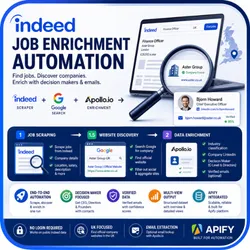
Indeed Job Enrichment Automation
Pricing
Pay per usage
Indeed Job Enrichment Automation
Scrape Indeed jobs by category and country, discover official company websites, and enrich companies with Apollo.io decision-maker data in one workflow.
Pricing
Pay per usage
Rating
0.0
(0)
Developer

ScrapySpider
Maintained by CommunityActor stats
0
Bookmarked
0
Total users
0
Monthly active users
4 months ago
Last modified
Categories
Share
An Apify Actor that automates job lead generation from Indeed by scraping job postings, discovering company websites via Google Search, and enriching company and decision-maker data using Apollo.io.
Built with: Apify SDK, Crawlee (CheerioCrawler), Apollo.io API, and Google SERP proxy.
🚀 Features
- Phase 1 - Job Scraping: Scrapes jobs from Indeed using Apify's Indeed Scraper for any job category
- Phase 1.5 - Website Discovery: Automatically searches Google to find official UK company websites for every job posting
- Phase 2 - Data Enrichment: Uses Apollo.io to enrich each company with:
- Industry classification
- Company LinkedIn profile
- Decision Maker details (CEO/Director/Founder)
- Verified email addresses and confidence scores
- Structured Output: All data is pushed to the Apify Dataset with multiple views for easy access
📂 Project Structure
⚙️ Workflow
Phase 1: Job Scraping
- Reads job titles from
jobs.jsonbased on the selected category - Calls the Indeed Scraper Actor for each job title
- Collects all scraped jobs with company details
Phase 1.5: Website Discovery
- Uses Google Search (with SERP proxy) to find company websites
- Searches for "Company Name UK" and extracts the first valid result
- Filters out social media and aggregator sites (LinkedIn, Facebook, Indeed, etc.)
- Updates each job with the discovered company website
Phase 2: Data Enrichment
- Enriches companies using Apollo.io Organization API:
- Gets industry classification
- Gets company LinkedIn URL
- Extracts primary domain
- Searches for decision makers (CEO, Founder, Managing Director, COO, Directors):
- Retrieves decision maker name and title
- Gets LinkedIn profile URL
- Optionally extracts verified email addresses (if
extractEmailsis enabled)
Final Output
- Pushes enriched data to Apify Dataset with status tracking:
Enriched: Successfully enriched with decision maker dataFailed-to-Enrich: Company found but no decision maker data availableNot-Enriched: Apollo API key not provided
💻 Usage
Running on Apify Platform
- Create an Actor run via the Apify Console or API
- Configure input parameters:
- Select a job category
- Provide your Apollo.io API key
- Set maximum items per search
- Enable email extraction if needed
- View results in the Output tab with three available views:
- Enriched Jobs Overview: Key fields with decision maker contacts
- Full Job Details: Complete job descriptions and metadata
- All Data (JSON): Raw dataset export
Local Development
Install dependencies:
Set environment variables:
Create a .env file or set in your environment:
Run locally:
Note: Local runs use the storage/ directory to emulate Apify storage. This data is NOT synced to Apify Console. To verify output, deploy and run on the platform.
Deploy to Apify
Authenticate and push to Apify platform:
🧩 Configuration
Input Parameters
Defined in .actor/input_schema.json:
| Parameter | Type | Required | Description |
|---|---|---|---|
category | string | Yes | Job category from jobs.json (Admin, Resourcers, Compliance, etc.) |
apolloApiKey | string | Yes | Your Master API Key from Apollo.io (stored securely) |
maxItemsPerSearch | integer | No | Maximum jobs to scrape per search term (default: 10) |
extractEmails | boolean | No | Enable email extraction using Apollo credits (default: false) |
parseCompanyDetails | boolean | No | Parse company details from Indeed (default: true) |
Job Categories
Edit jobs.json to customize job titles for each category:
- Admin: Administrator, Admin Assistant, Office Administrator, HR Administrator
- Resourcers: Recruiter, Talent Sourcer, Recruitment Consultant
- Compliance: Compliance Officer, Compliance Administrator, Compliance Coordinator
- Data Entry: Data Entry Clerk, Data Entry Administrator, Data Processor
- Back Office: Operations Assistant, Accounts Assistant, Finance Assistant, and more
jobs.json
📊 Output
Dataset Schema
The Actor outputs enriched job data with three views defined in .actor/dataset_schema.json:
Overview View
Key enrichment fields for lead generation:
- Job title, company, location, salary
- Job type, posting date, job URL
- Industry, company LinkedIn
- Decision maker name, title, LinkedIn
- Email address and confidence score
- Enrichment status, category
Job Details View
Complete job information:
- All job posting details
- Job description and snippets
- Company details from Indeed
- Company website from Google Search
- Search query metadata
Output Schema
The Actor provides multiple output templates in .actor/output_schema.json:
- Enriched Jobs Overview: Filtered view with lead generation data
- Full Job Details: Complete job postings with descriptions
- All Data (JSON): Raw dataset export
- Run Statistics: Actor performance metrics
🔑 API Keys
Apollo.io API Key
- Sign up at Apollo.io
- Navigate to Settings → API
- Generate a Master API Key
- Add to Actor input (stored securely as a secret)
Note: Email extraction consumes Apollo credits. Set extractEmails: false to save credits.
Apify API Token
- Required for local development
- Get from Apify Console
- Set as
APIFY_TOKENenvironment variable
🎯 Use Cases
- Lead Generation: Find decision makers at companies hiring for specific roles
- Sales Prospecting: Build targeted lists with verified contact information
- Market Research: Analyze hiring trends by industry and location
- Recruitment: Identify companies actively hiring in your niche
📝 Notes
- Google SERP proxy is required for website discovery (included with Apify residential proxies)
- Apollo.io free tier provides limited credits - monitor usage if extracting emails
- The Indeed Scraper Actor ID can be configured via
INDEED_ACTOR_IDenvironment variable - Local storage in
storage/directory is for testing only and not synced to Apify Console
🤝 Contributing
Contributions welcome! To add new job categories:
- Edit
jobs.jsonwith new category and job titles - Update
.actor/input_schema.jsonenum values - Test with
npm startlocally - Submit a pull request
📄 License
ISC
Apify Dataset
Contains one JSON object per job with merged data, e.g.: