

Walmart Price Scraper: Rollback & Was Prices
Pricing
from $10.00 / 1,000 items
Walmart Price Scraper: Rollback & Was Prices
Walmart search, category and product prices, including the rollback items whose price the search response leaves empty.
Pricing
from $10.00 / 1,000 items
Rating
0.0
(0)
Developer

SellerKit
Maintained by CommunityActor stats
0
Bookmarked
2
Total users
1
Monthly active users
19 days ago
Last modified
Categories
Share
Walmart Price Scraper
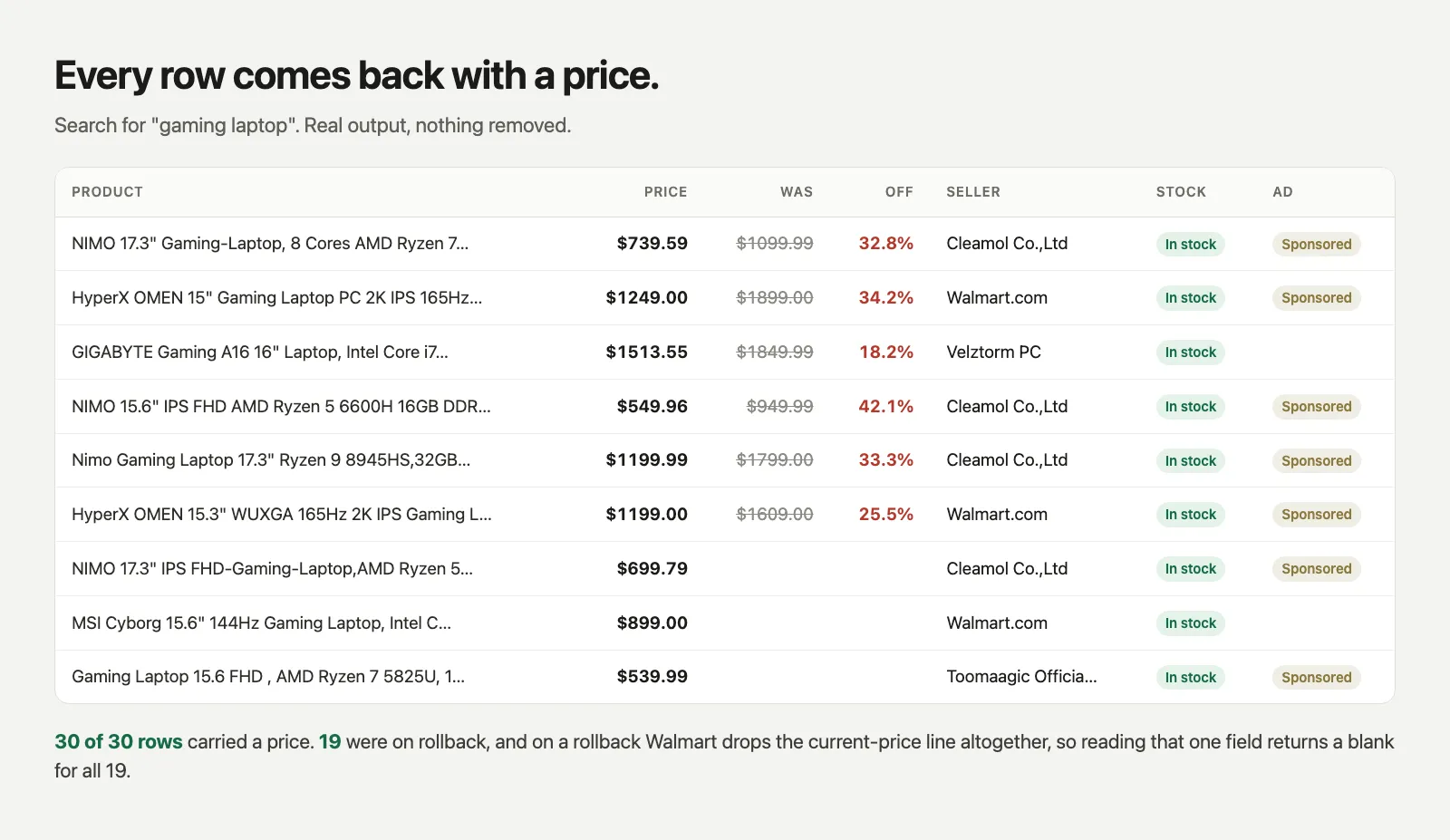
Walmart search, category and product pages, with a price on every row. Including the rollback items, whose price the search response leaves empty.
The problem this solves
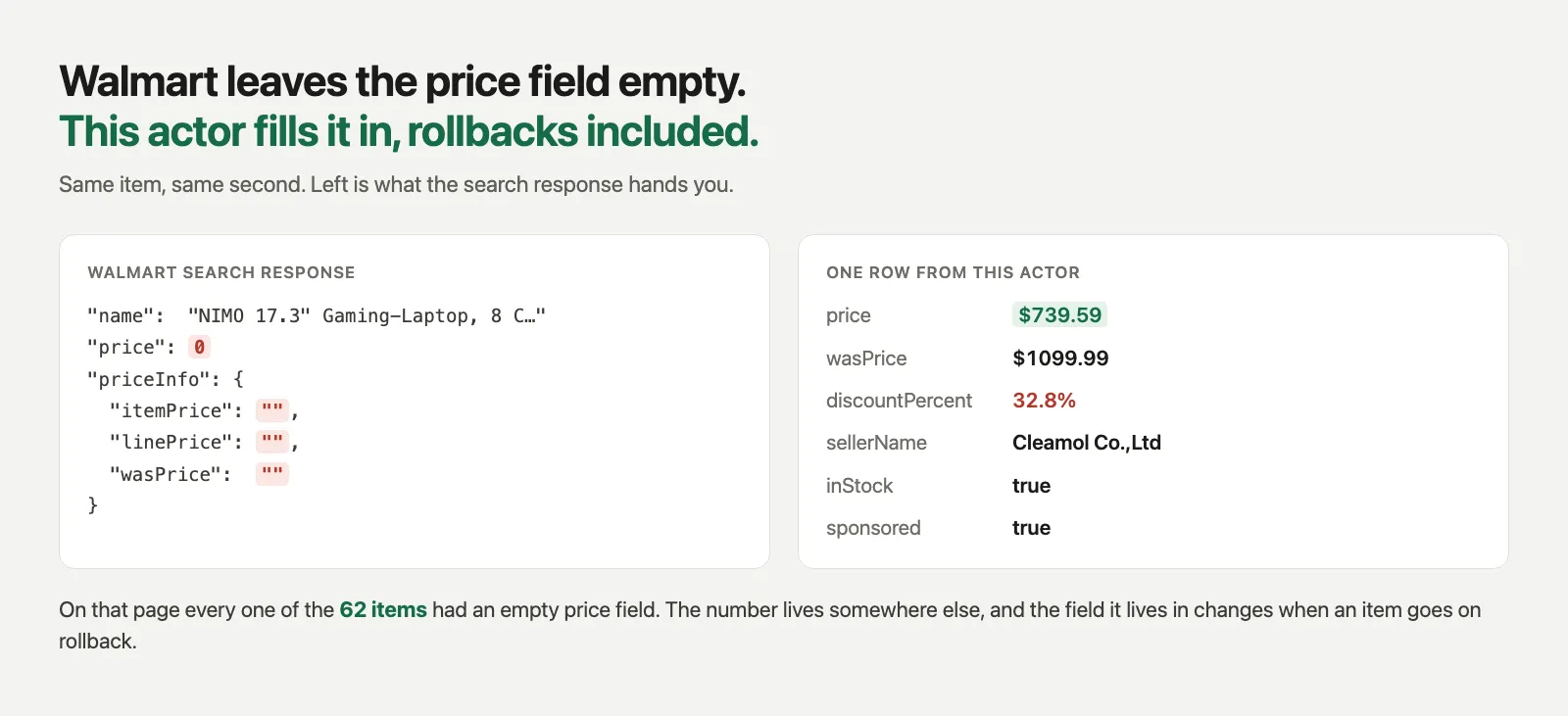
Open a Walmart search response and look at the price fields:
All empty. On a laptop search we measured, that was true for 62 items out of 62.
The real number sits in priceInfo.priceDetails.priceLines, and the name of the line changes with
the state of the item:
| Item state | Line that holds the price |
|---|---|
| Regular price | CURRENT_PRICE |
| On rollback | DISCOUNTED_PRICE, with COMPARISON holding the was-price |
| Several options | OPTIONS / OPTIONS_RANGE |
| Subscribe and save | SUBSCRIPTION_DUAL_PRICE |
A scraper that reads CURRENT_PRICE gets a number for full-price items and a blank for discounted
ones. On that same page 26 of the 62 items were on rollback and had no CURRENT_PRICE line at
all. Those 26 are the rows a price tracker exists for.
Walmart's deals pages are different again. /shop/deals has no priceDetails and still uses the
old linePrice / wasPrice / savingsAmt strings, on all 50 items of the page.
This actor reads every one of those places, and each row says which one the number came from
(priceSource), so you can tell a genuinely missing price from a parser that gave up.
What you get
| Field | |
|---|---|
usItemId name url image | identity |
price currency | the number a shopper sees |
wasPrice discountPercent onSale | the rollback |
optionsFrom optionsTo | the range across colours, sizes and configurations |
subscriptionPrice unitPrice | subscribe and save, and price per unit |
priceSource | which field the price was read from |
inStock availability | stock |
sellerName sellerId | who actually ships it, which is not always Walmart |
rating reviewCount | as shown |
brand model upc | product page only |
sponsored position page query | where the row sat, and whether it was an ad |
postalCode storeId | the location Walmart served these prices from |
scrapedAt enriched | when, and whether the product page was opened |
Input
You can also pass categoryUrls (any browse or deals page) or productUrls
(20305508298, /ip/..., or the full URL). Paste a product URL into the category box and it is
still read as a product, and the other way round.
Full URLs keep the parts that decide what you see. selectedSellerId, classType and
conditionGroupCode change which offer Walmart shows, so they are preserved; ad tracking
parameters are dropped.
onSaleOnly, inStockOnly, skipSponsored and requirePrice filter before anything is written,
so the rows you did not want are never saved and never charged.
Brand, model and UPC
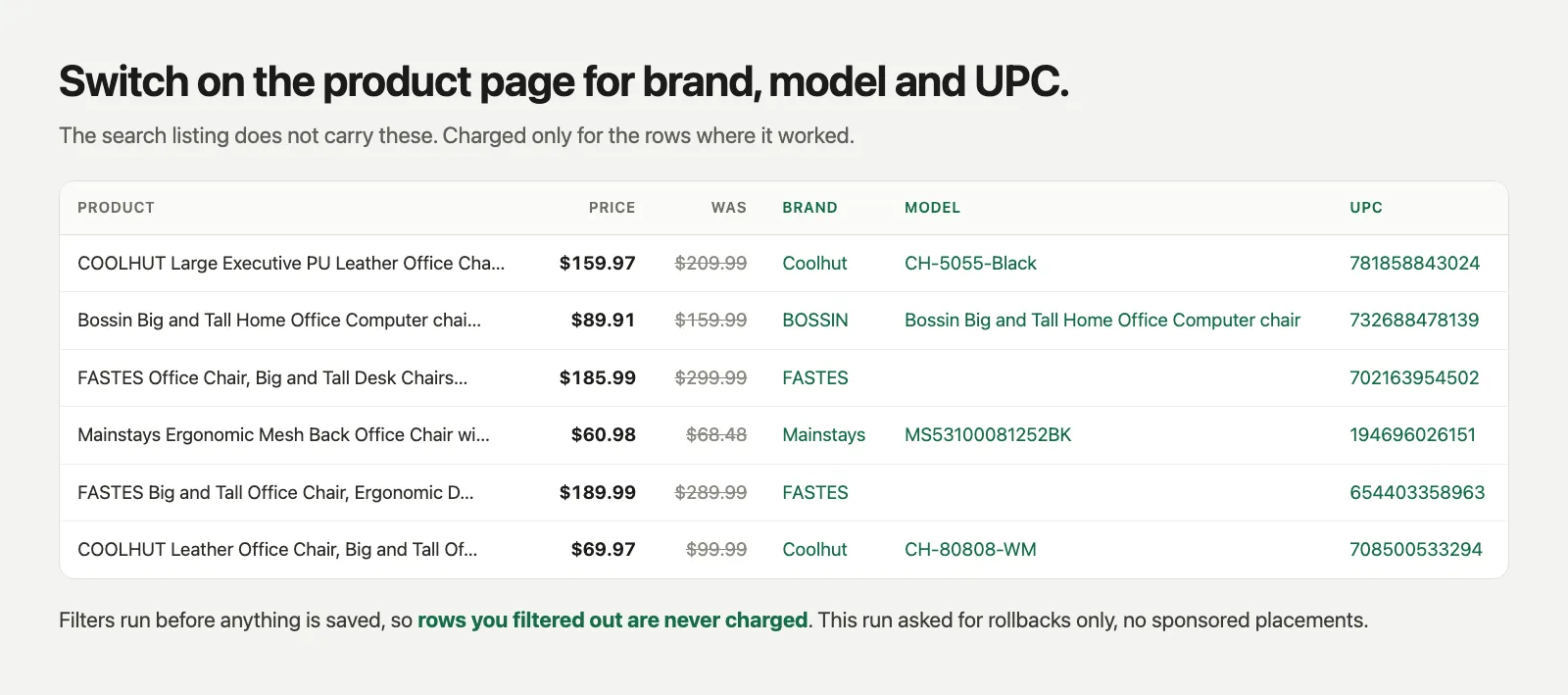
Set enrichFromProductPage to open each item's own page. It adds brand, model, upc and the
seller level stock status, and confirms the price on the product page itself. This is a second
event, charged only for the rows where it worked.
Pricing
Charged per row that reaches the dataset, not per minute of compute. A run that finds nothing
costs nothing, and a row you filtered out was never saved, so it was never charged. Turn on
requirePrice and a row without a price is not saved either.
Notes
- Walmart's block reads the client, not the address. Measured on one connection at the same
minute:
curlgot a 15 KB page titled "Robot or human?", headless Chromium got the same page, and headed Chromium got the real 1.4 MB page. So this actor drives a real browser with a display, and reuses one session for every page rather than opening a new one each time. - Leave the proxy off unless you are bringing residential addresses. On a direct connection this actor returned 30 rows out of 30 with a price. Through datacenter proxy addresses every request was blocked before the first page, because those addresses are already burned for this site.
- The block arrives as
200 OK, not as an error code. This actor recognises that page, retries on a fresh session, and fails loudly rather than writing an empty dataset. - One item that fails to load does not stop the run. It is recorded in
RUN_SUMMARYwith the reason, and the rest still come back.RUN_SUMMARYalso counts how many rows carried a price. Watch that rather than the row count. - Sponsored placements repeat across pages and sit at pinned positions. Set
skipSponsoredwhen you are comparing prices rather than measuring the search page itself. - Prices come from one location, and the run tells you which one.
RUN_SUMMARY.locationand thestoreIdon each row record where Walmart served the run from. This matters more than it sounds: two runs a minute apart came back from store 3081 and store 2038 (Ashburn, 20149), because the location follows the address the run went out from. Comparing yesterday's prices with today's is only meaningful when this field matches. - Choosing that location is not offered, and it is worth saying why rather than leaving you to
guess. Walmart keeps it in the session, not in the URL:
?stores=and?storeId=are ignored, injecting the store cookie gets the session blocked, and the request that actually sets it (setFulfillmentIntent) answers with412and a CAPTCHA payload. Getting past that means defeating the bot check, which this actor will not do.


