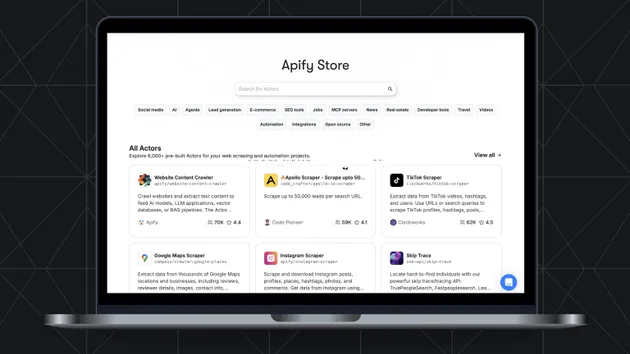
Apify Store Scraper
Pricing
Pay per usage
Apify Store Scraper
Scrape Apify Store actor data including titles, descriptions, pricing, reviews, and usage stats. Perfect for marketplace analysis, competitive research, and building actor intelligence databases. Monitor trends and benchmark competitors.
Pricing
Pay per usage
Rating
5.0
(3)
Developer

Shahid Irfan
Maintained by CommunityActor stats
1
Bookmarked
21
Total users
6
Monthly active users
6 days ago
Last modified
Categories
Share
What does Apify Store Scraper do?
Apify Store Scraper collects structured actor listings from the Apify Store. Use a profile URL, keyword, category, pricing model, or developer filter to build datasets for marketplace research, competitor monitoring, actor discovery, and portfolio analysis.
Each dataset item can include the actor name, owner, listing URL, description, categories, pricing information, bookmarks, ratings, reviews, usage statistics, and the filters used for the run. Results can be collected from multiple pages and exported through Apify in JSON, CSV, Excel, or XML format.
Why use Apify Store Scraper?
- Actor marketplace research - Compare how tools are positioned across categories, pricing models, and developer groups.
- Competitor monitoring - Track listing descriptions, ratings, reviews, bookmarks, and other available marketplace signals.
- Portfolio analysis - Monitor all public Actors for a creator profile or focus on a selected category.
- Tool discovery - Find Actors by keyword and organize the results into a searchable dataset.
- Automation-ready output - Download structured results or connect runs to schedules, webhooks, and external workflows.
What data can you extract from Apify Store?
| Field | Type | Description |
|---|---|---|
actorFullName | String | Combined actor identifier in username/name format. |
title | String | Public actor listing title. |
name | String | Actor slug or public name. |
username | String | Apify username of the actor owner. |
url | String | Direct URL of the actor listing. |
description | String | Public description shown for the listing. |
categories | Array | Categories assigned to the actor. |
bookmarkCount | Number | Number of bookmarks when available. |
actorReviewRating | Number | Average review rating, rounded to two decimal places. |
actorReviewCount | Number | Number of reviews when available. |
stats | Object | Listing statistics when provided by the Store. |
currentPricingInfo | Object | Pricing and plan metadata when available. |
query | Object | Effective filters used for the run. |
fetchedAt | String | ISO timestamp when the item was collected. |
How to use Apify Store Scraper
- Open the Actor in Apify Console.
- Enter a profile URL, keyword, category, pricing model, or developer filter.
- Set
results_wantedandmax_pagesfor the size of the dataset. - Run the Actor and review the dataset preview.
- Export the results or connect the dataset to your workflow.
The simplest run uses the default Shahid Irfan profile URL. For broader marketplace research, combine a keyword with a category, pricing model, or developer filter.
When both url and keyword are submitted, the keyword search takes precedence and URL-derived filters are ignored. This lets a keyword run work with the default profile URL still present in the Console form.
Input Parameters
| Parameter | Type | Required | Default | Description |
|---|---|---|---|---|
url | String | No | "https://apify.com/shahidirfan" | Apify profile URL or Store URL used as a starting context. |
keyword | String | No | "" | Search term applied to actor listings. |
category | String | No | "All categories" | Category filter, such as Jobs, AI, E-commerce, or Developer tools. |
sort | String | No | "Most Relevant" | Result order: Most Relevant, Newest, Pouplar, or Recently updated. |
pricingModel | String | No | "All pricing models" | Pricing filter: Pay per event, Pay per Usage, or Rental. |
developers | String | No | "All developers" | Developer group: Maintained by Apify or Maintained by Community. |
results_wanted | Integer | No | 20 | Maximum number of dataset items to save. |
max_pages | Integer | No | 10 | Maximum number of Store pages to process. |
Usage Examples
Profile Listings
Collect actor listings from a public profile:
Keyword Search
Find community Actors related to LinkedIn:
Filtered Marketplace Research
Collect recently updated job-related listings and limit the dataset to 50 records:
Sample Output
Tips for Best Results
- Use a complete Apify profile or Store URL when you want results from a specific creator or marketplace context.
- Start with
results_wanted: 20to confirm the filters and output shape before larger runs. - Combine
keywordandcategoryto reduce unrelated listings. - Use
NewestorRecently updatedwhen monitoring changes over time. - Increase
max_pageswhen the selected filters match more listings than the first page contains. - Expect some fields to be empty when an actor listing does not publish that information.
Integrations and Export Formats
- Google Sheets - Review and compare actor listings in a spreadsheet.
- Airtable - Build a searchable catalog of marketplace tools.
- Make or Zapier - Route new datasets into automated workflows.
- Webhooks - Notify downstream services when a run finishes.
- Apify API - Start runs and retrieve datasets programmatically.
Datasets can be downloaded as JSON, CSV, Excel, XML, and other formats supported by Apify.
Frequently Asked Questions
Can I collect all Actors from a profile?
Yes. Provide the profile URL, use All categories, and raise results_wanted and max_pages as needed.
Can I search without a profile URL?
Yes. Provide a keyword, category, pricing model, or developer filter to search the Store listings directly.
How are results sorted?
Results can be returned by relevance, newest listings, popularity based on bookmarks, or recent activity when the selected sort option is available.
What happens when a field is missing?
Missing, empty, and always-null values are removed from the dataset item so the output stays compact.
Can I run this Actor on a schedule?
Yes. Create an Apify schedule to refresh a profile or marketplace query hourly, daily, weekly, or at a custom interval.
Is collecting Apify Store data legal?
You are responsible for complying with Apify terms, applicable laws, and any restrictions that apply to your intended use of public listing data.
Related Actors
- RSS / XML Scraper - Collect structured feed data for content monitoring and research pipelines.
- Product Hunt Scraper - Research product launches, makers, and technology trends.
- Kickstarter Scraper - Analyze crowdfunding projects, funding activity, and market interest.
Support
For issues, feature requests, or output questions, use the Issues and Discussions sections on the Actor page.
Legal Notice
This Actor is intended for legitimate research, monitoring, and data organization workflows. Use collected information responsibly and comply with Apify terms, applicable laws, and the terms governing any connected service.