

Google Trends Scraper
Pricing
$1.50 / 1,000 searches
Google Trends Scraper
Google Trends data for any keyword: interest over time, interest by country, region, city or US metro, and top and rising related searches. Compare up to 5 keywords, or check YouTube, News, Images and Shopping trends. Fast, no browser.
Pricing
$1.50 / 1,000 searches
Rating
0.0
(0)
Developer

SignalMole
Maintained by CommunityActor stats
0
Bookmarked
2
Total users
1
Monthly active users
4 days ago
Last modified
Categories
Share
Google Trends Scraper
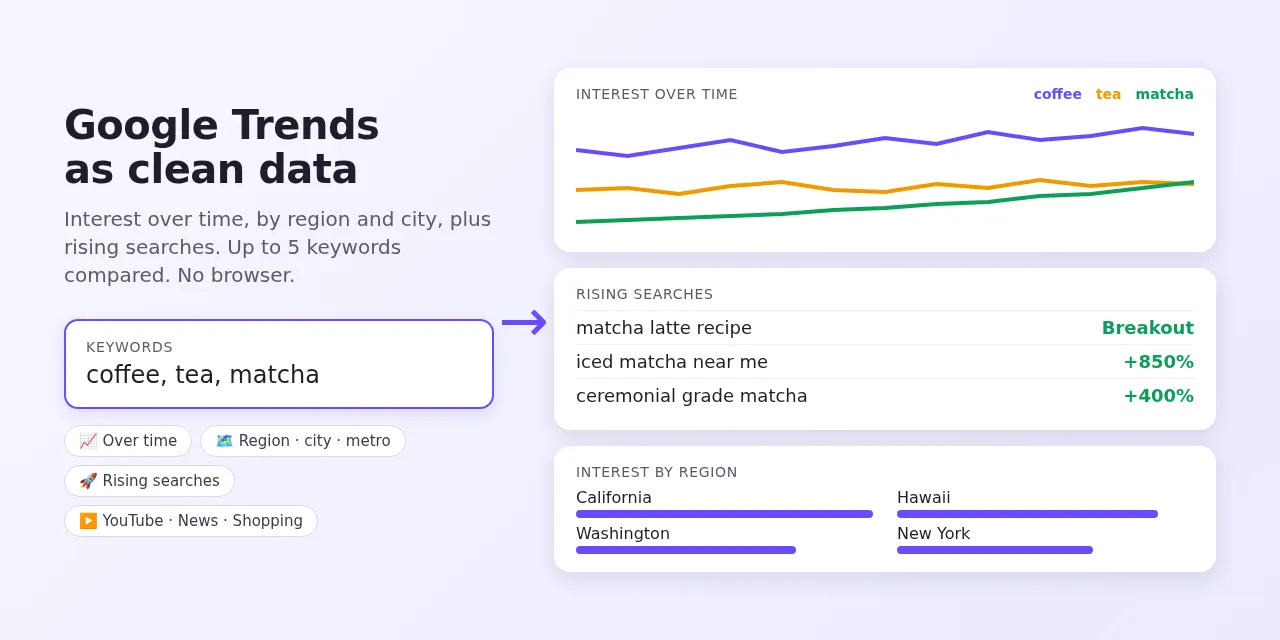
Get Google Trends data for any keyword as clean JSON, CSV or Excel: interest over time, interest by country, state, city or US metro area, and top and rising related searches. Compare up to 5 keywords on the same scale, and look at YouTube, News, Images and Google Shopping search trends too.
No browser, no login. Fast and reliable: ~130 keywords in under 3 minutes. $1.50 per 1,000 searches.
✨ Why this scraper?
| Feature | What you get |
|---|---|
| ⚡ Fast and reliable | Reads Google Trends' own data endpoints — no browser that times out |
| 📈 Interest over time | Every point of the chart, hourly to monthly, with the partial last point flagged |
| ⚖️ Compare up to 5 keywords | coffee, tea, matcha on one line → one result, all on the same 0–100 scale |
| 🗺️ Four region levels | Countries, states/regions, cities (with coordinates) or US metro areas (DMA) |
| 🚀 Rising searches | Top and rising related searches, including "Breakout" terms |
| ▶️ Five search types | Web, YouTube, News, Images, Google Shopping |
| 🔗 Paste a Trends URL | Copy any Google Trends explore link; its country, dates and filters are kept |
| 💰 Simple price | $1.50 per 1,000 searches, platform usage and proxy included |
🎯 Use cases
- SEO and content planning — find rising searches before your competitors write about them.
- Product and e-commerce research — use Google Shopping trends to time launches and stock.
- Market sizing by region — see which states, cities or metro areas care most.
- Brand monitoring — compare your brand against competitors every week.
- Data science and dashboards — feed clean time series into notebooks, BI tools or forecasting models.
- AI agents — call it through the Apify MCP server: "Is matcha still growing in the US?"
🚀 How to use
- Add keywords, one search per line. Put several on one line with commas to compare them:
coffee, tea, matcha. - Optional: choose country or region, time range, search type and region level.
- Click Start. Download the results or pull them via API.
| Input | What it does |
|---|---|
searchTerms | One search per line. Commas compare up to 5 keywords. Google Trends explore URLs work too. |
geo | Empty for worldwide, a country (US, DE, TW) or a region (US-CA, GB-ENG). |
timeRange | Past hour, 4 hours, day, 7 days, 30 days, 90 days, 12 months, 5 years, or since 2004. |
customTimeRange | Your own dates: 2025-01-01 2025-06-30. |
searchType | web, youtube, news, images or shopping. |
category | Google Trends category ID, e.g. 71 Food & Drink. 0 = all. |
regionResolution | default (countries or states), CITY or DMA (US metro areas). |
includeRegions, includeRelatedQueries | Turn sections off for a smaller output. |
📦 Output
One item per search line. Real example (shortened):
| Field | Description |
|---|---|
interestOverTime | One row per point; one column per keyword (0–100). isPartial marks the unfinished last period. |
averageInterest | Average per keyword over the range. |
interestByRegion | One row per region with a column per keyword; cities include latitude / longitude. |
regionComparison | When comparing keywords: each keyword's share of searches in each region (adds up to 100). |
relatedQueries | top and rising related searches per keyword. Rising value is the % increase; "Breakout" means more than +5000%. |
noData | true when Google has too little search volume for this search. |
trendsUrl | Opens the same chart on Google Trends. |
Google Trends values are relative (0–100), not absolute search counts. Comparing keywords on one line puts them on the same scale; separate lines are each scaled on their own.
💰 How much does it cost?
You pay $0.0015 per search line ($1.50 per 1,000), whether it has one keyword or five. Platform usage and proxy are included.
| Searches | Cost |
|---|---|
| 100 | $0.15 |
| 1,000 | $1.50 |
| 10,000 | $15.00 |
Apify's free plan includes $5 of monthly credit — enough for about 3,300 searches.
🔁 Tracking trends over time
Schedule the Actor weekly (Apify Schedules) with the same keywords and watch relatedQueries with type: "rising" for new terms. Use customTimeRange to fetch the same historical window every time.
🔌 Integrations
- API / SDKs — start runs and fetch results from Python, JavaScript or any HTTP client.
- Zapier, Make, n8n, Google Sheets, Slack — via Apify integrations.
- MCP — add the Apify MCP server to Claude, Cursor or any MCP client and call this Actor as a tool.
❓ FAQ
Why are the numbers 0–100 and not search volumes? That is how Google Trends works: 100 is the peak popularity within your chosen keywords, place and time range.
Why does the same keyword give different numbers in two runs? Google Trends samples its data, so small differences between requests are normal, especially for low-volume keywords.
Where are related topics? Google Trends no longer returns related topics through its data endpoints, so this Actor returns related searches only.
Can I export to CSV or Excel? Yes — every Apify dataset downloads as JSON, CSV, Excel, XML or HTML.
⚖️ Is this legal?
Google Trends is a public tool. This Actor reads the same public data the Google Trends website shows and does not log in. You are responsible for how you use the data; check the rules that apply to you.
💬 Need help?
Open an issue on the Issues tab — feature requests welcome.


