

ImportYeti Scraper - US Customs Records, Suppliers & Trade Data
Pricing
from $4.00 / 1,000 results
ImportYeti Scraper - US Customs Records, Suppliers & Trade Data
Extract US maritime customs records from ImportYeti, the bill of lading filings behind a vessel manifest. Search suppliers, importers and products by name or address for shipment counts, trading partners, HS code chapters, ocean shipping lanes, carriers and published contacts. Pay per result.
Pricing
from $4.00 / 1,000 results
Rating
0.0
(0)
Developer

SilentFlow
Maintained by CommunityActor stats
1
Bookmarked
70
Total users
15
Monthly active users
a month ago
Last modified
Categories
Share
ImportYeti Scraper
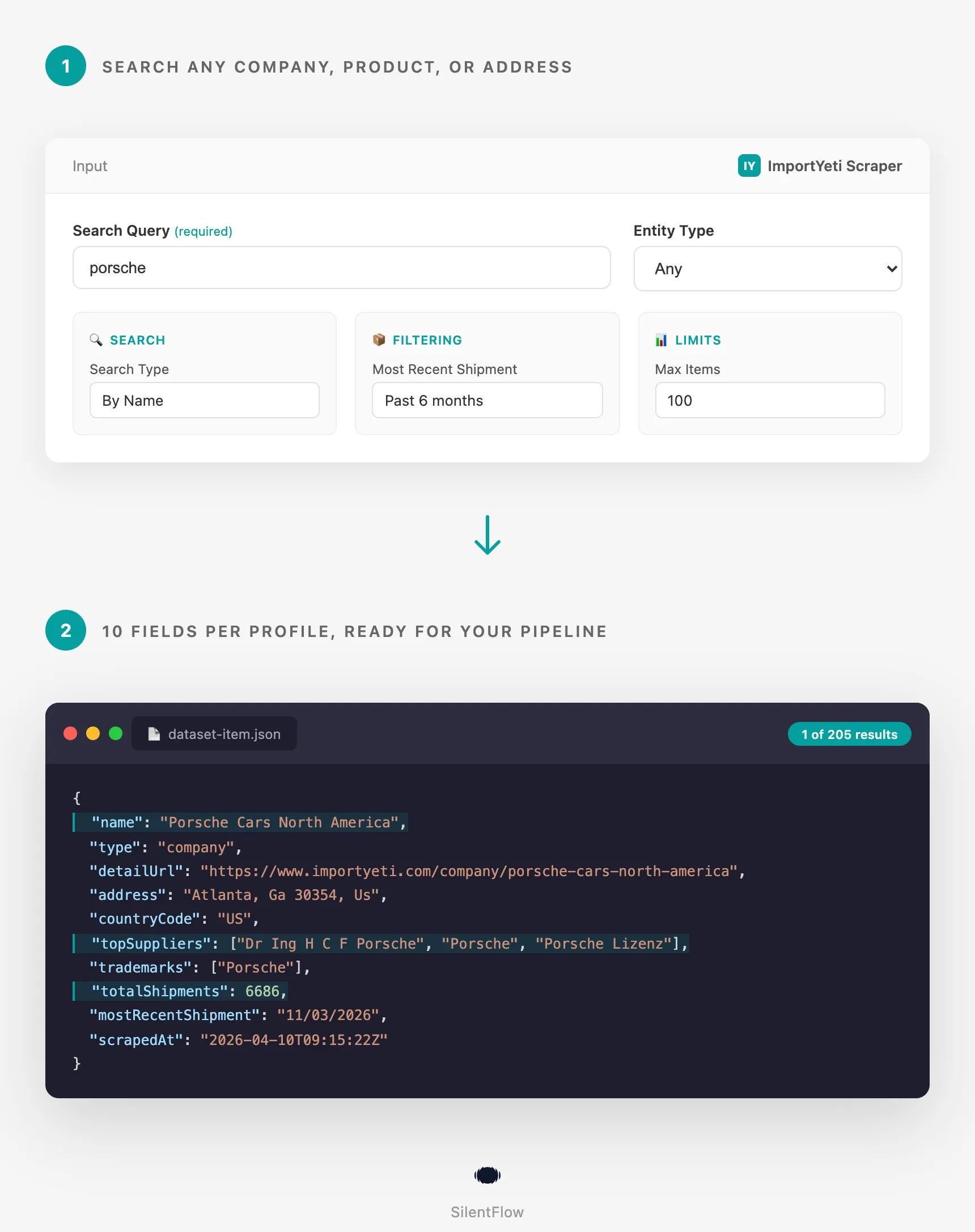
Turn ImportYeti's US customs records into structured supplier and importer profiles. Search by company, product, or address. Every result carries shipment counts, top trading partners, HS code chapters, ocean shipping lanes, carriers, trademarks and published contact details, read from the company's own profile page.
How it works
✨ Why teams choose this over other ImportYeti scrapers
Spending hours copying supplier data from ImportYeti tabs? Hitting rate limits with basic Python scripts? Tired of scrapers that hand you a name and a number and call it a supplier profile?
- 🔍 Search three ways, not one. Company name, product keyword, or address in the same input. Find HDMI cable suppliers, all importers in Atlanta, or every entity named "Porsche" without switching tools.
- 🤝 Trading partners on every row, not just a name. Each result is enriched from the company's own ImportYeti profile: up to four top trading partners, trademarks, first and most recent shipment, and the aliases the same entity ships under. A search listing alone cannot tell you who a supplier actually sells to.
- 📇 Published contact details included. Email, phone and website where ImportYeti shows them, so a sourcing shortlist is ready to contact instead of ready to research.
- 🚢 The trade itself, not just the name. HS code chapters, the ocean lanes a company actually ships on with port of loading and port of entry, and the carriers and freight forwarders moving the containers. That is what tells you whether a supplier really runs the volume it claims.
- ⚡ Pagination handled for you. Name search reaches up to 280 results per query, by reading suppliers and importers as two passes. Address search goes deeper still, and the run tells you when a query has given everything the site will serve.
- 🎯 Filters that really filter. Entity type, minimum shipment count, and a recency window from one month to two years. Ask for suppliers active in the last month and that is exactly what lands in the dataset.
- 💰 Pay per result, not per minute. No compute costs, proxies included. You pay for rows delivered, period.
- 🔓 No login, no API key, no cookies. Works on publicly available data only.
🎯 What you can do with ImportYeti data
| Team | What they build |
|---|---|
| Procurement | Shortlist of 50 verified HDMI cable suppliers with 100+ shipments in the last 6 months |
| Competitive Intel | Full supplier map of a competitor's import activity, refreshed monthly |
| Sales / BD | Lead list of 500 US importers in a category, sorted by volume |
| Supply Chain | Map which suppliers serve multiple competitors in your segment |
| Trade Compliance | Screen suppliers by country of origin and shipment recency |
| Market Research | Compare import volumes across product categories and years |
| Private Equity | Diligence a target's supplier exposure and trading partner concentration |
📥 Input parameters
Search
| Parameter | Type | Default | Description |
|---|---|---|---|
query | String | (required) | Company name, supplier name, or product keyword |
searchType | Select | search | search (by name) or addresses (by location) |
type | Select | any | any, supplier (overseas exporters), or company (US importers) |
Filtering
| Parameter | Type | Default | Description |
|---|---|---|---|
mostRecentShipment | Select | any | any, 1mo, 3mo, 6mo, 12mo, or 24mo |
minShipments | Integer | (none) | Only return entities with at least this many shipments |
Limits
| Parameter | Type | Default | Description |
|---|---|---|---|
maxItems | Integer | 100 | Maximum results to return (1 to 10,000) |
Advanced
| Parameter | Type | Default | Description |
|---|---|---|---|
requestTimeout | Integer | 30 | HTTP request timeout in seconds |
debugMode | Boolean | false | Enable detailed logs |
Note: Proxies are configured automatically. No proxy setup needed.
On result counts: a name search serves up to 140 results per filter combination. Ask for more and suppliers and importers are read as two separate passes, which reaches up to 280. Address search goes to 10,000, so use it when you need a long list from one city or state.
📊 Output data
Company example
Supplier example
🗂️ Data fields
| Category | Fields |
|---|---|
| Identity | name, type, detailUrl |
| Location | address, countryCode |
| Volume | totalShipments |
| Activity | mostRecentShipment, firstShipment |
| Relationships | topSuppliers (up to 4 top trading partners) |
| Products | topHsCodes (up to 5 HS chapters with their product category) |
| Logistics | topShippingLanes (port of loading to port of entry), topCarriers (ocean carriers and freight forwarders) |
| Brand | trademarks (company rows, when the entity holds any) |
| Contact | email, phone, website (when ImportYeti publishes them) |
| Entity matching | alsoKnownAs, otherAddresses, otherNames |
| Meta | scrapedAt |
For supplier rows, topSuppliers contains the supplier's top customers (US importers). The field name stays the same for schema consistency.
Empty fields mean ImportYeti does not publish that detail for the entity. US importers usually have their phone number hidden, and suppliers rarely hold US trademarks.
alsoKnownAs carries the first 10 spellings. ImportYeti records every variant a customs form ever used, which can run into the hundreds for a large importer, and otherNames gives the full count.
🚀 Examples
Find HDMI cable suppliers
Pull every importer in Atlanta
Get active high-volume electronics companies
Map a competitor's supplier network
Quick supplier shortlist for sourcing
Investigate a specific brand's importers
🤖 Copy to your AI assistant
Paste this block into Claude, ChatGPT, or Cursor to give it full context about this scraper:
💻 Integrations
Feed results into a supplier database (Python)
Build a competitor monitoring pipeline (JavaScript)
Export to CSV for spreadsheet analysis (Python)
Schedule weekly runs with Apify CLI
📈 Performance
| Metric | Value |
|---|---|
| Speed | ~10 enriched results per 4 seconds, pagination and profile reads included |
| Results per page | 10 (ImportYeti fixed page size) |
| Max results, name search | 140 per filter combination, 280 with suppliers and importers read separately |
| Max results, address search | 10,000 |
| Enrichment | Every row is read from its own profile page, 8 at a time |
| Data freshness | ImportYeti updates the source database daily |
| Pagination | Automatic, no configuration |
| Concurrent runs | Supported, each run uses an isolated session |
💾 Data export
Results are available in:
- JSON (full API output, best for pipelines)
- CSV (flat spreadsheet, array fields comma-joined)
- Excel (.xlsx, native formatting)
- RSS and JSONL (for streaming consumers)
Download from the Apify console or fetch programmatically with the dataset API:
💡 Tips for best results
- Product keywords beat category names. "hdmi cable" returns more suppliers than "cables". ImportYeti matches against raw product descriptions in bills of lading, which are specific.
- Filter with
typebefore scaling.type: "supplier"gives you overseas manufacturers,type: "company"gives you US importers. Without the filter, you get both mixed and waste half your quota. - Combine
minShipmentswithmostRecentShipment.minShipments: 50+mostRecentShipment: "6mo"gives you active, high-volume traders only. Perfect for sourcing shortlists. - Address search is for locations, not names. Use
searchType: "addresses"with a city or state to map all importers operating from that area. - Start small, then scale. Run with
maxItems: 25first to check the query returns what you expect, then raise it. If a name search stops before your limit, the log says so: the site has given everything it will serve for that query. - Finding a Chinese manufacturer for a product? Search the product keyword with
type: "supplier", then sort the rows bytotalShipmentsand look attopSuppliers: a factory that already ships to named US importers is a very different prospect from one with only a website.topShippingLanestells you which port it loads from, which matters for your freight quote. - Slice a broad query instead of asking for more. "electronics" tops out quickly, while "hdmi cable", "usb charger" and "lithium battery" each return their own 140. Several narrow queries beat one broad one every time.
❓ FAQ
What data does ImportYeti contain? US import records extracted from sea shipment bills of lading. Covers company names, addresses, supplier relationships, trademarks, and shipment volumes back to 2015.
What is the difference between "company" and "supplier"? A "company" is a US importer (the consignee on the bill of lading). A "supplier" is the overseas manufacturer or exporter (the shipper). The same entity can appear as both depending on trade direction.
How current is the data?
ImportYeti updates its database daily. The mostRecentShipment field shows the latest available record for each entity. Most active importers have shipments from the past week.
Can I search by HS code?
Not as a search filter, but every result reports the HS chapters that entity ships under, in topHsCodes. To find companies in a category, search the product keyword and read the HS chapters back. HS chapters are the first two digits shared by HS and HTS tariff codes, so an "85" row is electrical machinery whichever classification your team uses.
How does this compare to Panjiva, ImportGenius, Volza or Datamyne? Those are subscription platforms built on the same raw material: US customs bill of lading filings. This Actor reads ImportYeti, which publishes that data, and hands it back as rows you can pipe anywhere. It is not a scraper for Panjiva, ImportGenius, Volza, Datamyne, TradeAtlas, Tendata, ExportGenius, 52WMB or Zauba, and it does not log into any of them. The difference is commercial rather than technical: you pay per result instead of per seat per year, so a one-off supplier check or a 200 row sourcing list costs cents rather than an annual contract.
Is this a good ImportYeti alternative if I just need the data once? That is the usual reason people run it. There is no account to create on ImportYeti and no subscription to any trade data platform. You run a query, you get rows, you stop.
What does "topSuppliers" contain for supplier rows? For supplier rows, the field lists top customers (US importers), not the supplier's own suppliers. The field name is kept identical across rows for schema consistency.
Do I need an ImportYeti account? No. The scraper extracts publicly available data. No login, no API key, no cookies.
Can I scrape multiple queries in one run? One query per run. Schedule multiple runs if you need to compare several queries, or chain runs with an Apify task or CLI script.
What happens if my search returns fewer results than maxItems? The scraper stops at the actual result count. You only pay for rows delivered, never for empty slots.
Why does a query stop before maxItems? ImportYeti serves a fixed number of pages per search, so a name search returns at most 140 results for one set of filters. When you ask for more and leave the entity type as "any", suppliers and importers are read as two separate passes, which reaches up to 280. Address search is not limited that way and goes to 10,000, so use it for long lists, or split a broad keyword into several specific ones.
Why is a trading partner missing from topSuppliers? ImportYeti marks a counterparty as "Missing in source document" when the underlying bill of lading kept the shipper private. Those placeholders are skipped, and the next named partner takes the slot, so the field holds real names only.
Why does a foreign company show countryCode "US"?
ImportYeti tags companies by the destination market of their imports, not by physical HQ. A company like "Porsche Chile" appearing as a US consignee will show countryCode: "US". This reflects ImportYeti's own classification.
⚖️ Legal
This Actor extracts publicly available data from ImportYeti. It does not bypass any login, paywall, or CAPTCHA. Users are responsible for complying with ImportYeti's terms of service and applicable laws in their jurisdiction. The data returned is informational; verify accuracy for regulated use cases.
📬 Support
Need something this scraper doesn't do yet? We ship features fast.
- Feature requests go straight to our backlog
- Enterprise needs? We do custom integrations and high-volume plans
- Pricing questions? Check the Monetization tab on the actor page
Response time: usually under 24 hours.
Check out our other scrapers: silentflow on Apify


