

Instagram Engagement Scraper
Pricing
from $40.00 / 1,000 processed usernames
Instagram Engagement Scraper
Turn any public Instagram username into ready-to-use creator insights: follower stats, feed and Reels engagement rates by views, average views, content mix, and coverage signals, one clean record per creator. Perfect for influencer vetting, campaign planning, and creator analytics at scale.
Pricing
from $40.00 / 1,000 processed usernames
Rating
0.0
(0)
Developer

SilentFlow
Maintained by CommunityActor stats
1
Bookmarked
8
Total users
4
Monthly active users
2 hours ago
Last modified
Categories
Share
Turn public Instagram usernames into engagement-ready creator insights. Profile, feed, and Reels performance in one clean record per creator, in seconds, not hours.
Give it a handle. Get back follower stats, real engagement rates measured the right way (feed by followers, Reels by views), the creator's content mix, and quality signals that tell you how much of the sample you can trust. No spreadsheets, no manual math, no exporting raw posts.
How it works
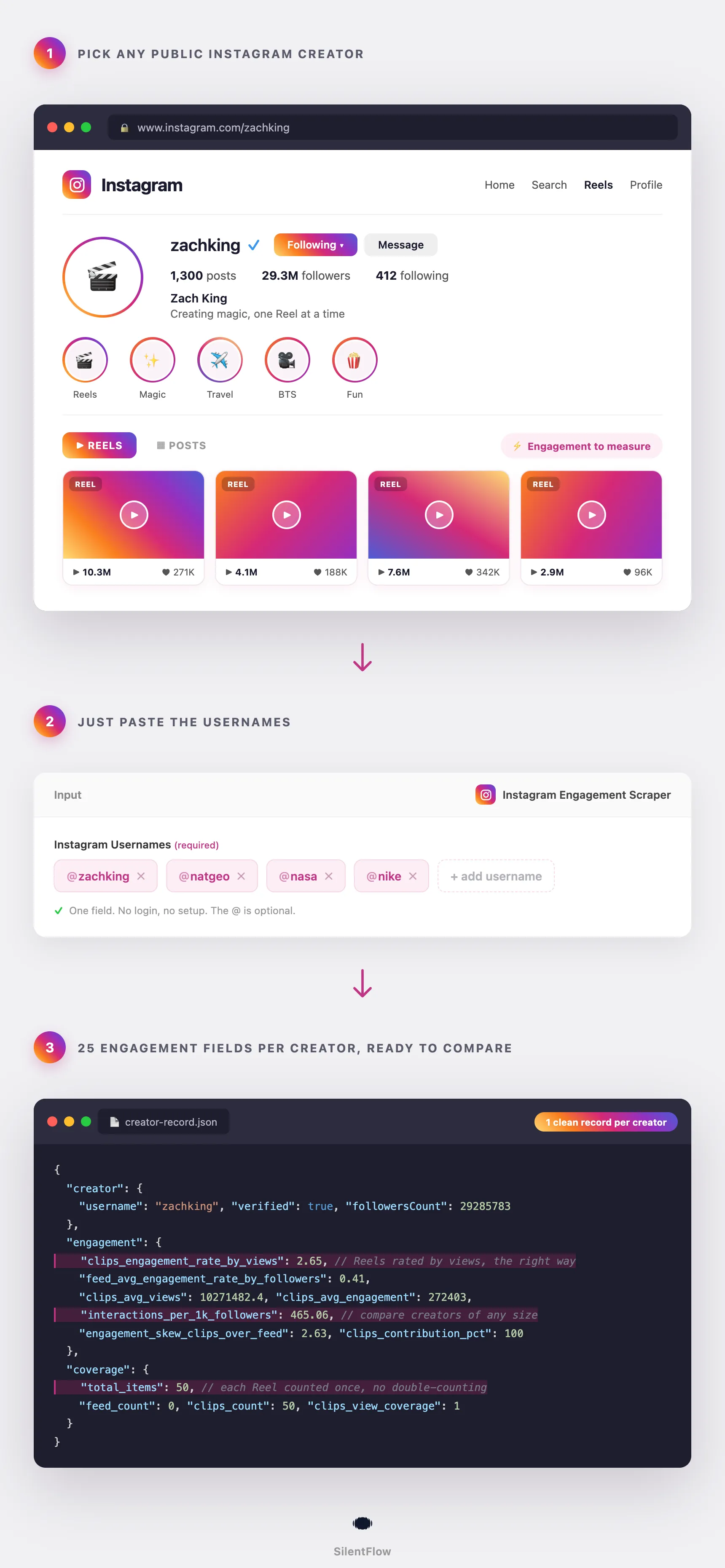
- You enter Instagram usernames. One or many, with or without the @.
- The scraper reads each public profile, recent feed posts, and Reels. Feed posts and Reels are measured separately, because mixing them into one number is meaningless.
- You get one structured record per creator, ready to export, sort, or feed into a dashboard.
✨ Why teams choose this over other Instagram scrapers
Paying an influencer who looks big but converts nothing? Drowning in raw post exports you still have to crunch yourself? Comparing creators on numbers you do not fully trust?
- 💰 Pay per result, not per minute. No compute costs, proxies included. You pay for creators delivered, period.
- 🎯 Engagement measured the right way. Feed posts are rated against followers, Reels against views. These are the correct denominators, so the rates actually mean something.
- 🧮 Honest sample size. Each Reel is counted once, even though Instagram shows it in both the grid and the Reels tab. Other tools double-count it and inflate the numbers. Yours stay accurate.
- 📊 A deeper read on Reels. Up to 50 Reels and 75 feed posts sampled per creator, so the Reels engagement rate sits on real data, not a handful of clips.
- 🔍 Know what you can trust. Coverage fields tell you exactly how much of the sample had usable view data before you cite a metric.
- ⚖️ Compare any creator, any size. Interactions per 1,000 followers removes audience-size bias, so a 30K micro-creator and a 30M mega-creator sit on the same scale.
- 🧹 One clean record per creator. Structured JSON that drops straight into a sheet, a dashboard, or an AI workflow.
🎯 What you can do with Instagram engagement data
| Team | What they build |
|---|---|
| Influencer marketing | Vet creators on real engagement before sending a single outreach message |
| Brand / growth | Shortlist creators for a campaign and compare them on one consistent scorecard |
| Agencies | Build client-ready creator reports without hand-pulling numbers from each profile |
| Talent management | Track a roster's engagement trend over time and prove value to brands |
| Competitive research | Watch how rival brands' chosen creators perform and where their content skews |
| Data / RevOps | Feed standardized creator metrics into models, lead scores, or BI dashboards |
📥 Input parameters
| Field | Type | Required | Description |
|---|---|---|---|
usernames | array of strings | Yes | One or more public Instagram usernames. The @ is optional. |
That is the whole input. One field, no setup.
📊 Output data
One record per username. A successful creator returns three sections: creator, engagement, and coverage.
If a username cannot be analyzed, you get a clear record instead of a silent gap:
🗂️ Data fields
Creator
| Field | What it tells you |
|---|---|
username | The handle analyzed |
fullName | Display name |
verified | Whether the account holds a verification badge |
followersCount | Audience size at run time |
followsCount | Following count, useful for follower-to-following ratio checks |
postsCount | Total lifetime posts |
profilePicUrl | Profile picture URL |
external_url | Link in bio, often a brand or personal site |
id | Instagram numeric account id |
Engagement (all rates are percentages)
| Field | What it tells you |
|---|---|
overall_interactions | Total likes plus comments across the sampled content |
feed_avg_engagement | Average likes plus comments per feed post |
feed_avg_engagement_rate_by_followers | Feed engagement divided by followers, the industry-standard feed rate |
clips_avg_engagement | Average likes plus comments per Reel |
clips_avg_views | Average views per Reel |
clips_engagement_rate_by_views | Reel engagement divided by views, the correct rate for Reels |
avg_interactions_per_content | Average interactions across all sampled content |
interactions_per_1k_followers | Interactions normalized per 1,000 followers, the best cross-creator comparison number |
posts_contribution_pct | Share of the sample made up of feed posts |
clips_contribution_pct | Share of the sample made up of Reels |
engagement_skew_clips_over_feed | Reel engagement divided by feed engagement. Above 1 means Reels outperform feed |
Coverage (data-quality signals)
| Field | What it tells you |
|---|---|
total_items | Unique content pieces analyzed (feed plus Reels) |
feed_count | Feed posts analyzed |
clips_count | Reels analyzed |
feed_view_coverage | Share of feed posts with usable view data. Often 0, which is normal for feed |
clips_view_coverage | Share of Reels with usable view data. 1 means full coverage |
profile_counts_rounded | True when Instagram only shows this profile's followers, following and posts rounded (for example 78M), so the counts and the rates based on followers are approximate |
🚀 Examples
Analyze one creator
Score a shortlist for a campaign
Compare two competitors' brand creators
Check a micro-creator before outreach
Batch a full vetting list
🤖 Copy to your AI assistant
Paste this block into Claude, ChatGPT, or Cursor to give it full context about this scraper:
💻 Integrations
Build a creator vetting list in Python
Flag Reels-first creators in JavaScript
Export to CSV for the team
📈 Performance
| Metric | Value |
|---|---|
| Output | One record per username |
| Sample depth | Up to 75 feed posts and 50 Reels per creator |
| Typical speed | Most creators process in under a minute |
| Reliability | High, proxies included |
| Input size | From one username to a large batch |
💾 Data export
Results land in an Apify dataset. Export from the dataset tab as JSON, CSV, Excel, XML, or HTML, or pull them programmatically:
💡 Tips for best results
- Benchmark by creator tier. Typical feed engagement rates: Nano under 10K followers 3 to 6 percent, Micro 10K to 100K 1 to 3 percent, Macro 100K to 1M 0.5 to 1.5 percent, Mega 1M and up 0.1 to 0.5 percent. A rate well below the range can signal an inflated or passive audience.
- For Reels, read
clips_engagement_rate_by_views. Above 2 percent is generally strong. Checkclips_view_coveragefirst; a low value means the rate sits on fewer Reels and deserves more caution. - Use
interactions_per_1k_followersto compare across sizes. It removes the audience-size advantage, so creators of any size line up fairly. - Watch
engagement_skew_clips_over_feed. Above 2 means a Reels-dominant creator, below 0.8 means feed-first. Brief them for the format they win at. - Send your highest-priority handles first when running a long list, so the creators you care about most come back at the top.
❓ FAQ
What exactly does this scraper return? A profile snapshot, feed and Reels engagement metrics computed separately, aggregate volume and per-1k-follower numbers, the creator's content mix, and coverage-quality signals. One record per username.
Do I need an Instagram account or login? No. It reads publicly available profile and post data. No login, no API key.
How are feed and Reels measured differently? Feed engagement is rated against followers (the standard for grid posts). Reels are rated against views, because views are how Reels are distributed. Combining them into a single rate produces a meaningless number, so they are kept separate.
Why is my feed_view_coverage zero?
That is expected. Instagram does not consistently expose view counts on feed posts, so the feed view coverage is usually zero. It does not affect the like-and-comment based feed metrics.
How many posts does it look at? Up to 75 recent feed posts and 50 recent Reels per creator. Metrics reflect this recent sample, not the account's entire history.
Can it analyze private accounts?
No. Private accounts are not public, so they return a clear private record instead of metrics.
Can I analyze many creators at once? Yes. Pass a list of usernames and you get one record per creator. You only pay for usernames that are successfully processed.
Why might a creator show zero feed posts?
Some creators post almost entirely Reels. When their recent content is all Reels, feed_count is zero and clips_count carries the sample. The content-mix fields make this visible.
Is the sample size accurate if a creator posts the same Reel to the grid and the Reels tab?
Yes. Each piece of content is counted once. The same Reel appearing in both places is de-duplicated, so total_items reflects unique content.
⚖️ Legal
This Actor extracts publicly available data from Instagram. It does not bypass any login, paywall, or CAPTCHA, and it does not access private accounts. Users are responsible for complying with Instagram's terms of service and applicable laws in their jurisdiction. The data returned is informational; verify accuracy for regulated use cases.
📬 Support
Need something this scraper does not do yet? We ship features fast.
- Feature requests go straight to our backlog
- Enterprise needs? We handle custom integrations and high-volume plans
- Pricing questions? Check the Monetization tab on the actor page
Check out our other scrapers: silentflow on Apify


