

YouTube Transcript Scraper
Pricing
from $4.50 / 1,000 transcripts
YouTube Transcript Scraper
Extract transcripts from YouTube videos in bulk. Get timestamped segments and full text in any language. Proxies included.
Pricing
from $4.50 / 1,000 transcripts
Rating
5.0
(1)
Developer

SilentFlow
Maintained by CommunityActor stats
1
Bookmarked
6
Total users
0
Monthly active users
a month ago
Last modified
Categories
Share
Turn any list of YouTube videos into clean, timestamped transcripts and full text, in any language. In seconds, not hours.
Paste your video links, pick a language, and get back one tidy record per video: the full transcript, every line with its timestamp, the title, and the language. No copy-pasting from the transcript panel, no one-video-at-a-time tools, no manual cleanup.
How it works
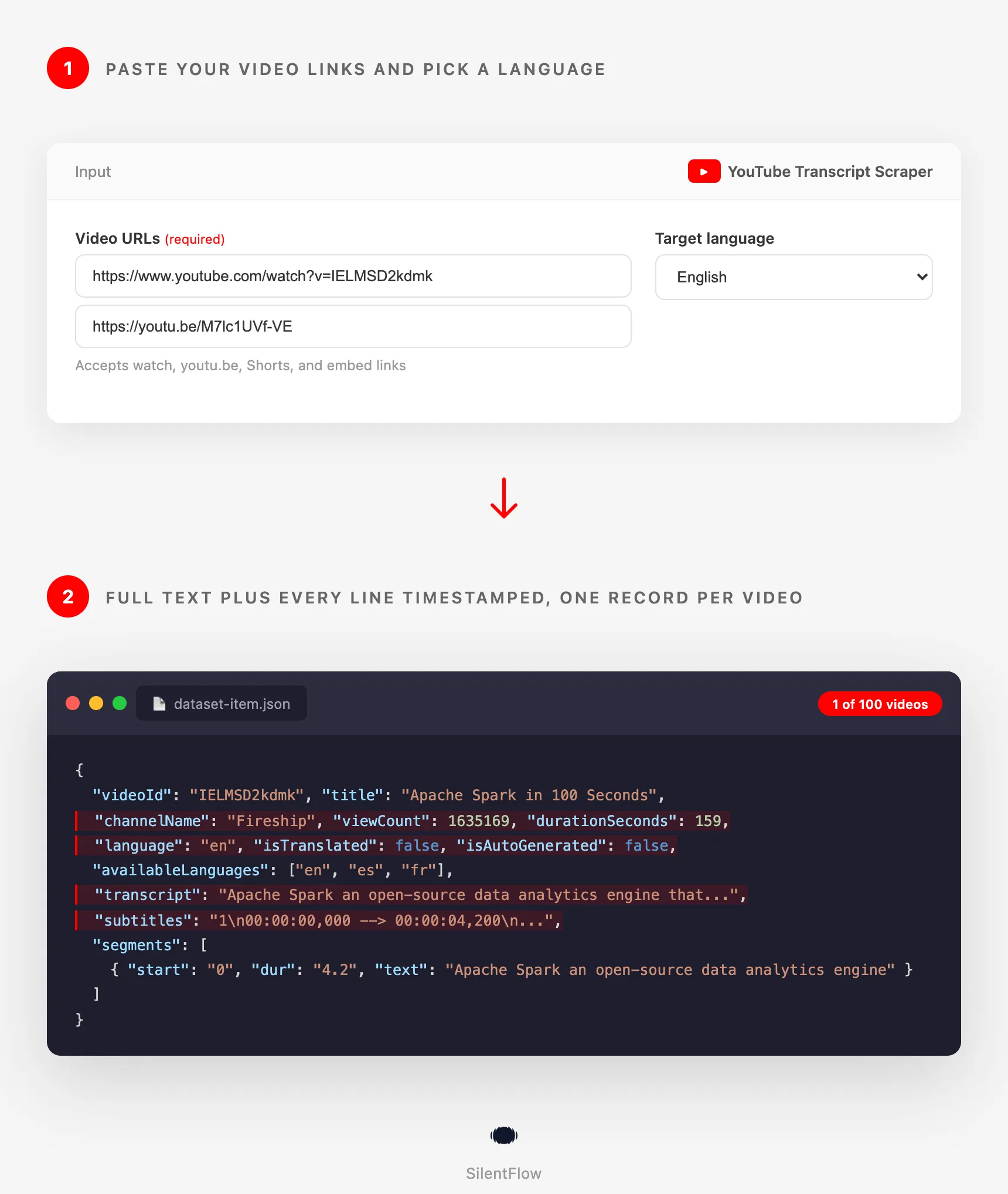
- Paste a list of YouTube video URLs (watch links, youtu.be short links, Shorts, or embeds).
- Choose your target language.
- Get one structured record per video with full text and timestamped segments, ready to export or pipe into your tools.
✨ Why teams choose this over other YouTube transcript scrapers
Tired of copying transcripts line by line from the YouTube panel? Stuck with a tool that only does one video per run? Watched a "transcript downloader" suddenly return nothing?
- 💰 Pay per result, not per minute. No compute costs, proxies included. You pay for transcripts delivered, period.
- 📋 Whole lists in one run. Drop in dozens or hundreds of video URLs at once and get a clean record for each. The popular alternative handles a single video per run.
- 🧱 Output you can actually use. Every record carries the video ID and URL, title, channel, view count, duration, description, keywords, the full transcript text, and the timestamped segments. Other tools hand you bare segments and leave you to stitch in the rest.
- 🎬 Ready-made subtitle files. Pick SRT or VTT and get a drop-in subtitle file per video, not just raw timestamps you have to format yourself.
- ✅ Know what you are reading. Each record flags whether captions are creator-written or auto-generated, and lists every language the video offers, so you can trust and route the text correctly.
- 🌍 Any language, the right way. When the video already has captions in your target language, you get that faithful native track. When it does not, you get an automatic translation. You always get the best text available.
- 🔗 Every link format works. Standard watch URLs, youtu.be short links, Shorts, and embed links all resolve to the right video. No reformatting your list first.
- 🧹 Clean text, not raw markup. HTML entities are decoded, stray line breaks are merged, and a ready-to-read full transcript is joined for you alongside the per-line segments.
- 🔁 Built to keep working. Reliable retrieval that keeps returning transcripts when simpler tools break.
🎯 What you can do with YouTube transcript data
| Team | What they build |
|---|---|
| Content marketing | Turn a channel's back catalog into blog posts, newsletters, and show notes without rewatching anything |
| SEO | Generate keyword-rich, indexable text from videos to capture search traffic the video alone cannot |
| Social / short-form | Pull exact quotes and timestamps to cut clips and write captions for Shorts, Reels, and TikTok |
| Localization | Draft subtitles and translated transcripts to bring videos to new-language audiences |
| Research & academia | Build searchable corpora of talks, lectures, and interviews for coding and analysis |
| Data / AI teams | Feed transcripts into RAG pipelines, summarizers, and training sets, one clean record per video |
| Product & UX research | Mine user interviews and demo recordings posted on YouTube for themes and verbatim quotes |
| Sales & competitive intel | Transcribe competitor webinars and product launches to track messaging and positioning |
📥 Input parameters
| Parameter | Type | Required | Default | Description |
|---|---|---|---|---|
videoUrls | array of strings | Yes | - | YouTube video links. Accepts watch URLs, youtu.be short links, Shorts, and embed links. |
targetLanguage | string (select) | No | en | The language you want the transcript in (ISO 639-1 code). A native track is used when available, otherwise the transcript is translated. |
outputFormat | string (select) | No | json | json (segments + full text), text (plain text), srt or vtt (adds a ready-to-use subtitle file). |
debugMode | boolean | No | false | Adds detailed run logs. Leave off for normal use. |
Example input
📊 Output data
You get one record per video. Each record includes the full transcript text and a segments array where every entry has a start time, a duration, and the spoken text.
Native transcript (video already in the target language)
Translated transcript (no native track in the target language)
Subtitle file (when outputFormat is srt or vtt)
With "outputFormat": "srt", each record also includes a ready-to-use subtitles string:
🗂️ Data fields
| Field | Type | Description |
|---|---|---|
videoUrl | string | The original video URL you provided. |
videoId | string | The 11-character YouTube video ID. |
title | string | The video title. |
channelName | string | The channel (author) name. |
channelId | string | The channel ID (stable identifier). |
durationSeconds | number | Video length in seconds. |
viewCount | number | View count at scrape time. |
language | string | The language of the returned transcript (ISO 639-1). |
isTranslated | boolean | true if translated to your target language, false if from a native track. |
isAutoGenerated | boolean | true if captions are auto-generated, false if creator-written. |
availableLanguages | array | All caption languages the video offers. |
description | string | The video description. |
keywords | array | The video tags. |
transcript | string | The full transcript as one continuous, ready-to-read text. |
subtitles | string | Ready-to-use SRT or VTT file (present when outputFormat is srt or vtt). |
segments | array | The transcript split into timed lines. |
segments[].start | string | Start time of the line, in seconds. |
segments[].dur | string | Duration of the line, in seconds. |
segments[].text | string | The spoken text for that line. |
🚀 Examples
Get one video's transcript
Transcribe a batch of videos at once
Pull a Spanish transcript from an English video
Generate SRT subtitle files
Transcribe Shorts for clip ideas
Mix link formats in one run and translate to French
🤖 Copy to your AI assistant
Paste this block into Claude, ChatGPT, or Cursor to give it full context about this scraper:
💻 Integrations
Build a content repurposing pipeline (Python)
Pull quotes with timestamps for clips (JavaScript)
Export every transcript to CSV (Python)
📈 Performance
| Metric | Result |
|---|---|
| Single transcript | About 1 second |
| Batch processing | Multiple videos in parallel |
| Output | One clean record per video |
| Reliability | Native track preferred, translation fallback, resilient retrieval |
Runtime per video depends on transcript length and YouTube response times. Larger lists process several videos at the same time.
💾 Data export
Export results from the Apify dataset in JSON, CSV, Excel, HTML, RSS, or XML. Pull them programmatically from the dataset API:
💡 Tips for best results
- Pass clean video URLs. Watch links, youtu.be, Shorts, and embeds all work. Playlist and channel links are not video links, expand them to individual videos first.
- Pick the language you actually need. If you set a language the video does not have natively, you get an automatic translation, flagged with
isTranslated: true. - Your list is your batch size. The number of URLs you pass is exactly how many videos are processed, one record each. No extra limit to configure.
- Use the full
transcriptfield for reading and search, andsegmentsfor timing. The full text is best for repurposing and indexing; the segments are best for clips and subtitles. - De-duplicate is automatic. If the same video appears twice in your list, it is processed once.
❓ FAQ
What exactly does this scraper return? For each video, the full transcript text plus a list of timed segments (start, duration, text), along with the video ID, URL, title, and language.
Which videos work? Any public video that has captions, whether the creator added them or YouTube generated them automatically. Videos with no captions at all are skipped.
Can I get transcripts in another language?
Yes. Set targetLanguage. If the video has a caption track in that language, you get it directly. If not, you get an automatic translation.
What link formats are supported? Standard watch URLs, youtu.be short links, Shorts links, and embed links. Each resolves to the right video automatically.
Can I transcribe many videos at once?
Yes. Pass a list of URLs in videoUrls and the scraper returns one record per video, as many as you provide.
Do I need a YouTube account or API key? No. The scraper reads publicly available caption data. No login, no API key.
How fresh is the data? Transcripts are pulled live at run time, so you get whatever captions are currently available for each video.
Why is a field like title sometimes shorter than expected, or a transcript auto-generated?
The data comes from YouTube itself. Auto-generated captions can include filler and lack punctuation, and some videos only offer them. The scraper returns exactly what is available, faithfully.
What happens to a video with no captions? It is skipped and noted, and the rest of your batch still completes.
⚖️ Legal
This Actor extracts publicly available caption data from YouTube. It does not bypass any login, paywall, or CAPTCHA. Users are responsible for complying with YouTube's terms of service and applicable laws in their jurisdiction. The data returned is informational; verify accuracy for regulated use cases.
📬 Support
Need something this scraper doesn't do yet? We ship features fast.
- Feature requests go straight to our backlog
- Enterprise needs? We do custom integrations and high-volume plans
- Pricing questions? Check the Monetization tab on the actor page
Check out our other scrapers: silentflow on Apify


