

Multilingual Github Scraper
Under maintenancePricing
from $0.01 / 1,000 results
Multilingual Github Scraper
Under maintenanceTurn any GitHub file or issue into clear, multilingual insights instantly. This standalone AI actor explains complex code with flowcharts and generates step-by-step solution plans for issues all in your preferred language.
Pricing
from $0.01 / 1,000 results
Rating
0.0
(0)
Developer

Sk Akram
Maintained by CommunityActor stats
0
Bookmarked
1
Total users
1
Monthly active users
9 months ago
Last modified
Categories
Share
A standalone, AI-powered Apify Actor designed to analyze GitHub repositories. It can explain code files, visually diagram logic with flowcharts, and create solution plans for GitHub issues. It supports multiple languages and two primary usage patterns: Standalone (AI-powered) and App Integration (Raw Data).
User Guidance
1. Raw Data Modes (Fast & Cheap)
These modes perform NO AI analysis. They simply fetch the raw content from GitHub. Ideal for feeding data into your own external pipelines.
| Mode | Purpose | Required Input | URL Error Policy |
|---|---|---|---|
file | Fetch raw code file content | Github File URL (e.g., .../blob/main/main.ts) | ❌ Error: If you provide an Issue URL, it will fail. |
issue | Fetch raw issue data (body, comments, labels) | Github Issue URL (e.g., .../issues/1) | ❌ Error: If you provide a File URL, it will fail. |
2. AI-Powered Modes (Deep Analysis)
These modes use LLMs (and optionally Lingo.dev) to analyze the content.
📄 File Explainer (file_explainer)
Analyzes code files to explain purpose, logic, and structure.
| Feature | Input | Description |
|---|---|---|
| Base Analysis | mode: "file_explainer" | Standard logic explanation. |
| Flowchart | includeFlowchart: true | Adds a Mermaid.js flowchart visualization. |
| Lingo Translation | useLingoTranslation: true | Uses Lingo.dev for high-quality technical translation (if language != en). |
🔧 Issue Solver (issue_solver)
Analyzes GitHub issues to propose actionable step-by-step solutions.
| Feature | Input | Description |
|---|---|---|
| Base Analysis | mode: "issue_solver" | Explains the issue context and problem. |
| Solution Plan | includeSolutionPlan: true | Adds a detailed, step-by-step fix plan with code snippets. |
| Lingo Translation | useLingoTranslation: true | Uses Lingo.dev for high-quality technical translation (if language != en). |
1. Standalone Modes (AI-Powered)
These modes are for users running the Actor directly on Apify to get AI insights.
Mode: File Explainer (file_explainer)
Analyzes a single source code file and provides a technical breakdown with a visualization.
Example Input JSON:
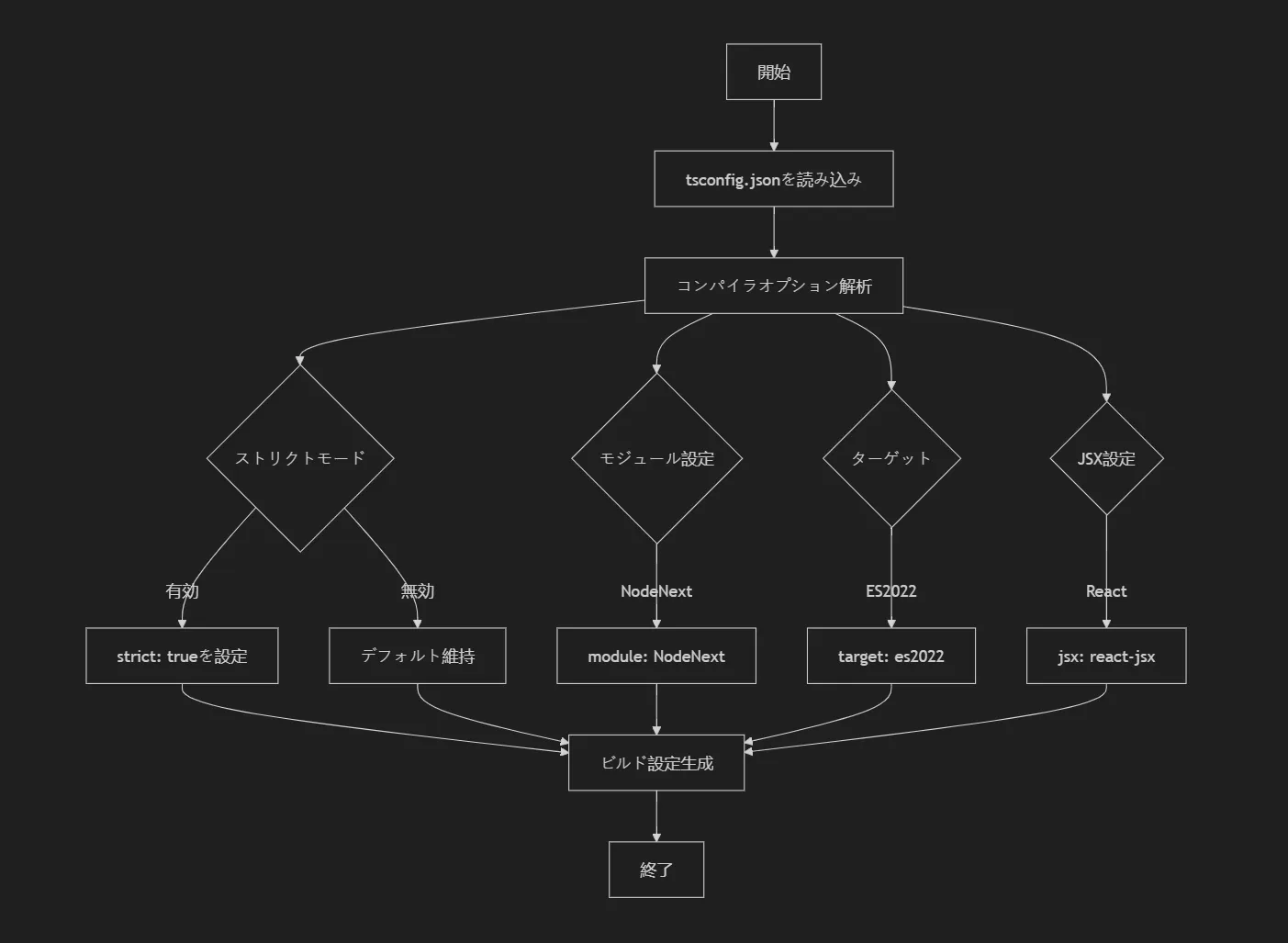
Example Output (Japanese With Flowchart):
"## ファイルの目的 このファイルは、TypeScriptコンパイラの設定(tsconfig.json)を解析し、ビルドプロセスを初期化するためのロジックを含んでいます。
フローチャート
Full Output JSON Structure:
How to Render Flowcharts
The flowchart field contains Mermaid.js syntax. To visualize it:
| Tool | How to Use |
|---|---|
| Mermaid Live Editor | Paste at mermaid.live |
| GitHub Markdown | Wrap in ```mermaid code blocks in .md files |
| VS Code | Install "Mermaid" extension |
| React/Web Apps | Use mermaid npm package (see below) |
React Example:
Mode: Issue Solver (issue_solver)
Analyzes a GitHub issue, identifies mentioned files, and proposes a fix.
Example Input JSON:
Example Output (Hindi Solution Plan):
"## समस्या विवरण मोनोरेपो के लिए Vitest टेस्टिंग कॉन्फ़िगरेशन में नए प्रोजेक्ट पाथ को जोड़ने की आवश्यकता है।
समाधान योजना
- चरण 1:
vitest.config.tsफ़ाइल खोलें। - चरण 2:
test.projectsसरणी (array) में नए पैकेज का पाथ जोड़ें। - चरण 3: परिवर्तनों को सहेजें और
npm testचलाकर पुष्टि करें। "
Full Output JSON Structure:
2. App Integration Modes (Raw Data)
These modes are used by the OSFIT App or other external tools. They perform no AI analysis on the Actor side, instead acting as high-speed data fetchers.
Mode: File (file)
Specifically designed to fetch the raw content of a file from GitHub for app-side processing.
Example Input JSON:
Output Example (JSON):
Mode: Issue (issue)
Scrapes GitHub issue data into a structured format for app-side AI processing.
Example Input JSON:
Output Example (JSON):
Input Parameters Table
| Parameter | Type | Required | Description |
|---|---|---|---|
mode | string | Yes | Operation mode: file_explainer, issue_solver, file, or issue. |
url | string | Yes | The GitHub URL. Must match the mode (File URL for file modes, Issue URL for issue modes). |
language | string | No | Target language code for AI output (e.g., en, fr, hi). Default: en. |
includeFlowchart | boolean | No | (File Explainer only) If true, generates Mermaid.js flowchart (+$0.04). Default: true. |
includeSolutionPlan | boolean | No | (Issue Solver only) If true, generates solution plan ($0.10 total). If false, only explanation ($0.04). Default: true. |
useLingoTranslation | boolean | No | If true, uses Lingo.dev for professional-grade translation. Default: false. |
Environment Variables
This Actor requires the following environment variables. In the hosted version, these are pre-configured.
GROQ_API_KEY: Required. API key for Groq (used for AI analysis).LINGO_API_KEY: Optional. API key for Lingo.dev (used ifuseLingoTranslationis true).
Pricing
This Actor uses a pay-per-event model. You pay for the specific features you use:
AI-Powered Analysis
| Mode | Features | Price |
|---|---|---|
| File Analysis | Code explanation in 20+ languages | $0.06 |
| File Analysis + Flowchart | Explanation + Mermaid.js diagram | $0.10 |
| File Analysis + Flowchart + Lingo | Above + Lingo.dev translation | $0.50 |
| Issue Explanation | Issue analysis in 20+ languages | $0.04 |
| Issue Explanation + Solution | Analysis + step-by-step fix plan | $0.10 |
| Issue Explanation + Solution + Lingo | Above + Lingo.dev translation | $0.50 |
Raw Data Fetching
| Mode | Description | Price |
|---|---|---|
| File Fetcher | Fetch raw file content | $0.001 |
| Issue Fetcher | Fetch raw issue data | $0.001 |


