

Google Play Review Intelligence
Pricing
from $1.20 / 1,000 google play review intelligence records
Google Play Review Intelligence
Google Play reviews across many languages in one run, with rating by app version, release regression flags, per locale sentiment, complaint themes, developer reply rate and joined app metadata. Export normalized records, use the API, schedule monitoring, or connect integrations and agent workflows.
Pricing
from $1.20 / 1,000 google play review intelligence records
Rating
0.0
(0)
Developer

Skootle
Maintained by CommunityActor stats
0
Bookmarked
1
Total users
0
Monthly active users
a month ago
Last modified
Categories
Share
Google Play Review Intelligence pulls public Google Play reviews for the apps you name, across many languages in one run, and turns them into release-regression signals, complaint themes and per-locale sentiment. It is built for app teams tracking a release, competitor analysts watching a rival's ratings slide, support leads mining complaints, and AI agents that need clean structured rows instead of scraped text. Three ways to run it: paste one package name and press Start, add five languages and watch coverage multiply, or schedule it daily and diff the summaries.
TL;DR
You give it Android package names such as com.duolingo. You get back:
REVIEWrows, one per unique review, withreviewId,appId,locale,language,country,rating,sentiment,body,bodyLength,reviewedAt(ISO 8601),reviewedAtEpochMs,authorName,authorAvatarUrl,thumbsUpCount,appVersion,appVersionMajor,hasDeveloperReply,developerReplyBody,developerReplyAt,themes,fieldCompletenessScoreandagentMarkdown.- One
APP_SUMMARYper app, withratingDistribution,meanRating,medianRating,negativeSharePct,developerReplyRatePct,versionBreakdown,versionRegression,localeBreakdown,distinctVersionsAcrossLocales,versionRolloutSplit,topComplaintThemes,duplicateSuppressedCount, plus joined store metadata:appTitle,developer,storeRating,storeRatingCount,genre,priceText. - One run
SUMMARYwith provenance, per-locale status and the apps whose latest release was flagged as a regression. - One
AGENT_BRIEFINGrecord, and the same briefing asAGENT_BRIEFING.mdin the key-value store.
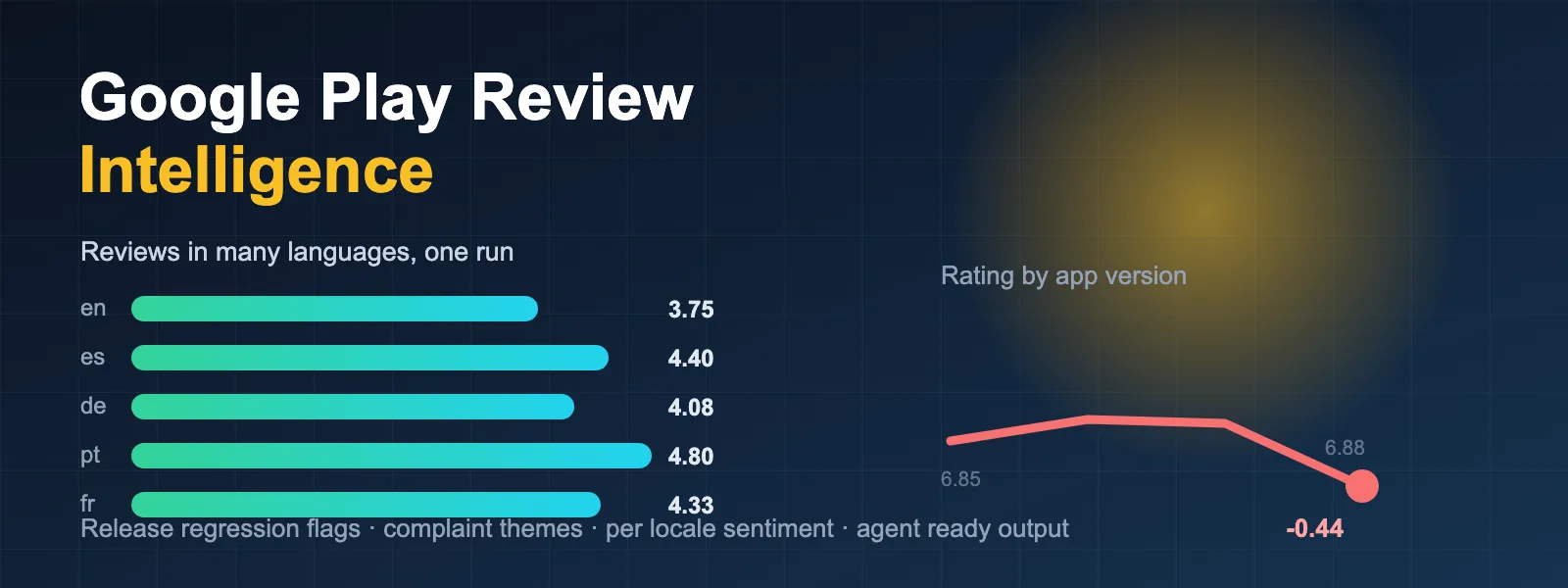
The pain it kills: you export 500 English reviews, see a 3.8 average, and have no idea that your Portuguese users rate you 4.8, that half your install base is still on last week's build, or that the drop you are staring at started with a specific version number.
If this Actor earns its keep, a short review helps other buyers find it: leave a review.
What does Google Play Review Intelligence do?
It calls the public Google Play review listing for each app you name, once per locale you request, deduplicates every review by its Google review ID so you are never billed twice for the same row, normalizes each review into a stable versioned schema, and then computes the intelligence layer on top: rating by app version, release-over-release deltas, complaint themes, developer reply coverage, and how all of that differs by language.
Every run also joins the app's own store page so the summary carries appTitle, developer, lifetime storeRating, storeRatingCount, genre and price alongside the reviews you just collected. That lets you compare lifetime reputation against what people are saying this week.
Why does language matter more than country on Google Play?
This is the finding that shaped the Actor, and it is worth stating plainly because it changes what you should ask for.
On Google Play, changing the country parameter alone returns the same review set. Changing the language returns a completely different one. We verified this against live Google Play on 21 July 2026 using com.spotify.music, 30 reviews per call:
| Locale requested | Unique review IDs | Overlap with en-us |
|---|---|---|
en-us | 30 | 30 of 30 |
en-gb | 30 | 30 of 30 |
en-de | 30 | 30 of 30 |
de-de | 30 | 0 of 30 |
fr-fr | 30 | 0 of 30 |
es-es | 30 | 0 of 30 |
ja-jp | 30 | 0 of 30 |
pt-br | 30 | 0 of 30 |
Union across those eight locales: 180 unique reviews, against 30 from a single locale. Country-only variation added nothing. Language variation added everything.
That is why this Actor takes a languages array as its primary coverage control, and why it deduplicates globally per app. A tool that looped over countries and pushed every row would hand you the same 30 reviews six times and charge you for 180.
How much more coverage do I actually get?
From the verification runs behind this listing, one app at 40 reviews per locale:
| Request | Unique reviews returned | Duplicates suppressed |
|---|---|---|
1 language (en) | 40 | 0 |
5 languages (en, es, de, pt, fr) | 200 | 0 |
Five times the reviews, one run, one start fee, zero duplicate rows.
Worked example: Duolingo across five languages
Real output from a verification run on 21 July 2026, input {"appIds":["com.duolingo"],"languages":["en","es","de","pt","fr"],"countries":["us"],"maxReviewsPerLocale":40}.
The per-locale breakdown from APP_SUMMARY.localeBreakdown
| Locale | Unique reviews | Mean rating | Negative share | Most common version |
|---|---|---|---|---|
en-us | 40 | 3.75 | 27.5% | 6.87.6 |
es-us | 40 | 4.40 | 12.5% | 6.86.5 |
de-us | 40 | 4.08 | 17.5% | 6.86.5 |
pt-us | 40 | 4.80 | 0.0% | 6.86.5 |
fr-us | 40 | 4.33 | 15.0% | 6.86.5 |
An English-only export would have told you the app sits at 3.75 with 27.5% negative reviews. Across five languages the real picture is a 4.27 mean, and the Portuguese-speaking cohort had zero negative reviews in the window. Same app, same day, completely different conclusion about where the problem is.
The release regression from APP_SUMMARY.versionRegression
Version 6.88.2 is landing 0.44 stars below 6.87.6. regressionFlag turns true at a drop of 0.3 stars or worse, comparing versions that have at least three reviews in the run, so a single angry reviewer cannot trip it.
The rollout split
The en-us cohort was on 6.87.6 while every other locale was still on 6.86.5. Staged rollouts mean your language cohorts are literally reviewing different software. If you only pull one locale you cannot see this at all.
Lifetime versus current
Lifetime store rating 4.728 from 47.2 million ratings, against 4.27 in the 200 reviews collected this run. The gap between the badge on the listing and what people are writing right now is exactly the number product managers get asked about.
Proof artifact
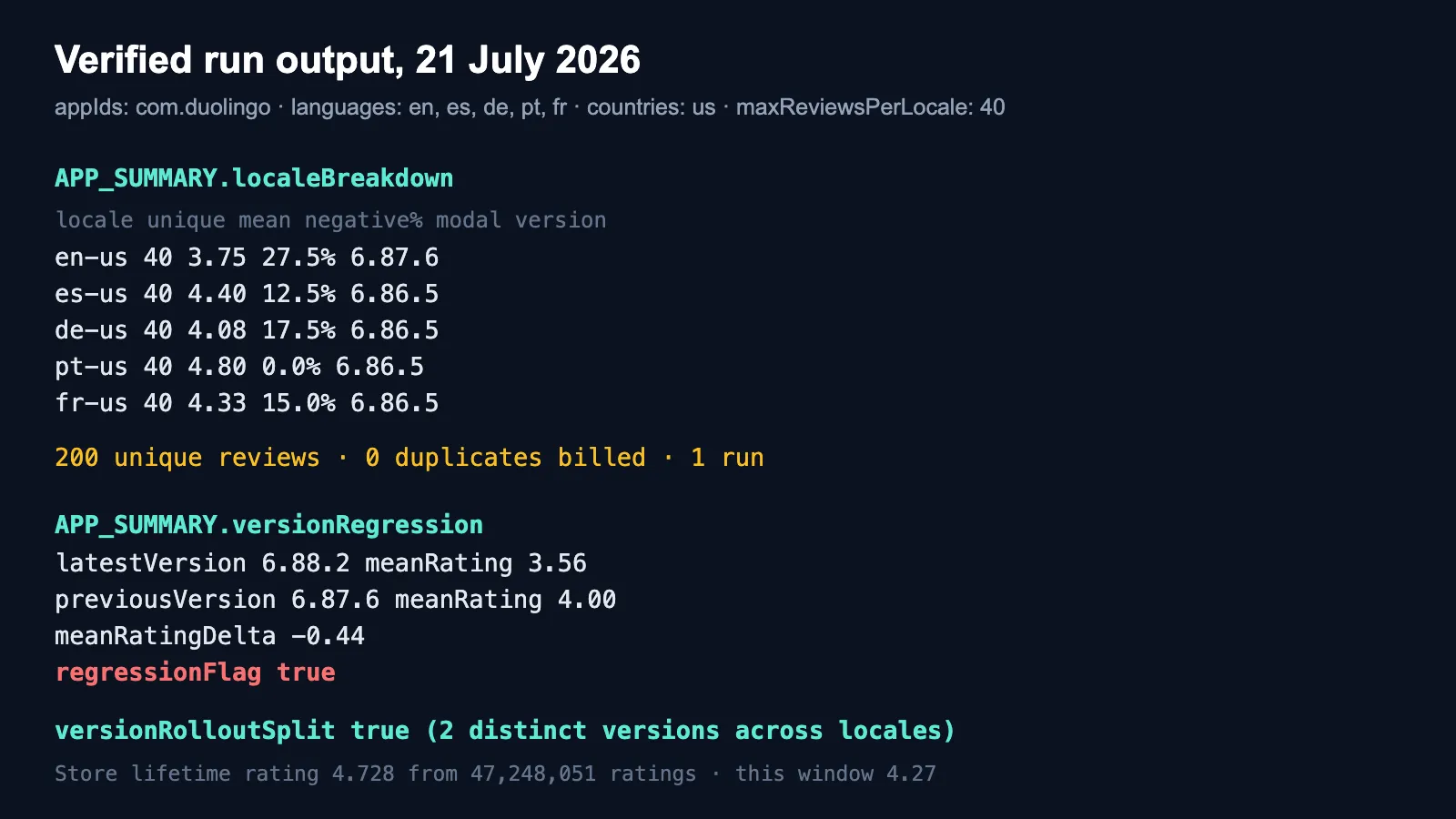
Every number in the tables above is rendered from the same verification run, so you can check the listing against the output rather than taking the copy on trust.
A single REVIEW row
fieldCompletenessScore is 83 rather than 100 because this reviewer's client did not report an appVersion. The Actor tells you that instead of hiding it.
Complaint themes from topComplaintThemes
Themes are matched over negative reviews only, using published deterministic keyword rules, not a language model. The same input produces the same labels every time, which matters if you are diffing runs on a schedule.
Worked example: Spotify, one app, five languages
Input {"appIds":["com.spotify.music"],"languages":["en","es","de","pt","fr"],"countries":["us"],"maxReviewsPerLocale":40} returned 200 unique reviews and 0 duplicates, with Spotify: Music and Podcasts, developer Spotify AB, lifetime rating 4.339 across 35,972,075 ratings, category MUSIC_AND_AUDIO. The largest version cohort in the window was 9.1.64.1676 at a 3.96 mean and 21.7% negative share.
Worked example: two apps in one run
The prefilled demo input runs com.spotify.music and com.duolingo together across five languages. It returns 404 dataset items: 400 unique reviews, 2 APP_SUMMARY records, 1 run SUMMARY, 1 AGENT_BRIEFING. Mean field completeness across the review rows was 99%. Three consecutive cloud runs on this exact input returned 404 items every time.
Worked example: a query that is genuinely empty
Input {"appIds":["com.skootle.no.such.package.exists"],"languages":["en"],"countries":["us"],"expectedNoMatch":true} returns 3 items: an APP_SUMMARY with sourceStatus: "no_match", a run SUMMARY with the same status, and the briefing. No invented rows, no silent success.
Run the same input without expectedNoMatch and the Actor fails on purpose, with this message:
Google Play returned zero reviews for every requested app and storefront. Set expectedNoMatch to true if this query is genuinely expected to be empty.
and writes DEBUG_ZERO_PARSE.json to the key-value store. An empty dataset that you did not ask for is a bug, not a result.
How is this different from a plain Google Play reviews scraper?
| Dimension | This Actor | Typical Google Play review scraper |
|---|---|---|
| Coverage axis | languages array, many locales per run, deduplicated globally | one country and one language per run |
| Duplicate billing | duplicateSuppressedCount reported, duplicates never pushed | no dedupe across locale loops |
| Release intelligence | versionBreakdown, versionRegression, regressionFlag | raw appVersion string only |
| Locale intelligence | per-locale mean, negative share and modal version | none |
| App metadata | joined storeRating, storeRatingCount, developer, genre | not joined |
| Themes | deterministic keyword clusters over negative reviews | none |
| Empty results | fails closed with saved evidence unless you declare expectedNoMatch | silent empty dataset |
| Agent output | agentMarkdown per row, AGENT_BRIEFING.md per run | raw JSON |
This is a comparison of shipped features, read from public input schemas and output on 21 July 2026. Competitors change; check their listings before you decide.
Where a plain scraper is the better buy: if all you need is a large volume of English-language review text at the lowest possible unit price, a raw extractor will be cheaper per row than this Actor. This one is priced for the intelligence layer, not for bulk text.
Tutorial: your first three runs
- Baseline. Paste one package name into
appIds, leavelanguagesat["en"], setmaxReviewsPerLocaleto 40, press Start. Look at theAPP_SUMMARYrow. NotemeanRatingandnegativeSharePct. - Multiply coverage. Add
es,de,pt,frtolanguagesand run again. ComparelocaleBreakdown. If the per-locale means differ by more than half a star, your single-language baseline was misleading you. - Watch a release. Set
sortBytonewest, schedule the Actor daily, and readversionRegression.regressionFlagfrom each run. When it flips true, theversionBreakdownrow for that version tells you the review count and negative share behind it.
To pull complaints only, set maxRating to 2. To audit one specific build, put its exact version string into appVersions.
Input
appIds accepts either a package name or a full Google Play URL; the package name is extracted for you. languages multiplied by countries is capped at 40 locale pairs per run. Optional minRating, maxRating and appVersions filter the rows that reach your dataset.
Output
Every record carries schemaVersion, recordType, retrievedAt, queryFingerprint, sourceUrl and fieldCompletenessScore, so you can diff two runs and know exactly which query produced which rows. Dates are ISO 8601 with numeric epoch mirrors. Ratings and counts ship as numbers, not strings.
The dataset has three prepared views: Reviews and review intelligence (everything), Review rows (just REVIEW), and Per app intelligence (just APP_SUMMARY).
API, scheduling, monitoring and integrations
This Actor runs on the standard Apify platform, so everything platform-level works out of the box:
- API: start runs and pull the dataset over the Apify REST API or any Apify client library. Results are also exposed as JSON, CSV, Excel and RSS through the dataset endpoints.
- Scheduling: run it nightly or hourly from the Schedules tab. Scheduled runs are what make
versionRegressionuseful, because you get a time series instead of a snapshot. - Monitoring: point Apify monitoring at the run and alert on failures. The Actor fails closed on unexpected empties, so a monitoring alert means something real changed at the source.
- Integrations: push results to Google Sheets, Slack, Zapier, Make, webhooks, or your own endpoint using the standard Apify integrations.
- Agents: every row carries
agentMarkdown, and each run writesAGENT_BRIEFING.md, so you can hand a run straight to an LLM without writing a formatter.
Pricing
Pay per event. $0.01 per run start, $0.0015 per dataset item, which is $1.50 per 1,000 records. Usage is not passed through to you, so the price you see is the price you pay. Each run is capped at $5.
A dataset item is any record: a review row, an app summary, the run summary, or the briefing. The prefilled demo input produces 404 items, which costs $0.01 + $0.61, about $0.62 per run.
Two things that make this cheaper than it looks. Duplicate reviews are removed before they are pushed, so multi-language runs never bill you twice for the same row. And filters are applied before records reach the dataset, so maxRating: 2 collects the same pages but only bills you for the complaints you asked for.
This Actor is priced above the cheapest bulk review extractors on the Store and below several mid-market ones. If your job is bulk English text at minimum unit cost, buy a raw extractor. If your job is knowing which release broke and for whom, this is the cheaper answer.
Frequently asked questions
Do I need a Google account, an API key, or a proxy? No. This Actor reads public Google Play listing data over plain HTTP. There is no login, no key to supply, and no proxy configuration to pay for.
How many reviews can I get for one app?
Google Play exposes a rolling window of public reviews per locale, not the full lifetime history. In practice you get up to maxReviewsPerLocale per locale, and the ceiling is set by Google, not by this Actor. Adding languages is the reliable way to increase unique coverage; the verification runs above show 5x from five languages.
Why do two locales sometimes return the same review?
Occasionally they do overlap. When that happens the review is pushed once and counted in duplicateSuppressedCount, so you can see exactly how much overlap there was and you are only billed for the unique row.
What exactly triggers regressionFlag?
The two most recent app versions that each have at least three reviews in the run are compared by mean rating. A drop of 0.3 stars or more sets the flag. If there are not two comparable versions, comparable is false and the flag is null rather than false, so you can tell "no regression" apart from "could not tell".
Are the complaint themes generated by AI? No. They are matched with published deterministic keyword rules over negative reviews only. Two runs on the same reviews always produce the same labels. That is a deliberate choice so that scheduled diffs are meaningful.
What happens if Google changes the response format?
The Actor fails the run and writes DEBUG_ZERO_PARSE.json with the stage, the URL, the HTTP status and a response snippet. It does not return a partial or empty dataset and pretend it worked. If you see a failure, that file tells you and us what changed.
Can I get reviews for an app that is not published in the US?
Yes. Set countries to the storefront you want. Bear in mind the verification above: country changes little on its own, so pair it with the languages spoken in that market.
Can I use this for competitor apps?
Yes. All of the data is the public review content Google Play shows to any visitor. Put several package names in appIds and compare the APP_SUMMARY rows side by side.
Is scraping Google Play reviews legal?
This Actor collects only publicly visible review content from Google Play listing pages, the same content any visitor sees without logging in. It does not access private data, does not log in, does not bypass authentication, and collects no data behind a paywall.
Review text is written by users and may be subject to their rights; reviewer display names and avatar URLs are personal data under GDPR, CCPA and similar regimes. You are the controller of anything you collect. Have a lawful basis, honour deletion requests, and do not republish reviewer identities without a reason you can defend. If you are doing anything beyond internal analysis, take your own legal advice.
Skootle is not affiliated with, endorsed by, or sponsored by Google LLC. Google Play is a trademark of Google LLC.
Related Skootle Actors
- App Store Reviews for the Apple side of the same question. Run both to compare how iOS and Android users receive the same release.
- Google Trends Intelligence to check whether a ratings move lines up with a change in search demand.
- Website SEO Audit Intelligence and Website Tech Stack Intelligence for the marketing surface behind the app.
Your feedback
Found a bug, hit a source change, or need a field this Actor does not emit yet? Open an issue on the Actor's Issues tab. That is the fastest route to a fix and it keeps the conversation attached to the run that showed the problem.
If it worked, a rating helps other buyers judge whether it fits their job: leave a review.


