ActorWebApp
Pricing
from $10.00 / 1,000 web app runs
ActorWebApp
Turn a compatible Apify Actor into a branded web app with a simple input form, run status, Dataset results, exports, and shareable Standby URL. Give customers and teammates an easier way to use your Actor without exposing your API token.
Pricing
from $10.00 / 1,000 web app runs
Rating
5.0
(1)
Developer

Solutions Smart
Maintained by CommunityActor stats
1
Bookmarked
3
Total users
0
Monthly active users
21 days ago
Last modified
Categories
Share
Actor Web App
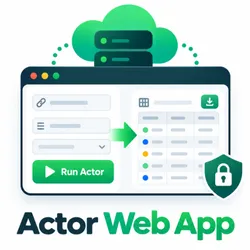
Turn an Apify Actor into a shareable web app with a generated input form, run status, Dataset preview, exports, and output-file links. Actor Web App reads the target Actor's default-build input schema, groups supported fields into a clear form, starts the target run, and displays its default Dataset without exposing your Apify API token.
Important: this Actor is a Standby web app.
Do not use the normal run URL as the product URL. Enable Actor Standby, open the Actor's Endpoints tab, and share the
https://...apify.actorStandby URL. A regular Start run is only a quick health check and exits after writing basic output.If the Store shows a low or
0%success rate, it usually means automated tests or users started the Actor as a normal run instead of opening the Standby URL. The web app experience happens through Standby, where the generated form can stay open, accept input, start the configured target Actor, and show results.
Use it when you want a friendly frontend for an Apify Actor without building and hosting a separate application. It works with crawlers, extractors, research tools, and other Actors that expose a compatible input schema.
Why use Actor Web App
- Generates a web form from the target Actor's Apify input schema.
- Supports labels, help text, defaults, examples, selectors, numeric limits, sections, arrays, request lists, and other rich input types.
- Hides common Apify technical fields when you want a simpler end-user experience.
- Validates submitted input before starting the target Actor.
- Shows run progress, status, Dataset rows, JSON and CSV exports, and safe output files.
- Supports light, dark, and warm themes, a custom logo, and an accent color.
- Keeps Apify API calls and credentials on the server.
Use it with any compatible Apify Actor that you want to make easier for customers, teammates, or non-technical users to run.
Common use cases
- Turn a crawler into a branded website data collection tool.
- Give customers a simple interface for a lead generation or research Actor.
- Share a focused version of an internal Actor with a team.
- Link from a DEV article, tutorial, or product page directly to a live Actor-powered tool.
- Add a results page and downloads without building a separate frontend.
Get started
- Deploy Actor Web App to your Apify account.
- Open Settings and enable Actor Standby.
- Set the target Actor ID in
username/actor-nameformat. - Configure the Branding, Input display, and Output display groups.
- Open Endpoints, copy the
https://...apify.actorStandby URL, and share that URL.
The target Actor must be available to the account running Actor Web App. Its default build must expose a compatible input schema. Results are read from the target run's default Dataset.
Using the Standby URL
After the Actor has been built with Standby mode enabled:
- Open the Actor's Endpoints tab in Apify Console.
- Copy the displayed Standby URL.
- Open the URL in a browser.
- Complete the generated form and select the run button.
- Wait for the target Actor to finish, then review the Dataset preview or download the available results.
The Standby URL is the shareable web app address. It is different from an individual run URL, which is intended for inspecting one specific run.
Starting the Actor with the regular Start button is only a health check for this Standby Actor and exits successfully. It does not keep the web app open at the run URL. Use the Standby URL to display the generated form and start target runs.
Why the Store success rate can look wrong
Actor Web App is designed to serve HTTP requests in Standby mode. A normal Actor run exits immediately with a success status and does not host the web app, so it is not the usage path customers care about. If you see a low success rate in the Store or Console, check whether those runs came from the regular Start Actor button instead of the Standby URL.
For a real user test, open the Standby URL, submit the generated form, and confirm that the configured target Actor receives a new run. The target Actor's own run history is the best signal that the web app is doing its job.
Common failure scenarios
FAILED during startup: Check that the configured Actor ID or Task ID is correct and accessible to your account. The Actor must have a default build with a compatible input schema. Review the Actor run log for specific error messages about missing Actors, Tasks, or build resolution failures.
ABORTED target runs: If target Actor runs show ABORTED status in older versions of this Actor, it was often caused by pay-per-event (PPE) charging logic that aborted the run when the charge failed. This has been fixed in recent versions. Upgrade to the latest version and ensure your account has sufficient credits if PPE is enabled for this Actor.
If the browser shows api-token-missing, the Actor's Standby access still requires authentication. Configure Standby access in Apify for the audience you intend to serve. For private or programmatic use, authenticate requests with an Authorization: Bearer <token> header. Apify also supports a token query parameter when a header cannot be used, but do not place a secret token in a public or shared browser URL. See the Apify Standby documentation for access and authentication details.
Configuration
The Apify Console renders the configuration as grouped controls, so normal setup does not require editing JSON. Set actorId for an Actor, or taskId for a saved Apify Task. When taskId is set, it takes precedence over actorId.
Use a saved Task
Create a Task for Brand DNA in Apify Console and save its input, then enter its Task ID under Target Task ID:
Replace the example with your own Task's username/task-name or 17-character ID. The generated form uses saved Task values instead of schema examples. Submitting starts a Task run without changing the saved Task. Its memory, timeout, and other run settings remain managed by Apify. Results and the web-app-run charge work as they do for Actor targets.
Use the default build or an existing build tag in the Task settings. An untagged historical build number is not supported. Task input is loaded when the Standby instance starts; restart the instance after editing the saved Task to refresh the form.
Saved fields marked isSecret, hidden fields, and objects or arrays containing secret fields stay on the server and cannot be edited through the form. Other saved values are visible to app users, so only use Tasks whose non-secret input is suitable for your audience. The running account must have access to both the Task and its Actor.
Complete example
Replace the example logo URL with an HTTPS image URL that you control. The logo appears in the generated app header. accentColor must be a six-digit hexadecimal color such as #19724c. The theme can be light, dark, or warm.
Branding examples
For a clean public app with no custom logo, use the default light theme:
For a branded dark app, set the logo, accent color, and dark theme:
Set hideApifyTechnicalFields to false when advanced users need to see platform fields such as proxy, memory, or runtime options exposed by the target schema.
Input display examples
Use the compact form for most public apps:
Show the full supported target schema when users need complete control:
The generated form uses the target Actor's own labels, descriptions, defaults, selectors, arrays, request-list controls, and validation rules. Values entered by end users are sent to the target run and are not persisted in the browser by Actor Web App.
Output display examples
For a table with both downloads and a 100-row preview:
For a result page focused on downloads, hide the table and keep the exports:
maxPreviewRows accepts values from 1 to 500. JSON and CSV exports come from the target Dataset. HTML reports, JSON files, Markdown files, PDFs, and other supported files written by the target Actor are shown in the output-files section.
Output
After a user submits the form, Actor Web App follows the target run until it finishes, fails, or is stopped. The results page shows the run status, a preview of the target Actor's default Dataset, downloads, and supported output files.
Pricing
Actor Web App does not remove the costs of running the target Actor. Users may incur Apify platform usage costs and any charges defined by the target Actor. Standby mode may also incur platform costs while the app is active.
Actor Web App may charge for a successful web-app run when paid access is enabled. Users still pay the target Actor's own charges and any applicable platform usage costs. Review the pricing shown in Apify before starting a run, especially when the target Actor is long-running or expensive.
Security and privacy
Apify API calls are made server-side with APIFY_TOKEN; the token is never sent to the browser. Target metadata is rendered as text, and user-entered values are sent only when a target run is started.
Configure Standby access in Apify to control who can open the app. Actor Web App does not add a separate authentication layer. Secret values entered into the generated form are not persisted in browser state by this Actor, but the target Actor may process them during its run according to its own behavior and policies.
Limitations
- Supports the practical JSON Schema subset used by Apify input schema v1, not arbitrary composition such as
oneOf,$ref, or conditional schemas. - Reads the target Actor's default build, default Dataset, and filtered output files from the default Key-value store.
- Requires the configured account to be allowed to run the target Actor.
- Standby access, idle costs, target Actor permissions, and target Actor charges remain governed by Apify.
- Multi-Actor workflows, custom domains, quotas, payments, and white-labeling are not included.
Frequently asked questions
Can I use a private target Actor?
Yes, if the account running Actor Web App has permission to run it and its default build exposes a supported input schema.
Does Actor Web App expose my Apify token?
No. The token remains in the Actor server process and is not returned to the browser.
Where do the results come from?
Results come from the target run's default Dataset. The app does not automatically combine multiple Actors or datasets.
Can I use the app from an API or automation workflow?
The app runs through Apify Standby and can be used with Apify API access, webhooks, schedules, and integrations according to your account and Actor configuration.
Support
For a target-specific issue, check the target Actor's input schema, permissions, run log, and Dataset. For an Actor Web App issue, include the configured actorId, sanitized display settings, run ID, and relevant log messages when contacting the Actor maintainer. Do not include API tokens or other secrets in support requests.