

Strategy Execution Research Builder
Pricing
from $5.00 / 1,000 results
Strategy Execution Research Builder
Discover implementation examples and turn source-backed evidence into deterministic OKRs, KPIs, Balanced Scorecard views, and executive briefs.
Pricing
from $5.00 / 1,000 results
Rating
0.0
(0)
Developer

Solutions Smart
Maintained by CommunityActor stats
0
Bookmarked
2
Total users
0
Monthly active users
7 months ago
Last modified
Categories
Share
Discover real implementation examples and turn them into grounded OKRs, KPIs, Balanced Scorecard views, execution plans, and executive briefs.
This Apify Actor is built for teams that need more than raw research. It finds relevant implementation examples from trusted websites and optional search expansion, extracts structured evidence, and generates deterministic planning artifacts without requiring an external LLM.
It is designed for:
- strategy and transformation teams
- PMO and operations leaders
- consultants
- business analysts
- internal research teams preparing planning workshops or execution programs
What this Actor does
This Actor helps you move from research to execution support.
Instead of manually collecting articles, PDFs, and framework pages and then translating them into planning material, the Actor:
- discovers relevant implementation examples from seed URLs and optional search expansion
- extracts structured evidence from pages and optional PDFs
- identifies framework mentions, challenges, timelines, lessons, metrics, and supporting quotes
- generates deterministic execution-ready outputs based on the evidence
- stores a run-level summary with aggregate insights and an executive brief
The goal is not to replace strategy judgment. The goal is to give your team a clean, source-backed starting point for planning and execution.
How to use
Using this Actor is straightforward:
- Click
Try for free - Add a few trusted
seedUrls - Optionally add
searchQueryfor discovery expansion - Select the frameworks and execution artifacts you want
- Run the Actor
- Review results in:
- the
Datasetfor per-source evidence - the
OUTPUTrecord for the run summary - the
DASHBOARDrecord for the HTML interface
- the
HTML dashboard
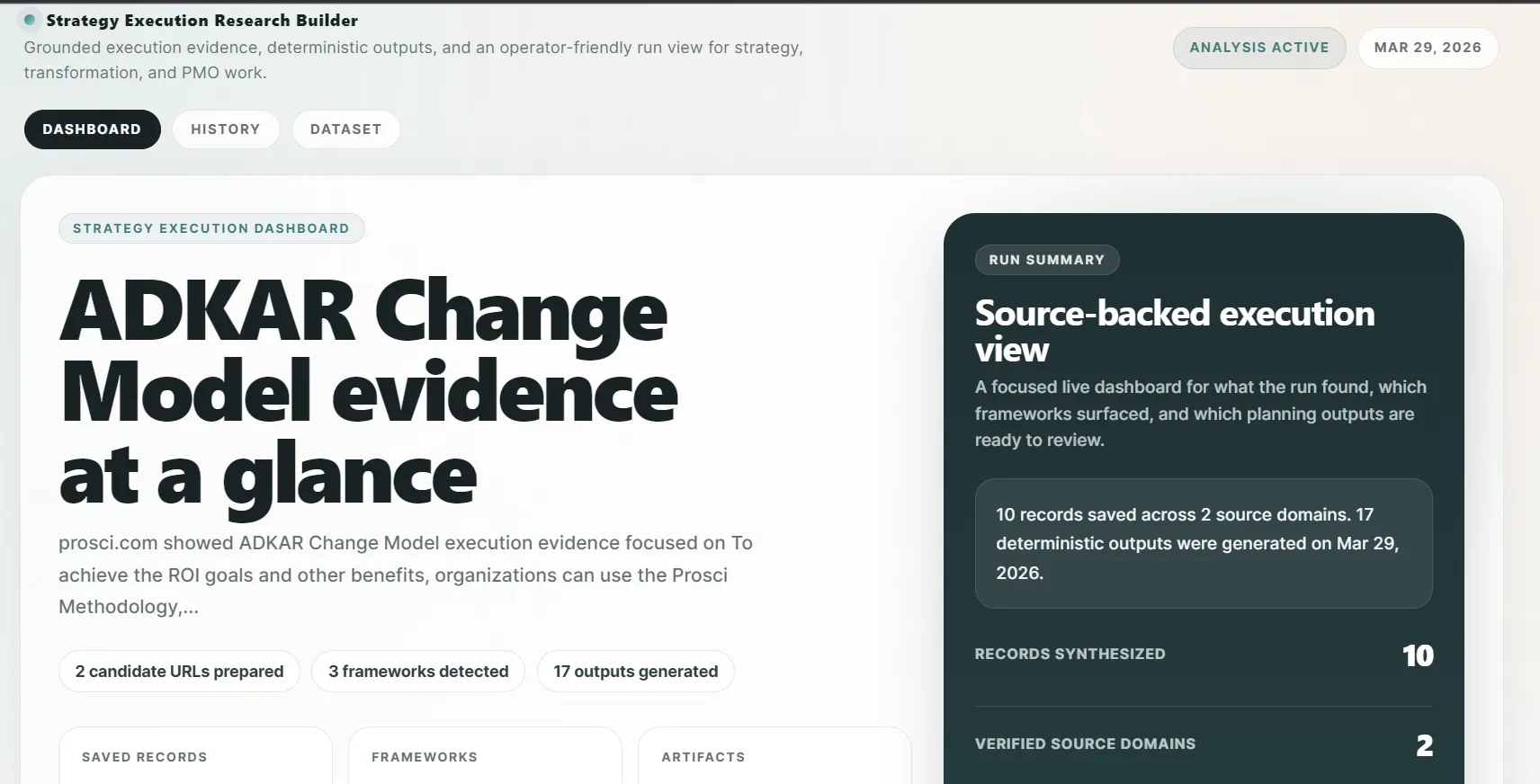
This Actor also generates a polished HTML dashboard for live review and post-run sharing.
DASHBOARDrecord: a browsable HTML workspace written to the Key-Value Store- Live View support: the same dashboard updates during the run
- multi-view layout:
Dashboard,History, andDataset - grounded presentation: the HTML stays deterministic and reflects real run data, not fabricated UI states
The dashboard is useful when you want a more presentation-ready layer on top of the raw dataset and OUTPUT record.
Live example:
https://api.apify.com/v2/key-value-stores/lRQGvrZLsLQ053rc0/records/DASHBOARD
Example screenshot:
What it produces
Per-source outputs
For each crawled page or parsed PDF, the Actor produces normalized dataset items with evidence such as:
- framework mentions
- implementation challenge
- timeline references
- lessons learned
- success metrics
- supporting quotes
- publication metadata
- source URL and domain
Deterministic execution artifacts
Depending on your configuration, the Actor can generate:
- OKRs
- KPIs
- Balanced Scorecard views
- executive summary / executive report
- EOS components
- project plan rows
- RACI rows
- OCAI guidance
Run-level artifact
At the end of the run, the Actor writes a run-level OUTPUT record to the Key-Value Store with:
- aggregate counts
- top frameworks detected
- top domains
- run-level executive brief
- other summary indicators useful for downstream workflows
HTML dashboard output
The Actor also writes a DASHBOARD HTML record to the Key-Value Store. This output includes:
- a run summary view with key metrics and executive brief
- execution artifact previews for OKRs, KPIs, Balanced Scorecard mappings, and optional outputs
- a dataset view for current-run records
- a history view backed by persistent actor storage for previous executions
Why use this Actor
Turn scattered research into planning inputs
Most teams can find case studies. The harder part is converting them into something useful for execution. This Actor helps bridge that gap.
Stay grounded in evidence
Outputs are based on extracted source material. Unsupported values are not invented. Missing facts remain empty or null.
No external LLM required
The Actor is deterministic by design and does not depend on an external LLM provider.
Useful for real business workflows
The output is designed to support:
- planning workshops
- transformation program design
- PMO preparation
- executive briefings
- structured research pipelines
Best use cases
This Actor works especially well when you want to:
- research how organizations implemented ADKAR, Balanced Scorecard, or other strategy execution frameworks
- build a source-backed starting point for OKRs or KPIs
- collect implementation lessons from consulting firms, methodology providers, and case-study pages
- prepare executive briefs before planning sessions
- compare strategy execution approaches across domains, industries, or regions
Example input
Example output ideas
Depending on the evidence found, the Actor can help produce outputs such as:
Source-backed OKRs
- objectives aligned with the selected framework
- candidate key results grounded in available evidence
- quarter-focused structure when
okrHorizonis set
KPI drafts
- candidate KPI ideas mapped to the implementation context
- clearly separated from unsupported source metrics
Balanced Scorecard views
- structured into perspectives such as Financial, Customer, Internal Process, and Learning & Growth
Executive brief
- concise run-level summary
- top themes
- common challenges
- repeated lessons
- dominant frameworks and domains
HTML dashboard
- presentation-ready review surface for the current run
- live-updating dashboard during execution
- history and dataset views for easier navigation of results
How it works
1. Discovery
The Actor starts from seedUrls and can optionally expand discovery with searchQuery.
2. Filtering
You can constrain the crawl using:
allowDomainsframeworkTypeindustryregionlanguages
3. Extraction
The Actor extracts structured evidence from pages and optional PDFs.
4. Artifact generation
The extracted evidence is transformed into deterministic execution-ready artifacts.
5. Run summary
A run-level OUTPUT record is generated for quick review and automation.
6. HTML presentation layer
The Actor writes a DASHBOARD HTML record for live review, output sharing, and lightweight run navigation across dashboard, history, and dataset views.
Recommended first run
For the best results in v1:
- start with a few high-quality seed URLs
- keep
followDepthlow - enable only the execution artifacts you really need
- use
searchQueryas optional expansion, not as your only discovery method
A strong first run usually looks like:
- 2 to 5 trusted seed URLs
- 1 to 2 frameworks
- a single industry context
- a small result limit
This gives you cleaner evidence and more focused outputs.
Input field guide
| Field | Purpose | Notes |
|---|---|---|
seedUrls | Primary discovery source | Start here for the best results in v1 |
searchQuery | Optional search expansion | Useful for finding additional examples, but not exhaustive |
allowDomains | Focus on trusted sources only | Strongly recommended for cleaner results |
frameworkType | Guide extraction toward your planning model | Helps focus the generated outputs |
industry | Add contextual relevance | Optional filter |
region | Add regional context | Optional filter |
languages | Restrict to target languages | Useful when sources mix locales |
followDepth | How far to follow links from seed pages | Lower values are usually cleaner |
maxResults | Limit the number of processed results | Smaller runs often produce better signal |
dedupe | Reduce repeated or overlapping results | Recommended enabled |
includePdf | Enable PDF parsing | Can improve coverage, but is slower |
executionArtifacts | Choose which outputs to generate | Enable only what your team needs |
summaryWords | Control summary length | Typical range: 100-200 words |
Tips for best results
- start with
seedUrls, because they are the highest-quality discovery path in v1 - keep runs focused with 2-5 trusted sources, 1-2 frameworks, and one industry context
- use
searchQueryfor expansion, not as your only discovery method - keep
followDepthlow unless you truly need broader coverage - enable only the execution artifacts your team will actually use
- validate quality on a small run before scaling up
Important notes
seedUrlsare the most reliable source of high-quality results in v1searchQueryis useful for expansion, but should not be the only discovery strategy- the Actor does not invent unsupported numeric metrics
- missing evidence stays empty or
null - confidence should be interpreted in the context of available source support
- the Actor is deterministic and does not require an external LLM
- the HTML dashboard is a presentation layer over real stored outputs, not a separate analysis engine
- PDF parsing can be slower than HTML crawling
What this Actor is not
This Actor is not:
- a generic web search bot
- an LLM-only strategy writer
- a replacement for expert planning judgment
- a guarantee of complete market or literature coverage
It is a deterministic research-to-structure pipeline that helps teams move faster with better-organized evidence and execution-ready outputs.
Is it legal to scrape the websites this Actor accesses?
This Actor is designed to extract public information from websites and PDFs for research and planning purposes. Whether scraping is appropriate depends on the source website's terms, your jurisdiction, and how you intend to use the data.
Important:
- personal data may be protected by GDPR and other privacy laws
- you should not scrape personal data unless you have a legitimate reason to do so
- if you are unsure, consult your legal team before using the output operationally
We also recommend reviewing Apify's guidance on web scraping legality:
https://blog.apify.com/is-web-scraping-legal/
Ideal users
This Actor is a strong fit for:
- strategy consultants
- transformation leads
- PMO teams
- operations and business planning teams
- researchers building structured strategy evidence packs
Positioning summary
Use this Actor when you want to go from:
articles, framework pages, and scattered case studies
to:
source-backed execution inputs your team can actually work with
Short store description
Discover implementation examples and turn source-backed evidence into deterministic OKRs, KPIs, Balanced Scorecard views, and executive briefs.
Suggested first test
Try a small run with:
- one framework
- two trusted seed URLs
- one industry
- one or two artifact types
Example:
- framework:
Balanced Scorecard - industry:
Technology - artifacts:
BSC,Executive Report
This will help you validate quality before scaling discovery.


