
Aldi Product Search Scraper
Pricing
from $2.00 / 1,000 results
Aldi Product Search Scraper
Efficiently scrape product listings from Aldi.com.au, Australia's popular discount supermarket chain. Extract comprehensive data including SKUs, prices, availability, categories, and product specifications. Perfect for price monitoring, competitive analysis, and grocery market research.
Pricing
from $2.00 / 1,000 results
Rating
0.0
(0)
Developer

Stealth mode
Maintained by CommunityActor stats
1
Bookmarked
47
Total users
0
Monthly active users
11 hours ago
Last modified
Categories
Features
Share
Aldi.com.au Product Search Scraper: Extract Australian Grocery Data
Understanding Aldi.com.au and Its Market Position
Aldi Australia operates over 570 stores nationwide, offering quality groceries at competitive prices through a unique business model focused on private label products and limited selections. Unlike traditional supermarkets, Aldi's catalog changes weekly with "Special Buys" alongside core range items, making it essential for retailers and analysts to track product availability, pricing, and promotional cycles.
The platform's product data reveals pricing strategies, seasonal availability, category expansions, and inventory patterns critical for competitive intelligence. For price comparison services, grocery analytics firms, and competing retailers, this data provides insights into one of Australia's fastest-growing supermarket chains.
Manual product data collection across categories and weekly changes is impractical at scale. This scraper automates extraction from search result pages, transforming Aldi's product catalog into structured datasets for analysis, monitoring, or integration.
What This Scraper Extracts and Target Users
The Aldi.com.au Product Search Scraper processes search result and category pages, extracting multiple product listings per page. Unlike detail page scrapers requiring individual URLs, this tool efficiently captures broad product datasets across searches and categories.
Key Data Fields:
Product Identification: SKU (stock keeping unit), name, brand name, and URL slug provide unique identifiers for tracking products across time and linking to detail pages.
Pricing & Availability: Current price, sale dates, discontinued status, and not-for-sale flags enable price tracking, availability monitoring, and promotional analysis.
Purchase Restrictions: Age restriction (alcohol, restricted items), quantity limits (min/max/interval/default), and quantity units govern purchase rules—critical for compliance and inventory planning.
Product Specifications: Selling size, weight type, energy class (appliances), and quantity unit provide product dimensions and regulatory classifications.
Categorization: Categories array shows product placement in Aldi's taxonomy, enabling category-level analysis and competitive positioning.
Marketing Elements: Assets (product images), badges (promotional tags like "Special Buy"), and on-sale date displays reveal merchandising strategies.
Geographic Data: Country extensions indicate market-specific variations, useful for multi-market retailers.
Target Users:
Price Monitoring Services track Aldi pricing to power comparison platforms. Competing Retailers benchmark prices and identify product gaps. Market Researchers analyze grocery trends, category performance, and promotional patterns. Suppliers & Manufacturers monitor their products' pricing and availability. E-commerce Platforms integrate Aldi product data for grocery delivery services.
Input Configuration: Targeting Product Search Pages
The scraper processes product search and category listing pages from Aldi.com.au, not individual product detail pages.
The Actor supports two scraping modes — use only one at a time:
- Scrape by URLs — scrape data directly from a list of Aldi product search/category/special page URLs.
- Scrape by search filters — scrape data using a keyword and additional filters (category, theme, brand, sort order) instead of providing URLs.
There is also a General settings group that applies to both modes.
Example Screenshot:
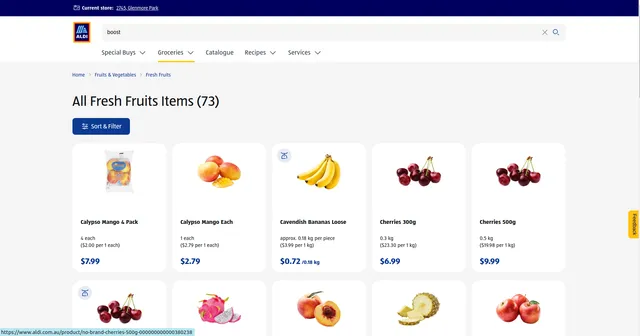
1. Scrape by URLs
Use this mode when you already have specific search, category, or special list URLs to scrape. When this mode is used, all options in the "Scrape by search filters" section will be disabled.
| Field | Type | Default | Description |
|---|---|---|---|
urls | array | (required) | URLs of the product search/category/special list pages to scrape. You can paste URLs one by one, or use the Bulk edit section to add a prepared list. Format: https://www.aldi.com.au/products/[category]/[subcategory]/k/[category-id]?page=[N]. Build the list by browsing Aldi's site, applying filters, and copying URLs. |
ignore_url_failures | boolean | true | If true, the scraper continues running when a URL fails instead of stopping the entire run. Recommended for resilience when scraping multiple URLs. |
URL Collection Strategy: Browse Aldi's product categories, apply relevant filters (price range, special buys), then copy the resulting URLs. For comprehensive extraction across pages, increment the page query parameter (page=1, page=2, etc.).
2. Scrape by search filters
Use this mode when you want to search using a keyword and additional filter attributes instead of scraping by URLs. If you use this mode, leave the urls field above empty.
| Field | Type | Default | Description |
|---|---|---|---|
keyword | string | — | The keyword to search for. |
sort_by | string ("", name_asc, name_desc, price_asc, price_desc) | — | Sort results by Relevance (empty), Name (A-Z), Name (Z-A), Price (low to high), or Price (high to low). |
category | string | — | The product category to search within, e.g. Fruits & Vegetables, Meat & Seafood, Deli & Chilled Meats, Dairy, Eggs & Fridge, Pantry, Bakery, Freezer, Drinks, Health & Beauty, Baby, Cleaning & Household, Pets, Liquor, Snacks & Confectionery, or promotional groups like Lower Prices, Super Savers, and Limited Time Only. Leave empty for All. Select from the dropdown in the Actor input UI. |
theme | string | — | The seasonal or promotional theme to search within, e.g. Flavours of Asia, Kitchen Essentials, Food Specials, Kids Toys and Books, Garden, Pantry Staples, Sporting Goods, or Tools & DIY. Leave empty for All. Select from the dropdown in the Actor input UI. |
brand | string | — | The product brand to filter by (e.g. ALDI, GRANDESSA, BAUHN, MAMIA, and many others). Leave empty for All. Select from the dropdown in the Actor input UI, as the full brand list is extensive. |
page | integer | — | The page number to start scraping from. |
3. General settings
Applies to both scraping modes above.
| Field | Type | Default | Description |
|---|---|---|---|
max_items_per_url | integer | 20 | The maximum number of products to extract per URL/search. Aldi typically displays 20–24 items per page, so 20 captures most page content. Increase to 50+ for more comprehensive single-page extraction. |
Complete Output Structure and Field Definitions
The scraper returns JSON data with each product as an object containing detailed fields. Understanding field purposes enables effective analysis and application.
Product Identification
ID: Unique product code (SKU) of the item on ALDI. Purpose: Database indexing, tracking specific products and prices over time, avoiding duplicates, linking to detail pages.
Listing URL: Direct link to the product page on ALDI. Purpose: Accessing complete details, sharing products, verification of scraped data.
Name: Product name as displayed on ALDI. Purpose: Product matching, keyword analysis, catalog building.
Brand Name: Brand of the product (may be null for unbranded or private-label items). Purpose: Brand analysis and separating branded from private-label products.
Slug: URL-friendly product identifier. Purpose: Constructing product URLs and image URLs, alternative identifier.
Size and Quantity
Selling Size: Size or unit in which the product is sold (e.g., "1 each"). Purpose: Comparing pack sizes and normalizing unit prices.
Weight Type: Code indicating how the product is weighed or sold (fixed unit or by weight). Purpose: Distinguishing fixed-size items from weight-based items.
Quantity: Object with purchase rules: min, max, interval, default and unit. Purpose: Understanding order limits and step sizes, and the unit of measure (e.g., "ea" = each).
Pricing
Price Amount: Current price as a number in minor currency units (cents). Purpose: Price comparison, price tracking, budget analysis.
Price Display: Current price formatted as shown on the website. Purpose: Display in reports and verification against the website.
Currency: Currency code of the price (e.g., AUD). Purpose: Correct financial interpretation when merging datasets from multiple markets.
Currency Symbol: Currency symbol used on the website. Purpose: Display formatting.
Comparison Price: Normalized price per comparison unit, in minor currency units. Purpose: Fair value comparison between products of different sizes.
Comparison Price Display: Comparison price with its unit as displayed (e.g., "$1.49 per 1 each"). Purpose: Human-readable unit price benchmarking.
Was Price Display: Previous price before a discount (null if not discounted). Purpose: Detecting promotions and price drops.
Savings Display: Amount saved on a discounted product (null if none). Purpose: Measuring promotion depth.
Per Unit: Price per unit of measure value (may be null). Purpose: Unit-based price analysis.
Per Unit Display: Per-unit price as displayed (may be null). Purpose: Human-readable per-unit pricing.
Bottle Deposit: Container deposit amount in minor currency units. Purpose: Calculating the true shelf price for beverages.
Bottle Deposit Display: Container deposit formatted as shown on the website. Purpose: Display and verification.
Bottle Deposit Type: Type of container deposit scheme (may be null). Purpose: Regulatory and pricing analysis.
Price Additional Info: Extra pricing notes shown with the price (may be null). Purpose: Capturing conditions attached to the price.
Fee Text: Additional fee description (may be null). Purpose: Identifying extra charges.
Availability and Status
Is Discontinued: Whether the product has been discontinued. Purpose: Catalog maintenance and assortment tracking.
Discontinued Note: Note explaining the discontinuation (may be null). Purpose: Understanding why a product was removed.
Not For Sale: Whether the product is currently not available for sale. Purpose: Separating purchasable products from display-only listings.
Not For Sale Reason: Reason the product cannot be sold (may be null). Purpose: Understanding availability gaps.
On Sale Date Display: Date from which the product is available (may be null). Purpose: Tracking upcoming and seasonal products.
Compliance and Attributes
Age Restriction: Minimum age required to buy the product (may be null). Purpose: Identifying restricted items.
Alcohol: Alcohol-related information (may be null). Purpose: Identifying alcoholic products.
Energy Class: Energy efficiency class for applicable products (may be null). Purpose: Comparing appliances by efficiency.
Country Extensions: Country-specific extra attributes (may be null). Purpose: Capturing market-specific data not covered by standard fields.
Categories
Categories: Array of category objects (id, name, slug) from top level to the most specific. Purpose: Category-level analysis and navigation mapping.
Category Path: Category hierarchy as a readable string (e.g., "Fruits & Vegetables > Fresh Fruits"). Purpose: Quick grouping and display in reports.
Badges: List of promotional or informational badges on the product (empty if none). Purpose: Identifying labels such as new, special buy or organic.
Media
Image Count: Total number of images for the product. Purpose: Evaluating listing completeness.
Images: Array of image objects with url_template, resolved url, max_width, max_height, mime_type, asset_type, alt and display_name. Purpose: Selecting image sizes and types, accessibility analysis.
Image URLs: List of ready-to-use image links resolved at maximum width. Purpose: Downloading images, visual inspection, computer vision analysis.
Source
Category Page URL: Page where the product was found during scraping. Purpose: Tracing the product's origin category and verifying scraped data.
Raw Data
Raw Data: Complete original JSON object of the product as scraped, without modification. Purpose: Auditing, debugging, accessing fields not included in the cleaned output, and reprocessing without re-scraping.
Sample Output:
Step-by-Step Usage Guide
1. Identify Target Products: Determine categories, price ranges, or specific products to track. Browse Aldi.com.au to understand category structure and filter options.
2. Build URL List: Navigate to target categories, apply filters, copy resulting URLs. For paginated results, collect multiple page URLs (page=1, page=2, etc.) or set high max_items_per_url for automatic pagination.
3. Configure Input: Create JSON with URLs, set appropriate max_items_per_url (20 for standard extraction, 100+ for deep scraping). Enable ignore_url_failures for robustness.
4. Execute Scraper: Launch via Apify. Monitor progress—10 URLs with 20 items each typically completes in 1-2 minutes.
5. Validate Data: Check for complete SKUs, prices, and categories. Verify discontinued/not-for-sale flags accurately reflect current availability.
6. Export and Analyze: Export as JSON (database integration), CSV (spreadsheet analysis), or Excel (business reporting). Filter active products, calculate price ranges, identify promotional patterns.
Error Handling: Verify URLs are search/category pages, not product detail pages. Check that category IDs in URLs are valid—Aldi may restructure categories periodically.
Strategic Applications for Retail Intelligence
Dynamic Price Monitoring: Track price changes across products and categories. Identify promotional cycles, price reductions, and seasonal pricing patterns. Automate competitor price matching strategies.
Inventory Availability Tracking: Monitor not_for_sale status and discontinued flags to detect stock-outs, product discontinuations, and restocking patterns. Critical for competing retailers matching Aldi's availability.
Special Buys Analysis: Track badges and on_sale_date_display to identify weekly Special Buys—Aldi's rotating promotional items. Analyze which categories receive promotions and typical discount depths.
Category Expansion Monitoring: Track new SKUs appearing in categories to identify Aldi's market expansion strategies. Detect when Aldi enters new product segments, signaling competitive threats.
Price-Per-Unit Benchmarking: Combine price, selling_size, and quantity_unit data to calculate standardized price-per-unit ($/kg, $/litre). Compare Aldi's value positioning across package sizes.
Private Label Strategy Analysis: Filter by brand_name to distinguish Aldi private labels from name brands. Analyze private label penetration across categories and pricing vs. national brands.
Seasonal Product Intelligence: Track product appearances/disappearances to map seasonal availability (summer fruits, winter vegetables, holiday items). Plan inventory and promotions accordingly.
Compliance Monitoring: Track age_restriction and alcohol flags to ensure proper handling of restricted products in your systems. Identify regulatory requirements across categories.
Maximizing Data Value: Best Practices
Schedule Regular Scraping: Aldi updates weekly (especially Special Buys on Wednesdays and Saturdays). Schedule scraping twice weekly to capture promotional changes and new products.
Segment by Category: Create separate URL lists for produce, pantry staples, Special Buys, and appliances. Enables focused analysis and reduces processing time for specific insights.
Track Historical Pricing: Store scraped data with timestamps. Build historical price databases to identify pricing patterns, seasonal fluctuations, and promotion frequencies.
Enrich with External Data: Combine Aldi data with Woolworths and Coles pricing (via their scrapers) for comprehensive market analysis. Cross-reference with Australian Bureau of Statistics grocery CPI data.
Quality Validation: Flag anomalies—prices of $0, missing SKUs, or empty categories. Implement data quality checks before analysis or integration.
Respect Rate Limits: Space out large scraping operations. While this scraper handles technical aspects, avoid overwhelming Aldi's servers with excessive concurrent requests.
Handle Discontinued Products: Archive discontinued items rather than deleting—historical product data reveals category evolution and replacement patterns valuable for trend analysis.
Conclusion
The Aldi.com.au Product Search Scraper transforms Australia's popular discount supermarket into actionable retail intelligence. From real-time price tracking to promotional analysis and category expansion monitoring, this tool delivers comprehensive data for competing in Australia's competitive grocery market. Start extracting Aldi product insights today to inform pricing strategies, inventory decisions, and competitive positioning.


