

Domain Property Search Scraper
Pricing
from $2.00 / 1,000 results
Domain Property Search Scraper
Efficiently scrape property listings from Domain.com.au, Australia's leading real estate platform. Extract comprehensive data including prices, features, images, and auction details. Perfect for real estate market analysis, property investment research, and competitive intelligence.
Pricing
from $2.00 / 1,000 results
Rating
0.0
(0)
Developer

Stealth mode
Maintained by CommunityActor stats
0
Bookmarked
29
Total users
1
Monthly active users
3 months ago
Last modified
Categories
Share
Domain.com.au Property Search Scraper: Extract Australian Real Estate Market Data
Understanding Domain.com.au and Why This Data Matters
Domain.com.au stands as one of Australia's most trusted and comprehensive real estate platforms, rivaling REA Group's realestate.com.au in market reach and data quality. Owned by Nine Entertainment, Domain provides extensive coverage of residential and commercial properties across every Australian state and territory, making it an essential resource for understanding the Australian property market.
The platform's significance extends far beyond simple property listings. Domain.com.au aggregates data from thousands of real estate agents, developers, and private sellers, providing a real-time snapshot of property availability, pricing trends, and market sentiment. For property investors, market analysts, real estate professionals, and developers, this data represents a comprehensive view of supply, demand, pricing strategies, and market dynamics across diverse Australian property markets from metropolitan Sydney and Melbourne to regional Queensland and rural areas.
However, manually collecting property data from hundreds or thousands of listings would be extraordinarily time-consuming and prone to errors. The challenge intensifies when you need to track market changes over time, compare properties across different suburbs, or analyze pricing trends across multiple regions. This is where the Domain.com.au Property Search Scraper becomes invaluable, transforming weeks of manual data collection into an automated process that delivers structured, analysis-ready property data.
What This Scraper Does and Who Benefits
The Domain.com.au Property Search Scraper is specifically designed to extract comprehensive information from property search result pages on Domain.com.au. Unlike scrapers that only capture basic listing information, this tool collects the complete dataset that Domain provides for each property, including visual assets, detailed features, pricing information, and marketing metadata.
The scraper excels at capturing both standard property information and Domain-specific features that make Australian real estate unique. This includes auction details (a prominent feature in Australian property markets), branding information from real estate agencies, comprehensive feature lists that detail property amenities, and high-quality image collections that showcase each property. The tool respects Domain's platform structure while ensuring you receive clean, organized data that's immediately usable for analysis, reporting, or integration into property management systems.
This scraper serves multiple professional audiences effectively. Real estate agents and agencies can use it to conduct competitive market analysis, tracking what properties are listed in their area, at what prices, and by which competitors. Property investors gain insights into market opportunities, identifying undervalued properties, emerging suburbs, or investment trends before they become widely recognized. Market researchers and analysts can track pricing trends, inventory levels, and time-on-market metrics across different regions and property types.
Property developers benefit from understanding what types of properties are in demand, what features command premium prices, and where market gaps exist. Financial institutions and mortgage brokers can use the data for property valuation, risk assessment, and market forecasting. PropTech companies can integrate this data into their applications, providing customers with comprehensive market intelligence and property comparison tools.
Understanding Input Requirements and Configuration
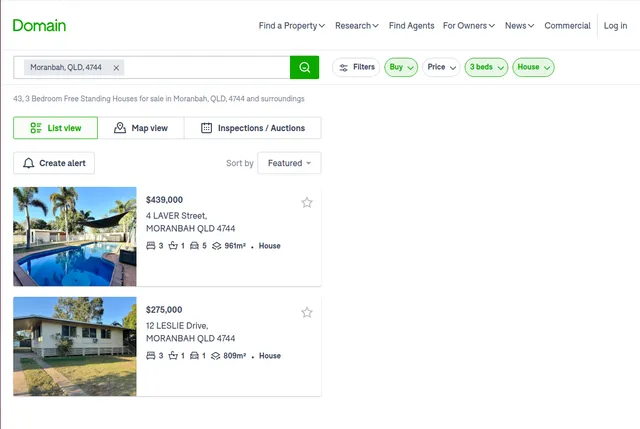
The scraper accepts property search result page URLs from Domain.com.au. These are the pages that display multiple property listings based on search criteria such as location, property type, number of bedrooms, and listing type (sale or rent).
Here's a practical example of properly formatted input with detailed explanation of each parameter:
Example Screenshot:
Understanding Each Input Parameter:
The proxy configuration is critical for reliable data collection from Australian property platforms. Using residential proxies helps ensure your scraping activity appears as legitimate user behavior, significantly reducing the likelihood of being blocked or rate-limited. The apifyProxyCountry setting should ideally be set to "AU" (Australia) for optimal results, as accessing Domain.com.au from Australian IP addresses provides faster response times and more consistent access to all content. Australian proxies also ensure you see the same content that actual Australian property seekers see, avoiding any geographic content variations.
The max_items_per_url parameter controls how many property listings to extract from each search result page. Domain.com.au typically displays 20-25 properties per page, so setting this to 20 ensures you capture most listings while maintaining reasonable execution times. If you need comprehensive coverage of a large search area, you can increase this number or include multiple page URLs (page=1, page=2, page=3, etc.) in your urls array. For market-wide analysis, starting with 20 items per page allows you to efficiently sample the market without overwhelming your data pipeline.
The ignore_url_failures parameter is set to true to ensure that if one URL fails (perhaps due to a temporary network issue or a delisted property), the scraper continues processing remaining URLs rather than stopping entirely. This is particularly important when scraping multiple search pages or different regions simultaneously, as it maximizes data collection success even if individual pages encounter issues.
The urls array accepts multiple property search URLs, allowing you to scrape different suburbs, property types, or price ranges in a single run. Each URL represents a specific search query on Domain.com.au. You can construct these URLs by performing searches on Domain.com.au manually, applying your desired filters (location, price range, property type, bedrooms, etc.), and then copying the resulting URL. The pagination parameter (page=2) allows you to access results beyond the first page, enabling comprehensive data collection from searches that return hundreds of properties.
Tips for URL Construction:
You can create powerful search URLs by combining multiple filters. For example, to scrape all 3-bedroom houses for sale in Moranbah, Queensland, within a specific price range, you would navigate to Domain.com.au, apply these filters through the interface, and copy the resulting URL. To capture multiple pages of results, simply increment the page parameter (page=1, page=2, page=3) and include each URL in your array.
For region-wide analysis, consider creating separate URLs for each suburb or postcode you're interested in. This approach provides better organization of your results and makes it easier to perform comparative analysis between different areas. You can also create URLs for different property types (free-standing houses, apartments, townhouses) to understand how different property categories perform in the same market.
Comprehensive Output Structure and Data Fields Explained
The scraper returns data in JSON format, with each property listing represented as a complete object containing all available information from Domain.com.au. Understanding what each field represents and how to leverage it is crucial for extracting maximum value from this data.
Unique Property Identifiers:
The ID field serves as Domain.com.au's unique identifier for each property listing. This numeric or alphanumeric code is essential for tracking specific properties over time, avoiding duplicate entries when combining multiple scraping runs, and building relational databases where properties might be referenced across multiple tables. When monitoring market changes, this ID allows you to track whether a property has been relisted, whether its price has changed, or how long it has been on the market.
Property URL and Access:
The URL field provides the direct link to the property's detail page on Domain.com.au. This is invaluable for manual verification, sharing specific properties with clients or colleagues, or building applications that link back to the original listing. The URL structure often contains the property address and listing ID, making it human-readable and useful for organizing your data.
Visual Assets:
The Images field is an array containing URLs to all property photos. Domain.com.au properties typically include multiple high-quality images showcasing different rooms, exterior views, and special features. These image URLs can be used to download photos for your own property database, create property comparison galleries, or train computer vision models to identify property features automatically. The order of images often reflects their importance, with primary photos appearing first.
Skeleton Images represents thumbnail or low-resolution preview images that load quickly while full images are being fetched. These are useful for creating responsive applications where you want to show image placeholders immediately before full-resolution images load, improving user experience in property search applications.
Pricing Information:
The Price field contains the advertised price or price range for the property. In the Australian market, this might be a specific dollar amount (e.g., "$750,000"), a price range (e.g., "$700,000 - $750,000"), or qualitative descriptions like "Offers Over $600,000" or "Contact Agent". Understanding price presentation styles is crucial for accurate market analysis, as different presentation methods can indicate seller confidence, market conditions, or negotiation strategies.
Display Search Price Range provides additional context about how the price should be interpreted or displayed in search results. This field helps distinguish between firm prices, negotiable prices, and auction properties where price guidance might be provided differently.
Property Location:
The Address field contains the property's street address, suburb, state, and postcode. This structured location data is essential for geographic analysis, mapping applications, and market segmentation. Australian property addresses typically include the unit number (if applicable), street number, street name, suburb, state abbreviation (QLD, NSW, VIC, etc.), and four-digit postcode. This comprehensive addressing enables precise location-based analysis and integration with mapping services.
Enable Single Line Address is a formatting flag indicating whether the address should be displayed in a compact single-line format or a multi-line format. This is particularly useful when building user interfaces where space constraints require compact address displays.
Property Features:
The Features field is typically an object or array containing detailed information about the property's characteristics. This includes the number of bedrooms, bathrooms, parking spaces, land size (in square meters), building size (in square meters), and property type (house, apartment, townhouse, etc.). Additional features might include swimming pools, garages, air conditioning, heating, and other amenities that affect property value and appeal.
Understanding the features data structure is crucial for comparative analysis. For example, you can calculate price-per-square-meter metrics, identify which features correlate with higher prices, or segment properties by feature combinations (e.g., 3-bedroom houses with pools in specific suburbs).
Marketing and Branding:
The Branding field contains information about the real estate agency marketing the property. This includes the agency name, logo URL, agent names, and contact information. For competitive analysis, tracking which agencies are most active in specific markets, or understanding agency market share, this data is invaluable. The branding information also helps identify premium agencies versus local operators, which can correlate with property quality and pricing strategies.
Branding Appearance indicates how the agency's branding is displayed on the listing (prominent, subtle, or minimal), which can reflect the marketing strategy or the level of advertising investment in that particular listing.
Promotional Features:
The Promo Type field identifies any special promotional features applied to the listing. Domain.com.au offers various advertising tiers where agents can pay for enhanced visibility, featured listings, or premium placements. Understanding promo types helps identify which properties agents are investing more marketing dollars in, potentially indicating higher-value listings, motivated sellers, or competitive markets.
Has Video is a boolean indicator showing whether the listing includes a video tour. Properties with videos typically receive more engagement and might indicate a more comprehensive marketing approach. This field is valuable for understanding marketing trends and identifying properties where sellers are investing in comprehensive media packages.
Inspection and Auction Details:
The Inspection field contains scheduled open house times and dates. In the Australian market, inspection times are crucial for buyers and agents alike. This structured time data enables analysis of inspection scheduling patterns, identification of popular viewing times, and tracking of how frequently properties are being shown (which can indicate market interest levels).
The Auction field is particularly significant in the Australian property market, where auctions are a common sales method, especially in metropolitan areas like Sydney and Melbourne. This field includes auction dates, times, locations, and potentially auction house information. Tracking auction properties separately from private sale properties enables distinct market analysis, as auction properties often behave differently in terms of pricing and sales timelines.
Property Classifications:
The Tags field contains categorical labels that Domain.com.au applies to properties. These might include "New Listing", "Price Reduced", "Under Contract", "Recently Sold", "Hot Property", or other status indicators. Tags provide crucial context about property status and market dynamics. For example, tracking "Price Reduced" tags across a suburb can indicate softening market conditions, while numerous "Hot Property" tags might suggest strong demand.
Example Output Structure:
Here's a comprehensive example showing how this data appears:
Step-by-Step Guide to Using the Scraper
Begin by creating an Apify account if you don't already have one. Navigate to the Domain.com.au Property Search Scraper in the Apify Store. Before starting your first scrape, clearly define your research objectives. Are you analyzing a specific suburb, tracking luxury properties, monitoring auction listings, or conducting region-wide market research? Your objectives will guide how you construct your search URLs and configure scraper parameters.
To identify the URLs you need, visit Domain.com.au and use their search interface to apply your desired filters. Select the location (suburb, region, or state), property type (house, apartment, townhouse, etc.), listing type (buy or rent), price range, number of bedrooms, and any other relevant criteria. Once your search results display, copy the URL from your browser's address bar. This URL contains all your search parameters encoded in a format the scraper can process.
For comprehensive coverage of search results spanning multiple pages, note the page number in the URL (typically page=1 by default). Create additional URLs by incrementing the page parameter (page=2, page=3, etc.) and add all these URLs to your input array. This approach ensures you capture all properties matching your criteria, not just those on the first page.
Configure your input JSON with the collected URLs and appropriate parameters. Set max_items_per_url based on your needs—20 provides a good balance for initial exploration, while 50-100 might be appropriate for comprehensive market analysis. Ensure useApifyProxy is set to true with Australian proxies (apifyProxyCountry: "AU") for optimal results. Set ignore_url_failures to true to maximize data collection success.
Start the scraper through the Apify console and monitor its progress. Execution time varies based on the number of URLs and properties per URL, but typically processes 100 properties in 5-10 minutes. The console provides real-time updates on progress, including how many properties have been scraped and any errors encountered.
Once complete, preview your results in the dataset tab. Verify that the data structure matches your expectations and that key fields (price, address, features) are populated correctly. Check a sample of URLs to ensure they link to valid property pages.
Download your data in your preferred format. JSON is ideal for programmatic processing, database imports, or integration with analytics tools. CSV format works well for Excel-based analysis, pivot tables, and quick data exploration. For regular market monitoring, set up scheduled runs (daily or weekly) to automatically collect fresh property listings and track market changes over time.
Practical Applications and Business Value
The comprehensive nature of this property dataset enables numerous valuable applications across the real estate ecosystem. Real estate agents can conduct sophisticated competitive analysis, tracking what properties competitors are listing, at what prices, and with what marketing strategies. By analyzing inspection times, agents can identify optimal scheduling patterns. Tracking price reductions and days-on-market helps agents advise clients on realistic pricing strategies and market timing.
Property investors gain powerful market intelligence tools. By tracking listings across multiple suburbs, investors can identify emerging markets before they become widely recognized. Price trend analysis reveals which areas are appreciating fastest, where inventory is tightening, or where opportunities for value investment exist. The features data enables sophisticated yield calculations—investors can compute price-per-bedroom or price-per-square-meter metrics to identify undervalued properties.
Auction tracking is particularly valuable in the Australian market. By monitoring auction listings, investors and analysts can gauge market sentiment, identify high-demand areas, and understand seasonal patterns in auction activity. Comparing auction properties to private sale properties reveals pricing strategies and seller confidence levels.
Market researchers and analysts can construct comprehensive market reports using this data. Time-series analysis of property listings reveals inventory trends, seasonal patterns, and market cycles. Geographic analysis identifies property hotspots, infrastructure impact on property values, and demographic shifts. Feature correlation analysis reveals which amenities command the highest price premiums, informing developers about market preferences.
Property developers benefit from understanding market gaps and opportunities. By analyzing what property types are listed versus what's in demand, developers can identify undersupplied market segments. Feature analysis reveals which amenities are becoming standard versus which remain differentiators commanding premium prices. Location analysis shows where new development opportunities exist based on pricing trends and inventory levels.
Financial institutions and mortgage brokers can use this data for property valuation, risk assessment, and market forecasting. Automated valuation models (AVMs) can be trained on this comprehensive dataset, incorporating location, features, and market trends to estimate property values. Risk models can identify overheated markets or declining areas that might represent elevated lending risk.
PropTech companies can integrate this data into consumer-facing applications, providing property search, comparison, and recommendation services. Historical data enables price prediction models, market trend visualizations, and personalized property alerts based on user preferences and market movements.
Maximizing Value and Ensuring Sustainable Use
To extract maximum value from this scraper, implement a systematic data collection strategy rather than ad-hoc scraping. Establish regular collection schedules that align with market dynamics—daily scraping for fast-moving markets like Sydney or Melbourne, weekly for more stable regional markets. Consistent data collection enables trend analysis, identifies market inflection points, and builds historical datasets that become increasingly valuable over time.
Implement comprehensive data enrichment processes. Combine Domain.com.au data with information from other sources such as realestate.com.au for cross-platform validation, government data for suburb demographics and infrastructure projects, or school catchment data for family-oriented property analysis. Cross-referencing multiple sources validates pricing information and provides richer context for analysis.
Develop robust data quality checks in your processing pipeline. Verify that addresses are valid and geocodable, price ranges are reasonable for the area, feature counts make sense (e.g., bathrooms shouldn't exceed bedrooms significantly), and image URLs are accessible. Implement anomaly detection to flag outliers that might indicate scraping errors or unusual properties requiring manual review.
Store historical data systematically using proper database design. Track how individual properties change over time—price adjustments, marketing modifications, tag changes. This temporal dimension reveals crucial market dynamics like average days-on-market, price reduction frequency, and seasonal patterns. Implement efficient data structures that enable fast querying by location, price range, or features.
Respect the platform and implement responsible scraping practices. Use reasonable rate limiting even though the scraper handles technical aspects. Avoid overwhelming Domain.com.au with excessive simultaneous requests. This sustainable approach ensures long-term access to this valuable data source and maintains ethical scraping standards.
Consider implementing alert systems based on your scraped data. Set up notifications for new listings matching specific criteria, price reductions in target suburbs, or changes in market inventory levels. These real-time alerts enable quick response to market opportunities or emerging trends.
For real estate professionals, integrate this data with your CRM systems. Automatically update property databases, trigger follow-ups for price-reduced properties, or identify properties matching client search criteria. This integration transforms raw data into actionable intelligence that directly supports business operations.
Conclusion
The Domain.com.au Property Search Scraper transforms one of Australia's leading property platforms into a structured, analyzable dataset that powers data-driven decision-making across the real estate ecosystem. Whether you're conducting market research, supporting investment decisions, managing real estate operations, or building PropTech solutions, this tool provides the comprehensive Australian property data you need to gain competitive advantage in a dynamic market. Start extracting insights today and make informed property decisions based on real-time market intelligence.


