

Goauto Auto Search Scraper
Pricing
from $1.50 / 1,000 results
Goauto Auto Search Scraper
Scrape comprehensive vehicle listings from GoAuto.ca, Canada's automotive marketplace. Extract detailed car specifications, pricing, dealer information, and vehicle history data. Ideal for automotive market analysis, price comparison platforms, dealership intelligence, and inventory tracking.
Pricing
from $1.50 / 1,000 results
Rating
0.0
(0)
Developer

Stealth mode
Maintained by CommunityActor stats
0
Bookmarked
1
Total users
0
Monthly active users
19 days ago
Last modified
Categories
Share
GoAuto.ca Auto Search Scraper: Extract Canadian Vehicle Inventory Data
Understanding GoAuto.ca and Its Value for Automotive Intelligence
GoAuto.ca serves as a comprehensive automotive marketplace connecting Canadian car buyers with dealerships across the country. Unlike general classifieds, GoAuto specializes in new and used vehicle inventory with detailed specifications, certified pre-owned programs, financing options, and dealer networks.
The platform aggregates inventory from dealerships nationwide, capturing real-time pricing, vehicle conditions, certification status, and market positioning. For automotive businesses, market researchers, and price comparison platforms, this data provides unmatched insights into Canadian vehicle markets—from luxury segments to economy vehicles, trucks to electric cars.
Manually tracking vehicle inventory across regions, makes, and price points requires endless browsing and data entry. The GoAuto.ca Auto Search Scraper automates this entirely, converting search results into structured datasets ready for analysis, competitive intelligence, or integration into automotive platforms.
What This Scraper Extracts and Who Should Use It
The GoAuto.ca Auto Search Scraper processes vehicle search result pages, capturing multiple listings efficiently. This approach suits broad data collection across vehicle types, regions, or price ranges.
Core Data Categories:
Vehicle Specifications: Make, model, trim, year, body type, engine details (cylinders, litres, configuration), transmission, drive type, fuel type, doors, passengers, and VIN. Complete technical profiles for inventory management and comparison tools.
Pricing Intelligence: List price, regular price, special price, MSRP, CBB prices (average, clean, extra clean, rough, selected), sort price, and special price expiration. Multi-dimensional pricing enables market positioning analysis and deal identification.
Financial Data: Lowest monthly/biweekly finance payments, finance APR, payment terms, payment rates, default down payment, and Stripe price ID. Critical for affordability calculators and financing offer comparison.
Condition & History: Odometer, date in service, days in stock, certified status, certification type, Carfax badging/report URLs, demo unit flag, loaner flag, and just arrived indicator. Tracks vehicle history and market freshness.
Visual & Marketing: Photo count, photo service IDs, video URL, website overlays, promotional badge type/date, featured status, on special flag. Assets for listing displays and marketing effectiveness analysis.
Dealer Information: Dealer ID, name, address, city, province (name/short), postal code, phone, region, country, and geo location. Maps dealer networks and geographic inventory distribution.
Inventory Management: Stock number, stock type, stock status, in transit flag, item key, object ID, date created/modified, decode version, manufacturer code, style ID. Tracking and database integration fields.
Additional Details: Exterior/interior colours (name, search colour, RGB value, option codes), fuel economy (city/highway), equipment, packages, option codes, published notes/trim, description, highlight result. Granular details for filtering and matching.
Target Users:
Price Comparison Platforms aggregate inventory with real-time pricing across dealerships. Automotive Market Researchers analyze pricing trends, inventory velocity, and regional demand patterns. Dealership Groups monitor competitor inventory, pricing strategies, and stock levels. Auto Finance Companies track financing offers and affordability trends across markets. Vehicle History Services integrate with Carfax data for comprehensive vehicle profiles. Automotive Analytics Firms build market intelligence dashboards tracking supply, demand, and pricing dynamics.
Input Configuration: Targeting Vehicle Search Pages
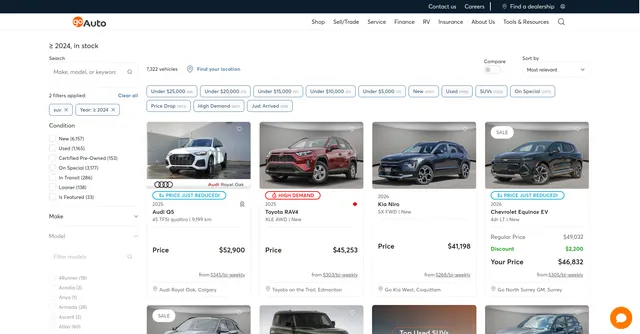
The scraper processes search result URLs from GoAuto.ca, not individual vehicle detail pages. These are pages displaying multiple vehicles after applying filters like make, model, price range, or location.
Example Input:
Example Screenshot:
Parameter Explanation:
proxy: Residential proxies prevent detection. While "US" works, consider "CA" for Canadian content since GoAuto.ca targets Canadian markets. Essential for reliable scraping.
max_items_per_url: Limits vehicles extracted per search page (default 20 matches typical page sizes). Increase to 50-100 for comprehensive page extraction.
ignore_url_failures: When true, continues processing if some URLs fail. Critical for batch scraping where expired searches or pagination errors shouldn't halt entire runs.
urls: Search result page URLs. Build these by performing searches on GoAuto.ca with desired filters (SUVs, 2024 models, specific regions), then copy URLs. The example URL searches SUVs from 2024, page 2.
URL Construction Tips: Manually test searches to verify results match your needs. For large datasets, systematically increment page numbers. Decode URL parameters to understand filters—query=suv searches SUVs, range encodes year filters.
Complete Output Structure: Field Definitions
Make/Model/Trim/Year: Vehicle identification fundamentals. Make Name (e.g., "Toyota"), Model Name ("RAV4"), Trim ("Limited"), Year (2024). Core fields for categorization and search.
Body Type: Category like "SUV," "Sedan," "Truck." Body Type Name (display name), Body Type Category (normalized classification). Enables filtering by vehicle class.
Engine Details: Engine Cylinders (4, 6, 8), Engine Litres (displacement like 2.5L), Engine Config Name (inline, V-type), Engine Compressor Name (turbo, supercharged). Technical specs for performance analysis.
Transmission: Transmission Name (e.g., "8-Speed Automatic"), Transmission Type (automatic/manual), Transmission Description (detailed specs). Drivetrain classification.
Drive Type: Drive Type Name ("AWD," "FWD," "4WD"), Drive Type Description. Traction system details.
Fuel: Fuel Type Name ("Gasoline," "Diesel," "Electric"), Fuel Type Category (normalized), Fuel Economy City/Highway (MPG or L/100km). Efficiency and type data.
Pricing Fields: List Price (advertised price), Regular Price (standard price), Special Price (promotional), Special Price Expires (deadline), MSRP (manufacturer's suggested), Sort Price (comparison price), CBB Average/Clean/Extra Clean/Rough/Selected Price (Canadian Black Book valuations). Multi-tier pricing for deal analysis.
Finance Data: Lowest Monthly Finance Payment (minimum monthly cost), Lowest Biweekly Finance Payment, Lowest Finance APR (interest rate), Lowest Monthly/Biweekly Finance Payment Term (loan duration in months), Lowest Monthly/Biweekly Finance Payment Rate (periodic rate), Default Down Payment. Complete financing picture.
Condition Indicators: Odometer (mileage), Date In Service (first use date), Days In Stock (inventory age), Certified (CPO status), Certification (certification details), Demo Unit (former demo car), Loaner (former loaner vehicle), Just Arrived (new to inventory). Vehicle history and condition.
Carfax Integration: Carfax Badging URL (badge image), Carfax Report URL (full report link). Vehicle history verification.
Visual Assets: Photo Count (number of images), Photo Service IDs (image identifiers), Video URL (video tour link), Website Overlays (promotional graphics). Media for listings.
Colors: Exterior Colour Name ("Red"), Exterior Search Colour (normalized for filtering), Exterior Colour Value/RGB Value (hex/RGB codes), Exterior Colour Option Code. Similar fields for Interior Colour. Detailed color specifications.
Dealer Information: Dealer ID (unique identifier), Dealer Name, Dealer Address, Dealer City/Province/Postal Code/Country, Dealer Phone, Dealer Region, Geo Location (coordinates). Complete dealer profiles.
Inventory Management: Stock Number (dealer's internal ID), Stock Type (new/used), Stock Status Name (available/sold), In Transit (shipping status), VIN (vehicle identification number). Tracking fields.
Marketing Flags: Featured (premium placement), On Special (promotion active), Promotional Badge Type (badge style), Promotional Badge Date Created (badge assignment date). Promotional status.
Additional Details: Doors Name (2-door, 4-door), Passengers (seating capacity), Equipment (standard features), Packages (option packages), Option Codes (equipment codes), Published Notes/Trim (dealer notes), Description (full description). Supplementary details.
Technical Metadata: Item Key, Object ID, Style ID, Manufacturer Code, Stripe Price ID, Craft Site IDs, Decode Version, Decoded (decoding status), Date Created/Modified, Groups, Highlight Result, Vehicle Type, Published Trim, Trim Variation. System and integration fields.
Sample Output:
Step-by-Step Usage Guide
1. Define Target Inventory: Decide what vehicles to track—specific makes/models, price ranges, regions, or conditions (new/used/certified). Test searches on GoAuto.ca to verify filters return desired results.
2. Build Search URLs: Copy URLs from test searches. For comprehensive data, create multiple URLs covering different segments (luxury, economy, electric, trucks) or regions (Ontario, Quebec, Alberta). Include pagination for deep extraction.
3. Configure Input: Set up JSON with URL list. Adjust max_items_per_url based on needs (20 for standard, 50+ for complete pages). Enable ignore_url_failures for robustness in batch operations.
4. Execute Scraper: Launch and monitor progress. Typical run processing 10 search pages with 20 vehicles each completes in 3-5 minutes depending on proxy performance.
5. Validate Data: Check dataset preview for completeness. Verify pricing fields, VINs, and dealer information populate correctly. Identify any systematic issues.
6. Export & Analyze: Export in preferred format—JSON for databases, CSV for spreadsheet analysis. Filter by certification status, days in stock, or pricing for specific analysis.
7. Handle Pagination: For large inventories, either include multiple page URLs or set high max_items_per_url values to auto-paginate. Systematically increment page parameters in URLs.
Error Handling: Failed URLs typically indicate expired searches or removed vehicles. Activity logs provide detailed error information. Verify URLs are search pages, not vehicle detail pages.
Strategic Applications for Automotive Intelligence
Dynamic Pricing Analysis: Track list vs. special pricing across markets. Identify aggressive discounting patterns, seasonal pricing trends, and regional price variations. Compare MSRP adherence across brands.
Inventory Velocity Tracking: Monitor "days in stock" to identify fast-moving vs. stagnant inventory. Correlate with pricing, certification, and features to understand market preferences.
Competitive Dealership Intelligence: Map competitor inventory levels, pricing strategies, and certification rates. Identify which dealers dominate specific segments or regions.
Financing Offer Benchmarking: Analyze APR rates, payment terms, and monthly payments across dealerships and vehicle types. Identify competitive financing offers and market standards.
Certified Pre-Owned Market Analysis: Track CPO inventory distribution, pricing premiums over non-certified vehicles, and certification program prevalence across brands.
Geographic Market Mapping: Use dealer location data to analyze inventory concentration, identify underserved markets, and map regional preferences (e.g., truck dominance in Alberta).
Vehicle History Intelligence: Integrate Carfax URLs for batch history checks. Correlate history reports with pricing to understand market discounting for accident history.
Seasonal Trend Identification: Track "just arrived" and promotional badges over time to identify seasonal inventory cycles, model year changeovers, and clearance patterns.
Best Practices for Maximum Value
Schedule Regular Scraping: Automotive markets shift rapidly—weekly scraping captures pricing changes, new inventory, and sold vehicles. Build historical databases to analyze trends.
Segment by Vehicle Class: Create targeted searches for SUVs, sedans, trucks, electric vehicles rather than one broad search. Cleaner datasets enable focused analysis.
Cross-Reference Pricing: Combine CBB valuations with list/special prices to calculate discount rates and identify exceptional deals or overpriced inventory.
Track Dealer Performance: Monitor individual dealer inventory turnover, pricing competitiveness, and certification rates. Identify high-volume dealers and market leaders.
Validate VINs: Use VIN field for precise vehicle tracking across time. Decode VINs to verify specifications match listed data and detect data quality issues.
Enrich with External Data: Merge with vehicle review scores, safety ratings, or fuel efficiency databases. Add demographic data for regional preference analysis.
Quality Assurance: Flag anomalies—negative days in stock, pricing below CBB rough values, missing VINs. Implement validation rules for critical fields.
Respect Data Freshness: Automotive inventory changes daily. Always timestamp scraped data and implement refresh logic. Stale data misleads pricing or availability decisions.
Conclusion
The GoAuto.ca Auto Search Scraper transforms Canada's automotive marketplace into actionable intelligence. From real-time pricing and inventory tracking to dealer network mapping and market trend analysis, this tool delivers comprehensive data for automotive professionals. Whether building price comparison platforms, conducting market research, or monitoring competitive landscapes, structured vehicle data drives better decisions in Canada's dynamic auto market.


