

Makerworld Models Search Scraper
Pricing
from $3.00 / 1,000 results
Makerworld Models Search Scraper
Scrape detailed 3D model data from MakerWorld.com, Bambu Lab's thriving maker community. Extract model specifications, engagement metrics, creator information, and printability data. Essential for market research, trend analysis, and competitive intelligence in the 3D printing ecosystem.
Pricing
from $3.00 / 1,000 results
Rating
5.0
(1)
Developer

Stealth mode
Maintained by CommunityActor stats
0
Bookmarked
34
Total users
1
Monthly active users
24 days ago
Last modified
Categories
Share
MakerWorld.com Models Search Scraper: Extract 3D Printing Community Data at Scale
Why MakerWorld.com Data Matters for 3D Printing Professionals
MakerWorld.com represents Bambu Lab's answer to the 3D printing community's need for a modern, integrated model-sharing platform. Unlike older platforms, MakerWorld combines social features, direct printer integration, and commercial elements like point redemption and exclusive models. This creates a unique dataset reflecting real-world 3D printing trends, popular designs, and community engagement patterns.
The platform's data reveals what makers actually print, not just what they browse. Metrics like print count, download numbers, and engagement statistics show genuine interest levels. For 3D printing businesses, designers, and market analysts, this represents actionable intelligence about product demand, design trends, and community preferences in a rapidly growing industry.
Manual data collection from thousands of models is impractical. This scraper automates the process, transforming MakerWorld's search results into structured datasets ready for analysis, competitive research, or integration into business systems.
Scraper Capabilities and Target Users
This scraper extracts comprehensive data from MakerWorld.com's search results pages, capturing everything from basic model information to advanced metrics like boost counts, AIGC indicators, and BOMs (Bill of Materials) requirements. It handles pagination automatically, allowing you to collect hundreds or thousands of models matching specific search criteria.
The tool excels at capturing MakerWorld-specific features that distinguish this platform from competitors. This includes Bambu Lab's point redemption system, staff picks, contest participation, custom Maker Lab designs, and the platform's unique social engagement metrics. You get a complete picture of each model's performance and characteristics.
Primary beneficiaries include 3D printing businesses analyzing market demand, designers researching trending categories and successful design patterns, marketplace operators conducting competitive intelligence, and data analysts tracking the evolution of consumer 3D printing. Content creators can identify gaps in popular categories, while manufacturers gain insights into what accessories or materials are most needed.
Input Format
The Actor supports two scraping modes — use only one at a time:
- Scrape by URLs — scrape data directly from a list of MakerWorld.com search result URLs.
- Scrape by search filters — scrape data using a keyword and additional filters (sort order, publish date, nozzle diameter, license, etc.) instead of providing URLs.
There is also a General settings group that applies to both modes.
1. Scrape by URLs
Use this mode when you already have specific MakerWorld search result URLs. When this mode is used, all options in the "Scrape by search filters" section will be disabled.
| Field | Type | Default | Description |
|---|---|---|---|
urls | array | (required) | One or more MakerWorld models list URLs to scrape. You can paste URLs one by one, or use the Bulk edit section to add a prepared list. |
ignore_url_failures | boolean | true | If true, the scraper continues running when a URL fails instead of stopping the entire run. Recommended for large scraping jobs. |
You can build these URLs by performing a search on MakerWorld.com, applying any keywords, categories, or filters you need, and then copying the resulting URL from your browser.
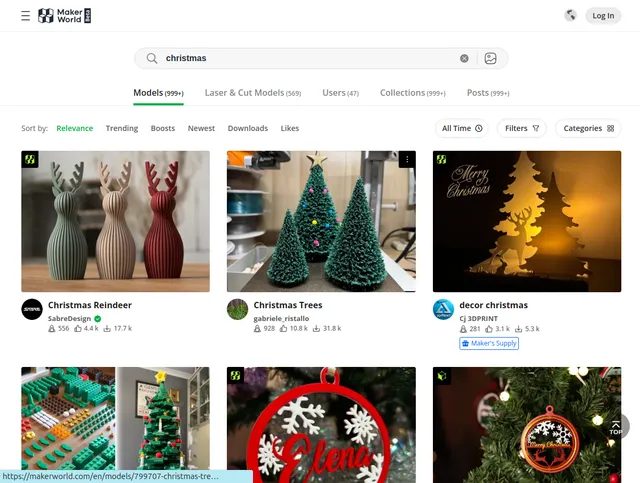
2. Scrape by search filters
Use this mode when you want to search using a keyword and additional filter attributes instead of scraping by URLs. If you use this mode, leave the urls field above empty.
| Field | Type | Default | Description |
|---|---|---|---|
keyword | string | — | The keyword to search for. |
sort_by | string ("", hotScore, boosts, newUploads, downloadCount, likeCount) | — | Sort results by Relevance (empty), Trending (hotScore), Boosts (boosts), New uploads (newUploads), Downloads (downloadCount), or Likes (likeCount). |
published_at | string ("", 1, 7, 30, 365) | — | Filter by publish date: All, Last 24 hours (1), Last week (7), Last month (30), Last year (365). |
nozzle_diameters | string ("", 0.2, 0.4, 0.6, 0.8) | — | Filter models by recommended nozzle diameter: All, 0.2mm, 0.4mm, 0.6mm, 0.8mm. |
print_duration | string | — | Filter by estimated print duration in minutes, as a min,max range (e.g. 10,20). |
total_weight | string | — | Filter by total print weight in grams, as a min,max range (e.g. 10,20). |
licenses | string ("", CCO, BY, BY-SA, BY-ND, BY-NC, BY-NC-SA, BY-NC-ND, Standard+Digital+File+License) | — | Filter by model license: All, Public Domain (CCO), BY, BY-SA, BY-ND, BY-NC, BY-NC-SA, BY-NC-ND, or Standard Digital File License. |
model_tag | string ("", featured, exclusive, cb, ms, custom, param) | — | Filter by model tag: All, Featured, Exclusive, CyberBrick (cb), Maker's Supply (ms), Customizable (custom), Parametric (param). |
3. General settings
Applies to both scraping modes above.
| Field | Type | Default | Description |
|---|---|---|---|
max_items_per_url | integer | 20 | The maximum number of models to collect per URL/search. MakerWorld typically displays 20–50 models per page, and the scraper handles pagination automatically — increase this value (e.g. 100–500) for more comprehensive data collection. |
Complete Output Data Structure and Field Meanings
The scraper returns JSON data with extensive information for each model. Understanding these fields enables sophisticated analysis and proper data utilization.
Core Identification and Content:
ID provides MakerWorld's internal unique identifier for each model, essential for tracking models over time or building relational databases. Title contains the original model name as published by the creator, while Translated Title offers automatic translations when available, useful for analyzing international content.
Slug is the URL-friendly version of the title, used in model page URLs. This field is valuable when constructing direct links to models or organizing data hierarchically. Cover, Cover Landscape, and Cover Portrait provide image URLs in different aspect ratios, enabling flexible display options in applications or reports.
Engagement Metrics – The Community Response:
Like Count shows how many users favorited the model, indicating general approval. Collection Count reveals saves to personal libraries, suggesting users plan to print or reference the model later. This metric often correlates with practical usefulness.
Share Count tracks social sharing, highlighting viral or broadly appealing designs. Print Count is particularly valuable as it represents actual usage rather than passive interest—users who physically printed the model.
Download Count and Raw Model File Download Count distinguish between different download types. The former includes all files, while the latter specifically tracks source file downloads, indicating users who want to modify or study the original design.
Comment Count reveals discussion activity, useful for identifying controversial, complex, or community-engaging designs. Read Count shows page views, providing context for conversion rates when compared to download or print counts.
Creator and Quality Indicators:
Design Creator contains creator information, enabling analysis of prolific designers, trending creators, or tracking specific makers' portfolios. Create Time timestamps enable temporal analysis—identifying seasonal trends, tracking design evolution, or measuring how quickly models gain traction.
Staff Picked and Pick Reason identify editorial selections by MakerWorld's team, indicating exceptional quality or innovation. These models often set trends and showcase platform standards. Official flags Bambu Lab's official models, important for distinguishing manufacturer content from community contributions.
Scoring and Ranking Systems:
Hot Score, Design Score, and Score represent MakerWorld's algorithmic quality and trending assessments. These proprietary metrics help identify rising stars before they become mainstream popular. High scores with low engagement might indicate models worth promoting, while high engagement with moderate scores suggests strong niche appeal.
Content Classification:
NSFW flags adult content, essential for filtering datasets for appropriate audiences or analyzing platform content policies. Status indicates model availability—active, removed, or under review.
Tags array contains creator-assigned and platform-generated keywords, invaluable for categorization, trend analysis, and understanding how models are discovered. Tags reveal semantic relationships between designs and identify emerging subcategories.
Design Type classifies models functionally (decorative, functional, tool, etc.), while Category provides MakerWorld's official categorization. Cross-referencing these fields reveals how users perceive versus how platforms categorize designs.
User Interaction States:
Has Collect, Has Like, and Has Dislike indicate the scraping account's interactions, useful when tracking personal collections or analyzing competitive models from a user perspective.
Technical and Printing Information:
Printable indicates whether the model includes necessary files for immediate printing. BOMs Needed and Featured BOMs reveal whether the model requires additional materials or hardware—crucial for assessing project complexity and cost.
Cyber Brick Needed and Featured Cyber Brick relate to MakerWorld's virtual currency system for premium features or exclusive content. Point Redeemable shows if the model can be obtained using platform points rather than direct purchase.
Model Source distinguishes between original designs, remixes, or imported models from other platforms. Ext contains file format information, important for compatibility analysis. Design Extension indicates additional features like parametric customization.
Advanced Features:
Customized by Maker Lab flags models created using Bambu Lab's design tools, indicating proprietary integration. Preset shows if printer settings are included, valuable for user experience analysis.
AIGC (AI Generated Content) indicates whether AI tools contributed to the design, a growing trend in 3D modeling. This field enables tracking AI's impact on the maker community.
Contest shows participation in platform competitions, often correlating with higher quality or innovation. Exclusive flags limited-availability models, important for understanding scarcity-driven engagement.
Has Steps indicates whether the model includes assembly or preparation instructions, affecting printability and user success rates. Boost Count tracks promotional activity, showing which models receive paid visibility boosts.
License specifies usage rights—critical for commercial applications or determining which models can be modified and redistributed.
Example Output Structure:
Step-by-Step Usage Guide
Create an Apify account and locate the MakerWorld.com Models Search Scraper. Before configuring, visit MakerWorld.com and perform searches to identify the data you need. Copy URLs from search results pages—you can search by keyword, category, creator, or use advanced filters.
Configure your input JSON with collected URLs. Set max_items_per_url based on your research scope—start with 50-100 for initial exploration, scale to 500+ for comprehensive datasets. Configure proxy settings with residential proxies and appropriate country selection.
Start the scraper and monitor progress through Apify's dashboard. Processing speed varies with max_items setting; expect 2-3 seconds per model on average. For 100 models, runs typically complete in 5-10 minutes.
Once complete, preview results in the dataset viewer. Verify data quality by checking that key fields like title, creator, and engagement metrics are populated. Download in JSON for programmatic analysis or CSV for spreadsheet work.
For large-scale operations, schedule regular scrapes to track trending models, monitor competitor uploads, or identify emerging design categories. Set up scrapes to run weekly or daily depending on how rapidly you need fresh data.
Practical Applications Across Use Cases
For 3D Printing Businesses: Identify which product categories have high demand but limited supply by analyzing print counts versus available model diversity. Track which accessories or components are frequently needed (BOMs data) to inform inventory decisions. Monitor competitor model performance to benchmark your own designs.
For Designers and Creators: Research what makes models successful by correlating engagement metrics with tags, categories, and design features. Identify underserved niches by finding high-interest keywords with few quality models. Study staff-picked models to understand platform quality standards and trending styles.
For Market Analysts: Track the growth of AI-generated content (AIGC field) and its reception compared to traditional designs. Analyze seasonal trends by monitoring model creation times and engagement patterns. Geographic analysis using creator locations reveals regional design preferences and emerging markets.
For Platform Operators: Benchmark MakerWorld's features, engagement patterns, and content policies against your own platform. Understand which community features drive engagement (contests, point systems, staff picks). Identify successful monetization patterns through exclusive and point-redeemable models.
For Academic Researchers: Study maker culture evolution through temporal analysis of designs, tags, and community interactions. Research AI's impact on creative communities using AIGC data. Analyze how social features affect creative output and collaboration patterns.
Data Analysis and Quality Assurance
Establish validation rules for scraped data. Verify that engagement metrics fall within reasonable ranges—extreme outliers may indicate platform bugs or promotional manipulation. Cross-reference staff picks with score metrics to understand editorial selection criteria.
Deduplicate data when running multiple scrapes by using the ID field as a unique key. Track changes over time by storing historical snapshots and comparing fields like print count, engagement metrics, or status changes.
Enrich scraped data with external information. Combine MakerWorld data with printing material costs to estimate project expenses. Correlate models with external events (holidays, product launches) to understand demand drivers.
Normalize metrics for fair comparisons. Calculate engagement rates (likes/views, prints/downloads) rather than raw counts, which favor older models. Create composite scores combining multiple metrics weighted by your specific analysis goals.
Handle missing or null values appropriately. Some fields like translatedTitle or contest may be null for most models. Establish whether to exclude incomplete records or treat missing data as meaningful information about model characteristics.
Optimizing Collection Strategy
Refine search queries to target specific niches. Use MakerWorld's filter parameters in URLs: sort by trending, most printed, newest, or highest rated. Combine multiple filters to create precise datasets matching your research needs.
Balance breadth versus depth in data collection. Wide searches across categories provide market overview but require more processing. Focused searches on specific keywords or creators offer detailed insights into niches.
Schedule scrapes strategically. Run daily scrapes for trending searches to catch viral models early. Weekly scrapes suffice for category overviews or long-term trend analysis. Time scrapes for after peak usage hours to reduce load and potential blocking.
Respect the platform through reasonable request rates and proxy usage. The scraper implements appropriate delays, but avoid simultaneous large-scale scrapes that could impact platform performance.
Store data systematically with clear versioning and timestamps. Maintain both raw scraped data and processed analysis datasets. Document which searches were run when, enabling reproducible research and troubleshooting.
Conclusion
The MakerWorld.com Models Search Scraper transforms Bambu Lab's community platform into actionable intelligence for 3D printing professionals. Whether researching market trends, analyzing competition, or identifying design opportunities, this tool provides the comprehensive data foundation needed for informed decisions. Start extracting insights from the MakerWorld.com community today.


