

Mercari Product Search Scraper
Pricing
from $1.00 / 1,000 results
Mercari Product Search Scraper
Scrape product listings from Mercari.com, America's leading resale marketplace. Extract prices, seller information, conditions, brands, shipping details, and authenticity status from search results. Perfect for price monitoring, market research, competitive analysis, and resale business intelligence
Pricing
from $1.00 / 1,000 results
Rating
0.0
(0)
Developer

Stealth mode
Maintained by CommunityActor stats
0
Bookmarked
6
Total users
0
Monthly active users
22 days ago
Last modified
Categories
Share
Mercari.com Product Search Scraper: Extract Marketplace Product Data
Understanding Mercari.com and Its Resale Market Value
Mercari.com is one of the largest peer-to-peer resale marketplaces in the United States, with millions of active listings spanning fashion, electronics, collectibles, home goods, and more. Unlike traditional e-commerce platforms, Mercari connects individual sellers directly with buyers, creating a dynamic secondary market with unique pricing patterns and product availability.
The platform's data reveals critical insights unavailable elsewhere: real-world resale values for used items, popular brands in secondary markets, condition-based pricing strategies, and seller behavior patterns. For resellers, this intelligence informs purchasing decisions and pricing strategies. For brands, it provides feedback on product longevity and secondary market demand. For researchers, it offers a window into consumer behavior and sustainable commerce trends.
Manual data collection across Mercari's vast catalog requires endless scrolling, clicking through categories, and copying fragmented information. This scraper automates the process, transforming search results into structured datasets ready for analysis.
What This Scraper Extracts and Who Should Use It
The Mercari.com Product Search Scraper processes category and search result pages, capturing multiple product listings efficiently. It extracts listing-level data from search pages rather than individual product detail pages, making it ideal for building broad datasets across categories or search queries.
Key extracted data includes:
Product identification (ID, name, photos), pricing (current price, original price, price changes), seller information, condition status, brand and size details, shipping arrangements, authenticity verification status, promotion indicators, category hierarchies, color and custom attributes, and search relevance scores.
Target users:
Resale businesses monitor competitor pricing, identify trending products, and discover sourcing opportunities. Price intelligence platforms track market values across product categories and conditions. Brand managers analyze secondary market performance and pricing patterns for their products. Market researchers study consumer preferences through resale patterns and pricing. Inventory sourcing tools identify arbitrage opportunities between retail and resale markets. Sustainability analysts track circular economy trends through secondary market activity.
Input Configuration: Targeting Product Searches
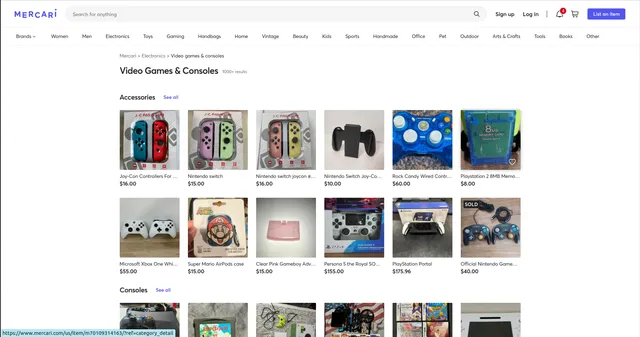
The scraper processes Mercari search and category page URLs. These are the pages displaying multiple products after browsing categories or searching keywords.
The Actor supports two scraping modes — use only one at a time:
- Scrape by URLs — scrape data directly from a list of Mercari search or category page URLs.
- Scrape by search filters — scrape data using a keyword and additional filters (sort order, price range, condition) instead of providing URLs.
There is also a General settings group that applies to both modes.
Example Screenshot:
1. Scrape by URLs
Use this mode when you already have specific search or category URLs. When this mode is used, all options in the "Scrape by search filters" section will be disabled.
| Field | Type | Default | Description |
|---|---|---|---|
urls | array | (required) | One or more Mercari search or category list URLs to scrape. You can paste URLs one by one, or use the Bulk edit section to add a prepared list. Category URLs follow the format https://www.mercari.com/us/category/[CATEGORY_ID]/. Search URLs include query parameters such as ?keyword=nike. Copy URLs directly from your browser after performing searches or browsing categories. |
ignore_url_failures | boolean | true | If true, the scraper continues running when a URL fails instead of stopping the entire run. Essential for batch processing multiple categories where some may be unavailable. |
Building URL lists: Navigate Mercari manually to identify relevant categories or searches. Copy URLs for categories you want to monitor. For comprehensive coverage, include multiple category IDs or search variations.
2. Scrape by search filters
Use this mode when you want to search using a keyword and additional filter attributes instead of scraping by URLs. If you use this mode, leave the urls field above empty.
| Field | Type | Default | Description |
|---|---|---|---|
keyword | string | — | The keyword to search for. |
sort_by | string (1, 2, 3, 4, 6) | — | Sort results by Best match (1), Newest first (2), Highest price first (3), Lowest price first (4), or Recently sold (6). |
price_min | integer | — | The minimum price to search for items. |
price_max | integer | — | The maximum price to search for items. |
condition | string ("", 1, 2, 3, 4, 5) | — | Item condition filter: Any (empty), New (1), Like new (2), Good (3), Fair (4), Poor (5). |
3. General settings
Applies to both scraping modes above.
| Field | Type | Default | Description |
|---|---|---|---|
max_items_per_url | integer | 20 | Controls the maximum number of items extracted per URL/search. Mercari displays ~48 items per page. Set to 20 for quick sampling, 50+ for comprehensive extraction. The scraper handles pagination automatically within this limit. |
proxy | object | — | Proxy configuration. Set useApifyProxy: false if a proxy isn't needed. For large-scale scraping or to avoid rate limits, enable Apify's residential proxies with appropriate country settings. |
Complete Output Structure: Field Definitions
ID: Unique Mercari identifier for each listing (e.g., "m12345678901234"). Use: Primary key for databases, tracking specific items over time, avoiding duplicates.
Name: Product title as written by seller. Use: Primary search field, product identification, keyword analysis for SEO patterns.
Status: Listing state ("on_sale", "sold_out", "reserved"). Use: Filtering active listings, calculating sell-through rates, identifying hot products.
Shipping Payer: Who pays shipping ("seller" or "buyer"). Use: True cost analysis, comparing listing competitiveness, seller strategy patterns.
Photos: Array of image URLs showing product from multiple angles. Use: Visual verification, image-based product matching, quality assessment, displaying in applications.
Seller: Seller profile object including ID, name, ratings, photo. Use: Seller reputation analysis, identifying professional resellers vs. casual sellers, trust indicators.
Price: Current listing price in cents (e.g., 2999 = $29.99). Use: Price tracking, market value benchmarking, pricing strategy analysis.
Original Price: Initial listing price before any reductions, in cents. Use: Price reduction tracking, discount analysis, seller pricing flexibility patterns.
Item Decoration Circle/Rectangle: Visual badges like "NEW" or "AUTHENTIC". Use: Highlighting special attributes, filtering verified items, understanding Mercari's quality indicators.
Promote Type: Promotion status ("promoted", "none"). Use: Identifying sellers using paid promotion, analyzing promotion impact on sales speed.
Promote Expire Time: Timestamp when promotion ends. Use: Calculating promotion duration, timing competitive listings.
Authentic Item Status: Mercari's authenticity verification ("authenticated", "not_verified"). Use: Filtering verified luxury items, trust indicators for high-value purchases, counterfeit risk assessment.
Country Source: Item origin country. Use: International market analysis, import/export insights, regional availability patterns.
Brand: Brand name when specified. Use: Brand performance analysis, filtering by manufacturer, competitive brand comparison.
Item Size: Size specification (clothing, shoes). Use: Size availability analysis, inventory planning for resellers, demand patterns by size.
__Typename: GraphQL type identifier. Use: Technical field for API integration, typically "ItemProductType".
Me: User-specific relationship data (liked, in cart). Use: Personalization features if building consumer applications.
Description: Full product description text. Use: Condition details, feature extraction, keyword analysis, content quality assessment.
Item Category Hierarchy: Nested category structure showing full taxonomy path. Use: Multi-level categorization, understanding product classification, navigation structure.
Item Condition: Condition rating ("new", "like_new", "good", "fair", "poor"). Use: Condition-based pricing analysis, quality segmentation, buyer expectation management.
Item Category: Specific category object with ID and name. Use: Category-level analysis, filtering, trend identification.
Custom Facets List: Additional attributes (material, style, features). Use: Detailed filtering, attribute-based search, product specifications analysis.
Color: Primary color(s) of item. Use: Color trend analysis, visual search, inventory diversity assessment.
Shipping Class: Shipping type/speed offered. Use: Shipping cost estimation, delivery time analysis, logistics planning.
Category Title: Human-readable category name. Use: Display purposes, category performance reporting.
Category ID: Numeric category identifier. Use: Linking to category taxonomies, programmatic category filtering.
Search Final Score: Relevance score for search results. Use: Understanding search algorithm, ranking analysis, SEO insights for sellers.
Sample Output:
Step-by-Step Usage Guide
1. Identify Target Categories/Searches: Determine what products you need data on. Browse Mercari to find relevant categories or perform test searches. Note category IDs from URLs or copy search result URLs.
2. Build URL List: Compile Mercari category or search URLs. For broad coverage, include multiple related categories. For specific products, use search URLs with targeted keywords.
3. Configure Input: Create JSON with your URLs. Adjust max_items_per_url based on needs—20 for testing, 50-100 for comprehensive extraction. Enable proxy if scraping frequently or at scale.
4. Execute Scraper: Launch via Apify console. Monitor progress. Typical runs processing 5 categories with 50 items each complete in 3-5 minutes.
5. Review Data: Check dataset preview for completeness. Verify prices, seller info, and conditions look accurate. Filter out sold items if only analyzing active inventory.
6. Export and Analyze: Export as JSON for databases or CSV for spreadsheets. Common analyses: price distributions by condition, brand popularity, seller strategies, promotion effectiveness.
Handling Pagination: Mercari search results paginate. The scraper automatically handles this up to max_items_per_url. For exhaustive category scraping, set high limits (200+) or use multiple URLs with page parameters.
Error Troubleshooting: Ensure URLs are search/category pages, not individual product pages. Verify category IDs are valid. Check activity logs for specific error messages.
Strategic Applications for Resale Intelligence
Dynamic Price Monitoring: Track price changes over time by scraping regularly. Identify when sellers reduce prices (original_price vs price), revealing desperation or seasonal adjustments. Build price indexes by category and condition.
Competitive Reselling: Monitor what similar items are listed for. Identify gaps in the market—high-demand products with few listings. Discover sourcing opportunities by finding underpriced items before competitors.
Brand Secondary Market Analysis: Track how specific brands perform in resale. Compare pricing across conditions. Identify brands with strong secondary demand (high prices, fast sell-through) vs. weak demand.
Authenticity Market Mapping: Filter authentic_item_status to analyze luxury goods markets. Compare pricing between authenticated and non-verified items. Identify categories where authentication adds premium value.
Seller Strategy Research: Analyze seller patterns—professional resellers using promotions vs. casual sellers. Study pricing strategies of top-rated sellers. Identify successful shipping policies (free shipping absorption rates).
Condition-Based Valuation: Build condition-based pricing models. Calculate average depreciation rates from retail to various resale conditions. Guide sellers on optimal pricing by condition.
Seasonal Trend Detection: Track listing volumes and prices over time. Identify seasonal products (winter coats spike in fall, swimwear in spring). Time inventory purchases and listings strategically.
Search Algorithm Insights: Analyze search_final_score to understand Mercari's ranking factors. Optimize your own listings based on high-scoring examples. Identify SEO patterns in successful product titles.
Maximizing Data Value: Advanced Techniques
Build Historical Price Databases: Scrape same categories weekly. Track individual items (by ID) across scrapes to monitor price changes and time-to-sell. Historical data reveals pricing trends and market velocity.
Cross-Platform Price Comparison: Combine Mercari data with eBay, Poshmark, or Facebook Marketplace scrapers. Identify arbitrage opportunities—products cheaper on one platform than others.
Seller Performance Profiling: Track specific sellers over time. Monitor their inventory turnover, pricing strategies, and promotion usage. Identify and learn from successful reseller patterns.
Image Analysis Integration: Use photo URLs for visual similarity matching. Identify duplicate listings or related products. Assess listing quality through image analysis (background, lighting, number of photos).
Promotion ROI Analysis: Compare promoted vs. non-promoted items for sell-through rates and speed. Calculate whether promotion costs justify faster sales. Guide your own promotion spending.
Size Availability Mapping: Track size distribution in fashion categories. Identify commonly available vs. rare sizes. Guide inventory sourcing toward underserved sizes.
Brand Opportunity Identification: Rank brands by average price, listing volume, and sell-through rate. Discover emerging brands with strong demand before markets saturate.
Condition Accuracy Verification: Cross-reference condition ratings with descriptions and prices. Identify sellers who accurately represent condition vs. those who oversell. Build trust scores.
Custom Alert Systems: Set up monitoring for specific brands, price ranges, or conditions. Get notified when target items are listed below market value for quick purchasing decisions.
Data Quality and Best Practices
Scraping Frequency: For price monitoring, weekly scraping captures meaningful changes without overwhelming systems. For competitive reselling, daily scraping provides timely opportunities. Balance data freshness with resource efficiency.
Status Filtering: Always filter by status field. Sold items provide historical context but shouldn't mix with active inventory analysis. Sold_out status helps calculate sell-through rates and successful pricing.
Price Normalization: Prices are in cents—divide by 100 for dollar amounts. Always check original_price exists before calculating discounts (new listings may have null values).
Seller Verification: High-rated sellers (4.5+ ratings, 50+ transactions) generally provide more reliable data. Filter by seller metrics for quality-focused analysis.
Category Standardization: Item_category_hierarchy provides consistent classification. Use this over seller-written category info for accurate aggregation and comparison.
Description Text Processing: Sanitize descriptions before analysis—remove special characters, normalize spacing. Extract structured data like measurements, defects, or included accessories through NLP.
Photo URL Persistence: Mercari may change image URLs or delete images after sales. Download and store critical images locally rather than relying solely on URLs for long-term analysis.
Promotion Context: When analyzing promoted items, remember they receive visibility boosts. Separate promoted vs. organic listings for fair performance comparison.
Authenticity Verification: The authenticated status applies primarily to luxury items. Most categories don't offer authentication—don't expect this field to be populated universally.
Rate Limiting Respect: Space out large scraping runs. Mercari's systems may throttle excessive requests. Use proxies and reasonable delays between requests for sustainable access.
Conclusion
The Mercari.com Product Search Scraper transforms America's largest resale marketplace into actionable intelligence. Whether optimizing resale pricing, conducting market research, sourcing inventory, or analyzing consumer behavior, this tool delivers comprehensive product data at scale. Extract secondary market insights today and gain competitive advantage in the circular economy.


