

Mobile Cars Search Scraper
Pricing
from $0.50 / 1,000 results
Mobile Cars Search Scraper
Scrape comprehensive vehicle listings from Mobile.de, Germany's largest automotive marketplace. Extract car specifications, pricing, seller information, and financing options from search results. Ideal for automotive dealers, market analysts, and price comparison platforms.
Pricing
from $0.50 / 1,000 results
Rating
0.0
(0)
Developer

Stealth mode
Maintained by CommunityActor stats
0
Bookmarked
14
Total users
0
Monthly active users
a day ago
Last modified
Categories
Features
Share
Mobile.de Cars Search Scraper: Extract German Automotive Marketplace Data
Excerpt: Scrape comprehensive vehicle listings from Mobile.de, Germany's largest automotive marketplace. Extract car specifications, pricing, seller information, and financing options from search results. Ideal for automotive dealers, market analysts, and price comparison platforms.
Understanding Mobile.de and Its Automotive Market Value
Mobile.de dominates the German automotive marketplace with millions of vehicle listings spanning new cars, used vehicles, motorcycles, and commercial vehicles. As Germany's premier automotive platform, it aggregates inventory from dealerships, private sellers, and fleet operators across Europe, making it essential for understanding vehicle pricing, market supply, and consumer demand patterns.
The platform captures unique automotive data: detailed technical specifications (KBA numbers), financing availability, dealer ratings, vehicle condition indicators, and regional pricing variations. For automotive dealers monitoring competitor inventory, market researchers analyzing pricing trends, or developers building price comparison tools, Mobile.de data provides unmatched insights into Europe's largest automotive market.
Manually collecting listings across multiple searches, filters, and pages requires hours of repetitive clicking. The Mobile.de Cars Search Scraper automates this process, transforming search result pages into structured datasets ready for analysis, competitive intelligence, or inventory management.
What This Scraper Extracts and Who Should Use It
The Mobile.de Cars Search Scraper processes search result pages—the listings displayed after applying filters for make, model, price range, or location. Unlike detail page scrapers requiring individual vehicle URLs, this tool efficiently captures multiple listings from search pages.
Key extracted data includes: vehicle identifiers (ID, KBA codes), pricing and financing information, make/model details, seller contact info, media assets (images, videos), listing prominence indicators (eye-catcher status), and vehicle attributes (mileage, year, fuel type).
Target users:
Automotive dealers track competitor inventory, pricing strategies, and market availability. Market researchers analyze pricing trends, vehicle depreciation, and regional supply patterns. Price comparison platforms aggregate listings for consumer-facing tools. Fleet managers source vehicles at scale. Data analytics firms build predictive models for automotive valuation.
Input Configuration: Targeting Search Results
The scraper processes Mobile.de search result URLs—pages showing filtered vehicle listings, not individual vehicle detail pages.
Example Input:
Example Screenshot:
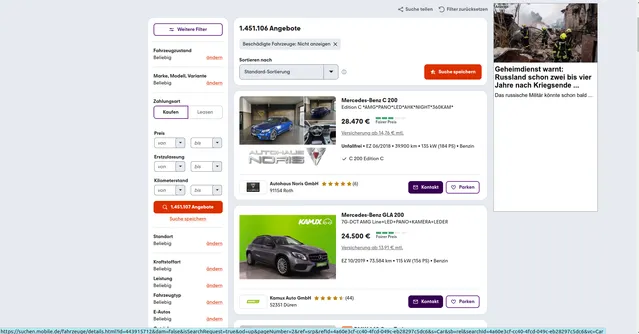
Parameter Explanation:
proxy: Essential for avoiding detection. Apify's residential proxies mimic genuine user traffic, ensuring reliable scraping without triggering anti-bot mechanisms.
max_items_per_url: Limits extraction to 20 listings per search page (Mobile.de typically displays 20-30 results per page). Adjust higher (50-100) for comprehensive extraction or lower for testing.
ignore_url_failures: When true, continues processing remaining URLs even if some fail—critical for batch scraping multiple search pages where expired listings or pagination issues might occur.
urls array: Contains search result page URLs. Build these by performing searches on Mobile.de with desired filters (make, model, price, location), then copy resulting URLs. URL parameters like pageNumber=2 handle pagination.
Pro tip: Test filters manually on Mobile.de first to ensure relevant results, then systematically collect URLs across multiple pages by incrementing pageNumber parameter.
Complete Output Structure and Field Definitions
The scraper returns JSON data with each car listing as an object containing detailed fields. Understanding field purposes enables effective analysis and application.
Listing Identification
ID: Unique numeric identifier of the car listing on mobile.de. Purpose: Database indexing, tracking specific cars over time, avoiding duplicates, linking to detail pages.
Listing URL: Direct link to the car's detail page on mobile.de. Purpose: Accessing complete details, sharing opportunities with clients, verification of scraped data.
Listing Type: Type of the listing placement (e.g., regular). Purpose: Separating standard listings from other placement types.
Vehicle
Make: Manufacturer of the car (e.g., Audi). Purpose: Brand-level market analysis and filtering.
Model: Model name of the car (e.g., S5). Purpose: Model-level price comparison and segmentation.
Vehicle Class: Vehicle category on the platform (e.g., Car). Purpose: Separating cars from other vehicle classes such as motorbikes or vans.
Attributes: Array of key/label/value objects describing the car's specifications as displayed on the listing: first registration, power, fuel type, mileage, engine displacement, transmission, general inspection due date, exterior color, market version, doors, seats, body type, emission class, previous owners and curb weight. The set of attributes may vary between listings. Purpose: Flexible access to all vehicle specifications without fixed columns; filtering, valuation and comparison of similar cars. Note: values are kept as displayed (text with units, German number format).
Pricing
Price: Gross asking price of the car as a number. Purpose: Price comparison, market valuation, budget filtering.
Currency: Currency of the asking price (EUR). Purpose: Correct financial interpretation when merging datasets from multiple markets.
Price Rating: Platform price evaluation of the offer (e.g., VERY_GOOD_PRICE). Purpose: Fast identification of underpriced or overpriced cars and deal scoring.
Location
Country Code: Country where the car is located (e.g., DE). Purpose: Geographic segmentation and multi-market analysis.
Zip Code: Postal code of the seller's location. Purpose: Regional grouping, distance and logistics planning.
City: City where the car is located. Purpose: City-level market analysis and lead targeting.
Seller
Seller ID: Unique numeric identifier of the seller on mobile.de. Purpose: Grouping listings by seller, competitor tracking.
Seller Type: Seller category (e.g., DEALER, PRIVATE). Purpose: Separating professional dealers from private sellers.
Seller Phones: List of contact phone numbers of the seller. Purpose: Direct outreach and lead generation.
Seller Rating Score: Average customer rating of the seller. Purpose: Evaluating seller reputation and reliability.
Seller Rating Count: Number of customer ratings the seller has received. Purpose: Judging how reliable the rating score is.
Financing
Financing Type: Type of financing offer attached to the listing (e.g., automatic-offers). Purpose: Identifying listings with financing options.
Financing Bank: Bank providing the financing offer (may be null). Purpose: Analyzing financing partners when available.
Media
Image Count: Total number of photos in the listing. Purpose: Evaluating listing quality and completeness.
Raw Data
Raw Data: Complete original JSON object of the listing as scraped, without modification. Purpose: Auditing, debugging, accessing fields not included in the cleaned output, and reprocessing without re-scraping.
Sample Output:
Step-by-Step Usage Guide
1. Define Search Criteria: Determine target vehicles—specific makes/models, price ranges, regions. Test filters on Mobile.de to ensure relevant results.
2. Build URL List: Perform searches manually, copy URLs. For large datasets, systematically increment pageNumber parameter (page=1, page=2, etc.) to cover multiple result pages.
3. Configure Input: Create JSON with collected URLs. Set max_items_per_url based on needs (20 for standard pages). Enable ignore_url_failures for robustness.
4. Execute Scraper: Launch via Apify console. Monitor real-time progress. Typical run processing 10 search pages (200 listings) completes in 3-5 minutes.
5. Export Data: Preview results, verify data quality. Export as JSON (databases), CSV (spreadsheets), or Excel (business reports).
6. Handle Pagination: For hundreds of listings, either include multiple page URLs in one run or increase max_items_per_url to auto-handle pagination.
Error handling: Verify URLs are search result pages, not detail pages. Check that filters produce valid results. Activity log provides detailed error diagnostics.
Strategic Applications for Automotive Intelligence
Competitive Inventory Monitoring: Track competitor stock levels, pricing changes, and promotional activities. Identify which dealers dominate specific segments or regions.
Dynamic Pricing Analysis: Monitor market prices across makes, models, and conditions. Identify pricing opportunities—vehicles listed below market average signal value purchases or motivated sellers.
Market Supply Forecasting: Analyze listing volumes, days-on-market patterns, and seasonal fluctuations. Predict supply shortages or oversupply for specific vehicle types.
Dealer Performance Benchmarking: Compare dealer pricing strategies, inventory turnover, and listing quality (image counts, video usage) against market norms.
Financing Penetration Research: Track financing availability and leasing rate trends across segments. Identify shifts toward alternative ownership models.
Geographic Market Analysis: Map vehicle availability and pricing by region. Identify arbitrage opportunities—vehicles cheaper in one region vs. another.
Maximizing Data Value: Best Practices
Schedule Regular Scraping: Automotive markets change daily. Weekly scraping captures price adjustments, new listings, and sold inventory for trend analysis.
Segment Your Searches: Create targeted URLs by brand, segment, or price range for cleaner datasets. Example segments: "luxury sedans €50k+," "compact cars Bavaria," "SUVs under 30k km."
Enrich with External Data: Combine Mobile.de data with vehicle valuation guides (Schwacke, DAT), dealer reviews, and service history databases for comprehensive intelligence.
Quality Checks: Flag missing critical fields (price, make, model) or suspicious data (unrealistic prices, zero mileage on old cars).
Historical Tracking: Store timestamped datasets to analyze depreciation curves, time-to-sell patterns, and seasonal pricing variations.
Respect Rate Limits: Space out large runs to maintain sustainable scraping practices and ensure continued platform access.
Conclusion
The Mobile.de Cars Search Scraper transforms Germany's largest automotive marketplace into actionable intelligence. Whether building inventory databases, conducting pricing research, or monitoring competitive landscapes, this tool delivers comprehensive vehicle data at scale. Start extracting automotive market insights today.


