

Vivareal Property Search Scraper
Pricing
from $1.50 / 1,000 results
Vivareal Property Search Scraper
Scrape comprehensive property listings from VivaReal.com.br, Brazil's leading real estate marketplace. Extract prices, locations, amenities, property details, and developer information from search results. Perfect for real estate agencies, property investors, market analysts, and market research.
Pricing
from $1.50 / 1,000 results
Rating
0.0
(0)
Developer

Stealth mode
Maintained by CommunityActor stats
0
Bookmarked
70
Total users
1
Monthly active users
6 days ago
Last modified
Categories
Features
Share
VivaReal.com.br Property Search Scraper: Extract Brazilian Real Estate Listings Data
Understanding VivaReal.com.br and Its Value in Brazilian Real Estate
VivaReal.com.br stands as one of Brazil's largest and most trusted real estate portals, connecting millions of buyers, renters, and sellers across the country. The platform aggregates listings from real estate agencies, property developers, and individual sellers, creating a comprehensive database of residential and commercial properties throughout Brazilian cities—from São Paulo's luxury apartments to Rio de Janeiro's beachfront condos and emerging developments in regional markets.
Unlike generic classified sites, VivaReal specializes exclusively in real estate, capturing detailed property information that drives investment decisions: precise locations, comprehensive amenity lists, construction status, condominium details, and verified pricing. For property investors analyzing market trends, real estate agencies monitoring competition, or researchers studying Brazilian housing dynamics, this data provides essential insights into one of Latin America's most dynamic property markets.
Manually collecting property data across multiple searches, neighborhoods, and price ranges requires endless scrolling through pages, copying scattered information, and organizing fragmented details. The VivaReal.com.br Property Search Scraper automates this entire process, transforming search result pages into structured datasets ready for analysis, competitive intelligence, or investment evaluation.
What This Scraper Extracts and Who Should Use It
The VivaReal.com.br Property Search Scraper processes search result pages—the listings displayed after applying filters for location, price, property type, or amenities on VivaReal. Unlike detail page scrapers requiring individual property URLs, this tool efficiently captures multiple listings from search pages, ideal for building comprehensive datasets across different searches, neighborhoods, or property categories.
Key Data Extracted:
Identification & Pricing: Property ID, external ID, prices (sale/rent), and source ID enable tracking specific listings, price monitoring, and cross-referencing with other platforms.
Property Classification: Contract type (sale/rent), business type, listing type, unit types, and unit sub types categorize properties for filtering and market segmentation analysis.
Location Data: Address, display address type, and condominium name provide geographic context crucial for neighborhood analysis and proximity-based searches.
Visual & Marketing: Image lists, highlights, and stamps (featured, new, price reduced) identify premium listings and marketing strategies.
Property Features: Amenities, real estate details, description, and construction status deliver comprehensive property information for evaluation and comparison.
Development Information: Property developer, enhanced development flags, expansion type, and children (related units) reveal new construction projects and developer activity.
Additional Details: No warrantor rent, triple bundle options, and listings count provide transaction terms and inventory information.
Target Users:
Real Estate Agencies monitor competitor listings, benchmark pricing, and identify market opportunities across Brazilian cities. Property Investors analyze pricing trends, identify undervalued properties, and track new developments for investment decisions. Market Researchers study housing supply, pricing dynamics, amenity trends, and geographic patterns in Brazilian real estate. Property Developers conduct competitive analysis, identify market gaps, and track similar projects. Real Estate Platforms aggregate VivaReal data into broader databases or comparison tools.
Input Configuration: Targeting Property Search Results
The scraper processes VivaReal search result page URLs—the pages displaying multiple property listings after applying search filters. Understanding URL structure and parameters ensures accurate data targeting.
Example Input Configuration:
Example Screenshot:
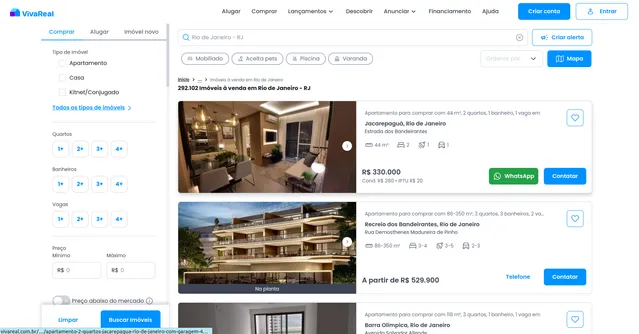
Parameter Breakdown:
proxy configuration: Set to false by default, but consider enabling Apify proxy (useApifyProxy: true) with residential proxies for large-scale scraping to avoid detection. Proxy usage depends on scraping volume and frequency—occasional small runs may not require proxies, while daily monitoring of hundreds of listings benefits from proxy rotation.
max_items_per_url: Controls how many property listings to extract per search page URL. Setting to 20 collects up to 20 properties from each URL. VivaReal typically displays 20-30 listings per page, so this parameter enables complete page extraction or limited sampling for testing. Higher values (50-100) work if you want to ensure capturing all listings even as page sizes vary.
ignore_url_failures: When true, the scraper continues processing remaining URLs even if some fail (expired searches, connection issues). Critical for batch processing multiple search URLs—one broken URL won't halt your entire job. Set false only when every URL must succeed.
urls array: Contains VivaReal search result page URLs. Each URL represents a specific search with filters applied (location, transaction type, price range, property features). You can include multiple search URLs to collect different property segments in a single scraping run.
Understanding URL Structure: VivaReal URLs contain encoded parameters:
transacao=venda(sale) oraluguel(rent) specifies transaction typeonde=contains location data including city, state, and coordinatespage=5indicates pagination—modify this to scrape multiple pages- Additional parameters can filter by price, bedrooms, area, amenities
Pro Tip: Perform manual searches on VivaReal first to verify filters return relevant properties, then copy those URLs into your configuration. For comprehensive datasets spanning multiple pages, systematically include URLs with different page numbers: page=1, page=2, etc.
Complete Output Structure and Field Definitions
The scraper returns JSON data with each property as an object containing detailed fields. Understanding field purposes enables effective analysis and application.
Listing Identification
ID: Unique identifier of the listing on VivaReal. Purpose: Database indexing, tracking specific listings over time, avoiding duplicates, linking to detail pages.
External ID: Identifier of the listing in the advertiser's or developer's own system. Purpose: Cross-referencing listings with the source CRM and detecting the same development published more than once.
Listing URL: Direct link to the full listing on VivaReal. Purpose: Accessing complete details, sharing opportunities with clients, verification of scraped data.
Title: Listing headline (falls back to the development name when the listing has no title). Purpose: Quick preview and listing summaries.
Description: Full text description written by the advertiser. Purpose: Extracting extra details (finishes, differentials, nearby attractions), keyword and sentiment analysis.
Listing Classification
Business: Type of deal offered (e.g., SALE, RENTAL). Purpose: Separating sales from rentals.
Listing Type: Type of listing (e.g., DEVELOPMENT for new-build projects, USED for resale). Purpose: Separating new developments from individual resale units.
Contract Type: Type of contract/seller relationship (e.g., PROPERTY_DEVELOPER). Purpose: Identifying whether the seller is a developer, agency or owner.
Construction Status: Current construction stage (e.g., UNDER_CONSTRUCTION). Purpose: Evaluating delivery timeline and investment risk.
Expansion Type: Platform category describing how the development is displayed or expanded. Purpose: Understanding how the development is structured on the platform.
Condominium Name: Name of the condominium or development. Purpose: Grouping listings by project and brand analysis.
Unit Types: Property types included in the listing (may be null for developments). Purpose: Segmenting the market by property type.
Unit Sub Types: More specific property subtypes (may be null). Purpose: Fine-grained filtering.
Is No Warrantor Rent: Whether rental is available without a guarantor. Purpose: Filtering rentals by entry requirements.
Stamps: List of platform quality or verification badges. Purpose: Assessing listing reliability and verification level.
Pricing
Sale Price: Sale price as a number (the lowest unit price when the listing has multiple units). Purpose: Price comparison, market valuation, budget filtering.
Sale Price Values: List of all sale prices available in the listing. Purpose: Determining the price range across units.
Is Sale Price Range: Whether the listing contains multiple sale prices. Purpose: Distinguishing single-price from multi-unit developments.
Rental Price: Monthly rent as a number (null for sale listings). Purpose: Rental market analysis and yield calculation.
IPTU: Annual municipal property tax (may be null). Purpose: Calculating the total cost of ownership.
Condominium Fee: Monthly condominium fee (may be null). Purpose: Calculating the monthly cost of ownership.
Price Period: Billing period of the price (e.g., monthly) when applicable. Purpose: Correct interpretation of rental prices.
Currency: Currency of the listed prices (BRL). Purpose: Correct financial interpretation when merging datasets from multiple markets.
Location
Street: Street name of the property. Purpose: Precise location identification and geocoding.
Street Number: Street number of the property. Purpose: Precise address matching.
Neighborhood: Neighborhood (bairro) of the property. Purpose: Micro-market analysis and price comparison between neighborhoods.
City: City of the property. Purpose: City-level market analysis and lead targeting.
State: Full state name. Purpose: State-level aggregation and reporting.
State Acronym: Two-letter state code (e.g., RJ). Purpose: Compact filtering and grouping by state.
Location ID: Platform location hierarchy path (country > state > city > zone > neighborhood). Purpose: Hierarchical location grouping and joining datasets.
Latitude: Geographic latitude of the property. Purpose: Map plotting, distance calculations, spatial analysis.
Longitude: Geographic longitude of the property. Purpose: Map plotting, distance calculations, spatial analysis.
Is Approximate Location: Whether the coordinates are approximate rather than exact. Purpose: Judging the reliability of spatial analysis.
Display Address Type: How much of the address is shown publicly (e.g., ALL). Purpose: Knowing whether the address data is complete or partially hidden.
Amenities
Amenities: List of {label, value} objects describing the property features, such as usable_areas (m²), bedrooms, bathrooms, suites, parking_spaces, floors, unit_floor and other_amenities. Values are arrays when the listing covers multiple unit configurations. Purpose: Filtering and comparing properties, size and layout analysis, and handling flexible attributes without fixed columns.
Developer and Agency
Real Estate: Real estate company attached to the listing (may be null). Purpose: Identifying the agency involved in the sale.
Property Developer Name: Name of the developer building the project. Purpose: Developer reputation analysis and market share tracking.
Property Developer Logo URL: Link to the developer's logo. Purpose: Branding in reports and dashboards.
Advertiser
Advertiser ID: Unique identifier of the advertiser on VivaReal. Purpose: Grouping listings by advertiser, competitor tracking.
Advertiser Legacy ID: Older numeric identifier of the advertiser. Purpose: Matching with older datasets and building profile links.
Advertiser Name: Name of the advertiser or agency. Purpose: Lead generation, competitor analysis.
Advertiser URL: Link to the advertiser's profile page. Purpose: Exploring the advertiser's portfolio.
Advertiser Tier: Subscription tier of the advertiser (e.g., standard). Purpose: Segmenting advertisers by account level.
Advertiser License: Professional license number (may be empty). Purpose: Verifying the advertiser's credentials.
Advertiser Created Date: Date the advertiser account was created. Purpose: Estimating advertiser seniority and reliability.
Advertiser Rating: Advertiser rating (may be null). Purpose: Evaluating advertiser reputation.
Advertiser Image URL: Link to the advertiser's logo or photo (may be null). Purpose: Branding in reports and dashboards.
Advertiser Phone Numbers: List of advertiser contact numbers. Purpose: Direct outreach and lead generation.
Advertiser WhatsApp Number: Advertiser WhatsApp contact (may be empty). Purpose: Direct messaging outreach.
Advertiser Total Listings: Number of listings published by the advertiser. Purpose: Measuring advertiser size and activity.
Media
Image Count: Total number of photos in the listing. Purpose: Evaluating listing quality and completeness.
Images: List of image objects with url, alt text and is_seo flag. The URL is a resizing template with {description}, {action}, {width} and {height} placeholders to replace before downloading. Purpose: Downloading images, visual inspection, computer vision analysis.
Floor Plans: List of floor plan images (empty if none). Purpose: Assessing listing completeness and layout analysis.
Units
Units Count: Number of individual units (unit types) in the development. Purpose: Measuring development size and variety.
Units: List of unit objects, one per unit type, each with id, title, unit_type, unit_sub_type, usage_type, publication_type, price fields (sale_price, sale_price_values, rental_price, iptu, condominium_fee, price_period), amenities (label/value list), image_count, images and floor_plans. Purpose: Comparing unit configurations and prices within a development, price-per-m² analysis per unit type.
Raw Data
Raw Data: Complete original JSON object of the listing as scraped, without modification. Purpose: Auditing, debugging, accessing fields not included in the cleaned output, and reprocessing without re-scraping.
Sample Output:
Step-by-Step Implementation Guide
1. Define Your Target Market: Identify the properties you need—specific neighborhoods, price ranges, property types, or transaction types (sale/rent). Perform test searches on VivaReal.com.br to ensure filters return relevant results matching your research or business needs.
2. Build Search URLs: Copy URLs from manual VivaReal searches. For comprehensive datasets, create multiple URLs with different filters: various neighborhoods, price brackets, property types. For deep extraction spanning many pages, include pagination URLs by incrementing the page= parameter.
3. Configure Your Input: Set up JSON with collected URLs. Adjust max_items_per_url based on needs (20 for standard pages, higher for thorough extraction). Enable ignore_url_failures: true when scraping multiple URLs to ensure resilience. Consider enabling proxy if planning frequent or large-scale scraping.
4. Launch Scraping Run: Start through Apify console and monitor real-time progress. Typical processing time: 3-5 search pages with 20 items each complete in 2-4 minutes, varying with platform load and connection quality.
5. Review Data Quality: Preview results in dataset tab. Verify critical fields (prices, addresses, amenities) are populated correctly. Check that property types and locations match your target criteria.
6. Export and Analyze: Export in preferred format—JSON for database integration, CSV for spreadsheet analysis, Excel for business reporting. Clean data by removing duplicates (same ID) or filtering by specific criteria (price range, construction status).
7. Handle Pagination Systematically: For large datasets (hundreds of properties), include multiple page URLs: page=1, page=2, etc. VivaReal typically shows 20-30 properties per page, so calculate required pages based on search result counts displayed on site.
Error Prevention: Ensure URLs are search result pages, not individual property pages or homepage. Verify URLs load properly in browser before scraping. Check that location parameters in URLs are correctly encoded (VivaReal uses specific URL encoding for Brazilian addresses with special characters).
Scaling Best Practices: For datasets exceeding 500 properties, split into multiple runs (200-300 properties each) to improve reliability. Use scheduled scraping (weekly or monthly) to track market changes over time rather than one-time massive extractions.
Strategic Applications for Brazilian Real Estate Intelligence
Market Price Analysis: Aggregate pricing data across neighborhoods, property types, and sizes. Calculate average prices per square meter, identify pricing trends, and detect undervalued or overpriced properties. Compare sale prices vs. rental yields to assess investment viability.
Neighborhood Research: Analyze property concentration, average prices, amenity availability, and construction activity by neighborhood. Identify emerging areas with new developments, established areas with premium pricing, or underserved markets with opportunities.
Competitive Intelligence: Real estate agencies can monitor competitor listings—what properties they represent, pricing strategies, how they market amenities. Track which agencies dominate specific neighborhoods or property segments.
Developer Activity Tracking: Monitor property developer field to identify active builders, their project locations, pricing strategies, and market positioning. Track construction status across developments to understand supply pipeline timing.
Amenity Demand Analysis: Analyze amenities lists to identify most common features in different price ranges or neighborhoods. Understand what amenities command premium pricing (pools, gyms, ocean views). Guide development decisions on feature inclusion.
Investment Opportunity Identification: Filter properties by construction status "under construction" or "launching" to find pre-construction investment opportunities, often priced below finished units. Track listings count to identify bulk purchase possibilities.
Rental Market Dynamics: Separate contract_type by "aluguel" to analyze rental market specifically. Compare rental prices across neighborhoods, understand warrantor requirements (no_warrantor_rent), and identify flexible rental opportunities.
Marketing Strategy Insights: Analyze stamps and highlights to understand promotional tactics. Track which marketing approaches correlate with faster sales (price reduced stamps, enhanced development flags). Inform your own marketing strategies.
Maximizing Data Value: Advanced Techniques
Time-Series Price Tracking: Scrape same searches weekly or monthly, storing data with timestamps. Track individual property price changes over time by matching IDs. Identify properties with price reductions (investment negotiation opportunities) or rapidly appreciating neighborhoods.
Geographic Heatmapping: Use address coordinates to create visual heatmaps showing property density, average prices by location, or amenity concentration. Identify clustering patterns revealing market dynamics—luxury coastal strips, emerging inland areas, commercial corridors.
Comparative Market Analysis (CMA): For specific property evaluation, extract comparable properties (same neighborhood, similar size, features) to establish fair market value. Essential for buyers, sellers, and appraisers needing data-driven pricing guidance.
Development Pipeline Forecasting: Filter by construction_status "under construction" and "launching," then track these properties over time. Predict market supply increases, potential price pressures, and optimal timing for investments or sales.
Agency Performance Benchmarking: Aggregate properties by real_estate field to analyze agency market share, average listing prices, property types handled. Identify dominant agencies in target markets for partnership opportunities or competitive positioning.
Amenity-Price Correlation Analysis: Statistically analyze which amenities correlate with premium pricing. Quantify value-add of features like pools, gyms, parking spaces, or security. Guide renovation or development decisions with data-driven feature selection.
Text Mining Descriptions: Process description fields with natural language processing to extract features not in structured amenity lists—"renovated," "panoramic views," "near metro." Build richer property profiles and identify unique selling points.
Cross-Platform Validation: Compare VivaReal listings with other Brazilian real estate portals (ZAP Imóveis, OLX) by matching external_ids or addresses. Identify properties listed on multiple platforms, assess pricing consistency, discover exclusive listings.
Data Governance and Best Practices
Scraping Frequency: Brazilian real estate market updates daily with new listings. Weekly scraping balances data freshness with resource efficiency. Daily scraping suits competitive monitoring or fast-moving markets (Rio, São Paulo luxury segments). Monthly scraping works for broader market trend analysis.
Data Freshness Validation: Track posted dates and last update timestamps. Flag stale listings (unchanged for 60+ days) potentially indicating filled properties or inactive listings. Prioritize recently posted or updated properties for active opportunities.
Privacy and Compliance: Property addresses and contact information may be personal data under Brazil's LGPD (Lei Geral de Proteção de Dados). Implement appropriate data handling, secure storage, and use data only for legitimate business purposes. Avoid sharing personal contact details publicly.
Duplicate Management: Properties often appear across multiple searches (neighborhood overlap, different filter combinations). Use ID field to deduplicate datasets. Consider keeping duplicates initially for analysis completeness, then consolidate in final databases.
Currency and Pricing Validation: All prices in Brazilian Real (BRL). When storing data long-term, note scrape date for inflation adjustment context. Validate extreme prices (too high/low) that might indicate data errors or misclassified properties.
Image Rights Consideration: Image_list URLs link to VivaReal-hosted photos. If displaying these externally, ensure compliance with terms of service. Consider scraping detail pages separately for authorized image usage information.
Quality Assurance Checks: Implement validation rules—addresses should have city/state, prices must be positive numbers, coordinates should fall within Brazil's geographic bounds. Flag anomalies for manual review before analysis.
Conclusion
The VivaReal.com.br Property Search Scraper transforms Brazil's leading real estate marketplace into actionable market intelligence. From pricing dynamics enabling investment decisions to developer activity revealing market supply, this tool delivers comprehensive insights into Brazilian property markets. Whether you're building real estate databases, conducting neighborhood research, monitoring competition, or identifying investment opportunities, structured VivaReal data provides the foundation for data-driven real estate decisions in Brazil's dynamic property landscape. Start extracting Brazilian real estate insights today.


