
Zomato Restaurants Search Scraper
Pricing
from $3.00 / 1,000 results
Zomato Restaurants Search Scraper
Scrape comprehensive restaurant data from Zomato search results including menus, ratings, promotions, and delivery options. Ideal for food delivery analytics, competitive research, and market intelligence in India's dynamic F&B sector.
Pricing
from $3.00 / 1,000 results
Rating
0.0
(0)
Developer

Stealth mode
Maintained by CommunityActor stats
1
Bookmarked
102
Total users
2
Monthly active users
2 months ago
Last modified
Categories
Share
Zomato Restaurant Search Scraper: Extract Dining Data from India's Leading Food Platform
Why Zomato Data Matters for Food Industry Intelligence
Zomato dominates India's online food delivery and restaurant discovery market, serving millions of users across hundreds of cities. The platform aggregates critical data about restaurants, their offerings, pricing, promotions, and customer preferences—making it an essential resource for anyone in the food and beverage industry.
For restaurant owners, aggregators, market researchers, and business analysts, Zomato data reveals dining trends, competitive positioning, promotional strategies, and consumer behavior patterns. However, manually collecting this information across multiple locations and restaurant categories would be impractical. This scraper automates that process, delivering structured data ready for analysis.
What This Scraper Extracts
The Zomato Restaurant Search Scraper collects detailed information from search result pages, capturing everything from basic restaurant details to promotional offers and delivery options. It processes dine-out, delivery, and takeaway listings, extracting both visible information and underlying metadata that powers Zomato's recommendation algorithms.
Target users include food delivery platforms conducting competitive analysis, restaurant chains monitoring market presence, investors researching F&B trends, and data analysts building predictive models for the hospitality sector.
Input Configuration Explained
The scraper accepts Zomato search page URLs—these are the results pages you see after searching for restaurants in a specific area or category. The URL structure typically includes location parameters and filters.
Input Parameters:
Example Screenshot:
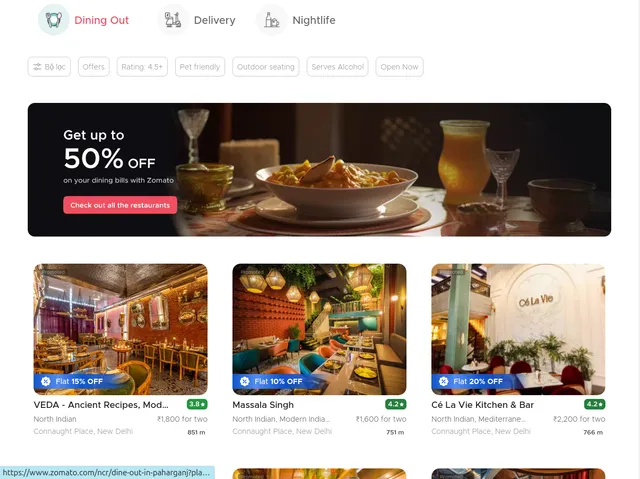
max_items_per_url limits how many restaurants to extract per search URL, useful for controlling costs and focusing on top results. ignore_url_failures ensures the scraper continues processing other URLs even if one fails, important when scraping multiple locations. The urls array accepts multiple search pages, allowing you to collect data across different neighborhoods, cuisines, or dining types simultaneously.
Note that proxy usage may be necessary for large-scale scraping to avoid rate limits, though it's disabled in this example for simplicity.
Output Fields and Their Business Value
The scraper returns JSON data with each restaurant represented as a complete object. Here's what each field means:
Type identifies the listing category (dine-out, delivery, nightlife), crucial for segmenting analysis by service model.
Info contains core restaurant details including name, cuisine types, location, ratings, and pricing indicators. This structured data enables comparative analysis across restaurants.
Order captures ordering capabilities and integration status, showing which restaurants support online orders directly through Zomato.
Gold indicates Zomato Gold membership status and available benefits, revealing which restaurants participate in loyalty programs—valuable for understanding partnership strategies.
Takeaway shows takeaway availability and terms, important for restaurants offering multiple service modes.
Card Action contains primary call-to-action data (Book Table, Order Online), indicating the restaurant's main engagement channel.
Distance provides proximity data from the search location, enabling geographic analysis and understanding delivery radius coverage.
Is Promoted and Promoted Text identify paid placements, essential for competitive advertising intelligence and understanding promotional investment patterns.
Tracking Data includes analytics metadata that Zomato uses internally, useful for understanding how restaurants are categorized and prioritized.
All CTA captures all available actions (order, book, directions), showing the full range of user engagement options.
Promo Offer and Check Bulk Offers detail current promotional campaigns, critical for tracking competitive discounting strategies and seasonal promotions.
Bulk Offers shows package deals and special offers, particularly relevant during festive seasons or for corporate catering analysis.
Is Disabled flags restaurants currently unavailable for ordering, useful for tracking operational status and availability patterns.
Bottom Containers includes additional metadata and promotional widgets displayed below main restaurant information.
Example output structure:
Using the Scraper Effectively
Create an Apify account and access the Zomato scraper. Identify your target search URLs by browsing Zomato and filtering by location, cuisine, or dining type. Copy the resulting URLs into your input configuration.
Configure max_items_per_url based on your needs—20 captures top restaurants, while higher values provide broader market coverage. Enable ignore_url_failures when scraping multiple locations to ensure partial failures don't halt the entire run.
For large-scale operations across multiple cities, organize URLs by region and run separate scraping jobs to manage data more effectively. Set up scheduled runs to track changes in promotions, ratings, or new restaurant additions over time.
Monitor execution through the Apify console. Processing speed depends on the number of URLs and items per URL, typically handling 100-200 restaurants within 5-10 minutes.
Practical Applications
Competitive Intelligence: Restaurant owners can monitor competitor promotions, pricing changes, and service offerings in their area. Track which restaurants invest in promoted listings and how promotion frequency correlates with customer engagement.
Market Research: Analyze cuisine trends by geography, identify underserved neighborhoods, and understand pricing patterns across different dining categories. The promotional data reveals seasonal campaign strategies and discount intensity by market segment.
Delivery Platform Analytics: Aggregators can benchmark against Zomato's offerings, identify restaurants not yet on competing platforms, and understand partnership penetration rates across different localities.
Investment Analysis: Investors researching F&B opportunities can assess market density, pricing dynamics, and competitive intensity in target locations. Gold membership participation rates indicate restaurant willingness to join loyalty programs.
Pricing Strategy: Cross-reference cost-for-two data with ratings and order volumes to identify optimal pricing positions. Track how promotional intensity varies by location and restaurant type.
Best Practices
Schedule regular scraping to capture promotional cycles and rating changes. Most restaurants update offers weekly, making bi-weekly data collection optimal for trend analysis.
Combine Zomato data with other platforms (Swiggy, Google Maps) for comprehensive market intelligence. Cross-validate restaurant information across sources to identify discrepancies.
Implement data quality checks for anomalies in ratings, pricing, or availability status. Set up alerts for significant changes like new competitors entering your market or major promotional campaigns.
Store historical data to analyze seasonal patterns, track restaurant lifecycle (new openings to closures), and measure how promotional strategies evolve over time.
Respect rate limits and use proxies for large-scale operations to ensure sustainable access to this valuable data source.
Conclusion
The Zomato Restaurant Search Scraper transforms India's largest food platform into actionable business intelligence. Whether you're optimizing restaurant operations, conducting market research, or building competitive strategies, this tool provides the structured data needed for informed decision-making in the dynamic food delivery and dining sector.


