Who Engaged With Me
Pricing
Pay per usage
Who Engaged With Me
This powerful Apify Actor tracks likes, comments, shares, stars, forks, followers, and more — then uses intelligent identity matching to identify the same person engaging with you on different networks.
Pricing
Pay per usage
Rating
5.0
(4)
Developer

mr beast
Maintained by CommunityActor stats
3
Bookmarked
19
Total users
1
Monthly active users
22 days ago
Last modified
Categories
Share

Who Engaged With Me - Cross-Platform Social Media Engagement Tracker
Discover who interacts with your content across multiple social media platforms. This powerful Apify Actor tracks likes, comments, shares, stars, forks, followers, and more — then uses intelligent identity matching to identify the same person engaging with you on different networks.


Supported Platforms (All 10!)










Why Use This Tool?
In today's multi-platform digital world, your audience engages with you across GitHub, X (formerly Twitter), LinkedIn, YouTube, Reddit, and more. But tracking who's genuinely interested in your content requires checking each platform separately — until now.
Who Engaged With Me solves this problem by:
- Aggregating engagement data from all your social media accounts in one place
- Identifying your most engaged followers with weighted scoring that values meaningful interactions
- Matching identities across platforms so you know when the same person engages on multiple networks
- Analyzing sentiment of comments and replies to understand engagement quality
- Tracking trends to identify peak activity times and engagement velocity
- Providing actionable exports in CSV, JSON, and CRM-ready formats
Key Features
Multi-Platform Social Media Tracking
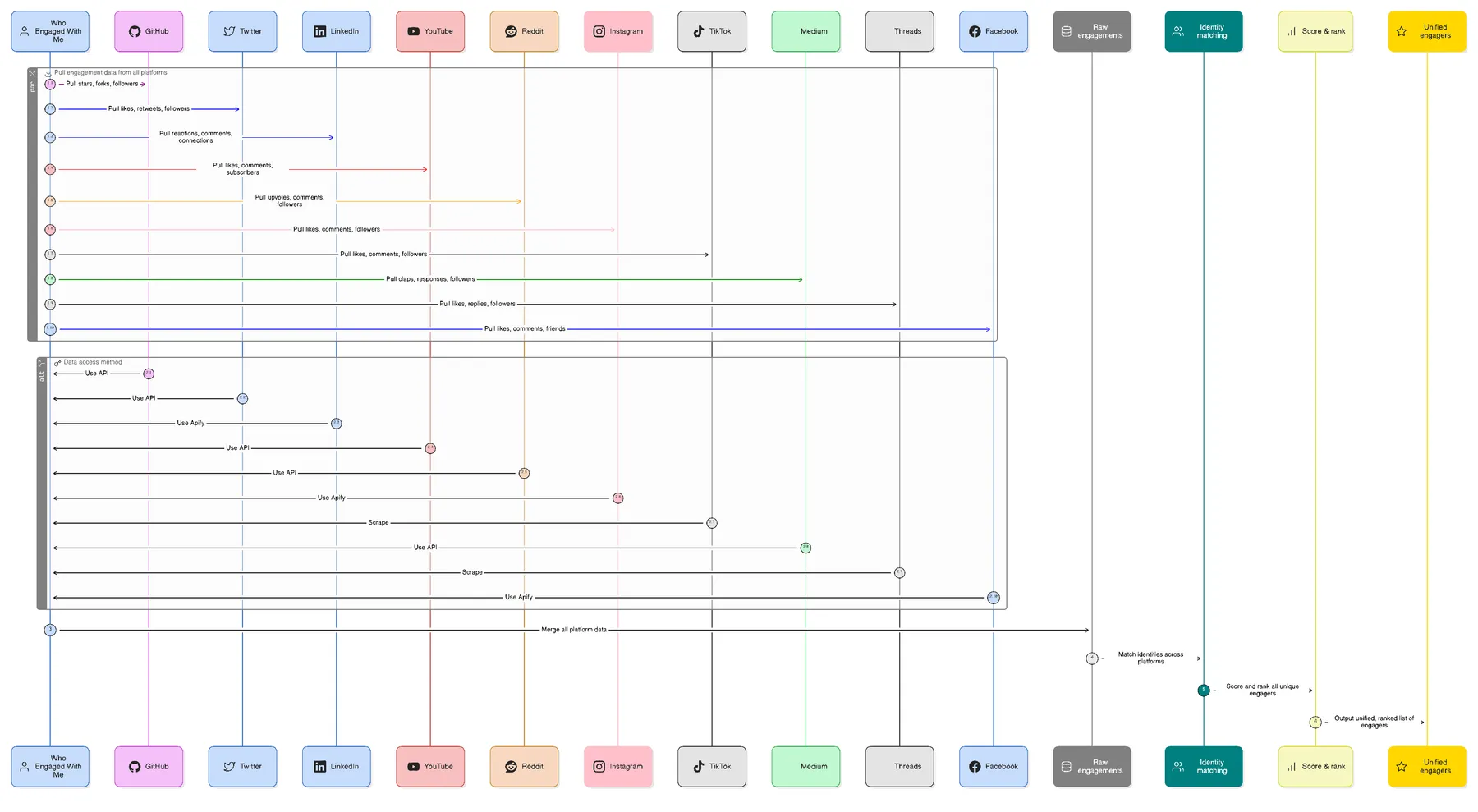
One actor run connects to 10 platforms simultaneously, extracts engagement data using the optimal method for each (API, Apify actors, or web scraping), and merges everything into a unified view of who's engaging with you.
Track engagement and interactions from 10 major platforms:
| Platform | What We Track | Authentication |
|---|---|---|
 | Stars, Forks, Issues, Pull Requests, Comments, Followers | Optional (token for private repos) |
 | Likes, Reposts, Replies, Mentions, Quotes, Followers | Optional (bearer token for API) |
 | Reactions, Comments, Profile Views, Connection Requests | Session cookie required |
 | Comments, Replies, Subscribers | API key optional |
 | Post Comments, Comment Replies, Mentions | None required |
 | Likes, Comments, Followers, Story Views | Session ID optional |
 | Comments, Followers | None required |
 | Claps, Responses, Followers | None required |
 | Likes, Replies, Reposts | None required |
 | Reactions, Comments, Shares | Access token optional |
Intelligent Cross-Platform Identity Matching
Our advanced matching algorithm identifies when the same person engages with you on different platforms using:
- Username similarity — Fuzzy matching catches variations like
john_smith,johnsmith, andjohn-smith - Display name matching — Recognizes "John Smith" across different networks
- Linked account detection — Parses bios for social media links
- Email and website matching — Connects accounts with shared contact info
Weighted Engagement Scoring
Not all engagements are equal. Our scoring system prioritizes high-value interactions:
| Engagement Type | Score | Why It Matters | |
|---|---|---|---|
 | Follow / Subscribe | 10 | Shows commitment to your content |
 | Fork (GitHub) | 8 | Indicates intent to use or build on your work |
 | Pull Request | 8 | Demonstrates active contribution |
 | Issue / Bug Report | 7 | Shows investment in improving your project |
 | Comment / Reply | 6 | Requires effort and thought |
 | Quote / Share | 5 | Amplifies your content to their audience |
 | Repost / Retweet | 5 | Extends your reach |
 | Mention | 5 | Brings you into their conversation |
 | Star / Watch | 4 | Bookmarks your content for later |
 | Like / Reaction | 2 | Quick acknowledgment |
 | Profile View | 1 | Passive interest |
Advanced Analytics (NEW!)
Sentiment Analysis
Understand the quality of engagement with automatic sentiment analysis:
- Analyzes comments, replies, and responses
- Identifies positive, negative, neutral, and mixed sentiment
- Tracks sentiment trends over time
- Highlights key sentiment keywords
Trend Analysis
Track engagement patterns and identify opportunities:
- Overall trend direction (growing, stable, declining)
- Peak activity hours and days
- Engagement velocity (per day, week, month)
- Emerging engagers (new high-activity users)
- Churning engagers (previously active users who stopped)
Export Options
Get your data in the format you need:
- JSON Export — Full structured data for developers
- CSV Export — Spreadsheet-compatible for analysis
- CRM-Ready Export — Pre-formatted with tags and notes for sales tools
- Markdown Report — Human-readable summary document
Who Is This For?
Sales & Business Development Professionals
Identify warm leads who are already engaging with your content. Know which prospects are showing interest before you reach out.
Recruiters & Talent Acquisition Teams
Find candidates who are actively engaging with your company's content, job posts, or team members.
Content Creators & Influencers
Discover your superfans — the people who consistently engage across multiple platforms. Build deeper relationships with your most loyal audience.
Job Seekers & Career Professionals
See which companies, recruiters, and industry leaders are viewing your profile and engaging with your posts.
Startup Founders & Entrepreneurs
Track engagement from potential investors, partners, and customers who are showing interest in your work.
Personal Brand Builders
Understand who's paying attention to your expertise. Identify networking opportunities and potential collaborators.
How It Works
Actor Flow
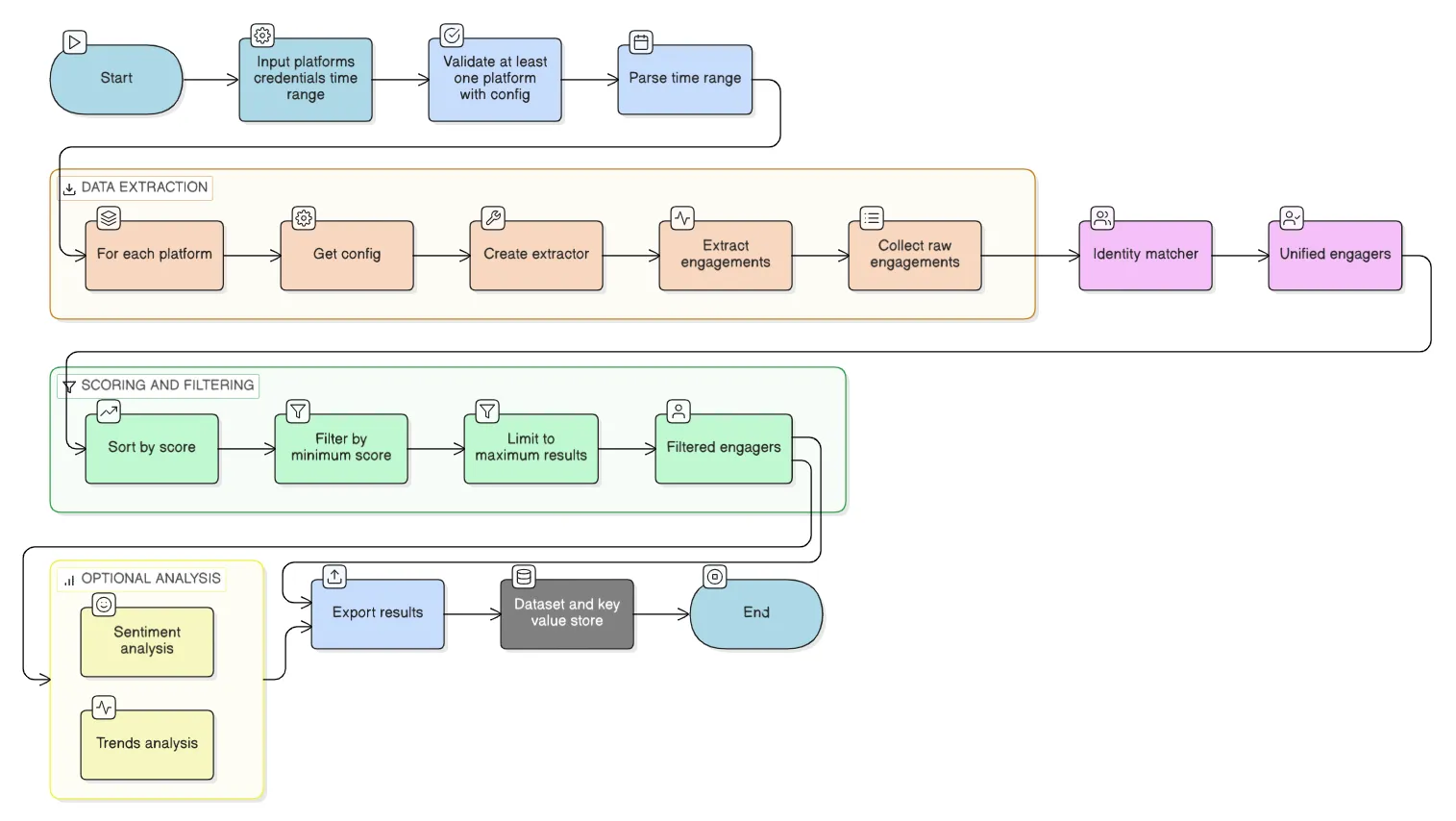
The actor processes your request through a sophisticated pipeline: input validation → multi-platform data extraction → identity matching → scoring and filtering → optional sentiment and trend analysis → export to multiple formats.
Step 1: Configure Your Platforms
Select which social media platforms you want to track and provide the necessary credentials:
Step 2: Run the Actor
Execute the Actor on Apify's cloud infrastructure. It will:
- Connect to each configured platform
- Extract engagement data within your specified time range
- Match identities across platforms
- Score and rank your engagers
- Analyze sentiment of text-based engagements
- Calculate engagement trends and velocity
- Generate exports in your chosen formats
- Save results to the dataset and key-value store
Step 3: Review Your Results
Get a comprehensive view of who's engaging with your content:
Configuration Options
Time Range
Choose how far back to look for engagements:
24h— Last 24 hours7d— Last 7 days (default)30d— Last 30 days90d— Last 90 daysall— All available data
Identity Matching Settings
- Enable/Disable — Turn cross-platform matching on or off
- Confidence Threshold — Set minimum similarity score (0.5 to 1.0) for matching accounts
Advanced Features
- Sentiment Analysis — Analyze comment/reply sentiment (enabled by default)
- Trend Analysis — Track engagement patterns over time (enabled by default)
- Export Format — Choose JSON, CSV, or both
- CRM Export — Generate CRM-ready format with tags and notes
- Include Raw Engagements — Include detailed engagement data in exports
- Generate Report — Create a markdown summary report
Output Controls
- Minimum Engagement Score — Filter out low-engagement users
- Maximum Results — Limit the number of engagers returned (up to 10,000)
Authentication Setup Guide
GitHub Personal Access Token
- Go to GitHub Settings → Developer Settings → Personal Access Tokens
- Click Generate new token (classic)
- Select scopes:
repo,user,read:user - Copy the token and paste it in the
githubAccessTokenfield
X/Twitter Bearer Token (Optional)
- Go to Twitter Developer Portal
- Create a project and app
- Generate a Bearer Token
- Paste it in the
twitterBearerTokenfield
LinkedIn Session Cookie
- Log into LinkedIn in your web browser
- Open Developer Tools (F12 or right-click → Inspect)
- Go to Application → Cookies →
www.linkedin.com - Find the
li_atcookie and copy its value - Paste it in the
linkedinSessionCookiefield
YouTube Data API Key
- Go to Google Cloud Console
- Create a new project (or select existing)
- Enable YouTube Data API v3
- Go to Credentials → Create Credentials → API Key
- Copy the key and paste it in the
youtubeApiKeyfield
Instagram Session ID (Optional)
- Log into Instagram in your web browser
- Open Developer Tools (F12)
- Go to Application → Cookies →
www.instagram.com - Find the
sessionidcookie and copy its value - Paste it in the
instagramSessionIdfield
Facebook Access Token (Optional)
- Go to Facebook Developers
- Create an app and get a Page Access Token
- Paste it in the
facebookAccessTokenfield
Output Data Structure
Dataset Items
Each engager is saved as a separate item in the Apify dataset with the following fields:
| Field | Description |
|---|---|
displayName | Best available name for the engager |
platforms | Array of platforms they engaged on |
totalEngagements | Total number of interactions |
engagementScore | Weighted score based on engagement types |
engagementTypes | Types of engagements performed |
lastEngagement | Most recent engagement timestamp |
firstEngagement | Earliest engagement timestamp |
matchConfidence | Confidence score for cross-platform matching |
contactInfo | Available contact information |
platformBreakdown | Engagement details per platform |
accounts | Full profile data from each platform |
engagements | Complete engagement history |
Key-Value Store
Additional outputs saved to the key-value store:
| Key | Description |
|---|---|
summary | Aggregated statistics and top engagers |
metadata | Execution details, timing, and errors |
output | Complete structured output |
sentiment_summary | Sentiment analysis overview |
trend_analysis | Engagement trends and patterns |
engagement_stats | Detailed engagement statistics |
export_engagers_json | JSON export of engagers |
export_engagers_csv | CSV export of engagers |
export_crm_json | CRM-ready JSON export |
export_crm_csv | CRM-ready CSV export |
export_trends_json | Trend analysis export |
report_markdown | Human-readable markdown report |
Best Practices
For Accurate Results
- Use authentication when available for better data access
- Start with a shorter time range (7 days) to test, then expand
- Configure specific repositories on GitHub to focus on relevant engagements
For Identity Matching
- Set threshold to 0.75 (default) for balanced accuracy
- Lower threshold (0.6) if you want more potential matches
- Higher threshold (0.9) if you want only high-confidence matches
For Performance
- Limit platforms to those you actively use
- Use proxies for Instagram and LinkedIn to avoid rate limits
- Run during off-peak hours for faster execution
Limitations & Considerations
- Public Data Only — Extracts only publicly available data (except LinkedIn with authentication)
- Rate Limits — Respects platform rate limits; large accounts may take longer
- Historical Data — Some platforms limit how far back data is available
- Identity Matching — Not 100% accurate; review matches with confidence scores below 0.8
Privacy & Compliance
- Only extracts publicly available data or data you're authorized to access
- Does not store data beyond your Apify account
- Respects platform terms of service and robots.txt
- Recommended for legitimate business and personal use only
- GDPR-compliant data handling
Frequently Asked Questions
Can this tool see who viewed my profile?
Only LinkedIn provides profile view data (requires Premium for full details). Other platforms like GitHub, X, and Instagram do not expose this information.
How accurate is cross-platform identity matching?
Matching accuracy depends on how consistent users are with their usernames and display names. Matches with confidence scores above 0.85 are highly reliable. Always review lower-confidence matches manually.
Does this work with private accounts?
No. This tool only accesses publicly available data. For private GitHub repositories, you'll need to provide a personal access token with appropriate permissions.
How often should I run this Actor?
For most use cases, running weekly captures meaningful engagement patterns. For high-volume accounts, daily runs may be appropriate.
What's new in this version?
- 10 platforms supported — Added Instagram, TikTok, Medium, Threads, and Facebook
- Sentiment analysis — Understand the quality of engagement
- Trend analysis — Track patterns and velocity over time
- Multiple export formats — JSON, CSV, CRM-ready, and markdown reports
- Improved error handling — Better error messages for missing configurations
Support & Feedback
Have questions or feature requests? We'd love to hear from you:
- Leave a review or comment on the Apify Store
- Contact us through Apify Console
Related Tools & Use Cases
- Social Media Analytics — Track engagement across platforms
- Lead Generation — Identify warm prospects from engagement data
- Influencer Marketing — Find your most engaged brand advocates
- Competitor Analysis — Monitor who engages with competitors
- Community Building — Identify and nurture superfans
License
MIT License — Free for personal and commercial use.
Keywords: social media engagement tracker, cross-platform analytics, who viewed my profile, GitHub stars tracker, X Twitter engagement, LinkedIn profile views, social media monitoring, audience insights, lead generation tool, influencer analytics, engagement scoring, identity matching, sentiment analysis, trend analysis, CRM export, Apify Actor, web scraping, social media API