

SEC Filing Comparison - 10-K & 10-Q Changes
Pricing
from $6.00 / 1,000 comparison processing + $0.001 report rows
SEC Filing Comparison - 10-K & 10-Q Changes
Compare your SEC 10-K and 10-Q filing text. Find added, removed and changed passages with document references, automatic section detection and readable HTML, JSON and CSV reports. Paste two filings to start.
Pricing
from $6.00 / 1,000 comparison processing + $0.001 report rows
Rating
0.0
(0)
Developer

Inus Grobler
Maintained by CommunityActor stats
1
Bookmarked
4
Total users
0
Monthly active users
11 days ago
Last modified
Categories
Security
Limited permissionsShare
SEC Filing Comparison
Paste two SEC filings and see what changed. Compare older and newer 10-K or 10-Q text from the same company. Get a readable before-and-after report, automatic section labels, exact text references, and JSON/CSV exports.
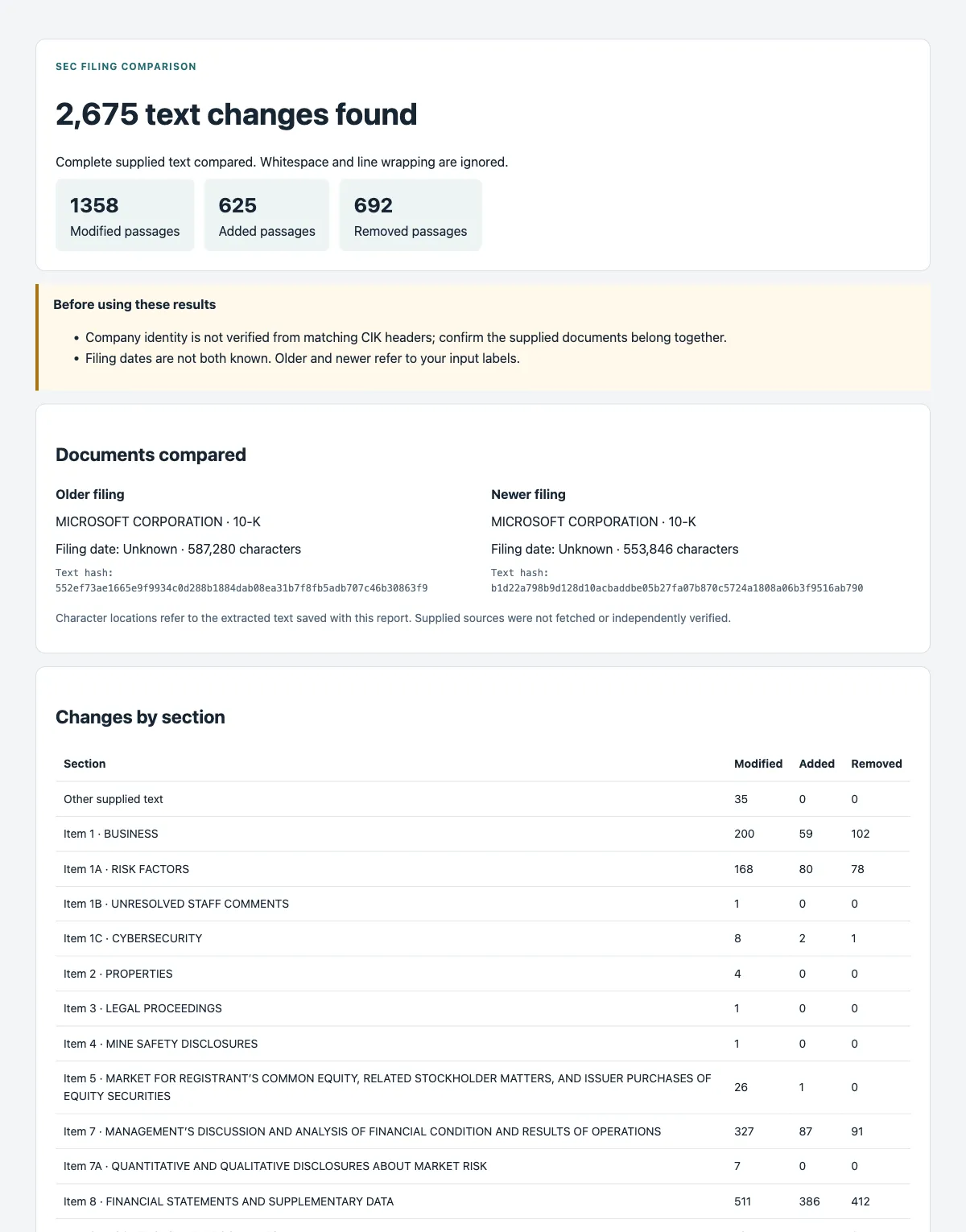
Example report from supplied Microsoft annual filings. Change counts describe literal text blocks.
Input: start with two text boxes
- Paste the earlier report into Older filing.
- Paste the later report into Newer filing, then click Start.
- Open Output → Open comparison report. The Dataset tab contains one comparison summary, with counts and download links.
No advanced settings or model keys are needed. Copy the readable filing text from your existing SEC documents or company reports. Include the filing header when available so the Actor can identify the company, form and filing date. Use the same company and form type on both sides.
The prefilled example is clearly labelled fictional demonstration text. Replace both examples with your own documents. Missing customer text is never replaced with example content automatically.
For an API request, this complete fictional example also runs as supplied:
What you receive
- HTML report: additions, removals and modified passages shown side by side, with nearby context.
- Comparison JSON: complete detected changes, document hashes, character locations, section labels and coverage warnings.
- Changes CSV: one row per change, suitable for review or downstream processing.
- Dataset summary: one row per complete comparison, including a valid No textual changes found result when the supplied texts match after whitespace normalization.
- Extracted text: the exact older and newer text used for source locations in the report.
A modified passage has both before and after text. Added passages have only newer text; removed passages have only older text. Counts describe text-change blocks, not financial events or independently assessed risks.
Example summary, with illustrative counts:
Use cases
- Compare annual 10-K disclosures and locate changed Risk Factors passages.
- Review changes in Management Discussion and Analysis between comparable reports.
- Compare quarterly 10-Q documents, with Part I and Part II section labels kept separate.
- Feed exact before/after passages into your own research or document-review workflow.
Whole supplied documents are compared even when a section cannot be confidently identified. Tables of contents, repeated headings, missing metadata and amendments are disclosed where detected. The tool does not invent missing filing dates, source links or company identifiers.
Pricing
One complete comparison is $0.01, including HTML, JSON, CSV and the two input documents. Bronze is $0.009, Silver $0.008, and Gold/Platinum/Diamond $0.007 per comparison. The existing startup event is $0.00005 per GB, with at least one event per run.
At 1 GB or below, one standard comparison is $0.01005 in event charges; a Gold comparison is $0.00705. These totals include comparison processing and one $0.001 report row: $0.009 + $0.001 on Free, $0.008 + $0.001 on Bronze, $0.007 + $0.001 on Silver, and $0.006 + $0.001 on Gold/Platinum/Diamond. The Store primary event shows the processing component; the report row completes the stated total. There is no fee per changed passage, input document or export. Check the Pricing tab for the active price and effective date.
A valid no-change comparison is charged once. Invalid inputs, failed comparisons and incomplete computations do not trigger a comparison-result fee; startup still applies. Set your maximum spending limit in Apify's normal run controls. If the allowance cannot cover a comparison, the run stops with an explanation instead of a placeholder result.
Limits and interpretation
- Supply readable text or pasted HTML, not a PDF file, URL, screenshot or API response. No live SEC lookup, source API, child Actor or AI model is used.
- Each input supports up to 2 million characters. Very large or highly dissimilar documents can exceed the bounded computation allowance; the Actor then reports an incomplete comparison without charging for a completed result. No silent text truncation is used.
- Each document needs at least 50 words and 250 characters. Include enough matching filing context for a useful comparison.
- Coverage means the complete text you supplied, not proof that you supplied an entire SEC filing. Partial source documents and amendments may omit information.
- Whitespace and line wrapping are ignored. Numbers and punctuation are retained. Moved content can appear as additions and removals.
- Company identity is checked when matching CIK headers are available. Unknown values remain unknown. Conflicting identified issuers, form types or reversed filing dates are rejected with instructions.
- Differences are literal text evidence. They are not investment advice, financial-materiality decisions, source authentication or legal conclusions.
- Your supplied text is processed into the run's Apify storage. Do not paste material you are not authorized to process.
Python API example
Existing record and dataset integrations
Existing providedRecords and providedDatasetId requests remain accepted through the legacy validation workflow. They retain their filing-row output and cost $0.001 per validated filing, plus startup. These hidden API fields do not need to be configured for the two-text workflow. Do not mix the two input methods.
Legacy input must follow the established filing schema. maxFilingsPerTicker continues to bound the total records scanned. Only confirmed delivered rows are analyzed; budget-limited delivery is reported as partial. The EVIDENCE_ANALYSIS artifact links up to 30 adjacent comparisons for compatible issuer/form/date groups, with warnings for skipped or incomplete comparisons. Legacy validation charges apply to delivered filings, not to these included analysis artifacts.
Troubleshooting
- Not a filing / too little text: paste readable filing content with the header or labelled Risk Factors section.
- Different company or form: use two reports from the same issuer and the same form type.
- Dates reversed: swap the older and newer text boxes.
- Comparison incomplete: compare matching complete sections or smaller documents. An incomplete run does not mean there were no changes.
- Delivery uncertain: inspect the run before retrying. The Actor will not automatically repeat an uncertain charge.
For support, open the Issues tab with the run ID and a sanitized input example. Do not include private filing text or credentials in a public issue.


