

PDF & Image to Text OCR – Tables as Rows
Pricing
from $3.00 / 1,000 page with texts
PDF & Image to Text OCR – Tables as Rows
Turn PDFs, scans, photos and screenshots into clean text. Tables, invoices and receipts come back as rows of cells (JSON and CSV), even from scans and phone photos. Reads text layers directly, OCRs only pages that need it, 20 languages. Pay per page with text; empty pages are free.
Pricing
from $3.00 / 1,000 page with texts
Rating
0.0
(0)
Developer

Tideline Data
Maintained by CommunityActor stats
0
Bookmarked
2
Total users
1
Monthly active users
7 days ago
Last modified
Categories
Features
Share
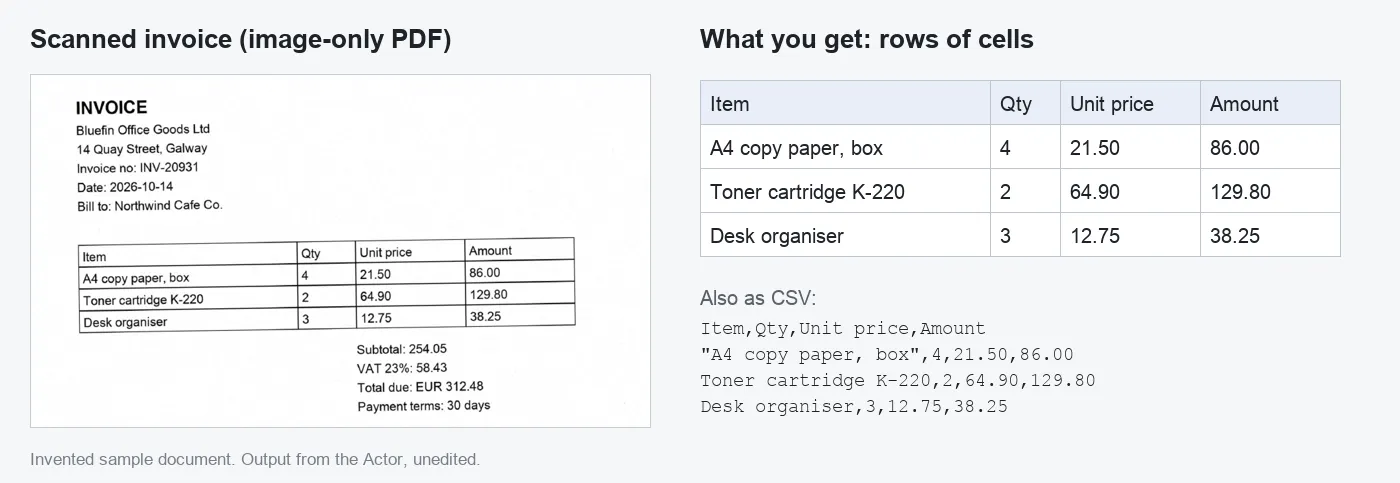
PDF & Image to Text OCR – Tables as Rows turns PDFs, scans, phone photos and screenshots into clean text. Tables, invoice lines and receipt items come back as rows of cells (JSON and CSV), also when the document is a scan or a photo, not just a digital PDF.
What it does
- Reads any PDF or image. Digital PDFs are read straight from their text layer (exact, instant). Scanned pages, photos and screenshots go through OCR. A PDF that mixes both is handled page by page.
- Keeps tables together. Columns are split into cells, so each invoice line or receipt item stays on one row with its price. You get every table as JSON rows and as CSV.
- Reads in reading order. Two-column pages come out column by column, not mixed line by line. Tilted scans are straightened first.
- Tells you when a page is empty. Each page has an
emptyflag and an OCR confidence. Empty pages are not charged. - 20+ languages. English, German, French, Spanish, Italian, Portuguese, Dutch, Polish, Czech, Swedish, Danish, Norwegian, Finnish, Turkish, Russian, Ukrainian, Arabic, Hindi, Japanese, Chinese (simplified) and Korean.
- Your files stay yours. Files are read inside your own run. Results go only to your run's storage. Nothing is kept or shared by us.
Good for
- Invoices and bills into a spreadsheet or accounting tool
- Receipts and expense photos into line items
- Scanned reports, price lists and statements into tables
- Screenshots and photos into searchable text
- Feeding documents to an AI model or a search index (RAG) as clean text
How to use it
- Click Try for free.
- Paste links to your files in File links (or upload one file). Google Drive and Dropbox share links work if the file is shared with "anyone with the link".
- Pick the languages in your documents. English alone is the fastest and most accurate choice for English receipts and photos. Pick only the languages you need.
- Click Start. Download the results as JSON, CSV or Excel, or connect them to Google Drive, Make, Zapier or your own code through the API.
Output
One row per page:
sourceistext_layerfor digital pages andocrfor scans and photos.- In
text, table cells are separated by tabs, so the text also pastes cleanly into a spreadsheet. - A file that can't be downloaded or opened gives one row with an
errormessage.
How much does it cost?
You pay $3 per 1,000 pages that contain text ($0.003 a page). Empty pages and files that fail are free. There is no separate OCR fee.
- A 1-page receipt photo: $0.003
- 500 scanned invoices of 2 pages: about $3
- A 200-page digital report: $0.60
You can set a maximum cost per run in Apify, and the Actor stops when it reaches it.
Tips and limits
- Best results: scans at 200–300 DPI, or sharp photos taken straight on with even light.
- Handwriting is not supported. Printed and typed text only.
- Tables that continue onto the next page come out as one table per page.
- Very faint or tiny print may lose characters. Check the
confidencevalue. - Password-protected PDFs are not supported yet.
- Files up to 100 MB. Max pages per file (default 100) protects you from paying for a huge file by accident.
Questions or problems?
Open an issue on the Issues tab with a link to a sample file (or a description if it's private). We read every one.


