
PDF & Image to Text (OCR) — $2/1k pages · Scanned PDFs, Photos
Pricing
from $1.60 / 1,000 ocr pages
PDF & Image to Text (OCR) — $2/1k pages · Scanned PDFs, Photos
OCR for PDFs and images by URL: PDF to text and image to text. Exact text from digital PDFs, automatic OCR (Tesseract) for scanned pages, photos and screenshots in 8 languages. Page-by-page output, ready for LLMs, search and RAG.
Pricing
from $1.60 / 1,000 ocr pages
Rating
0.0
(0)
Developer

tidydata
Maintained by CommunityActor stats
0
Bookmarked
2
Total users
2
Monthly active users
4 days ago
Last modified
Categories
Security
Limited permissionsShare
📄 PDF & Image to Text (OCR) — scanned PDFs, photos and screenshots
Turn any PDF or image URL into clean text. Digital PDFs are read exactly from their text layer (fast and cheap). Scanned pages, photos and screenshots are read with OCR (Tesseract) in 8 languages. You get the full text plus page-by-page text, ready for LLMs, RAG pipelines, search indexes or spreadsheets.
- ✅ PDFs, PNG, JPG, TIFF (multi-page), WEBP, GIF, BMP
- ✅ Auto mode: uses the PDF's real text when it exists and only OCRs pages without text, so you never pay OCR prices for digital pages
- ✅ OCR languages: English, Spanish, French, German, Italian, Portuguese, Dutch, Catalan (combine several)
- ✅ Page-by-page output for citations and chunking
- ✅ Password-protected PDFs are detected and reported, never cracked
- ✅ Your files are only downloaded during the run to extract the text; nothing else is kept
How to use it
- Paste one or more file URLs (one per line, or upload a list).
- Keep Auto mode (recommended) and pick the OCR languages of your scanned documents.
- Run. Each file becomes one row in the dataset; export it as JSON, CSV, Excel or straight to your app via API.
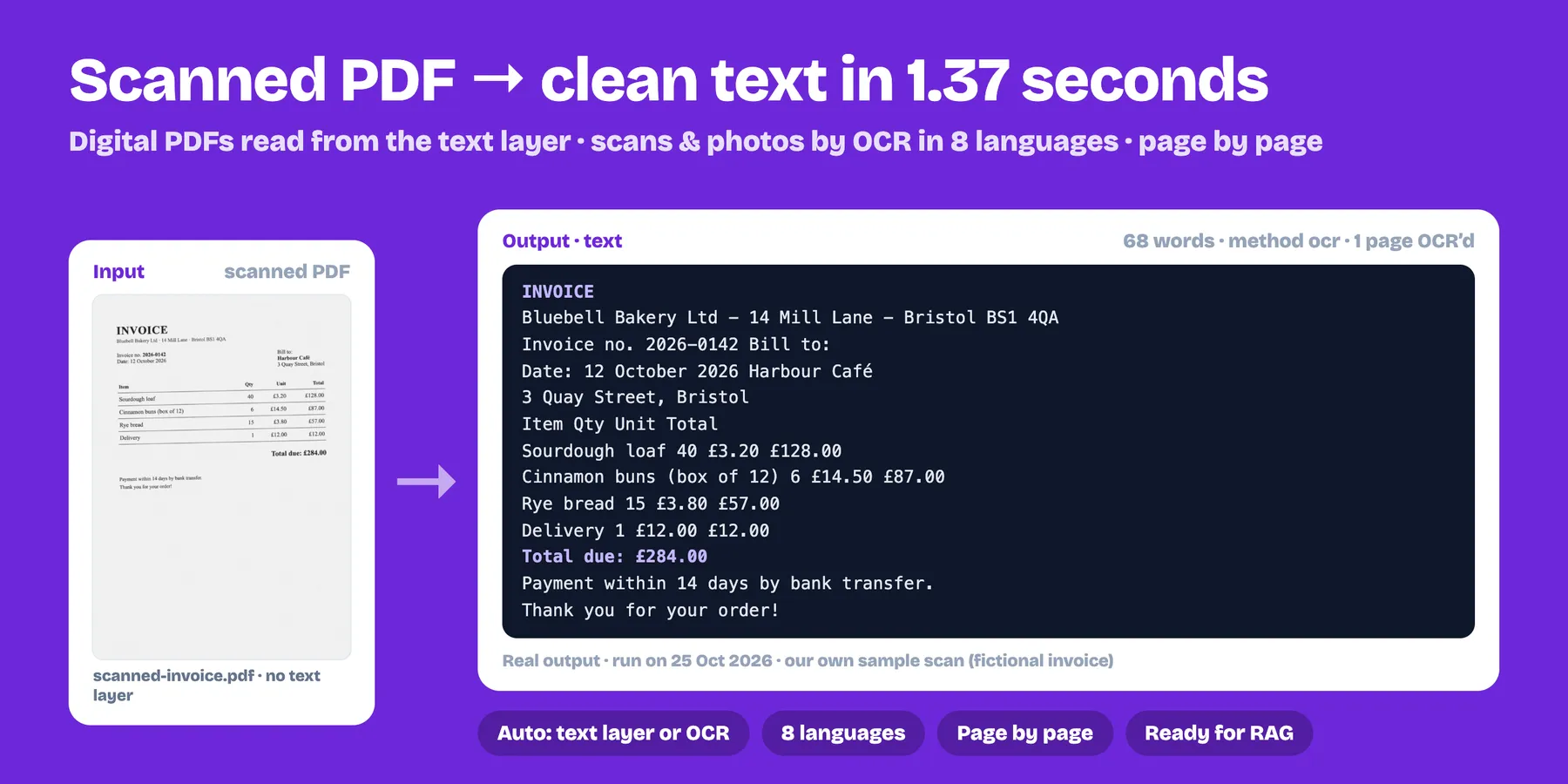
Output example
If a file can't be processed (broken link, unsupported format, password-protected, too big) you get a row with the error explained and you are not charged for it.
Use cases
- 🤖 AI & RAG — feed PDFs and scans to ChatGPT, Claude or your vector database with page numbers for citations.
- 🧾 Invoices, receipts and forms — get the text out of scanned paperwork for bookkeeping or data entry automations.
- 📚 Research — bulk-extract papers, reports and public documents.
- 🔎 Search & archiving — make scanned archives searchable.
- 🖼️ Screenshots & photos of documents — read text from images in workflows (Make, Zapier, n8n).
Pricing
Pay only for pages actually processed:
- Text-layer page (digital PDF): $0.50 per 1,000 pages ($0.0005 each)
- OCR page (scanned page or image): $2 per 1,000 pages ($0.002 each)
A 40-page digital PDF costs $0.02; the same document scanned costs $0.08. In auto mode you only pay the OCR price for pages that really need OCR. Higher Apify plans get an automatic discount (down to $0.0004 and $0.0016).
Use maxPagesPerFile to cap the cost of very long documents. Failed files are free.
Tips for the best OCR results
- Select only the languages that appear in your documents.
- Higher-resolution scans (≥ 200 DPI) give noticeably better results.
- Handwriting is not supported reliably (OCR is designed for printed text).
FAQ
Does it work with Make, Zapier or n8n? Yes — call the Actor via the Apify integration or API and read the dataset.
Is my data stored? Files are downloaded only for the duration of the run to extract text. The result stays in your own Apify dataset, under your control.
Can it read tables? Text from tables is extracted in reading order. Cell structure is not reconstructed.


