
Instagram Hashtag Scraper — Exact Limit, Date Range
Pricing
$0.50 / 1,000 post delivereds
Instagram Hashtag Scraper — Exact Limit, Date Range
Scrape posts from any Instagram hashtag with an exact results limit and a real date range (ISO dates or "7 days"). Returns caption, hashtags, likes, comments, timestamp, owner and media URLs, deduplicated within a run, never across runs. Export to JSON or CSV, schedule runs, or call the API.
Pricing
$0.50 / 1,000 post delivereds
Rating
0.0
(0)
Developer

Tiraisoft
Maintained by CommunityActor stats
0
Bookmarked
1
Total users
0
Monthly active users
a month ago
Last modified
Categories
Share
Instagram Hashtag Scraper
Recent posts from one Instagram hashtag, written straight to your dataset — with an exact result limit, a real date filter, and billing only for rows actually delivered.
You are charged $0.0005 per delivered post and for nothing else. A run that delivers nothing costs nothing.
What "billed only for delivered rows" actually means
Most scrapers charge you for starting, for every dataset write, or per platform unit — so a run that returns duplicates, half-formed rows, or nothing at all still appears on your bill. This one has a single chargeable event, and a post is only charged after its row reaches your dataset having passed every one of these:
- it is not a duplicate of a post already delivered in this run
- it carries the required fields and matches the output schema
- it is inside the result limit you asked for
- it is inside the date window you asked for
Duplicates, malformed rows, rows past your limit and empty runs are free. Platform usage is included in that price rather than charged on top, so the number above is the number you pay.
What a run costs
At $0.0005 a delivered post, and nothing else on the bill:
| What you run | Delivered posts | You pay |
|---|---|---|
| A first test run | 10 | $0.005 |
| A day's check on one hashtag | 200 | $0.10 |
| A week of a busy hashtag | 1,000 | $0.50 |
| A month of a busy hashtag | 10,000 | $5.00 |
A poll with onlyPostsNewerThan where nothing is newer | 0 | $0.00 |
The last row is the point. There is no per-run fee, no per-hashtag fee and no charge for starting, so polling a hashtag on a schedule and getting nothing back costs nothing at all.
Deduplication is within a run, not across runs. Two runs over the same
hashtag deliver — and charge for — the same posts twice. Use
onlyPostsNewerThan to fetch only what has appeared since your last run; that is
what makes repeated polling cheap.
Before your first run: two cookies
Instagram serves hashtag data only to a signed-in session. This actor holds no Instagram accounts and never will — you supply a session for an account you control.
Only two values are needed, sessionid and csrftoken, passed as:
Where to find them
In a browser signed in to Instagram, open DevTools (F12) and go to
Application → Storage → Cookies → https://www.instagram.com:
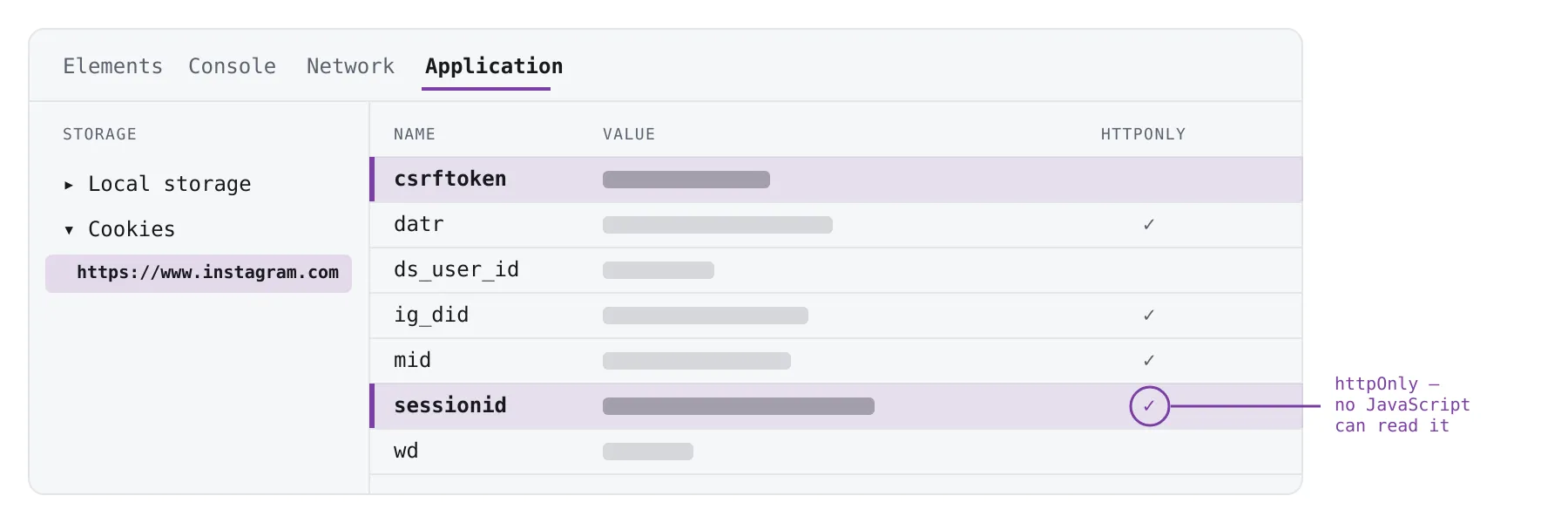
Copy the Value of csrftoken and of sessionid, and paste them into the
Instagram session cookie field in the form above. Pasting your whole cookie header
works too — the extra cookies are accepted and ignored. The field is marked
secret, so it is not shown in the run log.
Do not use document.cookie
Running document.cookie in the DevTools Console will not work, and will look
like it did. sessionid is an httpOnly cookie, so no JavaScript can read it —
the Console returns every other cookie and silently leaves out the only one that
matters. You get a long, plausible-looking string that fails with "has no
sessionid".
That is the ringed tick in the picture. The Application tab shows httpOnly
cookies; the Console cannot, by design. For the same reason there is no snippet or
bookmarklet that can collect these for you.
How long a session lasts
Instagram issues sessionid with roughly a year of expiry, so it does not need
refreshing often. What ends one early is signing out of that browser, changing the
account password, or Instagram invalidating it — after which a run fails with
"Instagram refused the session" and you copy a fresh value. Do not click Log
Out on the browser you took the cookie from.
Expect the account you use to be rate limited and eventually actioned by Instagram. That is a property of the platform, not a fault in the actor. Use an account you are willing to lose.
Input
| Field | Type | Required | What it does |
|---|---|---|---|
hashtag | string | yes | The hashtag to scrape, with or without the leading #. |
sessionCookie | string (secret) | yes | sessionid=…; csrftoken=… from an account you control. |
resultsLimit | integer | no (default 100) | Exact ceiling on delivered posts. The actor never delivers or charges for more than this, whatever a feed page happens to contain. |
onlyPostsNewerThan | string | no | Stop once the feed reaches this date. Takes a date (2026-08-01), a datetime, or a relative window (7 days, 3 months). |
onlyPostsOlderThan | string | no | Skip posts newer than this date. Combine with the field above to scrape one window. |
maxPages | integer | no (default 50) | Hard ceiling on requests to Instagram, so a very large hashtag cannot page indefinitely. |
onlyPostsNewerThan stops the run at the date rather than filtering after the
fact, so asking for a week costs a week of rows — not a month of rows narrowed to
a week.
Output
One row per post, newest first. Every field below is always present — optional
ones come back as null rather than disappearing, so a missing value never breaks
your schema.
One delivered row, in full — this is what lands in your dataset:
The values are illustrative, but the shape is not: this example is generated by the same parser the actor runs, so it cannot drift from what you receive.
| Field | Type | Meaning |
|---|---|---|
shortcode | string | The post's code, as it appears in its URL. |
url | string | Canonical post URL. |
takenAt | string | Publication time, ISO 8601. |
takenAtTimestamp | integer | The same instant as a Unix timestamp. |
caption | string | null | Caption text, or null when the post has none. |
hashtags | string[] | Every hashtag in the caption, lowercased and deduplicated. |
likeCount | integer | null | Likes, or null when Instagram did not return a count. |
commentCount | integer | null | Comments, or null when Instagram did not return a count. |
ownerUsername | string | null | The posting account's username. |
mediaType | string | One of image, video, carousel, unknown. |
isVideo | boolean | True only when the post itself is a standalone video. |
containsVideo | boolean | True when the post is a video or a carousel with at least one video slide. |
carouselCount | integer | null | Number of slides for a carousel, null otherwise. |
displayUrl | string | null | Cover image URL. |
Two things worth knowing before you filter on them:
- Filter video with
containsVideo, notisVideo. The hashtag feed serves images and carousels; a carousel can carry video slides while the post itself is not a video.isVideomeans exactly what its name says, and on this surface it is almost alwaysfalse—containsVideois the field that answers the question you are actually asking. nulland0are different.nullmeans Instagram returned no count for that post;0means it returned zero. Treating them alike will quietly skew any average you compute.
How a run ends, and what to do about it
Every run ends in exactly one of these, and says which in its status message and run log — so you can act on it without reading the log line by line. Nothing ends in silence.
| The run says | What happened | What to do |
|---|---|---|
| Delivered the number of posts you asked for. | It hit resultsLimit. | Nothing. Raise resultsLimit for more. |
| Reached your date cutoff — everything newer has been delivered. | It walked back to onlyPostsNewerThan and stopped. | Nothing. This is the cheap way to poll. |
| Instagram has no more posts for this hashtag. | The feed ran out before your limit. | Nothing. The hashtag is smaller than you asked for. |
| Stopped at the page budget. | It read maxPages pages without reaching your limit or your date. | Raise maxPages. A date far in the past will always hit this first. |
| Stopped at your run budget. | The platform's per-run charge limit was reached. | Raise the run's max charge in Apify, or lower resultsLimit. |
| This run was started with … MB of memory, above this actor's 1024 MB maximum. | The run was started outside the memory bounds the actor declares. Apify bills compute by memory × time, while this actor charges per delivered post — a larger allocation buys no more rows. | You were not charged. Re-run with memory set to 1024 MB or less; it stops before reading anything. |
| Instagram refused the session. | The cookie is expired, wrong, or the account was actioned. | Supply a fresh sessionCookie from a logged-in browser. |
| Instagram rate-limited the session. | Too many requests from that account or IP. | Wait — the message carries the delay when Instagram gives one — then re-run. |
| Instagram has no hashtag "…". | The tag does not exist. | Check the spelling in the message; it quotes exactly what was asked for. |
| The request to Instagram failed: … | A network or HTTP error, quoted verbatim. | Re-run. If it repeats, the detail in the message is what to report. |
| Instagram answered with a shape this actor could not read. | Instagram changed its response and the parser stopped matching. | You were not charged. This one is our bug, and you do not have to report it: the parser is checked against live Instagram on a schedule and a break files its own report. If it keeps happening on your tag, the Issues tab on this listing reaches us. |
The last six rows exit the run as FAILED, not as a success with an empty dataset — everything Instagram refused, the shape we could not read, and a run started above the memory ceiling. A scheduled task or an API caller therefore sees a failed run rather than a clean one that happened to deliver nothing, which is the difference between "this hashtag is quiet" and "we never got to look".
What this actor does not do
Said plainly here so you find out now rather than in a run:
- One hashtag per run. There is no multi-tag input.
- The recent tab only. There is no "top posts" mode.
- Recent posts, not history. The feed is newest-first with no way to seek to a past date, so a window far in the past means walking forward through pages and will hit the page budget before it arrives.
- No comments, no follower data, no profile scraping, no stories.
- No email addresses or contact details, of anyone, ever.
- Individual carousel slide URLs are not returned — only the cover image.
- It cannot run without a session cookie. There is no unauthenticated path to Instagram's hashtag data.
- We do not supply, sell or rent Instagram accounts, and we do not provide proxies for rotating them.
Your data
Posts are written to your dataset on your Apify account. This actor keeps no copy of them: it has no database, no storage of its own, and nothing it could hand to anyone. The session cookie you supply is a secret input handled by the Apify platform and is not written to the run log.
You decide what you collect and what you do with it. Instagram's terms, and the law that applies where you are, are yours to judge before you run it.
No warranty
The actor is provided as is and as available, with no warranty of accuracy, completeness, uninterrupted operation, or correction of defects. Instagram changes its platform without notice and can refuse, rate limit or action any account at any time. Whether the output is fit for what you intend is your judgement, on every run.
Questions
Full documentation: https://instagram-hashtag-scraper.tiraisoft.com
Write to instagram-hashtag-scraper@tiraisoft.com.


