

Realtor.com Scraper - Listings, Sold Homes, Rentals & Prices
Pricing
from $0.76 / 1,000 listings
Realtor.com Scraper - Listings, Sold Homes, Rentals & Prices
Scrape Realtor.com listings by city, ZIP, radius or search URL (for sale, new homes, rent, sold) for $0.76 per 1,000: price, beds, baths, sqft, lot, MLS #, coordinates, photos. Add-ons: price and tax history, schools, 3 home-value estimates, climate risk, permits. Past the 10,000 cap, no login.
Pricing
from $0.76 / 1,000 listings
Rating
0.0
(0)
Developer

Top Api
Maintained by CommunityActor stats
0
Bookmarked
2
Total users
2
Monthly active users
2 days ago
Last modified
Categories
Security
Limited permissionsShare
What does Realtor.com Scraper do?
Realtor.com Scraper extracts Realtor.com listings from realtor.com and turns a city, ZIP code, county, neighborhood, state or Realtor.com search URL into structured rows: one row per home for sale, new-construction plan, rental, sold home or off-market property, with price, address, beds, baths, square feet, lot size, MLS number, coordinates and photos. Built for real estate investors, analysts and proptech teams who need Realtor.com data in a spreadsheet or an API without copying listings by hand.
Realtor.com scraper · Realtor.com API alternative · Realtor data scraper · Realtor.com listings scraper · Realtor.com sold homes scraper · Realtor.com rentals scraper
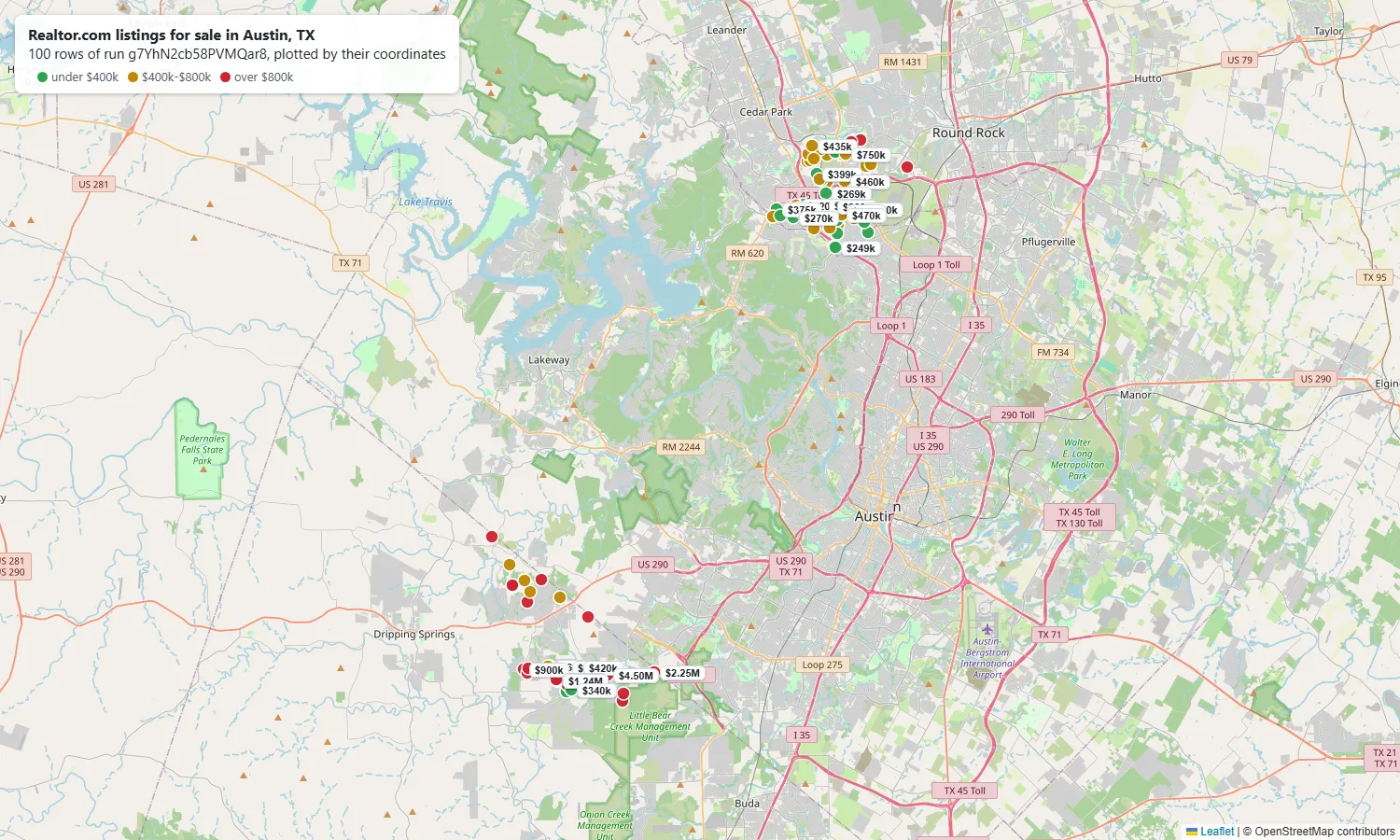
- Every Realtor.com search: for sale (including new construction), for rent, recently sold and off market, with the same filters as realtor.com - price, beds, baths, square feet, lot, year built, HOA, property type, days listed, price cuts, open houses, pending / contingent / foreclosure / 55+, 3D tours, feature tags and keywords.
- Past the 10,000-result limit: Realtor.com serves 10,000 results per search. Realtor.com Scraper splits a bigger search into price (or sold-date) bands by itself: 10,300 Austin sold homes came back in 134 seconds on a test run.
- Property details on demand: price and sale history, tax history with assessments, nearby schools with ratings, three home value estimates and their history, mortgage estimate, flood / wildfire / heat / wind / air risk scores, every photo.
- Look up single homes by Realtor.com URL, property ID, street address or MLS number.
- Monitoring: schedule it daily and get only the listings you have not received before (each search remembers up to 500,000), optionally with price and status changes.
- No login, cookies or Realtor.com API key.
- Export anywhere: JSON, CSV, Excel, XML; schedules, webhooks, Make, Zapier, n8n, Google Sheets; the Apify API and MCP server.
What data can you get from Realtor.com?
| 🆔 Property and listing ID (`id`, `listingId`) | 💲 List price, price per sq ft (`listPrice`) | 🏷️ Status: for sale, rent, sold, off market |
| 💵 Last sold price and date (`lastSoldPrice`, `soldOn`) | 📅 List date, days on market, last update | 📉 Price cuts (`priceReducedAmount`, last change) |
| 🛏️ Beds, baths (full / half), square feet | 🌳 Lot size, year built, stories, garage | 🏘️ Property type and sub type |
| 📍 Street, city, state, ZIP, county, FIPS | 🗺️ Latitude / longitude, Street View link | 🗂️ MLS name and MLS number (`source`) |
| 📝 Listing description and feature tags | 📷 Main photo, photo count, all photos | 🚩 Pending, contingent, foreclosure, new construction flags |
| 🏠 Home value estimate (`estimate`) | 🏢 HOA fee, pet policy (rentals) | 🔑 Open houses, virtual tours, 3D tour |
| 📜 Price / sale history and tax history | 🎓 Nearby schools with ratings and district | 🌊 Flood, wildfire, heat, wind and air risk |
| 📈 Views, clicks, saves, shares (stats add-on) | 🛠️ Building permits (permit add-on) | 📐 Floor plans (floor-plan add-on) |
On a 100-row Austin, TX for-sale run, 100% of rows had a price, ZIP, coordinates, MLS number, description and photo count; 91% had beds and square feet. Texas does not publish sale prices, so lastSoldPrice was empty there; on a 1,000-row Phoenix, AZ sold run it was 100% filled.
How to scrape Realtor.com with Realtor.com Scraper
- Create a free Apify account - $5 of monthly credit, no card needed.
- Open Realtor.com Scraper and click Try for free.
- Type a city, ZIP code or county into Locations (or paste a Realtor.com search URL), pick the Listing status and set Max results.
- Click Start. Rows stream into the dataset as they are found.
- Open the Storage tab and Export as JSON, CSV or Excel - or let a schedule run it for you.
⬇️ Input
| Parameter | Type | Description |
|---|---|---|
| 🔍 What to scrape | ||
searchLocations | List | Cities, ZIP codes, counties, neighborhoods or states, e.g. Austin, TX, 78704, Travis County, TX, TX. |
listingStatus | Select | for_sale (default, includes new construction), for_rent, sold, off_market, ready_to_build. |
startUrls | List | Realtor.com search URLs (their filters are kept) or property URLs. |
propertyIds · addresses · mlsListingIds | List | Single homes by Realtor.com property ID, street address or MLS number. Returned with full details. |
| 🎯 Filters (applied by Realtor.com) | ||
radiusMiles | Integer | Also search this many miles around each location. |
propertyTypes | Select | Single family, condo, townhome, multi family, mobile, land, farm, co-op and more. Default: all. |
minPrice / maxPrice | Integer | Price in USD - monthly rent for rentals, sale price for sold homes. |
minBeds maxBeds minBaths maxBaths minSqft maxSqft minLotSqft maxLotSqft minYearBuilt maxYearBuilt maxHoaFee | Number | Ranges as on realtor.com. |
listedWithinDays | Integer | Only listings that went live in the last N days. |
soldWithinMonths | Select | Sold homes: 1, 3, 6 (default), 12, 24, 36 months or any time. |
onlyWith / excludeListingTypes | Select | Narrow to pending, contingent, foreclosure, new construction, open house, price reduced, virtual tour, 3D tour, 55+ or no HOA; hide pending, contingent, foreclosure, new construction or 55+. |
tags · keywords | Text | Realtor.com feature tags (e.g. swimming_pool, garage_2_or_more) and keyword search. |
pets · moveInBy | Select / date | Pets allowed (rentals); move-in ready by (new construction). |
sortBy | Select | Default newest first (sold: latest sale first), or lowest / highest price, sold date, recently reduced, largest, lot size and more. |
customQuery | JSON | Extra Realtor.com search keys, merged last. |
| ✂️ Refine results | ||
minDaysOnMarket · withPhotosOnly | Number / Boolean | Keep stale listings only; keep listings with photos only. |
| ➕ Extra data | ||
includeDetails | Boolean | Price and tax history, schools, 3 home value estimates, mortgage, climate risk, all photos - charged as property-details. |
includeListingStats | Boolean | Views, clicks, saves, shares and inquiries for the last 1-28 days - charged as listing-stats. |
includePermitHistory | Boolean | Building permits with date, type of work, project and status - charged per permit record. |
includeFloorplans | Boolean | 2D / 3D / interactive floor plans - charged as floor-plans. |
includePhotos | Boolean | Every photo URL on each row. No extra charge. |
| 🔁 Monitoring | ||
monitorMode · trackPriceChanges · monitorStoreName | Boolean / Text | Return only listings not delivered by previous runs of the same search (up to 500,000 remembered per search); optionally also price and status changes. |
| 📦 Output | ||
maxItems | Integer | Default 100; 0 = no limit (the run ends when the search is finished, at your maximum charge, or 40 seconds before the run's timeout). |
maxItemsPerSearch · compact · flatOutput · customMapFunction | Per-search cap, core fields only (add-ons you turn on stay in the row), dot-named columns, your own row mapping. |
Input JSON
Pick the listing status before anything else
listingStatus decides which Realtor.com tab is searched: for sale (with new construction), for rent, recently sold or off market. Prices filter the rent for rentals and the sale price for sold homes. A search URL keeps its own status.
Paste a Realtor.com search URL to keep every filter you set on the site
Set up the search on realtor.com, copy the address bar and paste it into startUrls, e.g. https://www.realtor.com/realestateandhomes-search/Austin_TX/beds-3/price-na-900000. Beds, baths, price, square feet, lot, age, type, radius, days listed, keyword, HOA, open house, new construction, pending and pet filters in the URL are applied; a URL part the actor does not recognise is named in the log and left out. The URL above returned 3,819 homes, the same number realtor.com showed for it.
Go past 10,000 results with maxItems 0 or a big number
Realtor.com stops at 10,000 results per search. With a bigger maxItems, the search is split into price bands (sold-date bands for sold homes) until each band fits.
⬆️ Output
Every listing becomes one dataset item. Here is the table view of a run for Phoenix, AZ with property details and listing stats on:
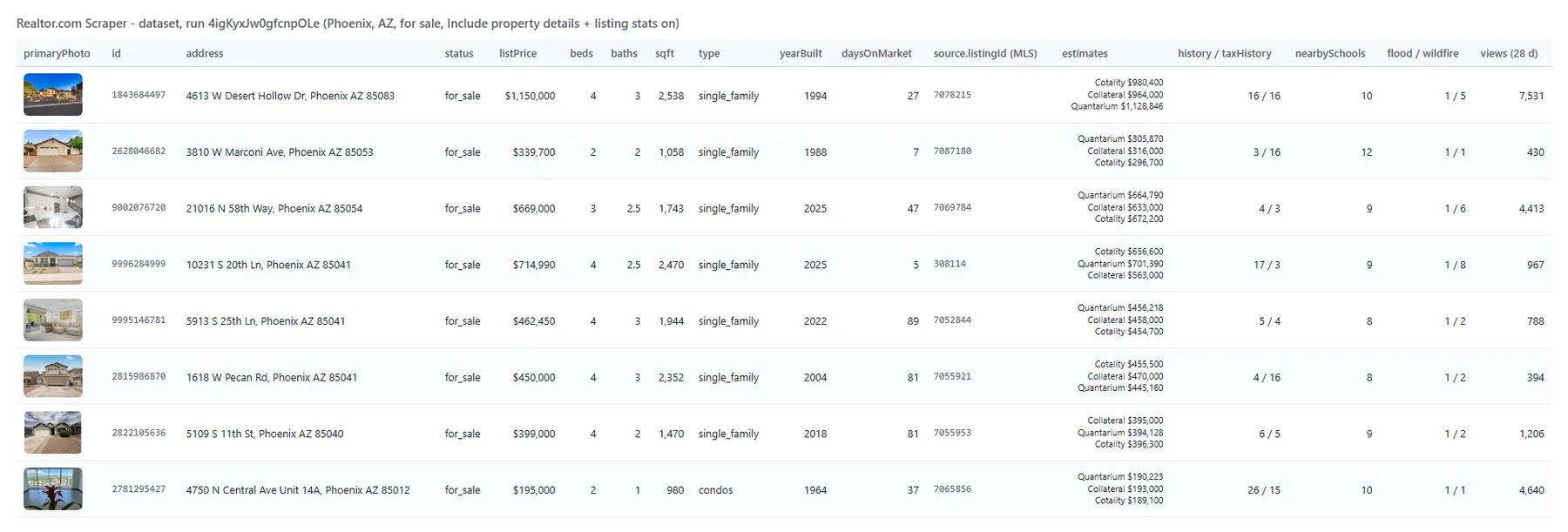
And one row as JSON (shortened):
Fields
Fill measured on platform runs: Austin, TX for sale (100 rows), Phoenix, AZ sold (1,000 rows) and Phoenix, AZ for sale with property details and listing stats (100 rows).
| Field | Type | What it is | Fill |
|---|---|---|---|
id, url, status, listPrice, listDate | string / number | Property ID, page, status, price, list date | 100% |
address, coordinates | object | Street, city, state, ZIP, county; latitude / longitude | 99-100% |
beds, baths, sqft | number | Bedrooms, bathrooms, living area | 76-99% |
lotSqft, yearBuilt | number | Lot size, year built | 76-99% |
lastSoldPrice, soldOn | number / string | Last sale | 100% on sold rows (not published in Texas) |
daysOnMarket | number | Days since list date (active listings) | 100% |
priceReducedAmount | number | Total price cut | 42-53% |
source.name, source.listingId | string | MLS and MLS number | 100% |
description, tags, primaryPhoto | string / list | Listing text, feature tags, main photo | 90-100% |
estimate | object | Realtor.com home value estimate | 59% (Austin) - 98% (Phoenix) |
hoaFee | number | Monthly HOA fee | 87-98% |
virtualTours, openHouses | list | Tours and upcoming open houses | 4-30%, 0-8% |
history, nearbySchools, details, mortgage | list / object | Property details add-on | 100% |
taxHistory | list | Property details add-on | 84% |
estimates, estimateHistory | list | Property details add-on: 3 sources | 97% |
local | object | Property details add-on: climate risk | 98% |
popularity | list | Listing stats add-on (1, 7, 14, 21, 28 days) | 100% |
permits, hasRoofPermit | list / boolean | Permit add-on | 13 of 50 homes had permits |
floorplans | list | Floor-plan add-on | mostly new-construction communities |
How can I use Realtor.com data?
- 🏘️ Real estate investors - pull every listing in a market with price per square foot, days on market and price cuts, and spot stale or reduced listings.
- 📊 Market analysts - track inventory, list prices and sold prices by ZIP code or county week over week.
- 🧮 Appraisers and lenders - sold comps with sale price, date, facts, tax assessments and three home value estimates.
- 🏗️ Builders and proptech teams - new-construction plans, communities, floor plans and building permits.
- 🛡️ Insurers - flood, wildfire, heat, wind and air risk scores with FEMA zones per address.
How much does it cost to scrape Realtor.com?
Realtor.com Scraper is pay-per-result: $0.76 per 1,000 listings (listing, $0.00076 each), no start fee. Add-ons, each only for rows that carry them: property details $0.95 per 1,000 (property-details), listing stats $0.95 per 1,000 (listing-stats), floor plans $0.95 per 1,000 (floor-plans), building permits $1.90 per 1,000 permit records (permit-history). A home looked up by URL, property ID, address or MLS number is one listing plus its details: $0.00171.
| Rows | Listings only | With property details | With details + stats |
|---|---|---|---|
| 10 | $0.0076 | $0.0171 | $0.0266 |
| 100 | $0.076 | $0.171 | $0.266 |
| 1,000 | $0.76 | $1.71 | $2.66 |
| 10,000 | $7.60 | $17.10 | $26.60 |
Apify's platform usage is included. Measured on 256 MB: 100 listings in 2 seconds, 100 listings with property details and stats in 6 seconds, 1,000 sold homes in 9 seconds, 10,300 sold homes in 134 seconds.
Integrations, API, scheduling & MCP
- Schedules: run Realtor.com Scraper daily or weekly from the Schedules tab; with
monitorModeeach run returns only new listings. - Webhooks: fire a URL when a run finishes - push listings to your CRM, Slack or a sheet.
- No-code: Make, Zapier, n8n, Google Sheets, Airtable, Slack via Apify integrations.
- API: call it from Node.js or Python with
apify-client- code on the API tab and the Apify API reference. - MCP / AI assistants: connect Claude, Cursor or any MCP client through the MCP tab and ask for Realtor.com listings in plain language.
More scrapers from TopApi
| 💬 Facebook Comments Scraper - comments and replies on local real estate posts | ⭐ Google Maps Reviews Scraper - reviews of local businesses around a property | 💼 Indeed Jobs Scraper - hiring and salaries in a housing market |
| 🔎 Facebook Search Posts Scraper - local posts by keyword and location | 🎵 TikTok Scraper - home-tour and neighborhood videos by hashtag | ▶️ YouTube Shorts Scraper - real estate Shorts by keyword |
| 🧭 All TopApi actors | ||
Limits & empty runs
- Results per search: Realtor.com serves 10,000 results per search, 200 per call. Bigger searches are split into price bands (sold-date bands for sold homes); listings with no price cannot be reached through a price band (12 of 6,654 Austin rentals) and are counted in
RUN_SUMMARY. - Run length:
maxItems0sets no row limit. The run then ends when the search is finished, when your maximum charge is reached, or 40 seconds before the run's timeout (1 hour by default; a run with no timeout has no time limit). When the time limit cuts a search short, the status message says so andRUN_SUMMARYhasstoppedBy: "timeLimit"; listings still waiting for add-ons at that moment are left out and not charged (leftOutWaitingForAddOns). Raise Timeout in the run options, or split the search, to get the rest. - Monitoring: each search keeps its own memory, named by what you set - the location or search URL, status, filters as you typed them and sort - so
soldWithinMonths6orlistedWithinDays7keeps the same memory from one day to the next; change any of them and the search starts a new memory. A search remembers up to 500,000 listings; past that the oldest are forgotten and can come back as new. A run that Apify restarts on another server keeps what it delivered before the restart, and a run that you abort or that fails keeps what it delivered too: each write is remembered as soon as it is in the dataset, so only the rows of a write still in progress at the moment of an abort can come again in the next run. - Sold prices: not published in non-disclosure states such as Texas; the sale date still is.
- Listing stats: Realtor.com fills the 1, 7, 14, 21 and 28-day periods; its 30-day period is empty and is left out.
- Move-in dates: published for new-construction homes only, so
moveInBydoes not apply to rentals. - Listing remarks: a phone number, e-mail address or licence number (such as
License #,DRE#orNMLS) written into the remarks text is shown as[phone removed]/[email removed]/[license removed]. - Sort order: Realtor.com's own relevant order changes on every call (two identical Austin searches shared 4 of their first 200 homes), so paging through it repeats some homes and never reaches others. The actor pages in a fixed order instead: newest first by default (sold homes: latest sale first; off-market homes: Realtor.com's own fixed order), with price as the tie-breaker, so pages no longer reshuffle between calls. A listing added or removed on Realtor.com while the run pages can still shift the later pages by one, so a few homes can come twice (the repeat is dropped and not charged) or be missed. Rows are written to the dataset in that order, add-ons on or off; several searches, or one search split into price bands, are read side by side, so their rows interleave page by page. When your maximum charge or the time limit stops a run, the rows kept are the first ones in that order.
- Search URLs: the filters listed above are applied; a URL part the actor does not recognise is named in the log and skipped. Sorting comes from
sortBy, not from the URL. - Empty dataset: the status message says why - Realtor.com has no listings for these filters, the location was not recognised, your refine filters removed every listing, or monitoring found nothing new. There is no start fee, so a run that delivers no rows has no charges.
FAQ
How many listings can Realtor.com Scraper collect in one run?
As many as Realtor.com has for the search: past 10,000 results the search is split into bands. Set maxItems to 0 for no limit, or a number to cap the bill. The run also stops at your maximum charge and 40 seconds before its timeout (1 hour by default), and the status message says when either one cut the search short. A 10,300-row sold search took 134 seconds.
Is there a Realtor.com API?
Realtor.com Scraper reads the same public listings a visitor sees and returns them as JSON, so you can use it like a Realtor.com API through Apify, with no key.
Can I run Realtor.com Scraper on a schedule to get new listings automatically?
Yes. Save your input as a task, open Schedules, pick the cadence and switch on monitorMode: each run then returns only listings not delivered before by the same search (up to 500,000 remembered per search). Relative windows such as sold within 6 months or listed within 7 days keep the same memory from day to day. Add trackPriceChanges to also get listings whose price or status changed. A run that finds nothing new costs nothing in listing charges.
How do I get price history, tax history, schools and home value estimates with Realtor.com Scraper?
Switch on includeDetails. Every row then carries history, taxHistory, nearbySchools, estimates (Cotality, Collateral Analytics, Quantarium), estimateHistory, mortgage, local climate risk, details and every photo.
Can I scrape Realtor.com rentals, sold homes and new construction with Realtor.com Scraper?
Yes. Set listingStatus to for_rent, sold or ready_to_build (new-construction plans; they are also part of for_sale). Sold rows carry the sale date and, where the state publishes it, the sale price.
Can I integrate Realtor.com Scraper with other apps?
Yes - Make, Zapier, n8n, Google Sheets, Slack and more via Apify integrations, or use webhooks to trigger an action when a run finishes.
Can I use Realtor.com Scraper with the Apify API or in Python?
Yes. Use apify-client for Node.js or Python; the API tab has ready-to-paste code.
Can I use Realtor.com Scraper through an MCP server?
Yes. Open the MCP tab, connect your MCP client (Claude Desktop, Cursor and others) and ask for Realtor.com listings in plain language. Turn on compact for rows sized for AI assistants.
Do I need a Realtor.com account, cookies or an API key?
No. Realtor.com Scraper reads only what Realtor.com shows publicly; you pass locations, URLs, property IDs, addresses or MLS numbers and nothing else.
Why did my Realtor.com Scraper run return no results?
Most often the filters match no homes (check the same filters on realtor.com), the location was not recognised (try "City, ST" or a ZIP code), or monitoring found nothing new since the last run. The status message and the RUN_SUMMARY record name the cause.
Is it legal to scrape Realtor.com data?
Realtor.com Scraper extracts publicly available property data such as prices, addresses and listing details. Results can still contain personal information, which is protected by regulations such as GDPR; scrape personal data only with a legitimate reason, and consult a lawyer if unsure. See Apify's post on the legality of web scraping.
Your feedback
We keep improving Realtor.com Scraper. Found a bug or missing a field? Open an issue on the Issues tab.


