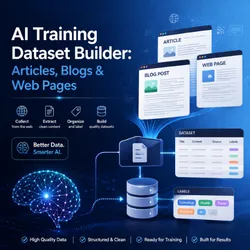
AI Training Dataset Builder: Articles, Blogs & Web Pages
Pricing
$5.00 / 1,000 page successfully processeds
AI Training Dataset Builder: Articles, Blogs & Web Pages
Turn any list of URLs into clean, structured training data for AI models, RAG systems, and LLM fine-tuning. Built for ML engineers and AI teams.
Pricing
$5.00 / 1,000 page successfully processeds
Rating
0.0
(0)
Developer

Moses Ndambuki
Maintained by CommunityActor stats
0
Bookmarked
3
Total users
0
Monthly active users
5 months ago
Last modified
Share
Turn any list of URLs into clean, structured training data for AI models, RAG pipelines, and LLM fine-tuning. Built for ML engineers, AI researchers, and dataset teams who need reliable web content at scale without writing custom scrapers for every site.
Pass in URLs. Get back clean JSON with title, author, publish date, body text, language, and word count. Pay only for pages that succeed.
Who this is for
- AI / ML engineers building training corpora for LLMs and small language models
- RAG developers populating vector stores with fresh, structured content
- Dataset curators assembling fine-tuning sets from public web sources
- Content intelligence teams monitoring articles, blogs, and editorial pages
- Researchers harvesting public web pages for analysis at scale
If you currently maintain hand-rolled scrapers per site, this replaces all of them with one tool.
What you get per URL
Every field is normalized. Empty pages and thin content (under 50 words by default) are skipped automatically so your dataset stays clean.
How it works
Behind the scenes: Playwright renders the page (handles JS-heavy sites), the extractor pulls semantic HTML (article, main, [role=main]), and the dataset emits one JSON item per successful URL. No DOM tweaking, no per-site config.
Quick start
Run from the Apify Console
- Click Try for free.
- Paste your URLs.
- Click Start.
- Download the dataset as JSON, CSV, Excel, or stream it into your pipeline.
Run from the API
Run from Python
Input fields
| Field | Type | Default | Description |
|---|---|---|---|
startUrls | array | required | URLs to process |
maxPages | integer | 100 | Safety cap per run |
includeImages | boolean | false | Attach image URLs from the article body |
minWordCount | integer | 50 | Skip pages below this word count |
Pricing
Pay per page processed. No subscriptions.
| Volume | Price per page | Total |
|---|---|---|
| First 50 pages (free tier) | $0.000 | $0.00 |
| Per page after that | $0.005 | 1,000 pages = $5 |
| 10,000 pages | $0.005 | $50 |
How it compares
| Tool | Pricing model | 1,000 pages |
|---|---|---|
| AI Training Dataset Builder | $0.005 per page | $5 |
| Apify Web Content Crawler | Per result + compute | $7 to $15 |
| Diffbot Article API | $299 per month base | $300+ |
| Custom in-house scraper | Engineer time | $500+ build cost |
You only pay for pages that return clean content. Thin, blocked, or failed pages cost nothing.
Common use cases
- LLM fine-tuning datasets from public blogs, documentation sites, and editorial archives
- RAG knowledge bases populated from a curated URL list, refreshed on a schedule
- Competitive content audits comparing publish cadence and word count across competitors
- Academic and journalistic research assembling source corpora across many domains
Tips for best results
- Start with 10 to 20 URLs to verify extraction quality on your target sites
- Set
minWordCounthigher (200 to 500) if you only want long-form content - Use
maxPagesas a hard safety cap on every run - Schedule the actor weekly to keep your training data fresh
Pairs well with
- Reddit Brand Monitor & Lead Finder — pair article harvesting with social signals
- Website Lead Extractor — turn the same URL list into a B2B contact dataset
- Lead Enrichment Pipeline — chain extractors together for multi-source enrichment
(Links updated as related actors ship.)
FAQ
Does it handle JavaScript-rendered pages? Yes. The actor uses headless Chromium via Playwright, so SPAs and JS-heavy sites work the same as static HTML.
What about paywalls and login walls? The actor reads what an unauthenticated browser sees. Paywalled content is not bypassed.
How is this different from a generic web scraper? Output is normalized for AI use cases: cleaned body text (not raw HTML), word count, language, and metadata. You can pipe it straight into a vector store or training pipeline.
Can I run this on a schedule? Yes. Apify's built-in scheduler runs the actor on any cron expression. Pair it with a webhook to ship new items to your store of choice.
What if a page fails? Failed pages are logged and skipped. You are not charged for failures.
Support
Open an issue on the actor's Apify page or message the maintainer. Bug reports with the failing URL get fastest turnaround.
Built and maintained by Turboextract on the Apify platform.