

Google Trends AI Content & SEO Keywords Generator
Pricing
from $3.50 / 1,000 enriched trend results
Google Trends AI Content & SEO Keywords Generator
Google Trends Scraper with AI content generator. Extract real-time trending topics from 48 countries → get blog titles, Twitter/Instagram/TikTok captions & 10 SEO keywords per trend. Results in 60 seconds. Free, no API keys, no proxies needed.
Pricing
from $3.50 / 1,000 enriched trend results
Rating
5.0
(1)
Developer

Vasram Sonagara
Maintained by CommunityActor stats
6
Bookmarked
49
Total users
2
Monthly active users
2 months ago
Last modified
Categories
Share
Google Trends Scraper with AI Content Generator — Blog Titles, SEO Keywords & Social Captions (48 Countries)
Stop spending hours researching what to write about. This Google Trends scraper fetches today's top trending searches across 48 countries and instantly generates platform-ready blog titles, Twitter/Instagram/TikTok captions, and 10 SEO keywords per trend — all powered by AI, in under 60 seconds, with zero API keys or proxies required.
Extract today's hottest Google searches and transform them into ready-to-publish content. Perfect for content creators, SEO professionals, and marketing agencies who need to stay ahead of trends before the competition does. Built natively on Apify — get scheduling, API access, webhooks, and Zapier/Make integrations included by default.
Disclaimer: This is an unofficial tool. It is not affiliated with, endorsed by, or sponsored by Google. It uses publicly available Google Trends and Google News RSS feeds.
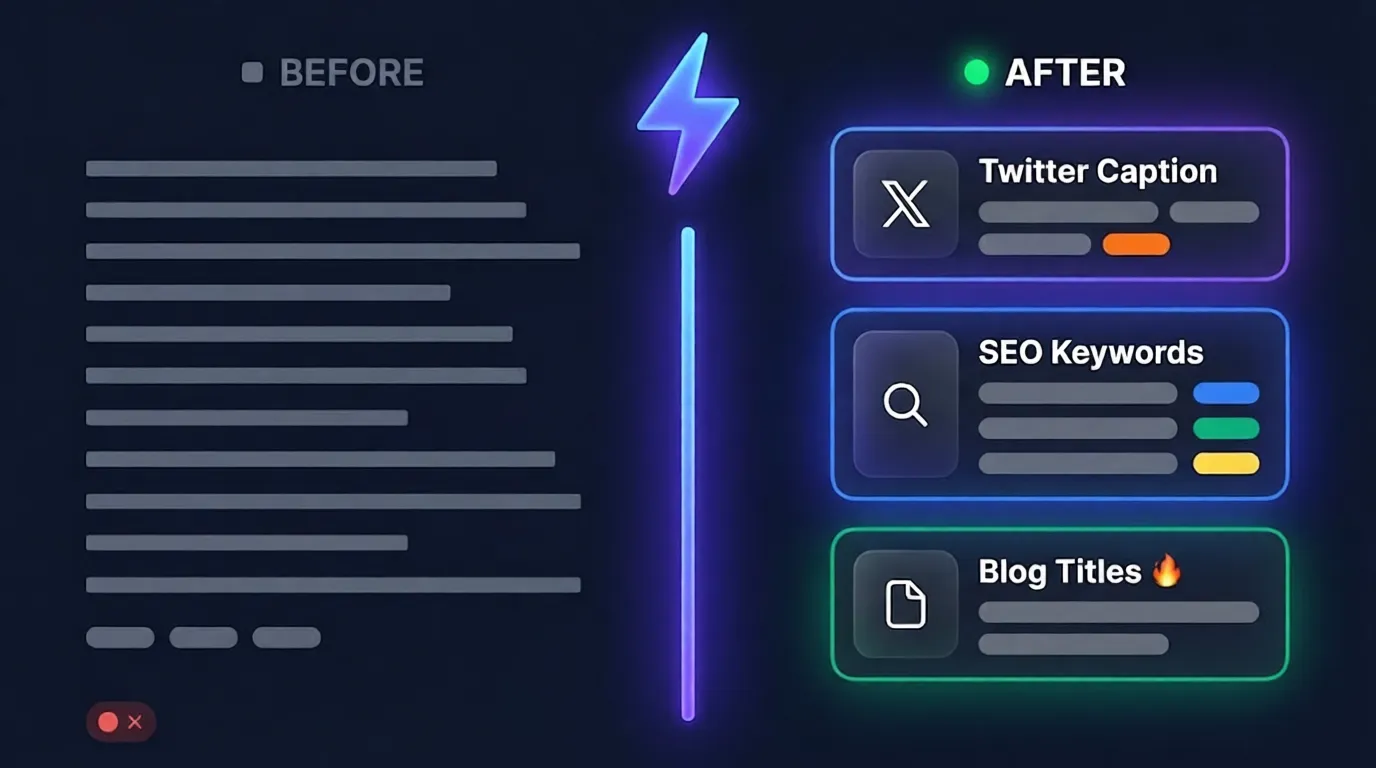
Google Trends API Alternative — Free, No API Keys Required
Looking for a Google Trends API? Google doesn't offer an official free API — but this Actor gives you full programmatic access to today's trending topics via Apify's REST API, scheduler, and webhooks. No credentials. No rate limits. No setup.
vs apify/google-trends-scraper: That Actor returns raw keyword data only. This Actor returns raw keyword data plus AI-generated blog titles, platform-specific social captions, and 10 SEO keywords — all in one automated run, under 60 seconds, at the same cost.
| This Actor | apify/google-trends-scraper | |
|---|---|---|
| Raw trending keywords | ✅ | ✅ |
| AI-generated blog titles | ✅ | ❌ |
| Twitter / Instagram / TikTok captions | ✅ | ❌ |
| SEO keywords (10 per trend) | ✅ | ❌ |
| Related news context | ✅ | ❌ |
| Best time to post + urgency score | ✅ | ❌ |
| Cost | ~$0.05/run | ~$0.01/run |
⚡ What You Get Per Trend — Two Real Output Examples
Example 1 — India (Sports)
| Output | Example |
|---|---|
| 🔥 Trending topic | "NorthEast United vs Goa" (~50K searches, Surging +200%) |
| 📰 News context | "Youngest ISL Coach Takes Charge as NEUFC Battles Goa" — Times of India |
| ✍️ Blog title | "Why the Youngest ISL Coach's Debut Matters in NEUFC vs Goa" |
| 🎬 Video title | "NEUFC vs Goa: Match Preview (Full Breakdown) [2026 Update]" |
| "The youngest coach in ISL history takes charge tonight. Can NEUFC finally beat Goa after 4 years? 🤯 #ISL2026" | |
| "History in the making! 🌩️ Will this be the turning point for the highlanders? Drop your predictions ⬇️ #ISL2026" | |
| 🎵 TikTok | "Debut alert 🚨 Youngest ISL coach ever stepping in rn 👀 Who you got? #NEUFCvGoa #ISL2026" |
| 🔎 SEO keywords | "where to watch northeast united vs goa live 2026" |
| ⏰ Best posting time | "Evening (6–9 PM EST)" — 🟠 High urgency, within 24 hours |
Example 2 — United States (Entertainment)
| Output | Example |
|---|---|
| 🔥 Trending topic | "Met Gala 2026" (~500K+ searches, 🚀 Breakout) |
| 📰 News context | "Best and Worst Dressed at Met Gala 2026" — People Magazine |
| ✍️ Blog title | "Every Jaw-Dropping Met Gala 2026 Look, Ranked by the Internet" |
| 🎬 Video title | "Met Gala 2026: Biggest Fashion Moments Nobody Saw Coming" |
| "The Met Gala just happened and fashion Twitter is NOT okay 😭 Here are the looks everyone is arguing about #MetGala2026" | |
| "Best dressed? Worst dressed? You decide 👇 Drop your picks in the comments #MetGala2026 #Fashion" | |
| 🎵 TikTok | "POV: Met Gala 2026 just ended and I need to talk about THIS look 👀 #MetGala #FashionTok" |
| 🔎 SEO keywords | "met gala 2026 best dressed", "who wore what met gala 2026" |
| ⏰ Best posting time | "🔴 Post NOW — live event is happening right now!" |
Run for 10 trends → get all of the above × 10 in under 2 minutes. Export as Excel, CSV, JSON, or XML.
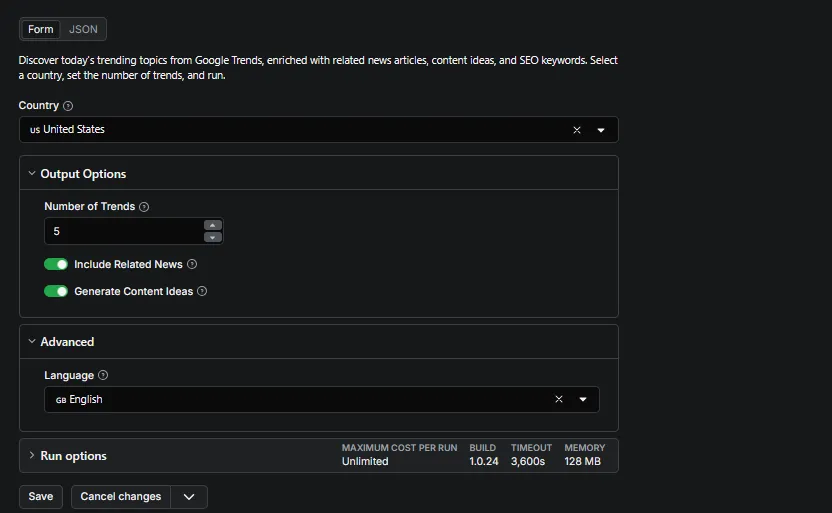
🚀 Quick Start — 3 Steps, Under 60 Seconds
- Click "Try for free" above (free Apify account required — takes 30 seconds to sign up)
- Select your country → set number of trends → click Start
- Download results as Excel, CSV, or JSON from the Dataset tab
- (Recommended) Set up daily automation → — takes 30 seconds, runs every morning automatically
Default settings work out of the box. No API keys. No proxies. No configuration needed.
⏰ Set Up Once, Get Trends Every Morning
Most users run this Actor manually once — and then forget about it.
The real value is daily automation. Trending topics change every 24 hours. The creators who act first win the traffic. Manual runs mean you'll always be a day late.
Here's how power users set it up:
- Go to the Schedules tab above
- Set time: 8:00 AM your timezone
- Done — fresh trends waiting for you every morning before your competition wakes up
Takes 30 seconds to set up. Saves 2+ hours of research every single day.
💡 Pro tip: Schedule two runs — one at 8 AM (morning trends) and one at 6 PM (evening trends). Google Trends updates throughout the day, so you catch both waves.
How This Google Trends Scraper Works
This is not just a scraper. It is a complete AI content pipeline that turns raw trend data into ready-to-use content:
- Step 1 — Scrape: Pulls live trending topics directly from Google Trends RSS for your selected country
- Step 2 — Enrich: Fetches related news from 200+ verified, spam-filtered sources via Google News RSS
- Step 3 — Generate: A built-in AI reads the actual news snippets and generates blog titles, social captions, and SEO keywords grounded in real events — not generic templates. No API key required from you; the AI is fully integrated into the Actor
- Step 4 — Export: Outputs structured JSON, CSV, Excel, or XML — ready to drop into your workflow
The AI only generates content after reading real news context. This is why the output is specific and relevant, not generic. Topics with no news coverage fall back to keyword-only generation and are clearly indicated in the output.
Who Uses This Google Trends Scraper
🎯 Content creators and bloggers — Get a full week's content ideas from today's trends in 60 seconds instead of spending 2+ hours on manual research.
🎯 SEO professionals — Receive 10 trending SEO keywords per topic across head, informational, commercial, and long-tail intent — before the competition finds them.
🎯 Social media managers — Get platform-optimized captions for Twitter, Instagram, and TikTok instantly, tailored to each platform's style and audience.
🎯 Marketing agencies — Monitor trending topics across 48 countries and auto-export results directly to Google Sheets for your clients.
🎯 News and media teams — Get curated trending news from 200+ verified sources, ranked by source reliability, in a single API call.
🎯 Developers and data engineers — Integrate trend data into any Python script, Node.js app, Make automation, or Zapier workflow via Apify's REST API.
Google Trends Scraper vs Alternatives
| Feature | This Actor | Manual Google Trends | Exploding Topics / Semrush |
|---|---|---|---|
| Real-time trending data | ✅ Yes (live daily) | ✅ Yes | ❌ Delayed / Historical |
| AI content generation | ✅ Built-in, no API key | ❌ No | ❌ No |
| Platform-specific social captions | ✅ Twitter, Instagram, TikTok | ❌ No | ❌ No |
| SEO keywords (10 per trend) | ✅ Yes, 4 intent types | ❌ No | ✅ Yes |
| Countries supported | 48 | 48+ | Varies |
| Export formats | JSON, CSV, Excel, XML | CSV only | CSV / PDF |
| Cost | ~$0.05/run | Free | $40–$100+/month |
| Setup required | Sign up to Apify (free) | Manual browsing | Account + subscription |
How Much Does This Google Trends Scraper Cost?
You pay only Apify's standard platform compute cost. There are no additional charges from this Actor beyond the per-result pricing below.
| Configuration | Run time | Compute cost | Actor charge |
|---|---|---|---|
| 5 trends | ~60 seconds | ~$0.025 | ~$0.025 |
| 10 trends | ~2 minutes | ~$0.05 | ~$0.05 |
| 20 trends | ~5 minutes | ~$0.10 | ~$0.10 |
Pricing model (effective May 8, 2026): $5.00 per 1,000 enriched trend results + $0.00001 per Actor start.
Free plan: Apify's free plan includes $5/month in platform credits — enough for 100+ free runs per month at the 10-trend configuration. No credit card required to get started.
To estimate your specific costs, use the Apify Pricing Calculator or check the Analytics tab after your first run.
Input Configuration
| Field | Default | Description |
|---|---|---|
country | US | 48 countries supported (see full list below) |
maxTrends | 10 | Number of trends to analyze per run (1–20) |
includeNews | true | Fetch up to 3 quality-filtered news articles per trend. Recommended: keep enabled — the AI generates significantly better content with news context |
includeContentIdeas | true | Generate AI blog titles, social captions, and SEO keywords |
language | en | Language for news article fetching (12 options). Controls news language only — trending keywords appear in the country's local language regardless |
Supported Countries
| Region | Countries |
|---|---|
| Americas (7) | 🇺🇸 US · 🇨🇦 Canada · 🇧🇷 Brazil · 🇲🇽 Mexico · 🇦🇷 Argentina · 🇨🇴 Colombia · 🇨🇱 Chile |
| Europe (19) | 🇬🇧 UK · 🇩🇪 Germany · 🇫🇷 France · 🇮🇹 Italy · 🇪🇸 Spain · 🇳🇱 Netherlands · 🇵🇱 Poland · 🇸🇪 Sweden · 🇳🇴 Norway · 🇩🇰 Denmark · 🇫🇮 Finland · 🇧🇪 Belgium · 🇦🇹 Austria · 🇨🇭 Switzerland · 🇮🇪 Ireland · 🇵🇹 Portugal · 🇷🇴 Romania · 🇬🇷 Greece · 🇨🇿 Czech Republic |
| Asia / Pacific (14) | 🇮🇳 India · 🇯🇵 Japan · 🇦🇺 Australia · 🇳🇿 New Zealand · 🇸🇬 Singapore · 🇲🇾 Malaysia · 🇵🇭 Philippines · 🇮🇩 Indonesia · 🇹🇭 Thailand · 🇰🇷 South Korea · 🇹🇼 Taiwan · 🇵🇰 Pakistan · 🇧🇩 Bangladesh · 🇻🇳 Vietnam |
| Middle East / Africa (8) | 🇿🇦 South Africa · 🇳🇬 Nigeria · 🇪🇬 Egypt · 🇦🇪 UAE · 🇸🇦 Saudi Arabia · 🇮🇱 Israel · 🇹🇷 Turkey · 🇰🇪 Kenya |
Full Output Structure (JSON)
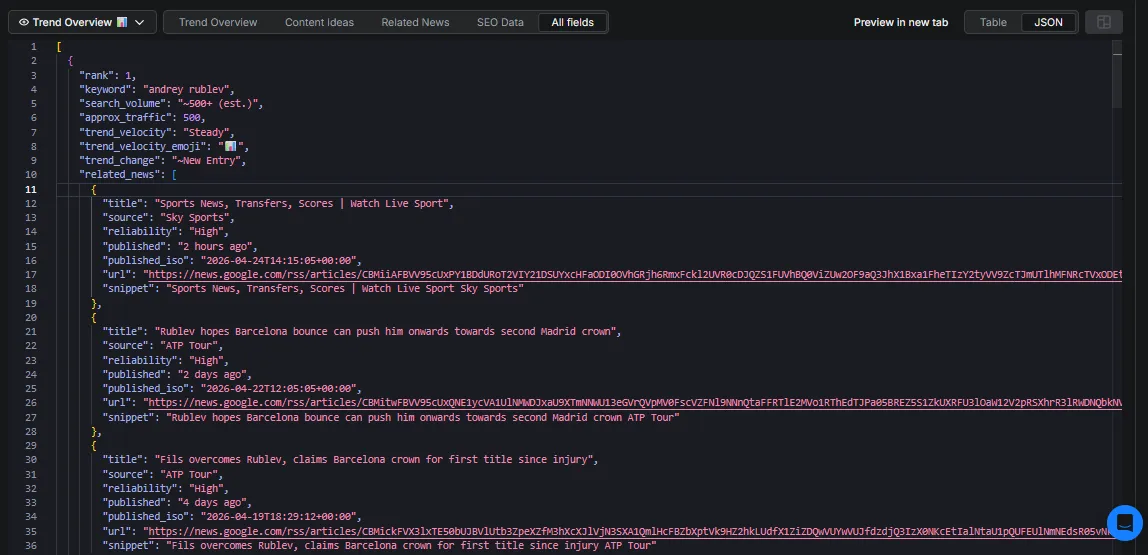
Each dataset item contains one trending topic with all enriched fields:
Output Field Reference
| Field | Type | Description |
|---|---|---|
rank | integer | Position in today's trending list (1 = most popular) |
keyword | string | The trending search term |
search_volume | string | Human-readable traffic estimate (e.g. ~50K (est.)) |
approx_traffic | integer | Numeric traffic estimate for programmatic filtering and sorting |
trend_velocity | string | Breakout · Surging · Rising · Steady |
trend_velocity_emoji | string | Visual emoji for velocity: 🚀 🔥 📈 📊 |
trend_change | string | Estimated percentage change in search interest, or ~New Entry |
related_news | array | Up to 3 quality-filtered news articles with source reliability score |
content_ideas | object | Blog titles, video titles, platform-specific social captions, posting time, urgency |
content_ideas.social_captions | object | Separate caption fields: twitter, instagram, tiktok |
content_ideas.content_urgency | string | ASAP · High · Medium · Low |
seo_keywords.keywords | array | 10 SEO keywords across head, informational, commercial, and long-tail intent |
seo_keywords.hashtags | array | 5 trending hashtags for social media use |
meta | object | Run timestamp, country, language, data sources, Actor version |
Trend Velocity & Urgency
Velocity Scale
| Label | Emoji | Search Traffic | Recommended Action |
|---|---|---|---|
| Breakout | 🚀 | 500K+ searches | Publish immediately |
| Surging | 🔥 | 100K–499K | Post today |
| Rising | 📈 | 10K–99K | Plan within 24 hours |
| Steady | 📊 | Under 10K | Schedule it |
Urgency Detection
The Actor uses two independent detection layers to score content urgency:
- Keyword-level: Checks the trend keyword against 150+ real-time signal patterns (e.g. "vs", "live score", "breaking", "election results")
- News-level: Scans related article titles for live event signals — catching cases where the keyword is generic but the news reveals an active event
If either layer detects a live event, urgency is set to 🔴 ASAP and posting time is set to "Post NOW". Evergreen topics are assigned 🟢 Low urgency with a longer content window.
Integrations
| Platform | How to connect |
|---|---|
| Apify Scheduler | Run daily or hourly — fully automated trend monitoring |
| Google Sheets | Auto-export results after each run via native Apify integration |
| Zapier / Make | Connect to 5,000+ apps — trigger workflows from trend data |
| Slack / Email | Send daily trend digests to your team automatically |
| Webhooks | Trigger your own pipeline when an Actor run completes |
See Apify Integrations documentation for setup guides.
Using This Actor as a Google Trends API
No official Google Trends API exists. This Actor fills that gap — use Apify's REST API, Python SDK, or JavaScript SDK to pull trend data programmatically into any pipeline.
Python
JavaScript
cURL
Real Workflow Use Cases
Daily content planning for a blog Schedule the Actor to run every morning at 9 AM via Apify Scheduler. Get 10 trending topics with ready-to-use blog titles and Instagram captions before your team's daily standup — without any manual research.
Automated SEO keyword pipeline Connect this Actor to Make or Zapier. Whenever a trend hits 🚀 Breakout velocity, automatically send the 10 SEO keywords to a Google Sheet for your writing team to target before the competition catches up.
Newsroom social media automation Run the Actor every 4 hours. Push AI-generated Twitter captions and relevant news links directly into a Slack channel for your social media manager to review and post — without opening a browser.
Global market research Schedule parallel runs across the US, UK, India, and Australia. Find overlapping global trends and use them to inform international campaign strategy.
Developer pipeline integration Pull trend data programmatically into Python scripts, Node.js apps, or data pipelines via Apify's API. Schedule runs, receive webhooks, and stream results — no scraping required.
Frequently Asked Questions
Do I need any API keys to run this? No. The AI content generation is fully built into the Actor. You do not provide any AI API keys — everything runs internally. Just create a free Apify account and click Start.
How often should I run this Actor? Once or twice daily covers most use cases. Google Trends updates throughout the day, so morning and afternoon runs provide excellent coverage. Use Apify Scheduler to automate this.
Can I run this for multiple countries at once? Not in a single run — one country per run. You can automate multi-country monitoring using Apify Scheduler with separate input configurations per country.
Can I get historical Google Trends data? No. This Actor fetches only today's trending topics. Each run is a real-time snapshot. For historical data, use a dedicated Google Trends historical tool.
Is the AI-generated content ready to publish as-is? The AI generates strong, news-grounded starting points. We recommend using the output as a framework and adding your own voice and editorial judgment before publishing — especially for breaking news topics.
Does this work for non-English countries?
Yes. Google Trends returns topics in the local language of the selected country. Set the language field to control which language news articles are fetched in. For example: country: IN + language: hi gives you Hindi news context for Indian trends.
Why does a run sometimes take longer than expected?
Each trend requires a separate AI call to generate content ideas. With maxTrends: 20 and includeContentIdeas: true, expect 4–6 minutes. Set maxTrends: 10 or includeContentIdeas: false for faster runs.
What if my country returns no trends? Google Trends RSS availability varies by country and time of day. If a country returns empty results, try the US first to confirm the Actor is working, then retry your country. Persistent issues can be reported on the Issues tab.
How is this different from apify/google-trends-scraper? That Actor returns raw keyword data only. This Actor adds a full AI content pipeline on top: it finds the news context behind each trend, then generates blog titles, platform-specific social captions, and 10 SEO keywords per trend. It is a complete content research tool, not just a data scraper.
Data Freshness and Accuracy
All trending topics and search volumes are pulled from live Google Trends RSS feeds, updated continuously throughout the day. Related news is fetched from Google News RSS, filtered through a 4-step quality pipeline:
- Spam detection — Rejects clickbait patterns, excessive punctuation, and scam text
- Freshness check — Only articles published within the last 14 days
- Encoding check — Rejects garbled or non-readable titles
- Source scoring — 200+ global sources ranked by authority (High → Medium → Unverified)
Note: Search volumes are approximate bucket estimates from Google — not exact counts. This Actor focuses on today's trending topics only. No historical data is available.
About This Actor
- ✅ Actively maintained — Version 1.0.0 (Updated May 2026)
- ✅ Issues and questions answered within 24–48 hours
- ✅ Feature requests welcome — use the Issues tab
- ✅ Built by an independent developer on a mission to make trend-based content research faster and more accessible
Try This Google Trends Scraper for Free
- ✅ Apify's free plan includes $5/month in platform credits — enough for 100+ free runs
- ✅ No credit card required to get started
- ✅ No API keys, no proxies, zero configuration
- ✅ Works with Python, JavaScript, Zapier, Make, Google Sheets, and more
- ✅ Trending searches → ready-to-publish content in under 60 seconds
🚀 Start scraping Google Trends for free →
Feedback
Found a bug or have a feature request? Open an issue on the Issues tab or reach out via Apify messaging. Every message is read and responded to.


