

LinkedIn Profile Comments Scraper (No Cookies)
Pricing
$5.00 / 1,000 comments
LinkedIn Profile Comments Scraper (No Cookies)
Every comment a LinkedIn profile has made, with the full parent post attached: post content, author, reactions by type and engagement counts. No cookies or LinkedIn account needed. Time filters that really work. Never charged for a comment we did not return. Not affiliated with LinkedIn.
Pricing
$5.00 / 1,000 comments
Rating
0.0
(0)
Developer

Vanja V
Maintained by CommunityActor stats
0
Bookmarked
2
Total users
1
Monthly active users
4 days ago
Last modified
Categories
Share
Every comment a LinkedIn profile has made — with the full post they commented on attached to each one. No cookies, no LinkedIn account, no browser session to keep alive.
You are never charged for a comment we did not return.
What you get
Paste in a profile. Get back every comment that person has left on LinkedIn, newest first. Each row carries the comment and its context:
- The comment — text, exact timestamp, direct link, whether it was edited
- Reactions broken down by type — likes, empathy, praise, appreciation, interest, with counts
- The parent post in full — its content, its author, its own like/comment/share counts, images, articles, polls, documents, reposts
- Who commented — name, headline, profile URL, profile picture
- Replies to the comment — up to 10 per comment
That parent post matters. Most comment scrapers hand you a line of text with a post ID and leave you to fetch the post yourself. Here the context arrives with the comment.
Example
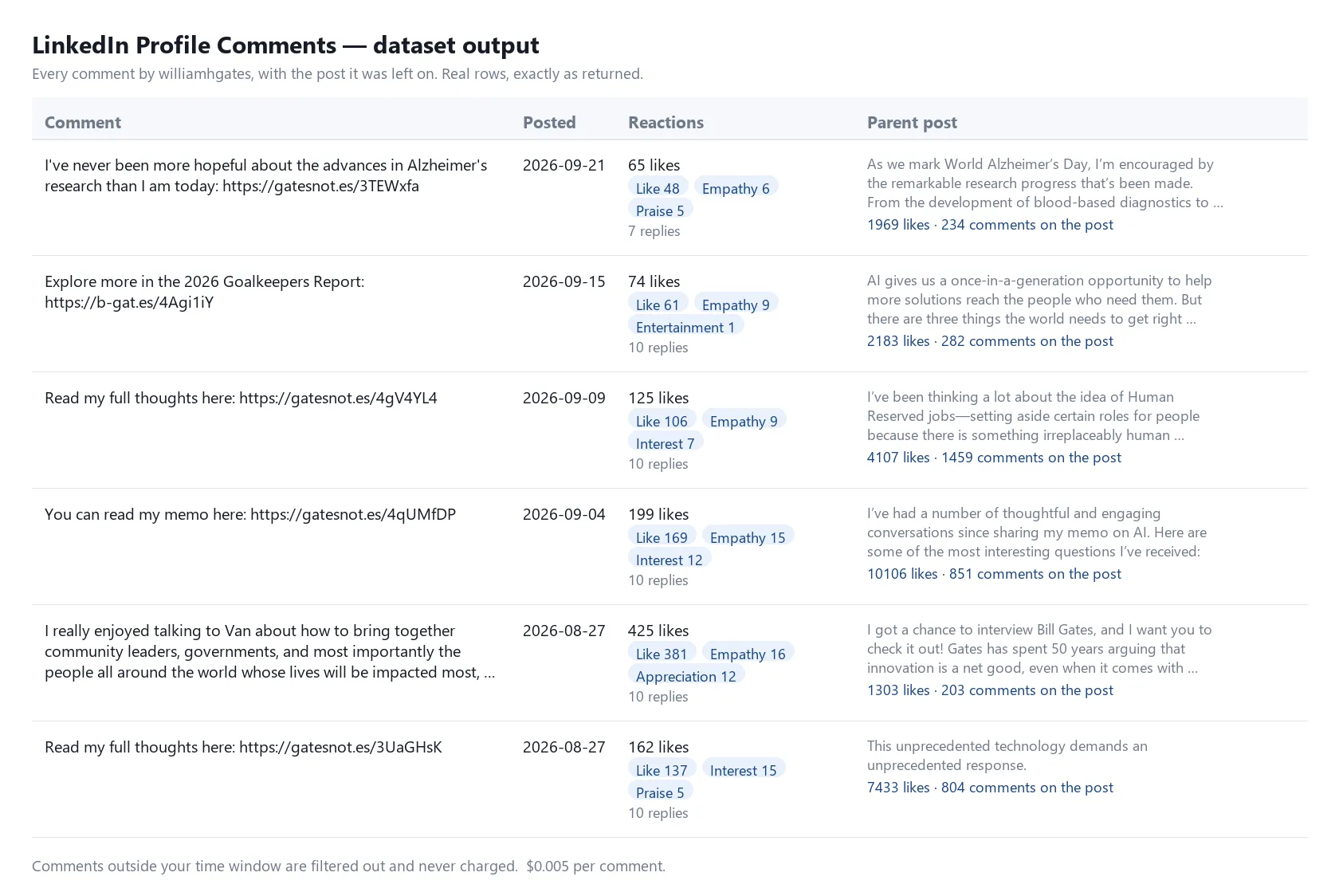
Real rows from a real run — nothing in this picture is mocked up.
Input:
One real output row, trimmed for length — everything shown is exactly as returned:
Export it as CSV, JSON or Excel from the Export button, or pull it from the API.
Input
| Field | What it does |
|---|---|
| LinkedIn profiles | Usernames (satyanadella) or full URLs (https://www.linkedin.com/in/satyanadella). Both work. Comma-separated entries are split for you and duplicates are removed. Up to 100 per run. |
| Only comments posted within | Any time, last 24 hours, last week, last month, last 3 months, last 6 months, or last year. |
| Max comments per profile | Leave blank to get everything. Set a number only if you want to spend less. |
Nothing is required. Run it with the prefilled example to see the shape of the output.
The time filter actually filters
Worth stating plainly, because it is not true of every Actor in this category: if you select last year, you get comments from the last year. Comments outside the window are dropped before they reach your dataset, so you are never charged for them, and the run stops paging as soon as it passes the end of your window — which makes a narrow window cheaper, not just smaller.
How do I know the pull was complete?
LinkedIn does not publish a comment total, so there is no number to check against. Instead, every run writes a SUMMARY record saying, per profile, how many comments came back, how many pages were read, and whether paging reached the end:
A profile reads complete: true when paging reached an empty page, or ran past the end of the
time window you chose. Anything else is listed under incompleteProfiles with the reason — a cap
you set, the run's time limit, or your maximum charge. The run's final message says so too.
Pricing
$0.005 per comment, pay-per-event. Nothing else is charged.
- Comments filtered out by your time window are not charged
- Duplicate rows are dropped and not charged
- A failed run charges nothing — no key, no credit, provider outage: zero
- Set a maximum charge on the run and the Actor stops cleanly at that ceiling rather than overrunning it
Measured on real profiles: Satya Nadella has 166 comments, Bill Gates 73. Most single profiles cost well under a dollar to pull completely.
Speed and limits
Each page of comments takes roughly 2–5 seconds and returns 50–100 comments. A run has a 4-minute budget; if it runs out with profiles still queued, the summary says which ones, and you can run those again. Up to 100 profiles per run.
Common uses
- Find everyone a prospect engages with, and what they say
- Track how a competitor's team shows up in comment sections
- Pull a person's own commentary as a body of text — their views, in their words
- Spot which posts in your industry are drawing the people you care about
Notes
No LinkedIn account, cookies, or session tokens are needed — from you or from us. You never supply credentials.
Only publicly visible comments are returned. Anything that requires being logged in, or that the profile owner has restricted, is not available through this Actor.
Unofficial. This Actor is not affiliated with, endorsed by, or connected to LinkedIn Corporation. "LinkedIn" is a trademark of LinkedIn Corporation, used here only to describe what this Actor reads. You are responsible for using the data it returns in line with applicable law and LinkedIn's terms.


![Profile Posts Scraper for LinkedIn [No Cookies] avatar](https://images.apifyusercontent.com/2r1MxY4feneklD8BD7qTRtzsL_II2yIB-xqoqgYECkI/rs:fill:76:76/cb:1/aHR0cHM6Ly9hcGlmeS1pbWFnZS11cGxvYWRzLXByb2QuczMudXMtZWFzdC0xLmFtYXpvbmF3cy5jb20vdFhKaEQ5SFNvdTY4N2NEUTQtYWN0b3ItTFFRSVhOOU90aGY4ZjdSNW4tOFpidkNJbW9JUy1hbS1sb2dvLnBuZw.webp)


