
Business Directory Lead Finder
Pricing
Pay per usage
Business Directory Lead Finder
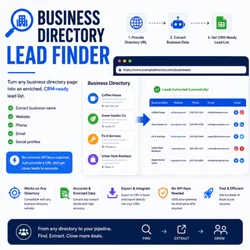
Turn any business directory page into an enriched, CRM-ready lead list. Extracts business name, website, phone, email, and social profiles — no external API keys required.
Pricing
Pay per usage
Rating
0.0
(0)
Developer

Proyecto Apify
Maintained by CommunityActor stats
0
Bookmarked
2
Total users
1
Monthly active users
3 months ago
Last modified
Categories
Security
Limited permissionsShare
Turn any business directory or listing page into an enriched, CRM-ready lead list — no API keys, no manual lookups.
Give it 1–50 URLs of business directory pages (Yelp-like listings, chamber-of-commerce pages, industry portals, Yellow Pages clones, event sponsor lists, vendor directories, etc.) and it returns a clean, deduplicated CSV of leads ready to import into your CRM.
What it does
- Stage 1 — Directory parsing. A
CheerioCrawlerfetches each directory URL and auto-detects repeating listing blocks via three strategies:<table>rows,<ul>/<ol>items, and card-like<div>grids that share a common class. For each listing it extracts the business name, the external website link, any visible phone, and a basic address. - Stage 2 — Enrichment. For every business with a website, a second crawl visits the home page plus any
/contact,/about,/impressum-style page it can find, and extracts email addresses, additional phones, and social profile URLs (Facebook, Instagram, LinkedIn, X, TikTok). - Deduplication. Leads are deduplicated by root domain across the whole run, so the same business appearing in two directories only shows up once.
- Output. All leads are pushed to the Actor's Dataset as JSON. If you keep the default
dataset_and_csvoutput format, a flat CSV is also written to the Key-Value Store asleads.csvfor direct download.
Input
| Field | Type | Default | Description |
|---|---|---|---|
directoryUrls | array<string> | — (required) | 1–50 URLs of business directory pages. |
maxLeadsPerDirectory | integer | 100 | Cap on listings extracted per directory (1–5000). |
enrichDepth | boolean | true | If false, skips Stage 2 and only returns what's visible on the directory page. |
outputFormat | enum | dataset_and_csv | dataset_only or dataset_and_csv. |
Example input
Output
Each lead in the Dataset / CSV has the following fields:
| Field | Notes |
|---|---|
businessName | From the directory listing. |
website | External URL of the business's own site. |
domain | Normalized root domain (used for dedup). |
phone | Best phone we found (Stage 1 or Stage 2). |
address | Best-effort regex match from the listing. |
email | First email found on the business site (Stage 2). |
facebook / instagram / linkedin / x / tiktok | Social profile URLs (Stage 2). Multiple values are separated by ; in the CSV. |
sourceDirectory | The directory URL the lead came from. |
enriched | true if Stage 2 ran successfully for this lead. |
Limitations & guarantees
- No external API keys. All crawling uses Crawlee's
CheerioCrawler. No Google Maps, Hunter.io, Clearbit, or Apollo calls. - No login walls, no CAPTCHAs. Pages that require authentication or anti-bot bypass are skipped and logged — never forced.
- No SMTP verification. Emails are format-validated only, not deliverability-checked.
- No sales claims. The Actor describes its technical behavior, not outcomes.
Pricing
Pay-per-result at $3 per 1,000 leads. You are only charged for the rows that actually appear in your final Dataset, after deduplication.
Local development


