
Konga Product Data Scraper
Pricing
from $2.00 / 1,000 results
Konga Product Data Scraper
Extract structured product data from Konga in minutes. Scrape product names, prices, seller information, SKUs, and more. Supports filtered Konga category URLs, making it easy to scrape products by brand, price range, rating, and other supported filters. Export your data as JSON, CSV, or XLSX.
Pricing
from $2.00 / 1,000 results
Rating
0.0
(0)
Developer

Michael Mathias
Maintained by CommunityActor stats
0
Bookmarked
2
Total users
1
Monthly active users
3 months ago
Last modified
Categories
Share
Extract structured product data from Konga categories in minutes.
Table of Contents
- Overview
- Who is this Actor for?
- Common Use Cases
- Features
- Input
- Output
- How to Use
- How to Find Konga Category URLs
- Export Formats
- Performance
- Notes
- Frequently Asked Questions
Overview
The Konga Product Data Scraper extracts detailed product information from a user-specified Konga category. Once you click Start, you get product ID, product name, price, special price, deal price, original price, SKU, seller information, stock availability, stock quantity, ratings, free delivery status, and many other product attributes.
What makes this Actor unique is its flexibility, ease of use, and user-friendly design for Konga. The Actor supports filtered category URLs, allowing you to scrape products by brand, rating, price range, fulfilment type, and other supported Konga filters, giving you total control. You decide the number of pages you want scraped, paste the Konga category URL, click Start, and the Actor collects the data without any hassle or bottlenecks.
Whether you need a few products or an entire category, the Actor automatically handles pagination, extraction, and saves the results to your Apify dataset, ready for download.
Who is this Actor for?
- E-Commerce businesses
- Market Researchers
- Competitor analysts
- Pricing Analysts
- Data analysts
- Developers
- Businesses building product catalogues
- Anyone who needs structured Konga product data
Common Use Cases
- Product catalogue collection
- Price monitoring
- Competitor research
- Market research
- Inventory comparison
- Business intelligence
- Building product databases
- E-Commerce analytics
Features
-
Detailed Konga product information: Scrapes comprehensive product details including pricing, SKU, seller information, stock availability, product identifiers, and more.
-
Fast Extraction: Retrieves product data quickly, making it suitable for extracting thousands of products
-
Configurable category URL: Paste the Konga category URL you want to scrape. Filtered category URLs are also supported (brand, rating, price, fulfilment type, etc.).
-
Configurable maximum pages: Choose the number of pages you want to scrape or leave the default value '0' to scrape every available page.
-
Automatic Pagination: Automatically continues until your page limit or the last available page.
-
Export to multiple formats: Export as JSON, CSV, or XLSX.
Input
| Input | Type | Required | Default | Description |
|---|---|---|---|---|
url | String | Yes | Example URL | Konga category URL to scrape. Filtered category URLs are also supported. |
max_pages | Integer | No | 0 | The maximum number of pages to scrape. 0 scrapes all available pages. |
Input Example
[!TIP]
Set
max_pagesto0to scrape every available page.
Output
Each dataset item represents a single product
[!Note]
Available fields may vary depending on the product.
How to Use
-
Open the Actor on Apify.
-
Paste the Konga category URL. Filtered category URLs are also supported (brand, rating, price, fulfilment type, etc.).
-
Set the
max_pagesyou want scraped or leave it as0to scrape all available pages. -
Click Start.
-
Wait for the run to finish.
-
Download the dataset in your preferred format.
How to Find Konga Category URLs
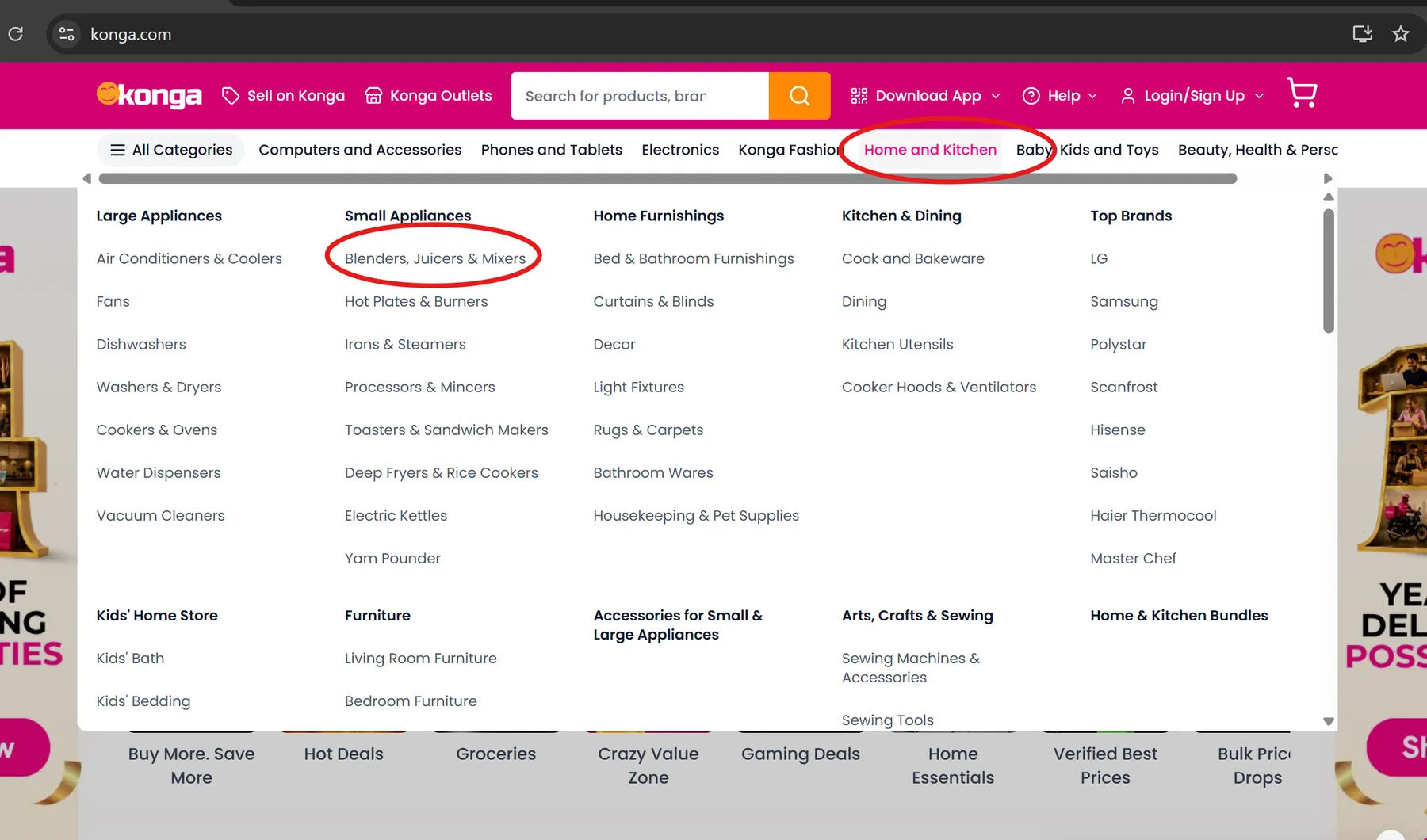
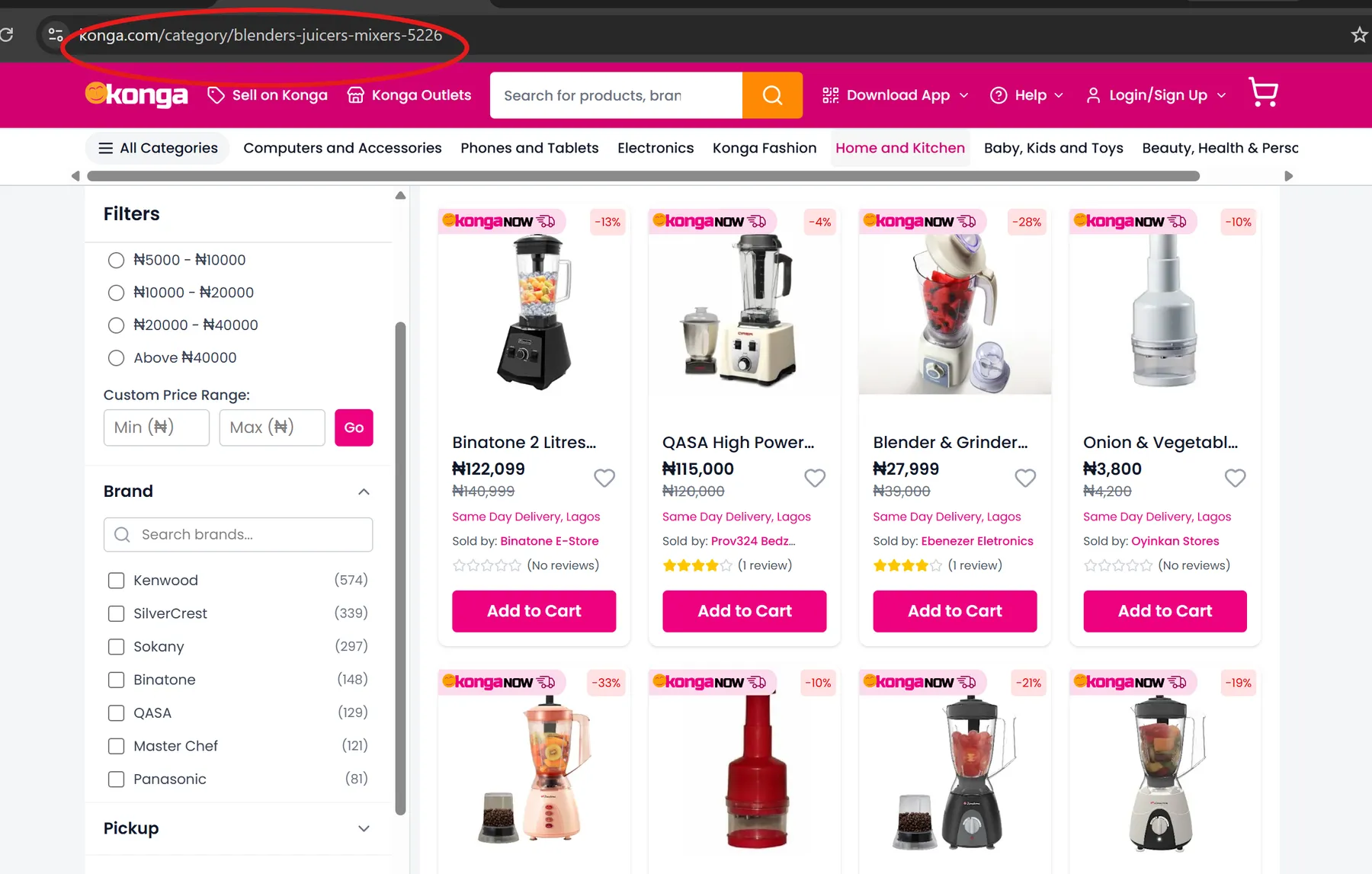
Go to konga.com. Hover over a main category below the search bar and choose a subcategory. See image below
Export Formats
- JSON
- CSV
- XLSX
Performance
This Actor scrapes product data without browser automation, which makes the extraction process faster while using fewer computing resources.
Notes
[!IMPORTANT]
- Output depends on the publicly available product data.
- One category is scraped per run.
- If
max_pagesexceeds the available pages, the actor stops automatically.
Frequently Asked Questions
Q: Can I scrape every page in a category?
A: Yes. Leave or set max_pages to 0
Q: What format can I export?
A: CSV, XLSX, JSON
Q: Do I need an account, cookies, or API key?
A: No. The Actor does not require a Konga account, cookies, or an API key.
Q: Is a proxy required?
A: No. The Actor works without a proxy because it retrieves publicly available product data directly from Konga.


![Tiktok Shop Product All Data Scraper [No Login Required] ✅ avatar](https://images.apifyusercontent.com/yZxKAPOXLUgUikt6wDfjyhLddZtlGSYZ1kebty-Sd98/rs:fill:76:76/cb:1/aHR0cHM6Ly9hcGlmeS1pbWFnZS11cGxvYWRzLXByb2QuczMudXMtZWFzdC0xLmFtYXpvbmF3cy5jb20vbWRDaHNOVUFhT0sxME1HRUUtYWN0b3ItdmdmYk9OSmxuWkRQQk1YMkEtVHd1bHNBaWtzUS10aWt0b2stYXBpZnktcHJvZHVjdC5wbmc.webp)


