
eBay Sold Items Scraper — Sold Prices, Comps & Price Stats
DeprecatedPricing
Pay per usage
eBay Sold Items Scraper — Sold Prices, Comps & Price Stats
DeprecatedeBay sold listings & comps with built-in price stats (median, avg, p25/p75) — not raw rows for Excel. Real SOLD prices across 8 marketplaces, plus promoted-ad bid data, best-offer-excluded comps, watch counts & auto category IDs. 12k+ comps/keyword via fast JSON — no API key, no browser.
Pricing
Pay per usage
Rating
0.0
(0)
Developer

Yakugusa Yumitori
Maintained by CommunityActor stats
0
Bookmarked
5
Total users
4
Monthly active users
7 days ago
Last modified
Categories
Share
Get the real prices items sold for on eBay — not asking prices — with built-in price statistics (median, average, p25/p75) so you skip the Excel math. Covers 8 marketplaces, returns 30+ fields per listing, surfaces promoted-listing bid data, and serves 12,000+ sold comps per keyword from structured data — no API key, no browser, no captcha.
What does this actor do?
eBay Sold Items Scraper pulls completed/sold listings straight from eBay — the actual transaction prices, sold dates, conditions, bids, shipping, and seller feedback. Unlike a general eBay scraper (which shows active listings and asking prices), this is built for price research: finding what an item truly sold for before you buy or list.
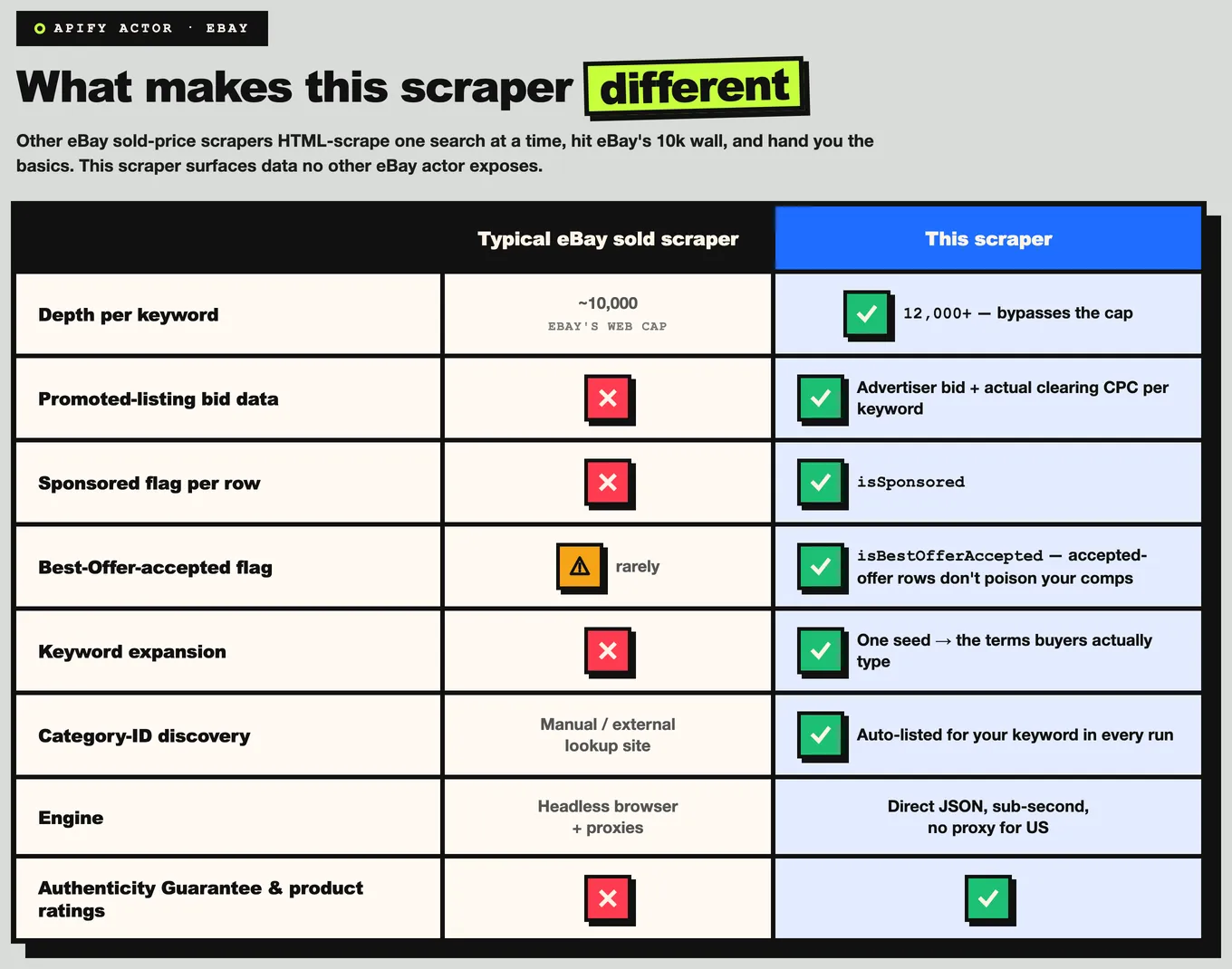
It goes further than a basic sold-listings scraper in three ways most don't:
- It computes the stats for you. Every run returns
priceStatsper keyword — count, min, max, average, median, p25, p75 — with best-offer-accepted sales excluded so your comps aren't skewed. - It sees the ad auction. Optional promoted-listing bid intelligence (advertiser max bid + estimated clearing price/CPC) per keyword.
- It speaks 8 marketplaces. US, UK, Germany, France, Italy, Spain, Canada, Australia — with correct localized currency.
Why use it instead of a generic sold-listings scraper?
Who is it for?
🛍️ Resellers & flippers — research comp sales before buying inventory, validate your asking price against what buyers actually paid, track seasonal trends, build pricing sheets for hundreds of items at once.
📦 E-commerce sellers — set competitive prices on eBay/Amazon/Shopify, analyze competitor sell-through by keyword, decide which condition (new vs used) commands a premium, time restocks.
📊 Market researchers & analysts — collect historical price data for vintage/collectible markets, build datasets for pricing models, compare auction vs Buy-It-Now differentials, export to Excel/Sheets.
🤖 Developers & data teams — power price-comparison tools, build price-shift alerts, feed sold-price data into inventory systems, schedule refreshes via the Apify API or MCP.
What data you get
Per sold listing (30+ fields):
| Field | Description |
|---|---|
itemId | eBay item ID |
title | Listing title |
price | Final sold price (number) |
shippingPrice | Shipping cost (number) |
totalPrice | Price + shipping |
currency | Marketplace currency (USD/GBP/EUR/…) |
condition | Normalized condition (New / Used / Open box / Refurbished / For parts) |
soldDate | Date the item sold |
listingType / buyingFormat | Auction or Buy It Now |
bidCount | Number of bids (auctions) |
endTime | Auction end time |
sellerName | Seller username |
sellerFeedbackScore | Seller total feedback count |
sellerPositivePct | Positive feedback % |
itemLocation | Item location |
watchCount | Watchers on the listing |
quantitySold / quantityAvailable | Units sold / available |
epid | eBay catalog product ID |
categoryId | Category ID |
marketplace | Source marketplace |
isSponsored | Promoted (sponsored) listing flag |
isBestOfferAccepted | Sale via accepted Best Offer (exclude for clean comps) |
authenticityGuarantee | eBay Authenticity Guarantee flag |
certifiedRefurbished | Certified Refurbished flag |
url | Direct eBay item URL |
image | Item image URL |
sourceQuery | The keyword that returned this item |
Per keyword (run summary):
priceStats— count, min, max, avg, median, p25, p75 (best-offer-excluded)- Auto-discovered
categories—[{ id, name }]for the keyword - Promoted-ad intelligence (when enabled) — advertiser
bid, estimatedclearingPrice,adSubType
Ready-made dataset views: Overview (image, title, price, condition, sold date, seller), Pricing (price / shipping / total / format / bids / end time), and Seller Intel (seller feedback, location, product rating).
Pricing
Pay-per-result — $2.99 per 1,000 sold listings (volume discounts apply at higher usage tiers). You're charged per listing returned, not by runtime — no charge for empty results.
Real-world cost examples:
| Use case | Listings | Cost |
|---|---|---|
| Quick comp check (1 keyword, 10 results) | 10 | ~$0.03 |
| Standard research (1 keyword, 100 results) | 100 | ~$0.30 |
| Deep analysis (5 keywords, 100 each) | 500 | ~$1.50 |
| Bulk research (10 keywords, 200 each) | 2,000 | ~$5.98 |
Every Apify account includes $5 in free credits — roughly 1,600 sold listings before you spend anything.
How to use
- Open eBay Sold Items Scraper on Apify Store and click Try for free.
- Enter one or more keywords in Search keywords (
queries). - Set Max results per keyword (
maxItemsPerQuery) — 10 for a quick test, 200+ for research. - Pick a Marketplace and apply optional filters (condition, price range, buying format, sold-within-days).
- Click Save & Start.
- Download results as JSON, CSV, or Excel — and read
priceStatsfor instant median/average pricing.
Input example — vintage camera comps (US, used, recent sales):
Input example — auction-only electronics:
Input example — multi-market price comparison with keyword expansion:
Output example — typical sold listing:
Output example — per-keyword price stats (run summary):
Input parameters
| Parameter | Type | Default | Description |
|---|---|---|---|
queries | string[] | — | Required. Keywords to search sold listings. Each runs a separate search. |
marketplace | string | EBAY-US | EBAY-US, EBAY-GB, EBAY-DE, EBAY-FR, EBAY-IT, EBAY-ES, EBAY-CA, EBAY-AU. |
maxItemsPerQuery | integer | 200 | Max sold listings per keyword (up to 20,000). |
sortOrder | string | endedRecently | endedRecently, newlyListed, priceLow, priceHigh, bestMatch. |
condition | string | any | any, new, open_box, refurbished, used, parts. |
buyingFormat | string | all | all, auction, buy_it_now. |
minPrice / maxPrice | number | — | Price range filter. |
soldWithinDays | integer | — | Only sales within the last N days (early-stops paging past the window). |
categoryId | string | — | Restrict to an eBay category ID. |
freeShippingOnly | boolean | false | Only free-shipping sales. |
expandKeywords | boolean | false | Auto-expand each keyword via eBay suggestions. |
expansionLimit | integer | 5 | Expansions per keyword when expandKeywords is on. |
includeAdIntelligence | boolean | true | Include promoted-listing bid intelligence. |
dedupeAcrossQueries | boolean | true | Remove duplicate items across keywords. |
concurrentQueries | integer | 2 | Keywords processed in parallel. |
proxyConfiguration | object | Apify Proxy off | US runs work without a proxy; use a country-matched residential proxy for non-US markets. |
The 8 marketplaces
Search any of US, UK, Germany, France, Italy, Spain, Canada, Australia with the correct localized currency. US runs work proxy-free; for non-US markets, a country-matched residential proxy surfaces ~20% more local inventory.
Built-in price analytics
Stop dumping rows into a spreadsheet to find the going rate. Every keyword returns a priceStats object — count, min, max, average, median, p25, p75 — with Best-Offer-accepted sales excluded so a few lowball deals don't drag your median down. Read the median for a robust "what it really sells for," and p25–p75 for the realistic negotiating band.
Promoted-listing bid intelligence
Turn on includeAdIntelligence to see the Promoted Listings ad auction behind a keyword: the advertiser max bid and estimated clearingPrice (effective CPC). Useful for gauging how competitive a niche is and what sellers are paying to surface there. (Live data — a point-in-time snapshot.)
Tips for best results
- 🎯 Specific keywords ("canon ae-1 program 50mm") return tighter comps than "camera".
- 📅
endedRecentlysort gives the freshest sales; pair withsoldWithinDaysfor a clean recent window. - 💰 Narrow
minPrice/maxPriceon high-variance categories (watches, jewelry) for a meaningful median. - 🧹 Filter out
isBestOfferAcceptedfor the cleanest median. - 🔄 Run multiple keywords (brand + model + aliases) for a fuller market picture.
- 📊 Read
priceStatsinstead of recomputing — median and p25/p75 are already there.
Integrations
- Google Sheets — push comps per keyword into a sheet; auto-refresh weekly to keep pricing current.
- Make / Zapier — trigger a scenario on run finish: filter by price, push bargains to Slack or email a daily price digest.
- Airtable — build a live pricing database with rollups for average sold price per category.
- Scheduling — daily/weekly runs via Apify's scheduler to track price trends and detect reversals.
API usage
Node.js (apify-client):
Python (apify-client):
cURL:
Use with AI agents via MCP
Available as a tool for AI assistants that support the Model Context Protocol.
Claude Code:
Claude Desktop, Cursor, or VS Code — add to your MCP config:
Example prompts: "What did 'rolex submariner 16610' actually sell for on eBay in the last 30 days — median and p25/p75?" · "Compare sold prices for 'iphone 15 pro 256gb' vs 'iphone 15 pro max 256gb', auctions only."
Is it legal to scrape eBay sold listings?
eBay's completed/sold listing data is publicly visible to any visitor without logging in. This actor accesses only that publicly available data. Use it responsibly: respect eBay's Terms of Service, don't spam buyers or sellers, comply with GDPR/CCPA when storing any personal data, and use the data for legitimate price research. See Apify's guide to ethical web scraping for context.
FAQ
How many results can I get? Up to 12,000+ per keyword. Run multiple keywords in one run for broader coverage.
How is this different from a general eBay scraper? A general scraper shows active listings (asking prices). This returns completed/sold listings (actual transaction prices) — what buyers really paid.
Do I need an API key or login? No. No eBay API key, no login, no captcha.
Why are some auction fields empty? bidCount and endTime only apply to auction-format sales; Buy-It-Now items leave them null.
How do I get the cleanest median? Filter out isBestOfferAccepted items and use soldWithinDays to keep comps recent — or just read the priceStats.median, which already excludes best-offer sales.
Can I research a specific category? Yes — pass a categoryId, or rely on the auto-discovered categories returned per keyword.
Which marketplaces are supported? US, UK, Germany, France, Italy, Spain, Canada, Australia — with localized currency.
⚠️ Unofficial. Not affiliated with, endorsed by, or sponsored by eBay Inc. "eBay" is a trademark of eBay Inc., used here for descriptive purposes only. Collects only publicly available listing data.


