

Etsy Review Photo Scraper — Download Customer Photos
Pricing
Pay per event
Etsy Review Photo Scraper — Download Customer Photos
Download real Etsy customer review photos in bulk by keyword — each with its star rating, review text and date. Filter by date range, export to CSV/JSON/Excel. No API key, no login.
Pricing
Pay per event
Rating
0.0
(0)
Developer

Yakugusa Yumitori
Maintained by CommunityActor stats
0
Bookmarked
2
Total users
1
Monthly active users
4 days ago
Last modified
Categories
Share
Download real Etsy customer review photos in bulk — just type a keyword. Etsy Review Photo Scraper crawls the top listings for any niche and pulls every buyer-uploaded review photo (with its star rating, review text, and date) into one clean dataset you can export to CSV, JSON, Excel, or XML. No API key, no login, no browser extension — the real, in-the-wild product imagery Etsy gives you no way to download in bulk.
Enter any keyword — say necklace, leather wallet, or ceramic mug — choose how many listings to crawl, and it starts collecting real buyer photos.
What can Etsy Review Photo Scraper do?
Etsy shoppers upload millions of review photos showing what they actually received — the true-to-life version of a product, not the seller's staged shot. Etsy has no "download all review photos" button and its official API won't hand you buyer photos, so this actor does it: as an Etsy review scraper built for images, it extracts every buyer review photo — the review images Etsy keeps locked away — in bulk, by keyword.
| 📦 What you can extract | ⚙️ Features & integrations |
|---|---|
| 📷 Buyer review photos (direct image URLs) from the top listings for any keyword | 🔎 Search by keyword across many shops at once |
| ⭐ Star rating for each photo's review | 📅 Date-range filter — pull any time window |
| 💬 Full review text attached to the photo | ⭐ Minimum-rating filter |
📅 Review date (YYYY-MM-DD) | ⬇️ Export to JSON, CSV, Excel, XML |
| 🏷️ Listing ID the photo belongs to | 🖼️ Optional: download the actual image files |
| 🌐 Review language | 🦾 API, MCP, Node.js & Python SDKs, scheduling |
Great for UGC & social-proof sourcing, product and niche research, competitor analysis, dropshipping validation, quality/complaint analysis, moodboards, and image datasets for AI — all from one keyword.
What data you get
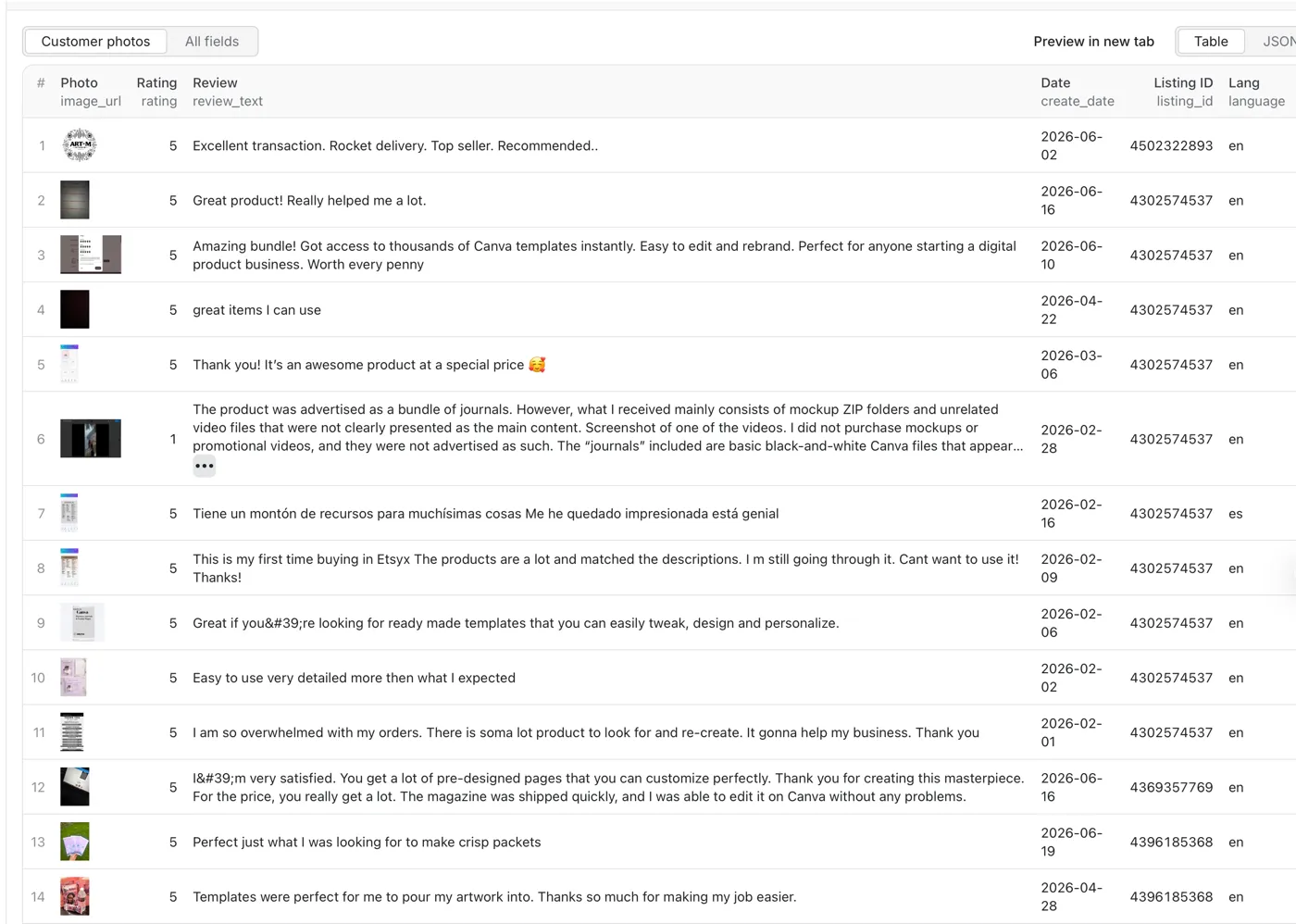
For any keyword, you get one row per customer photo — exportable to CSV, JSON, Excel, or XML:
| Field | Description |
|---|---|
image_url | Direct URL to the buyer's review photo (public Etsy CDN — opens/downloads anywhere) |
rating | Star rating of the review (1–5) |
review_text | What the buyer wrote |
create_date | Review date, YYYY-MM-DD |
listing_id | The Etsy listing the photo belongs to |
language | Detected review language |
keyword | The search term that surfaced the listing |
Photos only. Every row is a review that includes a buyer image — text-only reviews aren't collected. Buyer identities (names, avatars, profile links) are intentionally excluded.
Why this fills a real gap: Etsy's official Open API is built for managing your own shop and is locked behind app registration and OAuth — it won't hand you other shops' buyer photos in bulk. This actor reads only publicly visible review data — no key, no OAuth, no shop ownership.
How much does it cost?
Pay-per-result — $7 per 1,000 photos. You're billed per photo returned, never for runtime or empty results. Every Apify account includes $5 in free credits to start.
Why $7 when a generic Etsy scraper charges $3–5? Those tools return listing text and shop data — none of them pull the buyer review photos. This is the only actor that hands you real customer images in bulk.
| Charge | When | Price |
|---|---|---|
| Photo | Per photo returned (image URL + rating + review + date) | $7.00 / 1,000 |
| Image file (add-on) | Only if you enable Download image files | + $3.00 / 1,000 |
The default — photo URLs plus review data — bills only the base Photo rate. Turning on Download image files adds the add-on, for $10.00 / 1,000 all-in. Most users just take the free image URLs.
| Use case | Photos | Approx. cost |
|---|---|---|
| Quick sample | 300 | ~$2.10 |
| Niche moodboard | 2,000 | ~$14 |
| Full category sweep | 10,000 | ~$70 |
How to use it
- Open Etsy Review Photo Scraper in Apify Console and click Try for free.
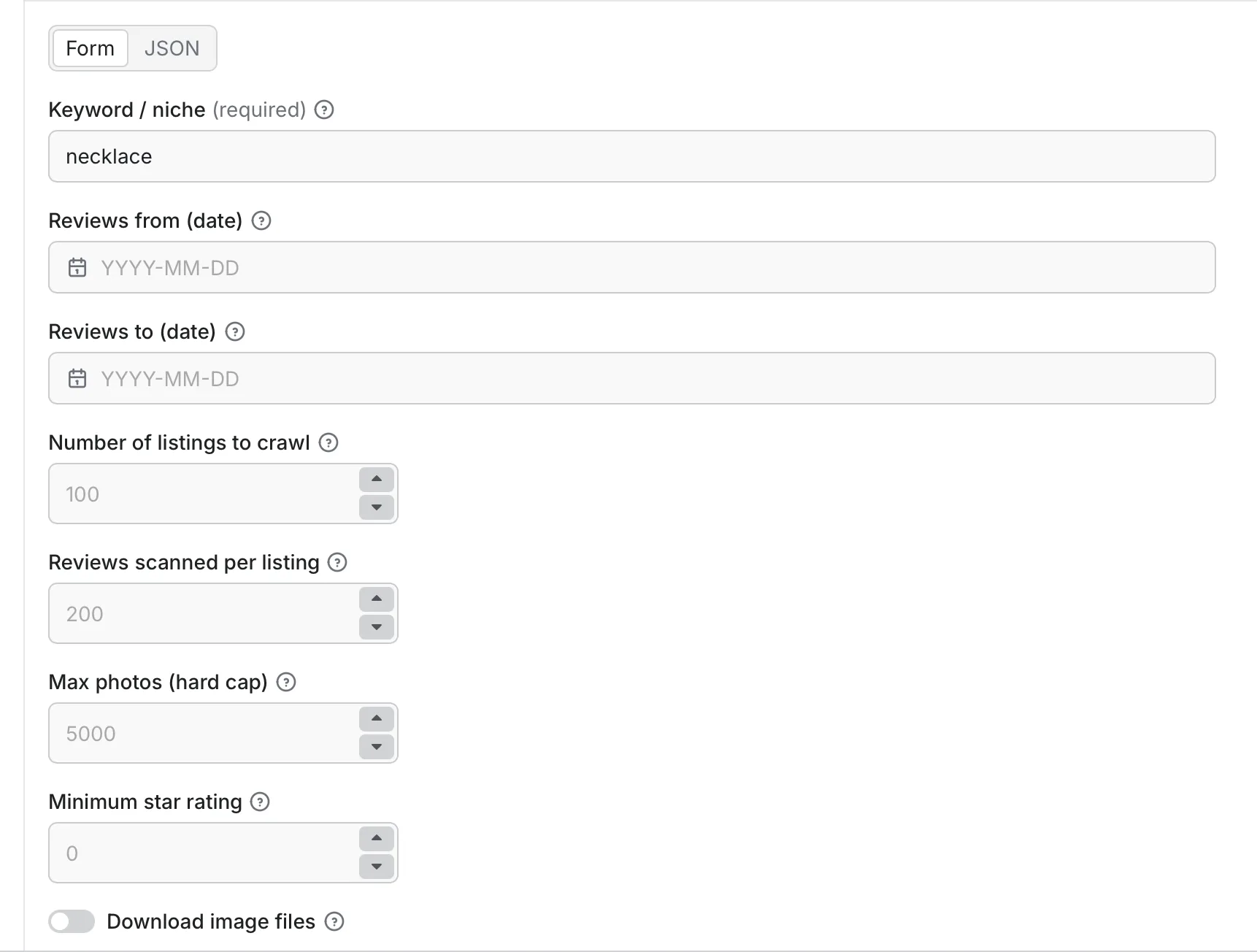
- Enter a keyword and adjust the optional filters (date range, minimum rating, how many listings, max photos).
- Click Save & Start.
- Download the results as JSON, CSV, Excel, or XML — or pull them via the API.
Inputs
| Parameter | Type | Default | Description |
|---|---|---|---|
keyword | string | — | Required. The Etsy search term / niche to pull photos from. |
dateFrom | string | — | Only keep reviews on/after this date (YYYY-MM-DD). |
dateTo | string | — | Only keep reviews on/before this date (YYYY-MM-DD). |
maxListings | integer | 100 | How many top listings to crawl. |
reviewsPerListing | integer | 200 | How deep to scan each listing's reviews (newest-first). |
maxPhotos | integer | 5000 | Hard cap on total photos for the run. |
minRating | integer | 0 | Only keep photos from reviews at/above this star rating. |
downloadImages | boolean | false | Also save the actual image files (adds the image-file charge). |
Date range: because reviews are read newest-first, the actor filters live and stops scanning a listing the moment it drops below your start date — so a "last 90 days" pull is fast. For older windows, raise reviewsPerListing so the crawl reaches far enough back.
Input examples:
Output
Results land in a dataset in the Storage tab — browse it as a table with photo thumbnails, download in JSON, CSV, Excel, or XML, or pull via API. The default view is pre-ordered, so your spreadsheet is clean the moment you open it.
What you can do with the photos
- 📣 UGC & social proof — build a library of authentic customer photos for a category (run with
minRating: 5+ a recentdateFrom, sort by rating, and verify usage rights before republishing). - 🔍 Product & niche research — see what buyers actually receive across the top sellers before you sell or dropship; read the paired
review_textfor what they love or complain about. - ⭐ Quality & complaint analysis — filter the export to
rating≤ 2 to surface the damage, colour mismatches, and sizing issues buyers photograph. - 🆚 Competitor benchmarking — compare how rival products look in customers' hands, not just in staged listing shots.
- 🤖 AI image datasets — labelled sets of photo + review text + rating for computer-vision or product models (pair with
downloadImagesand a schedule).
How it compares
| Approach | Bulk photos? | API key / login? | Coding? | Cross-shop? |
|---|---|---|---|---|
| This actor | ✅ Thousands by keyword | ❌ None | ❌ No | ✅ Any niche |
| Etsy Open API | ❌ Not buyer photos | ✅ App + OAuth | ✅ Yes | ⚠️ Limited |
| Browser extension / manual | ❌ One at a time | ❌ | ❌ | ⚠️ Tedious |
Integrations & automation
- Google Sheets / Airtable — push photo rows into a sheet and refresh on a schedule.
- Make / Zapier / n8n — trigger on run finish: filter by rating, drop image URLs into Slack or Notion.
- Scheduler — daily/weekly runs to keep a niche's customer-photo feed fresh.
Using the API
Python:
cURL:
AI agents (MCP): available as a tool for AI assistants that support the Model Context Protocol — so you can pull customer photos in plain English from Claude, Cursor, ChatGPT, and more.
Example prompts:
- "Pull 500 customer review photos for
ceramic mugfrom the last 3 months and show me the 5-star ones." - "Get the 1–2★ review photos for
resin coasterso I can see what buyers complain about." - "Grab 1,000
dog bandanacustomer photos and export them as a CSV." - "Find recent buyer photos for
leather walletand summarize the common quality issues from the review text."
FAQ
Do I need an Etsy API key or login? No — no API key, no OAuth, no login, no captcha, no browser extension.
How many customer review photos can I get? Thousands per run. Raise maxListings, reviewsPerListing, and maxPhotos for deeper pulls; the actor paginates each listing's reviews to reach older photos.
Does it include buyer names or personal info? No. Buyer identities are intentionally excluded — only photos and review metadata.
What's the difference between review photos and listing photos? Listing photos are the seller's staged shots. Review photos are uploaded by real buyers showing what they actually received — more authentic, and exactly what this collects.
Can I get only low-star (critical) review photos? Yes — set minRating, or filter the exported rating column. Low-star photos are the fastest way to spot quality issues.
How do I save the images as files? The image_url fields point straight at the JPGs on Etsy's CDN — open or download them directly, or enable Download image files to save every photo to the run's storage at once.
Will scraping Etsy get my IP blocked? No — the actor runs entirely on Apify's infrastructure; you never use your own IP and there's nothing to install.
Is it legal to scrape Etsy reviews? These are publicly visible reviews, and the actor collects only that public data (with buyer identities excluded). Respect Etsy's Terms of Service, don't spam anyone, comply with GDPR/CCPA, and confirm rights before republishing customer photos. See Apify's guide to ethical web scraping.
Is there a free Etsy review photo scraper? Every Apify account includes free credits, so you can pull thousands of photos before paying anything.
Getting an empty result? Try a broader keyword (a plain search term, not a URL or shop name). If you set a narrow date range or high minimum rating, widen it.
Related tools
Building a full Etsy research stack? Pair this with Etsy Listings Scraper for product, price, and shop data by keyword.
⚠️ Unofficial. Not affiliated with, endorsed by, or sponsored by Etsy, Inc. "Etsy" is a trademark of Etsy, Inc., used here for descriptive purposes only. This actor collects only publicly visible review data and excludes buyer identities. Respect Etsy's Terms of Service and comply with GDPR/CCPA when handling any data.


