

Twitter/X Trends Scraper & Intelligence
Pricing
from $0.09 / 1,000 results
Twitter/X Trends Scraper & Intelligence
Scrape Twitter/X trends from countries and cities. Get rankings, WOEIDs, trend scores, cross-location insights, and X's own trend-generation timestamp so you can judge freshness.
Pricing
from $0.09 / 1,000 results
Rating
0.0
(0)
Developer

Zapticx
Maintained by CommunityActor stats
0
Bookmarked
4
Total users
2
Monthly active users
a month ago
Last modified
Categories
Share
Collect Twitter/X trending topics for countries and individual cities, then receive clean, analysis-ready data in seconds. Choose up to 20 locations per run from hundreds of X-supported geographic locations.
Every row carries X's own trend-generation timestamp (trendsGeneratedAt) and its age in hours (trendsAgeHours) alongside our fetch time (scrapedAt), so you can always see how old a location's trend set is before you act on it.
No X account, login, cookie, or personal API token is required. Lightweight direct HTTP collection returns ranked trends, trending hashtags, location metadata, upstream freshness metadata, and transparent trend intelligence for cross-location analysis.
What does it do?
Twitter/X Trends Scraper & Intelligence retrieves up to 50 trends for every selected location. Each trend is a separate flat dataset row containing its rank, location, WOEID, country metadata, hashtag and promotion status, available post volume, X search link, upstream and fetch timestamps, and transparent derived metrics.
Use it as an X trends scraper in Apify Console or as a practical Twitter trends API through the Apify API and automated workflows.
Features
- Twitter/X trending topics from Worldwide, countries, and cities
- X's own trend-generation timestamp and trend-set age exposed on every row
- Up to 20 locations in one run with controlled concurrency
- Dynamic WOEID-backed catalog coverage of hundreds of X-supported locations
- Post volume when X provides it; omitted values are clearly marked and never fabricated
- Rank, hashtag detection, promoted status, and URL-encoded X search links
- Optional derived
trendScoreandnormalizedVolumemetrics - Always-present
locationCount,locationsTrending, andglobalReachScorecoverage metadata - Optional cross-location deduplication without losing location coverage
- No X username, password, account cookie, or user API token required
- JSON, JSONL, CSV, XML, RSS, and Excel-compatible dataset exports
- Partial results when an individual location fails
- Bounded retries, exponential backoff, and Apify Proxy support
- Pay-Per-Event compatible output
Supported locations
Collect trends from 1 to 20 locations per run by country, city, Worldwide, or WOEID. In JSON input, write a WOEID as a quoted digit string such as "2211096". The Actor uses X's live WOEID-backed catalog when available and uses its bundled catalog only when the live catalog cannot be loaded.
Recent live tests loaded 467 X-supported locations. X can change this catalog, so the exact count may vary over time; select up to 20 of them per run. Verified examples from the current live or fallback catalog include:
- Global: Worldwide
- North America: United States, New York, Los Angeles, Canada, Toronto, Mexico
- Europe: United Kingdom, London, Germany, France
- South Asia: Pakistan, Karachi, Lahore, India, Mumbai, Delhi
- Asia-Pacific: Australia, Japan
- Middle East: United Arab Emirates, Dubai, Saudi Arabia
- Other regions: Brazil, South Africa
Location names are case-insensitive. If the same city name exists in more than one country, enter its WOEID as a quoted digit string to remove ambiguity. Unsupported locations are skipped with a warning. If none of the requested locations are supported, the run fails before trend collection rather than returning the wrong region.
Common name aliases
A few everyday spellings are accepted as convenience aliases for X's canonical catalog names:
| You can type | Resolves to | WOEID |
|---|---|---|
USA, US, U.S., U.S.A., United States of America | United States | 23424977 |
UK, U.K., Britain, Great Britain, England | United Kingdom | 23424975 |
UAE, U.A.E. | United Arab Emirates | 23424738 |
Aliases are consulted only when a name has no direct match in X's catalog, so they never
shadow a real location and never weaken ambiguity protection - Birmingham, Barcelona
and Valencia still require a WOEID. Anything not in the catalog and not in this short
table is reported as unsupported; the Actor never guesses a nearby region.
About England: X exposes no separate England trend region. It offers United Kingdom
plus individual UK cities such as London, Manchester and Birmingham. England is therefore
a convenience alias for X's UK-wide geography, not a claim that England-specific trends
exist. The same applies to Scotland and Wales, which have no X region and are not
aliased - request Edinburgh, Glasgow, Cardiff or Swansea instead.
See the output
The default dataset is flat, readable, and ready to export or connect to another workflow. The example below is a real multi-location run in Apify Console.
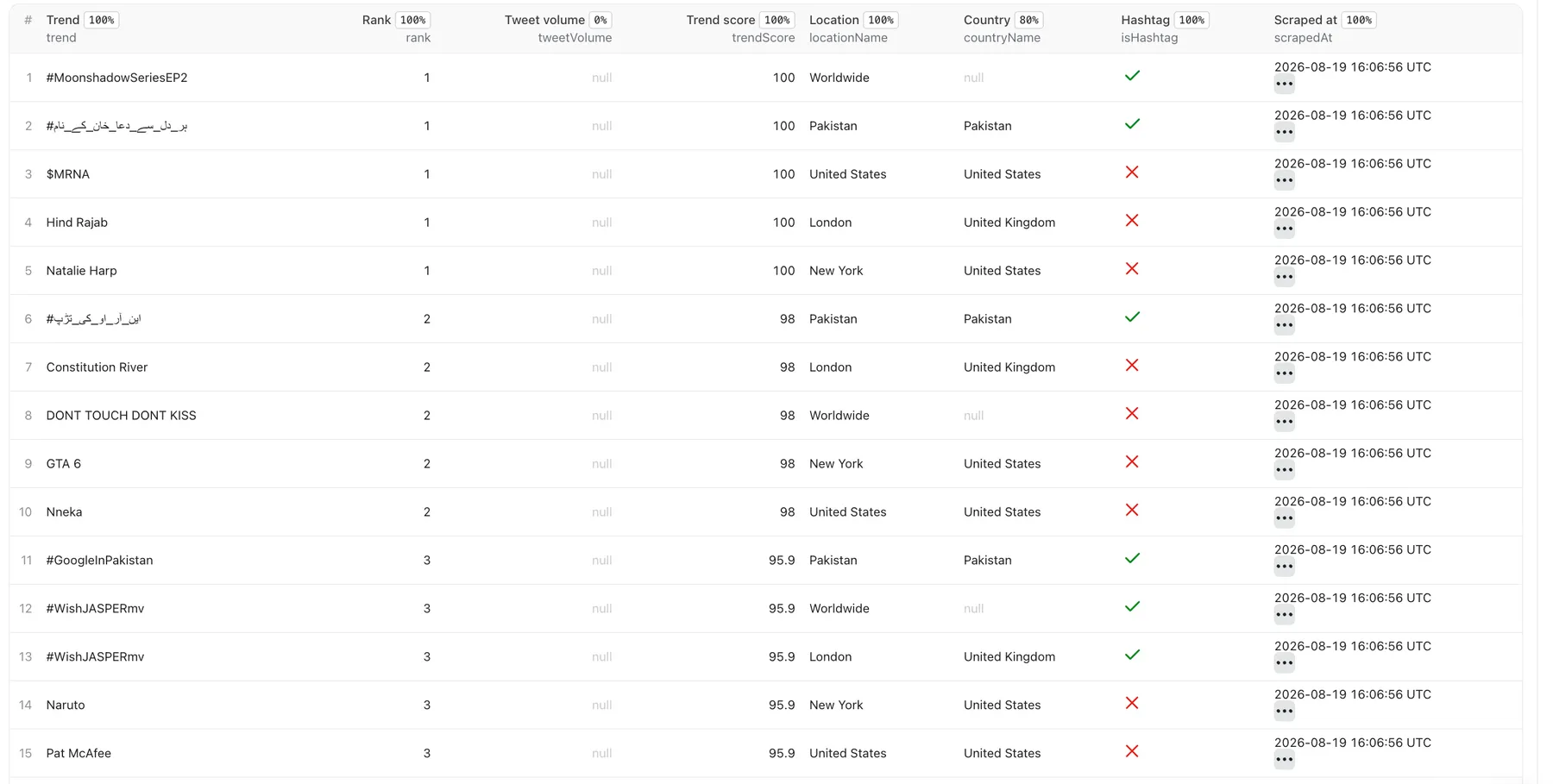
Each row is one trend in one location. tweetVolume remains null when X does not provide it; the Actor never fabricates missing volume.
Use cases
- Social media and breaking-news monitoring
- Marketing research and hashtag discovery
- Regional trend and market intelligence
- Content ideation and automated reporting
- Comparing attention across countries and cities
- Monitoring brand or competitor-adjacent conversations
Input
The main input is locations, a list of 1 to 20 strings. Use case-insensitive place names or, for advanced workflows, WOEIDs written as quoted digit strings such as "2211096". Bare JSON numbers are not part of the public input contract. Duplicate locations are removed before requests are made.
| Field | Default | Description |
|---|---|---|
locations | ["Worldwide"] | 1 to 20 place-name strings or quoted WOEID strings |
maxTrendsPerLocation | 50 | From 1 to 50 trends per location |
includeTweetVolume | true | Include volume and availability output fields; derived intelligence may still use an available upstream volume when these fields are hidden |
includeSearchUrl | true | Include an encoded X search URL |
includeTrendIntelligence | true | Include trendScore and normalizedVolume; coverage metadata remains |
deduplicateAcrossLocations | false | Keep one row per trend and preserve all matching locations |
sortBy | rank | rank, tweetVolume, or trendScore |
proxyConfiguration | disabled | Optional Apify Proxy configuration |
debug | false | Enable more diagnostic logging; secrets are never logged |
Useful presets:
Output
The Actor writes validated results to the default Apify dataset. Important fields include:
| Field | Description |
|---|---|
trend | Trend phrase, topic, cashtag, or hashtag |
rank | Position within the selected location |
tweetVolume | Approximate volume supplied by X, or null |
locationName, countryName | Human-readable geographic context |
locationWoeid | X/Yahoo Where On Earth identifier |
isHashtag, isPromoted | Classification flags |
trendScore | Transparent 0–100 score derived from rank and available volume |
searchUrl | URL-encoded link to the topic on X |
trendsGeneratedAt | UTC timestamp X reports for when it generated this location's trend set, or null |
trendsAgeHours | Age of that trend set in hours when the Actor fetched it, or null |
scrapedAt | UTC timestamp for when this Actor fetched the payload from X |
globalReachScore is locationCount / successfully retrieved locations. When deduplication is enabled, the retained row uses the requested sort criterion while locationsTrending still lists every matching location.
Data freshness
X does not regenerate every location's trend set on a fixed schedule. Some locations refresh within hours; others can go days or weeks between refreshes. Rather than guess, this Actor passes through the timestamp X itself reports for each location's trend set and lets you decide whether the data is fresh enough for your use case.
| Field | Meaning |
|---|---|
trendsGeneratedAt | The timestamp X reports for when X generated this location's trend set. null if X omits it. |
trendsAgeHours | How old that trend set was when we fetched it, in hours. null if trendsGeneratedAt is unavailable. |
scrapedAt | When this Actor fetched the payload from X. Always present. |
These three are distinct and must not be read interchangeably. scrapedAt tells you when we
asked X; trendsGeneratedAt tells you how old X's answer already was.
The Actor applies no freshness threshold and labels nothing "fresh" or "stale" - it reports
the measured age and leaves the judgement to you. Filter on trendsAgeHours if your workflow
needs a cutoff. Missing upstream timestamps stay null and are never replaced with fetch time.
Rank ordering
rank reflects the order X returned for that request. X may return a different ordering for
the same location between requests even when trendsGeneratedAt is unchanged, and city-level
results vary more than country-level ones. The Actor preserves X's ordering exactly rather
than imposing its own, so treat rank as X's ordering at fetch time rather than a stable
identifier. Anything derived from rank, including trendScore, inherits that variability.
Trend intelligence and coverage
Trend intelligence is calculated by this Actor. These are derived Actor metrics, not official X metrics:
trendScoreis a transparent 0–100 measure based on relative rank and available volume.normalizedVolumecompares a trend's supplied volume with the largest supplied volume in the same location.
The following cross-location coverage fields remain present even when includeTrendIntelligence is disabled:
locationCountrecords how many successfully retrieved locations contain a trend.locationsTrendingpreserves the names of those locations.globalReachScoreislocationCount / successfully retrieved locations.
With cross-location deduplication enabled, the Actor returns one row per trend while retaining locationsTrending, locationCount, and the requested sort criterion.
The retained row is selected deterministically using the active sort order. Ties use rank, normalized trend text, and WOEID; locationName and other location-specific fields come from that retained row, while locationsTrending describes every matching location.
When volume is available, the score is 75% relative rank strength and 25% logarithmic volume strength relative to that location's largest trend. Logarithmic scaling prevents one unusually large trend from overwhelming all other results. When X omits volume, the score uses rank alone so missing upstream data does not unfairly lower a trend. Scores range from 0 to 100.
The lowest-ranked returned trend can have a trendScore of exactly 0. Filtering for trendScore > 0 will therefore exclude that row.
trendScore is relative to the trends returned for that location in the current run. Because rank is normalized across that returned set, changing maxTrendsPerLocation can change a score even when the trend's raw rank is unchanged. Compare scores most directly between runs using the same result limit.
normalizedVolume is the trend volume divided by the largest available volume in the same location. It is null when volume is unavailable.
Tweet volume limitations
X currently does not provide post-volume counts for many trends through the upstream trends data used by this Actor. When X omits the value, tweetVolume is null and tweetVolumeAvailable is false. The Actor never estimates or fabricates missing volume.
The field historically called tweet_volume by X represents an approximate post count, despite the current “post” terminology.
When sorting by tweetVolume, rows with supplied volume appear first from highest to lowest. Rows with missing volume follow in rank order. If every volume is missing, the complete result falls back to rank order.
If sortBy is trendScore while includeTrendIntelligence is false, score values do not exist, so the Actor logs an informational message and uses deterministic rank ordering.
Integrations and exports
Use the default dataset through Apify API or clients for Python and JavaScript. Dataset results can also feed Make, n8n, Zapier, Google Sheets, or any system that accepts JSON/CSV. Mentioning these tools describes compatible workflow options; it does not imply an official partnership.
For a customer-friendly column order, select the dataset's Trends overview view before exporting CSV. Raw API exports retain the complete flat schema.
Scheduling and historical tracking
Every row has a UTC scrapedAt fetch timestamp plus X's own trendsGeneratedAt. Schedule the Actor hourly, daily, or at another interval with Apify Schedules and retain each dataset to build your own historical series. Because X refreshes irregularly, consecutive scheduled runs can return the same trend set with the same trendsGeneratedAt and a growing trendsAgeHours - compare trendsGeneratedAt between runs to detect an actual upstream refresh.
V1 does not claim persistent cross-run history, velocity, or first-seen times. Those require comparing saved snapshots.
Pricing
This Actor uses Apify's Pay Per Event model:
- Actor start: $0.001 per run
- Results: $0.09 per 1,000 dataset items ($0.00009 per result)
- Platform usage: included—you do not pay separate platform usage costs for this Actor
Estimated run price is $0.001 + (dataset items × $0.00009). For example, a 50-result Worldwide run costs approximately $0.0055, and a 250-result run costs approximately $0.0235. Failed locations do not create result items, and fewer returned trends mean fewer billable results.
See the Pricing tab on the Actor page for the current pricing. Apify shows the final estimated or charged amount in Console.
Reliability notes
The Actor uses the public guest session used by X's logged-out web client and calls X's WOEID trends endpoint directly. It does not use the paid official developer API and is not guaranteed by X. Upstream access can change; session, transport, and parsing logic are deliberately isolated for quick maintenance. Requests use finite retries and backoff, including automatic guest-session rotation so that large multi-location runs are not cut short by upstream per-session rate limits. A failed location does not discard successful locations from the same run.
FAQ
Does this require a Twitter/X account?
No. You do not provide an account, cookie, password, or personal bearer token.
Does this use the official paid X API?
No. It uses endpoints available to X's logged-out web client. They can change independently of documented developer APIs.
Why is tweet volume often missing?
X currently omits volume for many trends through this upstream source. Missing values remain null, with tweetVolumeAvailable set to false.
Can I retrieve multiple countries and cities?
Yes. Mix up to 20 Worldwide, country names, city names, and advanced WOEIDs in one run.
Can I schedule it?
Yes. Use Apify Schedules to create periodic snapshots.
Can I export CSV, Excel, or JSON?
Yes. The flat dataset is designed for those exports and automation tools.
Can I use it from Make or n8n?
Yes. Start a run through Apify integrations/API and consume its default dataset.
Legal and responsibility
Twitter/X Trends Scraper & Intelligence is an independent tool and is not affiliated with or endorsed by X Corp. Users are responsible for using the Actor and its public trend data in compliance with applicable laws and platform requirements.


