

Biorxiv Medrxiv Preprints Scraper
Pricing
from $2.99 / 1,000 results
Biorxiv Medrxiv Preprints Scraper
The BioRxiv & MedRxiv Preprints Scraper automatically collects research papers and metadata from public biology and medical preprint servers. It helps researchers, journalists, and analysts easily gather early-stage scientific findings and export them into structured formats like CSV and JSON.
Pricing
from $2.99 / 1,000 results
Rating
0.0
(0)
Developer

ZeroBreak
Maintained by CommunityActor stats
0
Bookmarked
2
Total users
1
Monthly active users
2 days ago
Last modified
Categories
Share
BioRxiv/medRxiv Preprints Scraper: Preprints by Date Range, No API Key
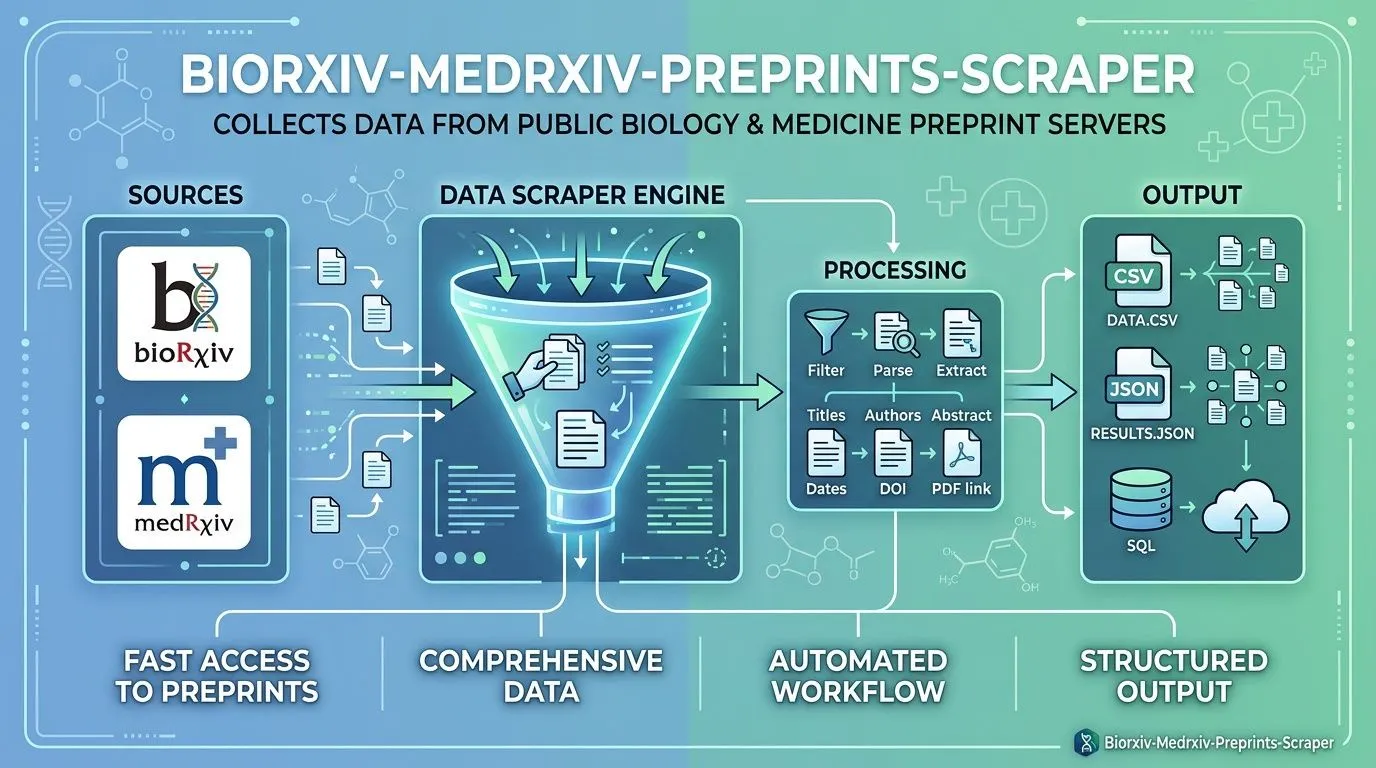
bioRxiv/medRxiv Preprints Scraper collects publicly available preprint metadata from bioRxiv and medRxiv using their public details API. No login or API key is required.
Collect preprints within a specified date range or retrieve individual records using their DOIs. Export structured results as JSON, CSV, or Excel for literature reviews, scientific research, and data analysis.
Each output row represents a preprint version and includes its title, authors, corresponding author, DOI, posting date, license, subject category, abstract, and additional metadata. Text fields are converted to plain text where appropriate, Unicode characters are preserved, and duplicate DOI-version combinations are removed.
Features
- Date-range collection: Retrieve preprints posted within a specified date window.
- DOI lookup: Retrieve individual preprint records using DOI identifiers.
- Cross-server fallback: Retry a DOI lookup on the other server when no matching record is found on the selected server.
- Structured metadata: Collect titles, authors, institutions, DOIs, versions, licenses, categories, abstracts, and publication information.
- Text cleaning: Remove HTML from applicable text fields while preserving Unicode characters.
- Duplicate detection: Deduplicate records using DOI and version.
- Automatic retries: Retry HTTP 429 responses, server errors, and timeouts with exponential backoff.
- Error handling: Save errors as separate dataset rows instead of terminating the entire run.
- Configurable limits: Control the maximum number of records and request timeouts.
Use Cases
- Literature reviews: Collect recent preprints in a specific research area.
- Scientific research: Build structured preprint datasets for analysis and referencing.
- DOI-based retrieval: Retrieve known preprints without collecting an entire date range.
- Research monitoring: Schedule recurring runs to identify newly posted preprints.
- License tracking: Preserve license information associated with each record.
- Data pipelines: Export metadata and abstracts for Python, Pandas, research databases, and reporting workflows.
Input Parameters
| Parameter | Type | Default | Description |
|---|---|---|---|
server | string | biorxiv | Select biorxiv or medrxiv. If a DOI is not found on the selected server, the actor retries on the other server. |
fromDate | string | 2026-10-01 | Start date in YYYY-MM-DD format. Used when no DOIs are supplied. |
toDate | string | 2026-10-10 | End date in YYYY-MM-DD format. Must be on or after fromDate. |
dois | array | Empty | Optional list of DOIs, with one DOI per item. When populated, the date range is ignored. |
maxItems | integer | 100 | Maximum number of successful records to save. Maximum: 1000. |
timeoutSecs | integer | 300 | Overall runtime limit in seconds. Maximum: 3600. |
requestTimeoutSecs | integer | 30 | Maximum wait time for an individual request, in seconds. Maximum: 120. |
Example Input: Date Range
Example Input: Specific DOIs
When the dois array contains at least one entry, the date range is ignored.
What Data Does This Scraper Extract?
Each successful dataset item represents one preprint version. The API title is stored in paperTitle, while the API's record type is stored in preprintType to maintain the dataset's field naming conventions.
HTML is removed from applicable text fields, Unicode characters in names are preserved, and the original license code is retained.
Example Output
Output Fields
| Field | Type | Description |
|---|---|---|
paperTitle | string | Preprint title returned by the API. |
authors | string | List of authors associated with the preprint. |
author_corresponding | string | Name of the corresponding author, when available. |
author_corresponding_institution | string | Institution associated with the corresponding author. |
doi | string | Digital Object Identifier for the preprint. |
date | string | Preprint posting date. |
version | string | Preprint version number. |
preprintType | string | Record type returned by the API, such as new results. |
license | string | License code associated with the record. |
category | string | Research subject category. |
jatsxml | string | Reference to the preprint's JATS XML resource. |
abstract | string | Abstract converted to plain text. |
published | string | Published article DOI, when available, or NA. |
server | string | Server associated with the record: bioRxiv or medRxiv. |
sourceUrl | string | Request URL associated with the returned record. |
scrapedAt | string | UTC timestamp indicating when the record was saved. |
error | string | Error description, included only in error rows. |
input | object | Original actor input copied into error rows. |
httpStatus | integer | HTTP status code, when available for an error response. |
An invalid date, invalid DOI, empty result, or non-JSON response may produce an error row. The actor continues processing other requests whenever possible.
How It Works
- Validates the selected server, date range, and record limits.
- If no DOIs are provided, requests preprint records from the selected server for the specified date range.
- If DOIs are provided, retrieves records individually using the supplied identifiers.
- If a DOI is not found on the selected server, retries the lookup once on the other server.
- Follows cursor-based pagination until the available records are processed or a configured limit is reached.
- Waits approximately one second between requests to avoid excessive traffic.
- Retries HTTP 429 responses, HTTP 5xx errors, and timeouts up to three times, using delays of 2, 4, and 8 seconds. Longer
Retry-Afterdelays are respected when provided. - Removes duplicate records with the same DOI and version.
- Saves successful records and error rows to the output dataset.
Troubleshooting
The Dataset Contains Only an Error Row
The input may not match any available records, or one of the supplied values may be invalid. Check the error field for details.
A message indicating that no posts were found may mean the DOI or date range returned no matching records.
The Date Range Is Invalid
Both dates must use YYYY-MM-DD format. Ensure that fromDate is on or before toDate.
Fewer Records Were Collected Than Expected
Check maxItems, which defaults to 100 and cannot exceed 1000. Also check timeoutSecs, which prevents new requests from starting after the configured runtime limit. Previously saved rows remain in the dataset.
Requests Are Blocked or Time Out
Increase requestTimeoutSecs when the service responds slowly. If requests are being blocked, review the service's usage policies and adjust the collection frequency.
A DOI Returns No Results
The actor retries the lookup on the other server once when the selected server returns no matching record. Confirm that the DOI is valid and belongs to bioRxiv or medRxiv.
The Dataset Contains Duplicate-Looking Records
Different versions of the same preprint may legitimately appear as separate records. Deduplication uses the combination of DOI and version rather than DOI alone.
Limits and Data Usage
- The public details API provides access to preprint metadata without requiring an API key.
- The supplied API information does not specify a numeric request-rate limit.
- The actor sends approximately one request per second.
- The maximum number of successful records per run is 1000.
- The maximum overall runtime is 3600 seconds.
- Individual request timeouts are limited to 120 seconds.
- Each preprint record carries its own license information. Preserve the license when reusing abstracts or other content.
- License conditions may vary. Check the applicable license before redistributing abstracts, full text, or other copyrighted material.
Frequently Asked Questions
Does this scraper require an API key?
No. It uses the public details API and does not require login credentials or an API key.
Can I search both servers in one date range?
A date-range search uses the selected server. DOI lookups that return no matching record on that server are retried on the other server.
Why is the title field called paperTitle?
The scraper uses paperTitle for the title and preprintType for the record type to maintain its dataset schema.
What happens if the date range returns no records?
The run may finish with an error row describing the empty result. The API's message is retained when available.
How many records can one run save?
The default limit is 100 successful records, with a maximum of 1000.
Can I export results to CSV, JSON, and Excel?
Yes. Export the dataset in these formats for literature reviews, statistical analysis, research databases, and reporting.
Can I collect new preprints automatically?
Yes. Schedule recurring runs and use DOI-version deduplication to maintain a growing dataset over time.
Pricing
The actor is free to run. Apify platform usage is billed separately according to the applicable plan.
Integrations
Export the dataset and incorporate it into research workflows using compatible spreadsheet tools, automation platforms, databases, and data-processing pipelines.
Trademark Notice
bioRxiv, medRxiv, and related names, logos, and trademarks belong to their respective owners. They are referenced only to identify the data sources and do not imply affiliation, sponsorship, endorsement, or partnership.
Disclaimer
This actor is an independent tool and is not affiliated with, endorsed by, sponsored by, or officially associated with bioRxiv, medRxiv, or their owners.
Data is collected from publicly accessible sources. Users are responsible for complying with applicable source terms, rate limits, licensing conditions, and attribution requirements.
Is Web Scraping Legal?
Collecting publicly available information through a public API is generally permitted, but the legality and conditions of use depend on the source's terms, applicable laws, data licenses, and intended purpose.
- Personal data: Author names and institutional affiliations may constitute personal information in some contexts. Follow applicable privacy requirements when collecting, storing, or redistributing such data.
- Copyright and licensing: Preprint abstracts, manuscripts, and related content may be subject to copyright or specific license terms. Check the license associated with each record before redistributing its content.
- Terms of use: Respect the source's usage policies, request limits, and attribution requirements.
- Legal advice: This information is provided for general educational purposes and does not constitute legal advice. Consult a qualified professional if you need guidance on a specific use case.


