

Apple Music Charts Scraper
Pricing
from $2.10 / 1,000 results
Apple Music Charts Scraper
[💰$3 / 1K] ⚡ Fast, cheap Apple Music charts scraper. No login, no API key. Get top songs, albums, playlists, music videos, city charts and daily Top 100 for any country, up to 200 ranks, with artist, album, ISRC, UPC, label, genres, release date and preview links.
Pricing
from $2.10 / 1,000 results
Rating
0.0
(0)
Developer

Aboo Script
Maintained by CommunityActor stats
0
Bookmarked
2
Total users
1
Monthly active users
6 days ago
Last modified
Categories
Features
Share
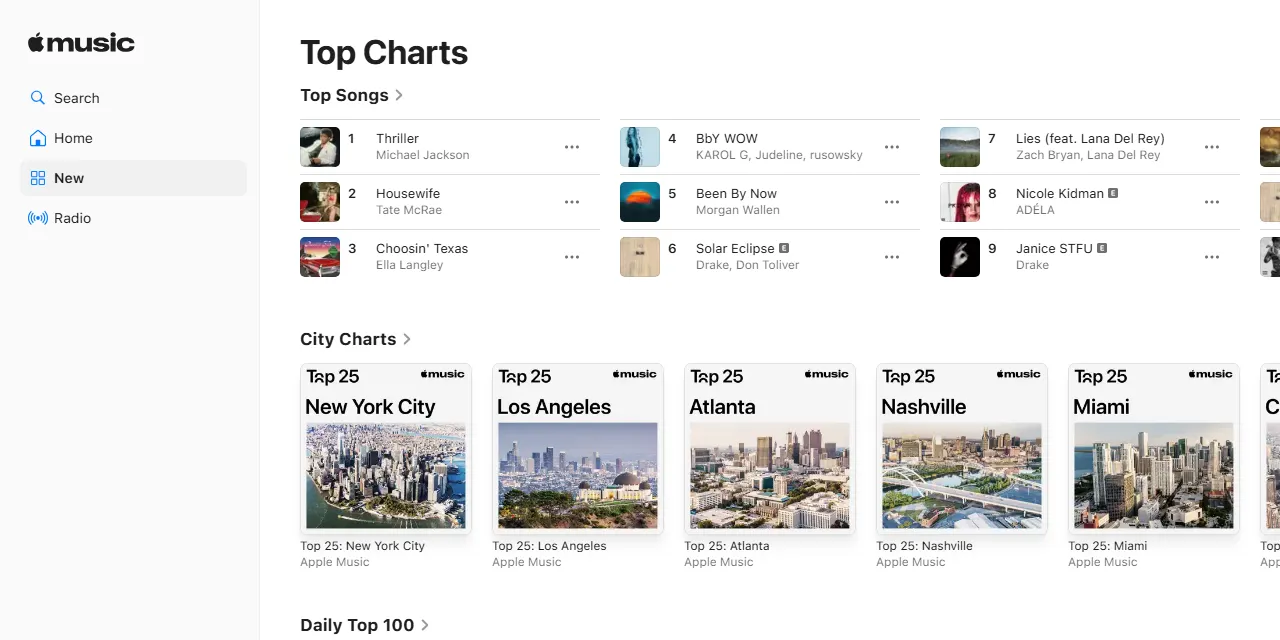
Apple Music Charts Scraper extracts the Apple Music top charts for any country from Apple Music into clean, structured data you can download as JSON, CSV, Excel, or HTML. Paste a top charts or chart playlist URL and get the rank, song or album title, artist, album, release date, ISRC, genres, preview link and artwork for every chart entry. No account or login required.
Introduction
Apple Music is Apple's music streaming service, with more than 100 million songs in over 160 countries. Its Top Charts show the most played songs, albums, playlists and music videos in each country, plus daily Top 100 charts per country and Top 25 charts for major cities around the world.
This actor collects the same public chart information you see in your browser and turns it into a ready-to-use dataset. You can run it once, schedule it to run daily to follow chart movements, or connect it to your own tools.
What data can you extract from Apple Music charts?
- 🏆 Chart position (rank), chart name, chart type, genre and country
- 🎵 Song, album, playlist or music video title and type
- 🎤 Artist name and artist page URL
- 💿 Album name and album URL, track and disc number
- 📅 Release date, duration and explicit flag
- 🔖 ISRC (songs and videos), UPC, record label and copyright (albums)
- ✍️ Composer names and genres
- 🎧 Audio quality (Dolby Atmos, lossless, hi-res lossless), lyrics availability, 4K and HDR for videos
- 📝 Editorial description, curator and last update date for playlists
- 🔗 Preview audio URL, artwork image URL and direct Apple Music link for every entry
Use Cases
- 📈 Music market research: follow which songs, artists and genres are rising in each country.
- 🎯 Artist and label tracking: see where your artists or competitors chart, and at what position.
- 🌍 Country comparisons: compare the top songs of the US, UK, Japan, Germany or any other country side by side.
- 🗂️ Chart history: schedule daily runs and build your own archive of Apple Music chart positions.
- 🤖 AI and automation: feed clean, structured chart data into spreadsheets, dashboards, or AI workflows.
How to scrape Apple Music charts step by step
- Paste one or more Apple Music top charts or playlist URLs into Start URLs.
- Optionally pick a Genre for the Top Songs, Top Albums and Top Music Videos charts.
- Set Maximum number of results to how many chart entries you want per chart (0 for the whole chart).
- Click Start and wait for the run to finish.
- Download your data in JSON, CSV, Excel, or HTML from the Output tab.
Input
- Start URLs: Apple Music URLs to scrape. Supported pages:
- The top charts page, for example
https://music.apple.com/us/new/top-charts. It is split into its six charts: Top Songs, Top Albums, Top Playlists, Top Music Videos, City Charts and Daily Top 100. - A single chart, for example
https://music.apple.com/gb/new/top-charts/songs(alsoalbums,playlists,music-videos,city-charts,daily-global-top-charts). - A playlist, for example the "Top 100: Global", "Top 100: USA" or "Top 25: New York City" chart playlists. Each track is returned with its position in the playlist.
- The two-letter code in the URL (
us,gb,jp,de...) selects the country. Add?l=en-USto get titles in English where the site supports it.
- The top charts page, for example
- Maximum number of results: how many chart entries to collect for each chart or playlist. Use 0 to get the whole chart.
- Genre: genre of the Top Songs, Top Albums and Top Music Videos charts (for example Pop, Hip-Hop/Rap, Rock, K-Pop or Latin). The default is all genres.
Input Examples
Scrape the US Top Songs chart and the Top 100: Global playlist:
Get the full UK Top Albums chart for Rock:
Output
Each chart entry is saved as one item in the dataset. Here is an example of a single item:
The chartType field tells you which chart an item comes from: topSongs, topAlbums, topPlaylists, topMusicVideos, cityCharts, dailyTop100 or playlistTracks.
You can download the dataset in JSON, CSV, Excel, XML, or HTML, or access it through the Apify API.
Notes
- Top Songs and Top Albums go down to position 200. Daily Top 100 and City Charts list the chart playlists (about 100 to 120 of them); paste a playlist URL to get its tracks.
- The genre filter only applies to Top Songs, Top Albums and Top Music Videos. Top Playlists, City Charts, Daily Top 100 and playlists are not split by genre.
- Some genres are not available in every country; such a chart is skipped with a warning.
- Fields depend on the item type: ISRC and composer exist for songs, UPC, label and copyright for albums, curator and description for playlists. Fields that do not apply are returned as
null. - Titles use the language of the country page unless you add
?l=en-US(or another language code) to the URL. - Other Apple Music pages (artists, albums, search, rooms) are not supported and are skipped.
Why use the Apple Music Charts Scraper?
- ✅ No login needed: works with public data only, so there is no account to manage.
- 🌍 Every country and every chart: songs, albums, playlists, music videos, city charts and daily Top 100 in one actor.
- 📊 Full charts: get all 200 positions, not only the first page you see on screen.
- 🧹 Clean data: ranks and durations are numbers, dates use one standard format, and text is free of HTML.
- 💸 Pay for what you need: set a result limit per chart and keep every run small and cheap.
- 🔄 Ready for automation: schedule runs, export to Google Sheets, or connect to Make, Zapier, and n8n.
FAQ
How many results can I scrape?
Set any number in Maximum number of results, or 0 for the whole chart. The limit applies to each chart or playlist separately, so the top charts page with a limit of 10 returns 10 entries for each of its six charts.
Do I need an Apple Music account?
No. The actor only collects publicly available chart data. You do not need to log in, subscribe, or provide any account details.
Can I track chart positions every day?
Yes. Use Apify Schedules to run the actor every day or week and keep the results to build your own chart history.
Why are some fields empty?
Each item type has its own details: songs have an ISRC and composer, albums have a UPC and record label, playlists have a curator and description. Fields that do not apply to an item, or that Apple Music does not show, are returned as null.
Can I request a new feature or filter?
Yes. Right now the actor supports chart and playlist URLs plus a genre filter. If you need other inputs, such as a list of countries or rank changes between runs, get in touch and they can be added.
Can I get a custom or private version?
Yes. The actor can be customized for your workflow, delivered as a private version, or a new scraper can be built for a different website. Use the contact details below.
Need to scrape other music and entertainment platforms?
- Ticketmaster Scraper: concerts and events with dates, venues and ticket prices.
- Ticketmaster Presale Monitor: upcoming presales and on-sale dates for concerts and shows.
Need help or want a custom solution?
- 📧 Email: aboo.script@gmail.com
- 🧩 More scrapers: Apify profile
Image Credit
Image credit: Apple Music


