Apple Podcasts Chart Scraper — iTunes Rank Tracker avatar

Apple Podcasts Chart Scraper — iTunes Rank Tracker

Pricing

from $3.00 / 1,000 apify-default-dataset-items

Go to Apify Store
Apple Podcasts Chart Scraper — iTunes Rank Tracker

Apple Podcasts Chart Scraper — iTunes Rank Tracker

Track Apple Podcasts charts by country/genre. CSV/JSON. No API key/login. Open Input → leave defaults → Start (us+limit1≈$0.003): https://console.apify.com/actors/cgIe9acaVfDo03fE5/input From $3/1k

Pricing

from $3.00 / 1,000 apify-default-dataset-items

Rating

0.0

(0)

Developer

naoki anzai

naoki anzai

Maintained by Community

Actor stats

0

Bookmarked

9

Total users

3

Monthly active users

2 days ago

Last modified

Share

Apple Podcasts Chart Scraper: iTunes Rank Tracker

What you get: Apple Podcasts / iTunes chart ranks by country (optional genre) as source-linked rows. Export CSV/JSON. No API key.

Sample output (3 real rows from a countries: ["us"], limit: 3 run on 2026-10-13):

rankshowNameartistNamecategorycountry
1The DailyThe New York TimesDaily Newsus
2Crime JunkieAudiochuckTrue Crimeus
3In The DarkThe New YorkerTrue Crimeus

Use it for:

  • Rank tracking: record daily Apple Podcasts chart positions by country.
  • Competitor watch: see when rival shows enter or leave the top chart.
  • Sponsor pitching: back up outreach with a show's current public chart rank.

CTA: Open Input (link below) → leave defaults (us, limit 1, movement OFF) → Start. First paid proof ≈ $0.003. Cap maxChargeUsd 0.05. From $3/1k. Open Input (leave defaults → Start)

{"countries":["us"],"limit":1,"generateMovementReport":false,"maxChargeUsd":0.05,"delivery":"dataset"}

Sibling next steps: Apple Podcasts Scraper (discovery) · Reviews (listener feedback).

Podcast growth teams, agencies, networks, and research teams provide public Apple Podcasts storefront codes and an optional genre/depth filter. The actor returns source-linked chart_rank rows, or one change report when a saved monitor detects new, changed, or dropped positions. Raw chart delivery remains the default for existing schedules.

Run the next report

Use chart movement as a proven public signal, then choose the buyer-facing follow-on:

Store Quickstart

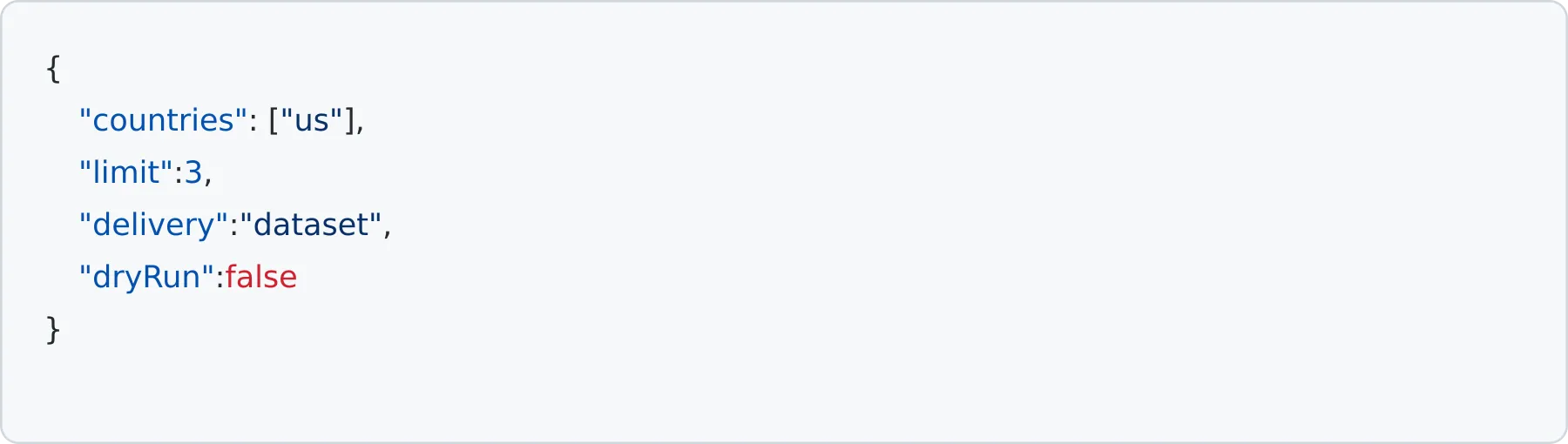
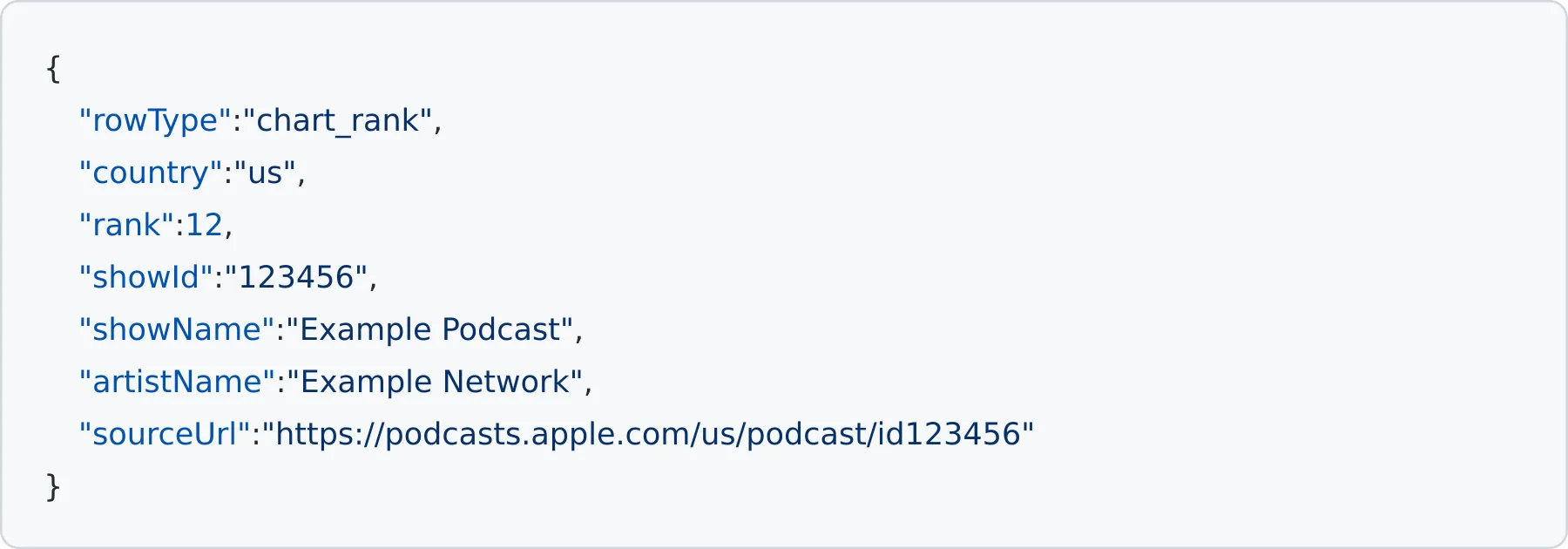
Apple Podcasts chart input Apple Podcasts chart output

The default path is a low-cost raw chart snapshot. Use one country and a small limit first. For recurring rank movement, set a stable monitorKey and generateMovementReport to true; the first baseline_only run stores state without dataset rows or charges.

1. Raw chart snapshot (first run)

Cheapest first run: limit 1, movement report OFF — raw chart rows at $0.003 each (≈ $0.003 total; not the $2.50 movement report). Store Quickstart matches this; use the Deeper chart template (limit 10) after proof.

{
"countries": ["us"],
"limit": 1,
"generateMovementReport": false,
"delivery": "dataset",
"dryRun": false
}
```
### 2. Free baseline for a recurring monitor
```json
{
"countries": ["us", "gb"],
"genreId": "1321",
"limit": 3,
"monitorKey": "weekly-news-us-gb",
"generateMovementReport": true,
"initialRunMode": "baseline_only",
"maxChargeUsd": 0.05,
"dryRun": false
}
```
### 3. High-value movement report
```json
{
"countries": ["us"],
"limit": 10,
"monitorKey": "weekly-news-us-gb",
"generateMovementReport": true,
"initialRunMode": "emit_backfill",
"delivery": "dataset",
"maxChargeUsd": 0.05,
"dryRun": false
}
```
Use `delivery: "webhook"` only when downstream routing is needed after the movement report has been validated. The movement report is the value path; the raw chart snapshot remains the low-cost starter path.
See [`docs/value-path-sample.json`](docs/value-path-sample.json) for the raw snapshot and movement-report input pair.
`countries` accepts at most 20 unique two-letter codes. Each country is fetched with a timeout and bounded retry. `limit` is capped at 200.
## Use with Apify MCP
Exact actor: `taroyamada/apple-podcast-chart-tracker`
Sample input JSON:
```json
{
"countries": [
"us"
],
"genreId": "",
"limit": 1,
"generateMovementReport": false,
"delivery": "dataset"
}
```
## Output
The actor output contains `chartEntries`, `movementReports`, and `deliveryRows`. Raw rows keep legacy aliases (`name`, `artist`, and `collectionId`) and add the stable fields used by integrations.
### Raw chart output
```json
{
"actorName": "apple-podcast-chart-tracker",
"rowType": "chart_rank",
"billingEventName": "apify-default-dataset-item",
"country": "us",
"rank": 12,
"showId": "123456",
"showName": "Example Podcast",
"artistName": "Example Network",
"sourceUrl": "https://podcasts.apple.com/us/podcast/id123456",
"fetchedAt": "2026-08-01T00:00:00.000Z",
"collectionId": "123456",
"name": "Example Podcast",
"artist": "Example Network"
}
```
### Movement report output
```json
{
"actorName": "apple-podcast-chart-tracker",
"rowType": "podcast_chart_movement_report",
"billingEventName": "podcast-chart-movement-report",
"monitorKey": "weekly-news-us-gb",
"initialRun": false,
"fetchedAt": "2026-08-01T00:00:00.000Z",
"changedCount": 1,
"newCount": 1,
"droppedCount": 0,
"changes": [
{
"changeType": "changed",
"country": "us",
"showId": "123456",
"showName": "Example Podcast",
"previousRank": 18,
"currentRank": 12,
"rankDelta": 6,
"sourceUrl": "https://podcasts.apple.com/us/podcast/id123456"
}
]
}
```
A baseline run emits zero `deliveryRows`. A later unchanged poll emits zero rows and zero charges. A later poll emits at most one movement report row for all observed changes. A failed source is not treated as a mass drop.
## Output fields
- Raw: `actorName`, `rowType`, `billingEventName`, `country`, `rank`, `showId`, `showName`, `artistName`, `sourceUrl`, `fetchedAt`, plus legacy aliases.
- Movement report: `monitorKey`, `changedCount`, `newCount`, `droppedCount`, `changes`, and source limitations.
- Envelope: `chartEntries`, `movementReports`, `deliveryRows`, `meta`, and delivery/state status in the final output file.
## Pricing and delivery
The existing raw path is unchanged: the default dataset event is used for each raw chart row. The movement event is named `podcast-chart-movement-report` and is sent through `Actor.pushData(row, eventName)` when the Apify SDK is available. The local test path never charges.
`maxChargeUsd` defaults to `$3`. The local safety estimate is `$0.003` per raw row and `$2.50` per movement report row; delivery stops before any row is sent when the estimate exceeds the cap.
`delivery=dataset` writes billable rows to the Apify default dataset. `delivery=webhook` sends the same output payload to the supplied HTTP(S) webhook first, then writes the billable rows to the default dataset. A non-2xx webhook response or dataset/PPE failure fails the run and prevents state commit. Webhook delivery does not replace dataset delivery.
## State and no-change behavior
State is isolated by `monitorKey`. State is saved only after webhook and dataset/PPE delivery succeeds. A state load or save failure fails closed; it never silently treats a missing state as a new baseline after a remote storage error.
- `baseline_only`: save the first successful snapshot with 0 rows and 0 charges.
- `emit_backfill`: emit one initial movement report for the current positions.
- Subsequent runs: emit only new, changed, or dropped positions; unchanged polls emit 0 rows and 0 charges.
- Set `emitRawRows=true` only when a monitor also needs the legacy raw rows; the charge cap still applies.
## Compliance guardrails
- Uses public Apple Podcasts/iTunes chart JSON only.
- No Apple logo, endorsement, private dashboard, or authenticated data is claimed.
- Rank movement is descriptive evidence, not a forecast, audience estimate, advertising guarantee, or provider approval.
- Unsupported storefronts produce a warning and are never interpreted as a mass drop from the saved baseline.
## See also
- [Apple Podcasts Scraper](https://apify.com/taroyamada/apple-podcast-scraper) for broad public show discovery.
- [Podcast Media Buyer Shortlist Scraper](https://apify.com/taroyamada/podcast-media-buyer-shortlist-scraper) for the next report-oriented workflow.
## Related Actors
- Hub: [`taroyamada/apple-podcast-scraper`](https://apify.com/taroyamada/apple-podcast-scraper)
- [`taroyamada/apple-podcast-scraper`](https://apify.com/taroyamada/apple-podcast-scraper)
- [`taroyamada/apple-podcast-reviews-monitor`](https://apify.com/taroyamada/apple-podcast-reviews-monitor)
- [`taroyamada/apple-podcast-episode-watchlist`](https://apify.com/taroyamada/apple-podcast-episode-watchlist)
- [`taroyamada/podcast-sponsor-contact-intelligence`](https://apify.com/taroyamada/podcast-sponsor-contact-intelligence)
- [`taroyamada/podcast-sponsor-evidence-report-scraper`](https://apify.com/taroyamada/podcast-sponsor-evidence-report-scraper)
- [`taroyamada/podcast-media-buyer-shortlist-scraper`](https://apify.com/taroyamada/podcast-media-buyer-shortlist-scraper)
- [`taroyamada/podcast-category-network-benchmark-report`](https://apify.com/taroyamada/podcast-category-network-benchmark-report)
## Works well with
- [Apple Podcasts Scraper](https://apify.com/taroyamada/apple-podcast-scraper) — search shows, look up IDs, pull recent episodes and listener reviews
- [Article Content Extractor](https://apify.com/taroyamada/article-content-extractor) — clean article text and metadata for RAG/LLM pipelines
- [Trade Show Exhibitor Intelligence](https://apify.com/taroyamada/trade-show-exhibitor-intelligence) — turn exhibitor pages into booth and lead lists