Google Ads Campaign Generator (by URL)
Pricing
$1,000.00 / 1,000 charged for each campaigns
Google Ads Campaign Generator (by URL)
Turn any website URL into a complete, launch-ready Google Search campaign: themed ad groups, keywords with match types, Responsive Search Ads, extensions, negative keywords and bidding tips - all within Google's limits. Multi-language, one campaign per URL (by URL).
Pricing
$1,000.00 / 1,000 charged for each campaigns
Rating
0.0
(0)
Developer

Acmee AI
Maintained by CommunityActor stats
0
Bookmarked
2
Total users
1
Monthly active users
6 days ago
Last modified
Categories
Share
🎯 Google Ads Campaign Generator (by URL)
Turn any website URL into a complete, launch-ready Google Search campaign. Point it at a site and our AI content engine reads the page, understands the business, and builds the whole campaign for you - one full campaign per URL.
🌐 From URL to campaign. No briefs, no blank page. Paste a website, pick a language, get a ready-to-launch structure you can paste straight into Google Ads.
📄 Every run ships a branded, client-ready report - the real highlight. Share it as a link or email it: the whole campaign laid out for stakeholders, not just raw JSON.
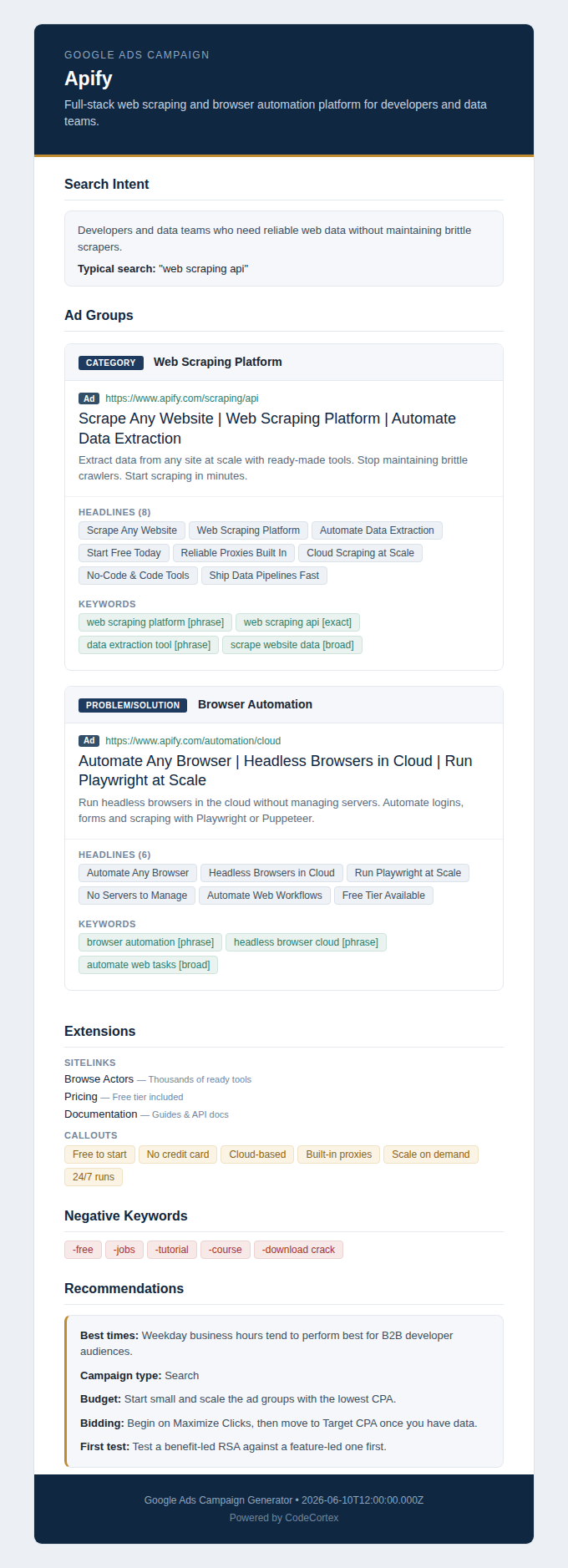
Preview of the HTML report - company analysis, ICP, ad groups, extensions and recommendations. Click to open the full report.
📈 What does it do?
For each URL you provide, the actor crawls the site and returns a structured campaign:
- Company analysis - what they do, value proposition, products, tone and industry.
- Ideal customer profile (ICP) - persona, pains, triggers, objections and the search your buyer actually types.
- 3 to 5 themed ad groups - each a different search intent, with 8 to 15 keywords and the right match type (exact / phrase / broad).
- One Responsive Search Ad (RSA) per ad group - 10 to 15 headlines and 4 descriptions, all within Google's character limits.
- Ad extensions - sitelinks, callouts and structured snippets.
- Negative keywords - terms to exclude so you don't waste budget.
- Optimization tips - campaign type, budget, bidding and best times to run.
Every text field is validated against Google's limits in code; anything too long is trimmed and the row is flagged (trimmed: true).
ℹ️ The audience, timing and bidding recommendations are AI best-practice suggestions, not measured performance data.
🧩 Plus a branded HTML report
Each campaign is also rendered as a branded HTML report (saved to the Key-Value Store, returned as a public reportUrl) with the company summary, ICP, every ad group and the recommendations. Fill in the optional emails field to have it emailed automatically.
🎯 Why use it?
- Launch faster - go from a landing page to a campaign draft in minutes.
- Agencies - spin up first-draft campaigns for new clients straight from their site.
- Go multi-language - generate the same site in English, Spanish, Portuguese and more.
- Refresh accounts - benchmark and rebuild a stale campaign structure.
🚀 How to use
- Add one or more website URLs.
- Pick an output language (or leave
autoto match the site). - (Optional) add emails to receive the HTML report.
- Click Start. You get one campaign per URL.
Prefer real time? Call the Standby endpoint POST /generate (see API integration below).
💲 Pricing
Pay per result: you are charged once per URL for which a campaign is generated (campaign-generated). URLs that fail or can't be processed are not charged.
📥 Input
| Field | Required | Description |
|---|---|---|
urls | yes | Websites to analyze. One full campaign per URL (max 20). |
language | no | auto, en, pt-BR, es, fr, de, it. Default auto. |
emails | no | Send the branded HTML report to these addresses. |
📤 Output
One record per URL. Example (arrays trimmed for brevity):
A URL that can't be processed comes back with success: false and a filled error. See the Dataset schema tab for the full field list.
❓ FAQ
What is the reportUrl? A public, signed link to a branded HTML campaign report (ICP, all ad groups, recommendations). It opens in any browser, no token needed.
Will the copy fit Google Ads?
Yes. The character limits are enforced in code; anything over is trimmed and the row is flagged with trimmed: true.
Are the recommendations real performance data? No - they are AI best-practice suggestions to use as a starting point. Validate against your own campaign data.
Can I process many sites at once? Yes - up to 20 URLs per run, one campaign each.
Can I call it in real time?
Yes. The Standby endpoint POST /generate responds synchronously.
🔌 API integration
Batch run:
Standby (POST /generate):
The token goes in the Authorization: Bearer header, never in the URL.
🔗 Related actors
- AI Google Ads Generator - generate many RSA ad copy variations from a short product description and offer (text in, ads out), when you don't have a URL.
📌 Notes
Generated ad copy and recommendations are provided as a starting point and are not guarantees of performance. Always review the copy and comply with Google Ads policies before publishing.