

Grab Scraper - GrabFood Menus & GrabMart Data
Pricing
from $1.40 / 1,000 results
Grab Scraper - GrabFood Menus & GrabMart Data
Extract GrabFood restaurants, menus, and GrabMart products across eight Southeast Asian markets. Get merchant IDs, public URLs, ratings, and prices when available. Pay per delivered row plus a start fee.
Pricing
from $1.40 / 1,000 results
Rating
0.0
(0)
Developer

Adam D
Maintained by CommunityActor stats
0
Bookmarked
2
Total users
1
Monthly active users
3 days ago
Last modified
Categories
Security
Limited permissionsShare
Grab Scraper
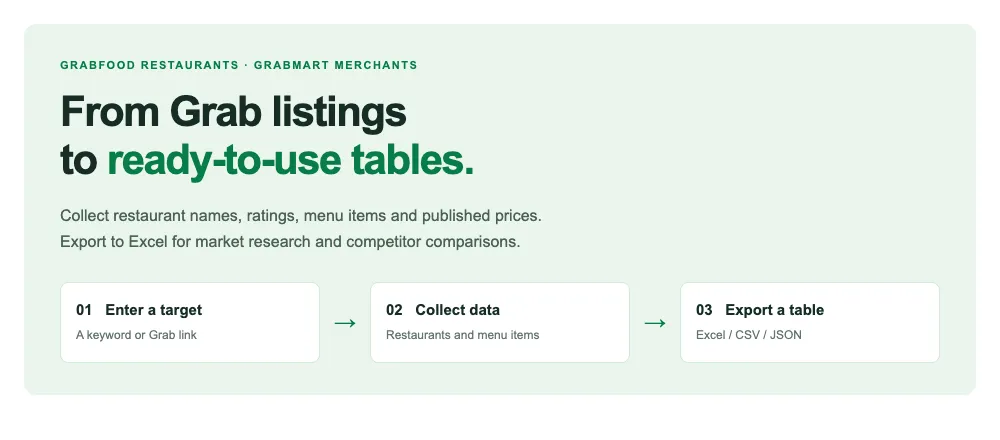
Turn Grab restaurant and menu information into ready-to-use tables.
Enter a keyword or a restaurant link. Collect names, ratings, menu items and published prices, then export to Excel for market research and competitor comparisons.
- No coding required: fill in the form in Apify Console.
- Pay per delivered row: $2.00 per 1,000 rows on the Free plan, plus a start fee.
- Control your spend: set a result limit and a maximum charge per run.
Three ways to use it
| Your goal | What you can collect | How to start |
|---|---|---|
| Find restaurants | Restaurant names, ratings, source links and other public details | Choose a country and enter a keyword |
| Explore a menu | Item names, categories and published prices from a specific restaurant | Enter a restaurant URL and enable menu items |
| Find GrabMart merchants | Grocery and other retail merchants | Select GrabMart feed |
GrabMart merchant search returns shops, not a complete product catalog. Available fields vary by location, merchant and collection mode.
See what you will get
Restaurants and menu items appear as separate rows. Download the table to filter, sort and compare results.
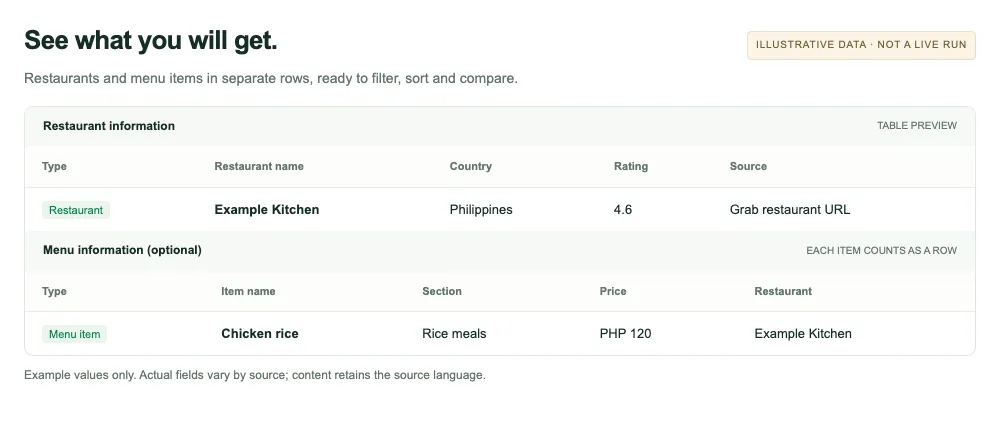
The image uses example data, not results from a live run. Column labels are simplified for readability. Actual output uses the field names below; content retains the source language.
| Data type | Common fields |
|---|---|
| Restaurant or merchant | name, merchantId, url, rating, countryCode |
| Menu item | name, section, price, currency, restaurantName |
Fields are populated only when Grab provides them. Missing values stay empty.
Get started in three steps
- Enter your target. Open Grab Scraper and leave Mode on Auto. For a small first run, choose Philippines, enter
pizzaas the Keyword, and set Max results to3. - Start the run. Check Maximum cost per run, click Start, and wait for completion.
- Download your results. Open the run's dataset, review the rows, and export as Excel, CSV or JSON.
Start with a small collection in your chosen location. The result limit is a cap, not a guaranteed number of results.
Want menu items? Enter a specific Restaurant URL and enable Include menu items. Keyword searches alone do not fetch complete menus.
Pricing
You pay for each delivered row, plus a start fee. All prices are in USD.
| Apify plan | Per 1,000 rows | Start fee at default memory |
|---|---|---|
| Free | $2.00 | $0.005 |
| Bronze | $1.80 | $0.005 |
| Silver | $1.60 | $0.005 |
| Gold / Platinum / Diamond | $1.40 | $0.005 |
"Free" is the name of an Apify membership tier; this Actor is not free to run. The start fee above assumes the default 1024 MB memory. Start events are charged once per GB of allocated memory, with a minimum of one event.
Small-run example: a default-memory run delivering 3 rows on the Free plan costs:
3 × $0.002 + $0.005 = $0.011.
- 1 restaurant + 10 menu items = 11 rows. Restaurant and menu rows have the same unit price and share the result limit.
maxResultsapplies per input target. For multiple links, also set a maximum charge to control the total run cost.- A start fee can apply even when no rows are returned.
- The Free plan currently has publisher-set limits of 200 rows per run and 10 runs of this Actor.
Coverage and limitations
Market options include Singapore, Malaysia, Philippines, Thailand, Vietnam, Indonesia, Cambodia and Myanmar. Selecting a country does not guarantee every mode is available or verified there. Test a small collection in your target location first.
- Core use cases: restaurant search, menus from specific restaurants, and GrabMart merchant discovery.
- Known restrictions: chain searches and GrabMart directory modes currently have access limitations.
- Some fields may be empty: phone numbers, emails, addresses and prices are not guaranteed. Directory entries do not confirm opening status or stock.
- Public information only: login-only member prices, private accounts, orders and rides are outside this Actor's scope.
- Fewer results than expected? Check the run log and result summary. Source availability, location restrictions and spending limits can reduce the number of delivered rows.
FAQ
What can I use the data for?
Build restaurant lists, compare menus and prices, or support market research. For repeated checks, use Apify Schedules. Each run is charged at the applicable rate.
Why is a menu incomplete?
Restaurant and menu rows share the result limit. A limit of 3 may return one restaurant and two menu items. Increase the limit if you need more items, and check your spending settings. Items that are not available from the source cannot be supplied.
Can I use this with code or an AI agent?
Yes. The Actor identifier is adamdd/grab-scraper. Use the Apify API or a compatible Apify MCP client. A small search input is:
See the API tab on this page for integration examples.
How do I get help?
Use the Issues tab and include the run ID, your input and the expected result. Remove credentials before sharing.
Grab Scraper is provided by adamdd. It is an independent tool, not affiliated with or endorsed by Grab. Use public data in accordance with applicable laws and platform terms.


